1
Section 5. How to Access YOUR PC BIOS
Section 5. How to Access YOUR PC BIOS
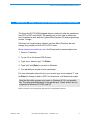
The instructions listed below may vary depending on the manufacturer of your
PC. It is recommended that you reference the documentation provided with
your PC to access and change the parallel port settings. If you have questions,
please contact your computer manufacturer.
Many computers display BIOS access instructions while the computer boots.
Pressing a key or a combination of keys before the Operating System begins
to load will access the BIOS. Some common keys are [Esc], [F1], [F2], [F10],
[Ctrl-Delete] or [Delete]. For more information, check the documentation that
came with your computer to find out how to gain access to the computer BIOS.
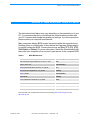
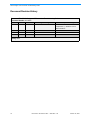
Table 2:
BIOS Manufacturer
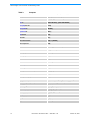
BIOS Manufacturer
Key Command(s)
ALR Advanced Logic Research, Inc. ® PC / PCI
[F2]
ALR PC non / PCI
[Ctrl+Alt+Esc]
AMD® (Advanced Micro Devices, Inc.) BIOS
[F1]
AMI (American Megatrends, Inc.) BIOS
[Delete]
Award™ BIOS
[Ctrl+Alt+Esc]
Award BIOS
[Delete]
DTK® (Datatech Enterprises Co.) BIOS
[Esc]
Phoenix™ BIOS
[Ctrl+Alt+Esc]
Phoenix BIOS
[Ctrl+Alt+S]
Phoenix BIOS
[Ctrl+Alt+Insert]
This information was compiled from several sources including: http://www.iomega.com/ and
http://www.hp.com
October 10, 2002
Document #: 38-12005 CY Rev. ** CMS Rev. 2.10
11