1
2.2
Working with the Postpaid Service
The Postpaid Service supports billing systems that charge subscribers after content
has been purchased. You can use the Postpaid Service instead of a customized billing
adapter if your billing system supports postpaid billing and processes records in one
of the following formats:
■
■
■
XML
CSV
Name-value pairs
To use the Postpaid Service, set the following properties in the
PostpaidService.properties file. This file is in the
$CDS_HOME/deployment/deployment-name/conf directory.
■
postpaid.handler.class. Set this property to the fully qualified name of the
class that you want to use. Use one of the following values:
■
com.sun.content.server.postpaid.impl.PostpaidDefaultHandler.
Use this class to generate billing records in either XML or name-value format.
■
com.sun.content.server.postpaid.impl.PostpaidCSVHandler. Use
this class to generate billing records in CSV format.
■
postpaid.record.class. Set this property to
com.sun.content.server.postpaid.PostpaidBillingRecord.
■
postpaid.template.filename. Set this property to the fully qualified name of
the file that defines the records that you want generated. Use one of the following
values:
■
deployment/deployment-name/conf/resources/default_record.xsl. Use
this file with PostpaidDefaultHandler to generate name-value records.
■
deployment/deployment-name/conf/resources/xml_record.xsl. Use this
file with PostpaidDefaultHandler to generate XML records.
■
deployment/deployment-name/conf/resources/csv_record.xsl. Use this
file with PostpaidCSVHandler to generate CSV records.
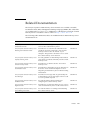
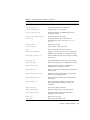
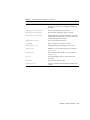
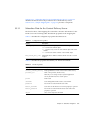
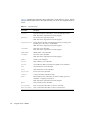
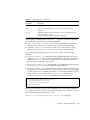
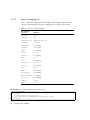
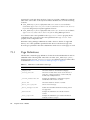
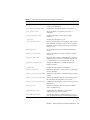
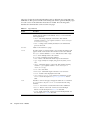
The following table shows the information provided for each billing event:
TABLE 2-1
2-2
Billing Event Parameters
Parameters
Description
billing-ticket
Billing ticket for this transaction.
campaign_coupon
Coupon code for a campaign.
campaign_id
String that identifies the campaign.
catalog-res-id
String that identifies the content edition.
Integration Guide • 2005Q4