1
3
Programming With TestExec SL
Auto Detection By System Configuration Editor(SCE)
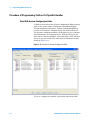
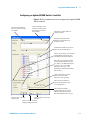
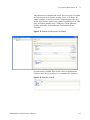
This editor can auto-detect supporting GPIB, VXI, LXI and USB
instruments, Pin Matrix Modules, and/or load cards. It can also
be used to add new modules/instruments or delete old
modules/instruments to/from the system.ust file. (Please refer
“TS-5000 System Software Manual” for more detail). Figure 3-13
shows the interface of System Configuration Editor (SCE).
Switching Path Manager
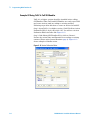
Switching actions make connections from the instrument and
loads to the Unit Under Test. These actions are internal to
Agilent TestExec SL. The switching information in these actions
are determined by the data in the 'system.ust' file and the
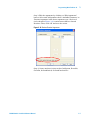
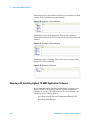
user-generated fixture.ust and uut.ust files. Figure 3-23 shows
how to add switching on TestExec SL.
Figure 3-23 Switching Interface of TestExec SL
Click here to add
switching path
3-12
E6198B Switch/Load Unit Software Manual