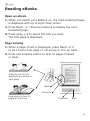
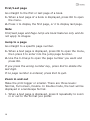
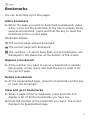
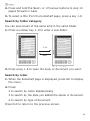
1
Important
Do not use a different type of battery or charger, this can
cause damage to your BeBook.
Do not remove the battery when charging.
Note
Your BeBook can be also charged by a power adapter2
(not supplied).
Connect the BeBook to the power adapter, and plug the
power adapter into a mains power socket.
Battery status
Operation
The battery status icon is displayed at the bottom right corner
of the screen. When only one power bar is displayed or you
hear the low battery warning, charge the battery.
battery warning, please charge the battery.
Low
Full
Low
The BeBook can be used while chargi
but the charging time will be increased.
One full charge of the battery, lasts 70
pages, or up to 5 hours Mp3.
Do not use an unauthorized battery and
charger, this can cause damage to yo
BeBook.
Do not remove the battery except wh
replacing.
Full
10