1
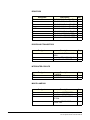
Symptom
System feedback
(acoustical).
Solution
1. The intercom-level 1. Adjust.
control at this panel or
another panel is set
too high.
2. The sidetone control 2. Adjust (see Figure
at the panel or another 1-1 on page 1-2).
panel is incorrectly
adjusted.
• System feedback can
have three different
causes.
VOX problems.
• VOX problems can
be caused by
incorrect sensitivity
settings.
• Note: VOX is
intended for close-in
operation.
Cause
The program signal
sounds distorted.
Rapid clicking noise.
3. A headset extension 3. Remove the
cord was used.
extension cord
because its use is not
recommended.
1. VOX stays tripped 1. Turn the VOX
(red light on); the
sensitivity control
sensitivity is set too
counterclockwise.
high.
2. VOX will not trip
when speaking (green
light on); the sensitivity
is set too low.
1. The program-level
control is set too high.
2. Turn the VOX
sensitivity control
clockwise.
2. The program-input
circuit is overloaded.
2. Reduce the gain of
the program signal at
the source, such as an
audio mixer.
1. Repair/replace
wiring or connectors.
1. Defective wiring or
connectors.
2. Defective IC1 on
710533 assembly.
4-2
1. Turn the
program-level control
counterclockwise.
2. Replace IC1.
Vitec Group Communications
ICS-22 Speaker Panel Instruction Manual