1
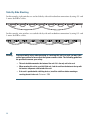
Step 7
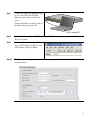
Connect a Category 5 Ethernet cable
to any 10/100 or 10/100/1000
Ethernet port on the switch front
panel.
1
SYST
RPS
MASTR
STAT
DUPLX
SPEED
STACK
MODE
1X
2
3
4
5
6
7
8
9
10
11
12
13
14
15
16
17
15X 17X
2X
18
19
20
21
22
23
24
25
26
27
28
29
30
31
32
33
31X 33X
34
35
36
37
38
39
16X 18X
40
41
42
43
44
45
46
47
Catalyst 3560G
48
SERIES
PoE-48
47X
32X 34X
49
51
Connect the other end of the cable to
the Ethernet port on your PC.
48X
50
52
DHCP-enabled PC
Step 8
Verify that the switch and PC Ethernet ports LEDs are green.
Wait 30 seconds.
Step 9
Start a web browser on your PC.
Enter the IP address 10.0.0.1 in the
web browser, and press Enter.
Step 10
The Express Setup page appears. If it does not appear, see the “In Case of Difficulty”
section for help.
5