1
Real Thoughts
GmbH
COMPROTware:Testtool
COMPROTware:Testtool
Introduction and Training
Real Thoughts GmbH
Haid-und-Neu-Straße 7
76131 Karlsruhe
Germany
Vanity-No. +49-700-REALTHOU
Fon +49-721-6276730, Fax +49-721-6276731
All rights reserved. No part of this publication may be reproduced, by any means whatsoever,
without the prior written permission of Real Thoughts.
(C) Copyright 2002-2009 - All Rights reserved
Real Thoughts GmbH
Vorlage Präsentation, 22. Mai ’98
Website www.realthoughts.de
E-mail [email protected]
CPTTTrainingEN.fm, 2009-03-10
Page 1
Real Thoughts
GmbH
COMPROTware:Testtool
General
General
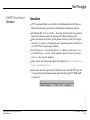
CPTT is an integrated testtool for transmission protocols of telecontrol systems
... combines different protocols in one user interface
... simulates master or slave station of a telecontrol system
(For details enlarge picture!)
The delivery includes
printed installation manual
CD-ROM with installation, documentation and examples
USB-, parallel port- or PCMCIA-dongle to license the protocols
(C) Copyright 2002-2009 - All Rights reserved
Real Thoughts GmbH
Vorlage Präsentation, 22. Mai ’98
Delivery
CPTTTrainingEN.fm, 2009-03-10
Page 2
Real Thoughts
GmbH
COMPROTware:Testtool
CD-ROM & Document
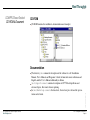
CD-ROM
CD-ROM contains the installation, documentation and examples:
The directory \doc contains the description of the software its self: Installation
Manual, User’s Manual, and Programer’s Guide; all material comes in German and
English, and the User’s Manual additionally in Italian
\doc\SupportDocuments contains descriptions of CPTT-related problems and
advanced topics, like remote license updating
In \doc\MarketingDocuments the data sheet, the end user price list and the presentation can be found.
(C) Copyright 2002-2009 - All Rights reserved
Real Thoughts GmbH
Vorlage Präsentation, 22. Mai ’98
Documentation
CPTTTrainingEN.fm, 2009-03-10
Page 3
Real Thoughts
GmbH
COMPROTware:Testtool
Installation
Installation of CPTT
The CPTT installation is based on Microsoft Windows Installer
It is described in detail in the Installation Manual
New releases are installed parallel to old ones; in case of problems with the new
release you still have access to the old one. Old releases can be very quickly uninstalled using Microsoft Windows Installer
The installation occurs in five steps (sequence at will, dongle not necessary):
Installation of Java Runtime Environment JRE
Start with \iX86_WIN32\jre-<RELEASE>.exe
Installation of WIBU-Key Driver for the dongle
Start with \iX86_WIN32\WkRt-<RELEASE>.exe
Installation of COMPROTware:Testtool
Start with \iX86_WIN32\CPTT\setup.exe
Installation WinPcap
For more detailed and complete Network Monitoring results with IEC 60870-5104, IEC 61850, MODBUS TCP/IP and DNP3 over LAN/WAN under MS Windows 2000 and XP
Installation of RIO Server
The installation of these separately licensed option is described later on
Vorlage Präsentation, 22. Mai ’98
Normaly, the standard values can always be used
(C) Copyright 2002-2009 - All Rights reserved
Real Thoughts GmbH
CPTTTrainingEN.fm, 2009-03-10
Page 4
Real Thoughts
GmbH
COMPROTware:Testtool
Licensing
Licensing
For simulation and monitoring a license is required; Offline Analysis can be done without a dongle any time
CPTT may be installed on any computer; a license is only required for simulation and
monitoring
The protocol specific licenses are stored in the dongle; only if a license for a protocol
is stored in the dongle simulation/monitoring is possible
Dongles are programmable:
A bit pattern in the dongle is used to control which protocols are licensed
Only one license per protocol can be stored on a dongle, but for all protocols a
license can be stored on a dongle.
With remote programming, by exchanging a context file and an update file, the
content of a dongle can be altered over electronic media
The dongles are deliverable as
Dongle for USB
Dongle for parallel port
Dongle for PCMCIA slot
Vorlage Präsentation, 22. Mai ’98
For more information about dongles, see http://www.wibu.com/
(C) Copyright 2002-2009 - All Rights reserved
Real Thoughts GmbH
CPTTTrainingEN.fm, 2009-03-10
Page 5
Real Thoughts
GmbH
COMPROTware:Testtool
Start and General Handling
Start
As usual under MS Windows, CPTT is started from the Start menu or by doubleclicking on the icon on the desktop
On program startup the configuration of the last program execution is restored.
CPTT can be started several times, even several simulations may run at the same time
User Engine Classes (see further below) can be loaded and started during program
startup
General Handling
The handling of CPTT meets the typical rules under MS Windows; with shortcut keys
frequently used functions can be accessed very quickly
The following file extensions are associated to CPTT:
.mlg for Message Log files (protocol traffic logs)
.mls for Message List files (message lists)
.cptt for configuration files (parameter sets)
Vorlage Präsentation, 22. Mai ’98
CPTT destinguishes between four operating modes:
Pure display of protocol traffic (Operate -> Stop)
Simulation of a Master (Operate -> as Master)
Simulation of a Slave (Operate -> as Slave)
Monitoring (Operate -> Monitor)
(C) Copyright 2002-2009 - All Rights reserved
Real Thoughts GmbH
CPTTTrainingEN.fm, 2009-03-10
Page 6
Real Thoughts
GmbH
COMPROTware:Testtool
Examples
Examples
The delivered Messages List examples under c:\Program files\realthoughts\comprotware\testtool\doc\<RELEASE>\MLS_Examples with name suffix
*_Std_Example.mls always carry out a complete demo of both Master and Slave;
the Message Lists must be imported throught Edit -> Message List Storage ... and
then the menu item File->Open from ...
Depending on which protocol you have licensed:
Is it a serial line-based protocol? Then connect two serial ports and run one tool on
one port as Master and another tool on the other port as Slave.
It’s even easier with network-based protocols: one instance of the testtool runs as
Slave, the other runs as Master Station (hence the IP address has to be set to
127.0.0.1 (Localhost))
Vorlage Präsentation, 22. Mai ’98
The delivered examples should help you understand CPTT and give you some insight
on the protocol
(C) Copyright 2002-2009 - All Rights reserved
Real Thoughts GmbH
CPTTTrainingEN.fm, 2009-03-10
Page 7
Real Thoughts
GmbH
COMPROTware:Testtool
Simulation
Simulation
CPTT can simulate Master as well as Slave (Controlling and Controlled Station or
Master and Outstation respectively) for all implemented transmission protocols
First through Edit -> Protocol Profile ... choose the desired protocol from a protocol
family; the station name makes the grouping of the different windows easier
In the next window, the protocol specific parameter must be specified; for each protocol, there’s a separate set of parameters and a separate input mask; the default values of CPTT meet common usage conditions
Now with Operate -> as Controlling/Operate -> as Master or with Operate -> as
Controlled/Operate -> as Slave you can simulate a control system or a sub device;
Operate -> Stop stops the simulation
In the window’s title, the operation mode will be displayed: Controlling, Master,
Controlled, Slave, Monitor, ...
Vorlage Präsentation, 22. Mai ’98
In the footer, the choosen protocol, the current time, state of the link (UP, down), the
receiving of characters through animation and the modem signal CTS, DSR and RI
are displayed:
(C) Copyright 2002-2009 - All Rights reserved
Real Thoughts GmbH
CPTTTrainingEN.fm, 2009-03-10
Page 8
Real Thoughts
GmbH
Simulation - Continuation
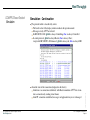
The protocol traffic is classified by colors:
The border color of the display window indicates the operation mode
Messages sent by CPTT are in bold
In IEC 60870-5-104: green is always Controlling, blue is always Controlled
In serial protocols: green is always Master, blue is always Slave;
except with IEC 60870-5-101 balanced: green is always dir, blue is always DIR
About the state of the connection (displayed in the footer):
Link down: no connection established; with Master simulation CPTT tries to initiate a connection by sending restart frames
Link UP: connection established; messages on Application Layer are exchanged
(C) Copyright 2002-2009 - All Rights reserved
Real Thoughts GmbH
Vorlage Präsentation, 22. Mai ’98
COMPROTware:Testtool
Simulation
CPTTTrainingEN.fm, 2009-03-10
Page 9
Real Thoughts
GmbH
COMPROTware:Testtool
Protocol Profiles
Protocol Profiles
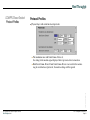
Physical Layer with serial line-based protocols:
Vorlage Präsentation, 22. Mai ’98
The simulation runs with Serial Comm. Device A;
the setting for the modem signal displayed here represents a direct connection
Both Serial Comm. Device B and Serial Comm. Device A are used for the monitoring of serial line-based protocols; the modem settings will be ignored
(C) Copyright 2002-2009 - All Rights reserved
Real Thoughts GmbH
CPTTTrainingEN.fm, 2009-03-10
Page 10
Real Thoughts
GmbH
COMPROTware:Testtool
Protocol Profiles
Protocol Profiles - Continuation
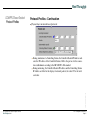
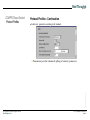
Physical Layer in network-based protocols:
Vorlage Präsentation, 22. Mai ’98
During simulation of a Controlling Station, the Controlled Station IP Address indicates the IP Address of the Controlled Station; 2404 is the port no. for the connection establishment according to the IEC 60870-5-104-standard
During monitoring, the Controlled Station IP Address and the Controlling Station
IP Address are filter for the display of network packets; the value 255 is the wildcard value
(C) Copyright 2002-2009 - All Rights reserved
Real Thoughts GmbH
CPTTTrainingEN.fm, 2009-03-10
Page 11
Real Thoughts
GmbH
COMPROTware:Testtool
Protocol Profiles
Protocol Profiles - Continuation
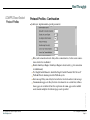
Link Layer, parameters according to the standard:
Vorlage Präsentation, 22. Mai ’98
Transmission procedure: unbalanced (polling) or balanced (spontaneous)
(C) Copyright 2002-2009 - All Rights reserved
Real Thoughts GmbH
CPTTTrainingEN.fm, 2009-03-10
Page 12
Real Thoughts
GmbH
COMPROTware:Testtool
Protocol Profiles
Protocol Profiles - Continuation
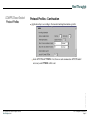
Link Layer, implementation-specific parameters:
Vorlage Präsentation, 22. Mai ’98
Delay after connection closed: delay after a connection loss, before a new connection is tried to be established
Disable Link Layer Engine: Link Layer Engine is deactivated (e.g. for connection
reestablishment)
Use SingleControlCharacter: should the Single Control Character 0xe5 be used?
TestLink Period: duration period for TestLink-cycles
Inter-message Delay: min. delay between the last received and next sent message
Communication gaps are delays between two characters on a serial line; within a
frame, gaps are not allowed; here the supervision of comm. gaps can be enabled
and a timeout multiplier for tolerated gaps can be specified
(C) Copyright 2002-2009 - All Rights reserved
Real Thoughts GmbH
CPTTTrainingEN.fm, 2009-03-10
Page 13
Real Thoughts
GmbH
COMPROTware:Testtool
Protocol Profiles
Protocol Profiles - Continuation
Link Layer, implementation-specific parameters:
Vorlage Präsentation, 22. Mai ’98
Message Timeout Multiplier: message reception timeout multiplier; reference time
is calculated based on frame length and baudrate
Link Down Timeout Multiplier: multiplier for link down timeout; reference time is
calculated based on frame length and baudrate
Test&Act - 2x-, 1xACD: if set, during Controlled Station simulation the ACD bit
is set in every third response frame
Test&Act - 2x-, 1xDFC: if set, during Controlled Station simulation the DFC bit is
set in every third response frame
(C) Copyright 2002-2009 - All Rights reserved
Real Thoughts GmbH
CPTTTrainingEN.fm, 2009-03-10
Page 14
Real Thoughts
GmbH
COMPROTware:Testtool
Protocol Profiles
Protocol Profiles - Continuation
Application Layer, according to the standard and implementation-specific:
Vorlage Präsentation, 22. Mai ’98
Auto ACTCON&ACTTERM: if set, then on each command an ACTCON and if
necessary an ACTTERM will be sent
(C) Copyright 2002-2009 - All Rights reserved
Real Thoughts GmbH
CPTTTrainingEN.fm, 2009-03-10
Page 15
Real Thoughts
GmbH
COMPROTware:Testtool
Simulation Examples
Simulation Examples
Now, the examples for IEC 60870-5-101 or -104 resp. should be read: open the files
IEC60870_5_101n104_Std_Example.mls and
IEC60870_5_101n104_All_TypeIdents.mls (when reading the last file, don’t
delete the Message List Storage)
Vorlage Präsentation, 22. Mai ’98
CPTT can be started several times on a computer: use your computer to simulate both
Master and Slave; with a network-based protocol use the IP address 127.0.0.1 (localhost) for simulation, with a serial line-based protocol connect two serial ports with a
cable
(C) Copyright 2002-2009 - All Rights reserved
Real Thoughts GmbH
CPTTTrainingEN.fm, 2009-03-10
Page 16
Real Thoughts
GmbH
Navigation
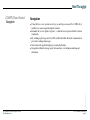
Using the keys cursor up und down, Page up and Page down and Pos1, STRG+Pos1
and End, you can navigate through the window.
Normally the view is updated „in place“, so that the newest protocol traffic is shown
continously.
By scrolling up the snap-on is freed. The scroll back buffer allows the examination of
previously exchanged messages.
You return to the updated display by pressing the End key
Navigation within the storage can be done anytime, even during monitoring and
simulation
Vorlage Präsentation, 22. Mai ’98
COMPROTware:Testtool
Navigation
(C) Copyright 2002-2009 - All Rights reserved
Real Thoughts GmbH
CPTTTrainingEN.fm, 2009-03-10
Page 17
Real Thoughts
GmbH
COMPROTware:Testtool
Formatting Options
Formatting Options
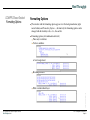
The window with the formatting options appears over the background menu (right
mouse button) and Formatting Options ...; alternatively, the formatting options can be
changed with the shortkeys <b>, <v>, <h> and <l>
Formatting options (all combinations allowed):
Time only or with date
Verbose, multiline
or brief, single-lined
Hexdump included
Vorlage Präsentation, 22. Mai ’98
With or without Link Layer
(C) Copyright 2002-2009 - All Rights reserved
Real Thoughts GmbH
CPTTTrainingEN.fm, 2009-03-10
Page 18
Real Thoughts
GmbH
COMPROTware:Testtool
Formatting Options
Formatting Options
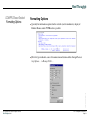
Specially for information captured on the network (not for simulation): display of
Ethernet Frames and/or TCP Headers is possible
Vorlage Präsentation, 22. Mai ’98
Filter for type indication, cause of transmission und station address through Formatting Options ... -> Message Filter ...
(C) Copyright 2002-2009 - All Rights reserved
Real Thoughts GmbH
CPTTTrainingEN.fm, 2009-03-10
Page 19
Real Thoughts
GmbH
Formatting Options
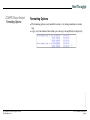
The formatting options can be modified any time, even during simulation or monitoring
A grey wavy line indicates that on that spot a message is being filtered (not displayed)
Vorlage Präsentation, 22. Mai ’98
COMPROTware:Testtool
Formatting Options
(C) Copyright 2002-2009 - All Rights reserved
Real Thoughts GmbH
CPTTTrainingEN.fm, 2009-03-10
Page 20
Real Thoughts
GmbH
COMPROTware:Testtool
Display Info-elementes
Display Information Elementes
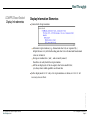
General rules for presentation:
Alternative representations (e.g. decimal and clear text) are separated by |;
helpful, because very often both coding and clear text or decimal and hexadecimal
value are of interest
Groups are embraced in [ and ], and are mostly named;
this allows to easily link to hex representation
All bits are displayed, set bits in capital, clear bits in small letters;
you always know which qualifiers an element has
Vorlage Präsentation, 22. Mai ’98
In the display mode BRIEF only a few representations are shown, in VERBOSE all
necessary ones are there
(C) Copyright 2002-2009 - All Rights reserved
Real Thoughts GmbH
CPTTTrainingEN.fm, 2009-03-10
Page 21
Real Thoughts
GmbH
COMPROTware:Testtool
IEC - Structured Addresses
IEC 60870-5-101/-104 - Structured Addresses
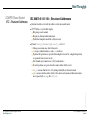
Structured addresses devide the address octets into smaller units
CPTT offers a very flexible display:
Bit groups can be named
Display in decimal and hexadecimal
Predefined templates make the selection easier
Format: V=%23_16d Fld=%15_8d Dev=%7_0d is 8-8-8
Strings can contain any desired character
% (escape symbol) initiates a value, %% results in %
Optional: bit positions are specified from higher to lower bit; a higher bit position
is separated from a lower one by _
For decimal representation use d, for hexadecimal x
If no bit positions are given, then the entire address field is used
Vorlage Präsentation, 22. Mai ’98
%23_16d means that bit 23 to 16 (starting with bit 0) are shown decimal
%d|%x means that the address field is first shown in decimal and then in hexadecimal, separated by a |, e.g. like 192|0xc0
(C) Copyright 2002-2009 - All Rights reserved
Real Thoughts GmbH
CPTTTrainingEN.fm, 2009-03-10
Page 22
Real Thoughts
GmbH
COMPROTware:Testtool
Settings & Statistic
Settings
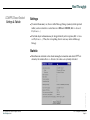
To control the memory use, the size of the Message Storage (memory for the protocol
traffic) can be restricted to a value between 3.000 and 1.000.000 (Edit -> General
Preferences ...)
Pure Link Layer information may be dropped directly after reception (Edit -> General Preferences ...). Thus, the event polling doesn’t waste any entries in Message
Storage
Statistic
Vorlage Präsentation, 22. Mai ’98
Miscellaneous statistical values about running/last connection and about CPTT are
shown by the window Extra -> Statistics; the values are cyclically refreshed
(C) Copyright 2002-2009 - All Rights reserved
Real Thoughts GmbH
CPTTTrainingEN.fm, 2009-03-10
Page 23
Real Thoughts
GmbH
COMPROTware:Testtool
Monitoring
Monitoring
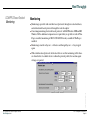
Monitoring is possible with serial line-based protocols through two serial interfaces,
and with network-based protocols through the network adapter
Concerning monitoring of network-based protocols: with MS Windows 2000 und MS
Windows XP no additional components are required but you get better results if WinPcap is installed; monitoring of IEC 61850 GOOSE is only available if WinPcap is
installed
Monitoring is started in Operate -> Monitor and through Operate -> Stop stopped
again
Vorlage Präsentation, 22. Mai ’98
With serial line-based protocols: both serial devices used for monitoring will be choosen from the list of available devices within the protocol profile; the modem signal
settings are ignored:
(C) Copyright 2002-2009 - All Rights reserved
Real Thoughts GmbH
CPTTTrainingEN.fm, 2009-03-10
Page 24
Real Thoughts
GmbH
COMPROTware:Testtool
Monitoring
Monitoring - Continuation
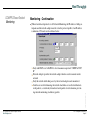
With network-based protocols: to do Network Monitoring, the IP address of both participants and the network adapter must be set in the protocol profile; if an IP address
is unknown, 255 can be used a wildcard value:
Vorlage Präsentation, 22. Mai ’98
Only with DNP3 over LAN/WAN: select transmission protocol: UDP/IP or TCP/
IP
Network Adapter specifies the network adapter which is used to monitor on the
network
Only the network traffic that passes by the network adapter can be monitored.
Switches are used for balancing the network load, hubs are used to distribute network packets; a switch only forwards network packets to its destination, preventing network monitoring on arbitrary packets
(C) Copyright 2002-2009 - All Rights reserved
Real Thoughts GmbH
CPTTTrainingEN.fm, 2009-03-10
Page 25
Real Thoughts
GmbH
COMPROTware:Testtool
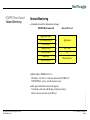
Network Monitoring
Network Monitoring
Standardized model for information exchange:
ISO/OSI Referenzmodell
Application Layer
Presentation Layer
Session Layer
Transport Layer
Network Layer
Link Layer
Physical Layer
7
6
5
4
3
2
1
Internet Protocol
Application
TCP / UDP
IP
Physical Layer
Hub: physical link between network adapters
Switch: like a hub, but with filtering on the physical layer
Router: connects networks on the IP layer
(C) Copyright 2002-2009 - All Rights reserved
Real Thoughts GmbH
Vorlage Präsentation, 22. Mai ’98
MAC-Address: 00-00-b4-82-c8-ce
IP-Address: 192.168.111.1 with network mask ff:ff:ff:00 or /24
TCP/UDP Ports: port no. at both client and server
CPTTTrainingEN.fm, 2009-03-10
Page 26
Real Thoughts
GmbH
COMPROTware:Testtool
Network Monitoring
Network Monitoring
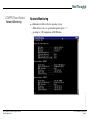
Additional tools delivered by the operating system:
With all these tools, you get help through the option “-?“
Vorlage Präsentation, 22. Mai ’98
ipconfig.exe - IP configuration of MS Windows
(C) Copyright 2002-2009 - All Rights reserved
Real Thoughts GmbH
CPTTTrainingEN.fm, 2009-03-10
Page 27
Real Thoughts
GmbH
COMPROTware:Testtool
Network Monitoring
Network Monitoring
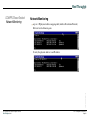
arp.exe - IP/physical address mapping table (Address Resolution Protocol)
Delivers list of all known pairs
Vorlage Präsentation, 22. Mai ’98
Or only the physical address to an IP address
(C) Copyright 2002-2009 - All Rights reserved
Real Thoughts GmbH
CPTTTrainingEN.fm, 2009-03-10
Page 28
Real Thoughts
GmbH
COMPROTware:Testtool
Network Monitoring
Network Monitoring
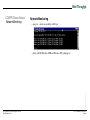
ping.exe - checks accessibility on IP layer
Vorlage Präsentation, 22. Mai ’98
Only with MS Windows 2000 and Windows XP: pathping.exe
(C) Copyright 2002-2009 - All Rights reserved
Real Thoughts GmbH
CPTTTrainingEN.fm, 2009-03-10
Page 29
Real Thoughts
GmbH
Network Monitoring
route.exe - network-routing table
Which target (host or network) is reachable using which gateway through which
interface?
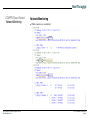
Vorlage Präsentation, 22. Mai ’98
COMPROTware:Testtool
Network Monitoring
(C) Copyright 2002-2009 - All Rights reserved
Real Thoughts GmbH
CPTTTrainingEN.fm, 2009-03-10
Page 30
Real Thoughts
GmbH
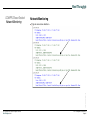
Network Monitoring
tracert.exe - way to a host
Show me all hosts on the way to my target
Vorlage Präsentation, 22. Mai ’98
COMPROTware:Testtool
Network Monitoring
(C) Copyright 2002-2009 - All Rights reserved
Real Thoughts GmbH
CPTTTrainingEN.fm, 2009-03-10
Page 31
Real Thoughts
GmbH
COMPROTware:Testtool
Network Monitoring
Network Monitoring
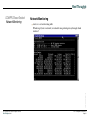
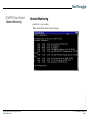
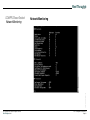
netstat.exe -e
Statistic Ethernet-Frames
Vorlage Präsentation, 22. Mai ’98
netstat.exe -s
Statistic IP-Layer
(C) Copyright 2002-2009 - All Rights reserved
Real Thoughts GmbH
CPTTTrainingEN.fm, 2009-03-10
Page 32
Real Thoughts
GmbH
Network Monitoring
Vorlage Präsentation, 22. Mai ’98
COMPROTware:Testtool
Network Monitoring
(C) Copyright 2002-2009 - All Rights reserved
Real Thoughts GmbH
CPTTTrainingEN.fm, 2009-03-10
Page 33
Real Thoughts
GmbH
Network Monitoring
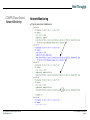
Typical connection establishment
Vorlage Präsentation, 22. Mai ’98
COMPROTware:Testtool
Network Monitoring
(C) Copyright 2002-2009 - All Rights reserved
Real Thoughts GmbH
CPTTTrainingEN.fm, 2009-03-10
Page 34
Real Thoughts
GmbH
Network Monitoring
While connection is established
Vorlage Präsentation, 22. Mai ’98
COMPROTware:Testtool
Network Monitoring
(C) Copyright 2002-2009 - All Rights reserved
Real Thoughts GmbH
CPTTTrainingEN.fm, 2009-03-10
Page 35
Real Thoughts
GmbH
Network Monitoring
Typical connection shutdown
Vorlage Präsentation, 22. Mai ’98
COMPROTware:Testtool
Network Monitoring
(C) Copyright 2002-2009 - All Rights reserved
Real Thoughts GmbH
CPTTTrainingEN.fm, 2009-03-10
Page 36
Real Thoughts
GmbH
COMPROTware:Testtool
Message Log files
Message Storage
During simulation or monitoring, the entire protocol traffic is saved in the Message
Storage
The content of the Message Storage can be written into a file
Always raw data is saved in the Message Log files, not processed data; for Offline
Analysis all formatting options keeps available
The protocol profile is also saved, so that when the file is loaded again, the right parameters are immediately set
The current content of the Message Storage can be saved through File -> Save as ... ;
don’t forget to use the filename extension .mlg in the directory dialog
Logging
Additionally, during simulation or monitoring the protocol traffic can be logged in a
file (File -> Log to file ... and File -> Close Log file); this file can be of any length,
allowing extensive recordings (that last days) to be created, that would otherwise not
fit in the Message Storage
Through File -> Open from ... a Message Log file can be read
A very long log file can be divided into smaller pieces through Extra -> Split Log file
...
(C) Copyright 2002-2009 - All Rights reserved
Real Thoughts GmbH
Vorlage Präsentation, 22. Mai ’98
Access to Message Log files
CPTTTrainingEN.fm, 2009-03-10
Page 37
Real Thoughts
GmbH
COMPROTware:Testtool
Offline Analysis
Offline Analysis
For postprocessing of the recorded protocol traffic
The Offline Analysis requires no license
Enables you to calmly go through the protocol traffic, to document and to draw the
right conclusions
Through File -> Open from ... a Message Log file can be retrieved again; with the cursor keys, the protocol traffic can be navigated, and using the shortcut keys the desired
formatting options can be choosen
Exporting to file
Extra -> Export to file ... allows the content of the Message Storage to be exported to
a file based on the previously choosen formatting options
Erase Message Storage
Vorlage Präsentation, 22. Mai ’98
Clear in the background menu deletes the Message Storage content
(C) Copyright 2002-2009 - All Rights reserved
Real Thoughts GmbH
CPTTTrainingEN.fm, 2009-03-10
Page 38
Real Thoughts
GmbH
COMPROTware:Testtool
Message List Storage
Message List Storage
The Message List Storage contains all the message lists
Through Edit -> Message List Storage ... a view of the Message List Storage can be
opened
In menu File through New, a new (empty) message list can be created, Open from ...
imports message lists and Save as ... saves all message lists in Message List Storage
in a file;
the background menu and the menu Edit allow the editing, renaming, cutting,
copying, pasting, sending and stopping of a message list;
double-clicking on a list name opens a editing window for the list
(C) Copyright 2002-2009 - All Rights reserved
Real Thoughts GmbH
Vorlage Präsentation, 22. Mai ’98
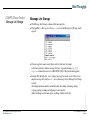
The message lists names can be choosen freely, but must be unique;
in destinct protocols, destinct message lists have a special meaning, e.g. C_IC
response contains the answer to a IEC 60870-5-101/-104 general interrogation
CPTTTrainingEN.fm, 2009-03-10
Page 39
Real Thoughts
GmbH
COMPROTware:Testtool
Message Lists
Message Lists
A single message list can be stored in a file (File -> Save as ...), by Edit meta-messages can be edited, copied, pasted, and deleted; double-clicking on a meta-message
opens the editing window
The attributes determine:
If the list is processed once (One time) or cyclically (Cyclic)
In cyclic processing: how many messages should be sent in a period, the delay between periods and the number of periods
The next message list
(C) Copyright 2002-2009 - All Rights reserved
Real Thoughts GmbH
Vorlage Präsentation, 22. Mai ’98
A number of attributes and a list of meta-messages together setup a message list (the
interpretation depends on the choosen protocol!)
CPTTTrainingEN.fm, 2009-03-10
Page 40
Real Thoughts
GmbH
COMPROTware:Testtool
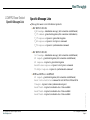
Specific Message Lists
Specific Message Lists
Message list names reserved for distinct protocols:
IEC 60870-5-101/-104:
M_EI message - initialization message (after connection establishment)
C_IC command - general interrogation (after connection establishment)
C_IC response - response to general interrogation
C_RP response - response to reset process command
C_CS response - response to synchronization command
DNP3 and DNP3 over LAN/WAN:
GI request - general interrogation (after connection establishment)
Reset Device Restarted - command to reset the Device Restarted bit
Timesync - response to time synchronization request
Read Class1 - response to indication class 1 data available
Read Class2 - response to indication class 2 data available
Read Class3 - response to indication class 3 data available
(C) Copyright 2002-2009 - All Rights reserved
Real Thoughts GmbH
Vorlage Präsentation, 22. Mai ’98
IEC 60870-5-102/-103:
Init message - initialization message (after connection establishment)
GI request - general interrogation (after connection establishment)
GI response - response to general interrogation
ResetProcess response - response to reset process command
ClockSync response - response to synchronization command
CPTTTrainingEN.fm, 2009-03-10
Page 41
Real Thoughts
GmbH
COMPROTware:Testtool
Specific Message Lists
Specific Message Lists - Continuation
ABB RP570/571:
Init message - initialization message (after connection establishment)
Status Check request - general interrogation (after connection establishment)
Status Check response - response to general interrogation
Coldstart response - response to reset process command (FCOM 1)
VersionId response - response to inquiry firmware version (FCOM 4)
Vorlage Präsentation, 22. Mai ’98
MODBUS:
Cyclic Queries - cyclic list with queries
Response Read coils 1...8 - response; adjust value range
Response Read input discretes 1...8 - response; adjust value range
Response Read multiple registers 1...8 - response; adjust value range
Response Read multiple registers 1...8 - response; adjust value range
Response Read input registers 1...8 - response; adjust value range
Response Read exception status
Response Read general reference 1/2/3/4 - response; adjust value range
Response Read/write registers 1...8 - response; adjust value range
Response Read FIFO queue 8 - response; adjust value range
(C) Copyright 2002-2009 - All Rights reserved
Real Thoughts GmbH
CPTTTrainingEN.fm, 2009-03-10
Page 42
Real Thoughts
GmbH
COMPROTware:Testtool
Meta-Messages
Meta-Messages
The message lists are composed of single meta-messages;
the meta-messages can consist of:
A complete frame (Link Layer frame) as a hexstring (PDU transparent)
Payload data (Application Layer message) in clear text or as a hexstring (SDU
clear text or SDU transparent)
User String
Delay
Abrupt, uncontrolled connection break-off (Abort)
Controlled shutdown of the connetion (Shutdown)
Vorlage Präsentation, 22. Mai ’98
The clear text entry of messages offers a very fast and efficient way of entering message lists
(C) Copyright 2002-2009 - All Rights reserved
Real Thoughts GmbH
CPTTTrainingEN.fm, 2009-03-10
Page 43
Real Thoughts
GmbH
COMPROTware:Testtool
Sending of single messages
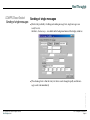
Sending of single messages
Besides the possibility of editing and sending message lists, single messages can
easily be sent;
therefore, Send message... is available in the background menu of the display windows
Vorlage Präsentation, 22. Mai ’98
The advantage here is that the entry text boxes can be changed rapidly and the message can be sent immediately
(C) Copyright 2002-2009 - All Rights reserved
Real Thoughts GmbH
CPTTTrainingEN.fm, 2009-03-10
Page 44
Real Thoughts
GmbH
COMPROTware:Testtool
User Comments
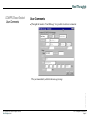
User Comments
Throught the window “Send Message“ it is possible to add user comments:
Vorlage Präsentation, 22. Mai ’98
They are immediately added to the message storage
(C) Copyright 2002-2009 - All Rights reserved
Real Thoughts GmbH
CPTTTrainingEN.fm, 2009-03-10
Page 45
Real Thoughts
GmbH
COMPROTware:Testtool
Sending Message Lists
Sending Message Lists
A single window allows it to easily activate message lists and to stop their execution;
therefore, in the background select menu item Send Message List ...:
Vorlage Präsentation, 22. Mai ’98
Multiple message lists can be simultaneously executed; but every message list can
only be processed once.
Through Send the execution will begin and with Stop it will end
(C) Copyright 2002-2009 - All Rights reserved
Real Thoughts GmbH
CPTTTrainingEN.fm, 2009-03-10
Page 46
Real Thoughts
GmbH
COMPROTware:Testtool
Preparing Configurations
Preparing Configurations
Configurations can be prepared comfortably right from your desk and then saved; in
doing so an important step in the preparation for an on-site customer visit can be previously solved
The following belong to a configuration: protocol profile, loaded User Engine Classes, general preferences and position/size of windows
Save the configuration using File -> Save Configuration as ..., import the configuration using File -> Open Configuration from ...
Vorlage Präsentation, 22. Mai ’98
If CPTT must run several times on the desktop with the same configurations, there is
a trick: start CPTT, set configuration and then save it using File -> Save Configuration to user default; the new user configuration has been saved; now you can run
CPTT as often as wanted... all CPTTs have the same configuration
(C) Copyright 2002-2009 - All Rights reserved
Real Thoughts GmbH
CPTTTrainingEN.fm, 2009-03-10
Page 47
Real Thoughts
GmbH
COMPROTware:Testtool
User Engine Classes
User Engine Classes
Are plug-ins for CPTT, that are implemented in Java. In the Programmer’s Guide the
API of the User Engine Classes is described; a precondition for the development
of User Engine Classes is an installed Java Development Kit
Because Java is very similar to ANSI C and C++, it is easy to write User Engine
Classes
Java helps to protect programs against crashes from User Engine Classes
An example for User Engine Classes will be delivered:
IEC 60870-5-101/-104-Filetransfer
Through Edit -> User Engine Classes ... you are able to choose and load User
Engine Classes; if the path in the text field is cleared, then the class will be
unloaded again
Vorlage Präsentation, 22. Mai ’98
Many other applications are imaginable:
File transfer and other Application Layer procedures
Recreating of device specific pseudo points
Controlling the basic functions of a device
(C) Copyright 2002-2009 - All Rights reserved
Real Thoughts GmbH
CPTTTrainingEN.fm, 2009-03-10
Page 48
Real Thoughts
GmbH
COMPROTware:Testtool
Remote I/O Server
Remote I/O Server
Please note: Remote I/O Server is a separately licensed option of COMPROTware:Testtool. The license is not included in the standard delivery.
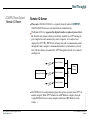
The Remote I/O Server separates the display from the reception of protocol traffic. It enables data streams, which are not directly available on a CPTT-running display computer but can be monitored by remote computers, to be analyzed and
displayed by CPTT. The RIO Server exchanges data with a communication partner
through the remote computer’s communication interface (serial interface, network,
files). The data frames are handed off to CPTT through the network, to be analyzed
and displayed.
Remote Computer
Display
Computer
Remote Computer
Network
Communication Partner
The RIO Server is an independent program, that operates separately from CPTT on
another computer. While CPTT is limited to an MS Windows computer, the light
weight RIO Server runs on many computer architectures (MS Windows, Linux,
Solaris, ...).
(C) Copyright 2002-2009 - All Rights reserved
Real Thoughts GmbH
Vorlage Präsentation, 22. Mai ’98
Remote Computer
CPTTTrainingEN.fm, 2009-03-10
Page 49
Real Thoughts
GmbH
COMPROTware:Testtool
Remote I/O Server
RIO Server
RIO Server
The executable version of RIO Servers for the required computer architecture can be
found on the CD-ROM in the directory \CPRioServer:
CPRioServer_iX86_WIN32 for MS Windows
CPRioServer_iX86_Linux for PC Linux 2.x
CPRioServer_sun4_SunOS_5 for Sun SPARC Solaris 7
Copy the executable version on your target system.
Vorlage Präsentation, 22. Mai ’98
Start the RIO Server on the remote computer. So that the RIO Server is always
available, it should be started when the computer is booted or the supervised application is started:
Under MS Windows: Put RIO Server in the registry
Under UNIX or Linux within the /etc/rd.d scripts
Or through a script related to the supervised application
(C) Copyright 2002-2009 - All Rights reserved
Real Thoughts GmbH
CPTTTrainingEN.fm, 2009-03-10
Page 50
Real Thoughts
GmbH
COMPROTware:Testtool
Remote I/O Server
RIO Server
RIO Client in CPTT
The configuration of the RIO Clients in CPTT can be carried out through
Edit->General Preferences:
Vorlage Präsentation, 22. Mai ’98
In this window, the address (computer name or IP address) of the RIO Servers,
the TCP port no. and the configuration strings can be entered. The configuration
string must be specified from the RIO Servers perspective (see below).
(C) Copyright 2002-2009 - All Rights reserved
Real Thoughts GmbH
CPTTTrainingEN.fm, 2009-03-10
Page 51
Real Thoughts
GmbH
COMPROTware:Testtool
Remote I/O Server
RIO Client in CPTT
RIO Client in CPTT
The following applies for the inputs:
If there is a correct RIO Server address given, with immediate effect communication takes place through the RIO Server. If you like to continue without RIO Server, just clear the address.
If predefined settings (as CPTT configuration files) were read, then these can be
selected from Predef’d Servers and accepted.
Vorlage Präsentation, 22. Mai ’98
“@Rio“ in the title of the window shows that the communication occurs indirectly
through the RIO Server.
Predefined RIO Server configuration can be read through File->Open Configuration
from. The maintenance of these configurations must occur through an external editor.
The configuration string have the following structure:
<Medium>:<location>[;<location]:<Format>
dblsrl:com1,9600,8n1;com2,9600,8n1:PPP
From two serial interfaces (com1 and com2 each running on 9600 baud, 8 data-, 1
stop- and no parity bits) in format PPP (Point-to-Point Protocol) successive PPPframes are caught and forwarded to CPTT.
file:/var/tmp/trace1.txt;/var/tmp/trace2.txt:RWE
From a file, path and filename is “/var/tmp/trace1.txt“ or “/var/tmp/trace2.txt“, in
format RWE all added data frames are consecutively read out and forwarded to
CPTT.
(C) Copyright 2002-2009 - All Rights reserved
Real Thoughts GmbH
CPTTTrainingEN.fm, 2009-03-10
Page 52
Real Thoughts
GmbH
COMPROTware:Testtool
We have observed...
We have observed...
Using Edit -> Protocol Profiles ... a protocol can be choosen from a protocol family,
and its profile can be determined,
the simulation as Controlling Station/Master or as Controlled Station/Slave is started
through Operate -> as Controlling/as Master or Operate -> as Controlled/as Slave,
the simulation can be finished again through Operate -> Stop,
the display formatting of the protocol traffic can be changed using the background
menu (right mouse button) -> Formatting Options ...
the messages can be saved on a disk (File -> Save as ...) and be opened again (File > Open from ...)
The size of the Message Storage can be controlled using Edit -> General Preference,
as well as whether all Link Layer information should be saved
For long lasting tests, the protocol traffic can be saved directly into a file through File
-> Log to file ..., logging will be stopped through File -> Close Log file
This is specially useful during monitoring (Operate -> Monitor und Operate -> Stop)
Vorlage Präsentation, 22. Mai ’98
Large Message Log files can be split into smaller files using Extra -> Split Log file ...,
the content of the Message Storage, with the selected formatting options, can be saved
in a file by using Extra -> Export to file
(C) Copyright 2002-2009 - All Rights reserved
Real Thoughts GmbH
CPTTTrainingEN.fm, 2009-03-10
Page 53
Real Thoughts
GmbH
COMPROTware:Testtool
We have observed...
We have observed... - Continuation
Message lists are processed by Edit -> Message List Storage ..., User Engine Classes (plug-ins) can be added to CPTT through Edit -> User Engine Class ...
For questions, Help -> About gives you the contact information to contact us!
Real Thoughts GmbH
Haid-und-Neu-Straße 7
76131 Karlsruhe
Germany
Vanity-No. +49-700-REALTHOU
Fon +49-721-6276730, Fax +49-721-6276731
Vorlage Präsentation, 22. Mai ’98
Website www.realthoughts.de
E-mail [email protected]
(C) Copyright 2002-2009 - All Rights reserved
Real Thoughts GmbH
CPTTTrainingEN.fm, 2009-03-10
Page 54