1
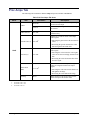
3. Assign a transition event to a GPI /Tally by selecting the function from the Function
drop-down list to the required GPI/Tally. Choose from the following:
•
None — Select this option to not assign a function to the selected GPI/Tally. The
Trigger and Polarity settings are ignored. This is the default setting.
•
Output xx - Quad — Selecting this option causes the specified output, where xx
represents the output, to display the Quad Split when the GPI is triggered.
•
Output xx - Bkgd # — Selecting this option causes the specified output, where xx
represents the output, to display the specified full-screen input when the GPI is
triggered.
•
Output xx - Cycle — Selecting this option causes the specified output, where xx
represents the output, to cycle through the Quad Split and full-screen inputs when
the GPI is triggered.
•
yy Quad - Black — Selecting this option causes the specified quadrant, where yy
represents the quadrant (UL, UR, LL, and LR), to show black when the GPI is
triggered.
•
yy Quad - Bkgd # — Selecting this option causes the specified quadrant, where
yy represents the quadrant, to show the specified Bkgd source when the GPI is
triggered.
•
yy Quad - Cycle — Selecting this option causes the specified quadrant, where yy
represents the quadrant, to cycle through Black and the four inputs when the GPI is
triggered.
•
Bkgd # - Tally x — Selecting this option causes the GPI to control the specified
tally, where x represents the tally number, associated with the specified Bkgd input.
Refer to the section “Tally to GPI Setup” on page 3-10 for details.
4. Select a trigger for the GPI from the Trigger column. Choose from the following:
•
Edge — Select this option to configure the card to perform the Function on either
the Rising or Falling Edge of the GPI signal as determined by the Polarity setting.
•
Level — Select this option to have the GPI action controlled by a static voltage
level. The card performs the Function when the GPI state is either High or Low as
determined by the Polarity set in step 5. The action triggered by the GPI input will
remain in that state until the GPI level changes. Select this option when using a GPI
to control a tally.
5. Select a polarity for the GPI from the Polarity column. Choose from the following:
•
High/Rising — Select this option to have the GPI triggered on a static High level,
or on a Low-to-High pulse.
•
Low/Falling — Select this option to have the GPI triggered on a static Low level
or on a High-to-Low pulse. This is the default setting.
This completes the procedure for configuring remote control for GPIs.
QSP-8229A User Manual (Iss. 01)
Configuration • 3–9