1
CR3000 Overview
CS IO)
COMPUTER
RS232
(TRANSFORMER
ISOLATED)
Pin 5
Pin 1
Pin 9
Pin 6
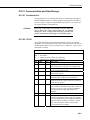
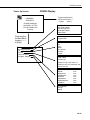
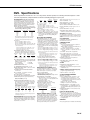
FIGURE OV1-3. Serial Communication Interfaces
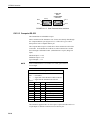
OV1.2.3 Computer RS-232
The CR3000 has an isolated RS-232 port.
Direct connection of the CR3000 to a PC is most conveniently done through
the "Computer RS232" port (Figure OV1-3). Table OV1-2 gives a brief
description of each "Computer RS232" pin.
The Computer RS-232 port is a DCE device when connected to a PC with a
serial cable. It also doubles as a DTE device when connected to a modem
device through a null-modem cable. (DTR function is on pin I, Ring is an
input).
Maximum input = ± 25V
Minimum Output = ± 5V
Typical Output = ± 7V
NOTE
Serial communications is not reliable over cable greater than 50
feet in length.
TABLE OV1-2. Computer RS-232 Pin-Out
ABR =
PIN =
O
=
I
=
device
PIN
1
2
3
4
5
6
7
8
9
Abbreviation for the function name
Pin number
Signal Out of the CR3000 to a RS-232 device
Signal Into the CR3000 from a RS-232
ABR
DTR
TX
RX
I/O
O
O
I
GND
CTS
RTS
RING
O
I
O
I
Description
data terminal ready
asynchronous transmit
asynchronous receive
not connected
isolated ground
connected to pin
clear to send
request to send
ring
The CR3000 is supplied with a six foot 9-pin to 9-pin serial cable and a 9- to
25-pin adapter to facilitate connection to a PC RS-232 port.
OV-6