1
FINGERTEC® TECHNICAL TRAINING
Chapter 2
Communication Settings
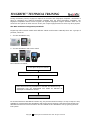
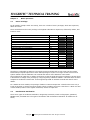
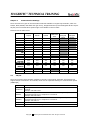
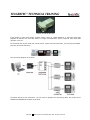
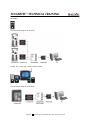
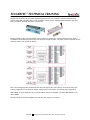
There are total of 6 types of communication methods available in FingerTec® terminals, which are
TCP/IP, RS23, RS485, USB flash disk (pen drive), Wiegand 26-bits input and Wiegand 26-bits output.
Anyway some communication option might not available in some models.
Please check the table below.
AC100
AC103-R
TA100
TA103-R
AC100Plus
AC800
AC800Plus
AC800Plus
MC
AC900
M2
R2
R2
MIFARE
iKiosk 100
iKiosk
100Plus
TimeLine
Kadex
Kadex U
2.1
26-bits
Wiegand
Input
26-bits
Wiegand
Output
TCP/IP
RS232
RS485
USB flash
disk
Yes
Yes
Yes
Yes
Yes
Yes
Yes
Yes
Yes
Yes
Yes
Yes
Yes
Yes
Yes
Yes
Yes
Yes
Yes
Yes
Yes
Yes
Yes
Yes
Yes
Yes
Yes
Yes
Yes
Yes
Yes
Yes
Yes
Yes
Yes
Yes
Yes
Yes
Yes
Yes
Yes
Yes
Yes
Yes
Yes
Yes
Yes
Yes
Yes
Yes
Yes
Yes
Yes
Yes
Yes
Yes
Yes
Yes
Yes
Yes
Yes
Yes
Yes
Yes
Yes
Yes
Yes
Yes
Yes
Yes
Yes
Yes
Yes
Yes
Yes
Yes
Yes
Yes
Yes
Yes
TCP/IP
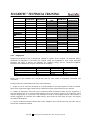
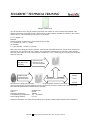
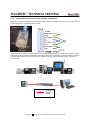
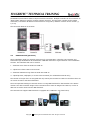
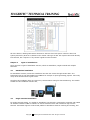
The most common communication method to connect to FingerTec® terminals. All terminals can
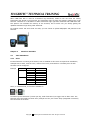
support TCP/IP connections. In terminals, these are the important settings in communication option
(COMM Opt),
IP address
NetMask
GateWay
Netspeed
Dev num
Functions
To assign an IP address to the terminal, so software can connect to the
terminal.
Example 192.168.1.201
NetMask settings to suit into the network envionment. Ignore if you are
connecting direct from 1 computer to 1 terminal.
Example 255.255.255.0
Gateway settings to suit into network environment. Ignore if you are
connecting direct from 1 computer to 1 terminal.
Example 192.168.1.1
Network speed of the network environment, recommeneded AUTO.
The number of device, range from 1 to 255.
Copyright
2008 FingerTec Worldwide Sdn. Bhd. All rights reserved.