1
.3
English
English
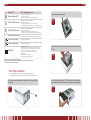
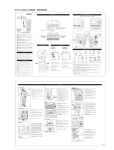
Power LED
Blue: System power on
System Status LED
Blinking orange: System startup
Blinking red: System error
Off: System startup complete; system operating normally
HDD 1 LED (blue/red)
Blue: HDD 1 detected
Blinking blue: Active HDD 1 data transfer
Red : HDD 1 error detected
Blinking red: HDD 1 capacity is nearly full (90% or more)
* If RAID is configured, capacity is based on the entire RAID system.
HDD 2 LED (blue/red)
Blue: HDD 2 installed
Blinking blue: Active HDD 2 data transfer
Red : HDD 2 error detected
Blinking red: HDD 2 capacity is nearly full (90% or more)
* If RAID is configured, capacity is based on the entire RAID system.
One-Button USB Copy
Push the button to copy entire USB volume to theN2100. Files are
stored in a folder named by current time stamp: (YearMonthDayHHMM)
LAN 1 LED (green)
Green: Network connected
Blinking green: Network activity
LAN 2 LED (green)
Green: Network connected
Blinking green: Network activity
USB LED
USB Device Connection:
Blinking blue (5 seconds) : USB device connected successfully.
*For universal USB memory card reader, USB LED will blink blue
when one or more card is mounted successfully.
Blinking red (5 seconds) : USB device connection failure
Data Transfer:
Blinking blue: Active data transfer
Blinking red: USB device read/write error
USB Port: USB 2.0 port for USB storage expansion.
USB Copy Button: Automatically copy entire USB storage content to the YES Box N2100.
Power Button: Turn on/off YES Box N2100.
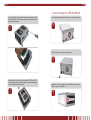
Unscrew four mounting screws.
STEP
2
Lift up the hard disk tray by pulling up the top panel of the YES Box
N2100.
STEP
3
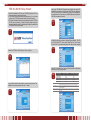
Hard Disk Installation
The YES Box N2100 supports up to two Serial ATA (SATA) hard disks.
To install hard disks into the YES Box N2100, please follow the diagrams below:
Remove two screws located on the back of the unit using a Philips
screwdriver.
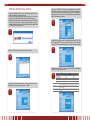
Carefully insert a standard 3.5” SATA hard disk into the tray, and
secure the hard disk with screws from the included accessory pack.
STEP
1
STEP
4
4.