1
OPERATING INSTRUCTIONS:
Controls
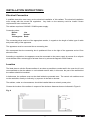
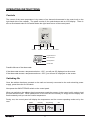
The control of the room temperature is by means of an electronic thermostat in the control unit on the
right hand side of the radiator. The panel consist of four push-buttons and an LCD display. There is
also an illuminated main On-Off switch below the right hand corner of the control panel.
Increase
Decrease
Mode / OK
ON / OFF / PROG
Programmed Hours
Days of the week
Heating indicator
Current Mode
Possible failures of the thermostat:
If the thermostat senses a temperature below -15ºC, you will see OC displayed on the screen.
If the thermostat senses a temperature above + 50ºC, you will see SC displayed on the screen.
Switching On
Once the radiator has been mounted on the wall and correctly connected to the main electricity power
supply, press the main On-Off switch.
Now press the ON/OFF/PROG switch on the control panel.
When you switch on the radiator the microprocessor reads the memory in the control unit in order to load
the last selected mode. When switched on for the first time the memory is empty and the display will
flash constantly until you set the Comfort temperature.
During use, the control panel will display the temperature and the current operating mode set by the
user.
Comfort
Economy
Programming
8
OFF