1
2-055-844-12(1)
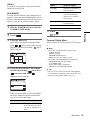
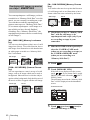
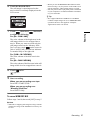
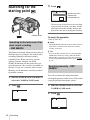
Camera Operations Guide [US]
Camera
Operations Guide
Read this first
Digital Video Camera Recorder
DCR-HC1000
© 2004 Sony Corporation
Read this first
Before operating the unit, please read this
manual thoroughly, and retain it for future
reference.
WARNING
To prevent fire or shock hazard, do not
expose the unit to rain or moisture.
For customers in the U.S.A. and
CANADA
RECYCLING LITHIUM-ION BATTERIES
Lithium-Ion batteries are recyclable.
You can help preserve our
environment by returning your used
rechargeable batteries to the
collection and recycling location
nearest you.
For more information regarding recycling of
rechargeable batteries, call toll free 1-800-822- 8837,
or visit http://www.rbrc.org/
Caution: Do not handle damaged or leaking LithiumIon batteries.
“Memory Stick”
This device complies with Part 15 of the FCC Rules.
Operation is subject to the following two conditions:
(1) This device may not cause harmful interference,
and (2) this device must accept any interference
received, including interference that may cause
undesired operation.
This symbol is intended to alert the
user to the presence of uninsulated
“dangerous voltage” within the
product’s enclosure that may be of
sufficient magnitude to constitute a
risk of electric shock to persons.
This symbol is intended to alert the
user to the presence of important
operating and maintenance
(servicing) instructions in the
literature accompanying the
appliance.
b Notice
If static electricity or electromagnetic interference
causes data transfer to discontinue midway (fail),
restart the application or disconnect and connect the
USB cable again.
2
This Class B digital apparatus complies with Canadian
ICES-003.
For customers in the U.S.A.
If you have any questions about this product, you may
call:
Sony Customer Information Center 1-800-222-SONY
(7669).
The number below is for the FCC related matters only.
Regulatory Information
Declaration of Conformity
Trade Name: SONY
Model No.: DCR-HC1000
Responsible Party: Sony Electronics Inc.
Address: 16450 W. Bernardo Dr, San Diego, CA
92127 U.S.A.
Telephone No.: 858-942-2230
This device complies with Part 15 of the FCC Rules.
Operation is subject to the following two conditions:
(1) This device may not cause harmful interference,
and (2) this device must accept any interference
received, including interference that may cause
undesired operation.
Owner’s Record
The model and serial numbers are located on the
bottom. Record the serial number in the space
provided below. Refer to these numbers whenever you
call upon your Sony dealer regarding this product.
Model No. DCR-HC
Serial No.
Model No.ACSerial No.
Notes on use
Note on Cassette Memory
Your camcorder is based on the DV format. You can
use only mini DV cassettes in your camcorder. Use of
mini DV cassettes with Cassette Memory is
recommended as you can use Title search (p. 52), Date
search (p. 53), [
TITLE] (p. 73), [
TAPE
TITLE] (p. 75).
CAUTION
Cassettes with Cassette Memory are marked
with
.
You are cautioned that any changes or modifications
not expressly approved in this manual could void your
authority to operate this equipment.
Note on the type of “Memory Stick” you
can use in your camcorder
b Note:
This equipment has been tested and found to comply
with the limits for a Class B digital device, pursuant to
Part 15 of the FCC Rules. These limits are designed to
provide reasonable protection against harmful
interference in a residential installation. This
equipment generates, uses, and can radiate radio
frequency energy and, if not installed and used in
accordance with the instructions, may cause harmful
interference to radio communications. However, there
is no guarantee that interference will not occur in a
particular installation. If this equipment does cause
harmful interference to radio or television reception,
which can be determined by turning the equipment off
and on, the user is encouraged to try to correct the
interference by one or more of the following measures:
– Reorient or relocate the receiving antenna.
– Increase the separation between the equipment and
receiver.
– Connect the equipment into an outlet on a circuit
different from that to which the receiver is
connected.
– Consult the dealer or an experienced radio/TV
technician for help.
The supplied interface cable must be used with the
equipment in order to comply with the limits for a
digital device pursuant to Subpart B of Part 15 of FCC
Rules.
You can use only a “Memory Stick Duo,” which is
about half the size of a standard “Memory Stick,” in
your camcorder (p. 121).
The
mark is indicated on the
“Memory Stick Duo.”
Notes on recording
• Before starting to record, test the recording function
to make sure the picture and sound are recorded
without any problems.
• Compensation for the contents of recordings cannot
be provided, even if recording or playback is not
possible due to a malfunction of the camcorder,
storage media, etc.
• TV color systems differ depending on the countries/
regions. To view your recordings on a TV, you need
an NTSC system-based TV.
• Television programs, films, video tapes, and other
materials may be copyrighted. Unauthorized
recording of such materials may be contrary to the
copyright laws.
Notes on the LCD panel, viewfinder, and
lens
• The LCD screen and the viewfinder are
manufactured using extremely high-precision
technology, so over 99.99% of the pixels are
operational for effective use.
However, there may be some tiny black points and/
or bright points (white, red, blue, or green in color)
that appear constantly on the LCD screen and the
viewfinder.
These points are normal results of the manufacturing
process and do not affect the recording in any way.
• Exposing the LCD screen, the viewfinder, or the lens
to direct sunlight for long periods of time may cause
malfunctions. Be careful when placing the camera
near a window or outdoors.
• Do not aim at the sun. Doing so might cause your
camcorder to malfunction. Take pictures of the sun
only in low light conditions, such as at dusk.
,continued
3
Note on connecting other device
Before connecting your camcorder to other device
such as a VCR or a computer with a USB or i.LINK
cable, be sure to insert the connector plug in the proper
direction. If you insert the connector plug forcibly in
the wrong direction, the terminal may be damaged, or
this may cause a malfunction of your camcorder.
• When you are using the touch panel, place your hand
on the back side of the LCD panel to support it.
Then, touch the buttons displayed on the screen.
Notes on using this manual
• The images of the LCD screen and the viewfinder
used on this manual are captured using a digital still
camera, and thus may appear different from what
you see.
• The on-screen displays in each local language are
used in illustrating the operating procedures. Change
the screen language before using your camcorder if
necessary (p. 21).
Touch the button on the LCD screen.
• Be careful not to press buttons on the LCD frame
accidentally when you open or close the LCD panel,
or when you adjust the angle of the LCD panel.
• Do not hold the camcorder by the following parts.
Notes on using the camcorder
• Hold your camcorder correctly.
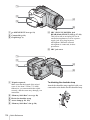
Flash
• Rotate the Multi-Angle Grip to the angle you prefer.
Battery compartment lid
• Do not rotate the Multi-Angle Grip forcefully or
subject it to shock, as distorted images or sound may
result.
• Fasten the Grip Belt as shown in the following
illustration.
4
LCD panel
Table of Contents
: Features available for tape only.
: Features available for “Memory Stick Duo”
only.
Read this first ............................................................................................. 2
Quick Start Guide
Recording movies ...................................................................................... 8
Recording still images .............................................................................. 10
Getting started
Step 1: Checking supplied items.............................................................. 12
Step 2: Charging the battery pack............................................................ 13
Using an outside power source ................................................................................. 15
Step 3: Turning the power on................................................................... 16
Step 4: Adjusting the LCD panel and viewfinder...................................... 16
Adjusting the LCD panel ........................................................................................... 16
Adjusting the viewfinder ............................................................................................ 17
Step 5: Setting the date and time............................................................. 18
Step 6: Inserting the recording media ...................................................... 19
Inserting a cassette tape ........................................................................................... 19
Inserting a “Memory Stick Duo” ................................................................................ 20
Step 7: Setting the screen language ........................................................ 21
Recording
Recording movies .................................................................................... 22
Recording for a longer time ....................................................................................... 24
Using zoom ............................................................................................................... 24
Recording in mirror mode ......................................................................................... 25
Using the self-timer ................................................................................................... 26
Enhanced sound recording
Recording still images
– 4CH MIC REC .................................... 27
– Memory photo recording............................. 29
Selecting image quality or size ................................................................................. 30
Using the flash .......................................................................................................... 31
Using the self-timer ................................................................................................... 32
Recording a still image on a “Memory Stick Duo” while recording movies
on a tape ............................................................................................................. 33
,continued
5
Adjusting the exposure............................................................................. 33
Adjusting the exposure for backlit subjects ............................................................... 33
Fixing the exposure for the selected subject – Flexible spot meter ........................... 34
Adjusting the exposure manually ............................................................................... 34
Adjusting the focus................................................................................... 35
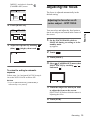
Adjusting the focus for an off-center subject – SPOT FOCUS .................................. 35
Adjusting the focus manually ..................................................................................... 36
Recording a picture using various effects ................................................ 37
Fading in and out of a scene
– FADER .............................................................. 37
Using special effects
– Digital effect ................................................................... 38
Overlaying still images on movies on a tape – MEMORY MIX .................................. 40
Searching for the starting point
.......................................................... 42
Searching for the last scene of the most recent recording – END SEARCH ............. 42
Searching manually – EDIT SEARCH ....................................................................... 42
Reviewing the most recently recorded scenes – Rec review .................................... 43
Playback
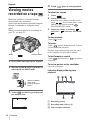
Viewing movies recorded on a tape
................................................... 44
Playing back in various modes .................................................................................. 45
Viewing recordings with added effects – Digital effect .............................................. 45
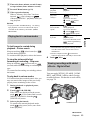
Viewing recordings on a “Memory Stick Duo”
.................................... 46
Playing back in various modes from a “Memory Stick Duo” ...................................... 48
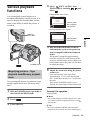
Various playback functions ...................................................................... 49
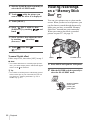
Magnifying pictures – Tape playback zoom/Memory playback zoom ....................... 49
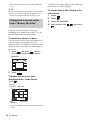
Displaying the screen indicators ................................................................................ 50
Displaying the date/time and camera settings data – Data code .............................. 50
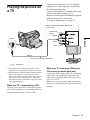
Playing the picture on a TV ...................................................................... 51
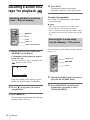
Locating a scene on a tape for playback
........................................... 52
Searching quickly for a desired scene – Zero set memory ........................................ 52
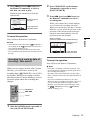
Searching for a scene using Cassette Memory – Title search .................................. 52
Searching for a scene by date of recording – Date search ....................................... 53
6
Advanced operations
Dubbing selected scenes from a tape
– Digital program editing ..............91
Using the Menu
Dubbing sound to a recorded
tape
........................................98
Selecting menu items .........................54
Deleting recorded pictures
Using the AUTO LOCK switch ...........55
Marking recorded images with specific
information
– Image protection/
Print mark ...................................101
Using the
(CAMERA SET) menu
– PROGRAM AE/WHITE BAL./
SHUTTR SPEED/ZEBRA/16:9
WIDE, etc. ....................................56
Using the
(MEMORY SET) menu
– BURST/QUALITY/IMAGE SIZE/
ALL ERASE/NEW FOLDER,
etc. ...............................................63
Using the
(PICT. APPLI.) menu
– PICT. EFFECT/SLIDE SHOW/
FRAME REC/INTERVAL REC/INT.
REC–STL, etc. .............................67
Using the
(EDIT/PLAY) menu
–
TITLE/ TAPE TITLE,
etc. ...............................................72
.........100
Printing recorded images (PictBridge
compliant printer)
.................103
Troubleshooting
Troubleshooting ...............................106
Warning indicators and
messages ...................................114
Additional Information
Using your camcorder abroad ..........119
Usable cassette tapes ......................120
Using the
(STANDARD SET) menu
–
REC MODE/MULTI-SOUND/
AUDIO MIX/MIC LEVEL/USBCAMERA, etc. ..............................76
About the “Memory Stick” .................121
Using the
(TIME/LANGU.) menu
– CLOCK SET/WORLD TIME,
etc. ...............................................82
About i.LINK .....................................125
About the “InfoLITHIUM”
battery pack ................................123
Maintenance and precautions ..........126
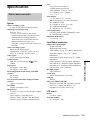
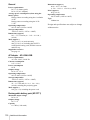
Specification .....................................129
Customizing Personal Menu ..............83
Quick Reference
Dubbing/Editing
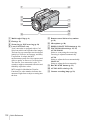
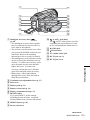
Identifying parts and controls ...........131
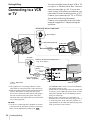
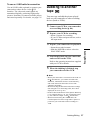
Connecting to a VCR or TV ...............86
Dubbing to another tape
Index ................................................138
..............87
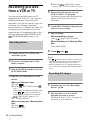
Recording pictures from a VCR or
TV .................................................88
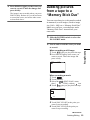
Dubbing pictures from a tape to a
“Memory Stick Duo” .....................89
Dubbing still images from a “Memory
Stick Duo” to a tape ......................90
Refer also to other operating instructions
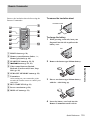
supplied with your camcorder:
• Editing images with your computer
cComputer Applications Guide
7
Quick Start Guide
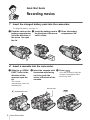
Recording movies
1
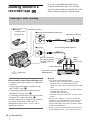
Insert the charged battery pack into the camcorder.
To charge the battery, see page 13.
a Push the catch on the b Insert the battery pack in c Close the battery
battery compartment
lid in the direction of
the arrow 1 to open
the lid.
2
the direction of the arrow
until it clicks.
Insert a cassette into the camcorder.
a Slide the
OPEN/
EJECT lever in the
direction of the
arrow to open the
lid.
b Insert the cassette with c Press
its window-side facing
out, then push the
center of the back of the
cassette.
The cassette
compartment comes out
automatically.
Window-side
OPEN/EJECT lever
8
compartment lid.
Quick Start Guide
.
Close the cassette lid after the
cassette compartment slides
back in by itself.
3
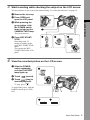
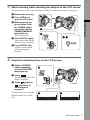
Start recording while checking the subject on the LCD screen.
The date and time is not set up in the default setting. To set the date and time, see page 18.
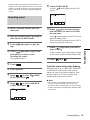
a Remove the lens cap.
b Press OPEN and
open the LCD panel.
Quick Start Guide
c While pressing the
green button, slide
the POWER switch
down to light up the
CAMERA-TAPE lamp.
The power turns on.
d Press REC START/
STOP.
Recording starts. To
change to standby mode,
press REC START/STOP
again.
You can also use REC
START/STOP of the LCD
panel.
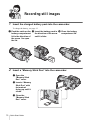
4
View the recorded picture on the LCD screen.
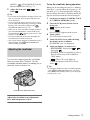
a Slide the POWER
switch repeatedly
until the PLAY/EDIT
lamp lights up.
b Touch
(rewind).
c Touch
(play) to
start the playback.
To stop, press
.
To turn off the power, slide the
POWER switch up to (CHG)
OFF.
Quick Start Guide
9
Recording still images
1
Insert the charged battery pack into the camcorder.
To charge the battery, see page 13.
a Push the catch on the b Insert the battery pack in c Close the battery
battery compartment
lid in the direction of
the arrow 1 to open
the lid.
2
compartment lid.
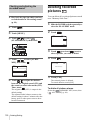
Insert a “Memory Stick Duo” into the camcorder.
a Open the
“Memory Stick
Duo” cover.
b Insert a “Memory
Stick Duo” with
its terminal
facing up until it
clicks.
c Close the
“Memory Stick
Duo” cover.
10
the direction of the arrow
until it clicks.
Quick Start Guide
3
Start recording while checking the subject on the LCD screen.
The date and time is not set up in the default setting. To set the date and time, see page 18.
a Remove the lens cap.
b Press OPEN and
open the LCD panel.
Quick Start Guide
c While pressing the
green button, slide
the POWER switch
repeatedly until the
CAMERA-MEMORY
lamp lights up.
The power turns on.
d Press PHOTO lightly.
A short beep sound is heard
when the focus is adjusted.
e Press PHOTO fully.
A shutter sound is heard
and the still image is
recorded.
4
View the recorded picture on the LCD screen.
a Slide the POWER
switch repeatedly
until the PLAY/EDIT
lamp lights up.
b Touch
.
The most recently recorded
image is displayed.
c Touch
(next) or
(previous) to
view images in
sequence.
To turn off the power, slide the
POWER switch up to (CHG)
OFF.
Quick Start Guide
11
Getting started
Lens hood (1)
Step 1: Checking
supplied items
Use the lens hood to record under strong light, such as
under the sun. Note when you use a filter (optional),
the shadow of the lens hood may appear on the screen.
Also, if you force the lens hood on, you may not be
able to remove it again.
Make sure you have following items supplied
with your camcorder.
The number in parentheses indicates the number
of that item supplied.
Shoulder strap (1)
“Memory Stick Duo” 8MB (1)
You can use only a “Memory Stick Duo,” which is
about half the size of a standard “Memory Stick,” in
your camcorder. See page 121 for details.
Wireless Remote Commander (1)
A button-type lithium battery is already installed.
Memory Stick Duo adaptor (1)
If you attach a Memory Stick Duo adaptor to a
“Memory Stick Duo,” you can use a “Memory Stick
Duo” with any of the devices compatible with a
standard “Memory Stick.”
A/V connecting cable (1)
AC Adaptor (1)
USB cable (1)
Rechargeable battery pack NP-FF71 (1)
Power cord (1)
CD-ROM “SPVD-012 USB Driver” (1)
Cleaning cloth (1)
Lens cap (1)
Attached to the camcorder.
12
Getting started
Camera Operations Guide (This manual)
(1)
Computer Applications Guide (1)
Step 2: Charging the
battery pack
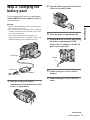
2
Insert the battery pack in the direction
of the arrow until it clicks.
3
Close the battery compartment lid.
4
With the v mark on the DC plug facing
the battery compartment lid side,
connect the AC Adaptor to the DC IN
jack on your camcorder.
You can charge the battery by attaching the
“InfoLITHIUM” battery pack (F series) to
your camcorder.
Getting started
b Note
• Only the “InfoLITHIUM” battery pack (NP-FF70/
FF71) can be used (p. 123).
• Do not short-circuit the DC plug of the AC Adaptor
or battery terminals with any metallic objects. This
may cause a malfunction.
• Use a nearby wall outlet when using the AC
Adaptor. Disconnect the AC Adaptor from the wall
outlet immediately if any malfunction occurs.
DC IN jack
v mark
DC plug
Power cord
5
Connect the power cord to the AC
Adaptor.
6
Connect the power cord to the wall
outlet.
AC Adaptor
To the wall outlet
1
Push the catch on the battery
compartment lid in the direction of the
arrow 1 to open the lid.
,continued
Getting started
13
7
Slide the POWER switch up to (CHG)
OFF.
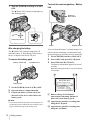
To check the remaining battery – Battery
Info
The (flash)/CHG (charge) lamp lights up
and charging starts.
DISPLAY/
BATT INFO
/CHG
Flash/charge lamp
OPEN
After charging the battery
The (flash)/CHG (charge) lamp turns off
when the battery is fully charged. Disconnect
the AC Adaptor from the DC IN jack.
To remove the battery pack
Battery release tab
POWER switch
POWER switch
You can check the battery’s current charge level
and its current remaining recording time both
during charging or when the power is turned off.
1 Set the POWER switch to (CHG) OFF.
2 Press OPEN and open the LCD panel.
3 Press DISPLAY/BATT INFO.
The battery information appears for about 7
seconds.
Keep the button pressed to view it for about
20 seconds.
BATTERY INFO
BATTERY CHARGE LEVEL
Battery pack
1 Set the POWER switch to (CHG) OFF.
2 Open the battery compartment lid.
3 Unlatch the battery release tab in the
direction of the arrow and remove the
battery pack.
b Note
• If you do not use the battery pack for a long time, use
up the battery pack completely before storing it. See
page 124 about storage of the battery pack.
14
Getting started
0%
50%
100%
REC TIME AVAILABLE
LCD SCREEN: 108 min
VIEWFINDER: 121 min
A Battery charge level: Displays
approximate remaining amount of
power left in the battery pack.
B Approximate possible recording time
using the LCD panel.
C Approximate possible recording time
using the viewfinder.
Charging time
Playing time
Approximate number of minutes required when
you fully charge a fully discharged battery pack
at 25°C (77°F). (10 – 30°C (50 – 86°F)
recommended.)
Approximate number of minutes available
when you use a fully charged battery pack at
25°C (77°F).
Battery pack
NP-FF71 (supplied)
170
NP-FF70
150
Approximate number of minutes available
when you use a fully charged battery pack at
25°C (77°F).
With LCD BACKLIGHT set to ON
Battery pack Continuous
recording
time
Typical*
recording
time
NP-FF71
(supplied)
120
65
NP-FF70
110
60
With LCD BACKLIGHT set to OFF
Battery pack Continuous
recording
time
Typical*
recording
time
NP-FF71
(supplied)
135
75
NP-FF70
120
65
Recording time when recording with the
viewfinder
Approximate number of minutes available
when you use a fully charged battery pack at
25°C (77°F).
Battery pack Continuous
recording
time
Typical*
recording
time
NP-FF71
(supplied)
135
75
NP-FF70
125
70
LCD panel
closed
NP-FF71
(supplied)
190
230
NP-FF70
175
210
* With LCD BACKLIGHT set to ON.
Getting started
Recording time when recording with the
LCD screen on
Battery pack LCD panel
opened*
b Note
• The power will not be supplied from the battery pack
when the AC Adaptor is connected to the DC IN jack
of your camcorder, even if its power cord is
disconnected from the wall outlet.
• The recording and playback time will be shorter
when you use your camcorder in low temperature.
• The (flash)/CHG (charge) lamp flashes during
charging, or the battery information will not be
correctly displayed in following conditions.
– The battery pack is not attached correctly.
– The battery pack is damaged.
– The battery pack is fully discharged. (For Battery
information only)
Using an outside power source
You can use the AC Adaptor as the power
source when you do not want the battery to
run out. While you are using the AC Adaptor,
the battery pack will not lose its charge even
when it is attached to your camcorder.
PRECAUTION
Even if your camcorder is turned off, AC power
(house current) is still supplied to it while
connected to the wall outlet via the AC Adaptor.
Connect your camcorder as shown in
“Charging the battery pack” (p. 13).
* Approximate number of minutes when recording
while you repeatedly record, start/stop, slide the
POWER switch to change the power mode, and
zoom. The actual battery life may be shorter.
Getting started
15
Step 3: Turning the
power on
You need to slide the POWER switch
repeatedly to select the desired power mode
to record or play.
When using this camcorder for the first time,
the [CLOCK SET] screen appears (p. 18).
While pressing the green button, slide the
POWER switch down.
The power turns on.
To enter the recording or playing mode, slide
the switch repeatedly until the respective lamp
for the desired power mode lights up.
Step 4: Adjusting the
LCD panel and
viewfinder
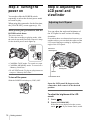
Adjusting the LCD panel
You can adjust the angle and brightness of
the LCD panel to meet various recording
situations.
Even when there are obstructions between you
and the subject, you can check the subject on the
LCD screen during recording by adjusting the
angle of the LCD panel.
Maximum
180 degrees
• CAMERA-TAPE mode: To record on a tape.
• CAMERA-MEMORY mode: To record on a
“Memory Stick Duo.”
• PLAY/EDIT mode: To play or edit pictures on
a tape or “Memory Stick Duo.”
To turn off the power
Maximum
90 degrees
OPEN
LCD BACKLIGHT
Slide the POWER switch up to (CHG) OFF.
Open the LCD panel 90 degrees to the
camcorder, then rotate it to the desired
position.
To adjust the brightness of the LCD
screen
1 Touch
.
2 Touch [LCD BRIGHT].
If the item is not displayed on the screen,
touch
/
. If you cannot find it, touch
16
Getting started
[MENU],
(STANDARD SET) menu,
then touch [LCD/VF SET] (p. 77).
3 Adjust the item with
touch
/
, then
.
When you are recording on a tape or a “Memory
Stick Duo,” you can adjust the exposure (p. 34)
and fader (p. 37) while checking the image on
the viewfinder. Have the LCD panel rotated 180
degrees and closed with the screen facing out.
1 Set the power mode to CAMERA-TAPE
or CAMERA-MEMORY (p. 16).
2 Close the LCD panel with the screen
facing out.
appears on the screen.
Getting started
z Tip
• If you rotate the LCD panel 180 degrees to the lens
side, you can close the LCD panel with the LCD
screen facing out.
• If you are using the battery pack for power source,
you can adjust the brightness by selecting [LCD BL
LEVEL] from the [LCD/VF SET] on the
(STANDARD SET) menu (p. 78).
• When you use your camcorder in bright conditions,
press LCD BACKLIGHT to switch off the LCD
screen backlight (
appears on the screen.). This
setting saves battery power.
• Even if you adjust the LCD screen backlight, the
recorded picture will not be affected.
• You can turn off the operation confirmation beep by
setting [BEEP] in the
(STANDARD SET)
menu to [OFF] (p. 80).
To use the viewfinder during operation
3 Touch
.
[Set LCD off?] appears on the screen.
4 Touch [YES].
The LCD screen is turned off.
5 Touch the LCD screen while checking
the display in the viewfinder.
[EXPOSURE], etc. are displayed.
6 Touch the button you want to set.
Adjusting the viewfinder
You can view images using the viewfinder
when you close the LCD panel. Use the
viewfinder when the battery is running out, or
when the screen is hard to see.
• [EXPOSURE]: Adjust with
/
and touch
.
• [FADER]: Touch it repeatedly to select a
desired effect (only in the CAMERATAPE mode).
•
: The LCD screen lights up.
To hide the buttons on the LCD screen,
touch
.
z Tip
• To adjust the brightness of the viewfinder backlight,
select
(STANDARD SET) menu, [LCD/VF
SET], then [VF B.LIGHT] (when you are using the
battery pack, p. 78).
Viewfinder lens adjustment lever
Adjust the viewfinder lens adjustment
lever until the picture is clear.
Getting started
17
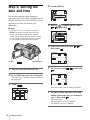
Step 5: Setting the
date and time
Set the date and time when using this
camcorder for the first time. If you do not set
the date and time, the [CLOCK SET] screen
appears every time you turn on your
camcorder.
4
Touch [MENU].
– :– – :– –
60min
CAMERA SET
PROGRAM AE
SPOT METER
EXPOSURE
5
b Note
• If you do not use your camcorder for about 3
months, the built-in rechargeable button-type
battery gets discharged and the date and time
settings may be cleared from the memory. In that
case, charge the rechargeable button-type battery
(p. 128) and then set the date and time again.
Select
(TIME/LANGU.) with
/
, then touch
.
– :– – :– –
60min
DISPLAY
MENU ROTATE
A. SHUT OFF
CLOCK SET
WORLD
PROGRAM AE
Press OPEN and open the LCD panel.
OK
7
Set [Y] (year) with
.
DATE
2004 Y
JAN
/
, then touch
– :– – :– –
CLOCK SET
Proceed to step 7 when you set the clock for
the first time.
3
,
1 D 12: 00 AM
POWER switch
2
/
– :– – :– –
DATE
2004 Y JAN M
Turn on your camcorder (p. 16).
OK
Select [CLOCK SET] with
then touch
.
CLOCK SET
1
––:––:––
LANGUAGE
6
OPEN
OK
M
1 D 12: 00
AM
OK
Touch
.
You can set any year up to the year 2079.
–:––:––
60min
1/3
MENU
EXPO–
SURE
SPOT
METER
PRGRAM
AE
WHITE
BAL.
SHUTTR
SPEED
8
Set [M] (month), [D] (day), hour and
minute in the same way as was done in
step 7, then touch
.
The clock starts.
For midnight, set it to 12:00AM.
For midday, set it to 12:00PM.
18
Getting started
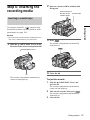
Step 6: Inserting the
recording media
2
Insert a cassette with its window-side
facing out.
Push the center of
the back of the
Window-side
cassette lightly.
Inserting a cassette tape
b Note
• Do not force the cassette into the compartment. This
may cause a malfunction of your camcorder.
1
3
Press
Getting started
You can use mini DV
cassettes only.
For details on these cassettes (such as writeprotection), see page 120.
.
The cassette compartment automatically
slides back in.
Slide the OPEN/EJECT lever in the
direction of the arrow and open the lid.
OPEN/EJECT lever
Lid
The cassette compartment automatically
comes out and opens up.
4
Close the lid.
To eject the cassette
1 Slide the OPEN/EJECT lever and
open the lid.
The cassette compartment automatically
comes out and opens up.
2 Take out the cassette, then press
.
The cassette compartment automatically
slides back in.
3 Close the lid.
Getting started
19
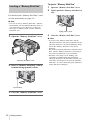
Inserting a “Memory Stick Duo”
To eject a “Memory Stick Duo”
1 Open the “Memory Stick Duo” cover.
2 Lightly push the “Memory Stick Duo” in
once.
For details on the “Memory Stick Duo” (such
as write-protection), see page 121.
b Note
• You can use only a “Memory Stick Duo,” which is
about half the size of a standard “Memory Stick,” in
your camcorder (p. 121). Do not try to force any
other type of “Memory Stick” into the “Memory
Stick Duo” slot.
1
Open the “Memory Stick Duo” cover.
“Memory Stick Duo” cover
2
Insert a “Memory Stick Duo” with its
terminal facing up until it clicks.
Access lamp
3
20
Close the “Memory Stick Duo” cover.
Getting started
Lightly push in once.
3 Close the “Memory Stick Duo” cover.
b Note
• If you force the “Memory Stick Duo” into the
“Memory Stick Duo” slot in the wrong direction, the
“Memory Stick Duo” slot may be damaged. Image
files in the “Memory Stick Duo” may also be
damaged.
• Do not insert anything other than a “Memory Stick
Duo” into the “Memory Stick Duo” slot. Doing so
may cause a malfunction of your camcorder.
• When the access lamp is lit or flashing, your
camcorder is reading/writing data from/to the
“Memory Stick Duo.” Do not shake or knock your
camcorder, turn the power off, eject the “Memory
Stick Duo,” or remove the battery pack. Otherwise,
image data may be damaged.
z Tip
• Your camcorder offers [ENG [SIMP]] (simplified
English) for when you cannot find your native
tongue among the options.
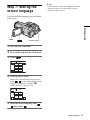
Step 7: Setting the
screen language
You can select the language to be used on the
LCD screen.
Getting started
OPEN
POWER switch
1
Turn on your camcorder.
2
Press OPEN and open the LCD panel.
3
Touch
60min
1/3
4
.
STBY
MENU
EXPO–
SURE
SPOT
METER
PRGRAM
AE
WHITE
BAL.
SHUTTR
SPEED
0:00:00
Touch [LANGUAGE].
If the item is not displayed on the screen,
touch
/
. If you cannot find it, touch
[MENU], and select it from the
(TIME/LANGU.) menu (p. 82).
60min
LANGUAGE:
0:00:00
STBY
ENGLISH
ENG
LISH
ENG
[SIMP]
FRAN
ÇAIS
ESPA
ÑOL
1/2
5
Select the desired language with
, then touch
.
/
Getting started
21
Recording
3
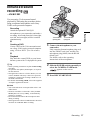
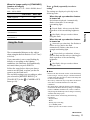
Recording movies
To record on a tape
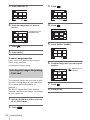
Slide the POWER switch until the
CAMERA-TAPE lamp lights up, and your
camcorder is set to the standby mode.
You can record movies on a tape or a
“Memory Stick Duo.”
Before recording, follow steps 1 to 7 in
“Getting started” (p. 12 to p. 21).
When you are recording on a tape, movies
will be recorded along with stereo sound.
When you are recording on a “Memory Stick
Duo,” the movie will be recorded with
monaural sound.
Camera recording lamp
Select the recording mode.
Slide the POWER
switch while
pressing the green
button.
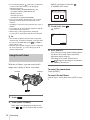
To record on a “Memory Stick
Duo” – MPEG MOVIE EX
Slide the POWER switch repeatedly until
the CAMERA-MEMORY lamp lights up,
and the currently selected recording folder
appears on the screen.
POWER switch
Slide the POWER
switch while
pressing the green
button.
OPEN
1
REC START/STOP
Remove the lens cap. Pull the lens cap
string down and attach it to the grip
belt.
4
Press REC START/STOP.
Recording starts. [REC] appears on the
LCD screen and the Camera recording lamp
lights up.
Press REC START/STOP again to stop
recording.
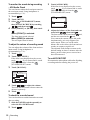
To check the most recently recorded
MPEG movie
– Review
Touch
. Playback starts automatically.
Touch
again to return to standby.
To delete the movie, touch
after playback
is finished, then [YES].
To cancel deleting, touch [NO].
2
Press OPEN and open the LCD panel.
To turn the power off
Slide the POWER switch up to the (CHG) OFF
position.
22
Recording
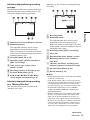
Indicators displayed during recording
on a tape
Date/time (p. 50) will not be displayed during
recording.
The indicators will not be recorded on the tape.
Date/time and the camera settings data (p. 50)
will not be displayed during recording.
60min
REC
101
60min
REC
0:00:00
320 2min
0:00:00
60min
P-MENU
P-MENU
Recording
A Recording folder
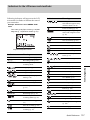
A Indicators for Cassette Memory cassettes
B Remaining battery
The indicated time may not be correct
depending on the environment of use.
When you opened or closed the LCD panel,
it takes about 1 minute to display the correct
remaining battery time.
C Recording mode (SP or LP)
D Recording status ([STBY] (standby) or
[REC] (recording))
E Time code or tape counter (hour:
minute: second)
F Recording capacity of the tape (p. 80)
G Personal Menu button (p. 54)
H END SEARCH/EDIT SEARCH/Rec
review display switch button (p. 42)
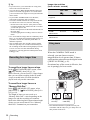
Indicators displayed during recording
on a “Memory Stick Duo”
The indicators will not be recorded on the
“Memory Stick Duo.”
B Remaining battery
The indicated time may not be correct
depending on the environment of use.
When you opened or closed the LCD panel,
it takes about 1 minute to display the correct
remaining battery time.
C Recording status ([REC] (recording))
D Movie size
E Recorded time (hour: minute: second)
F Recording capacity of the “Memory
Stick Duo”
G “Memory Stick Duo” recording start
indicator (appears for about 5 seconds)
H Personal Menu button (p. 54)
I Review button (p. 22)
b Note
• Before changing the battery pack, slide the POWER
switch up to (CHG) OFF.
• In the default setting, when you do not operate the
camcorder for more than about 5 minutes, the power
will automatically turn off to prevent battery loss
([A.SHUT OFF], p. 81). To restart recording, slide
the POWER switch down to select CAMERATAPE or CAMERA-MEMORY, and then press
REC START/STOP.
• While recording movies on a “Memory Stick Duo,”
the only menu items available will be those with
short cuts on the Personal Menu. In order to use
other menu items, add them to the Personal Menu.
• When you are recording on a “Memory Stick Duo”
with an external flash (optional) connected to the
accessory shoe, turn off the power of the external
flash to prevent charging noise being recorded.
,continued
Recording
23
z Tip
• If you do not use your camcorder for a long time,
remove the cassette and store it.
• You can also use REC START/STOP of the LCD
panel to record moving pictures. It is useful when
you record from a low-angle or record yourself in the
mirror mode.
• To press REC START/STOP on LCD frame,
support the LCD panel with your hand.
• To ensure smooth transition on a tape from the last
recorded scene to the next, note the following.
– Do not remove the cassette. (The picture will be
recorded continuously without a break even when
you turn the power off).
– Do not record pictures in SP mode and LP mode on
the same tape.
– Avoid stopping then recording a movie in the LP
mode.
• See “To record for a longer time on a “Memory Stick
Duo”” (p. 24) for the approximate length of time it is
possible to record on a “Memory Stick Duo” of
different capacities.
• The recording time, date, and the camera settings
data (for tape only) are recorded automatically on
the recording media without being displayed on the
screen. You can view this information during
playback by selecting [DATA CODE] in the menu
setting (p. 50).
Recording for a longer time
To record for a longer time on a tape
Image size and time
(hour: minute: second)
320 × 240
160 × 112
8MB
(supplied)
00:01:20
00:05:20
16MB
00:02:40
00:10:40
32MB
00:05:20
00:21:20
64MB
00:10:40
00:42:40
128MB
00:21:20
01:25:20
256MB
(MSX-M256)
00:42:40
02:50:40
512MB
(MSX-M512)
01:25:20
05:41:20
Using zoom
When the CAMERA-TAPE mode is
selected, you can choose zoom to
magnification levels greater than 12 times,
and from that point activate the digital zoom
([DIGITAL ZOOM], p. 61).
Occasional use of the zoom is effective, but
use it sparingly for best results.
In the
(STANDARD SET) menu, select
[
REC MODE], then [LP] (p. 76).
In the LP mode, you can record 1.5 times longer
than you can when recording in the SP mode.
A tape recorded in the LP mode should be
played back only on this camcorder.
To record for a longer time on a
“Memory Stick Duo”
In the
(MEMORY SET) menu, select
[MOVIE SET], [ IMAGE SIZE], then [160 ×
112] (p. 64).
The length of time you can record on a
“Memory Stick Duo” varies depending on the
image size and the recording environment.
Refer to the following list for approximate length
of time you can record movies on a “Memory
Stick Duo” formatted on your camcorder.
24
Recording
1 cm (approx.
1/2 inch)*
80 cm (approx.
2 5/8 feet)*
* The minimum distance required between your
camcorder and the subject to get a sharp focus in
that position of the lever.
Move the power zoom lever slightly for a
slower zoom. Move it further for a faster
zoom.
To record wider range of view
Move the power zoom lever towards W.
The subject appears farther away (Wide
angle).
To record closer view
Move the power zoom lever towards T.
The subject appears closer (Telephoto).
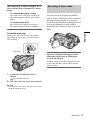
Recording in mirror mode
You can turn the LCD panel towards the
subject so that you and your subject can share
the image being recorded. You can also
utilize this function when recording yourself,
to keep the attention of small children
attracted to the camcorder while you record
them.
Recording
To use the zoom ring
Zoom in/out can be achieved at the desired
speed with the zoom ring. You can also finetune zooming.
Zoom ring
Open the LCD panel 90 degrees to the
camcorder, then rotate it 180 degrees
towards the subject.
A mirror-image of the subject appears on the
LCD screen, but the picture will be normal
when recorded.
1 Set the FOCUS/ZOOM switch to
ZOOM.
appears on the screen.
2 Turn the zoom ring at the desired speed.
b Note
• If you turn the zoom ring too fast, the zoom function
might not follow the speed.
Recording
25
4
Using the self-timer
With the self-timer, you can start recording
after a delay of about 10 seconds.
REC START/STOP
Press REC START/STOP.
You will hear a beep sound counting down
for about 10 seconds (The count down
indication begins from 8).
The recording starts.
To stop recording, press REC START/
STOP.
To cancel the count down
Touch [RESET] or press REC START/STOP.
To cancel the self-timer
Follow steps 1 and 2, then select [OFF] in step
3.
REC START/STOP
1
Touch
2
Touch [SELF-TIMER].
.
If the item is not displayed on the screen,
touch
/
. If you cannot find it, touch
[MENU], and select it from the
(CAMERA SET) menu (p. 56).
60min
SELF–TIMER:
STBY
OFF
OFF
3
0:00:00
ON
Touch [ON], then
appears.
60min
STBY
0:00:00
P-MENU
26
Recording
.
Enhanced sound
recording
– 4CH MIC REC
You can enjoy 5.1ch surround sound
playback by following the procedure below
using an optional microphone and a Sony
VAIO series personal computer.
To the REAR
(black) jack
Recording
Recording
Attach the optional ECM-CQP1
microphone to your camcorder and make a
recording. 4ch sound (front-left, front-right,
rear-left, and rear-right) will be recorded
simultaneously.
To the FRONT
(red) jack
m
Creating a DVD
Create a DVD with 5.1ch surround sound
on a Sony VAIO series personal computer
using “Click to DVD” (Ver.2.0 or later).
1
Fully insert the front microphone plug (red)
into the FRONT (red) jack, and the rear
microphone plug (black) into the REAR
(black) jack.
For details, refer to the operating
instructions of the microphone.
m
Playback
Play back the created DVD on your home
theater system with 5.1ch playback system.
z Tip
• These operating instructions explain the Recording
procedure.
• An optional microphone (ECM-CQP1) is required
for this function.
• The application software “Click to DVD” (Ver.2.0
or later) bundled with Sony VAIO series personal
computers is required for creating a DVD in 5.1ch
surround sound format.
• For details on Creating a DVD, refer to the supplied
“Computer applications Guide.”
Connect the microphone to your
camcorder.
2
Slide the POWER switch repeatedly to
select the CAMERA-TAPE mode.
appears on the screen.
3
Press REC START/STOP.
b Note
• Your camcorder does not output audio in the 5.1ch
audio format.
• Sound is recorded in 12-bit mode. If the [AUDIO
MODE] has been set to [16BIT], it automatically
switches to [12BIT].
• Do not disconnect/connect the microphone cable
during recording.
• Some application software bundled with VAIO does
not allow for 4CH MIC REC recording.
Recording
27
To monitor the sound during recording
– 4CH Audio Check
You can listen to either the front input sound or
the rear input sound. Using headphones is
recommended (p. 131).
1 Touch
.
2 Touch [MENU].
3 Select
(STANDARD SET) menu,
3 Touch [AUDIO MIX].
If the item is not displayed on the screen,
touch
/ . If you cannot find it, touch
[MENU], and select it from the
(STANDARD SET) menu.
60min
0:00:00:00
AUDIO MIX
ST1/
FRONT
ST2/
REAR
then [4CH AUD CHECK] by touching
/ , and then touch
.
4 Select [FRONT] or [REAR], then touch
.
When [FRONT] is selected:
The front input sound is heard.
When [REAR] is selected:
The rear input sound is heard.
To adjust the volume of recording sound
You can adjust the volume of the front and rear
input sound. Using headphones is
recommended (p. 131).
1 Touch
.
2 Touch [MIC LEVEL].
If the item is not displayed on the screen,
touch
/ . If you cannot find it, touch
[MENU], and select it from the
(STANDARD SET) menu.
3 Touch [MANUAL].
60min
MIC LEVEL:
STBY
0:00:00
MANUAL
30
20 12
0 dB
FRONT
REAR
AUTO
MANUAL
OK
4 Touch
/
to adjust the volume.
The front and rear sound volumes cannot be
adjusted separately.
5 Touch
.
To check the recorded sound
You can check the recorded front and rear sound
after recording.
1 Slide the POWER switch repeatedly to
select the PLAY/EDIT mode.
2 Touch
28
Recording
.
4 Adjust the balance of the front and rear
sound with
/ , then touch
.
The front sound can be heard at the
end,
and the rear sound at the
end.
Your camcorder cannot output 4ch audio
simultaneously as it only supports 2ch
audio output. When you set the audio
balance bar to the center, the front and rear
sounds are output at equal level.
The adjusted audio balance returns to the
default setting in about 5 minutes after the
battery pack or other power sources have
been disconnected.
To end 4CH MIC REC
Disconnect the microphone cable after finishing
recording and after turning the power off.
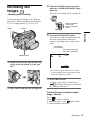
Recording still
images
3
Slide the POWER switch repeatedly
until the CAMERA-MEMORY lamp
lights up.
The selected recording folder is displayed.
– Memory photo recording
You can record still images on a “Memory
Stick Duo.” Before recording, follow steps 1
to 7 in “Getting started” (p. 12 to p. 21).
OPEN
Slide the POWER
switch while
pressing the green
button.
PHOTO
Recording
4
Press and hold PHOTO lightly.
You will hear a light beeping sound when
the focus and brightness settings are
adjusted. Recording does not start at this
point.
The indicator
stops flashing.
The number of images
that can be recorded.*
60min
POWER switch
1
1152 FINE
30
101
Remove the lens cap. Pull the lens cap
string down and attach it to the grip
belt.
P-MENU
* The number of images that can be recorded
varies depending on the image quality setting
and the recording environment.
5
Press PHOTO fully.
A shutter sound is heard. When bars of
disappear, the image is recorded on
the “Memory Stick Duo.”
2
Press OPEN and open the LCD panel.
To check the most recently recorded
image – Review
Touch
.
Touch
to return to standby.
To delete the image, touch
, then [YES].
To cancel deleting, touch [NO].
Recording
29
To turn the power off
Slide the POWER switch up to the (CHG) OFF
position.
To record still images continuously –
Burst
Select the
(MEMORY SET) menu,
[STILL SET], then [ BURST] (p. 63).
You can record 4 to 13 images continuously in
a time interval of about 0.5 seconds.
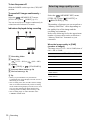
Indicators displayed during recording
60min
Selecting image quality or size
Select the
(MEMORY SET) menu,
[STILL SET], then [ QUALITY] or
[ IMAGE SIZE] (p. 64).
The number of pictures you can record on a
“Memory Stick Duo” varies depending on
the quality/size of the image and the
recording environment.
Refer to the following list for the approximate
number of pictures that can be recorded on a
“Memory Stick Duo” formatted on your
camcorder.
1152 FINE
101
P-MENU
When the image quality is [FINE]
(number of images)
The image size of 1152 × 864 is 500kB, that of
640 × 480 is 150kB.
1152 × 864
8MB (supplied)
15
50
B Image size
(1152 × 864) or
16MB
30
96
32MB
61
190
64MB
120
390
128MB
245
780
256MB
(MSX-M256)
445
1400
512MB
(MSX-M512)
900
2850
C Quality
([FINE]) or
(640 × 480)
([STANDARD])
D Personal Menu button (p. 54)
E Review button (p. 29)
z Tip
• When you press PHOTO on your Remote
Commander, the image displayed on the screen at
that timing is recorded.
• The recording time, date, and the camera settings
data are recorded automatically on the recording
media without being displayed on the screen. You
can view this information during playback by
selecting [DATA CODE] on the screen (p. 50).
• The recording angle is wider than that of the
CAMERA-TAPE mode.
30
640 × 480
A Recording folder
Recording
When the image quality is [STANDARD]
(number of images)
The image size of 1152 × 864 is 200kB, that of
640 × 480 is 60kB.
640 × 480
8MB (supplied)
37
120
16MB
74
240
32MB
150
485
64MB
300
980
128MB
600
1970
256MB
(MSX-M256)
1000
3550
512MB
(MSX-M512)
2050
7200
Using the flash
The recommended distance to the subject
when using the built-in flash is 0.3 to 2.5 m (1
to 8 feet).
Your camcorder is set to auto flashing by
default, so according to the lighting
conditions, the flash may be automatically
activated when you press PHOTO.
Follow the steps below when you always
want to use the flash, or when you do not
want to use the flash at all.
The available settings vary according to what
you selected in [REDEYE REDUC] of
[FLASH SET] in the
(CAMERA SET)
menu (p. 60).
(flash)
The settings are displayed cyclically in the
following order.
When the red eye reduction feature
is turned off
No indicator displayed: Automatically
flashes when there is not enough
surrounding light.
m
(Forced flash): Always uses the flash
regardless of the surrounding brightness.
m
(No flash): Always records without
using the flash.
When the red eye reduction feature
is turned on
(Auto red-eye reduction): Pre-flashes to
reduce red-eye before the flash
automatically flashes when there is not
enough surrounding light.
m
(Forced red-eye reduction): Always
uses the flash and the red-eye reducing preflash regardless of the surrounding
brightness.
m
(No flash): Always records without
using the flash.
b Note
• Remove the dust from the surface of the flash lamp
before using it. You may not get a sufficient amount
of flash if the dust discolors or sticks to the lamp due
to the heat from flashing.
• The red-eye reduction may not produce the desired
effect due to individual differences and other
conditions.
• The flash charge indicator flickers while charging,
and remains lit when the battery charge is complete.
(In the CAMERA-TAPE mode, it takes a while to
fully charge the flash lamp since it charges its battery
with the flash lamp open.)
• The flash will not work during the following
operations:
– Digital effect
– Burst
– During tape recording
– [16:9 WIDE] mode
– Shutter speed 1/30 second or slower
,continued
Recording
31
Recording
1152 × 864
Press (flash) repeatedly to select a
setting.
• Even if auto flashing or
(Auto red-eye reduction)
is selected, the flash will not work during the
following operations:
– [SPOTLIGHT], [SUNSET&MOON], and
[LANDSCAPE] of [PROGRAM AE]
– Manual exposure
– Flexible spot meter
– [MANUAL] of [SHUTTR SPEED]
• If you use the flash in bright places such as when
shooting a backlit subject, the flash may not be
effective.
• Attaching a conversion lens (optional) may create a
shadow.
• You cannot use an external flash (optional) and the
built-in flash at the same time.
• When using a video light with the intelligent
accessory shoe, the built-in flash does not function.
[MENU] and select it from the
(CAMERA SET) menu.
60min
SELF–TIMER:
OFF
OFF
3
30
1152 FINE
ON
Touch [ON], then
.
appears.
60min
30
1152 FINE
101
z Tip
• The amount of light used by the flash is adjusted
automatically. To adjust it manually, select [FLASH
LEVEL] of [FLASH SET] in the
(CAMERA
SET) menu (p. 60).
• When the focus is hard to adjust, refer to “Adjusting
the focus manually” (p. 36) for the proper focal
distance information.
P-MENU
4
Press PHOTO.
You will hear a beep sound counting down
for about 10 seconds (The count down
indication begins from 8).
The image is recorded. When bars of
disappear, the image is recorded on
the “Memory Stick Duo.”
Using the self-timer
With the self-timer, you can record a still
image after a delay of about 10 seconds.
To cancel the count down
PHOTO
PHOTO
Touch [RESET].
To cancel the self-timer
Follow steps 1 and 2, then select [OFF] in step
3.
1
Touch
2
Touch [SELF-TIMER].
.
If the item is not displayed on the screen,
touch
/
. If you cannot find it, touch
32
Recording
Recording a still image on a
“Memory Stick Duo” while
recording movies on a tape
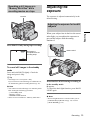
Adjusting the
exposure
The exposure is adjusted automatically in the
default setting.
PHOTO
Adjusting the exposure for backlit
subjects
Recording
When your subject has its back to the sun or
other light, you can adjust the exposure to
prevent the subject from becoming
shadowed.
Press PHOTO fully during tape recording.
60min
REC
0:00:10
BACK LIGHT
Recording is
complete when the
scrolling stops.
P-MENU
To record still images in the standby
mode
Press and hold PHOTO lightly. Check the
image and press it fully.
z Tip
• The image size is set to [640 × 480].
If you want to record a still image in a different size,
use the Memory photo recording function (p. 29).
b Note
• You cannot record a still image on a “Memory Stick
Duo” during the following operations:
– [16:9 WIDE] mode
– Memory overlap
– MEMORY MIX function
• Titles are not recorded on a “Memory Stick Duo.”
Press BACK LIGHT during recording or
in the standby mode.
. appears.
To cancel the back light function, press BACK
LIGHT again.
b Note
• The back light function is canceled when you set
[EXPOSURE] to [MANUAL] (p. 34) or select
[SPOT METER] (p. 34).
Recording
33
[SPOT METER] flashes while the camera
is adjusting the exposure for the selected
point.
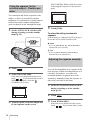
Fixing the exposure for the
selected subject – Flexible spot
meter
SPOT METER
You can adjust and fix the exposure to the
subject, so that it is recorded in suitable
brightness even when there is strong contrast
between the subject and the background
(such as subjects in the limelight on stage).
1
0:00:00
AUTO
5
Set the AUTO LOCK switch to OFF
during recording or in the standby
mode (p. 55).
STBY
END
Touch [END].
To return the setting to automatic
exposure
Follow steps 1 to 3 and touch [AUTO] in step 4.
Or set the AUTO LOCK switch to ON.
b Note
• If you set [PROGRAM AE], [SPOT METER] is
automatically set to [AUTO].
z Tip
• If you set [SPOT METER], [EXPOSURE] is
automatically set to [MANUAL].
Adjusting the exposure manually
2
Touch
3
Touch [SPOT METER].
.
If the item is not displayed on the screen,
touch
/
. If you cannot find it, touch
[MENU], and select it from the
(CAMERA SET) menu.
SPOT METER
AUTO
4
34
STBY
0:00:00
END
Touch the point you want to adjust and
fix the exposure on the screen.
Recording
You can fix the brightness of a picture at the
best exposure. When recording indoors on a
clear day, for instance, you can avoid
backlight shadows on people next to the
window by manually fixing the exposure to
that of the wall side of the room.
1
Set the AUTO LOCK switch to OFF
during recording or in the standby
mode (p. 55).
2
Touch
3
Touch [EXPOSURE].
.
If the item is not displayed on the screen,
touch
/
. If you cannot find it, touch
[MENU], and select it from the
(CAMERA SET) menu.
60min
EXPOSURE:
AUTO
STBY
AUTO
Adjusting the focus
0:00:00
The focus is adjusted automatically in the
default setting.
MANUAL
Adjusting the focus for an offcenter subject – SPOT FOCUS
4
Touch [MANUAL].
60min
EXPOSURE:
MANUAL
OK
5
Adjust the exposure by touching
(dim)/
(bright), then touch
60min
Recording
AUTO
You can select and adjust the focal point to
aim it at a subject not located in the center of
the screen.
STBY
0:00:00
MANUAL
STBY
1
9 appears.
.
0:00:00
Set the FOCUS/ZOOM switch to
MANUAL during recording or in the
standby mode.
2
Touch
3
Touch [MENU].
4
Select
(CAMERA SET) menu, then
[SPOT FOCUS] by touching
/
and touch
.
.
P-MENU
To return the setting to automatic
exposure
SPOT FOCUS
STBY
0:00:00
Follow steps 1 to 3 and touch [AUTO] in step 4.
Or set the AUTO LOCK switch to ON.
b Note
• If you set [PROGRAM AE], [EXPOSURE] is
automatically set to [AUTO].
END
5
Touch the subject for which you want
to adjust the focus on the screen.
[SPOT FOCUS] flashes while the camera is
adjusting the focus.
6
Touch [END].
Recording
35
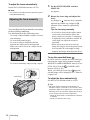
To adjust the focus automatically
Set the FOCUS/ZOOM switch to AUTO.
b Note
• You cannot use the SPOT FOCUS function together
with [PROGRAM AE].
Adjusting the focus manually
You can adjust the focus manually according
to the recording conditions.
Use this function in the following cases.
– To record a subject behind a window covered
with raindrops.
– To record horizontal stripes.
– To record a subject with little contrast
between the subject and its background.
– When you want to focus on a subject in the
background.
1
Set the FOCUS/ZOOM switch to
MANUAL.
9 appears.
2
Rotate the focus ring and adjust the
focus.
9 changes to
when the focus cannot be
adjusted any further. 9 changes to
when the focus cannot be adjusted any
closer.
Tips for focusing manually
• It is easier to focus on the subject when
you use the zoom function. Move the
power zoom lever towards T (telephoto)
to adjust the focus, and then, towards W
(wide angle) to adjust the zoom for
recording.
• When you want to record a close-up
image of a subject, move the power zoom
lever towards W (wide angle) to fully
magnify the image, then adjust the focus.
To use the expanded focus
– To record a stationary subject using a tripod.
Focus ring
It will be easier to confirm the focus setting by
enlarging the image during manual focusing.
When the CAMERA-MEMORY lamp is on, set
[EXP. FOCUS] in the
(CAMERA SET)
menu to [ON] (p. 60).
When you rotate the focus ring,
appears
and the image will be displayed at 1.5 times its
original size.
To adjust the focus automatically
Set the FOCUS/ZOOM switch to AUTO.
z Tip
• The focal distance information (the distance at
which the subject is focused on, for when it is dark
and hard to adjust focus) appears for 3 seconds in the
following cases. (It will not be displayed correctly if
you are using a conversion lens (optional).)
– When the focus mode is switched from automatic
to manual.
– When you rotate the focus ring.
36
Recording
Recording a picture
using various effects
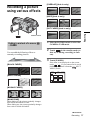
[OVERLAP] (fade in only)
[WIPE] (fade in only)
[DOT FADER] (fade in only)
Recording
POWER switch
Fading in and out of a scene
– FADER
1
Slide the POWER switch to select the
CAMERA-TAPE mode.
2
Touch
in the standby mode (to
fade in) or during recording (to fade
out).
3
Touch [FADER].
You can add the following effects to
currently recording pictures.
[BLACK FADER]
If the item is not displayed on the screen,
touch
/
. If you cannot find it, touch
[MENU], and select it from the
(PICT.
APPLI.) menu.
60min
FADER:
[WHITE FADER]
STBY
OFF
OFF
BLACK
FADER
WHITE
FADER
MOSAIC
FADER
0:00:00
1/2
[MOSAIC FADER]
[MONOTONE]
When fading in, the picture gradually changes
from black-and-white to color.
When fading out, the picture gradually changes
from color to black-and-white.
,continued
Recording
37
4
5 Select
Touch the desired effect, then touch
.
When you touch [OVERLAP], [WIPE] or
[DOT FADER], the image on the tape in
your camcorder is stored as a still image.
(While storing the image, the screen turns to
blue.)
60min
STBY
0:00:00
MOSAIC
FADER
6 Touch
(previous)/
(next) to
select the still image to be superimposed.
7 Touch [ON], then
.
8 Touch
.
9 Press REC START/STOP to start
recording.
[M. OVRLAP] stops flashing, and
disappears when fading is finished.
P-MENU
5
(PICT. APPLI.), then
[
OVERLAP] by touching
/
and
.
The recorded image appears on the
thumbnail screen.
Press REC START/STOP.
The fader indicator stops flashing and
disappears when the fade is complete.
b Note
• If you set the shutter speed to 1/30 second or slower,
you cannot use the memory overlap.
Using special effects
effect
To cancel the operation
– Digital
Follow steps 2 and 3, then select [OFF] in step 4.
b Note
• You cannot use the FADER function together with:
– Self-timer
– Digital effect
– [FRAME REC] (Frame recording)
– [INTERVAL REC] (Interval recording)
– Shutter speed 1/30 second or slower
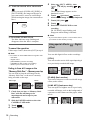
You can add digital effects to the recordings.
[STILL]
You can record a movie while superimposing it
on a previously recorded still image.
Fading in from still image on the
“Memory Stick Duo” – Memory overlap
You can fade in from the still image on the
“Memory Stick Duo” to the movie currently
being recorded on the tape.
Still image
Movie
1 Check that you have a “Memory Stick
Duo” with the still image to be
superimposed and a tape in your
camcorder.
2 Slide the POWER switch to select the
CAMERA-TAPE mode.
3 Touch
.
4 Touch [MENU].
38
Recording
[FLASH] (flash motion)
You can record a movie with a serial-still-image
effect (strobe effect).
[LUMI. KEY] (luminance key)
You can replace a brighter area in a previously
recorded still image, such as the background of
a person or a title written on white paper, with a
movie.
[TRAIL]
You can record a picture so that an incidental
image like a trail is left.
Effect
Items to adjust
[FLASH]
The interval of frame-byframe playback.
[OLD MOVIE]
You can add an old movie-type atmosphere to
pictures. Your camcorder automatically records
pictures in the letterbox mode for all screen size,
sepia in color, and at a slower shutter speed.
[LUMI. KEY]
The color scheme of the
area in the still image
which is to be swapped
with a movie.
[TRAIL]
The fade time of the
incidental image.
1
[OLD MOVIE]
No adjustment necessary.
Slide the POWER switch to select the
CAMERA-TAPE mode.
5
Touch
.
2
Touch
3
Touch [D. EFFECT].
To cancel Digital effect
If the item is not displayed on the screen,
touch
/
. If you cannot find it, touch
[MENU], and select it from the
(PICT.
APPLI.) menu.
Follow steps 2 and 3, then select [OFF] in step
4.
.
STBY
OFF
OFF
STILL
FLASH
LUMI.
KEY
0:00:00
1/2
4
Touch the desired effect, then adjust
the effect by touching
(decrease) /
(increase) and touch
.
Adjustment screen example:
60min
D. EFFECT:
STBY
STILL
Recording
60min
D. EFFECT:
appears.
b Note
• You cannot use Digital effect together with:
– FADER function
– Memory overlap
– MEMORY MIX function
– Shutter speed 1/30 second or slower
• You cannot use [OLD MOVIE] together with:
– [PROGRAM AE] except [AUTO]
– [16:9 WIDE] mode
– Picture effect ([PICT. EFFECT])
– [MANUAL] of [SHUTTR SPEED]
z Tip
• You can create a picture with color and brightness
reversed while recording on a tape. For details, refer
to Picture effect ([PICT. EFFECT], p. 67).
0:00:00
OK
When you touch [STILL] or [LUMI. KEY],
the image displayed on the screen at that
time is saved as a still image.
Effect
Items to adjust
[STILL]
The degree of transparency
of the still image on which
you want to superimpose a
movie.
Recording
39
Overlaying still images on movies
on a tape – MEMORY MIX
You can superimpose a still image you have
recorded on a “Memory Stick Duo” over the
movie you are currently recording on a tape.
You can then record the superimposed
pictures on a tape or a “Memory Stick Duo.”
(You cannot superimpose a still image on a
tape which you have already finished
recording. On a “Memory Stick Duo,” the
superimposed pictures can be recorded only
as still images.)
[MTCAM LUMI.] (Memory Luminance
key)
You can swap the brighter (white) area of a still
image into a movie. To use this function, have a
still image of an illustration or title handwritten
on white paper recorded on a “Memory Stick
Duo” beforehand.
Still image
Movie
Still image
Blue
1
Check that you have a “Memory Stick
Duo” with the still image to be
superimposed and a tape (only if you
are recording on tape) in your
camcorder.
2
Slide the POWER switch repeatedly to
select the CAMERA-TAPE mode
(when you are recording on a tape) or
the CAMERA-MEMORY mode
(when you are recording on a
“Memory Stick Duo”).
3
Touch
4
Touch [MEMORY MIX].
Movie
[CAMTM CHROMA] (Camera Chroma
key)
You can superimpose a movie on top of a still
image, such as an image which can be used as
background. Shoot the movie with the subject
against a blue background. Only the blue area of
the movie will be swapped with the still image.
Still image
[MTCAM CHROMA] (Memory Chroma
key)
You can have the movie swap into the blue area
of a still image such as an illustration or into a
frame with a blue area enclosed by the frame.
.
If the item is not displayed on the screen,
touch
/
. If you cannot find it, touch
[MENU], and select it from the
(PICT.
APPLI.) menu.
The still image stored in the “Memory Stick
Duo” will be displayed on the thumbnail
screen.
Movie
Thumbnail screen
60min
MEMORY MIX:
Blue
101
101–0001
STBY
OFF
0:00:00
OFF
M CAM
LUMI.
CAM M
CHROMA
M CAM
CHROMA
OK
5
40
Recording
Touch
(previous)/
(next) to
select the still image to overlap.
6
Touch the desired effect.
The still image is superimposed on the
movie which is currently displayed on the
LCD screen.
60min
MEMORY MIX:
z Tip
• The supplied SPVD-012 USB Driver CD-ROM
contains sample images for use in MEMORY MIX
operations. Refer to the supplied “Computer
Applications Guide” for details.
0:00:00
STBY
CAM M CHROMA
101
101–0001
OK
7
(increase)
Recording
Touch
(decrease)/
to adjust the following.
• When you use the MEMORY MIX function in the
mirror mode (p. 25), the picture on the LCD screen
appears normally, without being mirror-reversed.
• You may not be able to play back pictures modified
on your computer or recorded with other camcorders
on your camcorder.
For [MTCAM LUMI.]
The color scheme of the bright area in the
still image which is to be swapped into a
movie. When you want to record only the
still image stored on the “Memory Stick
Duo” to a tape, touch
on the screen in
[MTCAM LUMI.] until the bar indicator
is extended fully to the right side.
For [CAMTM CHROMA]
The color scheme of the blue area in the
movie.
For [MTCAM CHROMA]
The color scheme of the blue area in the still
image which is to be swapped into a movie.
8
Touch
twice.
appears.
9
Start recording.
When you are recording on a tape
Press REC START/STOP.
When you are recording on a
“Memory Stick Duo”
Press PHOTO fully.
To cancel MEMORY MIX
Follow steps 3 and 4, then touch [OFF] in step 5.
b Note
• When the overlapping still image has a large amount
of white, the image in the thumbnail screen may not
be clear.
Recording
41
Searching for the
starting point
3
Touch
.
60min
END SEARCH
1
0:00:00
EXECUTING
CANCEL
Appears only with a
cassette with
Cassette Memory
The last scene of the most recent recording
is played back for about 5 seconds, and the
camcorder enters the standby mode at the
point where the last recording has finished.
POWER switch
To cancel the operation
Touch [CANCEL].
Searching for the last scene of the
most recent recording
– END SEARCH
This function is handy when you have played
back the tape, for example, but want to start
recording right after the most recently
recorded scene. When you use a cassette
without Cassette Memory, the END
SEARCH function will not work once you
eject the cassette after you have recorded on
the tape. If you use a cassette with Cassette
Memory, it will function even when you have
ejected the cassette.
b Note
• The END SEARCH function will not work correctly
when there is a blank section between recorded
sections on the tape.
z Tip
• You can do this operation also by selecting [END
SEARCH] in the menu setting. When the PLAY/
EDIT mode is selected, you can do this operation
by selecting [END SEARCH] short-cut on
(p. 54).
Searching manually – EDIT
SEARCH
1
Slide the POWER switch repeatedly to
select the CAMERA-TAPE mode.
You can search for the start point while
viewing the pictures on the screen. The sound
is not played back during the search.
2
Touch
1
Slide the POWER switch to select the
CAMERA-TAPE mode.
2
Touch
60min
.
STBY
0:00:00
60min
.
STBY
EDIT
EDIT
42
Recording
0:00:00
3
Keep touching
(to go
backward)/
(to go forward) and
release it at the point where you want
the recording to start.
Reviewing the most recently
recorded scenes – Rec review
1
Slide the POWER switch repeatedly to
select the CAMERA-TAPE mode.
2
Touch
60min
Recording
You can view a few seconds of the scene
recorded just before you stopped the tape.
.
STBY
0:00:00
EDIT
3
Touch
once.
The last few seconds of the most recently
recorded scene are played back. Then, your
camcorder is set to the standby mode.
Recording
43
Playback
4
Viewing movies
recorded on a tape
Make sure you have a recorded cassette
inserted into your camcorder.
Some of the operations are possible using the
Remote Commander or using the touch
panel.
When you want to play back recordings on
your TV, see page 51.
Touch
(play) to start playback.
To adjust the volume
1 Touch
.
2 Touch [VOLUME].
If the item is not displayed on the screen,
touch
/
. If you cannot find it, touch
[MENU], and select it from the
(STANDARD SET) menu.
3 Adjust the volume by touching
(decrease) /
.
(increase), then touch
To stop playback
Touch
(stop).
To pause
Touch
(pause) during playback. Touch it
again to restart the playback.
Playback stops automatically when the pause
mode continues for more than 5 minutes.
OPEN
POWER switch
1
Press OPEN and open the LCD panel.
2
Slide the POWER switch repeatedly to
select the PLAY/EDIT mode.
To fast forward or rewind
Touch
(fast forward) or
stop mode.
(rewind) in
To review movies on the viewfinder
Slide the POWER
switch while
pressing the green
button.
3
Close the LCD panel.
Indicators displayed during tape
playback
60min
0:00:00:15
60min
Touch
(rewind) to go to the point
you want to view.
60min
P-MENU
0:00:00:00
60min
A Remaining battery
B Recording mode (SP or LP)
P-MENU
44
Playback
C Tape transport indicator
D Time code (hour: minute: second: frame)
or tape counter (hour: minute: second)
Touch
change the
playback
direction*
(frame) during
playback.
play back
slowly**
b Note
• If you press REC START/STOP (p. 131) during
tape playback, a movie recorded on the tape is
recorded on the “Memory Stick Duo” (MPEG
MOVIE EX).
(slow) during
playback.
To reverse direction
1 Touch
(frame).
2
(slow).
play back 2 times
faster (double
speed)
(double speed)
during playback.
To reverse direction
1 Touch
(frame).
2
(double speed).
Playing back in various modes
play back frame
by frame
(frame) during
playback pause.
To reverse direction, touch
(frame) again during
frame playback.
E Personal Menu button (p. 54)
F Video operation buttons
When a “Memory Stick Duo” has been
inserted,
(stop) changes to
(“Memory Stick Duo ” playback) when you
stop playback.
To fast forward or rewind during
playback – Picture search
Keep on touching
(fast forward) or
(rewind) during playback.
To resume normal playback, release the button.
To view the picture while fast
forwarding or rewinding – Skip scan
Keep on touching
(fast forward) or
(rewind) while fast forwarding or rewinding the
tape.
To resume fast forwarding or rewinding, release
the button.
To play back in various modes
You will not hear the recorded sound. Also, you
may see mosaic-like images of the previously
played picture remaining on the screen.
Playback
To
* Horizontal lines may appear at the top, bottom,
or in the center of the screen. This is not a
malfunction.
** Pictures output from the
DV Interface
cannot be played back smoothly in slow mode.
4 Touch
, then
.
Viewing recordings with added
effects – Digital effect
You can apply [STILL], [FLASH], [LUMI.
KEY], and [TRAIL] effects when viewing
recorded pictures. For details on each effect,
see page 38.
1 During playback or playback pause,
touch
.
2 Touch [
VAR. SPD PB].
If the item is not displayed on the screen,
touch
/
. If you cannot find it, touch
[MENU], and select it from the
(EDIT/PLAY) menu.
3 Select a playback mode.
To return to the normal playback mode,
touch
(play/pause) twice (once from
frame playback).
POWER switch
,continued
Playback
45
1
Slide the POWER switch repeatedly to
select the PLAY/EDIT mode.
2
Touch
while the picture you
want to add the effect to is displayed.
3
Touch [MENU].
4
Select
(PICT. APPLI.), then
[D.EFFECT] by touching
/
and
touch
.
5
Select an effect, then adjust the effect
by touching
(decrease)/
(increase).
6
Touch
twice, then
Viewing recordings
on a “Memory Stick
Duo”
You can view pictures one at a time on the
screen. When you have a lot of pictures, you
can list them to search through them easily.
Make sure you have a recorded “Memory
Stick Duo” inserted into your camcorder.
When you want to play back a recorded
picture on your TV, see page 51.
.
appears.
To cancel Digital effect
Follow steps 2 to 4, then select [OFF] in step 5.
b Note
• You cannot add effects to externally input pictures.
Also, you cannot output pictures edited with digital
effects via the DV Interface.
z Tip
• You cannot record the pictures edited using special
effects on the tape in your camcorder, but you can
copy them to a “Memory Stick Duo” (p. 89) or
another tape (p. 87).
OPEN
POWER switch
1
Press OPEN and open the LCD panel.
2
Slide the POWER switch repeatedly to
select the PLAY/EDIT mode.
Slide the POWER
switch while
pressing the
green button.
46
Playback
3
Touch
.
The most recently recorded picture appears
on the screen.
60min
101–0001
1152
1 / 10 101
MEMORY PLAY
Indicators displayed during “Memory
Stick Duo” playback
60min
101–0010
1152
10 / 10 101
0:00:00
P-MENU
P-MENU
4
Touch
(previous)/
select a picture.
(next) to
Screen example (movies):
320
2 / 10 101
MEMORY PLAY
MPEG
B Image size
C Picture number/Total number of
recorded pictures in the current
playback folder
P-MENU
When you view a movie, touch
when the selected movie appears on the
screen.
To adjust the volume of movies
1 Touch
.
2 Touch [VOLUME].
If the item is not displayed on the screen,
touch
/
. If you cannot find it, touch
[MENU], and select it from the
(STANDARD SET) menu.
3 Adjust the volume by touching
(decrease)/
.
(increase), then touch
To stop or pause movies
Touch
playback.
A Remaining battery
Playback
60min
MOV00002
. Touch it again to restart the
To delete pictures
See “Deleting recorded pictures” (p. 100).
D Playback folder
E Playing time (movies only)
F Previous/next folder icon
The following indicators appear when the
first or last picture of the current folder is
displayed and when there are multiple
folders on the same “Memory Stick Duo.”
: Touch
to move to the previous
folder.
: Touch
to move to the next
folder.
: Touch
/
to move to either
the previous or the next folder.
G Image delete button
H Print mark (still images only) (p. 102)
I Image protection mark (p. 101)
J Data file name
K Personal Menu button
L Index screen display button
M Tape playback select button
N Picture select button
b Note
• Folders that you have created on a computer,
renamed folders, and modified pictures may not
appear on the screen.
• While playing back movies on a “Memory Stick
Duo,” the only menu items available will be those
with short cuts on the Personal Menu. In order to use
,continued
Playback
47
other menu items, add them to the Personal Menu
(p. 83).
To return to the single display mode, touch the
picture that you want to display.
z Tip
• Once you record a picture in a folder, the same folder
will be set as the default folder for playback. You
can select a playback folder in the menu (p. 66).
To view pictures in other folders in the
index screen
1 Touch
.
2 Touch
.
3 Touch [PB FOLDER].
4 Select a folder with
/
, then touch
Playing back in various modes
from a “Memory Stick Duo”
.
Using the screen in step 4 in “Viewing
recordings on a “Memory Stick Duo”” (p. 46),
the following operations are available.
To search for a scene in a movie
You can divide a movie into a maximum of 60
scenes in order to start playback from a
particular scene. The number of scenes you can
divide the movie into depends on the length of
the movie.
1 Touch
(previous)/
(next) to
select a scene from which to start the
playback.
60min
MOV00002
2 / 10 101
0:00:00
320
MPEG
P-MENU
2 Touch
.
To display 6 pictures at a time,
including movies – Index Screen
Touch
.
Previous
6 pictures
N mark*
END
101–0002
2 / 10
Next
6 pictures
101
SET
Movie icon
* The picture displayed before switching to the index
screen.
48
Playback
Various playback
functions
4
Select
(PICT. APPLI.), then
[PB ZOOM] by touching
/
and
touch
.
Tape playback zoom screen
You can magnify a small subject in a
recording and display it on the screen. You
can also display the recorded date and the
name of the folder in which the picture is
recorded.
PB ZOOM
0:00:00:00
Play back
the image.
PB
END
“Memory Stick
Duo” playback
select button
Memory playback zoom screen
PB ZOOM
1 / 10
101
MEMORY PLAY
DISPLAY/
BATT INFO
5
You can magnify movies recorded on a tape
or still images stored on a “Memory Stick
Duo.”
1
Slide the POWER switch repeatedly to
select the PLAY/EDIT mode.
2
Touch
3
Touch [MENU].
.
Tape playback
select button
Play back the still picture or movie,
and touch the screen at the point you
want to magnify within the displayed
frame.
The picture is magnified approximately
twice the original size and centered at the
point you touched on the screen. When you
touch another place, the point you touched
becomes the center.
POWER switch
Magnifying pictures – Tape
playback zoom/Memory playback
zoom
END
Playback
101–0001
VIDEO
6
Adjust the zoom ratio using the power
zoom lever.
You can select the zoom ratio from
approximately 1.1 to 5 times the original
size. Touch W to decrease, or T to increase
the ratio.
If the FOCUS/ZOOM switch is set to
ZOOM, the zoom ring becomes functional.
To cancel the operation
Touch [END].
b Note
• You cannot magnify externally input pictures. Also,
you cannot output the magnified pictures via the
DV Interface.
z Tip
• If you press DISPLAY/BATT INFO during the
playback zoom operation, the frame will disappear.
Playback
49
Displaying the screen indicators
4
Select [CAMERA DATA] or [DATE/
TIME] then touch
.
60min
0:00:00:00
You can choose to display the time code, tape
counter, and other information on the screen.
AUTO
100 AWB
F3. 4
0dB
P-MENU
Press DISPLAY/BATT INFO.
The indicator switches on or off as you press the
button.
z Tip
• You can display the screen indicators during
playback on a TV. Select the
(STANDARD
SET) menu, [DISPLAY], then [V-OUT/PANEL]
(p. 80).
Displaying the date/time and
camera settings data – Data code
To hide the date/time or camera
settings data
Follow steps 2 and 3, and select [OFF] in step 4.
Camera settings data display
In the date/time data display, the date and time
is displayed in the same area.
If you record the picture without setting the
clock, [--- -- ----] and [--:--:--] will appear.
60min
During playback, you can view the date/time
data and the camera settings data
([CAMERA DATA]) that are automatically
recorded while recording pictures on a tape or
a “Memory Stick Duo.”
1
Slide the POWER switch repeatedly to
select the PLAY/EDIT mode.
0:00:00:00
AUTO
100 AWB
F1. 8
9dB
A SteadyShot off*
B Exposure*
C White balance*
2
Touch
during playback or
playback pause.
D Gain*
E Shutter speed
F Aperture value
3
Touch [DATA CODE].
* Appears only during tape playback
If the item is not displayed on the screen,
touch
/
. If you cannot find it, touch
[MENU], and select it from the
(STANDARD SET) menu.
b Note
• Camera setting data do not appear when movies on a
“Memory Stick Duo” are played back.
60min
DATA CODE:
OFF
CAMERA
DATA
50
Playback
0:00:00:00
OFF
DATE/
TIME
z Tip
• Exposure adjustment value (0EV) appears when a
“Memory Stick Duo” is played back.
•
appears for the picture recorded using a flash.
Playing the picture on
a TV
Connect your camcorder to a TV using the
supplied A/V connecting cable as shown in
the following illustration.
Connect the supplied AC Adaptor to the wall
outlet for the power supply (p. 13).
Refer also to the instruction manuals supplied
with the devices to be connected.
To copy to another tape, see page 87.
When you have an S video jack on your
TV or VCR*2
S video plug
(black)
Yellow
A/V jack
Playback
White
Red
A/V connecting cable (supplied)*1
Signal flow
*1 The supplied A/V connecting cable has a video
plug and an S video plug for the video connection.
*2 This connection produces higher quality DV format
pictures. When there is an S video jack on the
device to be connected, connect the S video plug to
that jack instead of using the yellow video plug.
The audio will not be output when you connect with
the S video plug alone.
When your TV is connected to a VCR
VCRs or TVs
When your TV is monaural (When your
TV has only one audio input jack)
Connect the yellow plug of the A/V connecting
cable to the video input jack and connect the
white or the red plug to the audio input jack of
your TV or VCR.
When you want to play the sound in monaural
mode, use a connecting cable (optional) for that
purpose.
Connect your camcorder to the LINE IN input
on the VCR using the A/V connecting cable. Set
the input selector on the VCR to LINE.
Playback
51
Locating a scene on a
tape for playback
Searching quickly for a desired
scene – Zero set memory
m REW
4
Press PLAY.
The playback starts from the point
designated “0:00:00” on the tape counter.
To cancel the operation
Press ZERO SET MEMORY on the Remote
Commander again.
b Note
• There may be a discrepancy of several seconds
between the time code and the tape counter.
• Zero set memory will not function correctly if there
is a blank section between recorded sections on the
tape.
PLAY
STOP
DISPLAY
Searching for a scene using
Cassette Memory – Title search
ZERO SET MEMORY
1
During playback, press ZERO SET
MEMORY on the Remote
Commander at the point you want to
locate later on.
You can locate a scene where you have added a
title (p. 73).
SEARCH M.
The tape counter is reset to “0:00:00” and
appears on the screen.
60min
./>
STOP
0:00:00
P-MENU
1
Slide the POWER switch repeatedly to
select the PLAY/EDIT mode.
2
Press SEARCH M. on the Remote
Commander repeatedly to select
[TITLE SEARCH].
If the tape counter is not displayed, press
DISPLAY on the Remote Commander.
2
Press
(stop) when you want to
stop playback.
3
Press m REW.
The tape stops automatically when the tape
counter reaches “0:00:00.”
52
Playback
3
Press .(previous)/> (next) on
the Remote Commander to select a
title that you want to play.
Playback starts automatically from the
selected title.
TITLE SEARCH
1
2
3
4
5
6
0:00:00:00
HELLO !
HAPPY BIRTHDAY
HAPPY HOLIDAYS
CONGRATULATIONS !
OUR SWEET BABY
WEDDING
Present point on
the tape
Point where the
playback starts
To cancel the operation
b Note
• You cannot use Title search when [
SEARCH] is
set to [OFF] on the
(EDIT/PLAY) menu (it is
set to [ON] by default) (p. 73).
• The Title search will not function correctly when
there is a blank section between recorded sections on
the tape.
Searching for a scene by date of
recording – Date search
When you are using a cassette with Cassette
Memory, you can locate a scene by the
recording date ([ SEARCH] is set to [ON]
by default). When you are using a cassette
that does not have Cassette Memory, you can
locate the point where the recording date
changes.
SEARCH M.
Press SEARCH M. on the Remote
Commander repeatedly to select
[DATE SEARCH].
3
Press . (previous)/> (next) on
the Remote Commander to select a
recording date.
When your cassette has Cassette Memory,
you can select the recording date itself.
When your cassette does not have Cassette
Memory, you can select the previous or the
next date of the present point on the tape.
Playback starts automatically from the
point where the date changes.
Screen example
(when the cassette has Cassette Memory):
DATE SEARCH
1
2
3
JAN/ 4/ 04
JAN/ 4/ 04
JAN/ 5/ 04
0:00:00:00
Playback
Press STOP on the Remote Commander.
2
Present point on
the tape
Point where the
playback starts
To cancel the operation
Press STOP on the Remote Commander.
b Note
• If one day’s recording is less than 2 minutes, your
camcorder may not accurately find the point where
the recording date changes.
• The Date search will not function correctly when
there is a blank section between recorded sections on
the tape.
• You can record date/time data for up to 6 days.
When you have recorded for more than 7 days on a
tape, locate the date without using the Cassette
Memory. To turn off the Cassette Memory, select
the
(EDIT/PLAY) menu, [
SEARCH],
and then [OFF] (p. 73).
./>
STOP
1
Slide the POWER switch repeatedly to
select the PLAY/EDIT mode.
Playback
53
BAdvanced operations
4
Using the Menu
Select the icon of the desired menu
with
/
, then touch
.
CAMERA SET (p. 56)
MEMORY SET (p. 63)
PICT. APPLI. (p. 67)
EDIT/PLAY (p. 72)
STANDARD SET (p. 76)
TIME/LANGU. (p. 82)
Selecting menu items
You can change various settings or make
detailed adjustments using the menu items
displayed on the screen.
60min
0:00:00:00
TITLE ERASE
TAPE TITLE
ALL ERASE
REC MODE
AUDIO MODE
VOLUME
MULTI SOUND
5
Turn on the power (p. 16).
2
Touch
60min
REMOTE CTRL: ON
ON
Example: PLAY/EDIT mode’s
Personal Menu
MENU
END
SEARCH
VOLUME
VAR.
SPD PB
REC
CTRL
DATA
CODE
6
,
0:00:00:00
OFF
Select the desired setting.
changes to
. If you decide not to
change the setting, touch
to return to
the previous screen.
60min
REMOTE CTRL: OFF
Touch [MENU] to display the menu
index screen.
ON
60min
/
0:00:00:00
60min
3
Select the desired item with
then touch
.
.
The Personal Menu appears. Items that are
used often are displayed as short-cuts.
1/3
OK
You can also touch the item directly to
select it.
You can scroll and see all items.
The available items vary depending on the
power mode of your camcorder.
Unavailable items will be grayed out.
POWER switch
1
SP
0:00:00:00
OFF
0:00:00:00
OK
MEMORY SET
STILL SET
MOVIE SET
ALL ERASE
OK
7
Touch
screen.
, then
to hide the menu
You can also touch
(return) to go back
a screen each time you touch the button.
54
Using the Menu
To use the short-cuts of the Personal
Menu
Using the AUTO LOCK
switch
The available items vary depending on the
power mode of your camcorder.
Unavailable items will be grayed out.
You can customize the short-cuts (p. 83).
1 Touch
.
2 Touch the desired item.
3 Select the desired setting, then touch
.
By changing the position of the AUTO
LOCK switch, you can select automatic
adjustment or manual adjustment of the
setting required for recording.
z Tip
• When the PLAY/EDIT mode is selected, touch
on the screen displayed after step 2 (p. 54) to display
the video operation screen. Touch
to return to
the previous screen.
• It is convenient if the items you often use appear as
short-cuts on the Personal Menu. To customize the
Personal Menu, see page 83.
Using the Menu
Setting the AUTO LOCK switch
ON
Your camcorder automatically adjusts the
settings needed for recording.
OFF
Use this when you adjust the flexible spot
meter, exposure, PROGRAM AE, white
balance, or shutter speed.
b Note
• Settings adjusted while the AUTO LOCK switch is
OFF are retained when it is set to ON, and will be
restored when set to OFF again. The setting you
have made will return to the default setting if you
disconnect the power source from your camcorder
for more than 5 minutes.
z Tip
• Set the AUTO LOCK switch to ON when using the
external flash (optional).
Using the Menu
55
Using the
(CAMERA SET) menu
– PROGRAM AE/WHITE BAL./SHUTTR
SPEED/ZEBRA/16:9 WIDE, etc.
You can select items listed below on the
CAMERA SET menu. To select items, see
“Selecting menu items” (p. 54).
The default settings are marked with G. The
indicators in parentheses appear when the
setting is selected. The settings you can adjust
vary depending on the power mode of your
camcorder. The screen shows the items you can
currently operate. Unavailable items will be
grayed out.
60min
STBY
0:00:00
CAMERA SET
PROGRAM AE
SPOT METER
EXPOSURE
OK
PROGRAM AE
You can record pictures easily in a situation that requires various techniques by
selecting the following settings.
Set the AUTO LOCK switch to OFF beforehand (p. 55). If it is set to ON, you
cannot select [PROGRAM AE].
G AUTO
Select when not using PROGRAM AE.
SPOTLIGHT*
(spotlight) ( )
Select to prevent people’s faces from appearing
excessively white when subjects are lit by strong
light, such as in a theater or at a wedding.
PORTRAIT (soft
portrait) (
)
Select to bring out the subject such as people or
flowers while creating a soft background.
SPORTS* (sports Select to minimize shake when shooting fastlesson) ( )
moving subjects such as in tennis or golf.
BEACH&SKI*
(beach & ski) (
Select to prevent people’s faces from appearing
) dark in strong light or reflected light, such as at a
beach in midsummer or on a ski slope.
SUNSET&MOON Select to maintain the atmosphere of situations
** (sunset & moon) such as sunsets, general night views, fireworks,
(
)
and neon signs.
56
Using the Menu
LANDSCAPE**
Select when shooting distant subjects such as
(landscape) (
) mountains. This setting also prevents your
camcorder from focusing on glass or metal mesh
in windows that comes in between the camcorder
and the subject.
* Your camcorder is adjusted to focus only on subjects in the middle to far distance.
** Your camcorder is adjusted to focus only on distant subjects.
b Note
• [SPORTS] (sports lesson) will not work when the POWER switch is set to CAMERAMEMORY.
SPOT METER
See page 34 for details.
EXPOSURE
Using the Menu
See page 34 for details.
WHITE BAL.
You can adjust the color balance (temperature) according to lighting conditions.
Set the AUTO LOCK switch to OFF beforehand (p. 55). If it is set to ON, you
cannot select [WHITE BAL.].
G AUTO
OUTDOOR (
INDOOR (n)
Select when you want to record with the white balance adjusted
automatically.
) • Select when recording a sunset/sunrise, general night views, neon
signs, or fireworks.
• Select when under daylight fluorescent lamps.
• Select when recording at a party or in studios where lighting
conditions change quickly.
• Select when under video lamps such as those in a studio, under
sodium lamps, mercury lamps or warm white fluorescent lamps.
,continued
Using the Menu
57
ONE PUSH (
) Select when you want to record with the white balance adjusted
according to the ambient light.
1 Select [ONE PUSH].
2 Frame a white object such as a piece of paper, to fill
the screen under the same lighting conditions as you
will shoot the subject.
3 Touch [
].
flashes quickly.
When the white balance has been adjusted and stored in
the memory, the indicator stops flashing.
b Note
• Do not shake your camcorder while
is flashing quickly.
• When
flashes slowly, the white balance has not been set, or
could not be set.
• If
keeps flashing even after you have touched
, set
[WHITE BAL.] to [AUTO].
b Note
• The setting returns to [AUTO] when you disconnect the power source from your camcorder
for more than 5 minutes.
z Tip
• For better color balance adjustment when [WHITE BAL.] is set to [AUTO], aim your
camcorder at a nearby white object for about 10 seconds after setting the POWER switch
to CAMERA-TAPE when:
– You remove the battery pack for replacement.
– You bring your camcorder outdoors from inside the house while using fixed exposure, or
bring your camcorder in from outside.
• Redo the [ONE PUSH] procedure when:
– You changed the [PROGRAM AE] settings when [WHITE BAL.] is set to [ONE PUSH].
– You brought your camcorder outdoors from inside the house, or vice versa.
• Set [WHITE BAL.] to [AUTO] or [ONE PUSH] under white or cool white fluorescent
lamps.
SHARPNESS
You can adjust the sharpness of the image outline with
when the default setting is changed.
Softer
/
.
appears
Sharper
SHUTTR SPEED
You can adjust and fix the shutter speed freely. This is useful when you want to
freeze-frame a moving subject or emphasize its movement.
Set the AUTO LOCK switch to OFF beforehand (p. 55). If it is set to ON, you
cannot select [SHUTTR SPEED].
G AUTO
58
Using the Menu
Select to adjust the shutter speed automatically.
MANUAL
Select to adjust the shutter speed with
/
.
You can adjust the shutter speed between 1/10000 and 1/4 second
when the POWER switch is set to the CAMERA-TAPE mode, and
between 1/500 and 1/60 second when the POWER switch is set to the
CAMERA-MEMORY mode.
appears when the default setting is
changed.
Slower
Faster
125, 180, 250
b Note
• [xxx] is shown on the screen when the shutter speed is set to 1/xxx second.
• When [PROGRAM AE] is set to anything other than [AUTO], [SHUTTR SPEED] returns
to [AUTO].
• The shutter speed cannot be changed while you are using the following functions.
– Flexible spot meter
– Exposure
Using the Menu
z Tip
• When shooting a bright subject, setting the shutter speed to a slower value is recommended.
If the shutter speed is too fast, vertical lines may appear.
• At a slow shutter speed, automatic focus may be lost. Use a tripod and adjust the focus
manually.
• When recording under a discharge tube such as a fluorescent lamp, sodium lamp or
mercury lamp, the screen may become bright or dim (flickering phenomenon) or color
discrepancies may occur depending on the shutter speed.
AUTO SHUTTER
GON
Select to automatically activate the electronic shutter to adjust the
shutter speed when recording in bright conditions.
OFF
Select when recording without using the electronic shutter.
AE SHIFT
You can adjust exposure with
changed.
/
.
appears when the default setting is
z Tip
• We recommend that you use
when shooting a white or a backlit subject, and
when shooting a dark subject, or in low light.
• You can adjust the automatic exposure level to brighter or darker when [EXPOSURE] is
set to [AUTO].
CAMERA COLOR
You can adjust the color intensity with
setting is changed.
Decreases
color intensity
/
.
appears when the default
Increases
color intensity
Using the Menu
59
SPOT FOCUS
See page 35 for details.
EXP. FOCUS
When you are recording pictures on a “Memory Stick Duo” while focusing
manually, you can see if the focus is correctly adjusted by magnifying the center
of the picture to 1.5 times its original size (p. 36).
GOFF
Select to deactivate expanded focus.
ON
Select to activate expanded focus.
FLASH SET
Note that these settings will not function with external flashes that do not support
the following settings.
FLASH LEVEL
You can select an appropriate flash setting for recording.
HIGH (
)
GNORMAL (
LOW (
)
Select to make the flash level higher than the standard setting.
)
Standard setting.
Select to make the flash level lower than the standard setting.
b Note
• The setting returns to [NORMAL] when you disconnect the power source from your
camcorder for more than 5 minutes.
REDEYE REDUC
GOFF
ON (
Select to disable the red-eye reduction.
)
Select to activate the flash before recording to prevent red-eye (p. 31).
ZEBRA
This is useful as a guide when adjusting the exposure.
setting is changed.
The zebra pattern is not recorded.
60
Using the Menu
appears when the default
GOFF
The zebra pattern does not appear.
70
The zebra pattern appears in portions of the screen where brightness
is about 70 IRE.
100
The zebra pattern appears in portions of the screen where brightness
is above about 100 IRE.
b Note
• Portions of the screen where brightness is above about 100 IRE may appear overexposed.
z Tip
• The zebra pattern is diagonal stripes that appear in portions of the screen where brightness
meets or exceeds a preset level.
SELF-TIMER
See page 26, 32 for details.
DIGITAL ZOOM
You can select the maximum zoom level in case you want to zoom to a level
greater than 12 times while recording on a tape. Note that the image quality
decreases when you are using the digital zoom. This function is useful when
recording enlarged pictures of a distant subject, such as a bird.
GOFF
Select to deactivate the digital zoom. Up to 12 times zoom is
performed optically.
24 ×
Select to activate the digital zoom. 12 times through 24 times zoom is
performed digitally.
150 ×
Select to activate the digital zoom. 12 times through 150 times zoom
is performed digitally.
Using the Menu
The right side of the bar shows the digital zooming
zone.
The zooming zone appears when you select the
zooming level.
16:9 WIDE
You can record a 16:9 wide picture on the tape to watch on a 16:9 wide-screen TV
([16:9WIDE] mode).
With this function [ON], your camcorder offers even wider angles when you
move the power zoom lever to the “W” side than recording in [OFF].
When you connect your camcorder to a TV compatible with the ID-1/ID-2 system
and play the tape, the TV switches to full mode automatically.
Refer also to the manuals supplied with your TV.
,continued
Using the Menu
61
When viewed on the LCD screen/viewfinder
When viewed on a 16:9 wide screen TV*
When viewed on a standard TV**
* Picture appears in full screen when the wide-screen TV switches to full mode.
** Played in 4:3 mode. When you play a picture in the wide mode, it appears as you have
seen on the LCD screen or in the viewfinder.
GOFF
ON (
Standard setting (to record pictures to play back on a 4:3 TV). The
recorded picture will not be wide.
)
Select to record a picture to be played back on a 16:9 wide TV. The
recorded picture will be played in full mode when you connect to your
TV compatible with ID-1/ID-2 systems.
z Tip
• The ID-1 system sends aspect ratio information (16:9, 4:3, or letter box) by inserting
signals between video signals.
• The ID-2 system sends a copyright protection signal with the ID-1 signals inserted between
video signals in an analog connection.
STEADYSHOT
You can select this function to compensate for camera-shake.
GON
OFF (
62
Using the Menu
Standard setting (enable the SteadyShot function).
)
Select to deactivate the SteadyShot function.
Select to shoot a stationary subject with a tripod, or when using a
conversion lens (optional). Natural pictures are produced.
Using the
(MEMORY SET) menu
– BURST/QUALITY/IMAGE SIZE/ALL
ERASE/NEW FOLDER, etc.
setting is selected. The settings you can adjust
vary depending on the power mode of your
camcorder. The screen shows the items you can
currently operate. Unavailable items will be
grayed out.
60min
You can select items listed below on the
MEMORY SET menu. To select items, see
“Selecting menu items” (p. 54).
The default settings are marked with G. The
indicators in parentheses appear when the
1152 FINE
30
MEMORY SET
STILL SET
MOVIE SET
FORMAT
OK
STILL SET
BURST
1 Select [NORMAL] or [EXP. BRKTG], and then touch
GOFF
NORMAL (
EXP. BRKTG
(
)
Using the Menu
You can record several still images one after another. The number of images you
can record continuously changes depending on the image size and the number of
pictures recordable on the “Memory Stick Duo” you are using.
.
Select when not recording continuously.
)
Select to record from 4 (1152 × 864 image size) to 13 (640 × 480
image size) images continuously at approximately 0.5-second
intervals.
Select to record 3 images consecutively with different exposures
at approximately 0.5-second intervals. You can compare the 3
images and select an image recorded in the best exposure.
2 Touch
.
3 Press PHOTO fully.
In the [NORMAL] setting, the maximum number of images are recorded as
long as you are pressing PHOTO fully.
b Note
• The flash will not function while you are recording images continuously.
• The maximum number of images will be recorded in the self-timer mode or when you are
operating with the Remote Commander.
• [EXP.BRKTG] will not function when the number of pictures recordable on the “Memory
Stick Duo” is fewer than 3.
• When it is hard to see the difference between the images recorded in [EXP. BRKTG] mode
on the LCD screen, connect your camcorder to your TV or a computer.
,continued
Using the Menu
63
QUALITY
GFINE (
)
Select to record still images with the fine image quality (compressed
to about 1/4).
STANDARD
(
)
Select to record still images with the standard image quality
(compressed to about 1/10).
G1152 × 864
(
)
Select to record still images for playing on a large screen. This setting
can be selected only in the CAMERA-MEMORY mode.
IMAGE SIZE
640 × 480 (
) Select to record many still images or for playing on a small screen.
G320 × 240
(
)
Select to record movies for playing on a large screen, or to record
clearer pictures.
MOVIE SET
IMAGE SIZE
160 × 112 (
) Select to record for longer time.
REMAINING
GAUTO
Select to display the remaining capacity of the “Memory Stick Duo”
in the following cases:
• After inserting a “Memory Stick Duo” with the POWER switch in
the CAMERA-MEMORY mode (for about 5 seconds).
• When the remaining capacity of the “Memory Stick Duo” is less
than 2 minutes after the CAMERA-MEMORY mode is selected.
• At the starting or ending point of the movie (for approximately 5
seconds).
ON
Select to always display the remaining capacity of the “Memory Stick
Duo.”
ALL ERASE
You can delete all the pictures on a “Memory Stick Duo” that are not writeprotected. To delete pictures one by one, see page 100.
1 Select [ALL FILES] or [CURRNT FOLDER].
ALL FILES
Select to delete all the images on the “Memory Stick Duo.”
CURRNT
FOLDER
Select to delete all the images in the selected playback folder.
2 Touch [YES] twice.
To cancel deletion of all pictures, select [NO].
3 Touch
64
Using the Menu
.
b Note
• The folder will not be deleted even when you delete all the pictures in the folder.
• Do not do any of the following while [
Erasing all data...] is displayed:
– Move the POWER switch to select other power modes.
– Operate any buttons.
– Eject the “Memory Stick Duo.”
FORMAT
The supplied or newly purchased “Memory Stick Duo” has been formatted at the
factory, and does not require formatting.
For details on the “Memory Stick Duo,” see page 121.
1 Touch [YES] twice.
To cancel formatting, select [NO].
2 Touch
.
Using the Menu
b Note
• Do not do any of the following while [
Formatting...] is displayed:
– Move the POWER switch to select other power modes.
– Operate any buttons.
– Eject the “Memory Stick Duo.”
• Formatting erases everything on the “Memory Stick Duo” including protected image data
and newly created folders.
FILE NO.
GSERIES
Select to assign file numbers in sequence even if the “Memory Stick
Duo” is replaced with another one. The file number is reset when a
new folder is created or the recording folder is replaced with another.
RESET
Select to reset the file number to 0001 each time the “Memory Stick
Duo” is changed.
NEW FOLDER
You can create a new folder (102MSDCF to 999MSDCF) on a “Memory Stick
Duo.” When a folder is full (a maximum of 9999 images are stored) a new folder
is automatically created.
1 Touch [YES].
A newly created folder will be numbered in sequence after the last folder
number.
To cancel creation, select [NO].
2 Touch
.
b Note
• You cannot delete the created folders using your camcorder. You will have to format the
“Memory Stick Duo” (p. 65), or delete them using your computer.
• The number of pictures that can be recorded on a “Memory Stick Duo” may decrease as
the number of folders on it increases.
Using the Menu
65
REC FOLDER
As the default setting, pictures are saved in the 101MSDCF folder. You can select
a folder to save your pictures. Create new folders from the [NEW FOLDER]
menu, then select the folder to be used for recording with
/
and touch
.
When you have a lot of pictures, you can search for the desired picture easily when
you sort them in folders.
PB FOLDER
Select the playback folder with
66
Using the Menu
/
, then touch
.
Using the
(PICT.
APPLI.) menu – PICT.
EFFECT/SLIDE SHOW/FRAME REC/
INTERVAL REC/INT. REC–STL, etc.
You can select items listed below on the PICT.
APPLI. menu. To select items, see “Selecting
menu items” (p. 54).
The default settings are marked with G. The
indicators in parentheses appear when the
setting is selected. The settings you can adjust
vary depending on the power mode of your
camcorder. The screen shows the items you can
currently operate. Unavailable items will be
grayed out.
60min
STBY
0:00:00
PICT. APPLI.
FADER
OVERLAP
D. EFFECT
OK
FADER
See page 37 for details.
Using the Menu
OVERLAP
See page 38 for details.
D. EFFECT
See page 38 and 45 for details.
PICT. EFFECT
You can add special effects (such as films) to a picture before or after recording
on a tape.
appears when the effect is selected.
GOFF
Select when not using the Picture effect setting.
NEG.ART
Select to record/play the picture with the color
and brightness of the picture reversed.
SEPIA
Select to record/play the picture appearing in sepia.
B&W
Select to record/play the picture appearing in monochrome (blackand-white).
SOLARIZE
Select to record/play the picture looking like an
illustration with strong contrast.
,continued
Using the Menu
67
MOSAIC
Select to record picture appearing mosaicpatterned. (This effect is not available during
playback.)
b Note
• You cannot add effects to externally input pictures. Also, you cannot output pictures edited
with Picture effects via the DV Interface.
z Tip
• You can copy pictures edited using picture effects to a “Memory Stick Duo” (p. 89) or to
another tape (p. 87).
MEMORY MIX
See page 40 for details.
PB ZOOM
See page 49 for details.
SLIDE SHOW
You can play back the images stored in a “Memory Stick Duo” (or a selected
playback folder) in sequence (slide show).
1 Touch
.
2 Touch [PB FOLDER].
3 Select [ALL FILES] or [CURRNT FOLDER], then touch
GALL FILES (
CURRNT
FOLDER (
) Select to execute a slide show by playing back all the images on
the “Memory Stick Duo.”
)
Select to execute a slide show by playing back all the images in
the current playback folder selected in [PB FOLDER] (p. 66).
4 Touch [REPEAT].
5 Touch [ON] or [OFF], then
GON (
.
)
OFF
.
Select to repeat the slide show.
Select to execute the slide show only once.
6 Touch [END].
7 Touch [START].
Your camcorder plays back the images recorded on the “Memory Stick Duo”
in sequence.
To cancel the slide show, touch [END]. To pause, touch [PAUSE].
68
Using the Menu
z Tip
• You can select the first picture for the slide show by touching
/
before touching
[START].
• If movies are played in the slide show, you can adjust the volume by touching
(decrease)/
(increase).
FRAME REC
You can record pictures with a stop-motion animated effect by alternately frame
recording and then moving the subject a little. Operate your camcorder using the
Remote Commander to prevent camera shake.
GOFF
ON (
Select to record in the standard recording mode.
)
Select to record pictures using the FRAME REC function.
1 Select [ON], then touch
.
2 Touch
.
3 Press REC START/STOP.
Using the Menu
A picture (approximately 6 frames) is recorded, and your
camcorder enters the standby mode.
4 Move the subject and repeat step 3.
b Note
• When you use frame recording continuously, the remaining tape time will not be indicated
correctly.
• The last scene will be longer than other scenes.
INTERVAL REC
You can record pictures on a tape at a selected interval, when you record flowers
blooming, etc. Connect your camcorder to the wall outlet using the supplied AC
Adaptor during the operation.
[a]
[a]
[b]
[b]
a: [REC TIME]
b: [INTERVAL]
1 Touch
.
2 Touch [INTERVAL].
3 Select a desired interval time (30 seconds, 1, 5 or 10 minutes), then touch
.
4
5
6
7
Touch [REC TIME].
Select a desired recording time (0.5, 1, 1.5 or 2 seconds), then touch
.
Touch [END].
Touch [ON], then
.
,continued
Using the Menu
69
GOFF
To deactivate interval recording.
ON (
)
To record moving pictures on a tape in the selected interval.
8 Touch
.
flashes on the screen.
9 Press REC START/STOP.
stops flashing and the interval recording starts.
To cancel interval recording, select [OFF] in step 7.
b Note
• You cannot use the interval recording with Memory overlap.
• There may be a discrepancy in recording time of up to ± 6 frames from the selected time.
z Tip
• If you adjust the focus manually, you may be able to record clear pictures even if the light
changes (p. 36).
• You can silence the beeps during recording (p. 80).
INT. REC-STL
This function is useful to observe the movement of clouds or the change of
daylight. Your camcorder will shoot a still image at a selected interval and record
it on a “Memory Stick Duo.”
[a]
[a]
[b]
[a]
[b]
a: Shooting time
b: Interval
1 Touch
.
2 Select a desired interval time (1, 5, or 10 minutes), then touch
3 Touch [ON], then touch
.
GOFF
To deactivate interval recording.
ON (
)
To record still images on a “Memory Stick Duo” in the selected
interval.
4 Touch
.
flashes.
5 Press PHOTO fully.
stops flashing and the interval photo recording starts.
To cancel interval still image recording, select [OFF] in step 3.
70
Using the Menu
.
DEMO MODE
When you remove both cassette and “Memory Stick Duo” from your camcorder,
and select the CAMERA-TAPE mode, you can view the demonstration in about
10 minutes.
GON
Select to see an overview of the functions available such as when you
are using this camcorder for the first time.
OFF
Select when you do not intend to use the [DEMO MODE].
z Tip
• The demonstration will be suspended in situations such as those described below.
– When you touch the screen during the demonstration. (The demonstration starts again in
about 10 minutes.)
– When a cassette or “Memory Stick Duo” is inserted.
– When a mode other than CAMERA-TAPE is selected.
• If [A.SHUT OFF] is set to [5 min] when the camcorder is used on the battery pack, the
power will be turned off after approximately 5 minutes (p. 81).
PRINT
Using the Menu
See page 103 for details.
Using the Menu
71
Using the
(EDIT/
PLAY) menu – TITLE/
power mode of your camcorder. The screen
shows the items you can currently operate.
Unavailable items will be grayed out.
60min
0:00:00:00
TAPE TITLE, etc.
You can select items listed below on the EDIT/
PLAY menu. To select items, see “Selecting
menu items” (p. 54).
The default settings are marked with G. The
settings you can adjust vary depending on the
EDIT/PLAY
VAR. SPD PB
REC CTRL
AUD DUB CTRL
OK
VAR. SPD PB
See page 45 for details.
REC CTRL
For recording on a tape.
See page 88 and 90 for details.
AUD DUB CTRL
See page 99 for details.
PROG. EDIT
OTHER DEVICE
Select to make programs and dubbing the selected scenes to a tape on
a VCR (p. 91).
MEMORY STICK Select to make programs and dubbing the selected scenes to a
“Memory Stick Duo” (p. 95).
REC CTRL
For recording on a “Memory Stick Duo.”
See page 88 and 89 for details.
BURN DVD
When your camcorder is connected to a Sony VAIO series personal computer,
you can easily burn the picture recorded on the tape on a DVD (Direct Access to
“Click to DVD”) using this command. See the supplied “Computer Applications
Guide” for details.
72
Using the Menu
BURN VCD
When your camcorder is connected to a personal computer, you can easily burn
the picture recorded on the tape on a CD-R (Direct Access to Video CD Burn)
using this command. See the supplied “Computer Applications Guide” for details.
END SEARCH
EXEC
Select to activate the END SEARCH function. The most recently
recorded picture is played back for about 5 seconds and then stops
automatically.
CANCEL
Select to stop the END SEARCH function.
GON
Select when you want to search for a scene, title, etc. using the
Cassette Memory (p. 52, 53).
OFF
Select to search without using Cassette Memory.
SEARCH
Using the Menu
TITLE
Any titles you have superimposed using this camcorder can only be viewed on a
video cassette device with the index titler function. If you superimpose a
title, you will be able to search for it using Title search. You can superimpose up
to about 20 titles (about 5 letters per title) on a cassette with Cassette Memory.
Note, however, that only 11 titles can be recorded when other data (6 date/time
data/1 cassette label) is recorded.
1 Select a desired title from the displayed titles (2 original titles that you
have created before and the preset titles that have been stored in your
camcorder). You can create original titles (up to 2 types of title of within
20 characters each) in the following procedure.
1 Select [CUSTOM 1 ” ”] or [CUSTOM 2 ” ”] using
touch
.
/
, then
2 Touch the button repeatedly to select the desired character on the
button.
STBY
TITLE
0:00:00
END
E___________________
&?!
ABC
DEF
GHI
JKL
MNO
123
45
PQR
S
TUV
WXY
Z
' .,
/–
678
90
OK
To erase a character: Touch
To insert a space: Touch
.
.
,continued
Using the Menu
73
3 Touch
to move s to select the next character, and enter the
character in the same manner.
4 When you have finished entering characters, touch
2 Touch
3 Touch
.
.
(color),
/
(position), [SIZE] as necessary to select a
desired color, position or size.
Color
white t yellow t violet t red t cyan t green t blue
Position
You can select from 8 to 9 choices.
Size
small y large
(You can only select the small size when you are entering more than 13
characters.)
4 Touch
.
5 Touch [SAVE].
During playback, playback pause, or recording
[TITLE SAVE] is displayed on the screen for about 5 seconds and the title is
set.
During recording standby
[TITLE] appears. When you press REC START/STOP to start recording,
[TITLE SAVE] is displayed on the screen for about 5 seconds, and the title is
set.
b Note
• The point you superimposed the title may be detected as an index signal when searching a
recording with other video device.
• When you are using your camcorder on the battery pack and do not operate it for 5 minutes,
the power automatically goes off as the default setting. If you may take 5 minutes or longer
to enter characters, set [A.SHUT OFF] on the
(STANDARD SET) menu to
[NEVER] (p. 81). The power will not be turned off. Even though the power goes off, the
characters you have entered remain stored in memory. Turn the power back on, then start
again from step 1 to continue superimposing the title.
z Tip
• To change a created title, select the title in step 1, then touch
characters again.
. Then, reselect the
TITL ERASE
1 Select the title that you want to delete using
/
, then touch
2 Confirm the title is the one you want to erase, then touch [YES].
To cancel the operation, touch [NO].
3 Touch
74
Using the Menu
.
.
TITLE DISP
You can view the title when you play back the picture.
GON
Select to display the title when a scene superimposed with a title
appears.
OFF
Select when you do not want to display the title.
TAPE TITLE
You can label a cassette with Cassette Memory (up to 10 letters).
The label will be displayed for approximately 5 seconds when you select the
CAMERA-TAPE mode and insert a cassette, or when you select the PLAY/EDIT
mode. Up to 4 titles will be displayed at the same time if the cassette has titles
superimposed.
1 Touch the button repeatedly to select the desired character on the button.
TAPE TITLE
STBY
ABC
DEF
JKL
MNO
123
45
PQR
S
TUV
WXY
Z
' .,
/–
Using the Menu
&?!
GHI
0:00:00
END
678
90
OK
To erase a character: Touch
To insert a space: Touch
.
.
2 Touch
to move s to select the next character, and enter the
character in the same manner.
3 When you have finished entering characters, touch
4 Touch
.
.
z Tip
• To erase the label you have created, touch
repeatedly to erase the characters, then
touch
.
• To change the label you have created, insert the cassette into your camcorder and go
through the procedure from step 1.
ALL ERASE
You can delete all data such as date, title, and cassette label saved in the Cassette
Memory at one time.
1 Touch [YES] twice.
To cancel deletion of all data, select [NO].
2 Touch
.
Using the Menu
75
Using the
(STANDARD SET)
menu – REC MODE/MULTISOUND/AUDIO MIX/MIC LEVEL/USBCAMERA, etc.
You can select the items listed below on the
STANDARD SET menu. To select these
items, see “Selecting menu items” (p. 54).
The default settings are marked with G. The
indicators in parentheses appear when the
setting is selected. The settings you can adjust
vary depending on the power mode of your
camcorder. The screen shows the items you can
currently operate. Unavailable items will be
grayed out.
60min
STBY
0:00:00
STANDARD SET
REC MODE
AUD IO MODE
VOLUME
OK
REC MODE
GSP ( SP )
Select to record in the SP (Standard Play) mode on a cassette.
LP ( LP )
Select to increase the recording time to 1.5 times the SP mode (Long
Play). The use of Sony Excellence/Master mini DV cassette is
recommended to get the most out of your camcorder.
b Note
• You cannot add sound on the tape recorded in the LP mode.
• If you record in the LP mode, a mosaic-like noise may appear or sound may be interrupted
when you play back the tape on other camcorders or VCRs.
• When you mix recordings in the SP mode and in the LP mode on one tape, the playback
picture may be distorted or the time code may not be written properly between the scenes.
AUDIO MODE
G12BIT
16BIT (
Select to record in the 12-bit mode (2 stereo sounds).
)
Select to record in the 16-bit mode (1 stereo sound with high quality).
VOLUME
See page 44, 47 for details.
MULTI-SOUND
You can select how to play back audio recorded on a tape in stereo mode.
76
Using the Menu
GSTEREO
Select to play back a stereo tape or dual sound track tape with main
and sub sound.
1
Select to play back a stereo tape with the left channel sound or a dual
sound track tape with main sound.
2
Select to play back a stereo tape with the right channel sound or a dual
sound track tape with sub sound.
b Note
• You can play back a dual sound track cassette on this camcorder. However, you cannot
record a dual sound track on this camcorder.
• The setting returns to [STEREO] when you disconnect the power source from your
camcorder for more than 5 minutes.
AUDIO MIX
You can adjust the audio balance between the originally recorded sound (ST1)
and sound added afterwards (ST2) (p. 100), or the front and rear sound of a 4CH
MIC REC (p. 28) on the tape.
b Note
• You cannot adjust sound recorded in 16 bit audio mode.
• Only the originally recorded sound or the front sound of the 4CH MIC REC will be heard
when you disconnect the power source from your camcorder for more than 5 minutes.
MIC LEVEL
G AUTO
Select to adjust recording sound level automatically.
MANUAL
Touch
/
to adjust the recording sound level during
recording standby. The recording sound level adjustment bars appear
on the screen. The recording sound level increases as the bar goes to
the right. The recording level meter appears when the default setting
is changed.
Using the Menu
You can adjust the recording sound level manually. Use headphones to monitor
the sound when adjusting it.
b Note
• The setting returns to [AUTO] when you disconnect the power source from your camcorder
for more than 5 minutes.
z Tip
• The limiter in your camcorder enables recording with reduced distortion, even if you set
the recording level too high in the [MANUAL] setting. For best results, adjust the
recording level so as to avoid exceeding 0dB.
4CH AUD CHECK
See page 28 for details.
LCD/VF SET
The recorded picture will not be affected by this setting.
LCD BRIGHT
See page 16 for details.
,continued
Using the Menu
77
LCD BL LEVEL
You can adjust the brightness of the LCD screen’s backlight.
GNORMAL
Standard brightness.
BRIGHT
Select to brighten the LCD screen.
b Note
• When you connect your camcorder to outside power sources, [BRIGHT] is automatically
selected for the setting.
• When you select [BRIGHT], battery life is reduced by about 10 percent during recording.
LCD COLOR
Touch
/
to adjust the color on the LCD screen.
Low intensity
High intensity
VF B.LIGHT
You can adjust the brightness of the viewfinder.
GNORMAL
Standard brightness.
BRIGHT
To brighten the viewfinder screen.
b Note
• When you connect your camcorder to outside power sources, [BRIGHT] is automatically
selected for the setting.
• When you select [BRIGHT], battery life is reduced by about 10 percent during recording.
A/V c DV OUT
You can connect a digital device and an analog device to your camcorder and
convert the signal transmitted from the connected devices to the appropriate signal
on your camcorder.
GOFF
ON (
Select when not using the Signal convert function.
)
To output analog images and sound in digital format using your
camcorder.
The analog signal input to the A/V jack of your camcorder will be
converted and output from the DV Interface of your camcorder.
For details, refer to the “Computer Applications Guide.”
VIDEO INPUT
When you connect your camcorder to another device using the supplied A/V
connecting cable, set the type of plug you are going to use for the connection.
78
Using the Menu
G VIDEO
Select to input a video signal.
S VIDEO
Select to input an S video signal.
USB-CAMERA
You can connect a USB cable (supplied) to your camcorder, and view the picture
displayed on the screen of your camcorder on your computer (USB Streaming).
For details, refer to the “Computer Applications Guide.”
GOFF
Select to deactivate the USB Streaming function.
USB STREAM
Select to activate the USB Streaming function.
USB-PLY/EDT
You can connect a USB cable (supplied) to your camcorder, and view the picture
on the tape or “Memory Stick Duo” in your camcorder on your computer. For
details, refer to the “Computer Applications Guide.”
Select to view the picture on the “Memory Stick Duo.”
PictBridge
Select to connect the PictBridge compliant printer (p. 103).
USB STREAM
Select to view the picture on the tape.
GOFF
Select to hide the guide frame.
ON
Select to show the guide frame to confirm if the subject is on the
horizontal line. The guide frame is not recorded. Pressing DISPLAY/
BATT INFO hides the guide frame.
Using the Menu
GSTD-USB
GUIDE FRAME
COLOR BAR
You can display the color bar or record the color bar on a tape. This is useful for
adjusting the screen color on a connected monitor screen.
GOFF
Select to hide the color bar.
ON
Select to show the color bar.
GOFF
Select not to display date, time and the camera settings data during
playback.
DATE/TIME
Select to display the date and time during playback (p. 50).
CAMERA DATA
Select to display the camera settings data during playback (p. 50).
DATA CODE
Using the Menu
79
REMAINING
GAUTO
Select to display the remaining tape indicator for about 8 seconds:
• After you select the CAMERA-TAPE or PLAY/EDIT mode with
the cassette inserted, and your camcorder calculates the remaining
amount of tape.
• When you touch
(play/pause).
ON
Select to always display the remaining tape indicator.
GON
Select when using the Remote Commander supplied with your
camcorder.
OFF
Select to deactivate the Remote Commander to prevent your
camcorder from responding to a command sent by another VCR
remote control unit.
REMOTE CTRL
b Note
• The setting returns to [ON] when you have the power source disconnected from your
camcorder for more than 5 minutes.
REC LED
GON
Select to turn on the camera recording lamp on the front of your
camcorder during recording.
OFF
Select this setting in the following recording situations. The camera
recording lamp will not light up during recording.
• When you do not want the subject to be nervous about being
recorded.
• When you are recording close to the subject.
• When the subject reflects the recording lamp.
GMELODY
Select to sound a melody when you start/stop recording, operate the
touch panel, or when an unusual condition occurs on your camcorder.
NORMAL
Select to sound a beep instead of the melody.
OFF
Select to cancel the melody, the beep sound, the shutter sound or touch
panel operation confirmation beep.
GLCD PANEL
Select to show the displays such as the time code on the LCD screen
and in the viewfinder.
BEEP
DISPLAY
80
Using the Menu
V-OUT/PANEL
Select to show the displays such as the time code on the TV screen,
LCD screen, and in the viewfinder.
b Note
• You cannot input a signal to your camcorder if you press DISPLAY/BATT INFO while
[V-OUT/PANEL] is selected.
MENU ROTATE
You can select the scrolling direction (up or down) of the menu items on the LCD
screen when you touch
or
.
GNORMAL
Select to scroll the menu items downwards by touching
OPPOSITE
Select to scroll the menu items upwards by touching
G5 min
Select to activate the Auto shut off. When approximately 5 minutes
have elapsed while you do not operate your camcorder, the camcorder
is automatically turned off to prevent the battery from becoming
consumed.
NEVER
Select to deactivate the Auto shut off.
.
.
A.SHUT OFF
Using the Menu
b Note
• When you connect your camcorder to the wall outlet, [A.SHUT OFF] is automatically set
to [NEVER].
Using the Menu
81
Using the
(TIME/
LANGU.) menu – CLOCK SET/
The settings you can adjust vary depending
on the power mode of your camcorder. The
screen shows the items you can currently
operate. Unavailable items will be grayed out.
WORLD TIME, etc.
You can select items listed below on the TIME/
LANGU. menu. To select items, see “Selecting
menu items” (p. 54).
60min
STBY
0:00:00
TIME/LANGU.
CLOCK SET
WORLD TIME
LANGUAGE
OK
CLOCK SET
You can set the date and time (p. 18).
WORLD TIME
You can adjust the time difference when using your camcorder abroad. Set the
time difference by touching
/
, the clock will be adjusted in accordance
with the time difference. If you set the time difference to 0, the clock returns to
the originally set time.
LANGUAGE
You can select or change the language used for the on-screen display (p. 21). You
can select from English, Simplified English, Canadian-French, Latin American
Spanish, Brazilian-Portuguese, Traditional-Chinese, or Korean.
82
Using the Menu
Customizing Personal
Menu
You can add frequently used menu items to
Personal Menu, or sort them in the order you
like (customizing). You can customize the
Personal Menu for each power mode of your
camcorder.
3
Touch [ADD].
60min
STBY
Select the category.
END
CAMERA SET
PICT. APPLI.
EDIT/PLAY
STANDARD SET
TIME/LANGU.
OK
4
Touch
/
to select a menu
category, then touch
.
The available items vary depending on the
power mode of the camcorder.
Only the available items are displayed.
Adding a menu – Add
60min
Select the item.
Touch
PROGRAM AE
SPOT METER
EXPOSURE
WHITE BAL.
SHARPNESS
Using the Menu
1
0:00:00
STBY
END
You can add frequently used menu items to
Personal Menu for easier and faster access.
b Note
• You can add up to 28 menu items each for the
CAMERA-TAPE, CAMERA-MEMORY, and
PLAY/EDIT modes. If you want to add more, you
must delete a less important menu item before
adding a new menu item (p. 84).
0:00:00
OK
5
Touch
/
then touch
60min
ADD
.
to select a menu item,
.
0:00:00
STBY
Add this item to
CAMERA-TAPE mode's
P-MENU?
60min
1/3
STBY
MENU
EXPO–
SURE
SPOT
METER
PRGRAM
AE
WHITE
BAL.
SHUTTR
SPEED
0:00:00
YES
6
NO
Touch [YES].
The menu is added to the end of the list.
2
Touch [P-MENU SET UP].
If the desired menu is not displayed on the
screen, touch
/
until the menu is
displayed.
60min
STBY
P–MENU SET UP
7
Touch
.
0:00:00
END
ADD
DELETE
SORT
RESET
Using the Menu
83
Deleting menu – Delete
5
Touch [YES].
The selected menu is deleted from Personal
Menu.
1
Touch
60min
1/3
2
6
.
0:00:00
STBY
MENU
EXPO–
SURE
SPOT
METER
PRGRAM
AE
WHITE
BAL.
SHUTTR
SPEED
Touch [P-MENU SET UP].
If the desired menu is not displayed on the
screen, touch
/
until the menu is
displayed.
60min
STBY
P–MENU SET UP
DELETE
SORT
RESET
b Note
• You cannot delete [MENU] and [P-MENU SET
UP].
Arranging the order of menus
displayed on Personal Menu
– Sort
You can sort the menus added to Personal Menu
in the desired order.
1
Touch
60min
1/3
3
Touch [DELETE].
4
.
STBY
MENU
EXPO–
SURE
SPOT
METER
PRGRAM
AE
WHITE
BAL.
SHUTTR
SPEED
MENU
EXPO–
SURE
SPOT
METER
PRGRAM
AE
WHITE
BAL.
SHUTTR
SPEED
END
2
Touch [P-MENU SET UP].
If the menu is not displayed on the screen,
touch
/
until the desired menu is
displayed.
60min
STBY
P–MENU SET UP
ADD
DELETE
SORT
RESET
0:00:00
STBY
Delete this from
CAMERA-TAPE mode's
P-MENU?
YES
NO
3
Touch [SORT].
STBY
60min
Select button to move.
1/3
84
0:00:00
END
Touch the menu that you want to
delete.
60min
DELETE
0:00:00
0:00:00
60min
STBY
Select button to delete.
1/3
.
0:00:00
END
ADD
Touch
Using the Menu
MENU
EXPO–
SURE
SPOT
METER
PRGRAM
AE
WHITE
BAL.
SHUTTR
SPEED
0:00:00
END
4
Touch the menu item you want to
move.
60min
STBY
Select new location.
1
EXPO–
SURE
3
SPOT
METER
4
PRGRAM
AE
5
WHITE
BAL.
6
SHUTTR
SPEED
1/3
5
1
60min
STBY
P–MENU SET UP
3
1/3
5
SPOT
METER
PRGRAM
AE
4
WHITE
BAL.
EXPO–
SURE
6
SHUTTR
SPEED
END
3
DELETE
SORT
RESET
Touch [RESET].
60min
RESET
END
0:00:00
STBY
Initialize
CAMERA-TAPE mode's
P-MENU setting?
YES
OK
.
To sort more items, repeat steps 4 to 6.
7
ADD
OK
4
NO
Using the Menu
Touch
0:00:00
0:00:00
2
MENU
6
END
Touch
/
to move the menu item
to the desired place.
STBY
60min
Select new location.
Touch [P-MENU SET UP].
If the desired menu is not displayed on the
screen, touch
/
until the menu is
displayed.
0:00:00
2
MENU
2
Touch [YES].
60min
RESET
STBY
0:00:00
Touch [END].
Are you sure?
8
Touch
NO
.
b Note
• You cannot move [P-MENU SET UP].
5
YES
Touch [YES].
The Personal Menu settings return to the
default settings.
To cancel reset, touch [NO].
Initializing the settings – Reset
6
Touch
.
You can initialize Personal Menu to the default
settings after adding or deleting menus.
1
Touch
60min
1/3
.
STBY
MENU
SPOT
METER
PRGRAM
AE
WHITE
BAL.
EXPO–
SURE
SHUTTR
SPEED
0:00:00
Using the Menu
85
Dubbing/Editing
You can record the picture from a VCR or TV
to a tape or a “Memory Stick Duo” inserted
into your camcorder (p. 88). You can also
create a copy of the picture recorded on your
camcorder on other recording device (p. 87).
Connect your camcorder to a TV or VCR as
shown in the following illustration.
Connect your camcorder to the wall outlet
using the supplied AC Adaptor during the
operation.
Connecting to a VCR
or TV
Connecting with an i.LINK cable
DV Interface
i.LINK cable (optional)
i.LINK jack
A/V jack
When you have an S video jack on
your TV or VCR*2
S video plug
(black)
Yellow
A/V connecting
cable*1 (supplied)
White
Signal flow
*1 The supplied A/V connecting cable has a video
plug and an S video plug for the video connection.
*2 This connection produces higher quality DV format
pictures. When there is an S video jack on the
device to be connected, connect the S video plug to
that jack instead of using the yellow video plug.
The audio will not be output when you connect with
the S video plug alone.
b Note
• Use the A/V connecting cable (supplied) to connect
your camcorder to other devices. Before connecting,
make sure the [DISPLAY] setting in the
86
Dubbing/Editing
Red
VCRs or TVs
(STANDARD SET) menu is set to [LCD PANEL]
(the default setting) (p. 80).
• Connect the A/V connecting cable to the output jack
of a device you are dubbing a picture from, or to the
input jack of another device for dubbing a picture
from your camcorder.
• When you are connecting your camcorder to a
monaural device, connect the yellow plug of the A/
V connecting cable to the video jack, and the red
(right channel) or the white (left channel) plug to the
audio jack on the VCR or the TV.
To use an i.LINK cable for connection
Use an i.LINK cable (optional) to connect your
camcorder to other device via the DV
Interface. The video and sound signals are
transmitted digitally, producing high quality
pictures. Note that you cannot record the picture
and sound separately. For details, see page 125.
Dubbing to another
tape
You can copy and edit the picture played
back on your camcorder to other recording
devices (such as VCRs).
1
Connect your VCR to your camcorder
as a recording device (p. 86).
2
Prepare your VCR for recording.
• Insert a cassette for recording.
• If your VCR has an input selector, set it to
the input mode.
3
Prepare your camcorder for playback.
4
Dubbing/Editing
• Insert the recorded cassette.
• Slide the POWER switch to select the
PLAY/EDIT mode.
Start the playback on your camcorder,
and record it on the VCR.
Refer to the operating instructions supplied
with your VCR for details.
5
When the dubbing is finished, stop
your camcorder and the VCR.
b Note
• When your camcorder is connected to the VCR via
the DV Interface, you cannot record the title,
indicators, information for the Cassette Memory,
and words entered on the index screen of the
“Memory Stick Duo.”
• When recording the date/time and camera settings
data using the A/V connecting cable, have them
displayed on screen (p. 50).
• Pictures edited with Picture effect ([PICT. EFFECT]
p. 67), Digital effect (p. 38, 45), or Playback zoom
(p. 49) cannot be output via the DV Interface.
• When connected using the i.LINK cable, the
recorded picture becomes rough when a picture is
paused on your camcorder while recording to a
VCR.
Dubbing/Editing
87
Recording pictures
from a VCR or TV
You can record and edit pictures or TV
programs from a VCR or TV on a tape or a
“Memory Stick Duo” inserted in your
camcorder. You can also record a scene as a
still image on a “Memory Stick Duo.”
Insert a cassette or a “Memory Stick Duo” for
recording in your camcorder. If you have
connected the A/V connecting cable, select
the input signal in [VIDEO INPUT] in the
(STANDARD SET) menu (p. 78)
3 Select the
then [
5
Start playing the cassette on your
VCR, or select a TV program.
The picture played on the connected device
appears on the LCD screen of your
camcorder.
6
Touch [REC START] at the point you
want to start recording.
7
Stop recording.
When recording on a tape
Touch
(stop) or [REC PAUSE].
When recording on a “Memory Stick
Duo”
Touch [REC STOP].
Recording movies
1
(EDIT/PLAY) menu,
REC CTRL] with an
icon.
8
Touch
, then
.
Connect your TV or VCR to your
camcorder (p. 86).
2
If you are recording from a VCR,
insert a cassette.
3
Slide the POWER switch to select the
PLAY/EDIT mode.
z Tip
• The
indicator appears when you connect your
camcorder and other devices via an i.LINK cable.
(This indicator may also appear on your TV.)
• When recording movies on a “Memory Stick Duo,”
you can skip step 4 and press REC START/STOP in
step 6.
Recording still images
4
Operate your camcorder to record
movies.
When recording on a tape
1 Touch
.
2 Touch [
REC CTRL] with an
icon.
If the item is not displayed on the screen,
touch
/
. If you cannot find it,
touch [MENU], and select it from the
(EDIT/PLAY) menu (p. 72).
3 Touch [REC PAUSE].
When recording on a “Memory Stick
Duo”
1 Touch
.
2 Touch [MENU].
88
Dubbing/Editing
1
Perform steps 1 to 3 in “Recording
movies” (p. 88).
2
Play the video, or receive the TV
program you want to record.
The pictures on the VCR or TV appear on
the screen of your camcorder.
3
Press PHOTO lightly at the scene you
want to record. Check the image and
press it fully.
The image is not recorded unless you press
PHOTO fully. Release it if you do not want
to record the scene, and select other scene
as described above.
Dubbing pictures
from a tape to a
“Memory Stick Duo”
You can record movies (with sound recorded
in monaural) or still images (fixed to image
size [640 × 480]) on a “Memory Stick Duo.”
Make sure you have a recorded tape and a
“Memory Stick Duo” inserted into your
camcorder.
1
Slide the POWER switch to select the
PLAY/EDIT mode.
2
Search and record the scene you want
to record.
60min
640
FINE
101
P-MENU
When recording a movie
1 Touch
.
2 Touch [MENU].
3 Select the
(EDIT/PLAY) menu,
then [
REC CTRL] with an
icon.
4 Touch
(play) to play back the tape.
REC CTRL
0:00:00:00
REC
START
2min
5 Touch [REC START] at the point you
want to start recording.
6 Touch [REC STOP] at the point you
want to stop recording.
,continued
Dubbing/Editing
89
Dubbing/Editing
When recording a still image
1 Touch
(play) to play back the tape.
2 Press PHOTO lightly at the scene you
want to record. Check the image and
press it fully.
7 Touch
8 Touch
(stop) to stop tape playback.
, then
.
b Note
• The Data code and titles recorded on the tape cannot
be recorded on the “Memory Stick Duo.” The time
and date the picture is recorded on the “Memory
Stick Duo” will be recorded.
• The sound is recorded in 32 kHz monaural.
z Tip
• You can also record a movie by pressing REC
START/STOP during tape playback.
• For the recording time of movies, see page 24.
Dubbing still images
from a “Memory Stick
Duo” to a tape
You can record still images on a tape.
Make sure you have the “Memory Stick Duo”
with the images and a tape inserted into your
camcorder.
1
Slide the POWER switch to select the
PLAY/EDIT mode.
2
Search for the point where you want to
start dubbing by touching
(rewind) or
(fast forward), then
touch
(stop).
3
Touch
4
Touch
(previous)/
(next) to
select the image you want to dub.
5
Touch
6
Touch [
icon.
.
.
REC CTRL] with an
If the item is not displayed on the screen,
touch
/
. If you cannot find it, touch
[MENU], and select it from the
(EDIT/PLAY) menu.
7
Touch [REC PAUSE].
8
Touch [REC START].
The selected image is dubbed to the tape.
9
Touch
(stop) or [REC PAUSE]
when you want to stop recording.
To dub other still images, select images by
touching
/
, then repeat steps 7 to
9.
90
Dubbing/Editing
10Touch
, then
.
b Note
• You cannot dub the index screen.
• You may not be able to dub images modified on your
computer or recorded with other camcorders on your
camcorder.
• You cannot dub MPEG movies on the tape.
Dubbing selected
scenes from a tape
– Digital program editing
You can select up to 20 scenes (programs)
and record them in the desired order to other
recording device such as VCRs or to a
“Memory Stick Duo” inserted in your
camcorder.
When you are recording on a “Memory Stick
Duo,” skip steps 1 and 2 and start from
“Recording the selected scenes as programs”
(p. 95).
Delete unwanted scene
Change the order
Dubbing/Editing
Results of editing
Step 1 : Preparing your
camcorder and VCR for operation
Follow the steps below when you are
performing a digital program edit for the first
time to a tape in a VCR. You can skip this
setting if you have set up the VCR by the
following procedure before.
b Note
• Digital program editing cannot be performed on the
following equipment:
– VCRs that do not support [IR SETUP] codes
– DVD recorders (with or without hard disk drive),
etc.
• The operating signal for the Digital program editing
cannot be transferred via the LANC jack.
1
Connect your VCR to the camcorder
as a recording device (p. 86).
,continued
Dubbing/Editing
91
You can use either the A/V connecting
cable or the i.LINK cable to make the
connection. The dubbing procedure is
easier with the i.LINK connection.
2
8
Touch [OTHER DEVICE].
PROG. EDIT
MARK START
IN
Prepare your VCR.
0:00:00:00
EDIT
UNDO
SET
TOTAL 0:00:00:00
SCENE 0
• Insert a cassette for recording.
• Set the input selector to input mode if your
VCR has one.
END
9
3
Prepare your camcorder (playing
device).
• Insert a cassette for editing.
• Slide the POWER switch to select the
PLAY/EDIT mode.
4
Touch
5
Touch [MENU].
.
60min
Touch [EDIT SET].
PROG. EDIT
EDIT SET
0:00:00:00
END
CON–
TROL
ADJ
TEST
CUT–
IN
CUT–
OUT
1/2
10Touch [CONTROL].
PROG. EDIT
CONTROL:
0:00:00:00
IR
0:00:00:00
IR
i. LINK
MEMORY SET
STILL SET
MOVIE SET
ALL ERASE
OK
11Select [IR] or [i.LINK].
6
Touch
/
to select
PLAY), then touch
.
60min
(EDIT/
0:00:00:00
D. EFFECT
PICT. EFFECT
PRINT
VAR. SPD PB
REC CTRL
AUD DUR CTRL
PROG. EDIT
7
OK
Touch
/
to select [PROG.
EDIT], then touch
.
PROG. EDIT
0:00:00:00
END
Select the media.
OTHER
DEVICE
92
MEMORY
STICK
Dubbing/Editing
When connecting with an A/V
connecting cable
Touch [IR], then
. Follow the procedure
described in “To set the [IR SETUP] code”
(p. 93).
When connecting with an i.LINK
cable
Touch [i.LINK], then
. Go on to “Step
2 : Adjusting the synchronization of the
VCR” (p. 94).
To set the [IR SETUP] code
[IR SETUP] code list
When you connect with an A/V connecting
cable, you need to check the [IR SETUP] code
signal to see if your VCR can be operated by
your camcorder (infrared ray emitter).
The following [IR SETUP] codes are recorded
on your camcorder by default. (It is set at “3” as
the default setting.)
Remote sensor
Infrared ray emitter
VCR
Manufacturing
company
[IR SETUP] code
Sony
1, 2, 3, 4, 5, 6
Admiral (M. Wards)
89
Aiwa
47, 54, 80
Akai
49, 51
Audio Dynamic
21, 35
Bell&Howell (M. Wards) 36
1 Touch
, then [IR SETUP].
2 Select the [IR SETUP] code of your VCR
3 Touch [PAUSEMODE].
4 Select the mode to cancel recording
pause on the VCR, then touch
.
Refer to the operating instructions supplied
with your VCR for details on operation.
5 Point the infrared ray emitter of your
camcorder towards the remote sensor on
your VCR, from about 30 cm (12 in.)
away, with no obstructions.
6 Insert a cassette into your VCR, and set
the VCR to recording pause.
7 Touch [IR TEST].
8 Touch [EXEC].
The recording starts on your VCR when the
setting is correct. [Completed.] appears
when the [IR SETUP] code test is finished.
Go on to “Step 2 : Adjusting the
synchronization of the VCR” (p. 94).
When recording fails to start, select another
[IR SETUP] code and try again.
21, 70, 82
Canon
77, 78
Citizen
47
Craig
47, 73
Curtis Mathis
8, 77, 80
Daewoo
26, 40, 77
DBX
21, 33, 35
Dimensia
8
Emerson
26, 48, 59, 70, 80, 81, 82
Fisher
36, 37, 44, 45
Funai
80
General Electric
8, 32*, 77, 94*, 101
Goldstar/LG
47
GO VIDEO
71
Hitachi
8, 42, 78
HQ
40
Instant Replay
77, 78
JC Penny
8, 21, 33, 35, 36, 42, 77
JVC
12, 13, 14, 21, 33, 35
Kenwood
21, 33, 35, 47
LXI (Sears)
36, 37, 42, 44, 45, 47,
49, 80
Magnavox
17, 77, 78, 83
Marantz
21, 33, 35
Marta
47
Memorex
37, 77
Minolta
8, 42
Mitsubishi/MGA
22, 23, 24, 28, 29
Dubbing/Editing
/
, then touch
.
with
For the [IR SETUP] code of your VCR,
refer to “[IR SETUP] code list” (p. 93).
When there is more than one code listed for
the manufacturer of your VCR, try each
code and find the most appropriate one.
Broksonic
,continued
Dubbing/Editing
93
Manufacturing
company
[IR SETUP] code
Multitech
23, 32, 80
NEC
21, 33, 35
Olympic
77, 78
Optimus
22
Orion
60
Panasonic
16, 17, 77, 78
Pentax
8, 42
Philco
26, 70, 77, 78
Philips
47, 77, 78, 83
Pioneer
78
Quasar
6, 16, 17, 77, 78
RCA/PROSCAN
7, 8, 16, 40, 41, 42, 77,
78, 78*, 83, 101
Realistic
22, 36, 37, 77, 80, 88
Sansui
21
Singer
73
Samsung
24, 24*, 32, 32*, 41, 94,
94*
Sanyo
26, 36, 37, 47
Scott
22, 23, 24, 28, 32, 37,
40, 41
Sharp
88, 89
Shintom
73
Signature 2000
80, 89
Sylvania
77, 78, 80, 83
Symphonic
80
Tashiro
47
Tatung
21, 33, 35
Teac
21, 33, 35, 80
Technics
77, 78
Toshiba
7, 40, 49
Wards
37, 47, 88, 89, 95
Yamaha
21, 33, 35, 36
Zenith
95
* TV/VCR component
Step 2
: Adjusting the
synchronization of the VCR
Follow the steps below when you are
performing digital program edit for the first
time to a tape in a VCR. You can skip this
setting if you have set up your VCR before
using the following procedure.
You can adjust the synchronization of your
camcorder and the VCR to avoid not
recording the starting scene.
1
Remove the cassette from your
camcorder. Prepare a pen and paper
to take notes.
2
Set the VCR to recording pause mode.
Skip this step if you have selected [i.LINK]
in step 11 on p. 92.
b Note
• Run the tape for about 10 seconds before
pausing. The starting scenes may not get
recorded when you start recording from the
beginning of the tape.
3
Touch
, then [ADJ TEST].
0:00:00:00
PROG. EDIT
ADJ TEST
Set the recording
device in
rec. pause mode.
EXEC
4
CANCEL
Touch [EXEC].
A picture (about 50 seconds long) with 5
[IN] and [OUT] indicators each for
adjusting synchronization is recorded.
[Completed.] appears when the recording is
finished.
0:00:00:00
PROG. EDIT
ADJ TEST
Completed.
94
Dubbing/Editing
5
Rewind the tape on your VCR, then
play back in slow mode.
Recording the selected scenes as
programs
5 opening numbers for each [IN] and
closing numbers for each [OUT] appear.
6
7
Take a note of the opening number
value of each [CUT-IN] and the closing
number value of each [CUT-OUT],
then calculate the average number
value for each [CUT-IN] and [CUTOUT].
When you are performing a digital program
edit for the first time to a tape in a VCR, go
through the procedures described in Steps 1
and 2 (p. 91 to p. 94) beforehand.
1
Insert a tape to be played back into the
camcorder.
When you are recording on a tape, insert a
cassette for recording into your VCR. When
you are recording on a “Memory Stick
Duo,” insert a “Memory Stick Duo” into
your camcorder.
Touch [CUT-IN].
0:00:00:00
PROG. EDIT
CUT–IN
Prepare a cassette or a “Memory Stick
Duo.”
0
-60~+240
Touch
/
to select the average
number value for [CUT-IN], then
touch
.
Touch
3
Touch [MENU].
.
60min
Dubbing/Editing
8
2
0:00:00:00
The calculated start position for recording
is set.
MEMORY SET
9
STILL SET
MOVIE SET
ALL ERASE
Touch [CUT-OUT].
OK
0:00:00:00
PROG. EDIT
CUT–OUT
4
0
-60~+240
Touch
/
to select
PLAY), then touch
.
60min
(EDIT/
0:00:00:00
D. EFFECT
PICT. EFFECT
PRINT
10Touch
/
to select the average
number value for [CUT-OUT], then
touch
.
VAR. SPD PB
REC CTRL
AUD DUR CTRL
PROG. EDIT
OK
The calculated stop position for recording is
set.
11Touch [END] twice.
,continued
Dubbing/Editing
95
5
8
Touch
/
to select [PROG.
EDIT], then touch
.
The starting point of the first program is set,
and the upper part of the program mark
changes to light blue.
0:00:00:00
PROG. EDIT
END
Select the media.
OTHER
DEVICE
Touch [MARK IN].
[IMAGE SIZE] appears when recording
on a “Memory Stick Duo.”
MEMORY
STICK
PROG. EDIT
MARK START
OUT
6
TOTAL 0:00:00:00
SCENE 0
Touch the desired item.
When you are recording on a tape in
the VCR
Touch [OTHER DEVICE].
PROG. EDIT
MARK START
IN
0:00:00:00
EDIT
UNDO
SET
0:00:00:00
EDIT
UNDO
SET
END
9
Search for the end of the first scene
that you want to record on your
camcorder, then pause playback.
You can adjust the position with
(frame).
TOTAL 0:00:00:00
SCENE 0
/
END
10Touch [MARK OUT].
When you are recording on a
“Memory Stick Duo”
1 Touch [MEMORY STICK].
PROG. EDIT
MARK START
IN
The ending point of the first program is set,
and the lower part of the program mark
changes to light blue.
0:00:00:00
IMAGE UNDO
SIZE
2min
PROG. EDIT
MARK START
IN
TOTAL 0:00:00
SCENE 0
0:00:00:00
EDIT
UNDO
SET
TOTAL 0:00:00:12
SCENE 1
END
END
2 Touch [IMAGE SIZE] repeatedly to
11Repeat steps 7 to 10 and create
select the desired image size.
programs.
7
Search for the beginning of the first
scene that you want to dub on your
camcorder, then pause playback.
You can adjust the position with
(frame).
/
12Set your VCR to recording pause.
Skip this step if your camcorder is
connected via an i.LINK cable or recording
on a “Memory Stick Duo.”
13Touch [START].
START
CANCEL
0:00:00:00
ENGAGE
REC PAUSE
TOTAL 0:00:00:25
SCENE 3
96
Dubbing/Editing
EXEC
14Touch [EXEC].
A search for the beginning of the first
program starts, then the recording starts.
[SEARCH] appears during the search and
[EDITING] appears during editing.
SEARCH
–x1
0:00:00:00
SCENE 1/3
CANCEL
END
When a program is recorded, the program
mark changes from orange to light blue.
When all programs have been recorded, the
program editing operation stops
automatically.
To cancel recording, touch [CANCEL].
To end Digital program editing
Dubbing/Editing
Touch [END].
To save a program without using it to
record
Touch [END] in step 11.
The program is stored in memory until the
cassette is ejected.
To erase programs
1 Follow steps 1 to 6 in “Recording the
selected scenes as programs” (p. 95),
then touch [UNDO].
2 Touch [DEL 1MARK] to delete the last
set program. Or, touch [ALL ERASE] to
erase all the programs.
3 Touch [EXEC].
The programs are deleted.
To cancel this operation, touch [CANCEL].
b Note
• You cannot set starting point or ending point on a
blank section of the tape. If there is a blank section
between the starting and ending point of the
program, the total time may not appear correctly.
• When you cannot operate the device correctly using
an i.LINK cable connection, select [IR] in step 11 on
p. 92, and set the [IR SETUP] code.
Dubbing/Editing
97
You can record additional audio to the
original sound on the tape. You can add
sound to a tape already recorded in the 12-bit
mode without erasing the original sound.
Dubbing sound to a
recorded tape
Preparing for audio recording
B Intelligent
accessory shoe
Internal microphone
AMIC (PLUG IN POWER) FRONT jack
Microphone (optional)
See page 133.
CA/V jack
A/V connecting cable (supplied)
Do not connect the
S video plug (black)
and the Video plug
(yellow).
Audio L
(white)
Audio R (red)
Audio output jacks
Signal flow
Audio device (such as
CD/MD players)
Record audio in one of the following ways.
• Using the internal microphone (no connection
required).
• Connecting a microphone (optional) to the
MIC FRONT jack. (A)
• Connecting a microphone (optional) to the
Intelligent accessory shoe. (B)
• Connecting an audio device to your camcorder
using an A/V connecting cable. (C)
The audio input to be recorded takes precedence
over others in the order of MIC jack t
Intelligent accessory shoe t A/V jack t
internal microphone.
98
Dubbing/Editing
b Note
• You cannot record additional audio:
– When the tape is recorded in the 16-bit mode.
– When the tape is recorded in the LP mode.
– When your camcorder is connected via the i.LINK
cable.
– On sections of a tape that were recorded with the
4CH MIC REC function.
– On blank sections of the tape.
– When the write-protect tab of the cassette is set to
SAVE.
• When you are using the A/V jack or the internal
microphone to record additional sound, the picture
will not be output from the A/V jack. Check the
picture on the LCD screen or the viewfinder, and the
sound on the headphones.
• When you use an external microphone (optional) to
record additional audio, you can check the picture
and the sound by connecting your camcorder to a TV
using the A/V connecting cable. However, the sound
you have recorded afterwards is not output from the
speaker. Check the sound by using the headphones
or a TV.
9
Touch [AUDIO DUB].
A green
screen.
60min
AUD DUB CTRL
X mark appears on the LCD
0:00:00:00
Recording sound
AUDIO
DUB
1
Insert a recorded cassette into your
camcorder.
2
Slide the POWER switch repeatedly to
select the PLAY/EDIT mode.
3
Touch
tape.
A red
mark remains on the LCD screen
while recording sound.
The new sound is recorded in stereo 2 (ST2)
during the playback of the tape.
(play/pause) to play the
11Touch
(stop) when you want to
stop recording.
Touch
(play/pause) again at the
point where you want to start
recording the sound.
5
Touch
6
Touch [MENU].
7
Touch
/
to select
PLAY), then touch
.
To dub on other scenes, repeat steps 3 and 4
to select scenes, then touch [AUDIO DUB].
12Touch
The playback pauses.
8
(play) and start playing
back the audio you want to record at
the same time.
, then
.
.
To set the end point for audio dubbing
(EDIT/
Touch
/
to select [AUD DUB
CTRL], then touch
.
60min
AUD DUB CTRL
0:00:00:00
During playback, press ZERO SET MEMORY
on the Remote Commander at the scene at
which you want to stop audio dubbing. Then,
perform steps 4 to 10. The recording stops
automatically at the selected scene.
b Note
• You can only record additional audio over a tape
recorded on your camcorder. The sound may
deteriorate when you dub audio on a tape recorded
on other camcorders (including other DCR-HC1000
camcorders).
AUDIO
DUB
Dubbing/Editing
99
Dubbing/Editing
4
10Touch
Checking and adjusting the
recorded sound
1
Play back the tape on which you have
recorded audio in “Recording sound”
(p. 99).
2
Touch
3
Touch [MENU].
4
Deleting recorded
pictures
You can delete all or selected pictures stored
on a “Memory Stick Duo.”
1
Slide the POWER switch repeatedly to
select the PLAY/EDIT mode.
2
Touch
.
60min
101–0002
Touch
/
to select
(STANDARD SET), then touch
60min
.
2 / 10 101
MEMORY PLAY
.
0:00:00:00
P-MENU
TITLE DEL
TAPE TITLE
ALL ERASE
REC MODE
AUDIO MODE
VOLUME
MULTI SOUND
5
SP
Touch
/
to select [AUDIO
MIX], then touch
.
60min
3
Touch
(previous)/
(next) to
select a picture you want to delete.
4
Touch
OK
DELETE
101–0002
0:00:00:00
ST2/
REAR
YES
5
6
Touch
/
to adjust the balance
between the original sound (ST1) and
the sound recorded afterwards (ST2).
Then, touch
.
The original sound (ST1) is output in the
default setting.
The adjusted audio balance returns to the
default setting in about 5 minutes after the
battery pack or other power sources have
been disconnected.
100
Dubbing/Editing
2 / 10
101
Delete this image?
AUDIO MIX
ST1/
FRONT
.
NO
Touch [YES].
The selected picture is deleted.
To cancel deletion, touch [NO].
To delete all pictures at once
Select the
(MEMORY SET) menu, then
[
ALL ERASE] (p. 64).
To delete pictures on the index screen
You can easily search for the picture to be
deleted by displaying 6 pictures at once.
1 Slide the POWER switch to select the
PLAY/EDIT mode.
2
3
4
5
6
Touch
.
Touch
.
Touch
.
Touch [
DELETE].
Touch the picture you want to delete.
appears on the image to be deleted.
To display the next or the previous 6
pictures, touch
/
.
7 Touch
.
8 Touch [YES].
Marking recorded
images with specific
information
– Image protection/Print mark
When you are using a “Memory Stick Duo”
with the write-protect tab, make sure the
write-protect tab on the “Memory Stick Duo”
is not set to the write-protect position.
Preventing accidental erasure –
Image protection
The selected pictures are deleted.
To cancel deletion, touch [NO].
You can select and mark images to prevent
accidental erasure.
1
Slide the POWER switch to select the
PLAY/EDIT mode.
2
Touch
3
Touch
Dubbing/Editing
b Note
• Pictures cannot be deleted when you are using a
“Memory Stick Duo” with the write-protect tab and
the “Memory Stick Duo” is write-protected (p. 122),
or when the selected picture is protected (p. 101).
• The pictures cannot be restored once they are
deleted. Make sure you check the pictures before
deleting them.
.
.
END
101–0002
2/ 10
4
Touch
101
SET
.
SET
END
PRO–
TECT
PR I NT
MARK
DELETE
PB
FOLDER
,continued
Dubbing/Editing
101
5
3
Touch [PROTECT].
Touch
.
PROTECT
101–0002
2/ 10
6
END
101–0002
2/ 10
101
Touch the image that you want to
protect.
4
7
101
PRO–
TECT
PR I NT
MARK
DELETE
PB
FOLDER
OK
5
Touch
.
END
selected image.
101–0002
2/ 10
SET
SET
- appears on the
PROTECT
Touch
101
Touch [PRINT MARK].
.
PRINT MARK
8
Touch [END].
101–0002
2/ 10
To cancel image protection
Follow steps 1 to 5, then touch the image to
cancel image protection.
- disappears from the image.
6
Touch the image that you want to print
out later.
101–0002
2/ 10
102
1
Slide the POWER switch to select the
PLAY/EDIT mode.
2
Touch
.
Dubbing/Editing
appears on the
selected image.
PRINT MARK
Selecting still images for printing
– Print mark
You can mark images that you want to print
out while viewing them on your camcorder.
(You cannot specify the number of
printouts.)
The DPOF (Digital Print Order Format)
standard is used to select images for printing
on your camcorder.
101
101
7
Touch
8
Touch [END].
.
OK
To cancel the Print mark
Follow steps 1 to 5, then touch the image to
cancel the Print mark.
disappears from the image.
b Note
• If you mark images on your camcorder when the
“Memory Stick Duo” already has some images with
the Print mark put on other devices, the information
of the images with the Print mark put on the other
device may be changed.
Printing recorded
images (PictBridge
compliant printer)
By using a PictBridge compliant printer, you
can easily print still images recorded on the
camcorder without using a computer.
z Tip
• PictBridge is an industry standard established by the
Camera & Imaging Products Association (CIPA).
You can print still images without using a computer
by connecting a printer directly to a digital video
camera or digital still camera, regardless of model
manufacturer.
Dubbing/Editing
Connect your camcorder to the
printer
b Note
• Connect the supplied AC Adaptor to the wall outlet
for the power supply.
1
Insert the “Memory Stick Duo” on
which still images are stored into your
camcorder.
2
Set the paper in the printer, and turn
on the power.
3
Slide the POWER switch repeatedly to
select the PLAY/EDIT mode.
4
Touch
5
Touch [MENU].
6
Select
(STANDARD SET), then
[USB-PLY/EDT] by touching
/
and
.
.
,continued
Dubbing/Editing
103
7
Select [PictBridge], then touch
3
8
Touch
9
Connect the USB jack (p. 133) of your
camcorder to a printer using the
supplied USB cable.
.
.
Select the number of copies to be
printed by touching
/
, then
touch
.
You can set a maximum of 20 copies of one
image to be printed.
4
To print the date on the image
1 Touch
, then [DATE/TIME].
2 Select [DATE] or [DAY & TIME] and
.
The default setting is [OFF].
The location of the USB jack of the printer
differs depending on the model. Refer to the
operating instructions supplied with your
printer for details on operation.
10Select
(PICT. APPLI), then
[PRINT] by touching
/
and
.
Touch [END].
5
Touch [EXEC].
A confirmation screen appears.
When connection between your camcorder
and printer is complete,
appears on the
screen.
1 / 10
101
PRINT
101-0001
Print this?
1 / 10
PRINT
101-0001
101
COPIES 1
DATE/TIME OFF
END
PictBridge
connecting
-
+
SET
EXEC
One of the images stored on the “Memory
Stick Duo” will be displayed.
b Note
• We cannot guarantee the operation of models that
are not PictBridge compatible.
• You cannot connect your camcorder to the printer if
[USB-PLY/EDT] in the menu settings is not set to
[PictBridge]. Follow the instructions shown on the
screen.
Printing
6
Touch [YES].
When printing is finished, [Printing...]
disappears and the image selection screen
appears again.
1 / 10
101
PRINT
101-0001
Printing...
Keep USB cable connected.
CANCEL
To print another image
Repeat steps 1 to 6.
To stop printing
Touch [CANCEL] while printing.
1
2
104
Select the image to be printed by
touching
(previous image)/
(next image).
Touch
, then [COPIES].
Dubbing/Editing
To finish printing
Touch [END] and disconnect the USB cable
from your camcorder and printer.
b Note
• Do not attempt the following operations when
is on the screen. The operations may not be
performed properly.
– Sliding the POWER switch to select other power
modes
– Disconnecting the USB cable from your
camcorder or printer
– Removing the “Memory Stick Duo” from your
camcorder
• If the printer stops working, disconnect the USB
cable and restart the operation from the beginning.
• Some printer models may not support the date
printing function. Refer to your printer’s operating
instructions for details.
• We cannot guarantee the printing of images recorded
with a device other than your camcorder.
Dubbing/Editing
Dubbing/Editing
105
Troubleshooting
Troubleshooting
If you run into any problem using your
camcorder, use the following table to
troubleshoot the problem. If the problem
persists, remove the power source and
contact your Sony dealer.
If “C:ss:ss” is displayed on the LCD
screen or the viewfinder, the self-diagnosis
display function is activated. See page 114
for details.
Overall operations
106
Symptom
Cause and/or Corrective Actions
The power does not turn on.
• The battery pack is discharged, running low, or not attached to the
camcorder.
cAttach a charged battery pack to the camcorder. (p. 13)
cUse the AC Adaptor to connect to the wall outlet. (p. 15)
The camcorder does not operate even
when the power is set to on.
cDisconnect the AC Adaptor from the wall outlet or remove the battery
pack, then reconnect it after about 1 minute. If the functions still do not
work, press the RESET button using a sharp-pointed object. (If you press
the RESET button, all settings including the clock setting are reset,
except Personal Menu items.)
The supplied Remote Commander
does not function.
cSet [REMOTE CTRL] on the
(STANDARD SET) menu to [ON].
(p. 80)
cInsert a battery into the battery holder with the + – polarities correctly
matching the + – marks. If this still does not solve the problem, insert a
new battery since the battery is dead. (p. 135)
cRemove any obstructions between the Remote Commander and the
remote sensor.
The camcorder gets warm.
• This is because the power has been turned on for a long time. This is not
a malfunction.
Troubleshooting
Batteries/Power sources
Cause and/or Corrective Actions
The (flash)/CHG (charge) lamp
does not light while the battery pack
is being charged.
cAttach the battery pack to the camcorder correctly. If the lamp still does
not light up, then it indicates that no power is supplied from the wall
outlet.
• The battery charge is completed. (p. 13)
The (flash)/CHG (charge) lamp
flashes while the battery pack is being
charged.
cAttach the battery pack to the camcorder correctly. If the problem
persists, disconnect the AC Adaptor from the wall outlet and contact
your Sony dealer. The battery pack may be damaged. (p. 13)
The battery pack is quickly
discharged.
• The temperature of the environment is too low, or the battery pack has
not been charged enough. This is not a malfunction.
cFully charge the battery again. If the problem persists, replace the
battery pack with a new one. It may be damaged. (p. 13, 123)
The remaining battery time indicator
does not indicate the correct time.
• The temperature of the environment is too high or too low, or the battery
pack has not been charged enough. This is not a malfunction.
cFully charge the battery again. If the problem persists, replace the
battery pack with a new one. It may be damaged. (p. 13, 123)
The power turns off frequently
although the remaining battery
indicator indicates that the battery
pack has enough power to operate.
• A problem has occurred in the remaining battery time indicator, or the
battery pack has not been charged enough.
cFully charge the battery again to correct the indication. (p. 13)
The power abruptly turns off.
• [A.SHUT OFF] in the
(STANDARD SET) menu is set to [5 min].
(p. 81)
cWhen approximately 5 minutes have elapsed while you do not operate
your camcorder, the camcorder is automatically turned off.
Slide the POWER switch down to turn the power on again. (p. 16) Or
use the AC Adaptor.
A problem occurs when the
camcorder is connected to the AC
Adaptor.
cTurn off the power, and disconnect the AC Adaptor from the wall outlet.
Then, connect it again.
Troubleshooting
Symptom
Cassette tapes
Symptom
Cause and/or Corrective Actions
Cassette cannot be ejected from the
compartment.
cMake sure the power source (battery pack or AC Adaptor) is connected
correctly. (p. 13)
cRemove the battery pack from the camcorder, then attach it again. (p. 13)
cAttach a charged battery pack to the camcorder. (p. 13)
Cassette is not ejected even when the
cassette lid is open.
• Moisture condensation is starting in your camcorder. (p. 126)
,continued
Troubleshooting
107
Symptom
Cause and/or Corrective Actions
The Cassette Memory indicator does cClean the gold-plated connector of the cassette. (p. 121)
not appear while using a cassette with
Cassette Memory.
The remaining tape indicator is not
displayed.
cSet [
REMAINING] to [ON] on the
(STANDARD SET) menu
to always display the remaining tape indicator. (p. 80)
A cassette label is not recorded.
cUse a cassette with Cassette Memory. (p. 120)
cErase unnecessary titles when the Cassette Memory is full. (p. 74)
cSet the write-protect tab to REC. (p. 120)
LCD screen/viewfinder
Symptom
Cause and/or Corrective Actions
An unknown language appears on the cSee page 21.
screen.
An unknown picture appears on the
screen.
• The camcorder is in [DEMO MODE]. (The [DEMO MODE] is
automatically displayed when you leave the camcorder for 10 minutes
after selecting CAMERA-TAPE without inserting a cassette and
“Memory Stick Duo.”)
cTouch on the LCD screen or insert a cassette or “Memory Stick Duo”
to cancel [DEMO MODE]. You can also set [DEMO MODE] to [OFF]
on the menu. (p. 71)
An unknown indicator appears on the
screen.
cRefer to the indicator list. (p. 137)
The buttons do not appear on the
touch panel.
cTouch the LCD panel lightly.
cPress DISPLAY/BATT INFO (or DISPLAY on the Remote
Commander). (p. 50)
The buttons on the touch panel do not cAdjust the screen ([CALIBRATION]). (p. 127)
work correctly or do not work at all.
108
The picture in the viewfinder is not
clear.
cUse the viewfinder lens adjustment lever to adjust the lens. (p. 17)
The picture in the viewfinder has
disappeared.
cClose the LCD panel. The picture is not displayed in the viewfinder
when the LCD panel is open. (p. 17)
The picture remains on the LCD
screen.
• This occurs if you disconnect the AC Adaptor from the wall outlet or
remove the battery pack without turning off the power first. This is not a
malfunction.
Troubleshooting
Recording
If you are using a “Memory Stick Duo” for recording, refer also to the “Memory Stick Duo” section.
(p. 111)
Symptom
Cause and/or Corrective Actions
The tape does not start when you
press REC START/STOP.
cSlide the POWER switch to turn on the CAMERA-TAPE lamp. (p. 16)
cThe tape has reached the end. Rewind it, or insert a new cassette.
cSet the write-protect tab to REC or insert a new cassette. (p. 120)
cThe tape is stuck to the drum due to moisture condensation. Remove the
cassette and leave your camcorder for at least 1 hour, then re-insert the
cassette. (p. 126)
The power abruptly turns off.
• [A.SHUT OFF] in the
(STANDARD SET) menu is set to [5 min].
(p. 81)
cWhen approximately 5 minutes have elapsed while you do not operate
your camcorder, the camcorder is automatically turned off.
Slide the POWER switch down to turn the power on again. (p. 16) Or
use the AC Adaptor.
• Charge the battery pack. (p. 13)
The SteadyShot does not function.
cSet [STEADYSHOT] to [ON] in the
The auto focus does not function.
cSet the FOCUS/ZOOM switch to AUTO or AUTO/ZOOM. (p. 132)
cThe recording conditions are not suitable for auto focus. Adjust the focus
manually. (p. 36)
A vertical band appears when
recording candlelight or electric light
in the dark.
• This occurs when the contrast between the subject and the background is
too high. This is not a malfunction.
A vertical band appears when
recording a bright subject.
• This phenomenon is called the smear effect. This is not a malfunction.
Picture appears too bright on the
screen, and the subject does not
appear on the screen.
cCancel the back light function. (p. 33)
Picture appears too dark on the
screen, and the subject does not
appear on the screen.
• The LCD screen backlight is switched off.
cPress LCD BACKLIGHT. (p. 16)
The shutter sound is not heard.
cSet [BEEP] to [MELODY] or [NORMAL] on the
SET) menu. (p. 80)
The external flash (optional) does not
work.
• The power of the flash is not turned on, or the flash is not attached
correctly.
• Two or more flashes are attached. Only one external flash can be
attached.
(CAMERA SET) menu. (p. 62)
Troubleshooting
(STANDARD
Flickering or changes in color occurs. cThis occurs when recording pictures under a fluorescent lamp, sodium
lamp, or mercury lamp in the soft portrait or sports lesson mode. Cancel
[PROGRAM AE] in this case. (p. 56)
END SEARCH does not work.
• The cassette was ejected after recording when using a cassette without
Cassette Memory. (p. 120)
• The cassette is new and has nothing recorded.
,continued
Troubleshooting
109
Symptom
Cause and/or Corrective Actions
END SEARCH does not work
correctly.
• There is a blank section in the beginning or middle of the tape. This is
not a malfunction.
Playback
If you are playing back the pictures stored on a “Memory Stick Duo,” refer also to the “Memory Stick
Duo” section. (p. 111)
110
Symptom
Cause and/or Corrective Actions
Cannot play back.
cIf the tape has reached the end, rewind the tape. (p. 44)
Horizontal lines appear on the
picture. The displayed pictures are
not clear or do not appear.
cClean the head using the cleaning cassette (optional). (p. 127)
Fine patterns flicker, diagonal lines
look jagged.
cAdjust [SHARPNESS] to the
(soften) side in the
SET) menu before recording. (p. 58)
No sound or only a low sound is
heard.
cSet [MULTI-SOUND] to [STEREO] in the
(STANDARD SET)
menu. (p. 76)
cTurn up the volume. (p. 44)
cOn the
(STANDARD SET) menu, adjust [AUDIO MIX] from the
[ST2/REAR] side until the sound is heard appropriately. (p. 77)
cWhen you are using an S VIDEO plug, make sure the red and white plugs
of the A/V connecting cable are connected as well. (p. 51)
Sound recorded using the 4CH MIC
REC function is not heard.
cAdjust [AUDIO MIX] in the
The sound breaks off.
cClean the head using the cleaning cassette (optional). (p. 127)
Cannot perform the Date search with
the recording date displayed on the
screen.
cUse a cassette with Cassette Memory. (p. 120)
cSet [
SEARCH] to [ON] in the
(EDIT/PLAY) menu. (p. 73)
• There is a blank section in the beginning or middle of the tape. This is
not a malfunction.
“---” is displayed on the screen.
• The tape you are playing was recorded without setting the date and time.
• A blank section on the tape is being played.
• The data code on a tape with a scratch or noise cannot be read.
END SEARCH does not work.
• The cassette was ejected after recording when using a cassette without
Cassette Memory. (p. 120)
• The cassette is new and has nothing recorded.
END SEARCH does not work
correctly.
• There is a blank section in the beginning or middle of the tape. This is
not a malfunction.
Noises appear and
on the screen.
• The tape was recorded in a TV color system other than that of your
camcorder. This is not a malfunction. (p. 119)
Troubleshooting
is displayed
(CAMERA
(STANDARD SET) menu. (p. 28)
“Memory Stick Duo”
Cause and/or Corrective Actions
Cannot operate functions using the
“Memory Stick Duo.”
cSet the POWER switch repeatedly to the CAMERA-MEMORY or
PLAY/EDIT mode. (p. 16)
c Insert a “Memory Stick Duo” into your camcorder. (p. 20)
• The “Memory Stick Duo” was formatted on a personal computer.
cFormat it on your camcorder (Note that all recorded data will be
deleted). (p. 65)
Cannot record on the “Memory Stick
Duo.”
cWhen you are using the “Memory Stick Duo” with the write-protect tab,
release the lock on the write-protect tab of the “Memory Stick Duo.”
(p. 122)
cThe capacity is full. Delete unnecessary pictures recorded on the
“Memory Stick Duo.” (p. 100)
cFormat the “Memory Stick Duo” on your camcorder or insert another
“Memory Stick Duo.” (p. 65)
The pictures are not played back in
the actual size.
• Pictures recorded on other devices may not appear in the actual size. This
is not a malfunction.
Image data cannot be played back.
• Image data cannot be played back if you have modified files or folders,
or have edited the data on a computer. (The file name flashes in that
case.) This is not a malfunction. (p. 123)
• Pictures recorded on other devices may not be played back. This is not a
malfunction.
The picture you have recorded on the
tape has also been recorded on the
“Memory Stick Duo.”
cThe picture was recorded on a “Memory Stick Duo” because you pressed
REC START/STOP during tape playback. Delete the picture from the
“Memory Stick Duo” if the picture is unnecessary. (p. 100)
Pictures cannot be deleted.
cWhen you are using the “Memory Stick Duo” with the write-protect tab,
release the lock on the write-protect tab of the “Memory Stick Duo.”
(p. 122)
cCancel image protection on the picture. (p. 101)
• The maximum number of pictures that you can delete at one time is 100.
Delete them in groups of less than 100 pictures each.
Cannot format the “Memory Stick
Duo.”
cWhen you are using the “Memory Stick Duo” with the write-protect tab,
release the lock on the write-protect tab of the “Memory Stick Duo.”
(p. 122)
Cannot delete all pictures at once.
cWhen you are using the “Memory Stick Duo” with the write-protect tab,
release the lock on the write-protect tab of the “Memory Stick Duo.”
(p. 122)
cCancel image protection on the picture. (p. 101)
Image protection cannot be applied.
cWhen you are using the “Memory Stick Duo” with the write-protect tab,
release the lock on the write-protect tab of the “Memory Stick Duo.”
(p. 122)
cPerform the operation again on the index screen. (p. 101)
Troubleshooting
Symptom
,continued
Troubleshooting
111
Symptom
Cause and/or Corrective Actions
Cannot mark pictures for print.
cWhen you are using the “Memory Stick Duo” with the write-protect tab,
release the lock on the write-protect tab of the “Memory Stick Duo.”
(p. 122)
cPerform the operation again on the index screen. (p. 102)
• The maximum number of pictures you can mark for print is 999.
• Movies cannot be marked for print.
The data file name is not indicated
correctly.
• Only the file name is displayed if the directory structure does not
conform to the universal standard.
• The file is damaged.
• The file format is not supported on your camcorder. (p. 121)
The data file name flashes.
• The file is damaged.
• The file format is not supported on your camcorder. (p. 121)
Dubbing/Editing
Symptom
Cause and/or Corrective Actions
Pictures from connected devices are
not displayed on the LCD screen or
the viewfinder.
cSet [VIDEO INPUT] to the appropriate signal in the
(STANDARD
SET) menu. (p. 78)
cSet [DISPLAY] to [LCD PANEL] in the
(STANDARD SET)
menu. (p. 80)
Cannot dub correctly using the A/V
connecting cable.
cSet [VIDEO INPUT] to the appropriate signal in the
(STANDARD
SET) menu. (p. 78)
cSet [DISPLAY] to [LCD PANEL] in the
(STANDARD SET)
menu. (p. 80)
• The A/V connecting cable is not connected properly.
cMake sure that the A/V connecting cable is connected to the proper
jack, i.e. to the output jack of a device you are dubbing a picture from,
or to the input jack of another device for dubbing a picture from your
camcorder.
Pictures from connected devices are
not displayed correctly.
• The input signal is not NTSC. (p. 119)
New sound added to a recorded tape
is not heard.
cIn the
(STANDARD SET) menu, adjust [AUDIO MIX] from the
[ST1/FRONT] (original sound) side until the sound is heard
appropriately. (p. 77)
A title is not recorded/A cassette label cUse a cassette with Cassette Memory. (p. 120)
is not recorded.
cErase unnecessary titles when the Cassette Memory is full. (p. 74)
cSet the write-protect tab to REC. (p. 120)
• A title cannot be added to a blank section of the tape.
112
The title is not displayed.
cSet [
(p. 75)
The title cannot be deleted.
cSet the write-protect tab to REC. (p. 120)
Troubleshooting
TITLE DISP] to [ON] in the
(EDIT/PLAY) menu.
Symptom
Cause and/or Corrective Actions
The Title search does not work.
cEnter a title if there is no title on the tape. (p. 73)
cUse a cassette with Cassette Memory. (p. 120)
cSet [
SEARCH] to [ON] in the
(EDIT/PLAY) menu. (p. 73)
• There is a blank section in the beginning or middle of the tape. This is
not a malfunction.
Still pictures cannot be dubbed from a • You cannot record or a distorted picture may be recorded if the tape has
tape to a “Memory Stick Duo.”
been used repeatedly for recording.
• You cannot record or a distorted picture may be recorded in the
following:
– The tape has a blank section.
– The tape has been used repeatedly for recording.
– Input signal has been interrupted or cut.
Digital program editing on the tape
does not function.
cSet the input selector on the VCR correctly, then check the connection
between your camcorder and the VCR. (p. 86)
cWhen your camcorder is connected to a DV device that is not a Sony
product via an i.LINK cable, select [IR] in step11 of “Step 1: Preparing
your camcorder and VCR for operation” (p. 91).
cAdjust the synchronization of the VCR. (p. 94)
cEnter a correct [IR SETUP] code. (p. 93)
cSelect the mode used to cancel recording pause again. (p. 93)
cSet your camcorder and the VCR more than 30 cm (12 in.) apart. (p. 93)
• The program cannot be set to a blank section on the tape.
• Digital program editing cannot be performed on DVD recorders (with or
without hard disk drive), etc.
The VCR is not responding properly
during Digital program editing when
it is connected via an i.LINK cable.
cWhile connecting via an i.LINK cable, select [IR] in step 11 of “Step 1:
Preparing your camcorder and VCR for operation” (p. 91).
• Digital program editing cannot be performed on DVD recorders (with or
without hard disk drive), etc.
Digital program editing on the
“Memory Stick Duo” does not
function correctly.
• The program cannot be set to a blank section on the tape.
• You cannot record or a distorted picture may be recorded if the tape has
been used repeatedly for recording.
Troubleshooting
Troubleshooting
Movies cannot be dubbed from a tape
to a “Memory Stick Duo.”
113
Warning indicators
and messages
Self-diagnosis display/Warning indicators
If indicators appear on the screen or in the viewfinder, check the following. See the page in parentheses
for details.
Indication
Cause and/or Corrective Actions
C:ss:ss/E:ss:ss (Selfdiagnosis display)
Some symptoms can be fixed by yourself. If the problem persists even after
you tried a couple of times, contact your Sony dealer or local authorized
Sony service facility.
C:04:ss
cA battery pack that is not an “InfoLITHIUM” battery pack is being used.
Use an “InfoLITHIUM” battery pack. (p. 123)
C:21:ss
cMoisture condensation has occurred. Remove the cassette and leave your
camcorder for at least 1 hour, then re-insert the cassette. (p. 126)
C:22:ss
cClean the head using a cleaning cassette (optional). (p. 127)
cStrong shock has been applied to the Multi-Angle Grip. Do not subject
the Multi-Angle Grip to strong shock during recording or in the standby
mode.
C:31:ss / C:32:ss
cSymptoms that are not described above have occurred. Remove and
insert the cassette, then operate your camcorder again. Do not perform
this procedure if moisture starts to condense. (p. 126)
cRemove the power source. Reconnect it again and operate your
camcorder again.
cChange the cassette. Press RESET button (p. 133), and operate your
camcorder again.
E:61:ss / E:62:ss / E:91:ss
cContact your Sony dealer or local authorized Sony service facility.
Inform them of the 5-digit code, which starts from “E.”
101-0001 (Warning indicator
pertaining to files)
• The file is damaged.
• The file is unreadable.
• You are trying to carry out the MEMORY MIX function on a movie
(p. 40).
E (Battery level warning)
• The battery pack is nearly used up.
• Depending on the operating, environmental, or battery conditions, the
E indicator may flash, even if there are approximately 5 to 10 minutes
remaining.
(Battery Info warning)
• The actual operating time may be considerably shorter than the indicated
battery charge level, due to low ambient temperature (p. 14).
% (Moisture condensation warning)* cEject the cassette, set the POWER switch to (CHG) OFF, and leave it for
about 1 hour with the cassette lid open (p. 126).
114
Troubleshooting
Indication
Cause and/or Corrective Actions
(Warning indicator pertaining to
the “Memory Stick Duo”)
• No “Memory Stick Duo” is inserted.
(Warning indicator pertaining to
“Memory Stick Duo” formatting)*
• The “Memory Stick Duo” data is damaged.
• The “Memory Stick Duo” is not formatted correctly (p. 65).
(Warning indicator pertaining to • An incompatible “Memory Stick Duo” is inserted.
incompatible “Memory Stick Duo”)*
Slow flashing:
• There is less than 5 minutes remaining on the tape.
• No cassette is inserted.*
• The write-protect tab on the cassette is set to lock (p. 120).*
Fast flashing:
• The tape has run out.*
Z (Eject cassette warning)*
Slow flashing:
• The write-protect tab on the cassette is set to lock (p. 120).
Fast flashing:
• Moisture condensation has occurred (p. 126).
• The self-diagnosis display code is displayed (p. 114).
- (Warning indicator pertaining to
image deletion)*
• The image is protected (p. 101).
- (Warning indicator
pertaining to the write-protect of the
“Memory Stick Duo”)
• The write-protect tab on the “Memory Stick Duo” is set to lock (p. 122).
(Warning indicator pertaining to
the flash)
Slow flashing:
• During charging
Fast flashing:
• The self-diagnosis display code is displayed (p. 114).*
• There is something wrong with the built-in or the external flash
(optional).
Troubleshooting
Q (Warning indicator pertaining to
the tape)
* You hear a melody or beep sound when the warning indicators appear on the screen (p. 80).
Warning messages
If messages appear on the screen, check the following. See the page in parentheses for details.
Subjects
Indications
Corrective Actions/
References
Battery
Use the “InfoLITHIUM” battery pack.
cSee page 123.
Battery level is low.
cCharge the battery (p. 13).
Moisture
condensation
Old battery. Use a new one.
cSee page 123.
Z Re-attach the power source.
–
% Z Moisture condensation. Eject the cassette.
cSee page 126.
% Moisture condensation. Turn off for 1H.
cSee page 126.
,continued
Troubleshooting
115
Subjects
Indications
Cassette/Tape
Q Insert a cassette.
cSee page 19.
Z Reinsert the cassette.
cCheck if the cassette is damaged,
etc.
Q Z The tape is locked - check the tab.
cSee page 120.
“Memory Stick
Duo”
Corrective Actions/
References
Q The tape has reached the end.
–
Use a cassette with Cassette Memory.
cSee page 120.
Insert a Memory Stick.
cSee page 20.
Reinsert the Memory Stick.
cReinsert the “Memory Stick Duo” a
few times. If even then the indicator
flashes, the “Memory Stick Duo”
might be damaged. Try with another
“Memory Stick Duo.”
Do not eject the Memory Stick during writing.
–
This is a read-only Memory Stick.
cInsert a writable “Memory Stick
Duo.”
Incompatible type of Memory Stick.
cThe type of “Memory Stick Duo”
incompatible with your camcorder is
inserted (p. 121).
This Memory Stick is not formatted correctly.
cCheck the format, then format the
“Memory Stick Duo” as necessary
(p. 65).
Cannot record. The Memory Stick is full.
cDelete unnecessary images (p. 100).
- The Memory Stick is locked - check the tab. cSee page 122.
116
Troubleshooting
Cannot playback. Reinsert the Memory Stick.
–
Cannot record. Reinsert the Memory Stick.
–
No file.
• No file is recorded or there is no
readable file on the “Memory Stick
Duo.”
NO FILE AVAILABLE.
• There is no file in the selected folder.
Charging ... Cannot record still images.
• You tried to record an image while
charging the flash. Wait until the
flash charge indicator remains lit
(p. 31).
USB streaming... This function is not available.
• You tried to play back or record on a
“Memory Stick Duo” during USB
Streaming.
Memory Stick folders are full.
• You cannot create folders exceeding
999MSDCF.
cYou cannot delete the created
folders using your camcorder. You
will have to format the “Memory
Stick Duo” (p. 65), or delete them
using your computer.
Cannot record still images on Memory Stick.
–
Subjects
Indications
Corrective Actions/
References
PictBridge
compliant printer
Check the connected device.
cSwitch off the printer and switch it
on again, then disconnect the USB
cable and reconnect it.
Connect the camcorder to a PictBridge compatible
printer.
cSwitch off the printer and switch it
on again, then disconnect the USB
cable and reconnect it.
FLASH
Check the printer.
–
Error-Cancel the task.
cCheck the printer.
Cannot print. Check the printer.
cSwitch off the printer and switch it
on again, then disconnect the USB
cable and reconnect it.
The strobe cannot charge. Not available.
cSee page 31.
Troubleshooting
,continued
Troubleshooting
117
Subjects
Indications
Corrective Actions/
References
Others
Cannot record Memory Stick movie on a tape.
–
Cannot record due to copyright protection.
–
Cannot add audio. Disconnect the i.LINK cable.
cSee page 98.
Not recorded in SP mode. Cannot add audio.
cSee page 98.
Not recorded in 12-bit audio. Cannot add audio.
cSee page 98.
Cannot add audio on the blank portion of a tape.
cSee page 98.
Cannot add audio.
• You cannot record additional audio
on sections of a tape that were
recorded with the 4CH MIC REC
function.
Check FRONT MIC Jack.
cConnect the microphone to the MIC
FRONT jack when recording
additional audio. When recording
with the 4CH MIC REC function,
connect the front microphone plug to
the MIC FRONT jack, and the rear
microphone plug to the MIC REAR
jack.
Cannot use 4CH MIC REC.
• You disconnected/connected the
microphone cable during recording.
• 4CH MIC REC is only possible with
the specified microphone (p. 27).
Cassette Memory is full.
cSee page 75.
Cannot record 44.1 kHz audio on a Memory Stick.
–
Already added to CAMERA-TAPE mode’s PMENU.
–
Already added to CAMERA-MEMORY mode’s P- –
MENU.
Already added to PLAY/EDIT mode’s P-MENU.
x
118
Troubleshooting
Dirty video head. Use a cleaning cassette.
–
cSee page 127.
HDV recorded tape. Cannot playback.
• Your camcorder cannot play back
this format. Play back the tape with
equipment that recorded it.
HDV recorded tape. Cannot add audio.
• Your camcorder does not allow you
to add audio on a section of a tape
recorded in HDV format.
Additional Information
Using your camcorder
abroad
Power supply
Simple setting of clock by time
difference
You can easily set the clock to the local time by
setting a time difference when using your
camcorder abroad. Select [WORLD TIME] in
the
(TIME/LANGU.) menu, then set the
time difference (p. 82).
You can use your camcorder in any countries/
regions using the AC Adaptor supplied with
your camcorder within AC 100 V to 240 V,
50/60 Hz.
Use a commercially available AC plug
adaptor [a], if necessary, depending on the
design of the wall outlet [b].
[a]
AC-L25A/L25B
[b]
On TV color systems
Your camcorder is an NTSC system-based
camcorder. If you want to view the playback
picture on a TV, it must be an NTSC systembased TV (see following list) with the AUDIO/
VIDEO input jack.
Used in
NTSC
Bahama Islands, Bolivia, Canada,
Central America, Chile, Colombia,
Ecuador, Guyana, Jamaica, Japan,
Korea, Mexico, Peru, Surinam,
Taiwan, the Philippines, the
U.S.A., Venezuela, etc.
PAL
Australia, Austria, Belgium,
China, Czech Republic, Denmark,
Finland, Germany, Holland, Hong
Kong, Hungary, Italy, Kuwait,
Malaysia, New Zealand, Norway,
Poland, Portugal, Singapore,
Slovak Republic, Spain, Sweden,
Switzerland, Thailand, United
Kingdom, etc.
PAL - M
Brazil
PAL - N
Argentina, Paraguay, Uruguay
SECAM
Bulgaria, France, Guiana, Iran,
Iraq, Monaco, Russia, Ukraine, etc.
Additional Information
System
Additional Information
119
Usable cassette
tapes
You can use the mini DV format cassette
only. Use a cassette with the
mark.
is a trademark.
Cassette Memory
There are 2 types of mini DV cassettes: those
with Cassette Memory and those without
Cassette Memory. Cassettes with Cassette
Memory have the
(Cassette Memory)
mark. A cassette with Cassette Memory is
recommended for use on your camcorder.
is a trademark.
IC memory is mounted on this type of cassette.
Your camcorder can read and write data such as
dates of recording or titles from/to this memory.
The functions using the Cassette Memory
require successive signals recorded on the tape.
If the tape has a blank section at the beginning
or between recorded sections, titles may not be
displayed properly or the search functions may
not work properly.
To prevent a blank section from being
made on the tape
Touch
to go to the end of the recorded
section before you begin the next recording in
the following cases:
– You have ejected the cassette during
recording.
– You have played back the tape.
– You have used EDIT SEARCH.
If there is a blank section or discontinuous
signals on your tape, re-record from the
beginning to the end of the tape as described
above.
b Note
• The Cassette Memory may not function correctly
when you record using a digital video camera
recorder that does not support Cassette Memory, on
a tape already recorded on using a Cassette Memorycompatible digital video camera recorder.
120
Additional Information
z Tip
• The memory capacity of the cassette marked with
is 4k bits. Your camcorder can
accommodate cassettes having a memory capacity
of up to 16k bits.
Copyright signal
When you play back
If the cassette you play back on your camcorder
contains copyright signals, you cannot copy it to
a tape in another video camera connected to
your camcorder.
When you record
You cannot record software on your
camcorder that contains copyright
control signals for copyright protection
of software.
[Cannot record due to copyright protection.]
appears on the LCD screen, or on the TV screen
if you try to record such software.
Your camcorder does not record copyright
control signals on the tape when it records.
Notes on use
To prevent accidental erasure
Slide the write-protect tab on the cassette to set
to SAVE.
REC: The cassette can be recorded.
SAVE: The cassette cannot be recorded (writeprotected).
When labeling the cassette
Be sure to place the label only on the locations
as shown in the following illustration so as not
to cause malfunction of your camcorder.
Do not put a label
along this border.
Labeling position
After using the cassette
Rewind the tape to the beginning to avoid
distortion of the picture or the sound. The
cassette should then be put in its case, and stored
in an upright position.
When the Cassette Memory function
does not work
Re-insert the cassette. Cassette Memory may
not work when the gold-plated connector is
dirty or dusty.
Gold-plated
connector
The “Memory Stick” is a new light and small
recording media which, despite its size, can
store more data than a floppy disk.
You can use following types of “Memory
Stick” on your camcorder. However,
appearance on the list does not guarantee the
operation of all types of “Memory Stick Duo”
on your camcorder.
Types of “Memory Stick”
Recording/
Playback
“Memory Stick”
–
“Memory Stick
Duo”*1
a
“MagicGate Memory Stick”
–
“Memory Stick Duo”
(MagicGate/Parallel Transfer)*1
a*2*3
“MagicGate Memory Stick
Duo”*1
a*3
“Memory Stick PRO”
–
“Memory Stick PRO Duo”*1
a*2*3
Additional Information
When cleaning the gold-plated
connector
Generally, clean the gold-plated connector on a
cassette with a cotton-wool swab after every 10
times it has been ejected.
If the gold-plated connector on the cassette is
dirty or dusty, the remaining tape indicator may
not be indicated correctly, and you may not be
able to operate functions using Cassette
Memory.
About the “Memory
Stick”
*1 The “Memory Stick Duo” is about half the size of a
standard “Memory Stick.”
*2 The types of “Memory Stick” that support high
speed data transfer. The speed of data transfer
varies depending on the device to be used.
*3 “MagicGate” is a copyright protection technology
that records and transfers the contents in an
encrypted format. Note that data that uses
“MagicGate” technology cannot be recorded or
played on your camcorder.
• Still image format: Your camcorder
compresses and records image data in the
JPEG (Joint Photographic Experts Group)
format. The file extension is “.JPG.”
• Movie format: Your camcorder compresses
and records picture data in the MPEG
(Moving Picture Experts Group) format. The
file extension is “.MPG.”
• File names of still images:
– 101-0001: This file name appears on the
screen of your camcorder.
– DSC00001.JPG: This file name appears on
the display of a computer.
,continued
Additional Information
121
• File names of movies:
– MOV00001: This file name appears on the
screen of your camcorder.
– MOV00001.MPG: This file name appears
on the display of a computer.
• On a “Memory Stick Duo” formatted on a
computer: A “Memory Stick Duo” formatted
by the Windows OS or using Macintosh
computers does not have guaranteed
compatibility with your camcorder.
• Data read/write speed may vary depending on
the combination of the “Memory Stick” and
“Memory Stick” compliant product you use.
To prevent accidental erasure of images
Slide the write-protect tab* on the “Memory
Stick Duo” with a small tapered object, to the
write-protect position.
The position or the shape of the write-protect
tab* may differ depending on the “Memory
Stick Duo” you use.
*The “Memory Stick Duo” supplied with your
camcorder is not equipped with the write-protect tab.
When using the supplied “Memory Stick Duo,” be
careful not to edit or delete data by mistake.
Back of the “Memory Stick Duo”
Terminal
Write-protect tab*
• Be careful not to apply excessive force when
writing on a memo area on a “Memory Stick
Duo.”
• Do not attach a label or the like on a “Memory
Stick Duo” or a Memory Stick Duo adaptor.
• When you carry or store a “Memory Stick
Duo,” put it in its case.
• Do not touch, or allow metallic objects to
come into contact with the terminal.
• Do not bend, drop or apply strong force to the
“Memory Stick Duo.”
• Do not disassemble or modify the “Memory
Stick Duo.”
• Do not let the “Memory Stick Duo” get wet.
• Be careful to keep “Memory Stick Duo”
media out of the reach of small children. There
is danger that a child might swallow it.
• Do not insert any objects other than a
compliant “Memory Stick Duo” into the
“Memory Stick Duo” slot. It may cause a
malfunction.
On location for use
Do not use or keep the “Memory Stick Duo” in
the following locations.
– Places subject to extremely high temperature,
such as a car parked outside in the summer.
– Places under direct sunlight.
– Places with extremely high humidity or
subject to corrosive gases.
Memo area
Notes on use
Image data may be damaged in the following
cases. Compensation for damaged image data
will not be made.
– If you eject the “Memory Stick Duo,” turn the
power off on your camcorder, or remove the
battery pack for replacement while your
camcorder is reading or writing image files
on the “Memory Stick Duo” (while the access
lamp is lit or flashing).
– If you use the “Memory Stick Duo” near
magnets or magnetic fields.
It is recommended you take a back-up of
important data on the hard disk of a computer.
On handling
Keep the following notes in mind when
handling a “Memory Stick Duo.”
122
Additional Information
Notes on using a Memory Stick Duo
adaptor (supplied)
• When using a “Memory Stick Duo” with a
“Memory Stick” compliant device, be sure to
insert a “Memory Stick Duo” into a Memory
Stick Duo adaptor.
• When inserting a “Memory Stick Duo” into a
Memory Stick Duo adaptor, make sure the
“Memory Stick Duo” is inserted facing in the
correct direction, then insert it all the way in.
Note that improper use may damage the device.
• Do not insert a Memory Stick Duo adaptor
without a “Memory Stick Duo” attached.
Doing so may result in malfunctions of the unit.
Notes on using the “Memory Stick PRO
Duo” and “Memory Stick Duo”
(MagicGate/Parallel Transfer)
• The maximum memory capacity of a
“Memory Stick PRO Duo” that can be used on
your camcorder is up to 512 MB, and that of a
“Memory Stick Duo” (MagicGate/Parallel
Transfer) is up to 128 MB.
• This unit does not support high speed data
transfer.
Notes on image data compatibility
“Memory Stick,”
, “Memory Stick PRO,”
, “Memory Stick Duo,”
, “Memory Stick PRO Duo,”
, “MagicGate” and
are trademarks or registered
trademarks of Sony Corporation.
This unit is compatible with the
“InfoLITHIUM” battery pack (F series). Your
camcorder operates only with the
“InfoLITHIUM” battery pack.
“InfoLITHIUM” F series battery packs have the
mark.
What is the “InfoLITHIUM” battery
pack?
The “InfoLITHIUM” battery pack is a lithiumion battery pack that has functions for
communicating information related to operating
conditions between your camcorder and an
optional AC Adaptor/charger.
The “InfoLITHIUM” battery pack calculates
the power consumption according to the
operating conditions of your camcorder, and
displays the remaining battery time in minutes.
To charge the battery pack
• Be sure to charge the battery pack before you
start using your camcorder.
• We recommend charging the battery pack in
an ambient temperature of between 10°C to
30°C (50°F to 86°F) until the (flash)/CHG
(charge) lamp turns off. If you charge the
battery pack outside of this temperature range,
you may not be able to charge it efficiently.
• After charging is complete, disconnect the
cable from the DC IN jack on your camcorder,
or remove the battery pack.
Additional Information
• Image data files recorded on a “Memory Stick
Duo” by your camcorder conform to the
Design Rule for Camera File Systems
universal standard established by the JEITA
(Japan Electronics and Information
Technology Industries Association).
• On your camcorder, you cannot play back still
images recorded on other device (DCRTRV890E/TRV900/TRV900E or DSC-D700/
D770) that does not conform to the universal
standard. (These models are not sold in some
regions.)
• If you cannot use a “Memory Stick Duo” that
has been used with other device, format it with
your camcorder (p. 65). Note that formatting
erases all information on the “Memory Stick
Duo.”
• You may not be able to play back images with
your camcorder:
– When playing back image data modified on
your computer.
– When playing back image data recorded
with other device.
About the
“InfoLITHIUM”
battery pack
To use the battery pack effectively
• Battery pack performance decreases when the
surrounding temperature is 10°C (50°F) or
below, and the length of time you can use the
battery pack becomes shorter. Put the battery
pack in a pocket to warm it up, and insert it in
your camcorder right before you start taking
shots.
• Frequent use of the LCD screen or a frequent
playback, fast forward or rewind operation
wears out the battery pack faster.
,continued
Additional Information
123
• Be sure to set the POWER switch to (CHG)
OFF when not recording or playing back on
your camcorder. The battery pack is also
consumed when your camcorder is in
recording standby or playback pause.
• Have spare battery packs ready for two or
three times the expected recording time, and
make trial recordings before making the actual
recording.
• Do not expose the battery pack to water. The
battery pack is not water resistant.
About remaining battery time indicator
• When the power goes off even though the
remaining battery time indicator indicates that
the battery pack has enough power to operate,
charge the battery pack fully again. The
indication on the remaining battery time will
be indicated correctly. Note, however, that the
battery indication will not be restored if it is
used in high temperatures for a long time, or if
left in a fully charged state, or when the
battery pack is frequently used.
Use the remaining battery time indication as a
guide to the approximate shooting time.
• The E mark that indicates low battery flashes
even if there are still 5 to 10 minutes of battery
time remaining, depending on the operating
conditions or ambient temperature and
environment.
About storage of the battery pack
• If the battery pack is not used for a long time,
fully charge the battery pack and use it on your
camcorder once a year to maintain the proper
function.
To store the battery pack, remove it from your
camcorder and put it in a dry, cool place.
• To discharge the battery pack on your
camcorder completely, set [A. SHUT OFF] to
[NEVER] on the
(STANDARD SET)
menu and leave your camcorder in tape
recording standby until the power goes off
(p. 81).
About battery life
• The battery life is limited. Battery capacity
drops little by little as you use it more and
more, and as time passes. When the available
battery time is shortened considerably, a
probable cause is that the battery pack has
124
Additional Information
reached the end of its life. Please buy a new
battery pack.
• The battery life varies depending on how it is
stored and the operating conditions and
environment for each battery pack.
“InfoLITHIUM” is a trademark of Sony
Corporation.
About i.LINK
The DV Interface on this unit is an i.LINKcompliant DV Interface. This section describes
the i.LINK standard and its features.
What is i.LINK?
b Note
• Normally, only one device can be connected to this
unit with the i.LINK cable. When connecting this
unit to i.LINK-compatible device having two or
more DV Interfaces, refer to the operating
instructions of the device to be connected.
z Tip
• i.LINK is a more familiar term for the IEEE 1394
data transport bus proposed by Sony, and is a
trademark approved by many corporations.
• IEEE 1394 is an international standard standardized
by the Institute of Electrical and Electronics
Engineers.
* What is Mbps?
Mbps stands for “megabits per second,” or the
amount of data that can be sent or received in one
second. For example, a baud rate of 100 Mbps means
that 100 megabits of data can be sent in one second.
To use i.LINK functions on this unit
For details on how to dub when this unit is
connected to other video device having a DV
Interface, see page 86, 87.
This unit can also be connected to other i.LINK
(DV Interface) compatible device made by
Sony (e.g. a VAIO series personal computer) as
well as to video device.
Before connecting this unit to your computer,
make sure that application software supported
by this unit is already installed on your
computer.
Some i.LINK compatible video device such as
Digital Televisions, DVD recorders/players,
and MICROMV recorders/players are not
compatible with DV device. Before connecting
to other device, be sure to confirm whether the
device is compatible with DV device or not.
For details on precautions and compatible
application software, refer also to the operating
instructions for the device to be connected.
About the required i.LINK cable
Additional Information
i.LINK is a digital serial interface for
transferring digital video, digital audio, and
other data to other i.LINK-compatible device.
You can also control other device using the
i.LINK.
i.LINK-compatible device can be connected
using an i.LINK cable. Possible applications are
operations and data transactions with various
digital AV devices.
When two or more i.LINK-compatible device
are connected to this unit in a daisy chain,
operations and data transactions are possible
with not only the device that this unit is
connected to but also with other devices via the
directly connected device.
Note, however, that the method of operation
sometimes varies according to the
characteristics and specifications of the device
to be connected. Also, operations and data
transactions may not be possible on some
connected device.
device. It is also indicated near the i.LINK
interface on some device.
The maximum baud rate for device that does not
have any indication (such as this unit) is
“S100.”
The baud rate may differ from the indicated
value when the unit is connected to device with
a different maximum baud rate.
Use the Sony i.LINK 4-pin-to-4-pin cable
(during DV dubbing).
i.LINK and are trademarks of Sony
Corporation.
About i.LINK Baud rate
i.LINK’s maximum baud rate varies according
to the device. There are three types.
S100 (approx. 100Mbps*)
S200 (approx. 200Mbps)
S400 (approx. 400Mbps)
The baud rate is listed under “Specifications” in
the operating instructions of each piece of
Additional Information
125
Maintenance and
precautions
On use and care
• Do not use or store the camcorder and
accessories in the following locations.
– Anywhere extremely hot or cold. Never
leave them exposed to temperatures above
60°C (140°F), such as under direct sunlight,
near heaters or in a car parked in the sun.
They may malfunction or become
deformed.
– Near strong magnetic fields or mechanical
vibration. The camcorder may malfunction.
– Near strong radio waves or radiation. The
camcorder may not be able to record
properly.
– Near AM receivers and video equipment.
Noise may occur.
– Sandy beach or anywhere dusty. If sand or
dust gets in your camcorder, it may
malfunction. Sometimes this malfunction
cannot be repaired.
– Near windows or outdoors, where the LCD
screen, the viewfinder, or the lens may be
exposed to direct sunlight. This damages
the inside of the viewfinder or the LCD
screen.
– Anywhere very humid.
• Operate your camcorder on DC 7.2 V (battery
pack) or DC 8.4 V (AC Adaptor).
• For DC or AC operation, use the accessories
recommended in these operating instructions.
• Do not let your camcorder get wet, for
example, from rain or sea water. If your
camcorder gets wet, it may malfunction.
Sometimes this malfunction cannot be
repaired.
• If any solid object or liquid get inside the
casing, unplug your camcorder and have it
checked by a Sony dealer before operating it
any further.
• Avoid rough handling, disassembling,
modifying, or mechanical shock. Be
particularly careful of the lens.
• Keep the POWER switch setting to (CHG)
OFF when you are not using your camcorder.
126
Additional Information
• Do not wrap your camcorder with a towel, for
example, and operate it. Doing so might cause
heat to build up inside.
• When disconnecting the power cord, pull by
the plug and not the cord.
• Do not damage the power cord such as by
placing anything heavy on it.
• Keep metal contacts clean.
• Keep the Remote Commander and buttontype battery out of children’s reach. If the
battery is accidentally swallowed, consult a
doctor immediately.
• If the battery electrolytic liquid has leaked,
– consult your local authorized Sony service
facility.
– wash off any liquid that may have contacted
your skin.
– if any liquid gets in your eyes, wash with
plenty of water and consult a doctor.
When not using your camcorder for a
long time
Occasionally turn it on and let it run such as by
playing back tapes for about 3 minutes.
Otherwise, unplug it from the wall outlet.
Moisture condensation
If your camcorder is brought directly from a
cold place to a warm place, moisture may
condense inside your camcorder, on the surface
of the tape, or on the lens. In this state, the tape
may stick to the head drum and be damaged or
your camcorder may not operate correctly. If
there is moisture inside your camcorder, [%Z
Moisture condensation. Eject the cassette] or [%
Moisture condensation. Turn off for 1H.]
appears. The indicator will not appear when the
moisture condenses on the lens.
If moisture condensation has occurred
None of the functions except cassette ejection
will work. Eject the cassette, turn off your
camcorder, and leave it for about one hour with
the cassette lid open. Your camcorder can be
used again if % or Z does not appear when the
power is turned on again.
If moisture starts to condense, your camcorder
sometimes cannot detect condensation. If this
happens, the cassette is sometimes not ejected
for 10 seconds after the cassette lid is opened.
This is not a malfunction. Do not close the
cassette lid until the cassette is ejected.
Note on moisture condensation
Moisture may condense when you bring your
camcorder from a cold place into a warm place
(or vice versa) or when you use your camcorder
in a humid place as shown below.
• When you bring your camcorder from a ski
slope into a place warmed up by a heating
device.
• When you bring your camcorder from an airconditioned car or room into a hot place
outside.
• When you use your camcorder after a squall or
a shower.
• When you use your camcorder in a hot and
humid place.
How to prevent moisture condensation
When you bring your camcorder from a cold
place into a warm place, put your camcorder in
a plastic bag and seal it tightly. Remove the bag
when the air temperature inside the plastic bag
has reached the surrounding temperature (after
about one hour).
Video head
• Do not add excessive pressure on the LCD
screen, as it may cause damage.
• If your camcorder is used in a cold place, a
residual image may appear on the LCD screen.
This is not a malfunction.
• While using your camcorder, the back of the
LCD screen may heat up. This is not a
malfunction.
To clean the LCD screen
• If fingerprints or dust make the LCD screen
dirty, it is recommended you use the cleaning
cloth (supplied) to clean it. When you use the
LCD Cleaning Kit (optional), do not apply the
cleaning liquid directly to the LCD screen.
Use cleaning paper moistened with the liquid.
On adjustment of the LCD screen
(CALIBRATION)
The buttons on the touch panel may not work
correctly. If this happens, follow the procedure
below. It is recommended you connect your
camcorder to the wall outlet using the supplied
AC Adaptor during the operation.
1 Slide the POWER switch up to (CHG)
OFF.
Additional Information
• When the video head becomes dirty, you
cannot record pictures normally, or distorted
picture or sound is played back.
• If the following problem occurs, clean the
video heads for 10 seconds with the Sony
DVM-12CLD cleaning cassette (optional).
– Mosaic-pattern noise appears on the
playback picture or the screen is displayed
in blue.
LCD screen
2 Eject the cassette and “Memory Stick
Duo” from your camcorder, then
disconnect any connecting cables except
the AC Adaptor from your camcorder.
3 Slide the POWER switch repeatedly to
– Playback pictures do not move.
– Playback pictures do not appear or the
sound breaks off.
– [x Dirty video head. Use a cleaning
cassette.] appears on the screen during
recording.
• The video head suffers from wear after long
use. If you cannot obtain a clear image even
after using a cleaning cassette, it might be
because the video head is worn. Please contact
your Sony dealer or local authorized Sony
service facility to have the video head
replaced.
select the PLAY/EDIT mode while
pressing DISPLAY/BATT INFO on your
camcorder, then press and hold
DISPLAY/BATT INFO for about 5
seconds.
4 Touch the “×” displayed on the screen
with the corner of the supplied “Memory
Stick Duo.”
The position of the “×” changes.
,continued
Additional Information
127
If you did not press the right spot, start from
step 4 again.
b Note
• You cannot calibrate the LCD screen if you have
rotated the LCD panel and set it with the LCD screen
facing out.
On handling the casing
• If the casing is soiled, clean the camcorder
body with a soft cloth lightly moistened with
water, and then wipe the casing with a dry soft
cloth.
• Avoid the following to avoid damage to the
finish.
– Using chemicals such as thinner, benzine,
alcohol, chemical cloths, repellent and
insecticide.
– Handling with above substances on your
hands.
– Leaving the casing in contact with rubber
or vinyl objects for a long period of time.
About care and storage of the lens
• Wipe the surface of the lens clean with a soft
cloth in the following instances:
– When there are fingerprints on the lens
surface.
– In hot or humid locations
– When the lens is exposed to salty air such as
at the seaside.
• Store in a well-ventilated location subject to
little dirt or dust.
• To prevent molds periodically clean the lens
as described above.
It is recommended you operate your camcorder
about once a month to keep it in an optimum
state for a long time.
To charge the pre-installed button-type
battery
Your camcorder has a pre-installed button-type
battery to retain the date, time, and other
settings even when the POWER switch is set to
(CHG) OFF. The pre-installed button-type
battery is always charged while you are using
your camcorder but it will get discharged
gradually if you do not use your camcorder. The
button-type battery will be fully discharged in
about 3 months if you do not use your
camcorder at all. However, even if the preinstalled button-type battery is not charged, the
128
Additional Information
camcorder operation will not be affected as long
as you are not recording the date.
Procedures
Connect your camcorder to a wall outlet using
the supplied AC Adaptor, and leave it with the
POWER switch set to (CHG) OFF for more
than 24 hours.
Removing dust from inside the
viewfinder
1
1
2
1 Remove the eyecup.
1 Remove the screw on each side of the
eyecup and viewfinder using a
screwdriver.
2 Remove the eyecup.
2 Remove dust from inside the eyecup and
viewfinder with a blower.
3 Reverse steps 1 and 2 to re-attach the
eyecup and replace the screws.
b Note
• Do not drop or bend the eyecup shaft. Be careful
when handling the eyecup.
Specification
Video camera recorder
System
Video recording system
2 rotary heads, Helical scanning system
Still image recording system
Exif Ver. 2.2 *1
*1 “Exif” is a file format for still images,
established by the JEITA (Japan Electronics
and Information Technology Industries
Association). Files in this format can have
additional information such as your
camcorder’s setting information at the time of
recording.
Input/Output connectors
Audio/Video input/output
10-pin connector
Input/output auto switch
Video signal: 1 Vp-p, 75Ω (ohms), unbalanced
Luminance signal: 1 Vp-p, 75Ω (ohms),
unbalanced
Chrominance signal: 0.286 Vp-p, 75Ω (ohms),
unbalanced
Audio signal: 327 mV (at output impedance
more than 47 kΩ (kilohms)), Input impedance
more than 47 kΩ (kilohms), Output impedance
with less than 2.2 kΩ (kilohms)
DV input/output
4-pin connector
LANC jack
Stereo mini-minijack (∅ 2.5 mm)
USB jack
mini-B
MIC jack (FRONT/REAR)
Minijack, 0.388 mV low impedance with DC
2.5 to 3.0 V, output impedance 6.8 kΩ
(kilohms) (∅ 3.5 mm), Stereo type
Additional Information
Audio recording system
Rotary heads, PCM system
Quantization: 12 bits (Fs 32 kHz, stereo 1,
stereo 2), 16 bits (Fs 48 kHz, stereo)
Video signal
NTSC color, EIA standards
Usable cassette
Mini DV cassette with the
mark
printed
Tape speed
SP: Approx. 18.81 mm/s
LP: Approx. 12.56 mm/s
Recording/playback time (using a DVM60
cassette)
SP: 60 min
LP: 90 min
Fast forward/rewind time (using a DVM60
cassette)
Approx. 2 min 40 s
Viewfinder
Electric viewfinder (color)
Image device
3.8 mm (1/4.7 type) 3CCD (Charge Coupled
Device)
Gross: Approx. 1 070 000 pixels
Effective (still): Approx. 1 000 000 pixels
Effective (movie): Approx. 690 000 pixels
Lens
Carl Zeiss Vario-Sonnar T*
Combined power zoom lens
Filter diameter: 37 mm (1 1/2 in.)
12 × (Optical), 150 × (Digital)
F = 1.6 ~ 2.8
Focal length
3.6 - 43.2 mm (5/32 - 1 3/4 in.)
When converted to a 35 mm still camera
In CAMERA-TAPE:
49 - 588 mm (1 15/16 - 23 1/4 in.)
In CAMERA-MEMORY:
41 - 492 mm (1 5/8 - 19 3/8 in.)
Color temperature
[AUTO], [ONE PUSH], [INDOOR] (3 200
K), [OUTDOOR] (5 800 K)
Minimum illumination
5 1x (lux) (F 1.6)
LCD screen
Picture
6.2 cm (2.5 type)
Total dot number
211 200 (960 × 220)
Additional Information
129
General
Power requirements
DC 7.2 V (battery pack)
DC 8.4 V (AC Adaptor)
Average power consumption (when using the
battery pack)
During camera recording using the viewfinder
4.6 W
During camera recording using the LCD
5.1 W
Operating temperature
0° C to 40° C (32° F to 104° F)
Storage temperature
–20° C to +60° C (–4° F to +140° F)
Dimensions (approx.)
101 × 78 × 158 mm (4 × 3 1/8 × 6 1/4 in.)
(w/h/d)
Mass (approx.)
780 g (1 lb 11 oz) main unit only
890 g (1 lb 15 oz) including the NP-FF71
rechargeable battery pack, DVM60 cassette
and lens cap.
Supplied accessories
See page 12.
AC Adaptor AC-L25A/L25B
Power requirements
AC 100 - 240 V, 50/60 Hz
Current consumption
0.35 - 0.18 A
Power consumption
18 W
Output voltage
DC 8.4 V, 1.5 A
Operating temperature
0° C to 40° C (32° F to 104° F)
Storage temperature
–20° C to +60° C (–4° F to +140° F)
Dimensions (approx.)
56 × 31 × 100 mm (2 1/4 × 1 1/4 × 4 in.)
(w/h/d) excluding the projecting parts
Mass (approx.)
190 g (6.7 oz) excluding the power cord
Rechargeable battery pack (NP-FF71)
Maximum output voltage
DC 8.4 V
Output voltage
DC 7.2 V
Capacity
11.2 Wh (1 560 mAh)
130
Additional Information
Dimensions (approx.)
40.8 × 24.1 × 49.1 mm
(1 5/8 × 31/32 × 1 15/16 in.) (w/h/d)
Mass (approx.)
90 g (3.2 oz)
Operating temperature
0° C to 40° C (32° F to 104° F)
Type
Lithium ion
Design and specifications are subject to change
without notice.
Quick Reference
Identifying parts and
controls
Camcorder
1
2
7
8
9
q;
qa
3
4
5
6
5
qs
qd
A Lens cap (p. 22)
Quick Reference
B LCD/Touch panel screen (p. 3, 16)
C LCD BACKLIGHT (p. 16)
D OPEN button (p. 16)
E REC START/STOP (p. 22)
F Speaker
G Viewfinder (p. 3, 17)
H Eyecup
I CAMERA-TAPE, CAMERAMEMORY, PLAY/EDIT mode lamps
(p. 16)
J i (headphones) jack (green)
When you use headphones, the speaker on
your camcorder is silent.
K POWER switch (p. 16)
L
(flash) button (p. 31)
M
(flash)/CHG (charge) lamp (p. 13, 31)
,continued
Quick Reference
131
1
6
2
3
7
8
9
4
q;
qa
5
B Flash (p. 31)
E Remote sensor/Infrared ray emitter
(p. 93)
C Zoom ring (p. 25)/Focus ring (p. 36)
F Microphone (p. 98)
D Lens (Carl Zeiss Lens)
Your camcorder is equipped with a Carl
Zeiss lens which can reproduce fine images.
The lens for your camcorder was developed
jointly by Carl Zeiss, in Germany, and Sony
Corporation. It adopts the MTF
measurement system for video cameras and
offers a quality as fine as a Carl Zeiss lens.
The lens for your camcorder is also T*coated to suppress unwanted reflection and
faithfully reproduce colors.
MTF stands for Modulation Transfer
Function.The value number indicates the
amount of light from a subject coming into
the lens.
G DISPLAY/BATT INFO button (p. 14)
A Multi-Angle Grip (p. 4)
132
Quick Reference
H FOCUS/ZOOM switch (p. 25, 35)
AUTO/ZOOM
Select to zoom using the zoom ring.
Focusing is adjusted automatically.
AUTO
Select to adjust the focus automatically.
MANUAL
Select to adjust the focus manually.
I BACK LIGHT button (p. 33)
J AUTO LOCK switch (p. 55)
K Camera recording lamp (p. 22)
1
8
2
9
3
4
5
q;
qa
qs
qd
6
qf
7
J
(LANC) jack (blue)
The
LANC control jack is used for
controlling the tape transport of video
device and peripherals connected to it.
K
(USB) jack
L
DV Interface
M A/V (audio/video) jack
N DC IN jack (p. 13)
O DC IN jack cover
Quick Reference
A Intelligent accessory shoe
(p. 98)
• The intelligent accessory shoe supplies
power to optional accessories such as a
video light or microphone.
• The accessory can be turned on or off as
you operate the POWER switch on your
camcorder. Refer to the operating
instructions of the accessory for details.
• The intelligent accessory shoe has a safety
device for fixing the installed accessory
securely. To connect an accessory, press
down and push it to the end, and then
tighten the screw. To remove an
accessory, loosen the screw, and then
press down and pull out the accessory.
• When using a video light with the
intelligent accessory shoe, the built-in
flash does not function.
qg
B Viewfinder lens adjustment lever (p. 17)
C Jack cover
D Battery pack (p. 13)
E Battery release tab (p. 14)
F Battery compartment lid (p. 13)
G RESET button
If you press RESET, all the settings
including the date and time, except the
Personal Menu items, return to the default.
H PHOTO button (p. 29)
I Power zoom lever
,continued
Quick Reference
133
1
2
4
3
5
A
OPEN/EJECT lever (p. 19)
B Cassette lid (p. 19)
C Grip Belt (p. 4)
D MIC (PLUG IN POWER) jack
REAR (black)/FRONT (red) (p. 27, 98)
This jack works as an input jack for an
external microphone as well as a powersupply jack for a plug-in-power
microphone. When the external
microphone is connected, it takes
precedence.
E MIC jack cover
1
2
3
4
5
A Tripod receptacle
Make sure that the length of the tripod
screw is less than 5.5 mm (7/32 inch).
Otherwise, you cannot attach the tripod
securely, and the screw may damage your
camcorder.
B “Memory Stick Duo” cover (p. 20)
C Hooks for shoulder strap
D Access lamp (p. 20, 122)
E “Memory Stick Duo” slot (p. 20)
134
Quick Reference
To attaching the shoulder strap
Attach the shoulder strap supplied with your
camcorder to the hooks for the shoulder strap.
Remote Commander
Remove the insulation sheet before using the
Remote Commander.
To remove the insulation sheet
Insulation sheet
To change the battery
1 While pressing on the tab, inset your
fingernail into the slit to pull out the
battery case.
Tab
A PHOTO button (p. 29)
B Memory control buttons (Index, –/+,
Memory playback) (p. 46)
C SEARCH M. button (p. 52, 53)
D ./> buttons (p. 52, 53)
2 Remove the button-type lithium battery.
F ZERO SET MEMORY button (p. 52)
G Transmitter
After turning on your camcorder, point
towards the remote sensor to control your
camcorder.
3 Place a new button-type lithium battery
with the + side facing up.
Quick Reference
E Video control buttons (Rewind,
Playback, Fast-forward, Pause, Stop,
Slow) (p. 45)
H REC START/STOP (p. 22)
I Power zoom button (p. 24)
J DISPLAY button (p. 52)
4 Insert the battery case back into the
Remote Commander until it clicks.
Quick Reference
135
WARNING
Battery may explode if mistreated. Do not recharge,
disassemble or dispose of in fire.
CAUTION
Danger of explosion if battery is incorrectly
replaced.
Replace only with the same or equivalent
type recommended by the manufacturer.
Discard used batteries according to the
manufacturer’s instructions.
b Notes on the Remote Commander
• A button-type lithium battery (CR2025) is used in
the Remote Commander. Do not use batteries other
than CR2025.
• Point the remote sensor away from strong light
sources such as direct sunlight or overhead lighting.
Otherwise, the Remote Commander may not
function properly.
• The Remote Commander may not function properly
when the remote sensor is obstructed with a
conversion lens (optional).
• When you are operating with the Remote
Commander supplied with your camcorder, your
VCR may also operate. In that case, select a
commander mode other than VTR 2 for your VCR,
or cover the sensor of your VCR with black paper.
136
Quick Reference
Indicators for the LCD screen and viewfinder
Following indicators will appear on the LCD
screen and viewfinder to indicate the state of
your camcorder.
Indicators
Meanings
Flash (p. 31)
This indicator appears only
when the flash is in use.
Example: Indicators in the CAMERA-TAPE
mode
Frame recording (p. 69)
Time code (p. 50)/Tape counter (p. 23)/Selfdiagnosis (p. 114)/Picture number (p. 47)
60min
STBY
Outputting analog images
and sound in digital format
(p. 78)
0:00:00
60min
DV input (p. 88)
Zero set memory (p. 52)
QZ
Warning (p. 114)
Picture effect (p. 67)
P-MENU
Digital effect (p. 38)
Exposure adjustment scale
MEMORY MIX (p. 40)
Indicators
Meanings
y60min
Remaining battery (p. 23)
SP , LP
Recording mode (p. 24)
STBY REC
Recording standby/
recording mode
Manual focus/Expanded
focus (p. 35)
9
PROGRAM AE (p. 56)
Backlight (p. 33)
.
n
Sharpness (p. 58)
Image size (p. 30)
AE SHIFT (p. 59)
Image size (p. 24)
Color intensity (p. 59)
Recording folder/playback
folder (p. 66)
60min q
White balance (p. 57)
16:9 WIDE (p. 61)
Cassette Memory (p. 120)
SteadyShot off (p. 62)
4CH MIC REC (p. 27)
Shutter speed (p. 58)
Recording level meter
(p. 77)
Zebra pattern (p. 60)
-
Protect (p. 101)
Audio mode (p. 76)
Print mark (p. 102)
Remaining tape (p. 23)
Slide show (p. 68)
Continuous photo
recording (Burst) (p. 63)
LCD backlight off (p. 16)
Self-timer recording (p. 26,
32)
Interval recording (p. 69)
Quick Reference
Image quality (p. 30)
Image delete (p. 100)
PictBridge connecting
(p. 103)
Zoom ring (p. 25)
Interval still image
recording (p. 70)
Quick Reference
137
Index
Numerics
16:9 WIDE mode .............. 61
4CH AUD CHECK ........... 28
4CH MIC REC .................. 27
A
A/V connecting cable
........................ 51, 86, 98
AC Adaptor ....................... 13
Adjusting the viewfinder... 17
AE SHIFT ......................... 59
Audio dubbing
(AUD DUB CTRL) .... 98
AUDIO MIX ....... 28, 77, 100
AUDIO MODE ................. 76
Auto shut off function
(A. SHUT OFF).......... 81
AUTO SHUTTER............. 59
B
BACK LIGHT (camera).... 33
Battery
Battery Info................. 14
Battery pack................ 13
Remaining battery
..................... 23, 124
BEEP ........................... 17, 80
BLACK FADER ............... 37
BURN DVD ...................... 72
BURN VCD ...................... 73
Burst (BURST)............ 30, 63
Button-type battery
Camcorder ................ 128
Remote Commander
........................... 135
C
CALIBRATION.............. 127
Camera Chroma key
(CAM T M CHROMA)
.................................... 40
Camera settings data display
.................................... 50
Cassette ............................. 19
Cassette Memory......... 3, 120
138
Quick Reference
Cassette Memory Search
(SEARCH)
...................42, 52, 53, 73
Charging the battery
Battery pack ................13
Pre-installed button-type
battery .................128
Clock set
(CLOCK SET) ......18, 82
COLOR BAR.....................79
Color intensity
(CAMERA COLOR)
.....................................59
Customizing Personal Menu
.....................................83
D
Data code
(DATA CODE) .....50, 79
Date search.........................53
Date/time............................50
Delete
Deleting pictures .......100
DEMO MODE...................71
Digital convert function
(A/V c DV OUT) .......78
Digital effect
(D.EFFECT)..........38, 45
Digital program editing
(PROG.EDIT) .............91
DIGITAL ZOOM ..............61
Direct Access to
“Click to DVD”
See BURN DVD
Direct Access to
Video CD Burn
See BURN VCD
Display
DISPLAY....................80
Display indicators .....137
DOT FADER .....................37
Dual sound track tape ........76
Dubbing (REC CTRL).......90
E
EDIT SEARCH .................42
END SEARCH ............42, 73
Erase
ALL ERASE
(Cassette Memory)
.............................. 75
ALL ERASE
(still image) .......... 64
Expanded focus
(EXP. FOCUS) ..... 36, 60
Exposure bracketing
(EXP. BRKTG)
See Burst (BURST)
F
FADER.............................. 37
FILE NO............................ 65
Fine (FINE)
See Image quality
(QUALITY)
Flash .................................. 31
FLASH LEVEL................. 60
Flash motion (FLASH)...... 38
FLASH SET ...................... 60
Flexible spot meter
(SPOT METER) ......... 34
Focus ................................. 35
Focus ring.......................... 36
Folder
See NEW FOLDER
See PB FOLDER
See REC FOLDER
FORMAT .................. 65, 121
Frame playback ................. 45
Frame recording
(FRAME REC) ........... 69
Full charge......................... 13
G
Grip Belt .............................. 4
GUIDE FRAME................ 79
H
Headphones jack ............. 131
HIGH SPEED
See Burst (BURST)
I
i.LINK ............................. 125
i.LINK cable................ 86, 92
ID-1/ID-2 system............... 61
Image protection.............. 101
Image quality
(QUALITY) ..........30, 64
Image size
(IMAGE SIZE)......30, 64
Index screen .......................48
“InfoLITHIUM”
battery pack ...............123
Infrared ray emitter ............93
Intelligent accessory shoe
.............................98, 133
Interval photo recording
(INT. REC-STL) .........70
Interval recording
(INTERVAL REC) .....69
J
JPEG ................................121
L
N
NEW FOLDER ................. 65
NORMAL
See Burst (BURST)
NTSC............................... 119
O
OLD MOVIE..................... 39
Operation Confirmation beep
See BEEP
M
Main sound
See MULTI-SOUND
Manual exposure
(EXPOSURE) .............34
Manual focus......................36
Memory Chroma key
(M T CAM CHROMA)
.....................................40
Memory Luminance key
(M T CAM LUMI.)
.....................................40
MEMORY MIX.................40
P
PAL ................................. 119
PB FOLDER...................... 66
Personal Menu
(P-MENU) .................. 54
PictBridge ........................ 103
Picture effect
(PICT. EFFECT)......... 67
Picture search .................... 45
Playback (VAR.SPD PB)
Double speed .............. 45
Frame.......................... 45
Reverse ....................... 45
Slow............................ 45
Playback Zoom
(PB ZOOM)................ 49
Playing time ...................... 15
Power mode ...................... 16
PRINT
See PictBridge
Print mark........................ 102
PROGRAM AE ................ 56
Program edit
(PROG. EDIT) ........... 72
R
REC FOLDER .................. 66
Rec review ........................ 43
REC START/STOP .......... 22
Recording capacity
Display ....................... 23
REMAINING ....... 64, 80
Recording lamp
(REC LED)................. 80
Recording mode
(REC MODE)....... 23, 76
Recording time............ 15, 24
Red-eye reduction
(REDEYE REDUC)... 60
Remote Commander ....... 135
REMOTE CTRL ........ 80
Remote sensor................. 132
RESET ............................ 133
Review ........................ 22, 29
Quick Reference
LANC...............................133
Language
LANGUAGE.........21, 82
LCD back light
(LCD BL LEVEL) ......78
LCD BACKLIGHT
button...................16, 131
LCD brightness
(LCD BRIGHT) ..........16
LCD COLOR .....................78
LCD screen ..........................3
LCD/VF SET .....................77
LP (Long Play)
See Recording mode
(REC MODE)
Luminance key
(LUMI. KEY)..............38
Memory Overlap
(OVERLAP) ............... 38
Memory photo ................... 29
“Memory Stick Duo”
General
information......... 121
Inserting ...................... 20
Number of pictures ..... 30
Menu
CAMERA SET ........... 56
EDIT/PLAY................ 72
MEMORY SET .......... 63
MENU ROTATE........ 81
PICT. APPLI. ............. 67
Selecting items............ 54
STANDARD SET ...... 76
TIME/LANGU. ......... 82
MIC LEVEL...................... 77
Mirror mode ...................... 25
Moisture condensation .... 126
MONOTONE .................... 37
MOSAIC FADER ............. 37
MOVIE SET...................... 64
MPEG .............................. 121
Multi-Angle Grip................. 4
MULTI-SOUND ............... 76
S
S video ........................ 51, 86
Self-diagnosis display ..... 114
Self-timer recording
(SELF-TIMER) .... 26, 32
SHARPNESS .................... 58
Shutter speed
(SHUTTR SPEED) .... 58
Skip scan ........................... 45
SLIDE SHOW .................. 68
Smooth transition
See END SEARCH
,continued
Quick Reference
139
SP (Standard Play)
See Recording mode
(REC MODE)
SPOT FOCUS ................... 35
Standard (STANDARD)
See Image quality
(QUALITY)
STEADYSHOT................. 62
Stereo/monaural ................ 76
STILL ................................ 38
Still image format............ 121
STILL SET........................ 63
Sub sound
See MULTI-SOUND
T
Tape counter...................... 23
Telephoto
See Zoom
Time code.......................... 23
Title (Cassette Memory)
TAPE TITLE .............. 75
TITL ERASE.............. 74
TITLE ......................... 73
TITLE DISP ............... 75
Title search ........................ 52
TRAIL ............................... 39
TV color systems............. 119
V
Video head .......................127
VIDEO INPUT ..................78
Viewfinder .........................16
Brightness
(VF B.LIGHT)......78
Volume (VOLUME)....44, 47
W
Warning indicators...........114
Warning messages ...........115
White balance
(WHITE BAL.) ...........57
WHITE FADER ................37
Wide angle
See Zoom
WIPE..................................37
WORLD TIME ..................82
Write-protect tab ......120, 122
Z
Zebra pattern (ZEBRA) .....60
Zero set memory ................52
Zoom............................24, 49
Zoom ring ..........................25
U
USB jack ......................... 133
USB Streaming
USB-CAMERA .......... 79
USB-PLY/EDT........... 79
Using abroad ................... 119
Printed on 100% recycled paper using
VOC (Volatile Organic Compound)-free
vegetable oil based ink.
Printed in Japan