1
28 • Chapter 2
•
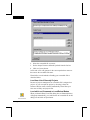
The source specified in the project Source Files folder.
•
The Source Files path specified in the Options dialog box
directory tab.
•
The path specified by the user directly.
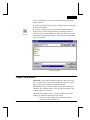
Source Path information and related options are discussed in greater
details in the chapter entitled “Viewing Source Code” found later in
this manual.
Troubleshooting Tips
This section provides information about how to diagnose and fix the
associated problems. The following types of problems are:
• Reading symbols information into Hitool
• What to do when you are unable to establish valid target
communications
• Diagnosing download problems
As always, if you encounter any difficulties, try to find the answer in
the user's manual or on-line Help. If you can't find the answer,
contact Technical Support Department.
Getting Started
Hitool for PowerPC User's Manual