1
TRIME®-PICO IPH
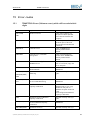
Calibration IDs and Names
again.
1001,1101,1102
Read file errors in Calibration
IDs and Names
Check if the files are in the
required path. If not, copy
the files to the path or
redefine the path under the
menu
Bus/Configuration/Material
Property Calibration.
1201, 1203
Operation errors in Test
Operate correctly and try it
again.
1202
Communication or protocol
errors in Test
Restart PICO and
TRIMETool.
1301
Write file error in Test
Check file path and try it
again. If failed, restart
TRIMETool.
4001-4002,
Read file or write file errors
Check the files and try
again.
Intenal calculating errors
Restart TRIMETool and try
again.Otherwise contact
IMKO.
4101-4106,4201
4301-4303
15.2
34
2013-06-26
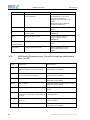
PICO Errors (Firmware errors). The errors come from the firmware,
from 1 to 255
Code
Explanation
Measurement
1-19
The serial communication errors due to Power off, power on PICO and try it again.
incorrect telegram, baud rate, timing
Otherwise contact IMKO.
etc.
20-39
incorrect command number, command
right or command parameters.
Power off, power on PICO and try it again.
Otherwise contact IMKO.
40-49
EEPROM is defect
Power off, power on PICO and try it again.
Otherwise contact IMKO.
50-59
ASIC is defect
Power off, power on PICO and try it again.
Otherwise contact IMKO.
60
Power voltage is too low
Check power voltage of PICO, it is minimal 6V.
100
TDR measurement parameter is incor- Adjust the TDR measurement parameters
rectly set or the material conductivity is or contact IMKO
too high.
101
TDR measurement parameter is incorrectly set
Adjust the TDR measurement parameters
or contact IMKO
102
ASIC is defect
Power off, power on PICO and try it again.
Otherwise contact IMKO.
I:\publik\TECH_MAN\PICO_IPH\TRIME-PICO IPH-manual_EN_Vers1_8.doc