1
Io XT Installation and Operation Guide — In This Manual
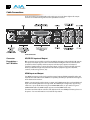
RS422 Machine Control
A female DE-9 connector on Io XT provides connection for VTRs, camcorders, disk media servers,
and other devices using RS422 SMPTE (Sony) protocol. (Connector pinout is listed in Appendix
A: Specifications.)
Component Video Output (with Composite and Y/C functions)
Io XT features a group of 3 BNC connectors for output of component, composite and
Y/C functions. The signals are labelled on the BNC connectors on the rear panel of Io XT.
A Note About YPbPr—Component Video, or YPbPr, has been given several names over time.
YUV, Y/R-Y/B-Y, and YCbCr, are just some examples. Although these various formats have
some differences in levels, they are all basically the same. Io XT uses the modern YPbPr
terminology exclusively. Io XT supports three different types of YPbPr: SMPTE/EBU N10,
1 level only and are
Betacam (NTSC), and Betacam (NTSC Japan). These three formats differ in
configured in the Mac System via the Io XT Control Panel.
Reference Video and LTC Input
Two BNC connectors on Io XT provide reference Input and Output. The Reference Video input
can also be used for LTC input. The selection of Reference (sync) or LTC is set using the
Io XT Control Panel.
In Video Pass-through mode, these connectors are effectively loop-through. Supplying
reference signal to the Reference input allows you to synchronize Io XT outputs to your house
analog reference video signal (or black burst). If you have a sync generator or central piece of
video equipment to use for synchronizing other video equipment in your studio, then connect
its analog composite output here. When Io XT outputs video, it uses this reference signal for
locking. When connecting a reference video source, the locking signal should be the same
format as the Primary format selected in the Io XT Control Panel. It is possible in some
circumstances to use an alternate format video signal as long as the basic frame rate is
compatible.
In This Manual
Chapter 1 is the introduction you’re reading, listing features, box contents, and system
requirements.
Chapter 2 provides complete instructions for installing and configuring the AJA Io XT. The user is
guided through unpacking, cabling the Io XT, installing Io XT Mac Software From CD, then
getting it up and running. Important configuration information is also provided on video
settings and use of genlock/external reference.
Chapter 3 discusses operational aspects of Io XT and how to work with 3rd-party software.
Chapter 4 discusses troubleshooting problems with your system and what to do when there’s
a problem you can’t solve.
Appendix A presents a list of technical specifications for the product.
Appendix B contains important Safety & Compliance information.
9