1
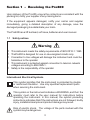
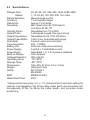
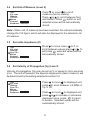
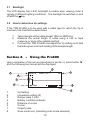
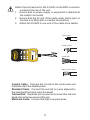
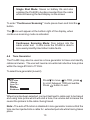
Pro400 TDR Cable Fault Locator Operating Instructions ARMADA 4403407 issue 1 CONTENTS Section 1 Receiving the Pro400 1.1 Safety notices.................................................3 1.2 Standards.......................................................4 Section 2 Introducing the Pro400 2.1 Pro400 features..............................................5 2.2 Specifications .................................................6 2.3 Accuracy ........................................................7 Section 3 First operations 3.1 Preparing the Pro400 .....................................7 3.2 Menu & screen displays .................................8 3.3 Set auto shutdown .........................................8 3.4 Set unit of measure ........................................9 3.5 Set cable impedance......................................9 3.6 Set Velocity of propagation ............................9 3.7 Backlight.......................................................10 3.8 How to determine unknown Vp Settings ......10 Section 4 Using the Pro400 4.1 Testing a cable .............................................12 4.2 Selecting range scales .................................12 4.3 Single shot and Continuous scan mode ......12 4.4 Tone generator .............................................13 4.5 Adjusting contrast.........................................14 4.6 Typical fault displays ....................................14 4.7 Typical Cable Vp & Impedance values.........14 Section 5 Maintenance 5.1 Battery replacement .....................................15 5.2 Cleaning .......................................................15 5.3 Storage.........................................................15 Section 6 Warranty & Repair 6.1 Contacting us ...............................................16 2 Section 1 - Receiving the Pro400 Upon delivery of the Pro400, ensure the contents are consistent with the packing list, notify your supplier of any missing items. If the equipment appears damaged, notify your carrier and supplier immediately, giving a detailed description of any damage, save the damaged packaging to substantiate your claim. The Pro400 has a 2ft test lead, soft case, batteries and user manual. 1.1 Safety notices Warning This instrument meets the safety requirements of IEC61010-1: 1995 ThePro400 is designed for use on de-energized circuits only. Connection to line voltages will damage the instrument and could be hazardous to the operator This instrument is protected against connection to telecom network voltages according to EN61326-1. Safety is the responsibility of the operator International Electrical Symbols This symbol signifies that the instrument is protected by double or reinforced insulation. Use only specified replacement parts when servicing the instrument. This symbol on the instrument indicates a WARNING, and that the operator must refer to the user manual for instructions before operating the instrument. In this manual, the symbol preceding instructions indicates that if the instructions are not followed, bodily injury, installation/sample and product damage may result. Risk of electric shock. The voltage of the parts marked with this symbol may be dangerous. 3 1.2 Standards The Pro400 has been manufactured in accordance with and meets the requirements of the following international standards: SAFETY IEC 61010-1 EN 60950 EMC BS/EN 61326-1 Water/Dust Proof to IP54 Section 2 - Introducing the Pro400 The Pro400 is a 6,000 ft (2,000m) range, hand held, time domain reflectometer weighing only 12 ozs (350 grams) designed for identifying and locating faults on Metalic cables, with a 20 ft first range scale and 2 ft dead zone. The Pro400 injects a series of pulses into the cable under test. The velocity at which the pulses travel is determined by the type of cable, this is known as the velocity of propagation (Vp) of the cable. The Vp value is expressed as a percentage of the speed of light i.e. 67% or ft/mtrs/micro second (ms). This value will vary according to the type of cable under test. The Pro400 can accept user selectable values between 1 and 99% (or the equivalent value in feet or meters per micro second). Based on the selected Vp and the time taken for the pulses to travel through the cable, a reflection profile of the cable under test is displayed, identifying impedance anomalies along the cable. By aligning the moveable cursor to the selected anomaly, the distance to fault is displayed in feet or meters. 4 2.1 Pro400 Features 1 Pro400 Pro400 V1.0 2 TDR Cable Fault Locator 3 4 menu select 6 5 8 7 ARMADA www.armadatech.com 1. 2. 3. 4. 5. 6. 7. 8. BNC Input connector LCD Start up screen Cursor left button / decrease range Cursor right button / increase range Menu and range select button Test start button Power on/off button Back light on/off button 5 2.2 Specifications Ranges Feet Meters Range Selection Accuracy Resolution Sensitivity Velocity Factor Output Pulse Output Impedance Output Pulse Width Scan Rate Tone Generator Battery Life Power Supply Power Down Back Lit Display Voltage Protection Operating Temp Storage Temp Dimensions Weight Safety EMC Water/Dust Proof 23, 49, 98, 197, 394, 820, 1640, 3280, 6560 7, 15, 30, 60, 120, 250, 500, 1km, 2km Manual range control 1% of selected range* Approx 1% of range Min 3 pixel return at 1750 meters on 0.6mm Ø, PE, TP Adjustable from 1% to 99% 5 volts peak to peak. Into open circuit Selectable 25, 50, 75 & 100 ohms 3 ns to 3 ms, Automatic with range 2 scans / second or scan held 810 – 1100Hz 60 hours continuous scanning 6 volts 4 x 1.5 AA Alkaline cells Selectable 1, 2, 3, 5 minutes or disabled 128 x 64 pixel 250 volts AC -10º / 50ºC -20º / 70ºC 165 x 90 x 37 (6.5 x 3.5 x 1.5 ins) 350 gms (12oz) IEC 61010-1 EN 60950 BS/EN 61326-1 IP54 * Measurement accuracy of <+/- 1% assumes the instrument setting for velocity of propagation (Vp) of the cable under test to be accurately set, homogeneity of the Vp along the cable length, and accurate cursor positioning. 6 2.3 Accuracy The Pro400 is able to measure distances to faults and cable lengths to an accuracy of +/- 1%. This measurement accuracy is based on the correct value of Vp being used for the cable under test, and homogeneity of the Vp along the cable length. If the Vp is set incorrectly by the operator, or the Vp varies along the length of the cable, then additional errors will be incurred and the measurement accuracy will be affected. Note:- The Vp is less well defined with unshielded multicore cable, including power cable, and is lower when a cable is tightly wound on a drum than when installed. Section 3 - First Operation 3.1 Preparing the Pro400 for use Press button to power the tester, the following screen will be displayed: Pro400 2 1 V1.0 3 1 Model 2 Software version programmed into tester 3 Battery condition indicator (all black battery, fully charged, as charge decreases symbol changes to white) Battery condition indicator is permanently displayed. Prior to use the following parameters will need to be set 1 2 3 4 Auto shutdown Set contrast Select unit of measure Select velocity of propagation section 3.3 section 4.5 section 3.4 section 3.6 7 3.2 Menu and Screen Displays Level 1. Start up screen Pro400 To access level 2 menu. Press down SELECT button and hold, press release both buttons. To exit press button. 100m/us T/P V1.0 100W 60m 25.0m TDR V/2 m/us 100m/us T/P 100 W Metres Contrast Shutdown: Disabled Level 2. Menu 3.3 Set Auto Shutdown TDR V/2 m/us 100m/us T/P 100 W Metres Contrast Shutdown: 2minutes To preserve battery life, the Pro400 has an auto shutdown feature. Shutdown time is selectable between disabled, 1 minute, 2 minutes or 3 minutes. To change settings press to move to shutdown, use or to select setting. To exit press button. 8 3.4 Set Unit of Measure (Level 2) TDR V/2 m/us 100m/us T/P 100 W Metres Contrast Shutdown: 2minutes Press to move to unit of measure (feet or meters). Press or to scroll between feet and meters. Press button to exit, selected value will be automatically stored. Note:- When unit of measure has been selected, this will automatically change the V/2 figure, which will also be displayed in the selected unit of measure. 3.5 Set cable Impedance (Z) TDR V/2 m/us 100m/us Coax 75 W Metres Contrast Shutdown: 2minutes 3.6 Press to move cursor to Z, to scroll between values press or To exit press , selected values will be automatically stored. Set Velocity of Propagation (Vp) Level 2 Velocity of propagation (Vp) may be set as % or speed in micro seconds (ms). The unit of measure, the speed is displayed in (feet or meters), will be determined by the setting selected in section 3.4 TDR V/2 m/us 100m/us Coax 75 W Metres Contrast Shutdown: 2minutes Press to move to displayed unit, press to scroll between v/2 M/Ms or Vp % UC. Press to move to displayed unit, press or to increase or decrease displayed value, press to return to screen. Selected values will be automatically stored. 9 3.7 Backlight The LCD display has L.E.D. backlight to enable easy viewing under a variety of different lighting conditions. The backlight is switched on and off with the key. 3.8 How to determine Vp settings If the TDR Pro400 is to be used with a cable type for which the Vp is unknown, this must first be determined. 1. 2. Take a sample of the cable at least 100m or 300ft long. Measure the actual length of cable using a rule or tape measure, or some other reliable method. Connect the TDR Pro400 and adjust the Vp setting such that the tester gives a correct reading of the sample length. 3. Section 4 - Using the Pro400 Upon completion of the set up procedures in section 3, press button and the following test screen will be displayed 2 1 Vp=67% Coax 75 W 7m 3 6 7 5 1. 2. 3. 4. 5. 6. 7. 8. 8 0.4m Vp Setting Impedance setting (Z) Range scale 7 mtrs Battery condition indicator Distance of cursor Cursor Output pulse Scan mode icon (indicating scan mode selected) 10 4 Attach the test lead set to the Pro400 via the BNC connector located at the top of the unit, 1. Ensure that no power supply or equipment is attached to the cable to be tested 2. Ensure that the far end of the cable under test is open or shorted (not fitted with a resistive termination) 3. Attach the Pro400 to one end of the cable to be tested Coaxial Cable Shielded Cable Coax 75 W 7m select Pro400 Vp=67% 0.4m TDR TDR Cable Fault Locator menu ARMADA BI Communications Innovation through Technology www.armadatech.com TX 2003 Twisted Pair Multi-conductor Cable Coaxial Cable: Connect the red clip to the centre wire and the black clip to the shield/screen. Shielded Cable: Connect the red clip to a wire adjacent to the shield and the black clip to the shield. Twisted Pair: Separate out one pair and connect the red and black clips to the two wires of the pair. Multicore Cable: Connect the clips to any two wires. 11 4.1 Testing a cable Having followed the set up procedures in the preceding sections, a typical display showing impedance anomalies is shown below. Further examples are shown in section 4.6. Vp=72% Z=100Ω 64m 129m 180m The vertical cursor line is moved left or right along the line of the trace by pressing and buttons to determine the distance to the event. Position the cursor at the beginning of the event and read off the distance at the bottom left corner. On the fault display shown above a low impedance fault occurs at 64 meters shown by a negative spike, and a high impedance at 129 meters. The open end of the cable is shown as a large positive spike, this is used to determine the end of the cable run and the overall length of the cable being 180 meters. 4.2 Selecting Range Scales The Pro400 has 9 range scales covering the range of 20 ft to 6,000 ft. To select a range scale, or scan the cable run, press and hold down the Select button and press to decrease range, press to increase range. 4.3 Single shot and Continuous Scanning Modes When the Pro400 is first switched on, it is set to “Single Shot” mode. In this mode the Pro400 only fires a pulse into the cable under test when either the and buttons or button is pressed. 12 Single Shot Mode: Saves on battery life and also enables the Pro400 to be disconnected from the cable while still leaving the fault display on the screen To enter “Continuous Scanning” mode press down and hold the button. The icon will appear at the bottom right of the display, when continuous scanning mode is activated. Continuous Scanning Mode: fires pulses into the cable under test. In this mode the Pro400 is able to more easily identify intermittent cable faults. 4.4 Tone Generator The Pro400 may also be used as a tone generator to trace and identify cables and wires. The user will need a conventional inductive tone probe within the range 810 Hz to 1110Hz. To select tone generator (Level 2) TDR V/2 m/us 100m/us Coax 75 W Metres Contrast Shutdown: 2minutes Press to move to TDR, press to scroll between TDR and warble. Press button to exit. When tone has been selected, connect test lead to cable pair to be traced and using tone probe which will emit a tone, the volume will increase the nearer the probe is to the cable / being traced. Note:- The auto off function is disabled in tone generator mode so that the tone can be injected into a cable for extended periods while tracing takes place. 13 4.5 Set Contrast (level 2) Press to move to contrast. Press to decrease contrast, press to increase contrast. Press button to exit. TDR V/2 m/us 100m/us Coax 75 W Metres Contrast Shutdown: 2minutes 4.6 Typical Fault Displays The following diagrams show typical fault traces to assist you in the identification of faults using the Pro400: 4.7 OPEN CONDUCTOR WET SPLICE/ WATER SHORTED CONDUCTOR FRAYED CABLE SPLICE WATER INGRESS BRIDGE TAP TAP SPLIT/ RESPLIT SPLITTER Typical Cable V.P and Impedance Values Type Vp Z Type Vp Z Cat5 STP Cat5 UTP Coax Air Coax Air Space Coax Foam PE Coax Solid PE 72 70 98 94 82 67 100 100 50/75 50/75 50/75 50/75 T/Pair Jelly PE T/Pair PE T/Pair PTFE T/Pair PVC T/Pair Paper 72nF T/Pair Paper 83nF 64 67 71 58 88 72 100 100 100 100 100 100 14 Section 5 - Maintenance 5.1 Battery Replacement Disconnect the instrument from any cable or network link Turn the instrument off Loosen the two black screws and remove the battery compartment cover Replace the batteries with 4 x 1.5 volt Alkaline batteries, observing the polarities Refit the battery compartment cover and refit the two screws 5.2 Cleaning Disconnect the instrument from any source of electricity Turn the instrument off Use a soft cloth lightly dampened with soapy water, wipe over the instrument, rinse the cloth in clean water squeezing out any excess water, wipe over the instrument removing any soap residue, dry instrument with a dry cloth Do not splash water directly on the instrument Do not use alcohol, solvents or hydrocarbons 5.3 Storage If the instrument is not to be used for a period of more than 60 days, it is recommended that the batteries are removed and stored separately (see 5.1) 15 Section 6 - Repair and Warranty The instrument contains static sensitive devices and is not user serviceable. If an instrument fails, or its protection has been impaired, it should not be used but sent back for repair by suitably trained and qualified personnel. New instruments are guaranteed against breakdown due to manufacturing or component defects for 12 months after the purchase date by the user. Note:- Any unauthorized prior repair or adjustment to the instrument will automatically invalidate the warranty 6.1 Contacting Us Armada Technologies, 3596 76th Street SE Caledonia, MI 49316 USA Tel No: (616)-803-1080 Fax : (616)-803-1083 www.armadatech.com [email protected] 16 17 ARMADA