1
6.7
Using the Tempest Remote Access Server
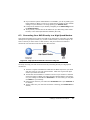
The Tempest Remote Access Server is a free service that helps facilitate connecting to
your DVR over the Internet. Most mainstream DSL and cable Internet connections do
not provide a static external IP address. This means that your IP address is constantly
changing and makes it difficult to connect into your DVR over the network. The Tempest
Remote Access Server automatically tracks your IP address and allows you to connect
into your DVR using a host name of your choice.
To setup your DVR to use the Tempest Remote Access Server:
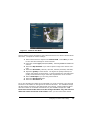
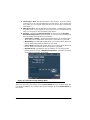
1. On your DVR, navigate to the Host Name menu (Figure 21) under the System menu.
2. Make sure the checkbox labeled Use Remote Access Server is checked.
3. Under the Host Name field, type in a convenient host name that you would
like to use to refer to your DVR. The host name must be a unique name that
no one else is using.
4. Press the Save button to save your settings.
Figure 21. Host Name Menu
The Tempest Remote Access Server will now automatically track your DVR’s network
changes.
26