1
A Pragmatic Introduction to Abstract Language
Analysis with Flex and Bison under Windows
DRAFT
Dr. Christophe Meudec
October 9, 2001
Abstract
This introduction will allow you to make the most of two powerful tools
for the analysis of abstract languages such as programming languages.
The aim of this introduction is to get you up and running as quickly as
possible with Flex and Bison, it is in no way a complete description of
these tools.
After reading this introduction you should be able to understand, modify and create specifications files for the creation of reliable and efficient
lexical analysers and parsers.
Keywords: flex, bison, programming language analysis, parsing, lexical analysis
1
1.1
Introduction
Objectives and Rationale
The primary aim of this introduction is to give the reader enough information
to make the most of Flex and Bison in a relatively short period of time. The
automatic analysis of data that is given in a prescribed text format requires the
development of a lexical analyser and/or of a parser. While lexical analysers
and parsers can of course be written by hand, it has long been known that most
useful lexical analysers and parsers follow the same design and can be generated
automatically given a description of their intended behaviour. Thus it is nearly
always the case that the programmer does not have to write a dedicated analyser
or parser but instead can avoid this tedious task using generating tools such as
Flex and Bison. The result will most likely be more reliable and efficient than
what could be obtained by hand. Writing a parser for a complex language is not
a simple task and can take a long time, tools such as Flex and Bison simplify
and speed up considerably this process.
1
1.2
History
Flex and bison are derivatives of Lex and Yacc respectively. Lex and Yacc
were originally distributed (and still are) with the Unix operating system. Flex
and Bison are rewrites of Lex and Yacc and are available with DOS and more
recently with Windows32. They generate C programs that can be compiled to
obtain executable lexical analysers and parsers.
Similars tools exist which generate Java and Ada code. They are not described here but all are based more or less on the Lex and Yacc originals. Do
your own research about them!
1.3
Windows Ports
Welcome to the wonderful world of Windows and C. The Bison and Flex ports
for Windows should work for most compilers (unless they don’t!). Not all C
compilers behave the same and there are differences between Visual C++, Bcc32
(C++ Borland version 5) and Borland C++ builder. The tools produce ANSI
C code and many compilers need to be set to this (e.g. C++ Borland version 5
do compiler then Sourec set to ANSI at the GUI level)
It is to be said that things are much easier under Unix, as compatibilty issues
are not so problematic.
1.3.1
Flex
Flex for example is supposed to be linked with the -lfl library, but this not
always available. This library provides the yywrap function (See Flex’s documentation) which is called on reaching the end of file. If all you want to do is to
terminate on reaching the end of file then the option %option noyywrap should
be added to the declaration part of the specification of Flex. The library also
provides a default main function. If a stand alone analyser is required you must
provide the main
Under C++ Builder the option %option never-interactive is also necessary but then the lexical analyser cannot be used interactively which can be
useful for debugging purposes. C++ Builder also requires access to the include
file unistd.h which is provided.
Other issues may arise.
1.3.2
Bison
For Bison the situation is usually more complex due to fact that most C/C++
compilers for Windows do not respect ANSI C definition. Thus each compiler is
different and may require changing bison.simple. We provide two versions of
bison.simple one for C++ builder called bison.builder (which needs to be
renamed bison.simple if you are working with C++ builder) and the standard
one called bison.simple which works fine with bcc32. More work would be
required in the settings of Visual C++.
2
Of course, the above is only true with C++builder version 3 and BCC32
version 5.3!
2
2.1
Lexical Analysis with Flex
Aim
Flex is a lexical analyser generator which analyse text at the character level
given a specification of the texts to be analysed. These specifications, listed in
a text input file for Flex, describe regular expressions that must be recognised.
With a specification file actions to be performed on the recognised entities can
be added under the form of C programs. These actions will be incorporated
verbatim in the C program generated by flex and will form, once compiled, a
lexical analyser for the specification given. All non recognised characters by the
lexical analyser are copied verbatim to an output file.
2.2
Calling
By tradition the specification file of Flex has a .l suffix. If spec.l is a specification of the text to analyse a call to
flex spec.l
will produce a C program, lex.yy.c, that must be compiled to obtain the lexical
analyser e.g.
bcc32 -eanalyser main.c
produces analyser.exe if main.c is something like:
#include "lex.yy.c"
int main()
{
yylex();
return 0;
}
The analyser takes as input the text file to analyse (standard input) and
outputs the result in a text file (standard output), it can be used in interactive
mode from the keyboard (CTRL Z terminates the session).
2.3
Specification File Format
The general format is:
{definitions}
%%
3
{matching rules}
%%
{C functions added to modify the standard processing of Flex}
Only the first %% is compulsory. Thus, if the spec.l file only contains this
%% the analyser generated by Flex will recognise nothing and will copy its input
straight to the output file.
The general format for a matching rule is:
pattern action
There must be at least a space or a tab between the pattern and the action.
The action is a block of statements in C (delimited by { and }).
For example the following specification file once processed by Flex will generate a lexical analyser which will copy its input text to its output but with the
words red, green and blue translated into French.
%%
red
green
blue
printf("rouge");
printf("vert");
printf("bleu");
Note that the rules above are very simple and does process words including
red, green and blue in them. Thus, redish will be rewritten as rougeish
which is meaningless in French. The next section, explain how patterns for flex
can be written.
2.4
Flex’s Regular Expressions
Regular expressions are used to construct patterns which must correspond to
the strings to be recognised in the text. The letters and digits in a pattern are
always characters of the text, thus a pattern such as red can only correspond
to to the string red in the text.
2.4.1
Special Characters
The following special characters are used as operators:
" \ [ ] ^ - ? . * + | ( ) $ / { } % < >
To introduce them in a pattern as characters in the text to be analysed, they
must be preceded by the \ character or by delimiting them with double quotes
as in "?". Thus, the pattern Ok" !..." corresponds to the string Ok !..., but
it can also be written as Ok\ \!\.\.\., or even "Ok !...".
The special characeters that are not operators are space, the tab, and NL
(newline). The notation \n is used for a newline, \t for a tab. The space must
be represented as \ or " ". The full stop character . denotes all characters
expect NL (newline). Finally all characters can be denoted in a pattern using
its octal code in the following format: \nnn.
4
2.4.2
Operators
The following list explains the roles of the operators:
[xyz] corresponds to only one character: here x or y or z. within square
brackets the notation - denotes a set of characters e.g. a-z denotes the
set of characters between a and z according to the ASCII definition order.
? indicates that the preceeding characeter is optional: x? denotes x or nothing
* indicates a repetition of the preceeding character : 0,1,. . . , n times
+ indicates a repetition of the preceeding character : 1,2, . . . ,n times. For
example, the identifiers in Pascal can be recognised by the pattern : [azA-Z][a-zA-Z0-9]* (i.e.they must always start with a letter by can contain
digits)
| indicates a choice : ab|cd denotes the string ab or cd
( ) are parenthesis that are sometimes necessary in complex patterns. e.g.
(ab|cd+)(ef)* is a pattern denoting the strings ab or a string cd (with
possibly several optional ds) followed by 0 or several ef strings.
^ placed at the beginning of a pattern indicates that the string must be at the
beginning of a line.
$ placed at the end of a pattern indicates that the string must be at the end of
a line.
x/y denotes x followed by y but y is not part of the string.
<y>x denotes x if the initial condition y (declared in the definition part of
the specification, see below) is satisfied.
{xx} xx is a macro defined in the definition part of the specification, and
{xx} is the expansion of this macro.
x{n, m} denotes n up to m occurences of x.
The initial conditions denotes a context left of the regular expressions. The
only pre-defined left context is the operator ^. An initial condition allows one to
express things like : recognise a string corresponding to the regular expression
only if it is preceeded by this context.
Each initial condition must be declared and named in the definition part
of the specification in the following manner:
%START ci1 ci2 ...
where ci1, ci2 are the names of the initial conditions. When a rule applies
if the initial conditions ci1, ci2 are satisfied, <ci1, ci2> must preceed the
rule (see above). When a rule satisfies an initial condition cij it is indicated
by the action: BEGIN cij ; . The end of the current condition is indicated by
the action: BEGIN 0 ;, see at the end of this section for examples.
5
2.5
Actions in Flex
By default the lexical analyser generated by Flex recopies all the input characters that correspond to no pattern in the ouput file. If we do not want any
output file all characters must be matched by a pattern. There are other predefined actions such as:
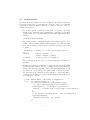
• the variable yytext contains the string wich correspond to the string
matched; the elementary action printf("%s", yytext); is predefined
by Flex and is denoted by ECHO. Thus the rule which outputs Pascal identifiers is
[a-zA-Z][a-zA-Z0-9]* ECHO;
• the variable yyleng contains the length of the string in yytext. If we
want to write an analyser which counts the number of words in the input
text, and the number of letters of the words the specification file would
look like:
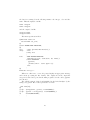
int nbword = 0, nbchar = 0; /* note the starting space */
%%
[a-zA-Z]+
{nbword = nbword + 1;
nbchar = nbchar + yyleng;}
[^a-zA-Z]
/* empty action: do nothing */
The second rule is used so as not to re-write characters not matched by
the first.
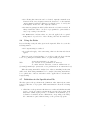
• the function yymore() concatenates to yytext the following string which
matches the same pattern. (instead of erasing yytext before putting the
string). The function yyless(x), on the other hand, implies that not all
the characters corresponding to the pattern must be placed in yytext :
the characters greater than the index x will not be placed and will be
reanalysed later. Thus to recognise Pascal strings (in which the quotes
are doubled) we can write:
’[^’]*\n
’[^’]*’.
printf("Error : the string is incomplete");
{if (yytext[yyleng-1] == ’’’’)
/* if the last character of the matched string
is a quote then the string is not finished */
{yyless[yylex-1] ; /* the quote is put back */
yymore() ; /* and the rest of the string is concatenated */
}
else
/* the string is finished and the . must be reanalysed */
{yyless(yylength-1);
printf("found string : %s", yytext);
}
}
6
• the following three functions can be re-defined: input() returns the next
character in the text; output(c) writes the character c on the standard
output; unput(c) sends the character c back in the text to be read by the
next input(). At the end of file, input() returns 0;
• the function yywrap() is called by Flex when the end of file is reached. It
always returns the value 1. It can be re-programmed to print results or
carry on processing on another file.
• the REJECT macro indicates that once the rule applied, the recognised
string must be rejected if one of the following other rule also matches it.
2.6
Using the Rules
If several strings verify the rules given in the input file, Flex chooses in the
following manner:
• the longuest string is considered
• if several rules apply of the same string, then it is the first rule that is
applied
Thus if we write a lexical analyser, we would recognise the keywords first
before recogonising the identifiers; thus to recognise Pascal programs:
...
/*all the keywords e.g. then */
then
{/* actions to be performed on then */}
...
/* other lexical entities, such as identifiers */
[a-zA-Z][a-zA-Z0-9]* {/*actions to be performed on an identifier */}
When the string then will be analysed, two rules are matching but the first
will be used. If the string thenumber is to be analysed, the string then will not
be recognised since of the two rules that could be applied the second takes the
longuest string.
2.7
Definitions in the Specification File
The three parts of the specification file (definitions, rules, functions) are transformed by Flex into a C program. This transformation follows the following
scheme:
1. all the lines of the specification file that are not rules and which starts with
a space or a tab are written verbatim in the generated C program. Such
lines in the definition part generate code with the extern attribute (e.g. a
declaration of variables extern to all functions corresponding to the rules).
the comments are passed without change to the generated program.
7
2. all the text including the delimiters %{ and %} is written in the program
where they appear and in the format they appear. This allows to include
text which must appear in the first column (e.g. #include or #define in
C).
3. the entire third part is copied verbatim after what is generated by Flex.
Macro definitions in the first part start in the first column. Their format is
name body. We can place here an encode table for characters whenever we want
the output characters to be different than the input ones. The minimum code
value must be 1, the last code must not be greater than what is recognisable by
the computer of course. The format is the following:
%T
code
...
%T
characters
...
The following table encodes the lower and upper case letters and give them
code from 1 to 26:
%T
1
2
...
26
%T
2.8
aA
bB
zZ
Examples
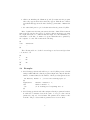
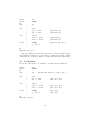
1. the following specification file will once processed by Flex generate a lexical
analyser which will take a Pascal program as input and verify the that the
number of end is identical to the number of the keywords begin and case.
int nbstart, nbend = 0 ; /* note
%%
begin|start
nbstart = nbstart
end
nbend = nbend + 1
.|\n
/* do nothing for
%%
the starting space */
+ 1 ;
;
everything else */
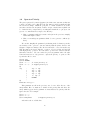
2. the following specification file takes as input a Pascal program and rewrites
it with added comments between the name of every procedure and its
parameters composed of several stars. The parameters are written on the
next line. The procedures without parameters are never modified.
8
P
%START
%%
^" "*P
[pP][rR][oO][cC][eE][dD][uU][rR]eE]
/* macro to recognise the keyword procedure with */
/* maybe mixed upper and lower case */
proc
/*declares the initial condition proc */
ECHO; BEGIN proc /* keyword recognised at the */
/* start of a line : the condition is satisfied */
<proc>( {printf(" {********}\n");
printf("
");
}
\n
ECHO ; BEGIN 0 /* release the initial condition */
/* proc at the end of line */
3. simpler examples are provided in the following Bison section.
3
3.1
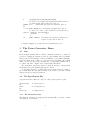
The Parser Generator: Bison
Aim
From an input grammar, Bison construct a C function which once compiled is
a parser recognising the language described by the grammar. The programmer
must provide a lexical analyser constructed with Flex or programmed manually.
In the specification file of Bison we can add actions programmed in C which
will be executed by the parser everytime the corresponding grammar rule is
recognised. An entire compiler can be written using this scheme.
In general Bison can generate parsers to check the structure of the input file
which must respect the grammar rules given to Bison.
To use Bison, therefore, one must write in a specification file, the format of
the eventual input files that will be analysed, the actions to perform, a lexical
analyser and the necessary declarations.
3.2
The Specification File
A specification file for Bison is composed of three parts separated by %%:
declarations
%%
rules
%%
functions
3.2.1
/* first part */
/* second part */
/* third part */
The Declarations Part
The first part, which can be empty (but the %% must still be present), contains
various kinds of declarations:
9
• the lexical entities received from the lexical analyser are declared by the
directive %token. For example :
%token IDENT NUMBER
indicates to Bison that IDENT and NUMBER in the rules designate two lexical
entities produced by the lexical analyser. These entities must of course be
recognised during the lexical analsing phase. In the C program generated
by Bison these identifiers are integer constants whose value characterise
the entity. In the preceeding example, the value of the entities is not
specified : Bison will assign an actual value. By default Bison give values
between 1 and 255 to entities composed of a single charater and values
from 257 to entities composed of several characters. If one wants a special
numbering, it can be done with:
%token IDENT
%token NUMBER
300
301
/* 300 is the value of the constant */
But it is then necessary to define these constants in the lexical analyser using #define. It is probably best to leave Bison to decide of the underlying
numbering of the lexical analysis.
• we indicate to the parser which rule is the starting rule (axiom) by:
%start
firstrule
If this declration is not present the first rule of the grammar will be considered as the starting rule.
• variables declarations necessary for the actions within the rules is given in
C delimited by %{ and %} e.g.:
%{ int count = 0; %}
declares and initialises the count variable which is then global for the
entire specification file and thus accessible within the actions.
• other declaration such as %type, %union, %left and %right will be discussed later.
Two rules must be respected:
1. the name of a lexical entity cannot be the same as a reserved C keyword
2. your C variables must not start by yy due to possible confusion with the
variables generated by Bison.
10
3.2.2
The Rules Part
A rule has the following format:
name : [body] [{actions}] ;
The name represents a non-terminal in the grammar. The body is a sequence
of lexical entities or rules’ name separated by at least a space or a tab. The
body can be empty. Whenever several rules have the same name (which is to
be avoided for clarity) we can merge the bodies by separating them with the |
symbol. Thus:
x : a b ;
x : c d e ;
is equivalent to:
x : a b
| c d e
;
This latest notation is to be recommended as coding style due to its clarity.
The actions associated with a rule, or with part of a rule, will be executed by
the program generated by Bison whenever the rule has been recognised during
parsing. The actions can perform complex processing such as referencing the
variables declared in the first part of the specification file, call functions from
the third part . . .
An action can return a value and can use the value returned by a preceeding
action or the lexical analyser. The pseudo variable $$ is the value returned by
an action, and the pseudo variables $1, $2 . . . are the values returned by the
components of the body of a rule. Thus:
exp : ’(’ exp ’)’ { $$ = $2;} ;
is a rule that recognises an expression (the non-terminal exp) as being an expression in parenthesis. The associated action assigns the returned value ($$) of
exp, the name of the rule, to be the value ($2) returned from exp the component
of the rule.
Similarly:
exp : NUMBER {$$ = $1;} ;
is a rule denoting the fact that an expression can be a number and that its value
in that case is the value attached to the NUMBER entity by the lexical analyser
(through yylval).
3.2.3
The Functions Part
This part contains a list of C functions used elsewhere in the actions or by the
lexical analyser. One of these functions must be the lexical analyser itself and
11
must be called yylex(). yylex returns after each call an integer which is the
number associated with the next lexical entity in the text under analysis and
puts into yylval the value associated with this lexical entity.
If the lexical analyser is produced by flex, this third part contains a #include
to include the file produced by Flex: lex.yy.c.
3.3
A Simple Example
A parser to recognise arithmetic expressions is described below. The four binary
operators +, -, * and /, the parentheses and integers are all allowed. Given the
traditional operators priority we can write in the Bison specification file the
following (where NUMBER is a lexical entity):
%start
%token
%%
init
exp
term
factor
init
NUMBER
:
;
:
|
|
;
:
|
|
;
:
|
;
exp
term
exp ’+’ term
exp ’-’ term
factor
term ’*’ factor
term ’/’ factor
NUMBER
’(’ exp ’)’
%%
#include "lex.yy.c"
By tradition the specification file of Bison has a .y suffix. The grammar
of the language to be recognised is preceeded by declarations which indicate
that the starting rule of the grammar (%start) is the non-terminal init and
that the only lexical entity (%token directive) is called NUMBER. This lexical
entity is recognised by the lexical analyser given in the last part of the Bison specification file, here it is the function generated by Flex (included by
#include "lex.yy.c"). The processing by Bison of the specification file above
(let’s call it exp1.y) generates a C file called y.tab.c which can be compiled
by:
bcc32 -A -eexp1 exp1_tab.c
which produces the executable exp1. The program thus created analyses an
expression and returns 0 if the expression is allowed by the grammar, or the
code 1 if the expression does not match. No actions have been introduced in
the rules of the file exp1.y and therefore only the parsing is performed by exp1.
12
To recapitulate the sequence of steps to be performed:
1. writing of the lexical analyser specification file, say exp1.l (See later) and
generation of the lexical analyser C program by:
flex exp1.l
which generates the file lex.yy.c
2. writing of the parser generator specification file, say exp1.y, and generation of the parser C program by:
bison exp1.y
which generates the file exp_tab.c
3. compilation of the parser and linking with the Flex and Bison libraries
which gives the main program (C main) and calls the parser (yyparse
function) by the command (the -A flag disables extensions, i.e. ensure
ANSI compilation):
bcc32 -A -eexp1 main.c
4. execution of the parser to recognise expressions, if for example the text to
be analysed is in the file express we can execute:
exp1 < express
main.c contains something like:
#include "exp1_tab.c"
main ()
{return(yyparse());
}
#include <stdio.h>
void yyerror(char *s)
/* s is usually the message "Syntax Error" */
{ fprintf(stderr, "This is a personalised syntax error message");
}
3.4
Postfix Example
To transform an expression from infix notation to postfix we can add actions to
our parser. The rules of the grammar remains of course unchanged:
13
%start
%token
%%
init
exp
term
factor
init
NUMBER
:
;
:
|
|
;
:
|
|
;
:
|
;
exp
term
exp ’+’ term
exp ’-’ term
{printf("+");}
{printf("-");}
factor
term ’*’ factor
term ’/’ factor
{printf("*");}
{printf("/");}
NUMBER
’(’ exp ’)’
{printf(" %d", $1);}
%%
#include "lex.yy.c"
The parser thus generated writes an integer as soon as it is returned by the
lexical analyser and writes an operator after recognising the rule that contains
it thus after the operands are written: it outputs expressions in postfix format.
3.5
A Calculator
We can also add actions to our grammar to actually perform calculations.
%start
%token
%%
init
exp
term
factor
init
NUMBER
:
;
:
|
|
;
:
|
|
;
:
|
;
exp
{printf("The result is: %d\n", $1); }
term
exp ’+’ term
exp ’-’ term
{$$ = $1 + $3;}
{$$ = $1 - $3;}
factor
term ’*’ factor
term ’/’ factor
{$$ = $1 * $3;}
{$$ = $1 / $3;}
NUMBER
’(’ exp ’)’
{$$ = $1;}
{$$ = $2;}
%%
#include "lex.yy.c"
14
3.6
Operator Priority
The parser generated by Bison (yyparse) is a finite state automaton that uses
a stack. It will be more efficient if the automation’s table is small and that
the actions are simple. Whithout going into too much details here about the
automaton and its actions (shift, reduce, accept, end and error (which can
be obtained in the y.output file by executing Bison with the -v option) we can
give two recommendations to improve its efficiency:
1. Write a grammar with left recursive rules (as in the previous example)
rather than right recursive.
2. Write a non-ambiguous grammar which does not generate conflicts (see
later).
We can also simplify the grammar by indicating in the declaration part the
associativity of the operators : left associativity with the %left directive and
%right for right associativity. The directives should be ordered in such a way
that the first is associated with the operators of lower priority and the last
with high priority operators. Non associative operators are declared with the
%nonassoc directive. We can rewrite the previous grammar where the rules
term and factor were only present to express the priority of operators. The
specification file becomes:
%start init
%token NUMBER
%left ’+’ ’-’
/* lower priority */
%left ’*’ ’/’
/* higher priority */
%%
exp
:
exp ’+’ exp
|
exp ’-’ exp
|
exp ’*’ exp
|
exp ’/’ exp
|
’(’ exp ’)’
|
NUMBER
;
%%
#include "lex.yy.c"
This grammar as well as the previous ones does not allow the use of the
unary minus. Here we must use a variable in the priority list and where the
unary minus appears in the grammar we must indicate its priority with the
%prec directive. For example:
%left ’+’ ’-’
%left ’*’ ’/’
%left unaryminus
/* highest priority */
and in the rule we add the line:
15
|
’-’ exp %prec unaryminus
In general it is clearer not to use the priority directives but instead use
intermediary non-terminals such as term and factor.
3.7
The Lexical Analyser
The lexical analyser must follow the following rules:
1. it is a function called yylex() and that at each call by yyparse return a
lexical entity number.
2. it assigns to yylval the value associated with the lexical entity.
3. at the end of file it return 0 or a negative value (thus at any other time
yylex cannot return an entity with value 0).
These functionalities are satisfied by the lexical analyser produced by Flex.
For the previous example the specification file of Flex could have been:
%% /* file exp1.l */
["*()+-/="]
return (yytext[0]);
[0-9]+
{yylval = atoi(yytext); return (NUMBER);}
\n
ECHO;
.
;
%%
yywrap() {return 1;}
The NUMBER identifier here will be associated with the NUMBER token in the
parser during linking.
We can also write an analyser by hand in the third part of the Bison specification file. For example:
%% /* third part of exp1.y */
#include <ctype.h>
int c = ’ ’;
/* read ahead character */
yylex()
{ int charbefore;
int n;
/* returned value */
while (c == ’ ’) c = getchar()
/* spaces are jumped */
swith(c)
{ case ’0’: case ’1’: case ’2’: case ’3’: case ’4’:
case ’5’: case ’6’: case ’7’: case ’8’: case ’9’:
n = 0;
while (isdigit(c))
/* c is a digit */
{n = n * 10 + c - ’0’;
c = getchar();
}
yylval = n;
16
return NUMBER;
case ’\n’:
return -1;
default :
{charbefore = c;
c = getchar();
return charbefore;
}
}
}
3.8
Syntax Errors in the Text under Analysis
It is difficult to treat errors otherwise than by terminating the parsing process. Bison behaves in a particular way if we have dealt with error cases. The
pseudo lexical entity error placed in the rules indicate to Bison that an error
is expected and that in that case we have a way of dealing with it.
Whenever the parser finds an error, it empties its stack until finding a state
in which the lexical entity error is recognised. Then it execute the associated
action. After, the entity from which an error was found becomes the read ahead
entity and the parsing process restarts normally. However, in order to avoid a
series of new errors, the parser stays in that error state until it has read and
analysed three new entities. If another occurs while it is in an error state, the
parser eliminates the lexical entity wihtout sending a new error message. To
have good chances of carrying on processing after an error, we should add after
the error entity the entity after which we would like to re-start the parsing.
For example if after having analysed the rule:
sentence
:
error ’.’
the parser will jump all entities until it finds a full stop. This works well in
general except in an interactive environment. Suppose that we use Bison to
check the data entered interactively: in that case the discovery of an error
would mean the abandonment of the line entered and the rule would be :
enter : error ’\n’ {printf("error start again")}
With this way of proceeding the parser will ignore the inputs until the end
of line, then start analysing the next three entities on the next line. If the user
makes new mistakes in these entities the parser, which is still in error mode,
will eliminate them without telling the user. To avoid this the action yyerrok
makes the parser forget that it is in error mode : it will not be in error mode
after jumping the erroneous line.
In another mechanism, the action yyclearin clears the current symbol after
an error which follows the error entity. This can be necessary if the clearing of
the erroneous entities is done by an action which handles itself the input file.
We illustrate below this error treatment with an interactive parser. The
inputs are composed of a name followed by an integer on one line. In outputs
17
the data is re-arranged in the following manner: the integer, colon and the
name. Thus the inputs looks like:
name1 integer1
name2 integer2
and the output looks like:
integer1:name1
integer2:name2
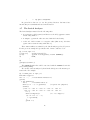
The Bison specification file is:
%{#include <stdio.h>
extern FILE* out_file;
%}
%token NUMBER NAME ENDOFLINE;
%%
init
: entry {printf("The End"\n");}
entry
: line
| entry line
;
line
: NAME NUMBER ENDOFLINE
{fprintf(out_file, "%4d:%s\n", $2, name);}
| error ENDOFLINE
{yyerrok;
printf("error : start again ");}
line
;
%%
#include "lex.yy.c"
Whenever a line is not correct, the parser displays an appropriate message
and re-start processing the line entirely. The outputs are in the output file
out_file declared and opened in the main program before the call to yyparse
(not shown).
The variable name is declared and initialised in the lexical analyser by the
string read, yylval. Here is the speicifcation for flex:
char name[20];
%%
[a-z]+ {strcpy(name, yytext); return(NAME);}
[0-9]+ {yylval = atoi(yytext); return(NUMBER);}
\n
return(ENDOFLINE);
.
;
18
3.9
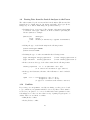
Passing Data from the Lexical Analyser to the Parser
The values returned by the actions and the lexical entities (The $is and the
%tokens) are by default integers, but Bison can handle other types (floats,
strings etc.) To do this we must change the specification file by:
• Declaring the set of types used. The elements of the Bison’s stack must
be an union of the types. This is done in the declaration part using the
directive %union, for example:
%union {int
float
other
}
aninteger ;
afloat ;
another;/* defined by a typedef beforehand */
• Adding the type of each lexical entity in the following format:
%token <aninteger> NUMBER
%token <afloat> FLOAT
• Declaring the type of each non-terminal in the following format:
%type <aninteger> integer_expression
%type <another>
another_expression
/* rule integer_expression */
/* rule another_expression */
• In the actions use the type of the value returned in the following format:
another_expression : t1 ’+’ t2 {$<other> = $1 + $3}
/* t1 and t2 are declared of type other */
• if the type is a C structure, the name of the field must of course be included
as in:
expTT : tt1 ’?’ tt2 {$<type3>.a = $1.a + $3.a;
$<type3>.b = $1.b - $3.b;}
/* type3 is a struture with fields a and b */
3.10
Conflicts
If you write your own grammar or modify an existing one then you are bound
to get conflicts in your grammar which are detected by Bison. These must be
resolved for your parser to be correct. Conflicts arise in the grammar because
it is ambiguous: i.e. there are more than one way of parsing a legal sequence of
entities. There are two kinds of conflicts:
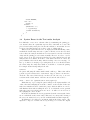
• Shift/Reduce conflict
• Reduce/Reduce conflict
19
To resolve conflicts it is necessary to understand a little bit about the Bison
parser algorithm. As already mentionned the automaton generated by Bison
uses a stack to keep track of the entities that have been recognised but which
do not yet as a whole form a rule. Traditionnaly pushing a lexical entity on the
stack is called shifting. Whenever the entities on the top of the stack matches a
rule, the entities concerned are poped from the stack, this is traditionally called
a reduction.
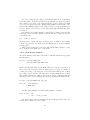
For example, if our infix calculator’s parser stack contains: 1+5*3 and the
next input token is a newline character, then the last three entities are reduced
to 15 via the rule:
exp : term ’*’ factor
Then the stack contains just three elements: 1+15, at which point a further
reduction is performed: the stack grows and shrinks as the text under analysis
is being parsed.
When a lexical entity is read, it is not immediately shifted, first it becomes
the look ahead token which is not on the stack.
3.10.1
Shift/Reduce Conflicts
The classic situation when this occurs is the conditional statement in programming languages:
if_stmt : IF expr THEN stmt
| IF expr THEN stmt ELSE stmt
;
With a rule like this, whenever the ELSE entity is read and becomes the look
ahead entity, the automaton is in an ambigous mode because a reduction is
possible (according to the first part of the rule) and a shift is also possible
(according to the second part of the rule), hence we have a Shift/Reduce conflict.
The default behaviour is to shift, however it is strongly recommended that this
warning be removed by re-writting the rule in a non ambiguous manner as in:
if_stmt : IF expr THEN stmt else_opt
;
else_opt : /* nothing */
| ELSE stmt
;
Another classical situation is with dealing with lists of entities:
list_of_vars : var
| var ’,’ list_of_vars
here after a single var the automation is in an ambiguous state. Here the
rule should re-written to be left recursive:
20
list_of_vars : var
| list_of_vars ’,’ var
Shift/Reduce conflicts may also occur if the priority of operators in expression is not self implied in the rules or if the preceedence directives are not used.
3.10.2
Reduce/Reduce Conflicts
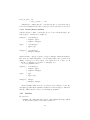
A Reduce/Reduce conflict occurs if there are two or more rule that apply to the
same sequence of entities. For example in:
sequence :
|
|
;
types
:
|
;
subtypes :
|
;
/* nothing */
sequence types
sequence subtypes
/* nothing */
types type
/* nothing */
subtypes subtype
which is meant to express a sequence of type or subtype entities intertwinned.
Here there are many ambiguities: even an empty input can be parsed in an
infinity of ways (e.g. it can be types or two types in a row, or three etc. It
could also be subtypes or a sequence of subtypes etc.).
A correct grammar is here:
sequence :
|
|
;
types
:
|
;
subtypes :
|
;
/* nothing */
sequence types
sequence subtypes
type
types type
subtype
subtypes subtype
Bison’s default behaviour in case of a reduce/recude conflict is to reduce the
rule that appear first in the grammar. Again however it is strongly recommended
that all conflicts should be remove by rewriting the grammar.
3.11
Advices
By experience:
• eliminate all conflicts through re-writes of the grammar. Keeping conflicts
in the generated parser is very dangerous indeed.
21
• try to find an existing grammar for the language you want to analyse (e.g.
on the internet but see below), it will save you a lot of time and frustation.
• removing conflicts can be very difficult, however you should end-up learning about the language you are trying to define and about Bison
• running Bison with the -v option generates a huge file detailing the automaton which can be used to debug your grammar
• always keep a good copy of your grammar before modifying the rules as
it might come in very handy if you have messed up the rules too much
4
4.1
Conclusions
On Parsing
The analysis of computer programs requires a prior parsing phase. While tool
like Flex and Bison remove most of the tedious aspect of writing lexical analysers and parsers they do not simplify on their own the analysis of programs.
Programming languages are complex languages and they inherently require a recursive approach to their analysis. While recursion is rarely encountered in other
aspects of programming (at least using structured programming languages) they
are the only way to recognise programming languages to perform the parsing
of programs. Thus grammars are highly recursive and one must take extra care
when adding actions to the rules. In particular the programming style should
be elegant and simple, the use of flags to indicate previous states in the parsing
is to be resisted as it may results in many flags being used and breaks the recursive logic of parsing. Sometimes if the analysis to be performed is complex
the parser can contsruct an abstract syntax tree of the program under analysis
and this data structure is then itself analysed. An abstract syntax tree allows
the traversal of programs in a variety of ways, in particular it allows to go
back an forth in the code. Compilers in general construct such abstract syntax
trees. Performing the actions while parsing restricts you in effect to a single
pass processing of the code.
Finnally, and whatever the temptation, one should never attempt to understand or modify the C programs generated by Flex and Bison. The code
thus generated is very complex and not intended for human reading: it is automatically generated and messy with wanton use of gotos (gotos are still in
the definition of programming languages to make the automatic generation of
code easier but should not be for human consumption). The grammar (and
to a lesser extent the Flex specification file) is where your efforts should be
targeted. Everything can be done in the grammar and if the parser does not
behave appropriatly it is the grammar file that needs to be reviewed.
22
4.2
On Getting Started
The calculator example is a good starting point. Once the compilation issues
are resolved you should be able to make good progress.
4.3
Additional Resources
Resources on Lex and Yacc should be to a large extend also be applicable to
Flex and Bison.
The primary technical references are the Flex user manual [?] and the Bison
user manual [?] which are also available in html format. These manuals are indepths description of these tools and should be consulted in cases of problems
or if something out of the ordinary is required. Flex and Bison are complex
tools and have many options, we do not have the room in this introduction to
describe them in details, instead the reader is refeered to the user manuals. The
user manuals describe to a large extend both tools in isolation to each other.
The emphasis in this introdyuction is on showing how they can work together
since this is the most useful way of using them.
Two specific books are also available: one by Bennet at McGraw Hill [?] and
the other by ... at O’Reilly. The second looks more promising.
The internet is an obvious place for additional information about Flex and
Bison. A note of warning however. Writing a grammar from scratch is difficult
and time consuming. There are many input files (grammars) available on the
internet for a variety of programming language but before making use of them
you should ensure yourself that:
• the language described is the one you want (e.g. which version of C is it?
Borland C, ANSI C etc.)
• that they do not generate warnings and conflicts during processing by
fleax and or bison
• input files can be written in a variety of formats and can be more or less
easy to understand.
Therefore one must very careful about using grammars from the Internet and
they should certainly be checked prior to intensive use. They do however save
you a lot of time for standard languages.
A few sites are listed below:
• http://www.uman.com/lexyacc.shtml a very good set of links for lex and
yacc
• http://ei.cs.vt.edu/ cs4304/ a course about compilers and translators
5
Acknowledgements
• Jean Louis Nebut of University of Rennes I, France, for his excellent introduction to Unix and its tools
23
• Martin Grogan from IT Carlow for giving me the C++ Builder port of
Bison
24