1
Application 2: AP Repeater
System Requirements
a)
b)
Three Access Point devices. Set two of them to
Access Point mode and the other to
Bridge/Station mode.
One PC (desktop or notebook) with Ethernet
interface. Set its IP address to, for example,
192.168.1.200
and
Subnet mask
to
255.255.255.0. (For setting all Access Point
devices)
c)
TCP/IP protocol must be installed on PC.
d)
Network cables. Use crossover 10/100BaseT
network (UTP) cables with RJ45 connectors.
Microsoft Internet Explorer 5.0 or later or
Netscape Navigator 4.7 or later.
e)
i)
Installation Instructions
j)
a)
b)
c)
d)
e)
f)
g)
h)
Use crossover LAN cable to connect PC with
one Access Point. Here we label it as AP1
hereafter.
Connect the power adapter to the power jack on
AP1.
Set the Network Name of AP1 to, for example,
rep on AP1 Web management page. Figure 4
shows the AP Web management configuration
page.
Set the IP address of AP1 to, for example,
192.168.1.80 on AP1 Web management page.
Figure 6 shows the AP management
administration page.
Use crossover LAN cable to connect PC
(disconnect to AP1) with one Bridge /Station.
Here we label it as STA hereafter.
Connect the adapter to power jack on STA.
Set the Network Name of STA to, for example,
wirelesslan on Station Web management
page. Figure 5 illustrates the Station Web
management configuration page.
Set the IP address of STA to, for example,
192.168.1.99 in the Station Web management
page. Figure 7 illustrates the Station Web
management administration page.
k)
l)
m)
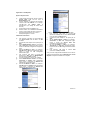
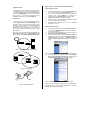
Figure 7: Station management administration page
Use crossover LAN cable to connect PC
(disconnect to STA) with the other Access Point.
Here we label it as AP2 hereafter.
Connect the power adapter to the power jack on
AP2.
Set the Network Name of AP2 to, for example,,
wirelesslan on AP2 Web management page.
Figure 4 shows the Access Point Web
management configuration page.
Set the IP address of AP2 to, for example,
192.168.1.90 on AP2 Web management page.
Figure 6 shows the AP management administration
page.
Use crossover LAN cable to connect AP1
(disconnect to AP2) with STA.
Once you have configured all the Wireless PCs on the two
networks with appropriate value of Network name, the AP
Repeater setup and installation are complete.
002
2503500500
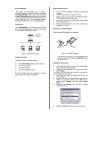
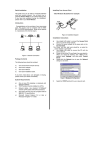
Figure 6: AP management administration page
2503501400