1
General Description
1. Introduction
Job limits provide a means of allocating a specific number of job
slots into which TWS is allowed to launch jobs. A job limit can be
set for each job stream, and for each workstation on which TWS is
running. Setting the workstation job limit to 25, for example, permits
TWS to have no more than 25 jobs executing concurrently.
Dependencies
Dependencies are prerequisites that must be satisfied before
execution of a job or job stream can proceed. They can be specified
for both job streams and jobs to ensure the correct order of
execution. The five types of dependencies are:

Follows Dependency: You can specify that a job or job stream
must not begin execution until other jobs and job streams have
completed successfully.

Resource Dependency: You can specify that a job or job stream
needs one or more system resources before it can begin
execution.

File Dependency: You can specify that a job or job stream needs
to have access to one or more files before it can begin
execution.

Prompt Dependency: You can specify that a job or job stream
needs to wait for an affirmative response to a prompt before it
can begin execution.

Time restrictions: You can specify a window of time that a job
or job stream is allowed to begin execution using the start time
(AT keyword) and the deadline time (UNTIL keyword).
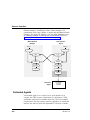
In a network, dependencies can cross workstation and domain
boundaries. For example, you can make JOB1, which runs on
workstation FINANCE1 in domain REGION1, dependent on the
successful completion of JOB2, which runs on workstation
FINANCE2 in domain REGION2.
Job Confirmation
There are instances when the completion status of a job cannot be
determined until you have performed some task. You may want to
check the results printed in a report, for example. In this case, you
Tivoli Workload Scheduler User’s Guide
5