1
Exclaiming WordPress User Manual
Last Edit August 14, 2012
Check out our FAQ’s
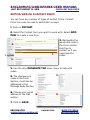
Add/Edit Your Blog Post or page
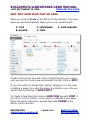
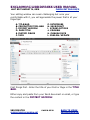
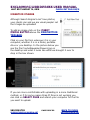
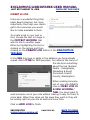
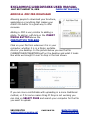
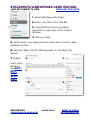
When you click on Posts in the Admin Control Section, the menu
opens up and automatically takes you to your current posts.
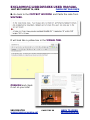
A. Title
B. Author
A
C. Categories
D. Tags
B
C
E. Date Created
D
E
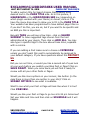
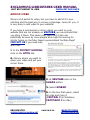
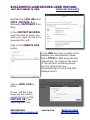
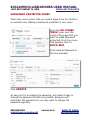
To Edit a Post hover over the name of the Post with your mouse
until you see the menu show up beneath the title. Click on Edit.
If you only want to change date, author, category or in the case
of editing a page, the order the pages are listed on your site you
can do that by clicking on Quick Edit.
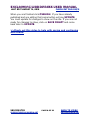
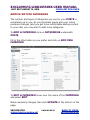
To Create a New Blog Post click on Add New beneath Post in
the Admin Control Section. If you want to edit/add a new page
follow the same instruction, except start with Pages in the
Admin Control Section.
360.353.3745
[email protected]
page 5 of 32
Back to Index
exclaimmedia.net