1
TX-50AX800E
TX-58AX800E
TX-65AX800E
e HELP
English
my Home Screen
my Home Screen
•Information12
•How to use
13
•Settings14
•OSD Colour16
APPS List
•Information17
•How to use
18
•Settings19
Watching
Basic
•Satellite connection
20
•Basic connection
22
•Selecting channel
24
•Information banner25
•Option Menu28
•Subtitle30
•Last view
30
•Off Timer31
•Energy saving functions
31
•Adjusting time
33
•Language33
4K resolution
•4K compatible equipment
34
•PC35
•HDMI4 HDCP Setting35
•DisplayPort Settings36
•Valid 4K format
36
External equipment
•External connection
37
•Watching external input
41
-2-
•Operating with TV’s remote control
43
•HDMI features
44
•Terminal information
46
•Valid input signals
47
For best picture
•Viewing Mode49
•Ambient Sensor50
•Aspect51
•Aspect Control Signal
53
•Basic settings
55
•Noise reduction settings
57
•Advanced Settings57
•Option Settings62
•Screen Settings64
•Lock Settings66
•Copy Adjustment66
For best audio
•Sound mode
67
•Basic settings
68
•Volume settings
70
•Voice Guidance Settings71
•Audio Description72
•Advanced settings
73
TV Guide
•Using TV Guide
76
•Timer Programming79
Teletext
•Viewing Teletext
81
•Teletext mode
83
•Teletext Character Set84
3D
•Note85
•3D Eyewear - Functions
86
-3-
•3D Eyewear - Registration
88
•3D Eyewear - Replacing battery
89
•Viewing 3D
90
•3D Mode Selection92
•3D Settings93
•Source image format
95
Tuning and editing channels
•Setting menu
96
•Favourites Edit96
•Channel List98
•Auto Setup99
•Manual Tuning102
•Update Channel List104
•New Channel Message104
•Signal Condition104
•Other settings
105
•Selectable satellites
106
Recording
USB HDD setup
•Preparations107
•Setting for USB HDD
108
Recording current programme
•One Touch Recording110
•REW LIVE TV111
Timer Programming
•Setting Timer Programming
113
•Editing Timer Programming
115
•Remote recording
116
•Note116
Technical information
•USB HDD118
-4-
Media Player
Using Media Player
•Information119
•Selecting device / mode
121
•Network device
123
•Sharing file
124
Photo mode
•Selecting file
125
•Viewing photo
126
•Sorting photos
126
•Multi Shot 3D127
•Using Slideshow
128
Video mode
•Selecting file
131
•Watching video
132
•Video Setup133
•Audio output settings
134
Recorded TV mode
•Selecting content
135
•Watching recorded TV
136
•Grouping contents
137
•Deleting content
137
•Changing device
138
•Chapter List138
•Audio output settings
139
Music mode
•Selecting file
140
•Playing music
141
•Music Setup142
Technical information
•Device handling caution
143
•SD Card
143
•USB devices
144
-5-
•Photo format
145
•Video format
146
•Music format
149
Network
Internet content
•Information150
•Selecting internet content
151
•Note152
DLNA
•Information153
•Using DLNA
156
Network connections
•Internet connection
157
•DLNA connection
158
•Note160
Network settings
•Network Connection161
•Custom - Wireless163
•Custom - Wired165
•Custom - Wireless Access Point166
•Network Status167
•my Home Cloud Settings168
•VIERA Name168
•TV Remote App Settings168
•Network Link Settings170
•TV Anywhere Settings171
•File Sharing Settings171
•Software Update172
•New Software Message172
Photos
•Selecting file
173
•Viewing photo
174
-6-
•Using Slideshow
175
Videos
•Selecting file
176
•Watching video
177
•Video Setup179
•Audio output settings
180
Music
•Selecting file
181
•Playing music
182
•Music Setup182
DIGA Recorder
•Controlling DIGA Recorder
183
Technical information
•Photo format
184
•Video format
184
•Music format
188
Functions
User profile
•Information189
•Settings189
•my Stream191
Info Bar
•Information192
•Settings192
•Human activity sensor
193
Built-in Camera
•Using built-in Camera
194
Voice Control
•Preparations195
•How to use
196
-7-
Touch Pad Controller
•Information197
•My button
197
•Settings198
Multi Window
•Information199
•How to use
200
•Note202
VIERA Link “HDAVI Control™”
•Summary of VIERA Link
203
•Preparations207
•Easy playback
207
•Power on Link208
•Power off Link208
•Standby Power Save208
•Intelligent Auto Standby208
•VIERA Link Control209
•Speaker Selection210
•Note211
Child Lock
•Using Child Lock
212
•PIN number
213
•Parental Rating213
Data Service Application
•Using Data Service Application
214
•Cookie214
•Note215
Common Interface
•Caution216
•Using Common Interface
217
Shipping Condition
•Shipping Condition218
-8-
Updating the TV Software
•Information219
•Auto update
219
•Manual update
220
Setting characters
•Using Numeric buttons
221
Bluetooth devices
•Bluetooth Setup222
Keyboard
•Keyboard223
Settings
Setting menu
•How to use
224
Picture
•Viewing Mode226
•Basic settings
226
•Ambient Sensor228
•Noise reduction settings
228
•Advanced Settings229
•Option Settings229
•Screen Settings231
•3D Settings232
•Lock Settings233
•Copy Adjustment233
•Reset to Defaults233
Sound
•Mode234
•Basic settings
234
•Volume settings
235
•Voice Guidance Settings236
•Audio Description237
•Advanced settings
238
-9-
•Reset to Defaults239
Network
•Network Connection240
•Network Status240
•my Home Cloud Settings240
•VIERA Name240
•TV Remote App Settings240
•Network Link Settings240
•TV Anywhere Settings240
•File Sharing Settings241
•Other settings
241
Timer
•Off Timer242
•Timer Programming242
•Time Zone242
•Auto Standby242
•No signal Power off242
Setup
•Eco Navigation243
•Voice Control Settings243
•User Settings243
•Info Bar Settings243
•USB Device Setup243
•Recording Setup243
•VIERA Touch Pad Controller243
•Bluetooth Setup244
•Child Lock244
•Tuning Menu244
•Language246
•Display Settings247
•HDMI4 HDCP Setting248
•DisplayPort Settings248
•Common Interface249
•VIERA Link Settings249
- 10 -
•Data Service Application250
•System Menu250
•Other Settings251
Support
FAQs
•Picture252
•Digital TV
254
•Analogue TV
255
•Sound256
•3D257
•HDMI258
•Network259
•Other260
Maintenance
•Care and Cleaning
262
Information
•Using Help menu
263
Optional accessories
•3D Eyewear264
•Wall-hanging bracket264
Licence
•Licence265
OK
Menu
●●
Letters enclosed in a box indicate remote control buttons.
Letters in cyan indicate on-screen display items.
References in this eHELP
The images shown in this eHELP are for illustrative purposes only.
- 11 -
my Home Screen
my Home Screen
Information
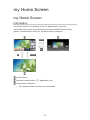
“my Home Screen” is a gateway to the TV, applications, and more.
It provides easy access to special features such as Media Player, videos,
games, communication tools, etc. as shown below (example).
HOME
OK
OK
HOME
Home Screen
Selected content screen (TV, application, etc.)
Home Screen Selection
– Your preferred Home Screen can be selected.
- 12 -
How to use
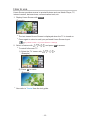
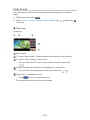
Home Screen provides access to special features such as Media Player, TV,
internet content, data services, communication tools, etc.
1.Display Home Screen with HOME.
(Example)
●●
The last viewed Home Screen is displayed when the TV is turned on.
●●
Press again to select or add your preferred Home Screen layout.
my Home Screen > my Home Screen > Settings
2. Select a feature with
●●
/
/
/
and press OK to access.
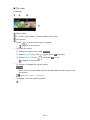
To watch full-screen TV
1) Select the TV viewer with
(Example)
/
/
2)Press OK to watch.
(Example)
●●
Also refer to Tutorial from the tool guide.
- 13 -
/
.
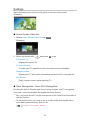
Settings
Select the setup menu from the tool guide on the top of the screen.
(Example)
■■Home Screen Selection
1.Display Home Screen Selection with HOME.
(Example)
2. Select the screen with
/
and press OK to set.
Full Screen TV:
Displays full-screen TV.
TV Home Screen:
To make your TV experience more convenient and comfortable
Lifestyle Screen:
Displays the TV with useful information and services for everyday life.
Info Screen:
Enjoy internet content while watching TV.
■■Face Recognition / Voice Print Recognition
By using the built-in Camera and Voice Control function, this TV recognises
your face / voice and displays the registered Home Screen.
●●
Say “my Home Screen” into the microphone of the Touch Pad Controller to
use this function.
●●
To use this function, you need to set up a user profile and register face /
voice data, preferred Home Screen, etc.
Functions > User profile > Settings
- 14 -
●●
For details of the built-in Camera
Functions > Built-in Camera > Using built-in Camera
●●
For details of Voice Control function
Functions > Voice Control
■■Settings
You can customise any Home Screen. (For example, changing the wallpaper,
renaming freely, editing applications, setting the screen launched when the
TV is turned on, etc.)
1.Select Settings from the tool guide.
2. Follow the on-screen instructions.
■■Search
You can search the content from various features.
1.Select Search from the tool guide.
2. Follow the on-screen instructions.
= Note =
●●
To change the colour type of on-screen displays, set OSD Colour.
my Home Screen > my Home Screen > OSD Colour
●●
To use this function fully, you need a broadband network environment.
Ensure the network connections and network settings are completed.
Network > Network connections
Network > Network settings
●●
Be sure to update the software when a software update notice is displayed
on the TV screen. If the software is not updated, you may not be able to
use my Home Screen. You can update the software later manually.
Network > Network settings > Software Update
- 15 -
OSD Colour
1. Display the menu with MENU.
2.Select Setup > Display Settings > OSD Colour with
to access.
3. Set with
/
/
and press OK
and press OK to store.
OSD Colour
(Jet black / Pale grey / Organic brown / Sand beige)
Selects the preferred colour type of on-screen displays.
●●
This function is available for the information banner, menu screen, Home
Screen, etc.
- 16 -
APPS List
Information
Various applications (internet contents, network contents, Media Player, etc.)
can be accessed easily from APPS List.
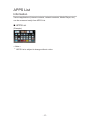
■■APPS List
(Example)
= Note =
●●
APPS List is subject to change without notice.
- 17 -
How to use
You can access special features such as internet contents, network contents,
Media Player, etc. from APPS List.
1.Display APPS List with APPS.
(Example)
●●
To exit APPS List
EXIT
2. Select an icon of the features with
/
/
/
and press OK to access.
Internet contents
Network > Internet content
my Stream
●●
Provides recommended contents (TV programme, internet content,
etc.).
●●
You need a broadband network environment to use this function fully.
●●
Follow the on-screen instructions to operate the application.
Functions > User profile > my Stream
Media Player
Media Player > Using Media Player > Selecting device / mode
Recorded TV
Media Player > Recorded TV mode
Media Server
Network > DLNA > Using DLNA
VIERA Link
Functions > VIERA Link “HDAVI Control™”
Multi Window
Functions > Multi Window
- 18 -
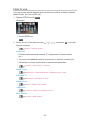
Settings
You can customise APPS List (screen settings, etc.).
1.Display APPS List with APPS.
2. Select the icon for settings on APPS List with
to access.
/
3. Follow the on-screen instructions.
= Note =
●●
Setup menu items may be changed without notice.
- 19 -
/
/
and press OK
Watching
Basic
Satellite connection
Please ensure that the unit is disconnected from the mains socket before
attaching or disconnecting any cables.
●●
For DVB-S
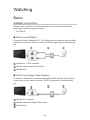
■■Dual Tuner (DiSEqC)
Connect the both of satellite IN 1 / IN 2 terminals to the satellite dish with Multi
Switcher, and you can watch or record 2 DVB-S programmes simultaneously,
etc.
Satellite IN 1 / IN 2 terminals
Satellite cables with Multi Switcher
Satellite dish
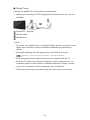
■■Dual Tuner (Single Cable System)
Connect the satellite IN 1 terminal to the satellite dish with the Single Cable
router, and you can watch or record 2 DVB-S programmes simultaneously,
etc.
Satellite IN 1 terminal
Satellite cable with Single Cable router
Satellite dish
- 20 -
■■Single Tuner
Connect the satellite IN 1 terminal to the satellite dish.
●●
Watching or recording 2 DVB-S programmes simultaneously, etc. are not
available.
Satellite IN 1 terminal
Satellite cable
Satellite dish
= Note =
●●
To ensure your satellite dish is correctly installed, please consult your local
dealer. Also consult the received satellite broadcasting companies for
details.
●●
Selectable satellites and dish alignment to tune DVB-S channels
Watching > Tuning and editing channels > Selectable satellites
●●
External equipment and cables shown are not supplied with this TV.
●●
Keep the TV away from electronic equipment (video equipment, etc.) or
equipment with an infrared sensor, otherwise distortion of image / sound
may occur or operation of other equipment may be affected.
●●
Check the terminal type and cable plugs are correct when connecting.
- 21 -
Basic connection
Please ensure that the unit is disconnected from the mains socket before
attaching or disconnecting any cables.
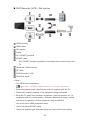
■■Aerial
Terrestrial / cable terminal
RF cable
Terrestrial aerial / Cable
●●
For DVB-C, DVB-T, Analogue
■■DVD Recorder / VCR
Terrestrial / cable terminal
RF cable
DVD Recorder / VCR
Terrestrial aerial / Cable
AV1 (SCART) terminal
SCART cable
– AV1 (SCART) adaptor (supplied) is necessary when connecting to the
TV.
- 22 -
■■DVD Recorder (VCR) / Set top box
HDMI terminal
HDMI cable
Set top box
Cable
AV1 (SCART) terminal
SCART cable
– AV1 (SCART) adaptor (supplied) is necessary when connecting to the
TV.
Terrestrial / cable terminal
RF cable
DVD Recorder / VCR
Terrestrial aerial
= Note =
●●
For VIERA Link connections
Functions > VIERA Link “HDAVI Control™” > Summary of VIERA Link
●●
External equipment and cables shown are not supplied with this TV.
●●
Please also read the manual of the equipment being connected.
●●
Keep the TV away from electronic equipment (video equipment, etc.) or
equipment with an infrared sensor, otherwise distortion of image / sound
may occur or operation of other equipment may be affected.
●●
Use a fully wired HDMI compliant cable.
●●
Use a fully wired SCART cable.
●●
Check the terminal type and cable plugs are correct when connecting.
- 23 -
Selecting channel
1.Display TV Selection with TV.
2. Select the mode with
/
and press OK to set.
DVB-S / DVB-C / DVB-T / Analogue
●●
The selectable modes vary depending on the channels stored.
●●
You can also select the mode pressing TV repeatedly.
●●
If TV Selection is not displayed, press TV to switch the mode.
3. Select a channel with Channel Up / Down or Numeric buttons.
●●
Press Numeric buttons to select a channel position with 2 or more-digit
(e.g. 399, press
).
■■To select a channel from the channel list
1. Display the channel list with OK.
2. Select a channel from the list with
●●
/
and press OK to watch.
To sort channel names in alphabetical order
(red)
●●
To change the category
(blue)
■■To select a channel using information banner
1. Display information banner with
2. Select a channel with
displayed.
/
if it is not displayed.
and press OK to watch while the banner is
Watching > Basic > Information banner
- 24 -
■■To select a channel using TV Guide
1.Display TV Guide with GUIDE.
2. Select the current programme with
access.
/
/
/
and press OK to
– The current programme is displayed on the top left of the screen.
3.Select View with
/
and press OK to watch. (DVB)
Watching > TV Guide > Using TV Guide
●●
The postcode entry or update may be required depending on the country
you select. Follow the on-screen instructions.
■■To watch pay-TV
●●
For information of the encrypted channels
Functions > Common Interface > Using Common Interface
●●
Consult the operator / broadcaster or CI module manufacturer for more
information and conditions of the services.
Information banner
Display information banner with
●●
.
Also appears when changing a channel.
(Example)
Channel position and name
Channel type (Radio, HDTV, etc.) / Encrypted channel (
, , )
) / TV mode (
Programme
Start time / End time (except Analogue)
Channel position, etc. (Analogue)
Progress time indicator of the selected programme (except Analogue)
- 25 -
,
Category
●●
To change the category (DVB)
1) Display the category list with
2) Select the category with
/
(blue).
and press OK to change.
Current time
Features available / message meanings
Bad signal:
Poor quality TV signal
Dolby D+, Dolby D, HE-AAC:
Dolby Digital Plus, Dolby Digital or HE-AAC audio track
AD:
Audio Description service available
●●
This function can aid visually-impaired viewers by adding an
additional audio track to describe events on screen.
Watching > For best audio > Audio Description
:
Subtitle service available
:
Teletext service available
:
Multiple audio available
:
Multiple video available
:
Multiple audio and video available
Stereo, Mono:
Audio mode
:
Data service (Hybrid Broadcast Broadband TV application) available
Functions > Data Service Application > Using Data Service Application
1 – 90:
Off Timer remaining time
Watching > Basic > Off Timer
- 26 -
●●
To confirm another tuned channel
/
●●
To watch the channel listed in the banner
OK
●●
Information on the next programme (DVB)
●●
Extra information (DVB)
– Press again to hide the banner.
●●
To hide the banner
EXIT
●●
To adjust banner timeout, set Banner Display Timeout.
1) Display the menu with MENU.
2)Select Setup > Display Settings > Banner Display Timeout with
and press OK to access.
3) Set with
●●
/
/
and press OK to store.
To change the colour type of on-screen displays, set OSD Colour.
my Home Screen > my Home Screen > OSD Colour
●●
To display the introduction banner for the internet service
1) Display the menu with MENU.
2)Select Setup > Display Settings > Smart Banner with
OK to access.
3)Select On / Off with
/
and press OK to set.
- 27 -
/
and press
Option Menu
Confirm or change the current status.
1. Display the option menu with OPTION.
2. Select one of the following items with
/
and press OK to access.
Voice Guidance Settings / Audio Type / Multi Video / Multi Audio / Dual
Audio / Sub Channel / Subtitle Language / Teletext Character Set / Teletext
Language / MPX / Volume Correction / CAM Selection
●●
The function items vary depending on the TV mode and country you
select.
3. Set with
/
/
/
and press OK to store.
Voice Guidance Settings
Guidance settings for visually impaired users
Watching > For best audio > Voice Guidance Settings
Audio Type
Set to Audio Description if the programme has Audio Description service,
then you will hear an additional audio track to describe events on screen (if
available).
●●
For DVB
●●
To adjust the volume for Audio Description
Watching > For best audio > Audio Description
●●
Not valid on the sub screen in multi window mode
Multi Video
Selects from a group of multiple videos (if available).
●●
This setting is not memorised and it will return to the default setting once
you exit the current programme.
●●
For DVB
Multi Audio
Selects between alternative language or Audio Description for sound tracks (if
available).
●●
This setting is not memorised and it will return to the default setting once
you exit the current programme.
●●
For DVB
- 28 -
Dual Audio
Selects stereo / monaural (if available).
●●
For DVB
Sub Channel
Selects the multifeed programme - sub channel (if available).
●●
For DVB
Subtitle Language
Selects the language for subtitles (if available).
●●
For DVB
●●
Not valid on the sub screen in multi window mode
Teletext Character Set
Sets the teletext language font.
Watching > Teletext > Teletext Character Set
Teletext Language
Selects between alternative languages for teletext (if available).
●●
For DVB
MPX
Selects multiplex sound mode (if available).
Watching > For best audio > Advanced settings
●●
For Analogue
Volume Correction
Adjusts the volume of each individual channel or input mode.
CAM Selection
Selects CI module (if available).
●●
Not valid while the recording is in progress
●●
For DVB
- 29 -
Subtitle
Display / hide subtitles (if available) with STTL.
●●
To select the preferred language for DVB subtitles (if available), set
Preferred Subtitles.
Watching > Basic > Language
●●
To select the preferred subtitle type
1) Display the menu with MENU.
2)Select Setup > Display Settings > Preferred Subtitle Type with
and press OK to access.
3)Select Standard / Hard of Hearing with
/
/
and press OK to set.
– Hard of Hearing provides aids in understanding and enjoyment with
DVB subtitles (depending on the broadcaster).
●●
Preferred Subtitles 1 / 2 in Language are given priority.
Watching > Basic > Language
= Note =
●●
Subtitles may not be displayed properly in 3D images.
●●
If you press STTL in Analogue, the TV switches to teletext service and
calls up a favourite page. Press EXIT to return to TV mode.
●●
Not valid on the sub screen in multi window mode
Last view
Switch to a previously viewed channel or input mode easily with last view
button.
●●
Press again to return to the current view.
= Note =
●●
Switching channel may not be available depending on the condition.
●●
Watching less than 10 seconds is not reflected in the previously viewed
channel or input mode.
- 30 -
Off Timer
Turn the TV Standby mode automatically after a fixed period.
1. Display the menu with MENU.
2.Select Timer > Off Timer with
/
and press OK to access.
3. Select the time in 15-minute increments with
/
and press OK to set.
90 / 75 / 60 / 45 / 30 / 15 / Off (minutes)
●●
To cancel, set to Off or turn the TV off.
●●
The remaining time displays on the information banner.
Watching > Basic > Information banner
●●
When the remaining time is less than 3 minutes, the remaining time will
flash on the screen.
Energy saving functions
The TV can be eco-friendly using energy-saving functions.
The TV will automatically go into Standby mode in the following conditions:
●●
Eco Navigation is set to Set to Eco.
●●
Off Timer is active.
Watching > Basic > Off Timer
●●
No operation is performed for 4 hours while Auto Standby is set to On.
●●
No signal is received and no operation is performed for 10 minutes while
No signal Power off is set to On.
= Note =
●●
This function does not affect the recording.
■■Auto Standby
1. Display the menu with MENU.
2.Select Timer > Auto Standby with
3.Select On / Off with
/
/
and press OK to access.
and press OK to set.
Auto Standby
(On / Off)
Automatically turns the TV to Standby mode for energy saving when no
operation is performed for 4 hours.
●●
Automatic input switching with the connected equipment affects this
function and time-count will be reset.
●●
The notification message will appear 3 minutes before going into Standby
mode.
- 31 -
■■No signal Power off
1. Display the menu with MENU.
2.Select Timer > No signal Power off with
3.Select On / Off with
/
/
and press OK to access.
and press OK to set.
No signal Power off
(On / Off)
Automatically turns the TV to Standby mode to prevent unnecessary power
consumption when no signal is received and no operation is performed for 10
minutes.
●●
The notification message will appear 3 minutes before going into Standby
mode.
■■Eco Navigation
Automatically sets the TV to the most suitable energy-saving mode.
The concerned items and their current settings are displayed. Select Set to
Eco to set them to the energy-saving settings at once.
1. Display the menu with MENU.
2.Select Setup > Eco Navigation with
3.Select Set to Eco with
●●
/
/
and press OK to access.
and press OK to set.
Auto Standby and No signal Power off are active when Eco Navigation is
set to Set to Eco.
■■Radio Mode
Sets the timer for turning off the screen automatically when a radio channel is
selected.
1. Display the menu with MENU.
2.Select Setup > Display Settings > Radio Mode with
to access.
3. Select the time with
/
/
and press OK
and press OK to set.
20 / 15 / 10 / 5 / Off (seconds)
●●
The sound is active even if the screen turns off. This function is effective in
reducing power consumption when listening to a radio channel.
●●
Press any buttons except Standby On / Off switch, Volume Up / Down and
MUTE to turn the screen on.
●●
Not valid in Analogue
- 32 -
Adjusting time
Adjusts the time data.
1. Display the menu with MENU.
2.Select Timer > Time Zone with
3. Set with
●●
/
/
and press OK to access.
and press OK to store.
The time data will be corrected based on GMT.
Language
1. Display the menu with MENU.
2.Select Setup > Language with
/
and press OK to access.
3. Select one of the following items with
/
and press OK to access.
OSD Language / Preferred Audio 1 / 2 / Preferred Subtitles 1 / 2 /
Preferred Teletext
4. Set with
/
/
/
and press OK to store.
OSD Language
Changes language for on-screen displays.
Preferred Audio 1 / 2
Selects the first and second preferred language for DVB multi audio
(depending on the broadcaster).
Preferred Subtitles 1 / 2
Selects the first and second preferred language for DVB subtitles (depending
on the broadcaster).
●●
To display subtitles
Watching > Basic > Subtitle
Preferred Teletext
Selects the preferred language for DVB teletext service (depending on the
broadcaster).
- 33 -
4K resolution
4K compatible equipment
You can watch the contents of 4K format that have twice the horizontal and
vertical resolution of the 1080p signal.
●●
For valid 4K format
Watching > 4K resolution > Valid 4K format
●●
Connect the 4K compatible equipment to HDMI4 using a 4K compatible
cable and you can watch contents of 4K format.
■■4K compatible equipment
HDMI4 terminal
HDMI cable
4K compatible equipment
●●
Check the terminal type and cable plugs are correct when connecting.
●●
Use a fully wired HDMI compliant cable.
- 34 -
PC
■■PC
DisplayPort™
DisplayPort cable
PC
●●
Please use DisplayPort 1.2 compliant cable. In some case using
DisplayPort 1.2 NON-compliant cable or mini DisplayPort connector
adaptor, there will be malfunctions that TV couldn’t display higher
resolution (e.g. 4K).
●●
Check the terminal type and cable plugs are correct when connecting.
●●
To select the signal stream, set DisplayPort Settings.
Watching > 4K resolution > DisplayPort Settings
HDMI4 HDCP Setting
1. Display the menu with MENU.
2.Select Setup > HDMI4 HDCP Setting with
3. Set with
/
/
and press OK to access.
and press OK to store.
HDMI4 HDCP Setting
(2.2 / 1.4)
Select a version of HDCP according to the content you watch.
●●
HDCP is a technology of copy protection for digital audio / video contents.
●●
For HDMI4 terminal
- 35 -
DisplayPort Settings
1. Display the menu with MENU.
2.Select Setup > DisplayPort Settings > Stream Setting with
press OK to access.
3. Set with
/
/
and
and press OK to store.
Stream Setting
(Auto / Single Stream)
Selects DisplayPort signal stream.
Auto:
Automatically selects the signal stream for multi stream.
Single Stream:
For single stream
●●
For DisplayPort input
Valid 4K format
■■Valid 4K format (HDMI4 / DisplayPort)
●● 4K UHD
3 840 × 2 160 (60p, 50p, 30p, 25p, 24p)
– Aspect is fixed to 16:9.
●● DCI 4K
4 096 × 2 160 (60p, 50p, 30p, 25p, 24p)
– Actual resolution is 3 840 × 2 160p.
– Selectable aspect is 16:9, H Full or V Full.
= Note =
●●
The above signals are reformatted for optimal viewing on your display.
●●
3D content of 4K format is not supported.
●●
The broadcast of 4K format is not supported.
●●
For details of aspect
Watching > For best picture > Aspect
- 36 -
External equipment
External connection
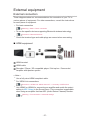
These diagrams show our recommendations for connection of your TV to
various pieces of equipment. For other connections, consult the instructions
for each piece of equipment.
●●
For basic connection
Watching > Basic > Basic connection
●●
To use the specific devices supporting Bluetooth wireless technology
Functions > Bluetooth devices
●●
Check the terminal type and cable plugs are correct when connecting.
■■HDMI equipment
HDMI terminal
HDMI cable
Recorder / Player / 3D compatible player / Set top box / Camcorder /
Amplifier with speaker system
= Note =
●●
Use a fully wired HDMI compliant cable.
●●
For VIERA Link connections
Functions > VIERA Link “HDAVI Control™” > Summary of VIERA Link
●●
Use HDMI2 or HDMI4 for connecting an amplifier and match the output
setting in ARC Output in the Sound menu. This connection is applicable
when using an amplifier that has ARC (Audio Return Channel) function.
Watching > For best audio > Advanced settings
- 37 -
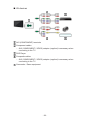
■■AV devices
AV2 (COMPONENT) terminals
Component cables
– AV2 (COMPONENT / VIDEO) adaptor (supplied) is necessary when
connecting to the TV.
DVD Player
Composite cables
– AV2 (COMPONENT / VIDEO) adaptor (supplied) is necessary when
connecting to the TV.
Camcorder / Game equipment
- 38 -
■■USB devices
USB port
USB cable
USB HDD
= Note =
●●
It is recommended to connect the device to the TV’s USB port directly.
●●
You cannot use two or more of the same kind of USB devices
simultaneously except USB Flash Memory or USB HDD.
●●
Use USB 3 port for connecting the USB HDD.
●●
Some USB devices or USB HUB may not be used with this TV.
●●
You cannot connect any devices by using USB card reader.
●●
Additional information for the devices may be on the following website.
http://panasonic.net/viera/support (English only)
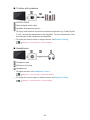
■■PC
DisplayPort™
DisplayPort cable
PC
●●
Please use DisplayPort 1.2 compliant cable. In some case using
DisplayPort 1.2 NON-compliant cable or mini DisplayPort connector
adaptor, there will be malfunctions that TV couldn’t display higher
resolution (e.g. 4K).
●●
To select the signal stream, set DisplayPort Settings.
Watching > 4K resolution > DisplayPort Settings
- 39 -
■■To listen with speakers
DIGITAL AUDIO
Optical digital audio cable
Amplifier with speaker system
●●
To enjoy multi-channel sound from external equipment (e.g. Dolby Digital
5.1ch), connect the equipment to the amplifier. For the connections, read
the manuals of the equipment and amplifier.
●●
To select the sound output to adjust volume, set Speaker Setting.
Watching > For best audio > Volume settings
■■Headphones
Headphone jack
M3 stereo mini plug
Headphones
●●
To adjust volume, set Headphone Volume.
Watching > For best audio > Advanced settings
●●
To select the sound output to adjust volume, set Speaker Setting.
Watching > For best audio > Volume settings
- 40 -
Watching external input
Connect the external equipment (VCR, DVD, etc.) and you can watch through
the input.
1. Display the input selection menu with AV.
2. Select the input mode connected to the equipment with
/
and press
OK to watch. (The selected mode is displayed on the top left of the
screen.)
●●
TV receives input signals automatically connecting with SCART when
playback starts.
– Input signals are automatically identified by the SCART (pin 8) terminal.
– This function is also available for HDMI connections when VIERA Link
is set to On.
Functions > VIERA Link “HDAVI Control™” > Easy playback
– When input mode is not switched automatically, perform as above or
check the setup of the equipment.
●●
You can also select the input pressing AV. Press repeatedly until the
desired input is selected.
●●
To switch between COMPONENT and VIDEO in AV2, select with
●●
You can label or skip each input mode. Skipped inputs will not be
displayed when AV is pressed. (Input Labels)
●●
The remote control is capable of operating the contents or external
equipment.
/
.
Watching > External equipment > Operating with TV’s remote control
●●
To return to TV mode
TV
= Note =
●●
If the external equipment has an aspect adjustment function, set it to 16:9.
●●
For details, read the manual of the equipment or ask your local dealer.
- 41 -
■■Input Labels
Accesses the input labels list to select the label of each input mode or set to
skip unconnected one for easier identification and selection in TV Selection,
Input Selection or banner.
Watching > Basic > Information banner
1. Display the menu with MENU.
2.Select Setup > Display Settings > Input Labels with
to access.
3. Set with
/
/
/
/
and press OK
and press OK to set.
●●
To name each input mode freely, select User input and set characters
(maximum 10 characters).
●●
To skip the input mode, select Skip.
■■Playing Time Display
Set to On to display a time period of continuous use in Game mode on the top
right of the screen every 30 minutes.
1. Display the menu with MENU.
2.Select Setup > Display Settings > Playing Time Display with
press OK to access.
3.Select On / Off with
●●
/
and press OK to set.
This function is available when Game Mode is set to On.
- 42 -
/
and
Operating with TV’s remote control
You can operate the contents in Media Player / media server, recording
functions or the connected equipment with the below buttons of this TV’s
remote control.
:
Playback (VCR / DVD / video content)
:
Stop the operations
:
Rewind, view the picture rapidly in reverse (VCR)
Skip to the previous track, title or chapter (DVD / video content)
:
Rewind, view the picture rapidly in reverse (VCR)
Search backward (DVD / video content)
:
Fast-forward, view the picture rapidly forward (VCR)
Skip to the next track, title or chapter (DVD / video content)
:
Fast-forward, view the picture rapidly forward (VCR)
Search forward (DVD / video content)
:
Pause / Resume
Press and hold to play at slow speed (DVD)
:
One Touch Recording
Recording > Recording current programme > One Touch Recording
- 43 -
■■How to change the code
Each Panasonic product has its own remote control code. Change the code
according to the product for operation.
1. Press and hold Standby On / Off switch during the following operations.
2. Enter the appropriate code as follows with Numeric buttons.
●●
Codes for each product and features
70: DVD Recorder, DVD Player, Blu-ray Disc Player
71: Player theatre, Blu-ray Disc theatre
72: VCR
73 (default):
Using in USB HDD recording, Media Player, DLNA features or VIERA
Link
3.Press
to change.
= Note =
●●
Confirm if the remote control works correctly after changing the code.
●●
The codes may be reset to defaults if batteries are replaced.
●●
Some operations may not be available depending on the equipment.
HDMI features
HDMI (high-definition multimedia interface) is the world’s first complete digital
consumer AV interface complying with a non-compression standard.
HDMI allows you to enjoy high-definition digital images and high-quality
sound by connecting the TV and the equipment.
HDMI-compatible equipment with an HDMI or DVI output terminal, such as a
DVD player, a set top box or game equipment, can be connected to the HDMI
terminal using a fully wired HDMI compliant cable.
Watching > External equipment > External connection
: The HDMI logo is displayed on HDMI-compliant equipment.
- 44 -
■■Applicable HDMI features
●●
Input audio signal:
2ch Linear PCM (sampling frequencies - 48 kHz, 44.1 kHz, 32 kHz)
●●
Input video signal:
Matches the output setting of the digital equipment.
Watching > External equipment > Valid input signals
●●
VIERA Link (HDAVI Control 5)
Functions > VIERA Link “HDAVI Control™” > Summary of VIERA Link
●●
Content Type
●●
Deep Colour
●●
Audio Return Channel
– Audio Return Channel (ARC) is a function to send digital sound signals
via an HDMI cable.
– For HDMI2 / HDMI4 terminals
– Match the output setting in ARC Output in the Sound menu.
Watching > For best audio > Advanced settings
●●
3D
●●
x.v.Colour™
■■DVI connection
If the external equipment has only a DVI output, connect to the HDMI terminal
via a DVI to HDMI adaptor cable. When using the DVI to HDMI adaptor cable,
connect the audio cable to the audio input terminal (use AV2 audio terminals).
●●
AV2 (COMPONENT / VIDEO) adaptor (supplied) is necessary when
connecting to the AV2 audio terminals.
●●
Enquire HDMI adaptor cable at your local digital equipment retailer shop.
- 45 -
= Note =
●●
Audio settings can be made on HDMI Input in the Sound Menu.
Watching > For best audio > Advanced settings
●●
If the connected equipment has an aspect adjustment function, set the
aspect ratio to “16:9”.
●●
These HDMI connectors are “type A”.
●●
These HDMI connectors are compatible with HDCP (High-Bandwidth
Digital Content Protection) copyright protection.
●●
Equipment having no digital output terminal may be connected to the input
terminal of component or video to receive analogue signals.
●●
This TV incorporates HDMI™ technology.
Terminal information
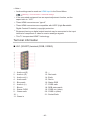
■■AV1 (SCART) terminal (RGB, VIDEO)
1 :
2 :
3 :
4 :
5 :
6 :
7 :
8 :
9 :
10:
11 :
Audio out (R)
Audio in (R)
Audio out (L)
Audio earth
Blue earth
Audio in (L)
Blue in
Status CVBS
Green earth
-Green in
12:
13:
14:
15:
16:
17:
18:
19:
20:
21:
- 46 -
-Red earth
Earth
Red in
Status RGB
CVBS earth
RGB status earth
CVBS out (video)
CVBS in (video)
Socket Earth
■■HDMI terminal
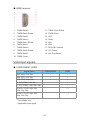
1 : TMDS Data2+
11 : TMDS Clock Shield
2 : TMDS Data2 Shield
12: TMDS Clock−
3 : TMDS Data2−
13: CEC
4 : TMDS Data1+
14: Utility
5 : TMDS Data1 Shield
15: SCL
6 : TMDS Data1−
16: SDA
7 : TMDS Data0+
17: DDC/CEC Ground
8 : TMDS Data0 Shield
18: +5V Power
9 : TMDS Data0−
19: Hot Plug Detect
10: TMDS Clock+
Valid input signals
■■COMPONENT, HDMI
Signal name
COMPONENT
HDMI
525 (480) / 60i, 60p
○
○
625 (576) / 50i, 50p
○
○
750 (720) / 60p, 50p
○
○
1 125 (1 080) / 60i, 50i
○
○
1 125 (1 080) / 60p, 50p, 24p
○
3 840 × 2 160 / 60p, 50p,
30p, 25p, 24p
○
4 096 × 2 160 / 60p, 50p,
30p, 25p, 24p
○
: For HDMI4 only
○: Applicable input signal
- 47 -
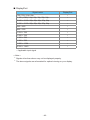
■■DisplayPort
Signal name
DisplayPort
750 (720) / 60p, 50p
○
1 125 (1 080) / 60p, 50p, 30p, 25p, 24p
○
3 840 × 2 160 / 60p, 50p, 30p, 25p, 24p
○
4 096 × 2 160 / 60p, 50p, 30p, 25p, 24p
○
640 × 480
○
800 × 600
○
1 024 × 768
○
1 280 × 768
○
1 360 × 768
○
1 366 × 768
○
1 280 × 1 024
○
2 560 × 1 440
○
○: Applicable input signal
= Note =
●●
Signals other than above may not be displayed properly.
●●
The above signals are reformatted for optimal viewing on your display.
- 48 -
For best picture
Viewing Mode
1. Display the menu with MENU.
2.Select Picture > Viewing Mode with
3. Select the mode with
/
/
and press OK to access.
and press OK to set.
Viewing Mode
(Dynamic / Normal / Cinema / THX Cinema / THX Bright Room / True Cinema
/ Monitor / Custom / Professional1 / Professional2)
Selects your favourite picture mode for each input.
Dynamic:
Improves contrast and sharpness for viewing in a bright room.
Normal:
Normal use for viewing in a normal lighting condition.
Cinema:
Improves the performance of contrast, black and colour reproduction
for watching movies in a darkened room.
THX Cinema :
Reproduces the original image quality precisely in a darkened room.
●●
Not valid in 3D mode
THX Bright Room :
Reproduces the original image quality precisely in a bright room.
●●
Not valid in 3D mode
True Cinema:
Reproduces the original image quality precisely without any revision.
Monitor:
Reproduces the original image quality of graphic contents.
●●
For HDMI and DisplayPort input
Custom:
Adjusts each menu item manually to suit your favourite picture quality.
Professional1 / 2:
Allows you to set and lock the professional picture settings.
Watching > For best picture > Advanced Settings
●●
If a certified professional dealer sets these modes, Professional1
and Professional2 may be displayed as isf Day and isf Night.
- 49 -
In each Viewing Mode, Backlight, Contrast, Brightness, Colour, Tint,
Sharpness, Colour Temperature, Vivid Colour, Adaptive Backlight Control,
Letterbox, Ambient Sensor, Noise Reduction, MPEG Remaster, Resolution
Remaster, Caption Smoother, Brilliance Enhancer, Intelligent Frame Creation
and 24p Smooth Film can be adjusted and stored.
When in Cinema, True Cinema, Monitor, Custom or Professional1 / 2,
Advanced Settings can be adjusted additionally. The settings in True Cinema,
Monitor, Custom or Professional1 / 2 can be stored for each input.
●●
You can set Viewing Mode in 2D and 3D mode for each.
: THX modes are used to mirror the picture settings used by professional
filmmakers, faithfully reproducing the image quality of THX Certified
movies. THX Certified movies have the THX logo on the disc. THX modes
are not available for photo contents or internet services.
Ambient Sensor
1. Display the menu with MENU.
2.Select Picture > Ambient Sensor with
3.Select On / Off with
/
/
and press OK to access.
and press OK to set.
Ambient Sensor
(On / Off)
●●
Automatic Brightness Control function
Adjusts picture settings automatically depending on ambient lighting
conditions.
- 50 -
Aspect
Change the aspect ratio (image size) with ASPECT.
■■To change the aspect ratio manually
1.Display Aspect Selection with ASPECT.
2. Select the mode with
●●
/
and press OK to set.
You can also change the mode pressing ASPECT.
(Press repeatedly until you reach the desired mode.)
Auto:
The best ratio is selected automatically according to the “Aspect Control
Signal”.
Watching > For best picture > Aspect Control Signal
16:9:
Directly displays the image at 16:9 without distortion (anamorphic).
14:9:
Displays the image at the standard 14:9 without distortion.
Just:
Displays a 4:3 image full-screen. Stretching is only noticeable at the left
and right edges.
4:3:
Displays the image at the standard 4:3 without distortion.
Zoom:
Displays a 16:9 letterbox or 4:3 image without distortion.
4:3 Full:
Displays a 4:3 image enlarged horizontally to fit the screen.
●●
For HD (High definition) signals
Sidecut Just:
Displays a 16:9 letterbox (anamorphic) image full-screen. Stretching is
only noticeable at the left and right edges.
●●
For HD (High definition) signals
Sidecut Zoom:
Displays a 16:9 letterbox (anamorphic) image full-screen without distortion.
●●
For HD (High definition) signals
- 51 -
H Full:
Displays the image enlarged horizontally to fit the screen without
distortion.
●●
For DCI 4K format
V Full:
Displays the image enlarged vertically to fit the screen without distortion.
●●
For DCI 4K format
= Note =
●●
Display the image (TV, external input, etc.) full-screen to use this function
completely.
●●
Aspect mode can be memorised separately for SD (Standard definition)
and HD (High definition) signals.
●●
Aspect cannot be changed in teletext service and 3D format signals.
●●
Aspect is fixed to 16:9 when watching the content of 4K format except DCI
4K.
●●
Only 16:9 and 4:3 are available for PC signal from DisplayPort input.
- 52 -
Aspect Control Signal
Programmes usually contain an “Aspect Control Signal”. (Widescreen signal,
Control signal through SCART / HDMI terminal)
In Auto mode, aspect mode will appear in the top left of the screen if a
Widescreen signal (WSS) or a Control signal through SCART (pin8) / HDMI
terminal is found. The aspect will switch to the appropriate ratio.
Watching > For best picture > Aspect
■■Available conditions
●● Satellite terminal (WSS only)
Valid input signal format:
DVB-S
●● Terrestrial / cable terminal (WSS only)
Valid input signal format:
DVB-C
DVB-T / DVB-T2
PAL B, G, H, I, D, K
SECAM B, G, L, L’, D, K
Invalid input signal format:
PAL 525/60 6.5 MHz
PAL 525/60 6.0 MHz
PAL 525/60 5.5 MHz
M.NTSC 6.5 MHz
M.NTSC 6.0 MHz
M.NTSC 5.5 MHz
●● AV1 (SCART) / AV2 (VIDEO) terminals
Valid input signal format:
PAL
SECAM
PAL 525/60
M.NTSC
NTSC
: Control signal through SCART (pin 8) / HDMI terminal only
- 53 -
●● AV2 (COMPONENT) terminals (WSS only)
Valid input signal format:
625 (576) / 50i, 50p
Invalid input signal format:
525 (480) / 60i, 60p
750 (720) / 60p, 50p
1 125 (1 080) / 60i, 50i
●● HDMI / DisplayPort terminals
Valid input signal format:
525 (480) / 60i, 60p
625 (576) / 50i, 50p
750 (720) / 60p, 50p
1 125 (1 080) / 60i, 50i
1 125 (1 080) / 60p, 50p, 24p
3 840 × 2 160 / 60p, 50p, 30p, 25p, 24p
4 096 × 2 160 / 60p, 50p, 30p, 25p, 24p
: For HDMI terminal only
: For HDMI4 / DisplayPort terminals only
●●
HDMI / DisplayPort terminals do not receive WSS signal.
= Note =
●●
If the screen size looks unusual when a widescreen-recorded programme
is played back on a VCR, adjust the tracking of the VCR. Read the manual
of the VCR.
- 54 -
Basic settings
1. Display the menu with MENU.
2.Select Picture with
/
and press OK to access.
3. Select one of the following items with
/
and press OK to access.
Backlight / Contrast / Brightness / Colour / Tint / Sharpness / Colour
Temperature / Vivid Colour / Colour Remaster / Reversal Film Effect /
Adaptive Backlight Control / Letterbox / Resolution Remaster / Caption
Smoother / Brilliance Enhancer / Intelligent Frame Creation / 24p Smooth
Film
4. Set with
/
/
/
and press OK to store.
Backlight, Contrast, Brightness, Colour, Tint, Sharpness
Adjusts the levels of these options according to your personal preference.
●●
Sharpness is not available when 1080p Pixel by 4pixels is set to On.
Colour Temperature
Sets the overall colour tone of the picture (bluer - redder).
Vivid Colour
(On / Off)
Automatically adjusts colours to vivid ones.
Colour Remaster
(Max / Min / Off)
Displays the vivid images with the expanded colour gamut.
●●
For HDMI input or video contents of Media Player
●●
Not valid when Viewing Mode is THX modes
Reversal Film Effect
(Max / Min / Off)
Provides the picture effect such as the reversal film for photo contents.
●●
For HDMI input or photo contents of Media Player
●●
Not valid when Viewing Mode is THX modes
- 55 -
Adaptive Backlight Control
Automatically controls the level of backlight according to the images.
●●
Not valid in multi window mode
Letterbox
(Dimmer / Normal)
Adjusts the black level of the letterbox (anamorphic) area for watching
movies, etc.
Resolution Remaster
(Auto / Max / Mid / Min / Off)
Enhances picture resolution to make the image sharper.
●●
Not valid when 1080p Pixel by 4pixels is set to On
Caption Smoother
(Auto / Max / Mid / Min / Off)
Makes caption contours smooth. Specially effective for low resolution
contents.
●●
Not valid in 3D mode or when 1080p Pixel by 4pixels is set to On
Brilliance Enhancer
(Max / Mid / Min / Off)
Enhances picture contrast locally to increase picture brilliance.
●●
Not valid in 3D mode or when 1080p Pixel by 4pixels is set to On
Intelligent Frame Creation
(Max / Mid / Min / Off)
Automatically compensates the picture frame rate and removes juddering
movements to make the images smooth.
●●
Depending on the contents, images may be noisy. To prevent the noise,
change the setting.
●●
Not valid in multi window mode, photo contents of Media Player / Network
services, when Game Mode is set to On or when aspect is set to H Full
- 56 -
24p Smooth Film
(Max / Mid / Min / Off)
Automatically compensates the picture frame rate to make the 24p source
movie images smooth.
●●
This function is available only for 24p signal input and displayed instead of
Intelligent Frame Creation.
●●
Not valid in multi window mode, photo contents of Media Player / Network
services, when Game Mode is set to On or when aspect is set to H Full
Noise reduction settings
1. Display the menu with MENU.
2.Select Picture > Noise Reduction / MPEG Remaster with
OK to access.
3. Set with
/
/
and press
and press OK to store.
Noise Reduction
(Auto / Max / Mid / Min / Off)
Reduces unwanted picture noise.
MPEG Remaster
(Auto / Max / Mid / Min / Off)
Reduces flicker noise in contoured parts of a picture and block noise.
Advanced Settings
You can adjust and set up the detailed picture settings when Viewing Mode
is set to Cinema, True Cinema, Monitor, Custom or Professional1 / 2. The
settings in True Cinema, Monitor, Custom or Professional1 / 2 can be stored
for each input.
Watching > For best picture > Viewing Mode
1. Select the input mode with AV or TV.
2. Display the menu with MENU.
3.Select Picture > Viewing Mode with
4. Select the mode with
/
/
and press OK to access.
and press OK to set.
Cinema / True Cinema / Monitor / Custom / Professional1 / Professional2
- 57 -
■■Adjust the detailed picture settings
1. Display the menu with MENU.
2.Select Picture > Advanced Settings with
3. Select one of the following items with
/
/
and press OK to access.
and press OK to access.
Contrast Control / Colour Gamut / White Balance / Colour Management /
Gamma / Reset to Defaults
4. Set with
/
/
/
and press OK to store.
■■Contrast Control
Contrast Control
(Auto / Custom / Off)
Automatically adjusts the detailed contrast settings. Select Custom to set
Contrast Control Setting manually.
Contrast Control Setting
Adaptive Gamma Control:
Adjusts the gamma curve to make the image brighter.
Black Expander:
Gradually adjusts the shades of black.
Clear White Effect:
Makes the white area clearer.
Reset to Defaults:
Resets items of Contrast Control Setting.
- 58 -
■■Colour Gamut
Colour Gamut
(Native / Rec. 709 / SMPTE-C / EBU)
Reproduces image colour precisely according to the colour gamut standards.
Native:
Displays deep colours by expanding the colour gamut to its maximum.
Rec. 709:
Standard for HD (High definition)
SMPTE-C:
Standard for NTSC
EBU:
Standard for PAL
●●
For HDMI input or video contents of Media Player (when Colour Remaster
and Reversal Film Effect are set to Off)
■■White Balance
R-Gain / G-Gain / B-Gain
Adjusts the white balance of bright red / green / blue areas.
R-Cutoff / G-Cutoff / B-Cutoff
Adjusts the white balance of dark red / green / blue areas.
More Detailed Adjustment
Adjusts more detailed items of White Balance.
Input Signal Level:
Adjusts the input signal level.
R-Gain / G-Gain / B-Gain:
Adjusts the detailed white balance of bright red / green / blue areas.
Reset to Defaults:
Resets items of More Detailed Adjustment.
Reset to Defaults
Resets White Balance to the default settings.
- 59 -
■■Colour Management
R-Hue / R-Saturation / R-Luminance
Adjusts the picture hue / saturation / luminance of red areas.
G-Hue / G-Saturation / G-Luminance
Adjusts the picture hue / saturation / luminance of green areas.
B-Hue / B-Saturation / B-Luminance
Adjusts the picture hue / saturation / luminance of blue areas.
More Detailed Adjustment
Adjusts more detailed items of Colour Management.
Y-Hue / C-Hue / M-Hue:
Adjusts the picture hue of yellow / cyan / magenta areas.
Y-Saturation / C-Saturation / M-Saturation:
Adjusts the saturation of yellow / cyan / magenta areas.
Y-Luminance / C-Luminance / M-Luminance:
Adjusts the luminance of yellow / cyan / magenta areas.
Reset to Defaults:
Resets items of More Detailed Adjustment.
Reset to Defaults
Resets Colour Management to the default settings.
- 60 -
■■Gamma
Gamma
Switches the gamma curve.
●●
Please note the numerical values are reference for the adjustment.
More Detailed Adjustment
Adjusts more detailed items of Gamma.
Input Signal Level:
Adjusts the input signal level.
Gain:
Adjusts the gain of gamma for selected signal level.
Reset to Defaults:
Resets items of More Detailed Adjustment.
Reset to Defaults
Resets Gamma to the default settings.
■■Reset to Defaults
Reset to Defaults
Resets Advanced Settings to the default settings.
- 61 -
Option Settings
1. Display the menu with MENU.
2.Select Picture > Option Settings with
/
and press OK to access.
3. Select one of the following items with
/
and press OK to access.
Game Mode / Film Cadence Mode / 1080p Pure Direct / 4K Pure Direct /
1080p Pixel by 4pixels / HDMI Content Type / DisplayPort Content Type
/ HDMI RGB Range / DisplayPort RGB Range / AV Colour System /
3D-COMB
4. Set with
/
and press OK to store.
Game Mode
(On / Off)
Provides suitable images for fast response signals when playing games.
●●
Not valid in TV or multi window mode
●●
To display a continuous record of time spent using Game mode, set
Playing Time Display.
Film Cadence Mode
(On / Off)
Improves vertical resolution for movie images.
●●
This function is available for interlaced signals (except in the mode of multi
window, Network services or when Game Mode is set to On).
1080p Pure Direct
(On / Off)
Reproduces the original image quality in detail for 1080p (HDMI / DisplayPort)
input signal.
●●
Not valid in 3D mode, multi window mode or when 1080p Pixel by 4pixels
is set to On
4K Pure Direct
(On / Off)
Reproduces the original image quality in detail for 4K (HDMI / DisplayPort)
input signal.
●●
Not valid in 3D or multi window mode
- 62 -
1080p Pixel by 4pixels
(On / Off)
Displays like pixel by pixel to make the image sharper for 1080p signal.
●●
For HDMI and DisplayPort input
●●
Not all image may be displayed as pixel by pixel precisely.
●●
Not valid in 3D or multi window mode
HDMI Content Type
(Graphics / Photos / Auto / Off)
Adjusts the picture settings of each HDMI input according to the selected
content type.
Auto:
Automatically adjusts the picture settings according to the received
HDMI content if the connected equipment supports HDMI Content
Type.
●●
To set the availability of each content type for Auto mode, select Auto
Detail Setting.
●●
For HDMI input
DisplayPort Content Type
(Graphics / Photos / Off)
Adjusts the picture settings of DisplayPort input according to the selected
content type.
●●
For DisplayPort input
HDMI RGB Range
(Auto / Full / Normal)
Adjusts the black level of the image for each HDMI input.
●●
When the black level is not suitable, select Full.
●●
For HDMI input
DisplayPort RGB Range
(Auto / Full / Normal)
Adjusts the black level of the image for DisplayPort input.
●●
When the black level is not suitable, select Full.
●●
For DisplayPort input
- 63 -
AV Colour System
(Auto / PAL / SECAM / M.NTSC / NTSC)
Selects optional colour system based on video signals.
●●
For AV input
3D-COMB
(On / Off)
Makes still or slow moving pictures more vivid.
●●
Occasionally, while viewing still or slow moving pictures, colour patterning
may be seen. Set to On to display sharper and more accurate colours.
●●
For PAL / NTSC signal reception in TV mode or from composite
connection
Screen Settings
1. Display the menu with MENU.
2.Select Picture > Screen Settings with
/
and press OK to access.
3. Select one of the following items with
/
and press OK to access.
16:9 Overscan / H-Size / Zoom Adjustments / Multi Window / Screen
Display
4. Set with
/
and press OK to store.
16:9 Overscan
(On / Off)
Selects the screen area displaying the image for 16:9 aspect.
On:
Enlarges the image to hide the edge of the image.
Off:
Displays the image in the original size.
●●
Set to On if noise occurs on the edge of the screen.
●●
This function can be memorised for SD (Standard definition) and HD (High
definition) signals respectively.
●●
Not valid for 4K contents, Network services or when 1080p Pixel by
4pixels is set to On
- 64 -
H-Size
(H-Size1 / H-Size2)
Switches the horizontal display range to reduce noise on the side edge of the
image.
●●
For TV mode, AV, HDMI, DisplayPort input
●●
Not valid for 4K contents, 3D mode or when 1080p Pixel by 4pixels is set
to On
Zoom Adjustments
Adjusts the vertical position and size when aspect is set to Just, Sidecut Just,
Zoom or Sidecut Zoom.
●●
Not valid for 4K contents
Multi Window
Displays two windows at once.
Functions > Multi Window > How to use
Screen Display
(On / Off)
Turns the screen off when you select Off.
●●
This function is effective in reducing power consumption when listening to
the sound without watching the TV screen.
●●
Press any buttons (except Standby On / Off switch) to turn the screen on.
- 65 -
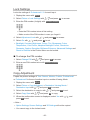
Lock Settings
Locks the settings of Professional1 / 2 for each input.
1. Display the menu with MENU.
2.Select Picture > Lock Settings with
/
and press OK to access.
3. Enter the PIN number (4 digits) with Numeric buttons.
●●
Enter the PIN number twice at first setting.
●●
Make a note of the PIN number in case you forget it.
4.Select Adjustment Lock with
5.Select On with
●●
/
/
and press OK to access.
and press OK to set.
Backlight, Contrast, Brightness, Colour, Tint, Sharpness, Colour
Temperature, Vivid Colour, Adaptive Backlight Control, Resolution
Remaster, Caption Smoother, Brilliance Enhancer, Advanced Settings and
Reset to Defaults in the Picture Menu can be locked.
■■To change the PIN number
1.Select Change PIN with
/
and press OK to access.
2. Enter a new PIN number twice with Numeric buttons.
Copy Adjustment
Copies the picture settings of True Cinema, Monitor, Custom, Professional1
or Professional2 to those of another input or another Viewing Mode.
1. Display the menu with MENU.
2.Select Picture > Copy Adjustment > Destination Viewing Mode /
Destination Input with
/
and press OK to access.
3. Select the destination to copy to with
4.Select Copy Start with
/
/
and press OK to set.
and press OK to copy.
5. When the confirmation screen is displayed, select Yes with
press OK to set.
/
and
= Note =
●●
Option Settings, Screen Settings and 3D Settings will not be copied.
●●
You cannot copy to the locked mode.
- 66 -
For best audio
Sound mode
1. Display the menu with MENU.
2.Select Sound > Mode with
3. Select the mode with
/
/
and press OK to access.
and press OK to set.
Mode
(Standard / Music / Ambience / User)
Selects your favourite sound mode for each input.
Standard:
Provides the suitable sound quality for all types of scenes.
Music:
Improves sound quality for watching music videos, etc.
Ambience:
Improves spatial effects and provides clear sounds.
User:
Adjusts the sounds manually using the equaliser to suit your favourite
sound quality.
●●
In each mode, Bass, Treble, Surround, Bass Boost and Digital Remaster
can be adjusted and stored.
●●
For the User mode, Equaliser will be available in the Sound Menu instead
of Bass and Treble. Select Equaliser and adjust the frequency.
Watching > For best audio > Basic settings
●●
This function is effective only for the sound from TV speakers.
- 67 -
Basic settings
1. Display the menu with MENU.
2.Select Sound with
/
and press OK to access.
3. Select one of the following items with
/
and press OK to access.
Bass / Treble / Equaliser / Balance / Surround / Bass Boost / Digital
Remaster
4. Set with
/
/
/
and press OK to store.
Bass
Adjusts level to enhance or minimise lower, deeper sound output.
Treble
Adjusts level to enhance or minimise sharper, higher sound output.
Equaliser
Adjusts the frequency level to suit your favourite sound quality.
●●
This function is available when Mode is set to User.
●●
Select the frequency and change the frequency level using
●●
To enhance the bass sound, raise the level of the lower frequency. To
enhance the treble sound, raise the level of the higher frequency.
●●
To reset the levels of each frequency to the default settings, select Reset
to Defaults with
/
and press OK.
●●
This function is effective only for the sound from TV speakers.
Balance
Adjusts volume level of right and left speakers.
- 68 -
/
.
Surround
(Stadium / Hall / Natural / Off)
Selects surround sound settings.
Stadium:
Provides the sound effect such as a stadium.
Hall:
Provides the sound effect such as a concert hall.
Natural:
Controls the reverberation to make the voice sound clearer.
●●
This function is effective only for the sound from TV speakers.
Bass Boost
(On / Off)
Enhances the effect of bass sounds.
●●
This function is effective only for the sound from TV speakers.
Digital Remaster
(On / Off)
Compensates a compressed audio signal to reproduce the original sound
quality.
●●
This function is effective only for the sound from TV speakers.
- 69 -
Volume settings
1. Display the menu with MENU.
2.Select Sound with
/
and press OK to access.
3. Select one of the following items with
/
and press OK to access.
Speaker Setting / Headphone Volume / Auto Gain Control / Volume
Correction / Speaker Distance to Wall
4. Set with
/
/
/
and press OK to store.
Speaker Setting
(TV Speaker / Headphones / Off)
Selects the sound output to adjust volume. Set to Off when using the external
speakers.
●●
Sound from TV speaker turns off when Headphone or Off is selected.
Headphone Volume
Adjusts the volume of headphones.
Auto Gain Control
(On / Off)
Automatically regulates large sound level differences between channels and
inputs.
Volume Correction
Adjusts the volume of each individual channel or input mode.
Speaker Distance to Wall
(Up to 30cm / Over 30cm)
Compensates for the low frequency sound due to the distance between the
speakers and the wall.
●●
If the back space between the TV and wall is within 30 cm, Up to 30cm is
recommended.
●●
If the back space between the TV and wall is over 30 cm, Over 30cm is
recommended.
●●
This function is effective only for the sound from TV speakers.
- 70 -
Voice Guidance Settings
1. Display the menu with MENU.
2.Select Sound > Voice Guidance Settings with
access.
3. Select one of the following items with
/
/
and press OK to
and press OK to access.
Voice Guidance / Speed / Volume / Language / User Level / Web Browser
4. Set with
/
/
/
and press OK to store.
Voice Guidance
(On / Off)
Set to On to enable voice guidance of the basic features (on-screen
messages, etc.) for visually impaired users.
Speed
(Fast / Normal / Slow)
Selects the readout speed for the voice guidance.
Volume
(Max / Mid / Min)
Selects the volume for the voice guidance.
Language
Changes language for the voice guidance.
●●
All languages may not be available. When the selected language is not
supported, Language is set to English automatically.
User Level
(Beginner / Expert)
Selects the level of verbosity for the voice guidance.
Web Browser
(On / Off)
Set to On to enable voice guidance of the network contents in web browser
function.
- 71 -
Audio Description
1. Display the menu with MENU.
2.Select Sound > Audio Description with
3. Select one of the following items with
/
/
and press OK to access.
and press OK to access.
Preferred Audio Type / Volume / Speakers / Headphones
4. Set with
/
/
/
and press OK to store.
Preferred Audio Type
(Standard / Audio Description)
Narration settings for visually impaired users
Set to Audio Description to activate the narration sound track when available
on the broadcast.
●●
The availability of audio description sound track is indicated by AD in the
information banner.
●●
For DVB
●●
Not valid on the sub screen in multi window mode
Volume
Adjusts the volume for Audio Description.
●●
For DVB
Speakers
(Mix / Standard)
Set to Mix to activate the description sound track from TV speakers.
●●
For DVB
Headphones
(Mix / Standard)
Set to Mix to activate the description sound track from headphones.
●●
For DVB
- 72 -
Advanced settings
1. Display the menu with MENU.
2.Select Sound with
/
and press OK to access.
3. Select one of the following items with
/
and press OK to access.
MPX / Audio Preference / SPDIF Selection / SPDIF Delay / HDMI Input /
DisplayPort Input / ARC Output
4. Set with
/
and press OK to store.
MPX
Selects multiplex sound mode (if available).
Stereo:
Use this normally.
Mono:
When stereo signal cannot be received
M1 / M2:
Available while mono signal is transmitted
●●
For Analogue
Audio Preference
(Auto / Multichannel / Stereo / MPEG)
●●
Selectable options vary depending on the country you select.
Selects the initial setting for audio tracks.
Auto:
Automatically selects the audio tracks if a programme has more than
two tracks. The priority is given in the following order - Dolby Digital
Plus, HE-AAC, Dolby Digital, MPEG.
Multichannel:
The priority is given to multi-channel audio track.
Stereo:
The priority is given to stereo (2ch) audio track.
MPEG:
The priority is given to MPEG.
●●
Dolby Digital Plus and Dolby Digital are the methods of coding digital
signals developed by Dolby Laboratories. Apart from stereo (2ch) audio,
these signals can be multi-channel audio.
- 73 -
●●
HE-AAC is a perceptual coding method used to compress digital audio for
efficient storage and transmission.
●●
MPEG is an audio compression method that compresses audio to the
smaller size without any considerable loss of audio quality.
●●
Dolby Digital Plus and HE-AAC are the technologies for HD (High
definition) programmes.
●●
For DVB
SPDIF Selection
(Auto / PCM)
Selects the initial setting for digital audio output signal from DIGITAL AUDIO
and HDMI2 / HDMI4 (ARC function) terminals.
●●
SPDIF is a standard audio transfer file format.
Auto:
Dolby Digital Plus, Dolby Digital and HE-AAC multi-channel are output
as Dolby Digital Bitstream. MPEG is output as PCM. DTS is output as
DTS for video contents of Media Player / Network services.
PCM:
Digital output signal is fixed to PCM.
●●
ARC (Audio Return Channel) is a function of digital audio output using
HDMI cable.
●●
For DVB or video contents of Media Player / Network services
Media Player > Video mode > Audio output settings
Network > Videos > Audio output settings
SPDIF Delay
Adjusts the delay time of the sound output from DIGITAL AUDIO and HDMI2 /
HDMI4 (ARC function) terminals if the sound does not synchronise the image.
●●
For DVB
- 74 -
HDMI Input
(Digital / Analogue)
Selects to fit the input signal.
Watching > External equipment > HDMI features
Digital:
When sound is carried via the HDMI cable connection
Analogue:
When sound is not carried via the HDMI-DVI adaptor cable connection
●●
For HDMI input
DisplayPort Input
(Digital / Analogue)
Selects to fit the input signal.
Digital:
When sound is carried via the DisplayPort cable connection
Analogue:
When sound is not carried via the DisplayPort cable connection
●●
For DisplayPort input
ARC Output
(HDMI2 / HDMI4)
Selects ARC output terminal settings.
●●
To use 4K compatible amplifier, connect an amplifier to HDMI4 and select
HDMI4.
- 75 -
TV Guide
Using TV Guide
TV Guide - Electronic Programme Guide (EPG) provides an on-screen listing
of the programmes currently broadcast and the forthcoming broadcasts over
the next seven days (depending on the broadcasters).
1.Display TV Selection with TV.
2. Select the mode with
/
and press OK to set.
DVB-S / DVB-C / DVB-T / Analogue
3.Display TV Guide with GUIDE.
●●
Press again to change the layout. (Landscape / Portrait)
–View Landscape to see several channels.
–View Portrait to see one channel by time.
●●
Depending on the country you select, you can select the type of TV Guide.
(Default Guide)
1) Display the menu with MENU.
2)Select Setup > Display Settings > Default Guide with
OK to access.
3)Select Channel List / TV Guide with
/
and press
and press OK to set.
TV Guide:
Electronic Programme Guide (EPG) is available.
Channel List:
The channel list will appear instead of EPG.
- 76 -
/
(Example)
TV screen
Date
Time
Programme
D (DVB-T) / A (Analogue)
Channel position and name
●●
To watch the programme
1) Select the current programme with
access.
/
/
/
and press OK to
– The current programme is displayed on the top left of the screen.
2)Select View with
/
and press OK to watch. (DVB)
– To use Timer Programming
Watching > TV Guide > Timer Programming
●●
To the previous day (DVB)
(red)
●●
To the next day (DVB)
(green)
●●
To view a channel list of the selected type
1) Display the type list with
2) Select the type with
/
(yellow).
and press OK to view.
- 77 -
●●
To search programme titles and view a list of the searched programmes
(DVB) (if available)
1) Display the search list with
2)Select Search with
/
3) Enter characters with
(yellow).
and press OK to access.
/
/
/
and press OK to set.
– You can set characters using Numeric buttons.
Functions > Setting characters > Using Numeric buttons
4)Press
(green) to start searching.
– All the programme titles including the word you set will be listed.
– Searching without any characters will list all programmes including
current programmes.
●●
To view a channel list of the selected category
1) Display the category list with
2) Select the category with
(blue).
/
and press OK to view.
– To list favourite channels, set Favourites Edit.
Watching > Tuning and editing channels > Favourites Edit
●●
To view more details of the programme (DVB)
1) Select the programme with
2)Press
/
/
/
.
to view.
– Press again to return to TV Guide.
●●
To exit TV Guide
EXIT
= Note =
●●
When this TV is turned on for the first time, or the TV is switched off for
more than a week, it may take some time before TV Guide is completely
shown.
●●
This function varies depending on the country you select.
●●
The postcode entry or update may be required to use the GUIDE Plus+
system depending on the country you select.
1) Display the menu with MENU.
2)Select Setup > Other Settings > GUIDE Plus+ Settings with
press OK to access.
3) Follow the on-screen instructions.
- 78 -
/
and
Update:
Performs the update of the GUIDE Plus+ schedule for the GUIDE
Plus+ system (only available in some countries).
Postcode:
Sets your postcode to receive local information in the GUIDE Plus+
system (only available in some countries).
System Information:
Displays the system information of the GUIDE Plus+ system (only
available in some countries).
●●
DVB-T and Analogue channels are displayed on the same TV Guide
screen. D and A may be displayed to distinguish DVB-T and Analogue
channels. There will be no programme listings for Analogue channels.
Timer Programming
This function allows you to select programmes that you want to be reminded
to watch or record to the USB HDD.
1. Select the forthcoming programme with
access.
2.Select USB HDD Rec. / Reminder with
●●
/
/
/
/
and press OK to
and press OK to set.
To check / change / cancel a timer event
Recording > Timer Programming > Editing Timer Programming
●●
LED will turn to orange in Standby mode if Timer Programming is set.
●●
To return to TV Guide
BACK/RETURN
●●
If you select the current programme, a confirmation screen asking
whether you want to watch or record the programme appears. Select
Timer Programming with
/
and press OK to set USB HDD Rec. to
record from the time you finish the timer event setting.
●●
is displayed on the TV Guide screen if Timer Programming is set
from TV Guide.
●●
Depending on the country you select, you can set Signal Supported
Recording (see below).
- 79 -
= Note =
●●
Not valid in Analogue
●●
Timer Programming only works reliably if correct time information is
received via the signal from the broadcaster or service provider.
●●
Depending on the progress of recording, analogue channel may not be
selected.
●●
When recording programmes to the USB HDD, be sure to format the USB
HDD and enable it to record in USB Device Setup.
Recording > USB HDD setup
●●
To set timer programming events of this TV on the network equipment
(smartphone, etc.) from outside the home network
Recording > Timer Programming > Remote recording
■■Signal Supported Recording
Signal Supported Recording is Timer Programming which is controlled by
information from the TV Guide; if programme start and end times are changed
by the broadcaster, the timer event will follow the change. Note that Signal
Supported Recording only works reliably if correct information is received
from broadcasters.
●●
●●
The availability of this function depends on the country and TV mode you
select.
is displayed on the timer event if Signal Supported Recording is set.
= Note =
●●
If you edit the start time or end time of a signal supported recording event
by more than 10 minutes, it will no longer follow the broadcaster’s changes
to the start or end time. The start and end times will become fixed.
- 80 -
Teletext
Viewing Teletext
1. Switch to teletext with TEXT.
●●
Displays the index page (content varies depending on the broadcasters).
●●
Current / sub page numbers are displayed on the top left of the screen.
●●
Time / date is displayed on the top right of the screen.
●●
Colour bar is displayed on the bottom of the screen.
2. Select the page with Numeric buttons,
(coloured buttons).
●●
/
or
To adjust contrast
1)Press MENU three times to display Contrast.
2) Adjust with
●●
/
and press OK to set.
To exit teletext
EXIT
■■Reveal hidden data
1.Press MENU.
2. Reveal with
●●
(red).
Press again to rehide.
■■To view a favourite page stored
Press STTL to view a favourite page.
●●
Call up the page stored on
●●
Factory setting is “P103”.
(blue). (List mode)
■■FULL / TOP / BOTTOM
1.Press MENU.
2.Press
(green) to change the layout.
- 81 -
■■Watch TV and teletext in two windows at once
1.Press MENU twice.
2.Set Picture and text to On / Off with
●●
/
.
Operations can be made only in teletext screen.
■■Store frequently viewed pages in the colour bar (List mode)
1.Press
(coloured buttons) while the page is displayed.
2. Press and hold OK.
●●
The stored page number changes to white.
●●
To change stored pages
1)Press
(coloured buttons) to change.
2) Enter a new page number with Numeric buttons.
3) Press and hold OK.
■■View sub page
The number of sub pages is displayed on the top of the screen. Press
to view sub page. (Only when teletext has more than one page.)
/
●●
The number of sub pages varies depending on the broadcasters (up to 79
pages).
●●
Searching may take time while you are watching TV.
●●
To view a specific sub page
1)Press MENU.
2)Press
(blue).
3) Enter the 4-digit number (e.g. P6, press
- 82 -
).
Teletext mode
Teletext services are the text information provided by the broadcasters.
●●
The features may vary depending on the broadcasters.
1. Display the menu with MENU.
2.Select Setup > Display Settings > Teletext with
access.
3.Select TOP (FLOF) / List with
/
/
and press OK to
and press OK to set.
■■FLOF (FASTEXT) mode
In FLOF mode, four differently coloured subjects are situated on the bottom of
the screen.
To access more information about one of these subjects, press the
appropriate coloured button.
This facility enables fast access to information on the subjects shown.
■■TOP mode (in case of TOP text broadcasting)
TOP is a particular improvement of the standard teletext service that results in
an easier search and effective guide.
●●
Fast overview of the teletext information available
●●
Easy to use step-by-step selection of the topical subject
●●
Page status information on the bottom of the screen
●●
Available page up / down
(red) /
●●
(green)
To select among subject blocks
(blue)
●●
To select next subject within the subject block
(yellow)
(After the last subject, it moves to the next subject block.)
■■List mode
In List mode, four differently coloured page numbers are situated on the
bottom of the screen. Each of these numbers can be changed and stored in
the TV’s memory.
Watching > Teletext > Viewing Teletext
- 83 -
Teletext Character Set
Selects teletext language font.
1. Display the menu with MENU.
2.Select Setup > Display Settings > Teletext Character Set with
press OK to access.
3. Select the font with
/
/
and
and press OK to set.
West:
English, French, German, Greek, Italian, Spanish, Swedish, Turkish,
etc.
East1:
Czech, English, Estonian, Lettish, Rumanian, Russian, Ukrainian, etc.
East2:
Czech, Hungarian, Lettish, Polish, Rumanian, etc.
- 84 -
3D
Note
●●
Display the image (TV, external input, etc.) full-screen for viewing 3D.
●●
If light appears to flicker under fluorescents or dimmers when using the 3D
Eyewear, change the setting of 3D Refresh Rate.
Watching > 3D > 3D Settings
●●
Do not exert pressure on or scratch the lens of the 3D Eyewear.
●●
3D content will not be correctly visible if the 3D Eyewear is worn upside
down or back-to-front.
●●
When viewing 3D images, make sure your eyes are at an approximately
horizontal level and keep a position where you do not see double images.
●●
Do not wear the 3D Eyewear when watching something other than 3D
images. Liquid crystal displays (such as computer screens, digital clocks
or calculators, etc.) may be difficult to see while wearing the 3D Eyewear.
●●
Do not use the 3D Eyewear as sunglasses.
●●
3D effects may be perceived differently depending on the person.
- 85 -
3D Eyewear - Functions
■■Part names and functions
Power button / Mode change / Indicator lamp
●●
Power button
– Press and hold for approx. 1 second to turn the 3D Eyewear on.
(The indicator lamp lights for 2 seconds.)
– Press and hold for 3 seconds or more to turn the 3D Eyewear off.
(The indicator lamp lights 3 times.)
●●
Mode change
– Press and hold for approx. 1 second to change the mode between
3D and 2D (view a 3D image in 2D).
– When power is off, press and hold for approx. 5 seconds to change
to registration mode.
Watching > 3D > 3D Eyewear - Registration
●●
Indicator lamp
– Lights or flashes during use to show the status (see below).
Protection film
– Peel off the protection film on both side of the lens.
Insulating sheet
– When using for the first time, remove the insulating sheet. Pull the
insulating sheet.
Battery cover
– To replace the battery
Watching > 3D > 3D Eyewear - Replacing battery
- 86 -
■■Indicator lamp status
●●
Lights red for 2 seconds when turned on:
Sufficient battery level
●●
Flashes 5 times when turned on:
Low battery level
●●
Flashes red:
Under registering
●●
Flashes red once every 1 second:
Under reconnecting to the TV
●●
Flashes red 3 times:
Power off (Press and hold for more than 3 seconds when in use,
or automatically power off when registering / reconnecting fails, or
connection is lost.)
●●
Flashes red once every 2 seconds when in use:
3D mode is selected.
●●
Flashes red twice every 4 seconds when in use:
2D mode is selected.
■■Storing and cleaning the 3D Eyewear
●●
Store the 3D Eyewear in a cool, dry place.
●●
Clean using a soft, dry cloth.
– Wiping the 3D Eyewear with a cloth that is covered in dust or dirt may
scratch the eyewear. Shake off any dust from the cloth before use.
– The lens of the 3D Eyewear is easily broken. Be careful when cleaning
the lens.
●●
Do not use benzene, thinner or wax on the 3D Eyewear, otherwise this
may cause peeling of the paint.
●●
Do not dunk the 3D Eyewear in liquid such as water.
- 87 -
3D Eyewear - Registration
■■First registration
Perform the first registration when the 3D Eyewear is used for the first time.
1. Turn the TV on.
2. Press Power button for about 1 second to turn the 3D Eyewear on.
●●
The lamp lights for about 2 seconds and then flashes.
●●
The 3D Eyewear will be turned on and the registration will start.
●●
Place the 3D Eyewear within 50 cm from the TV while registration is in
progress.
3. After the registration is successfully completed, the 3D Eyewear will
reconnect with TV automatically when the 3D Eyewear is turned on near
the TV in 3D mode.
■■Registration again
When connection with the registered TV fails, or when using with another TV,
re-register the 3D Eyewear.
1. Turn the TV on.
2. Within 50 cm from the TV, press Power button until lamp lights, then
release it to start registration.
3. After the registration is successfully completed, the 3D Eyewear will
reconnect with TV automatically when the 3D Eyewear is turned on near
the TV in 3D mode.
= Note =
●●
If the registration failed, the 3D Eyewear will be turned off. In this case,
turn the TV off and perform from step 1.
- 88 -
3D Eyewear - Replacing battery
When the battery is running low, the indicator lamp flashes 5 times on turning
the 3D Eyewear on. In this case, early battery replacement is recommended.
●●
Dispose of the old batteries as non-burnable rubbish, or in line with the
waste disposal regulations in your local area.
1. Remove the battery cover using pen tip or screwdriver (minus -), etc.
2. Replace the battery (coin-shaped lithium battery CR2025).
●●
If difficulty, remove it with the tip of the driver.
●●
Note the correct polarity (+ or -).
3. Attach the battery cover.
- 89 -
Viewing 3D
You can enjoy viewing 3D images with contents or programmes
corresponding to the 3D effect by wearing the 3D Eyewear.
●●
This TV supports Frame Sequential, Side by Side and Top and Bottom 3D
formats.
– Frame Sequential is the 3D format that the images for the left and right
eyes are recorded with the high definition quality and alternately played
back.
●●
3D content of 4K format is not supported.
●●
The 3D Eyewear must be worn to view 3D images. Perform the First
Registration when the 3D Eyewear is used for the first time.
Watching > 3D > 3D Eyewear - Registration
1. Turn the 3D Eyewear on and put it on.
●●
Connection status and battery status are displayed on the bottom right
of the screen.
2. View the 3D images.
●●
Safety precautions will be displayed when you first watch the 3D image.
Select Yes or No to continue to view 3D images.
If you select Yes, this message will be displayed again in the same
condition after Mains Power On / Off switch is next turned on. Select
No if you do not want to display this message again.
●●
Turn off the 3D Eyewear after using it.
■■Playing back 3D-compatible Blu-ray disc (Frame Sequential)
●●
Connect the 3D-compatible player via a fully wired HDMI compliant cable.
(If you use the non 3D-compatible player, the images will be displayed in
2D mode.)
●●
If the input mode is not switched automatically, select the input mode
connected to the player.
Watching > External equipment > Watching external input
■■3D-supported broadcast
●●
Please consult the suppliers of contents or programmes for availability of
this service.
- 90 -
■■3D photos and 3D videos taken by 3D-compatible Panasonic
products
●●
Available in Media Player and Network services
Media Player
Network
■■2D images converted to 3D
●●
Set to 2D→3D mode in 3D Mode Selection.
Watching > 3D > 3D Mode Selection
●●
Contents of 4K format cannot be changed to 3D mode.
- 91 -
3D Mode Selection
You can easily change the viewing mode between 2D and 3D with 3D.
1.Display 3D Mode Selection with 3D.
2. Select the mode with
●●
/
and press OK to set.
Items of 3D Mode Selection vary depending on the condition.
3D / 2D:
Displays the appropriate image as you desire without selecting 3D format.
●●
This mode may not work properly depending on the source image
format. In this case, select the appropriate 3D format manually.
■■To change 3D format manually
When the image is not changed properly using 3D / 2D mode, use this
manual setting.
1.Display 3D Mode Selection (Manual) with
operation.
2. Select the mode with
/
(red) during above
and press OK to set.
Original:
Displays the source image as it is.
●●
Use to identify the format type of the source image.
Watching > 3D > Source image format
Side by Side - 3D / Side by Side - 2D / Top and Bottom - 3D /
Top and Bottom - 2D:
Displays the mode you select.
●●
Not valid in Analogue and AV mode
2D→3D:
Converts 2D images into 3D.
●●
Please note the 3D images appear slightly different from the
originals.
●●
Using this function for profit-making purposes, or publically showing
images converted from 2D to 3D in places such as shops or hotels,
etc. may infringe on the rights of the copyright holder protected
under copyright law.
- 92 -
3D Settings
1. Display the menu with MENU.
2.Select Picture > 3D Settings with
/
3. Select one of the following items with
and press OK to access.
/
and press OK to access.
3D Detection / 3D Signal Message / 3D Refresh Rate / 2D→3D Depth /
3D Adjustment / L/R Picture Swap / Edge Smoother / Safety Precautions
4. Set with
●●
/
and press OK to store.
To exit the menu screen
EXIT
3D Detection
(On (Advance) / On / Off)
Selects whether to switch to the 3D mode automatically or not.
On (Advance):
Detects all the 3D format signals and displays the 3D image
automatically.
On:
Detects the particular 3D format signals (Frame Sequential, etc.) and
displays the 3D image automatically.
●●
To view 3D images without any notifications and operations, set to On
(Advance).
3D Signal Message
(On / Off)
Selects whether to give a notification message when a signal of 3D format is
found or not.
●●
Not valid when 3D Detection is set to On (Advance)
●●
For DVB, Component, HDMI and DisplayPort input
3D Refresh Rate
(Auto / 100Hz / 120Hz)
Reduces juddering and flicker noises of the 3D images when using the 3D
Eyewear.
100Hz:
If light appears to flicker under fluorescents (or dimmers) of 50 Hz.
120Hz:
If light appears to flicker under fluorescents (or dimmers) of 60 Hz.
- 93 -
2D→3D Depth
(Max / Mid / Min)
Selects a level of 3D-image depth for viewing converted 2D images.
3D Adjustment
(On / Off)
Adjustment of the 3D effect (except in 2D→3D mode)
Set to On to enable Effect setting.
●●
When setting to On, a safety precaution message will appear. Read it
carefully and press BACK/RETURN to go to Effect setting.
●●
When adjusting, take into account that the vision of 3D images varies
among different individuals.
Effect:
Adjusts the 3D depth according to the contents or to your preference.
(This setting will not be memorised when changing the input mode or
channel.)
L/R Picture Swap
(L/R (Normal) / R/L (Reversed))
Swaps pictures for left eye and right eye (except in 2D→3D mode).
Select R/L (Reversed) if you feel that the sense of depth is unusual.
●●
This setting will not be memorised when changing the input mode or
channel.
Edge Smoother
(On / Off)
Set to On if you feel the contoured parts of an image are not smooth enough
(except in 2D→3D mode).
Safety Precautions
Displays the precautions for viewing 3D images.
= Note =
●●
Display the image (TV, external input, etc.) full-screen to use this function
completely.
- 94 -
Source image format
If the picture appears to be abnormal, refer to the table of images that can be
seen for each 3D Mode Selection (Manual) and the source image format, and
select the correct 3D mode.
●●
3D images are displayed correctly with appropriate 3D format as following
yellow boxes.
Source image format
Side by Side
Top and Bottom
Normal format (2D)
3D Mode Selection
Original
Side by Side - 3D
Top and Bottom - 3D
2D→3D
: When selecting Side by Side - 2D or Top and Bottom - 2D, the images will
be displayed without 3D effect.
●●
Depending on the player or broadcasts, the image may be different from
the above illustrations.
- 95 -
Tuning and editing channels
Setting menu
You can retune channels, create your favourite channel lists, skip unwanted
channels, etc.
1.Display TV Selection with TV.
2. Select the mode with
/
and press OK to set.
DVB-S / DVB-C / DVB-T / Analogue
3. Display the menu with MENU.
4.Select Setup > Tuning Menu with
/
and press OK to access.
DVB-S Tuning Menu / DVB-C Tuning Menu / DVB-T Tuning Menu /
Analogue Tuning Menu
●●
The menu name varies depending on the TV mode.
5. Select one of the functions with
/
and press OK to access.
Favourites Edit / Channel List / Auto Setup / Manual Tuning / Update
Channel List / Favourite Network / New Channel Message / Service
Replacement / Signal Condition / Attenuator / Add TV Signal
●●
The function items vary depending on the TV mode and country you
select.
Favourites Edit
■■List favourite DVB channels
Create your favourite channel lists from various broadcasters (up to 4:
Favourites 1 to 4).
The favourites lists are available from Category in the information banner and
the TV Guide screen.
Watching > Basic > Information banner
Watching > TV Guide > Using TV Guide
1.Select Favourites Edit with
/
and press OK to access.
2. Select a channel to list from all DVB channels with
●●
●●
appears when the channel is encrypted.
To display other favourites
(green)
●●
To sort channel names in alphabetical order
(red)
- 96 -
/
.
●●
To change the category
(blue)
3.Press OK to add it to favourites list.
●●
●●
To add all channels to the list
1)Press
(yellow).
2)Press
(green) to add all.
To add consecutive channels to the list at once
1)Press
(yellow).
2) Make the channel block with
/
and press OK to add.
4.Press BACK/RETURN and OK to store.
■■Edit DVB favourites list
You can edit the favourites list while the cursor is on the channel in the
favourites list.
●●
To move the channel
1) Select the channel with
2)Press
/
.
(green).
3) Select the new position with
4)Press
●●
/
or Numeric buttons.
(green) to store.
To delete the channel
1) Select the channel with
/
.
2)Press OK to delete.
–Press
●●
(yellow) to delete all channels.
To name the favourites
1)Press
(red).
2) Enter characters (maximum 10 characters) with
Numeric buttons, and press OK to set.
3)Press BACK/RETURN to store.
- 97 -
/
/
/
or
Channel List
■■Skip unwanted DVB / Analogue channels
You can hide (skip) unwanted channels. The hidden channels cannot be
displayed except in this function.
1.Select Channel List with
2. Select a channel with
/
/
and press OK to access.
.
3.Press OK to set Reveal / Hide (skip).
: Reveal
: Hide (skip)
●●
To reveal all channels (DVB / Analogue)
(yellow)
●●
To sort channel names in alphabetical order (DVB)
(red)
●●
To change the category (DVB)
(blue)
■■Edit DVB / Analogue Channels
●●
To swap / move the channel position (if available)
1)Press
(green) to edit.
2) Set the new position with Numeric buttons or
(green) to store.
●●
/
, and press
To retune each channel (Manual Tuning)
(red)
– For Analogue
Watching > Tuning and editing channels > Manual Tuning
– Only for the revealed channels
- 98 -
●●
To rename the channel name (Analogue)
1)Press
(blue) to edit.
2) Enter characters (maximum 5 characters) with
Numeric buttons, and press OK to set.
/
/
/
or
3)Press BACK/RETURN to store.
●●
To exchange channel list (DVB-S)
1) Display the menu with MENU.
2)Select Setup > Other Settings > Exchange Channel List with
and press OK to access.
/
3) Follow the on-screen instructions.
– During the operation, remove USB devices other than the USB Flash
Memory used for this function.
= Note =
●●
If a VCR is connected only with the RF cable in Analogue, edit VCR.
Auto Setup
Automatically retunes the channels received in the area.
●●
This function is available if channel tuning is already performed.
●●
Only the selected mode is retuned. All the previous tuning settings are
erased.
●●
If Child Lock PIN number has been set, the PIN number is required.
Functions > Child Lock > PIN number
●●
If tuning has not been done completely, set Manual Tuning.
Watching > Tuning and editing channels > Manual Tuning
- 99 -
■■DVB-S
1.Select Antenna System with
/
and press OK to access.
2.Select One LNB / MiniDiSEqC / DiSEqC 1.0 / Single Cable with
press OK to set.
/
and
One LNB:
Compatible with single LNB.
MiniDiSEqC:
Up to 2 LNBs can be controlled.
DiSEqC 1.0:
Up to 4 LNBs can be controlled.
Single Cable:
When using the Single Cable router, up to 8 user bands are available.
●●
You can receive several satellites if you have DiSEqC control antenna
system.
●●
This TV supports DiSEqC Version 1.0.
3.Select LNB Configuration with
●●
Select Dual Tuner Mode with
tuner function.
4.Select LNB / Satellite with
●●
/
/
and press OK to access.
/
, set to On with
and set with
Select IN 1 / IN 2 in Signal Input with
/
/
/
to use dual
.
to set for each tuner.
1)Set LNB first.
– If you set to One LNB, LNB is not selectable.
– If you set to MiniDiSEqC or Single Cable, select from LNB AA and
AB.
– If you set to DiSEqC 1.0, select from LNB AA, AB, BA and BB.
2)Set Satellite for the selected LNB.
–Select No Satellite if you do not know the connected satellite.
(Available satellite will be searched in Auto Setup.)
–Select User defined to set Test Transponder Frequency manually.
– If you set to Single Cable, additional settings are required. Set User
Band, User Band Frequency and PIN (depending on the Single
Cable router you use). For details, read the manual of the Single
Cable router.
Watching > Tuning and editing channels > Selectable satellites
5.Press BACK/RETURN to store.
6.Select Auto Setup with
/
and press OK to access.
- 100 -
7.Select Search Mode / Scan Mode with
8. Set with
●●
/
/
and press OK to access.
and press OK to store.
Scan Mode
Full:
Scans the whole frequency range.
Quick:
Scans the suitable frequency for the selected satellite.
●●
After settings, select Start scan with
/
and press OK to search.
9. The confirmation screen is displayed and press OK to start Auto Setup.
(Settings are made automatically.)
●●
When the operation is completed, the channel at the lowest position will
be displayed.
■■DVB-C, DVB-T, Analogue
1.Select Auto Setup with
/
and press OK to access.
2.Set DVB-C Auto Setup Settings with
(DVB-C)
●●
/
/
/
and press OK to store.
Scan Mode
Full:
Scans the whole frequency range.
Quick:
Scans the suitable frequency in your country.
●●
Normally set Frequency, Symbol Rate and Network ID to Auto. If Auto
is not displayed or if necessary, enter each value specified by your
cable provider with Numeric buttons.
●●
After settings, select Start scan with
/
and press OK to search.
3. The confirmation screen is displayed and press OK to start Auto Setup.
(Settings are made automatically.)
●●
When the operation is completed, the channel at the lowest position will
be displayed.
- 101 -
■■Auto Setup using the buttons on the TV
1. Press and hold INPUT/OK/HOLD for MENU button for 3 seconds to
display the menu.
2.Set Auto Setup with following control panel buttons.
●●
Move the cursor / select from a range of options / select the menu item
(up and down only)
●●
Access the menu / store settings after adjustments have been made or
options have been set with INPUT/OK/HOLD for MENU button
Manual Tuning
●●
Normally use Auto Setup or Update Channel List to retune DVB channels.
●●
If tuning has not been done completely or for adjusting the direction of the
aerial or dish, use this function. (DVB)
●●
All DVB channels found will be added to Channel List.
■■DVB-S
●●
Please consult the received satellite broadcasting companies for the
setting.
1.Select Transponder Frequency / Symbol Rate / Polarisation / Modulation /
Service ID with
/
and set with
/
or Numeric buttons.
2.Select Start scan with
/
and press OK to search.
■■DVB-C
1. Enter the frequency with Numeric buttons.
●●
Normally set Symbol Rate and Service ID to Auto.
2.Select Start scan with
/
and press OK to search.
- 102 -
■■DVB-T
1. Select a channel with
channel.
●●
/
and adjust frequency with
/
for each
Set where the level of Signal Quality becomes the maximum.
2.Press OK to search.
■■Analogue
Set Analogue channel manually after Auto Setup.
●●
Set Sound System and Colour System, and then perform this function.
Normally set Colour System to Auto.
– SC1: PAL B, G, H / SECAM B, G
– SC2: PAL I
– SC3: PAL D, K / SECAM D, K
– F: SECAM L, L’
1. Select the channel position with Numeric buttons.
2. Select the channel with Channel Up / Down.
3. Search with
/
4.Select Store with
.
/
and press OK to set.
●●
Use Fine Tuning to make small adjustments to the tuning of an individual
programme (affected by weather conditions, etc.).
●●
If a VCR is connected only with the RF cable, select channel position 0.
- 103 -
Update Channel List
By updating the DVB channel list, you can add new channels, delete removed
channels or change channel names and positions automatically.
●●
The channel list is updated while keeping your settings in Favourites Edit,
Channel List, Child Lock, etc.
●●
Depending on the signal condition, the update may not work properly.
●●
To update DVB-S channels, set Search Mode and Scan Mode before
updating.
1)Select Search Mode / Scan Mode with
2) Set each item with
/
/
and press OK to access.
and press OK to store.
3) After settings, select Start scan with
/
and press OK to search.
New Channel Message
Selects whether to give a notification message when a new DVB channel is
found or not.
●●
When a notification message appears, you can perform Update Channel
List pressing OK.
Signal Condition
Selects a channel and checks the signal condition with indicators.
●●
A good Signal Strength is not an indication of suitable signal for DVB
reception.
●●
Vertical lines show the maximum signal value of the selected channel.
●●
To change the channel
●●
For DVB
- 104 -
Other settings
Favourite Network
Selects your favourite network for each broadcaster (only available in some
countries).
●●
For DVB-C, DVB-T
Service Replacement
(On / Off)
Set to On to display a message to switch to the available service (only
available in some countries).
●●
For DVB-C
Attenuator
(On / Off)
Sets the antenna system to use plural LNBs for receiving several satellites.
●●
If the DVB-C signal is too strong, the interference may occur. In this case,
set to On to weaken the signal automatically.
Add TV Signal
Adds the TV mode.
●●
This function is available if you skip any modes to tune in Auto Setup for
first using the TV.
- 105 -
Selectable satellites
■■Selectable satellites and dish alignment to tune DVB-S
channels
To ensure your satellite dish is correctly installed, please consult your local
dealer.
Also please consult the received satellite broadcasting companies for details.
●●
Intelsat at 85.2° East
●●
Hot Bird at 13° East
●●
ABS 1 at 75° East
●●
Eutelsat at 10° East
●●
Express at 53° East
●●
Eutelsat at 9° East
●●
Intelsat at 45° East
●●
Eutelsat at 7° East
●●
Turksat at 42° East
●●
Astra at 4.8° East
●●
Express at 40° East
●●
●●
Hellas at 39° East
Thor at 0.8° West /
Intelsat at 1° West
●●
Eutelsat at 36° East
●●
Amos at 4° West
●●
Eutelsat at 33° East
●●
Eutelsat at 5° West
●●
Astra at 28.2° East
●●
Eutelsat at 7° West
●●
Arabsat at 26° East
●●
Eutelsat at 8° West
●●
Eutelsat at 25.5° East
●●
Eutelsat at 12.5° West
●●
Astra at 23.5° East
●●
Telstar at 15° West
●●
Eutelsat at 21.5° East
●●
NSS at 22° West
●●
Astra at 19.2° East
●●
Intelsat at 24.5° West
●●
Eutelsat at 16° East
●●
Hispasat at 30° West
- 106 -
Recording
USB HDD setup
Preparations
You can record the digital TV programmes to the connected USB HDD and
enjoy playing back in various ways.
●●
Prepare the USB HDD for the exclusive use of recording with this TV.
●●
Connect the USB HDD to the USB 3 port with the USB cable.
●●
Be sure to connect the USB HDD to the socket outlet.
●●
To remove the USB HDD safely from the TV, perform Safely remove USB
in USB Device Setup.
Recording > USB HDD setup > Setting for USB HDD
●●
Check the terminal type and cable plugs are correct when connecting.
USB port
USB cable
USB HDD
Socket outlet
= Caution =
●●
All data in the USB HDD will be erased in the following cases:
– When formatting the USB HDD with this TV
Recording > USB HDD setup > Setting for USB HDD
– When formatting the USB HDD to use on PC, etc.
●●
When the TV is repaired due to a malfunction, you may have to format
the USB HDD again with this TV to use it. (All data will be erased after
formatting.)
●●
To use the USB HDD with your PC after recording with this TV, format it
again on your PC. (Special operations or tools may be necessary to format
on your PC. For details, read the manual of the USB HDD.)
- 107 -
●●
The data recorded on the USB HDD with this TV can only be played back
on this TV. You cannot play back its contents with another TV (including
the TV of the same model number) or any equipment.
●●
Do not turn the TV off, pull out the mains plug or remove the USB HDD
during operation (formatting, recording, etc.). Doing so may cause
malfunction of the device or damage the recorded data. (An electric
outage may also be a cause of malfunction.)
= Note =
●●
Analogue TV programme cannot be recorded on the USB HDD.
●●
The data broadcasting (MHEG, etc.), radio broadcasting will not be
recorded, and also the recording function will not work during the period
without any signal.
●●
Not all the programmes can be recorded depending on the broadcaster
and service provider.
●●
You cannot copy the recorded TV programmes of the USB HDD.
●●
The recorded content may not be played back properly depending on the
progress of recording.
●●
For more information of the USB HDD
Recording > Technical information > USB HDD
Setting for USB HDD
Format and set up the USB HDD with this TV in order to use it for recording.
All the USB devices recognised as a mass storage device will be listed.
●●
Please note that USB HDD will be formatted and all data in it will be
erased after this setup.
●●
Before setting, connect the USB HDD and be sure to turn on the USB
HDD.
Recording > USB HDD setup > Preparations
1. Display the menu with MENU.
2.Select Setup > USB Device Setup with
/
and press OK to access.
3. Select the USB HDD for recording with
/
and press OK to start setup.
●●
Some USB HDD may not be displayed.
●●
To display information of the highlighted device
4. When the caution and confirmation screen for using USB HDD is
displayed, select Yes with
/
and press OK to proceed.
- 108 -
5. When the confirmation screen of USB HDD name is displayed, select Yes
/
and press OK to set.
with
●●
The name for the USB HDD is created automatically. If you want to edit
the name, select Yes.
1) Enter characters with
OK to set.
/
/
/
or Numeric buttons, and press
2)Press BACK/RETURN to store.
6. When the confirmation screen to enable USB HDD for recording is
displayed, select Yes with
/
and press OK to set.
●●
●●
If another formatted USB HDD for recording already exists, this
confirmation screen will be displayed to switch to enable this USB HDD
for recording.
Mode of the USB HDD
: The USB HDD is available for recording / playing back.
Only one USB HDD on the list is available for recording.
: The USB HDD is available for playing back.
●●
To change the mode
OK
●●
To edit USB HDD name
(green)
●●
To format
(red)
●●
To remove the USB HDD safely from the TV
(yellow)
= Note =
●●
You can only select one USB HDD for recording at a time.
●●
You cannot change the settings for the USB HDD while recording is in
progress.
●●
Ensure that Dual Tuner Mode is set to On in Auto Setup to record 2
programmes simultaneously in DVB-S.
Watching > Tuning and editing channels > Auto Setup
- 109 -
Recording current programme
One Touch Recording
Records the current programme to the USB HDD immediately.
●●
Confirm the remote control code is “73”.
Watching > External equipment > Operating with TV’s remote control
1. Display the menu with MENU.
2.Select Setup > Recording Setup > One Touch Recording with
press OK to access.
/
and
3. Select the maximum recording time 30 / 60 / 90 / 120 / 180 (minutes) with
/
and press OK to set.
■■To start One Touch Recording
Press
to start.
■■To stop recording in progress
Press
to stop.
■■To play back or delete the recorded contents
Recorded TV programmes can be played back in Media Player.
1. Display icons of the feature with APPS.
2.Select Recorded TV with
/
/
/
and press OK to access.
Media Player > Recorded TV mode
●●
Even if One Touch Recording is in progress, you can play back all the
contents. (Depending on the USB HDD, playback may not be possible or
the recording may not work properly during playback.)
- 110 -
REW LIVE TV
Records the current programme to the USB HDD constantly within the
maximum recordable time.
●●
Confirm the remote control code is “73”.
Watching > External equipment > Operating with TV’s remote control
1. Display the menu with MENU.
2.Select Setup > Recording Setup > REW LIVE TV with
OK to access.
3.Select Auto with
/
/
and press
to start REW LIVE TV.
●●
When you select Auto, recording will start automatically.
●●
This recording may not start if another recording is in progress, TV signal
condition is bad or there are no images displayed.
■■To operate REW LIVE TV
●●
To pause
●●
To search backward (up to 90 minutes)
●●
After pausing or searching backward, the following buttons are available
for operation.
: Search backward
: Search forward
: Return to the current programme
OK : Playback / Pause
: Search backward / Search forward
: Pause / Resume
: Playback
: Return to the current programme
- 111 -
■■To stop REW LIVE TV
1. Display the menu with MENU.
2.Select Setup > Recording Setup > REW LIVE TV with
OK to access.
3.Select Off with
/
/
and press
to stop REW LIVE TV.
●●
If you stop REW LIVE TV, the recorded content for REW LIVE TV will be
deleted.
●●
REW LIVE TV will be stopped and the recorded content will be deleted
automatically in the following conditions: (Even if REW LIVE TV stops for
the following conditions, as long as the setting is Auto, a new recording will
start automatically in a condition that makes the recording available.)
– Other channels selected
– Locked channel selected
– Invalid channel selected
– No TV signal
– External input selected
– When the full-screen application (TV Guide, Media Player, eHELP, etc.)
is launched
– When the TV enters Standby or is turned off
- 112 -
Timer Programming
Setting Timer Programming
This function allows you to select programmes that you want to be reminded
to watch or record to the USB HDD.
●●
Not valid in Analogue
1.Display TV Selection with TV.
2. Select the mode with
/
and press OK to set.
DVB-S / DVB-C / DVB-T
3. Display the menu with MENU.
4.Select Timer > Timer Programming with
/
and press OK to access.
■■Set timer event details
1.Press OK to start making the settings.
2.Select USB HDD Rec. / Reminder with
/
.
USB HDD Rec.:
Records the programme to the USB HDD.
When the start time comes, the channel may be switched automatically
and the video and audio signals may be output. 2 minutes before the
start time, a reminder message may appear if you are watching TV.
●●
Press
(yellow) to select the appropriate CI module for the
programme to record.
Functions > Common Interface
Reminder:
Reminds you to watch the programme.
When you are watching TV, a reminder message appears 2 minutes
before the start time. Press OK to switch to the programmed channel.
3. Select the item (channel, date, start time, end time) with
/
/
with
/ .
●●
and
can also be entered with Numeric buttons.
- 113 -
/
and set
(Example)
!: Overlapped timer events
Function
(USB HDD Rec. / Reminder)
TV mode
: DVB-S
: DVB-C
: DVB-T
– You cannot change the mode within the menu.
Channel position, channel name, etc.
STTL: Displays subtitles (if available)
–Press
(yellow) to indicate subtitles and press again to
remove them.
–For Reminder
: Signal Supported Recording (if available)
Watching > TV Guide > Timer Programming
Date (You can set one day ahead with
.)
, select daily or weekly with
– Daily Sun-Sat: Sunday to Saturday
– Daily Mon-Sat: Monday to Saturday
– Daily Mon-Fri: Monday to Friday
– Weekly Sat / Fri / Thu / Wed / Tue / Mon / Sun: Same time on the
same day every week
Start time / End time / Duration (automatic display)
4. Store with OK.
- 114 -
Editing Timer Programming
1. Display the menu with MENU.
2.Select Timer > Timer Programming with
3. Select the event with
●●
/
/
and press OK to access.
.
To change a timer event
OK
– Correct as necessary.
Recording > Timer Programming > Setting Timer Programming
●●
To delete a timer event
1)Press
(red).
2)Press OK to delete.
●●
To display subtitles (if available)
(yellow)
– Press again to remove subtitles.
–For Reminder
●●
To cancel a timer event temporarily
(blue)
– Press again to stop cancelling.
■■To stop recording
1.Press
.
2. Select the programme with
recordings are in progress).
3.Select Yes with
/
/
and press OK to access (when 2
and press OK to stop.
■■To play back or delete the recorded contents
Recorded TV programmes can be played back in Media Player.
1. Display icons of the feature with APPS.
2.Select Recorded TV with
/
/
/
and press OK to access.
Media Player > Recorded TV mode
●●
The recorded content may not be played back properly depending on the
progress of recording.
- 115 -
Remote recording
You can set timer programming events of this TV on the network equipment
(smartphone, etc.) from outside the home network.
●●
Ensure the network connections and network settings are completed.
Network > Network connections
Network > Network settings
●●
Set TV Anywhere to On.
Network > Network settings > TV Anywhere Settings
●●
Additional information for the services may be found on the following
website.
http://panasonic.net/viera/support (English only)
= Note =
●●
This function is not available when the TV is turned off with Mains Power
On / Off switch.
●●
Depending on the network condition, this function may not be available.
Note
●●
TV Guide may also be used to set timer event.
Watching > TV Guide > Timer Programming
●●
Timer Programming can store up to 15 events.
●●
Timer Programming only works reliably if correct time information is
received via the signal from the broadcaster or service provider.
●●
For recording using Timer Programming, the TV must be either on or in
Standby. For reminders to be displayed, the TV must be on.
●●
Depending on the progress of recording, analogue channel may not be
selected.
●●
Recording an encrypted (copy-protected) programme may not be possible.
●●
2 minutes before the start time, a reminder message may appear if you
are watching TV.
– To remove the message and start the programming, press OK.
– To cancel the programming, press EXIT.
●●
LED will turn to orange in Standby mode if Timer Programming is set.
●●
Reminder messages will remain displayed until one of the following
occurs:
– You press OK to view the programme or EXIT to cancel the reminder.
– The timer event that the reminder is set for ends.
- 116 -
●●
“!” identifies that three or more timer events are overlapped. USB HDD
Rec. is given priority over Reminder. As for the overlapped recording
events, the first event starts and finishes as programmed. The next event
can then start.
●●
The recording of Timer Programming may automatically change the
channel to the programmed channel a few seconds before the start time.
●●
The recording of Timer Programming will be performed even if the TV is
in REW LIVE TV recording. In this case, REW LIVE TV recording will be
cancelled.
Recording > Recording current programme > REW LIVE TV
●●
For more information of the USB HDD
Recording > Technical information
- 117 -
Technical information
USB HDD
■■USB HDD
(for recording the digital TV programmes with this TV)
●●
The capacity of USB HDD that works with this TV is from 160 GB to 3 TB.
●●
Connect the USB HDD to the socket outlet to record and play back
properly with this TV.
●●
Use the USB HDD formatted with this TV.
Recording > USB HDD setup > Setting for USB HDD
●●
Regarding performance, not all USB HDDs are guaranteed. Check the
USB HDDs that have been tested for compatibility with this TV at the
following website.
http://panasonic.net/viera/support (English only)
= Note =
●●
Data modified with a PC may not be displayed.
●●
Do not remove the device while the TV is accessing data. Otherwise this
can damage the device or TV.
●●
Do not touch the pins on the device.
●●
Do not subject the device to a high pressure or impact.
●●
Insert the device in the correct direction. Otherwise this can damage the
device or TV.
●●
Electrical interference, static electricity, or erroneous operation may
damage the data or device.
- 118 -
Media Player
Using Media Player
Information
Media Player allows you to enjoy photo, video or music recorded on the
SD Card / USB Flash Memory / USB HDD / network device, and contents
recorded with this TV to the formatted USB HDD.
(Example)
Photo mode:
Still pictures recorded with digital cameras will be displayed.
Video mode:
Moving pictures recorded with digital video cameras and digital video data
will be played back.
Recorded TV mode:
(For exclusive USB HDD) TV programmes recorded on the USB HDD with
this TV will be played back.
Music mode:
Digital music data will be played back.
●●
During the operation, audio signal is output from DIGITAL AUDIO and
HDMI2 / HDMI4 (ARC function) terminals. But no video signals are output.
To use HDMI2 / HDMI4 with ARC function, connect an amplifier that has
ARC function, set to use theatre speakers and match the output setting in
ARC Output in the Sound menu.
Functions > VIERA Link “HDAVI Control™”
●●
Date shows the date on which the recording was made by the recording
equipment. For a file without a valid record date “ ” is shown.
●●
Pictures may not appear correctly on this TV depending on the recording
equipment used.
●●
Displaying may take some time when there are many files and folders.
●●
Partially degraded files may be displayed with reduced resolution.
●●
Picture setting may not work depending on the conditions.
- 119 -
●●
Folder and file names may be different from those on the digital camera or
digital video camera used.
■■To insert or remove the SD Card
Gently insert the SD Card with the label surface facing front. Push the centre
of the card until a click is heard. (To remove, push it again.)
Label surface
Cutout
■■To insert or remove the USB Flash Memory
Ensure alignment is straight and complete when inserting or removing.
●●
To remove the USB Flash Memory safely from the TV, perform Safely
remove USB in USB Device Setup.
1) Display the menu with MENU.
2)Select Setup > USB Device Setup with
3) Select the device with
●●
/
and press
/
and press OK to access.
(yellow) to set.
Connect the USB Flash Memory to the USB 1, 2 or 3 port.
- 120 -
= Note =
●●
To connect the USB HDD
Recording > USB HDD setup
●●
Check the terminal type and devices are correct when connecting.
●●
For the information of the devices
Media Player > Technical information
●●
For supported file formats
Media Player > Technical information
Selecting device / mode
1. Insert the SD Card or USB Flash Memory to the TV.
●●
When you insert the SD Card, Media Player will start automatically.
Media Player > Using Media Player > Information
●●
To play back contents in the USB HDD, ensure the connection and
settings are completed.
Recording > USB HDD setup
●●
To play back contents in the network device, ensure the connection and
settings are completed.
Media Player > Using Media Player > Network device
2.Display APPS List with APPS.
3.Select Media Player with
4. Select the device with
/
/
/
/
and press OK to access.
and press OK to access.
●●
If only one device is connected, this step will be skipped.
●●
The network device already connected to the TV is also displayed.
: Enter User / Password to access.
: User / Password are already entered.
5.Select Photo / Video / Music / Recorded TV with
access.
Photo
Media Player > Photo mode
Video
Media Player > Video mode
Music
Media Player > Music mode
Recorded TV
Media Player > Recorded TV mode
- 121 -
/
and press OK to
6. The thumbnail view will be displayed.
(Example)
●●
To display / hide information of the highlighted content
= Note =
●●
You may also access each mode directly from APPS List.
my Home Screen > APPS List > How to use
●●
Recorded TV is available for contents recorded on the USB HDD with this
TV.
●●
Select the appropriate device and content for playing back each file.
●●
You can use the following buttons during playback. Confirm the remote
control code is “73”.
Watching > External equipment > Operating with TV’s remote control
■■To change the device
You can change the current device to another device directly in the same
mode when two or more available devices are connected.
1. Display the device selection screen with
is displayed.
2. Select the device with
●●
/
(yellow) while the thumbnail
and press OK to access.
Not valid in Recorded TV mode
– To change the device in Recorded TV mode
Media Player > Recorded TV mode > Changing device
■■To change the mode
You can switch to another mode of Media Player from the thumbnail view.
1. Display the contents selection screen with
is displayed.
2. Select the contents with
●●
/
(blue) while the thumbnail
and press OK to access.
The mode can be switched in the current device.
- 122 -
Network device
You can enjoy photo, video or music stored in the network devices.
●●
To enable this function, connect this TV to your home network.
Network > Network connections
Network > Network settings
■■How to set User / Password
1. Display the menu with MENU.
2.Select Network > File Sharing Settings > Network Device List with
and press OK to access.
3. Select the network device with
4.Enter User / Password with
OK to set.
/
/
/
and press OK to access.
/
/
or Numeric buttons and press
●●
Press BACK/RETURN to store.
●●
To register the new network device, set Server Name / Shared Folder.
For details, read the manual of the equipment.
5.Select Register with
●●
/
and press OK to set.
To delete the registered device, select Delete with
to set.
/
and press OK
= Note =
●●
Regarding performance, not all servers are guaranteed. PCs with
Windows 7 / Windows 8 / Windows 8.1 have been tested for compatibility
with this TV (as of December, 2013). Additional information for the servers
may be found on the following website.
http://panasonic.net/viera/support (English only)
- 123 -
Sharing file
You can share the files between PC and devices connected to this TV.
●●
To enable this function, connect this TV to your home network.
Network > Network connections
Network > Network settings
1. Display the menu with MENU.
2.Select Network > File Sharing Settings > File Sharing Server with
and press OK to access.
3.Select On with
/
/
and press OK to set.
4. Operate your PC to share the files.
●●
For operations, refer to the support information on the following website.
http://panasonic.net/viera/support (English only)
●●
This function is not available when the TV is turned off with Mains Power
On / Off switch.
= Note =
●●
Regarding performance, not all PCs are guaranteed. PCs with Windows 7
/ Windows 8 / Windows 8.1 have been tested for compatibility with this TV
(as of December, 2013). Additional information for the PCs may be found
on the following website.
http://panasonic.net/viera/support (English only)
●●
Do not turn the TV off, pull out the mains plug or remove the device during
operation (reading, copying, etc.). Doing so may cause malfunction of the
device or damage the recorded data.
●●
All data in the USB HDD will be erased when you format the USB HDD
with this TV for recording.
●●
Picture noise may occur on the screen when playback starts during
operation (reading, copying, etc.).
●●
For the information of the devices
Media Player > Technical information
- 124 -
Photo mode
Selecting file
Select the file in the thumbnail view with
playback.
/
/
/
and press OK to start
: Error display
●●
To change the size of photos in the thumbnail view
1) Display the option menu with OPTION.
2)Select Change Size with
●●
/
and press OK to change.
For supported file formats
Media Player > Technical information > Photo format
■■Thumbnail view
●●
To display / hide information of the highlighted content
●●
To display Slideshow Settings
(red)
Media Player > Photo mode > Using Slideshow
●●
To sort
(green)
●●
To change the device
(yellow)
●●
To change the contents
(blue)
- 125 -
Viewing photo
■■Playback
●●
To operate Single view
: To the previous photo
: To the next photo
: Stop (return to thumbnail)
OK : Slideshow
●●
To display / hide the operation guide
●●
To rotate 90°
(blue)
●●
To return to thumbnail
BACK/RETURN
Sorting photos
■■To sort by folder, recorded date or recorded month
1. Display the view selection in the thumbnail view with
(green).
2.Select Folder view / Sort by Date / Sort by Month with
OK to set.
/
and press
Folder view:
Displays the thumbnail grouped by folder.
●●
Files which are in the root folder will be collected to the folder
named “/”.
Sort by Date / Sort by Month:
Displays the thumbnail grouped by the same date or month.
●●
●●
The group of the photos without recorded dates is shown as
Unknown.
To return to the thumbnail of all photos
1) Display the view selection in the thumbnail view with
2)Select All photos with
/
and press OK to set.
- 126 -
(green).
Multi Shot 3D
This TV can create a 3D photo using a pair of photos and save it.
●●
You can only save the image into the SD card.
●●
This function is available with photos recorded on digital cameras.
●●
Depending on the photos you select, they may not be suitable for creating
3D photos, or creating 3D photos may not be possible. In this case, it is
recommended to take a photo (for L) and then move your camera to the
right approx. 5 cm and take another photo (for R).
●●
To view the created 3D photo with 3D effect, you need the 3D Eyewear.
1. Display the option menu in the thumbnail view with OPTION.
2.Select Multi Shot 3D with
/
and press OK to access.
3. Select two photos for L (left) and R (right) with
(red).
/
/
/
and
●●
You can only select photos of the same recorded date and the same
pixels.
●●
You may not be able to view the created 3D photo properly if you
transpose the left and right photos.
4. Create the 3D photo with OK.
●●
If your selected photos are not suitable for the 3D photo, the error
message will be displayed and you will return to the photo selection
screen (step 3).
●●
To save the 3D photo in the SD Card, press OK and follow the onscreen instructions.
●●
After the photo is saved, the photo selection screen will be displayed
(step 3). Select photos again to create another 3D photo or exit from
Multi Shot 3D.
■■To enjoy the saved 3D photos
Saved 3D photos are displayed in the thumbnail view. Wear the 3D Eyewear
and enjoy the 3D photos.
- 127 -
Using Slideshow
Slideshow ends when all photos within the current thumbnail are viewed.
1. Select the file from the thumbnail of photos for the first view with
/ .
2. Start Slideshow with
/
/
(red) and OK.
●●
To display / hide the operation guide
●●
To pause (return to Single view)
OK
●●
To return to thumbnail
BACK/RETURN
●●
You can change the back ground music by setting Back Ground Music
in Slideshow Settings (see below).
■■Slideshow Settings
Set up the settings for Photo mode.
1. Display the option menu with OPTION.
2.Select Slideshow Settings with OK.
3. Select one of the following items with
/
and press OK to access.
Colour Effect / Auto Makeup / Screen Mode / Interval / Repeat / Back
Ground Music
4. Set with
/
and press OK to store.
Colour Effect
(Off / Sepia / Gray scale)
Selects the colour effect of photos.
Auto Makeup
(On / Off)
Automatically detects the face in the photo and improves luminance and
contrast.
- 128 -
Screen Mode
(Normal / Zoom)
Selects enlarged or normal viewing.
●●
Depending on the photo size, the photo may not be fully enlarged to fill the
screen (e.g. portrait style picture).
Interval
(Long / Normal / Short)
Selects slideshow interval.
Repeat
(On / Off)
Slideshow repeat
Back Ground Music
(Off / Type1 / Type2 / Type3 / Type4 / Type5 / User / Auto)
Selects the background music during Photo mode.
Type1 - 5:
Music files installed on this TV at the factory settings will be played
back.
Auto:
Music files stored in the current device will be played back.
●●
If there is no available music data, no sound will be played back.
User:
Music files in the device registered by yourself will be played back.
●●
If no music files have been registered or the device which had
registered music files is removed, no sound will be played back.
●● To register music
1) Select the music file with
●●
/
and press OK to access.
Depending on the condition of the device, select folders until you
reach the desired music file.
2)Select File / Folder with
/
and press OK to set.
File:
The selected music file will be registered.
Folder:
All the music files in the folder which contains the selected music file
will be registered.
- 129 -
= Note =
●●
Picture quality may be degraded depending on the slideshow settings.
●●
Picture setting may not work depending on the slideshow settings.
- 130 -
Video mode
Selecting file
1. Select the title in the thumbnail view with
/
/
/
.
: Error display
: The file does not support thumbnail view.
●●
The preview will start when the title / scene is highlighted in the
thumbnail view if it supports a preview. To turn off the preview, set
Video Preview to Off.
Media Player > Video mode > Video Setup
2. Start playback with
●●
●●
(red).
If you have stopped the last playback halfway, the confirmation screen
is displayed to select whether to start from where you stopped last time
or from the beginning.
For supported file formats
Media Player > Technical information > Video format
■■Thumbnail view
●●
To display / hide information of the highlighted content
●●
To start playback
(red)
●●
To change the device
(yellow)
●●
To change the contents
(blue)
- 131 -
Watching video
■■Playback from the selected scene in the title
Playback of the selected scene will start and continue until the end of the title.
1. Select the title with
/
/
/
2. Select the scene with
/
3. Start playback with
(red).
/
and press OK to access.
/
.
●●
The structure of titles and scenes may vary depending on the digital video
camera used.
●●
Playback may not continue depending on the condition.
●●
To repeat playback
Media Player > Video mode > Video Setup
■■Playback
●●
To operate playback
: Rewind
: Fast forward
: Stop
OK : Pause (displays the time seek bar) / Playback
●●
To jump to the specified time point
1) Display the time seek bar with OK.
2) While the time seek bar is displayed
Press
/
:
Search approx. 10 seconds
Press and hold
/
:
Search rapidly
3) Jump to the specified time point with OK.
●●
To display / hide the operation guide and information banner
●●
To the previous title / scene
(red)
●●
To the next title / scene
(green)
- 132 -
●●
To change aspect
1)Display Aspect Selection with ASPECT.
2) Select the mode with
/
and press OK to set.
Aspect1:
Displays the content enlarged without distortion.
Aspect2:
Displays the content full-screen.
Original:
Displays the content original size.
– You can also change the mode pressing ASPECT. (Press repeatedly
until you reach the desired mode.)
– Aspect cannot be changed depending on the content.
●●
To return to thumbnail
BACK/RETURN
Video Setup
Set up the settings for Video mode.
1. Display the option menu with OPTION.
2.Select Video Setup with OK.
3. Select one of the following items with
/
and press OK to access.
Video Preview / Multi Audio / Dual Mono Audio / Subtitle / Subtitle Text /
Repeat
●●
Menu items and selectable options vary depending on the content.
4. Set with
/
and press OK to store.
Video Preview
(On / Off)
Sets to start the preview of the title or scene in the thumbnail view.
●●
Images may not be displayed for an instant in the thumbnail view. Set the
preview Off to solve this.
●●
This function is available in the thumbnail view.
Multi Audio, Dual Mono Audio
Selects for selectable sound tracks (if available).
●●
It may take several seconds to change the sound.
●●
This function is available during playback.
- 133 -
Subtitle
Display / hide subtitles (if available).
●●
This function is available during playback.
Subtitle Text
Selects the font type to display subtitles correctly (if available).
●●
This function is available during playback.
Repeat
(On / Off)
Playback repeat within the title or selected file (depending on the content)
Audio output settings
You can enjoy the multi-channel sound via an amplifier connected to DIGITAL
AUDIO or HDMI2 / HDMI4 (ARC function) terminal.
●●
To confirm or change the current sound status
Media Player > Video mode > Video Setup
1. Display the menu with MENU.
2.Select Sound > SPDIF Selection with
3.Select Auto / PCM with
/
/
and press OK to access.
and press OK to set.
SPDIF Selection
(Auto / PCM)
Selects the initial setting for digital audio output signal from DIGITAL AUDIO
and HDMI2 / HDMI4 (ARC function) terminals.
●●
SPDIF is a standard audio transfer file format.
Auto:
Dolby Digital Plus, Dolby Digital and HE-AAC multi-channel are output
as Dolby Digital Bitstream. MPEG is output as PCM. DTS is output as
DTS.
PCM:
Digital output signal is fixed to PCM.
●●
ARC (Audio Return Channel) is a function of digital audio output using
HDMI cable.
- 134 -
Recorded TV mode
Selecting content
●●
For exclusive USB HDD
●●
To play back contents in the USB HDD, ensure the connection and
settings are completed.
Recording > USB HDD setup
1. Contents list of the selected device is displayed in Recorded TV mode.
●●
Remaining capacity of the selected device is displayed on the top right.
(This value may not be accurate depending on the condition.)
●●
Contents list is displayed as All or Not Viewed.
All:
All the recorded TV programmes are listed.
Not Viewed:
Contents not played back yet are listed.
●●
Icons are displayed.
: Content not played back yet (Once you play back the content, this
icon will disappear.)
: Protected content cannot be deleted.
: Content under recording (You can play back this content even if
under recording.)
: Two or more contents are grouped.
2. Select the content with
●●
/
and press OK to start playback.
●●
If you have stopped the last playback halfway, the confirmation screen
is displayed to select whether to start from where you stopped last time
or from the beginning.
●●
If the content has multiple programmes with different parental ratings,
the highest restriction is applied to the content. Once you unlock the
restriction, all the programmes in the content can be played back.
For supported file formats
Media Player > Technical information > Video format
- 135 -
Watching recorded TV
■■Playback
●●
To operate playback
: Manual skip
– Press to skip forward approx. 30 seconds.
– Press and hold to skip backward approx. 15 seconds.
: Rewind
: Fast forward
: Stop
OK : Pause (displays the time seek bar) / Playback
●●
To jump to the specified time point
1) Display the time seek bar with OK.
2) While the time seek bar is displayed
Press
/
:
Search approx. 10 seconds
Press and hold
/
:
Search rapidly
3) Jump to the specified time point with OK.
●●
To display / hide the operation guide and information banner
●●
To repeat between the starting point “A” and finishing point “B”
(blue)
(Set “A” and “B” in order.)
– The points will be reset by pressing again or by other operations.
●●
To the previous / next chapter
(red) /
(green)
– A recorded content is automatically divided into chapters (approx. 5
minutes for each).
●●
To change aspect
ASPECT
Watching > For best picture > Aspect
●●
To display the subtitle (if available)
STTL
- 136 -
●●
To confirm or change the current status (if available)
Watching > Basic > Option Menu
●●
To return to list
BACK/RETURN
= Note =
●●
The recorded content may not be played back properly depending on the
progress of recording.
Grouping contents
1. Select the content to edit with
contents list.
/
and press
(blue) to tick in the
2. Display the option menu with OPTION.
3.Select Create Group / Release Group / Exclude from Group / Change
Protect Status with
/
and press OK to set.
Create Group:
Two or more contents can be grouped. Select and tick all the desired
contents, and then select Create Group.
Release Group:
Select the created group to release, and then select Release Group.
(To release several groups at once, tick all the desired groups.)
Exclude from Group:
Select the group and press OK to display the grouped contents. To
exclude one specific content from the group, tick it and then select
Exclude from Group. (To exclude several contents at once, tick all the
desired contents.)
Change Protect Status:
Select the content to protect from deletion, and then select Change
Protect Status. Perform the same way to cancel the protection. (To
change the status of several contents at once, tick all the desired
contents.)
Deleting content
1. Select the content to edit with
contents list.
2. Delete the content with
/
and press
(blue) to tick in the
(red).
3. When the confirmation screen is displayed, select Yes with
press OK to set.
- 137 -
/
and
Changing device
You can change the current device to another device directly in the same
mode when two or more available devices are connected.
1. Display the option menu with OPTION.
2. Select Drive Select with
3. Select the device with
●●
/
/
and press OK to access.
and press OK to access.
If you select the device to play back photos, videos or music, change to
the appropriate content.
1) Display the option menu with OPTION.
2)Select Contents Select with
/
and press OK to access.
Chapter List
You can start playback from the chapter list you select.
1. Display the chapter list with
2. Select the chapter with
/
(yellow).
and press OK to start playback.
= Note =
●●
The chapter list is not displayed while the selected content is being
recorded.
●●
Depending on the recorded programmes, some playback operations may
not work properly.
- 138 -
Audio output settings
You can enjoy the multi-channel sound via an amplifier connected to DIGITAL
AUDIO or HDMI2 / HDMI4 (ARC function) terminal.
●●
To confirm or change the current sound status
Media Player > Video mode > Video Setup
1. Display the menu with MENU.
2.Select Sound > SPDIF Selection with
3.Select Auto / PCM with
/
/
and press OK to access.
and press OK to set.
SPDIF Selection
(Auto / PCM)
Selects the initial setting for digital audio output signal from DIGITAL AUDIO
and HDMI2 / HDMI4 (ARC function) terminals.
●●
SPDIF is a standard audio transfer file format.
Auto:
Dolby Digital Plus, Dolby Digital and HE-AAC multi-channel are output
as Dolby Digital Bitstream. MPEG is output as PCM. DTS is output as
DTS.
PCM:
Digital output signal is fixed to PCM.
●●
ARC (Audio Return Channel) is a function of digital audio output using
HDMI cable.
- 139 -
Music mode
Selecting file
1. Select the folder in the thumbnail view with
2. Start playback with
●●
/
/
(red).
For supported file formats
Media Player > Technical information > Music format
■■Thumbnail view
●●
To display / hide information of the highlighted content
●●
To start playback
(red)
●●
To change the device
(yellow)
●●
To change the contents
(blue)
- 140 -
/
.
Playing music
■■Playback of the selected file in the folder
1. Select the folder with
2. Select the file with
/
/
3. Start playback with
/
/
/
/
and press OK to access.
.
(red).
■■Playback
●●
To operate playback
: Rewind
: Fast forward
: Stop
OK : Pause (displays the time seek bar) / Playback
●●
To jump to the specified time point
1) Display the time seek bar with OK.
2) While the time seek bar is displayed
Press
/
:
Search approx. 10 seconds
Press and hold
/
:
Search rapidly
3) Jump to the specified time point with OK.
●●
To display / hide the operation guide
●●
To the previous track
(red)
●●
To the next track
(green)
●●
To return to thumbnail
BACK/RETURN
- 141 -
Music Setup
Set up the setting for Music mode.
●●
This function is available in the thumbnail view.
1. Display the option menu with OPTION.
2.Select Music Setup > Repeat with OK.
3.Select Off / Folder / One with
/
and press OK to set.
Folder:
Playback repeat within the selected folder
One:
Playback repeat of the selected one file
- 142 -
Technical information
Device handling caution
●●
Data modified with a PC may not be displayed.
●●
Do not remove the device while the TV is accessing data. Otherwise this
can damage the device or TV.
●●
Do not touch the pins on the device.
●●
Do not subject the device to a high pressure or impact.
●●
Insert the device in the correct direction. Otherwise this can damage the
device or TV.
●●
Electrical interference, static electricity, or erroneous operation may
damage the data or device.
●●
Back up the recorded data at regular intervals to prevent data
deterioration, data damage or erratic operation of the TV. Panasonic is not
liable for any deterioration or damage of recorded data.
SD Card
■■SD Card
Use an SD Card which meets SD standards. Failure to do so may cause the
TV to malfunction.
2.1 mm
32 mm
24 mm
Card format:
SDXC Card - exFAT
SDHC Card / SD Card - FAT16 or FAT32
Compliant card type (maximum capacity):
SDXC Card (64 GB), SDHC Card (32 GB), SD Card (2 GB), miniSD Card
(2 GB) (miniSD adaptor required)
●●
When using a miniSD Card, insert / remove it together with the adaptor.
- 143 -
USB devices
●●
It is recommended to connect the device to the TV’s USB port directly.
●●
Some USB devices or USB HUB may not be used with this TV.
●●
You cannot connect any devices using a USB card reader.
●●
Additional information for the devices may be found on the following
website.
http://panasonic.net/viera/support (English only)
■■USB Flash Memory
USB Flash Memory format:
FAT16, FAT32 or exFAT
●●
USB HDDs formatted on a PC are not guaranteed to work in Media Player.
■■USB HDD
●●
The capacity of USB HDD that works with this TV is from 160 GB to 3 TB.
●●
Connect the USB HDD to the socket outlet to record and play back
properly with this TV.
●●
Use the USB HDD formatted with this TV.
Recording > USB HDD setup > Setting for USB HDD
●●
Regarding performance, not all USB HDDs are guaranteed. Check the
USB HDDs that have been tested for compatibility with this TV at the
following website.
http://panasonic.net/viera/support (English only)
- 144 -
Photo format
■■Supported Photo formats
●● JPEG (.jpg, .jpeg, .mpo)
Sub-sampling:
4:4:4, 4:2:2, 4:2:0
Image resolution (pixel):
8 × 8 to 30 719 × 17 279
●●
DCF and EXIF standards
●●
Progressive JPEG is not supported.
= Note =
●●
Some files may not be played back even if they fulfil these conditions.
●●
Do not use multi-byte characters or other special codes for file names.
●●
Connected devices may become unusable with this TV if the file or folder
names are changed.
- 145 -
Video format
■■Supported Video formats
●● SD-Video (.mod)
Video codec:
MPEG1, MPEG2
Audio codec:
Dolby Digital, MPEG Audio
●●
SD-Video Standard Ver. 1.31 (Entertainment Video Profile)
●●
The data may not be available if a folder structure on the device is
modified.
●● AVCHD (.mts)
Video codec:
H.264 BP/MP/HP
Audio codec:
Dolby Digital
●●
AVCHD Standard Ver. 2.0 (AVCHD 3D, AVCHD Progressive)
●●
The data may not be available if a folder structure on the device is
modified.
●● AVI (.avi)
Video codec:
H.264 BP/MP/HP, MPEG1, MPEG2, MPEG4 SP/ASP, VC-1, Windows
Media Video Ver. 9
Audio codec:
AAC, ADPCM, Dolby Digital, Dolby Digital Plus, DTS core, HE-AAC,
LPCM, MPEG Audio, MP3, WMA, WMA Pro
●●
Some subtitles or chapter functions may not be available.
- 146 -
●● MP4 (.f4v, .m4v, .mp4)
Video codec:
H.264 BP/MP/HP, H.265 (HEVC), MPEG1, MPEG2, MPEG4 SP/ASP
Audio codec:
AAC, Dolby Digital, Dolby Digital Plus, HE-AAC, MPEG Audio, MP3
●●
This TV supports this container recorded with Panasonic products. For
details, read the manual of the products.
●● MKV (.mkv)
Video codec:
H.264 BP/MP/HP, MPEG1, MPEG2, MPEG4 SP/ASP
Audio codec:
AAC, Dolby Digital, Dolby Digital Plus, DTS core, HE-AAC, MPEG
Audio, MP3, Vorbis
●●
Some subtitles or chapter functions may not be available.
●● ASF (.asf, .wmv)
Video codec:
MPEG4 SP/ASP, VC-1, Windows Media Video Ver. 9
Audio codec:
AAC, Dolby Digital, Dolby Digital Plus, HE-AAC, LPCM, MP3, WMA,
WMA Pro
●●
Copy-protected files cannot be played back.
●● FLV (.flv)
Video codec:
H.264 BP/MP/HP
Audio codec:
AAC, MP3
●● 3GPP (.3gp, .3g2)
Video codec:
H.264 BP/MP/HP, MPEG4 SP/ASP
Audio codec:
AAC, HE-AAC
- 147 -
●● PS (.mod, .mpg, .mpeg, .vob, .vro)
Video codec:
H.264 BP/MP/HP, MPEG1, MPEG2, VC-1
Audio codec:
AAC, Dolby Digital, Dolby Digital Plus, HE-AAC, LPCM, MPEG Audio,
MP3
●● TS (.mts, .m2ts, .tp, .trp, .ts, .tts)
Video codec:
H.264 BP/MP/HP, H.265 (HEVC), MPEG1, MPEG2, VC-1
Audio codec:
AAC, Dolby Digital, Dolby Digital Plus, DTS core, HE-AAC, MPEG
Audio, MP3
■■Supported Subtitles formats
●● MicroDVD, SubRip, TMPlayer (.srt, .sub, .txt)
●●
The video file and subtitles text file are inside the same folder, and the file
names are the same except for the file extensions.
●●
If there are more than one subtitles text files inside the same folder, they
are displayed in the following order of priority: “.srt”, “.sub”, “.txt”.
= Note =
●●
Some files may not be played back even if they fulfil these conditions.
●●
Do not use multi-byte characters or other special codes for file names.
●●
Connected devices may become unusable with this TV if the file or folder
names are changed.
●●
Supported formats are different in Media Player and media server.
- 148 -
Music format
■■Supported Music formats
●● MP3 (.mp3)
●● AAC / Apple Lossless (.m4a)
●●
Copy-protected files cannot be played back.
●● FLAC (.flac)
●● WMA / WMA Pro (.wma)
●●
Copy-protected files cannot be played back.
●●
WMA Lossless is not supported.
●● LPCM (.wav)
= Note =
●●
Some files may not be played back even if they fulfil these conditions.
●●
Do not use multi-byte characters or other special codes for file names.
●●
Connected devices may become unusable with this TV if the file or folder
names are changed.
- 149 -
Network
Internet content
Information
You can access some specific websites supported by Panasonic, and enjoy
internet contents such as videos, games, communication tools, etc. from
APPS List.
(Example)
●●
To enable this function, you need a broadband network environment.
Ensure the network connections and network settings are completed.
Network > Network connections
Network > Network settings
- 150 -
Selecting internet content
1.Display APPS List with APPS.
●●
For details of APPS List
my Home Screen > APPS List
●●
Depending on the usage conditions, it may take a while to read all the
data.
2. Select the desired item with
/
/
/
and press OK to access.
(Example)
●●
To return to APPS List
APPS
●●
To exit APPS List
EXIT
●●
You may operate the internet contents with the free cursor and Voice
Control function of Touch Pad Controller (supplied).
Functions > Voice Control
●●
You can connect a keyboard for character input in the applications. You
can also use the keyboard for TV operation as well as for APPS List.
Functions > Bluetooth devices
Functions > Keyboard
- 151 -
Note
●●
If you cannot access the internet contents, check the network connections
and settings.
Network > Network connections
Network > Network settings
●●
APPS List is subject to change without notice.
●●
Not all the features of the websites are available.
●●
Be sure to update the software when a software update notice is displayed
on the TV screen. If the software is not updated, you may not be able to
use APPS List. You can update the software later manually.
Network > Network settings > Software Update
●●
The services through APPS List are operated by their respective service
providers and such service may be discontinued either temporarily or
permanently without notice. Therefore, Panasonic will make no warranty
for the contents or the continuity of the services.
●●
Some contents may be inappropriate for some viewers.
●●
Some contents may only be available for specific countries and may be
presented in specific languages.
●●
Depending on the connection environment, the internet connection may be
slow or may not be successful.
- 152 -
DLNA
Information
This TV is a DLNA Certified™ product.
DLNA® (Digital Living Network Alliance) is a standard that makes DLNA
Certified digital electronics easier and more convenient to use on a home
network. To learn more, visit www.dlna.org.
●●
To enable this function, connect this TV to your home network.
Network > Network connections
Network > Network settings
■■Playback of sharing contents stored in the media server
Store photos, videos or music contents into the DLNA Certified media server
(for example, PC with Windows 7 / Windows 8 installed, DIGA Recorder, etc.)
connected to your home network. And then you can enjoy these contents on
this TV.
(Example)
●●
For watching and operating contents on this TV
Network > DLNA > Using DLNA
●●
For supported file formats
Network > Technical information
●● To use a PC as a media server
Prepare the PC with Windows 7 / Windows 8 or ensure the server software
is installed on the PC. “Windows 7 / Windows 8” and “Twonky 7 (installed
on the PC with Windows XP or Mac)” are the server software that has been
tested for compatibility with this TV (as of December, 2013). Any other
server software has not been tested with this TV, therefore compatibility and
performance cannot be assured.
●●
Windows 7 / Windows 8
The setup for homegroup settings of Windows 7 / Windows 8 is required.
For details, refer to the help functions of Windows 7 / Windows 8.
- 153 -
●●
Twonky
“Twonky” is the product of PacketVideo Corporation.
To obtain the Installation Guides for installing and setting “Twonky”, visit
the website of TwonkyMedia.
Additional fees may be charged to obtain server software.
= Note =
●●
For more information about the server software, please consult each
software company.
●●
When server software for the media server is installed on the PC, the data
on the PC may be at risk of being accessed by other people. Please take
care of the settings and connections under the network circumstances in
office, hotel or even at home when not using a router.
●● To use a DLNA compatible DIGA Recorder as a media server
By connecting a DLNA compatible DIGA Recorder to your home network, you
can control it as one of the media servers.
●●
Please read the manual of your DIGA Recorder to check if the recorder is
compatible with DLNA.
■■Playback of sharing contents on this TV with the DMC (Digital
Media Controller) network equipment
You can enjoy contents stored in the media server by controlling with the
DMC network equipment (smartphone, PC with Windows 7 / Windows 8
installed, etc.) connected to your home network.
●●
To use this function with your smartphone or Windows 7 / Windows 8, set
TV Remote App Settings of this TV.
Network > Network settings > TV Remote App Settings
And you need to install the application for controlling VIERA on your
smartphone. For information of the application:
http://panasonic.net/viera/support (English only)
For the operations, refer to the support information of the application.
●●
“Windows 7 / Windows 8” are the OS that have been tested for
compatibility of this TV (as of December, 2013). For the operations, refer
to the help functions of Windows 7 / Windows 8.
- 154 -
■■Sharing the TV programme or contents of this TV with
another piece of network equipment
You can enjoy the current digital TV programme or the contents of this
TV on the other DLNA Certified VIERA, your smartphone, etc. connected to
your home network. You can also select the channel and watch TV on your
smartphone .
For example, watching the TV programme on your smartphone in the other
room, etc.
: Available contents:
●●
Contents that can be played back in Media Player of this TV and
another piece of network equipment
TV programmes recorded on USB HDDs with this TV
: To use this function with your smartphone, you need to install the
application for controlling VIERA in your smartphone. For information of
the application:
●●
http://panasonic.net/viera/support (English only)
For the operations, refer to the support information of the application.
●●
To use this function with another DLNA Certified VIERA, set Network Link
Settings of this TV.
Network > Network settings > Network Link Settings
●●
Sharing the current programme may not be available when selecting radio
channels, encrypted (copy-protected) programmes or when the broadcast
prohibits the output of video and audio.
= Note =
●●
To use this function, turn this TV on.
●●
This function is available only with 1 piece of other equipment.
●●
You may be able to control this TV using your smartphone. For details,
refer to the support information of the application.
●●
This function may not be available in the following conditions of this TV:
– While the recording is in progress
– When watching the content of 4K format
●●
Selecting the channel or TV mode on your smartphone may not be
available while the recording is in progress.
- 155 -
Using DLNA
To use DLNA® features, ensure the preparations of the media server, network
connections and network settings are completed.
Network > DLNA > Information
Network > Network connections
Network > Network settings
1.Display APPS List with APPS.
2.Select Media Server with
/
/
/
3. Select one of the media servers with
and press OK to access.
/
and press OK to access.
●●
For the operations to access another TV, select the name of another TV
from the displayed media server list.
●●
To display / hide information of the highlighted media server
4. Select the file with
/
and press OK to access.
(Example)
●●
Depending on the condition of media server, you may need to select
the folder before selecting the file.
●●
To display / hide information of the highlighted file
= Note =
●●
Non-playable files are also listed but cannot be selected.
●●
You can use the following buttons during playback. Confirm the remote
control code is “73”.
Watching > External equipment > Operating with TV’s remote control
- 156 -
Network connections
Internet connection
To use internet service, you need a broadband network environment.
●●
If you do not have any broadband network services, please consult your
retailer for assistance.
●●
Dial-up internet connections cannot be used.
●●
Required speed (effective): at least 1.5 Mbps for SD (Standard Definition)
and 6 Mbps for HD (High Definition) picture quality, respectively. If the
transfer speed is not enough, contents may not be played back properly.
■■Wireless connection
Built-in wireless LAN (Rear of the TV)
Access point
Internet environment
■■Wired connection
ETHERNET terminal
LAN cable (Shielded)
●●
Use the Shielded Twist Pair (STP) LAN cable.
Internet environment
- 157 -
DLNA connection
To use DLNA features, you need a home network environment and you can
operate the features without a broadband network environment.
●●
To use internet service, you need a broadband network environment.
Network > Network connections > Internet connection
■■Wireless connection (For DLNA and internet service)
Built-in wireless LAN (Rear of the TV)
Access point
Hub or Router
Internet environment
Smartphone
DLNA Certified media server (PC, etc.)
- 158 -
■■Wired connection (For DLNA and internet service)
ETHERNET terminal
LAN cable (Shielded)
●●
Use the Shielded Twist Pair (STP) LAN cable.
Hub or Router
Internet environment
DLNA Certified media server (PC, etc.)
■■Wireless connection (For DLNA)
TV
●●
To use the TV as a wireless access point
Network > Network settings > Custom - Wireless Access Point
DLNA Certified media server (PC, etc.)
Smartphone
- 159 -
Note
●●
Ensure to use a LAN straight cable.
●●
Set up and connect equipment required for the network environment. You
cannot make such settings on this TV. Read the manual of the equipment.
●●
If your modem has no broadband router functions, use a broadband router.
●●
If your modem has broadband router functions but there are no vacant
ports, use a hub.
●●
Ensure that the broadband routers and hubs are compatible with
10BASE-T / 100BASE-TX / 1000BASE-T.
●●
If you use the equipment compatible only with 100BASE-TX or
1000BASE-T, following LAN cables are required:
100BASE-TX: category 5 or later
1000BASE-T: category 5e or later
●●
Contact your Internet Service Provider (ISP) or telecommunications
company for further assistance regarding the network equipment.
●●
Confirm the terms and conditions of the contracts with your Internet
Service Provider (ISP) or telecommunications company. Depending on the
contracts, additional fees may be charged or multiple connections to the
internet may be impossible.
●●
Turn the TV off with Mains Power On / Off switch, and then on again when
changing or making the network connection again.
●●
Depending on the network condition, the content may not be played back
properly.
- 160 -
Network settings
Network Connection
Ensure the connections are completed before starting network setup.
Network > Network connections
■■Quick setup - Wireless
1. Display the menu with MENU.
2.Select Network > Network Connection with
access.
●●
/
and press OK to access.
When the LAN cable is connected, wired setup will be done
automatically.
4. Select your desired access point with
●●
and press OK to
Confirm the encryption key, settings and position of your access point
before starting setup. For details, read the manual of the access point.
3.Select Quick setup with
●●
/
/
and press OK to access.
Available Wireless Networks are displayed automatically.
: Encrypted access point
●●
For WPS(Push button)
1)Select Easy setup with Push button with
access.
/
and press OK to
2) Press the WPS button on the access point until the light flashes.
3) Connect the TV with the access point with OK.
– WPS: Wi-Fi Protected Setup™
– If the connection has failed, check the settings and positions of your
access point. And then, follow the on-screen instructions.
●●
It is recommended to select the encrypted access point.
5. Enter the encryption key of the access point with
OK to set.
●●
You can set characters using Numeric buttons.
●●
Press BACK/RETURN to store.
- 161 -
/
/
/
and press
6. Automatically setup is done and Network Status is displayed.
Network > Network settings > Network Status
7.Select Exit with
●●
/
and press OK to set.
To set manually
Network > Network settings > Custom - Wireless
■■Quick setup - Wired
1. Display the menu with MENU.
2.Select Network > Network Connection with
access.
3.Select Quick setup with
/
/
and press OK to
and press OK to access.
4. Automatically setup is done and Network Status is displayed.
Network > Network settings > Network Status
5.Select Exit with
●●
/
and press OK to set.
To set manually
Network > Network settings > Custom - Wired
= Note =
●●
When the network connection type is set to Wired, Wireless is deactivated.
- 162 -
Custom - Wireless
Ensure the connections are completed before starting network setup.
Network > Network connections
1. Display the menu with MENU.
2.Select Network > Network Connection > Custom > Wireless with
/
and press OK to access.
●●
/
Confirm the encryption key, settings and position of your access point
before starting setup. For details, read the manual of the access point.
3. Select your desired access point with
●●
/
/
and press OK to access.
Available Wireless Networks are displayed automatically.
: Encrypted access point
●●
For WPS(Push button)
1)Press
(red).
2) Press the WPS button on the access point until the light flashes.
3) Connect the TV with the access point with OK.
– WPS: Wi-Fi Protected Setup™
– If the connection has failed, check the settings and positions of your
access point. And then, follow the on-screen instructions.
●●
For WPS(PIN)
1)Press
(green).
2) Enter the PIN code to the access point.
3) Connect the TV with the access point with OK.
●●
For Manual
1)Press
(yellow).
2) You can set up SSID, security type, encryption type, and encryption
key manually.
3) Follow the on-screen instructions and set manually.
– When you use 11n (5 GHz) for the wireless system between the
built-in wireless LAN and access point, select AES for the encryption
type.
●●
To search access points again
(blue)
●●
To display / hide information of the highlighted access point
●●
It is recommended to select the encrypted access point.
- 163 -
4. Enter the encryption key of the access point with
OK to set.
●●
You can set characters using Numeric buttons.
●●
Press BACK/RETURN to store.
/
/
/
and press
5. IP/DNS Settings is displayed.
Acquire IP Address / Acquire DNS Address
●●
Auto is recommended.
●●
Available settings are displayed automatically.
●●
To set manually, select and set IP Address / Subnet Mask / Default
Gateway / DNS Address.
Proxy Settings
●●
It is not required for normal household use.
●●
Some internet services may not be available depending on the proxy
settings.
Proxy:
This is the address of the relay server which is connected between the
browser and the target server to send data to the browser.
1)Select Proxy with
/
2) Enter the address with
press OK to set.
and press OK to access.
/
/
/
or Numeric buttons, and
3)Press BACK/RETURN to store.
Proxy Port:
This number is also specified by the provider with the proxy address.
1)Select Proxy Port with
/
.
2) Enter the number with Numeric buttons.
3)Press BACK/RETURN to store.
- 164 -
6.Select Network Status with
/
and press OK to access.
Network > Network settings > Network Status
7.Select Exit with
/
and press OK to set.
Custom - Wired
Ensure the connections are completed before starting network setup.
Network > Network connections
1. Display the menu with MENU.
2.Select Network > Network Connection > Custom > Wired with
and press OK to access.
/
/
/
3. IP/DNS Settings is displayed.
Acquire IP Address / Acquire DNS Address
●●
Auto is recommended.
●●
Available settings are displayed automatically.
●●
To set manually, select and set IP Address / Subnet Mask / Default
Gateway / DNS Address.
Proxy Settings
●●
It is not required for normal household use.
●●
Some internet services may not be available depending on the proxy
settings.
Proxy:
This is the address of the relay server which is connected between the
browser and the target server to send data to the browser.
1)Select Proxy with
/
2) Enter the address with
press OK to set.
and press OK to access.
/
/
3)Press BACK/RETURN to store.
- 165 -
/
or Numeric buttons, and
Proxy Port:
This number is also specified by the provider with the proxy address.
1)Select Proxy Port with
/
.
2) Enter the number with Numeric buttons.
3)Press BACK/RETURN to store.
4.Select Network Status with
/
and press OK to access.
Network > Network settings > Network Status
5.Select Exit with
/
and press OK to set.
= Note =
●●
When the network connection type is set to Wired, Wireless is deactivated.
Custom - Wireless Access Point
You can use the TV as a wireless access point and connect the network
equipment without an access point.
●●
Confirm the PIN code, network settings of the equipment before starting
setup. For details, read the manual of the equipment.
1. Display the menu with MENU.
2.Select Network > Network Connection > Custom > Wireless Access Point
with
/
/
/
and press OK to access.
3.Select Connect to device in WPS with
●●
/
and press OK to access.
To set manually, select Change settings (see below).
4. Select and set WPS(Push button) / WPS(PIN) with
access.
/
and press OK to
WPS(Push button):
Set up the equipment for WPS(Push button). For details, read the
manual of the equipment.
WPS(PIN):
Enter the PIN code of the equipment.
●●
If the connection has failed, check the settings and positions of the
equipment. And then, follow the on-screen instructions.
- 166 -
■■Change settings
You can set up Network name(SSID), Encryption key, Wireless type and
Channel setting method manually.
Follow the on-screen instructions and set manually.
●●
Set Reset settings to reset the items of Change settings.
= Note =
●●
You cannot connect the internet service while the TV is set to Wireless
Access Point.
●●
You can connect up to 7 devices. But the transfer rate will vary according
to communication environment or the numbers of connected equipment.
●●
To confirm the current network settings
Network > Network settings > Network Status
●●
Ensure the equipment to connect supports WPS for this setup.
●●
WPS: Wi-Fi Protected Setup™
Network Status
Displays and checks the network status (MAC Address, current network
settings, etc.).
1. Display the menu with MENU.
2.Select Network > Network Status with
/
and press OK to access.
3. Automatically testing is done and Network Status is displayed.
Try Again:
Performs automatic testing of the network connection for the TV and
displays the current status again.
Status Details:
Displays the detailed network status (SSID, security type, encryption
type, etc.).
●●
For more information of the network connection, select Help.
- 167 -
my Home Cloud Settings
Displays the terms of service for the cloud services.
1. Display the menu with MENU.
2.Select Network > my Home Cloud Settings > Notices with
press OK to access.
/
and
3. Follow the on-screen instructions.
●●
To set up an account for the cloud services
Functions > User profile > Settings
VIERA Name
Sets your favourite name for this TV.
●●
This name will be used as the name of this TV on the screen of the other
network equipment.
●●
When you use two or more TVs in your network environment, set the
names of the TVs for each.
TV Remote App Settings
Sets to control the TV with the equipment (smartphone, etc.) connected to
your network.
1. Display the menu with MENU.
2.Select Network > TV Remote App Settings with
access.
3. Select one of the following items with
/
/
and press OK to
and press OK to access.
TV Remote
(On / Off)
Enables to control the TV from the network equipment (smartphone, etc.).
Networked Standby
(On / Off)
Enables to turn the TV on via the LAN cable or wireless LAN using a wake-up
message sent from the network equipment in the home network.
●●
Changing the default configuration may increase Standby Power
Consumption.
- 168 -
Powered On by Apps
(On / Off)
Enables to turn the TV on from the network equipment (smartphone, etc.).
●●
Depending on the network condition, you may have to turn the TV on with
Standby On / Off switch of the TV’s remote control.
●●
Changing the default configuration may increase Standby Power
Consumption.
Home Streaming
(Always / Only when powered on)
Enables to share the TV programme and contents of this TV with the network
equipment (smartphone, etc.) in the home network.
●●
Changing the default configuration may increase Standby Power
Consumption.
Device to upload contents
Selects device to upload contents from the network equipment (smartphone,
etc.).
= Note =
●●
This function is not available when the TV is turned off with Mains Power
On / Off switch.
●●
You need to install the application for controlling VIERA on your
smartphone. For information of the application:
http://panasonic.net/viera/support (English only)
For the operations, refer to the support information of the application.
●●
Depending on the network condition, this function may not be available.
●●
Depending on the area, this function may not be available. For details,
consult your local Panasonic dealer.
- 169 -
Network Link Settings
Sets to control the TV with devices connected to the network.
1. Display the menu with MENU.
2.Select Network > Network Link Settings with
access.
3. Select one of the following items with
/
/
and press OK to
and press OK to access.
DLNA Server / Registration Type / Remote Device List
4. Set with
/
and press OK to store.
DLNA Server
(On / Off)
Enables to share the TV programme and contents of this TV with the network
equipment (DLNA Certified VIERA, etc.).
●●
To use this function with another VIERA, select the name of this TV from
the DLNA server list of another VIERA, and then select the content to
share. Also read the manual of another VIERA.
●●
To use this function with your smartphone, you need to install the
application for controlling VIERA on your smartphone. For information of
the application:
http://panasonic.net/viera/support (English only)
For the operations, refer to the support information of the application.
●●
Changing the default configuration may increase Standby Power
Consumption.
Registration Type
(Auto / Manual)
Selects the type to restrict the access to this TV for each piece of equipment
on the home network.
Auto:
All available equipment on the home network is accessible (maximum
16 pieces of equipment).
Manual:
Sets the restrictions for each piece of equipment in Remote Device List.
Remote Device List
Lists the equipment accessible to this TV on the home network.
- 170 -
= Note =
●●
Depending on the area, this function may not be available. For details,
consult your local Panasonic dealer.
TV Anywhere Settings
TV Anywhere
(On / Off)
Enables to watch TV and set timer programming events of this TV on the
network equipment (smartphone, etc.) from outside the home network.
●●
Set DLNA Server to On to watch TV from outside the home network.
●●
Additional information for the services may be found on the following
website.
http://panasonic.net/viera/support (English only)
●●
Changing the default configuration may increase Standby Power
Consumption.
= Note =
●●
This function is not available when the TV is turned off with Mains Power
On / Off switch.
●●
Depending on the network condition and broadcasts, this function may not
be available.
File Sharing Settings
File Sharing Server
(On / Off)
Sets to share the files between PC and devices connected to this TV.
Media Player > Using Media Player > Sharing file
Network Device List
Lists the accessible network devices to play back the contents in Media
Player.
Media Player > Using Media Player > Network device
- 171 -
Software Update
Accesses the specific website to update the TV’s software if any updates are
available.
1. Display the menu with MENU.
2.Select Network > Software Update with
/
and press OK to access.
3. Follow the on-screen instructions.
New Software Message
Selects whether to give a notification message when new software is found
via network or not.
1. Display the menu with MENU.
2.Select Network > New Software Message with
access.
3.Select On / Off with
/
and press OK to set.
- 172 -
/
and press OK to
Photos
Selecting file
Ensure the preparations of the media server, network connections and
network settings are completed.
Network > DLNA > Information
Network > Network connections
Network > Network settings
1.Display APPS List with APPS.
2.Select Media Server with
/
/
/
3. Select one of the media servers with
and press OK to access.
/
and press OK to access.
●●
For the operations to access another TV, select the name of another TV
from the displayed media server list.
●●
To display / hide information of the highlighted media server
4. Select the file with
/
and press OK to access.
●●
Depending on the condition of media server, you may need to select
the folder before selecting the file.
●●
To display / hide information of the highlighted file
= Note =
●●
Non-playable files are also listed but cannot be selected.
- 173 -
Viewing photo
■■Playback
●●
To operate Single view
: To the previous photo
: To the next photo
: Stop (return to list)
OK : Slideshow
●●
To display / hide the operation guide
●●
To rotate 90°
(blue)
●●
To return to list
BACK/RETURN
- 174 -
Using Slideshow
Slideshow ends when all photos within the list are viewed.
1. Select the file from the thumbnail of photos for the first view with
/ .
2. Start Slideshow with
/
(red) and OK.
●●
To display / hide the operation guide
●●
To pause (return to Single view)
OK
●●
To return to list
BACK/RETURN
■■Slideshow Settings
Set up the settings for photo file operations on this TV.
1. Display the option menu with OPTION.
2.Select Slideshow Settings with
/
and press OK to access.
3. Select one of the following items with
/
and press OK to access.
Auto Makeup / Interval / Repeat / Back Ground Music
4. Set with
/
and press OK to store.
Auto Makeup
(On / Off)
Automatically detects the face in the photo and improves luminance and
contrast.
Interval
(Long / Normal / Short)
Selects slideshow interval.
Repeat
(On / Off)
Slideshow repeat
Back Ground Music
(Off / Type1 / Type2 / Type3 / Type4 / Type5)
Selects the background music during Photo mode.
- 175 -
/
Videos
Selecting file
Ensure the preparations of the media server, network connections and
network settings are completed.
Network > DLNA > Information
Network > Network connections
Network > Network settings
1.Display APPS List with APPS.
2.Select Media Server with
/
/
/
3. Select one of the media servers with
and press OK to access.
/
and press OK to access.
●●
For the operations to access another TV, select the name of another TV
from the displayed media server list.
●●
To display / hide information of the highlighted media server
4. Select the file with
/
and press OK to access.
●●
Depending on the condition of media server, you may need to select
the folder before selecting the file.
●●
To display / hide information of the highlighted file
= Note =
●●
Contents of 4K format may not be played back properly.
●●
Non-playable files are also listed but cannot be selected.
- 176 -
Watching video
■■Playback
If you have stopped the last playback halfway, the confirmation screen is
displayed to select whether to start from where you stopped last time or from
the beginning.
●●
To operate playback
: Manual skip (if available)
– Press to skip forward approx. 30 seconds.
: Rewind
: Fast forward
: Stop
OK : Pause (displays the time seek bar / slow playback) / Playback
●●
To jump to the specified time point
1) Display the time seek bar with OK.
2) While the time seek bar is displayed
Press
/
:
Search approx. 10 seconds
Press and hold
/
:
Search rapidly
3) Jump to the specified time point with OK.
●●
To play back slowly
1) Press and hold OK for 5 seconds.
Press
/
:
Search slowly
2) Return to the normal playback with OK.
●●
To display / hide the operation guide and information banner
●●
To the previous content
(red)
●●
To the next content
(green)
- 177 -
●●
To change aspect
1)Display Aspect Selection with ASPECT.
2) Select the mode with
/
and press OK to set.
Aspect1:
Displays the content enlarged without distortion.
Aspect2:
Displays the content full-screen.
Original:
Displays the content original size.
– You can also change the mode pressing ASPECT. (Press repeatedly
until you reach the desired mode.)
– Aspect cannot be changed depending on the content.
●●
To return to list
BACK/RETURN
- 178 -
Video Setup
Set up the settings for video file operations on this TV.
1. Display the option menu with OPTION.
2.Select Video Setup with
/
and press OK to access.
3. Select one of the following items with
/
and press OK to access.
Video Preview / Multi Audio / Dual Audio / Dual Mono Audio / Subtitle /
Subtitle Text / Subtitle Language / Repeat
●●
Menu items and selectable options vary depending on the content.
4. Set with
/
and press OK to store.
Video Preview
(On / Off)
Sets to start the preview of the title or scene in the thumbnail view.
●●
Images may not be displayed for an instant in the thumbnail view. Set the
preview Off to solve this.
Multi Audio, Dual Audio, Dual Mono Audio
Selects for selectable sound tracks (if available).
●●
It may take several seconds to change the sound.
●●
This function is available during playback.
Subtitle
Display / hide subtitles (if available).
●●
This function is available during playback.
Subtitle Text
Selects the font type to display subtitles correctly (if available).
●●
This function is available during playback.
Subtitle Language
Selects the language for subtitles (if available).
●●
This function is available during playback.
Repeat
(On / Off)
Playback repeat within the selected file
- 179 -
Audio output settings
You can enjoy the multi-channel sound via an amplifier connected to DIGITAL
AUDIO or HDMI2 / HDMI4 (ARC function) terminal.
●●
To confirm or change the current sound status
Network > Videos > Video Setup
1. Display the menu with MENU.
2.Select Sound > SPDIF Selection with
3.Select Auto / PCM with
/
/
and press OK to access.
and press OK to set.
SPDIF Selection
(Auto / PCM)
Selects the initial setting for digital audio output signal from DIGITAL AUDIO
and HDMI2 / HDMI4 (ARC function) terminals.
●●
SPDIF is a standard audio transfer file format.
Auto:
Dolby Digital Plus, Dolby Digital and HE-AAC multi-channel are output
as Dolby Digital Bitstream. MPEG is output as PCM. DTS is output as
DTS.
PCM:
Digital output signal is fixed to PCM.
●●
ARC (Audio Return Channel) is a function of digital audio output using
HDMI cable.
= Note =
●●
During the operation, audio signal is output from DIGITAL AUDIO and
HDMI2 / HDMI4 (ARC function) terminals. But no video signals are output.
To use HDMI2 / HDMI4 with ARC function, connect an amplifier that has
ARC function, set to use theatre speakers and match the output setting in
ARC Output in the Sound menu.
Functions > VIERA Link “HDAVI Control™”
- 180 -
Music
Selecting file
Ensure the preparations of the media server, network connections and
network settings are completed.
Network > DLNA > Information
Network > Network connections
Network > Network settings
1.Display APPS List with APPS.
2.Select Media Server with
/
/
/
3. Select one of the media servers with
and press OK to access.
/
and press OK to access.
●●
For the operations to access another TV, select the name of another TV
from the displayed media server list.
●●
To display / hide information of the highlighted media server
4. Select the file with
/
and press OK to access.
●●
Depending on the condition of media server, you may need to select
the folder before selecting the file.
●●
To display / hide information of the highlighted file
= Note =
●●
Non-playable files are also listed but cannot be selected.
- 181 -
Playing music
■■Playback
●●
To operate playback
: Rewind
: Fast forward
: Stop
OK : Pause (displays the time seek bar) / Playback
●●
To jump to the specified time point
1) Display the time seek bar with OK.
2) While the time seek bar is displayed
Press
/
:
Search approx. 10 seconds
Press and hold
/
:
Search rapidly
3) Jump to the specified time point with OK.
●●
To display / hide the operation guide
●●
To the previous track
(red)
●●
To the next track
(green)
●●
To return to list
BACK/RETURN
Music Setup
Set up the settings for music file operations on this TV.
1. Display the option menu with OPTION.
2.Select Music Setup > Repeat with OK.
3.Select Off / Folder / One with
/
and press OK to set.
Folder:
Playback repeat within the selected folder
One:
Playback repeat of the selected one file
- 182 -
DIGA Recorder
Controlling DIGA Recorder
Ensure the preparations of the media server, network connections and
network settings are completed.
Network > DLNA > Information
Network > Network connections
Network > Network settings
1.Display APPS List with APPS.
2.Select Media Server with
3.Select DIGA with
/
/
/
/
and press OK to access.
and press OK to access.
4. The screen of the DIGA Recorder will be displayed. You can control the
functions of the DIGA Recorder with this TV’s remote control according to
the operation guide.
(Example)
●●
Before operating, register this TV on the DIGA Recorder.
●●
For details, read the manual of the DIGA Recorder.
- 183 -
Technical information
Photo format
■■Supported Photo formats
●● JPEG (.jpg, .jpeg, .mpo)
Sub-sampling:
4:4:4, 4:2:2, 4:2:0
Image resolution (pixel):
8 × 8 to 30 719 × 17 279
●●
DCF and EXIF standards
●●
Progressive JPEG is not supported.
= Note =
●●
Some files may not be played back even if they fulfil these conditions.
●●
Do not use multi-byte characters or other special codes for file names.
●●
Connected devices may become unusable with this TV if the file or folder
names are changed.
Video format
■■Supported Video formats
●● SD-Video (.mod)
Video codec:
MPEG1, MPEG2
Audio codec:
Dolby Digital, MPEG Audio
●●
SD-Video Standard Ver. 1.31 (Entertainment Video Profile)
●●
The data may not be available if a folder structure on the device is
modified.
- 184 -
●● AVCHD (.mts)
Video codec:
H.264 BP/MP/HP
Audio codec:
Dolby Digital
●●
AVCHD Standard Ver. 2.0 (AVCHD 3D, AVCHD Progressive)
●●
The data may not be available if a folder structure on the device is
modified.
●● AVI (.avi)
Video codec:
H.264 BP/MP/HP, MPEG1, MPEG2, MPEG4 SP/ASP, VC-1, Windows
Media Video Ver. 9
Audio codec:
AAC, ADPCM, Dolby Digital, Dolby Digital Plus, DTS core, HE-AAC,
LPCM, MPEG Audio, MP3, WMA, WMA Pro
●●
Some subtitles or chapter functions may not be available.
●● MP4 (.f4v, .m4v, .mp4)
Video codec:
H.264 BP/MP/HP, MPEG1, MPEG2, MPEG4 SP/ASP
Audio codec:
AAC, Dolby Digital, Dolby Digital Plus, HE-AAC, MPEG Audio, MP3
●●
This TV supports this container recorded with Panasonic products. For
details, read the manual of the products.
●● MKV (.mkv)
Video codec:
H.264 BP/MP/HP, MPEG1, MPEG2, MPEG4 SP/ASP
Audio codec:
AAC, Dolby Digital, Dolby Digital Plus, DTS core, HE-AAC, MPEG
Audio, MP3, Vorbis
●●
Some subtitles or chapter functions may not be available.
- 185 -
●● ASF (.asf, .wmv)
Video codec:
MPEG4 SP/ASP, VC-1, Windows Media Video Ver. 9
Audio codec:
AAC, Dolby Digital, Dolby Digital Plus, HE-AAC, LPCM, MP3, WMA,
WMA Pro
●●
Copy-protected files cannot be played back.
●● FLV (.flv)
Video codec:
H.264 BP/MP/HP
Audio codec:
AAC, MP3
●● 3GPP (.3gp, .3g2)
Video codec:
H.264 BP/MP/HP, MPEG4 SP/ASP
Audio codec:
AAC, HE-AAC
●● PS (.mod, .mpg, .mpeg, .vob, .vro)
Video codec:
MPEG1, MPEG2
Audio codec:
Dolby Digital, LPCM, MPEG Audio
●● TS (.mts, .m2ts, .tp, .trp, .ts, .tts)
Video codec:
H.264 BP/MP/HP, MPEG1, MPEG2
Audio codec:
AAC, Dolby Digital, Dolby Digital Plus, HE-AAC, MPEG Audio
- 186 -
■■Supported Subtitles formats
●● MicroDVD, SubRip, TMPlayer (.srt, .sub, .txt)
●●
The video file and subtitles text file are inside the same folder, and the file
names are the same except for the file extensions.
●●
If there are more than one subtitles text files inside the same folder, they
are displayed in the following order of priority: “.srt”, “.sub”, “.txt”.
= Note =
●●
Some files may not be played back even if they fulfil these conditions.
●●
Do not use multi-byte characters or other special codes for file names.
●●
Connected devices may become unusable with this TV if the file or folder
names are changed.
●●
Supported formats are different in Media Player and media server.
- 187 -
Music format
■■Supported Music formats
●● MP3 (.mp3)
●● AAC / Apple Lossless (.m4a)
●●
Copy-protected files cannot be played back.
●● FLAC (.flac)
●● WMA / WMA Pro (.wma)
●●
Copy-protected files cannot be played back.
●●
WMA Lossless is not supported.
●● LPCM (.wav)
= Note =
●●
Some files may not be played back even if they fulfil these conditions.
●●
Do not use multi-byte characters or other special codes for file names.
●●
Connected devices may become unusable with this TV if the file or folder
names are changed.
- 188 -
Functions
User profile
Information
Setting user profile allows you to enjoy the recommended contents, your
favourite Home Screen, Info Bar, cloud services, etc.
●●
To display Info Bar
Functions > Info Bar
●●
To use my Stream
Functions > User profile > my Stream
= Note =
●●
You need a broadband network environment to use this function fully.
Settings
You can create and edit a user profile.
■■To edit a user profile
1. Display the main menu with MENU.
2.Select Setup > User Settings with
3. Select a user with
●●
/
/
and press OK to access.
and press OK to access.
To create a new user, select Create new user.
4. Select one of the following items with
/
and press OK to access.
(Your icon / Your name / Your voice / Your face / Main Home Screen / my
Home Cloud account)
5. Follow the on-screen instructions.
Your icon
Sets your favourite user icon.
Your name
Sets the name of the user.
Your voice
Registers the voice data of the user for Voice Print Recognition.
- 189 -
Your face
Registers the face data of the user for Face Recognition.
Main Home Screen
Selects Home Screen to be displayed when using Voice Control function. To
use this function, you need to register your voice data or face data.
my Home Cloud account
Sets up an account for the cloud services.
■■To delete a user profile
1. Display the main menu with MENU.
2.Select Setup > User Settings with
3. Select a user with
/
/
and press OK to access.
and press OK to access.
4.Select Remove this user with
/
and press OK to access.
5. When the confirmation screen is displayed, select Yes with
press OK to set.
/
and
= Note =
●●
You need a broadband network environment to use this function fully.
Network > Network connections
Network > Network settings
- 190 -
my Stream
Automatically provides the recommended contents (TV programmes, internet
content, etc.).
1.Display APPS List with APPS.
2.Select my Stream with
/
/
/
and press OK to access.
3. Follow the on-screen instructions.
●●
To register a content as your favourite
Functions > Touch Pad Controller > My button
= Note =
●●
You need a broadband network environment to use this function fully.
■■Face Recognition / Voice Print Recognition
By using the built-in Camera and Voice Control function, this TV recognises
your face / voice and provides the recommended contents.
●●
Say “my Stream” into the microphone of the Touch Pad Controller to use
this function.
●●
To use this function, you need to set up a user profile and register face /
voice data, etc.
Functions > User profile > Settings
●●
For details of the built-in Camera
Functions > Built-in Camera > Using built-in Camera
●●
For details of Voice Control function
Functions > Voice Control
- 191 -
Info Bar
Information
Automatically detects human activity and displays some information or
messages on the bottom of the screen. Voice operation is also available.
■■Info Bar
(Example)
Information area
●●
To use this function, set Info Bar Settings.
Functions > Info Bar > Settings
●●
To set user profile
Functions > User profile
●●
You need a broadband network environment to use this function fully.
●●
Built-in Camera and Built-in Microphone are available when Info Bar is set
to On. Voice command is displayed with icon “ “.
Settings
This setting allows you to adjust the items for Info Bar function.
1. Display the main menu with MENU.
2.Select Setup > Info Bar Settings with
access.
/
/
3. Select one of the following items with
/
and press OK to access.
/
and press OK to
Info Bar / Sensor sensitivity / Sound Effect volume
4. Set with
/
and press OK to store.
Info Bar
(On / Off)
Enables Info Bar function.
●●
Changing the default configuration may increase Standby Power
Consumption.
- 192 -
Sensor sensitivity
(High / Low)
Adjusts the sensitivity of the human activity sensor.
Sound Effect volume
(High / Low / Off)
Adjusts the volume of sound effect for Info Bar function.
= Note =
●●
You need a broadband network environment to use this function fully.
Network > Network connections
Network > Network settings
Human activity sensor
■■Available range for the human activity sensor
Range: Within approx. 5 m
Horizontal: Within approx. 35°
Vertical (upward): Within approx. 15°
Vertical (downward): Within approx. 7.5°
●●
This range is available when Sensor sensitivity is set to High.
= Note =
●●
Human activity sensor detects the gap between the room and human
body of temperature. The available range may be different depending on
the surrounding temperature, clothes, etc. Human activity sensor may
mistakenly detect the heat source such as direct sunlight, animals (dog,
cat, etc.), warm air from air conditioner, heater, electric pot, etc.
●●
Sideways or lengthways movement can be detected easily, but back and
forth movement or a slight movement may not be detected strictly.
●●
Human activity sensor may not work properly when there is a reflecting
object (mirror, etc.) in the available range or any objects between the
human activity sensor and person.
- 193 -
Built-in Camera
Using built-in Camera
You can use the built-in Camera as a communication tool for specific
applications such as face recognition, video message, etc.
my Home Screen > my Home Screen > Settings
= Note =
●●
Please note that under certain circumstances, audio / video recording
may be prohibited by local laws. This appliance should be used only in
compliance with all applicable laws, regulations and statutes.
■■Built-in Camera
Automatically comes out and back in by the operation of a camera
application.
●●
Do not pull or push the camera by hands.
= Note =
●●
Face recognition may not work properly depending on surrounding
environment or condition (for example, darkened room, etc.).
●●
The applications such as video communication need a broadband network
environment. Ensure the network connections and network settings are
completed.
Network > Network connections
Network > Network settings
●●
This function is subject to change without notice.
- 194 -
Voice Control
Preparations
Voice Control function allows you to operate the TV (e.g. selecting a channel),
search the content from various features, etc. with your speech.
●●
To use this function fully, you need a broadband network environment.
Ensure the network connections and network settings are completed.
Network > Network connections
Network > Network settings
●●
Ensure the pairing of Touch Pad Controller is completed.
Functions > Touch Pad Controller > Settings
■■Voice Control Settings
1. Display the menu with MENU.
2.Select Setup > Voice Control Settings > Language / Speech Detection
Level / Terms of Service with
/
and press OK to access.
3. Set with
/
/
/
and press OK to store.
Language
Select the language for Voice Control function.
●●
All languages may not be available. When the selected language is not
supported, Language is set to English automatically.
Speech Detection Level
(High / Standard)
Adjusts the sensitivity to recognise your speech.
Terms of Service
Displays the terms of service.
- 195 -
= Note =
●●
To use Voice Control function fully, you need a broadband network
environment, because this function accesses the speech recognition
server with the internet connection. Even if you have the internet
environment, this function may not be available depending on the
proxy settings. Please connect the internet without proxy settings.
(Proxy settings are not required for normal household use. For details
of internet environment, consult your Internet Service Provider (ISP) or
telecommunications company.)
How to use
1.Press
●●
of Touch Pad Controller.
When the confirmation screen is displayed, read carefully and start
Voice Control function.
2. The operation guide is displayed and follow the on-screen instructions.
●●
To display voice command list
OPTION
●●
To exit Voice Control function
BACK/RETURN
= Note =
●●
When you start Voice Control function, sound level of the TV becomes low.
●●
Voice Control function may not work properly in the following conditions.
– Not pronounce clearly and correctly
– Volume level of your voice is too loud or too low.
– Surrounded by the noise
●●
Phrases other than Voice Command may not be recognised.
●●
It is recommended to speak within about 15 cm from the integrated
microphone of Touch Pad Controller when using Voice Control function.
●●
Voice Control function is subject to change without notice.
- 196 -
Touch Pad Controller
Information
Touch Pad Controller is designed for the convenient operations, especially, on
Home Screen or internet contents. You can operate the TV intuitively with this
controller.
●●
Touch Pad Controller can be used by registering to this TV with Bluetooth
wireless technology.
●●
After registering, you can operate the TV without pointing this controller at
the TV (except Standby On / Off switch).
●●
To use Standby On / Off switch, point the controller directly at the TV’s
remote control signal receiver because it works with the infrared. (You can
operate the switch without registration.)
●●
It is recommended to speak within about 15 cm from microphone of Touch
Pad Controller when using Voice Control function.
My button
Press
(my button) of Touch Pad Controller on my Stream or other available
contents to register the content as your favourite.
●●
Your registered favourites are reflected on my Stream.
Functions > User profile > my Stream
●●
To select the user, set User Settings.
Functions > User profile > Settings
- 197 -
Settings
1. Display the menu with MENU.
2.Select Setup > VIERA Touch Pad Controller with
access.
3. Select one of the following items with
/
4. Follow the on-screen instructions.
Pairing
Registers Touch Pad Controller (supplied) to this TV.
Only 1 Touch Pad Controller can be registered.
Cursor Settings
Sets for the cursor of Touch Pad Controller.
Operation Guide
Displays the operation guide of Touch Pad Controller.
- 198 -
and press OK to
and press OK to access.
Pairing / Cursor Settings / Operation Guide
●●
/
Multi Window
Information
Displays two windows at once for viewing the TV programmes or external
input (AV / COMPONENT / HDMI / DisplayPort) as shown below (example).
(green)
Dual view
Pre-view
OK
Dual view
●●
Dual view
To swap windows
OK
●●
To exit multi window
EXIT
- 199 -
How to use
You can select a channel while watching another programme or external
input.
1. Display the menu with MENU.
2.Select Picture > Screen Settings > Multi Window with
to access.
/
and press OK
■■Dual view
(Example)
Main screen
TV mode / Input mode / Channel position and name (for main screen)
TV mode / Input mode (for sub screen)
– You can select the TV mode / input mode of the sub screen with
/ .
Current programme information (if available) (for sub screen)
– You can select the programme of the sub screen with
Sub screen / information screen
–Press
●●
(blue) to change the screen.
The sound comes only from the main screen.
- 200 -
/
.
■■Pre-view
(Example)
Main screen
TV mode / Input mode / Channel position and name
Sub screen
●●
Press
–
●●
/
to select the screen to operate.
displays on the screen.
To select the sound
1) Display the option menu with OPTION.
2)Select Sound Output with
3)Select Main / Sub with
–
●●
/
/
and press OK to access.
and press OK to set.
displays on the screen.
To confirm or change the current status
OPTION
– Menu items and selectable options vary between the main screen and
sub screen.
Watching > Basic > Option Menu
●●
To display / hide the operation guide
- 201 -
Note
●●
Ensure that Dual Tuner Mode is set to On in Auto Setup to display DVB-S
both in two windows.
Watching > Tuning and editing channels > Auto Setup
●●
Not valid in Analogue
●●
Data services are not available in multi window.
●●
You cannot change the aspect ratio in multi window.
●●
External input mode can only be displayed either on the main screen or
sub screen.
●●
HDMI and DisplayPort inputs are available for the main screen.
●●
Some signals are reformatted for suitable viewing on your display.
- 202 -
VIERA Link “HDAVI Control™”
Summary of VIERA Link
Enjoy additional HDMI Inter-Operability with Panasonic products which have
“HDAVI Control™” function.
VIERA Link (HDAVI Control) connects the TV and the equipment with
VIERA Link function, and enables easy control, playback, energy saving,
creating home theatre, etc. without complicated settings. Connections to the
equipment (DIGA Recorder, HD Video Camera, Player theatre, Amplifier,
etc.) with HDMI and SCART cables allow you to interface them automatically.
These features are limited to models incorporating “HDAVI Control” and
“VIERA Link”.
●●
This TV supports “HDAVI Control 5” function.
●●
Some functions are not available depending on the equipment’s version
of HDAVI Control. Confirm the connected equipment’s version of HDAVI
Control.
●●
VIERA Link “HDAVI Control” is a unique function that we have developed
and added based on the control functions provided by HDMI which is an
industry standard known as HDMI CEC (Consumer Electronics Control).
As such, its operation with other manufacturers’ product that supports
HDMI CEC cannot be guaranteed.
●●
VIERA Link features may be available even with other manufacturers’
equipment supporting HDMI CEC.
●●
Please refer to individual manuals for other manufacturers’ product
supporting VIERA Link function.
●●
About applicable Panasonic product, consult your local Panasonic dealer.
- 203 -
■■VIERA Link (HDMI connection)
●●
Use a fully wired HDMI compliant cable.
●●
Connect the equipment supporting VIERA Link to the TV’s HDMI terminal
via an HDMI cable.
About HDMI cable for connecting Panasonic HD Video Camera or LUMIX
Camera, read the manual of the equipment.
HDMI terminal
HDMI cable
Equipment with VIERA Link function (DIGA Recorder / DVD Player / Bluray Disc Player / HD Video Camera / LUMIX Camera)
■■Available features (HDMI connection)
DIGA Recorder / DVD Player / Blu-ray Disc Player
●●
Easy playback
●●
Power on Link
●●
Power off Link
●●
Standby Power Save
●●
Intelligent Auto Standby
●●
VIERA Link Control
HD Video Camera / LUMIX Camera
●●
Easy playback
●●
Power on Link
●●
Power off Link
●●
VIERA Link Control
: For equipment which has “HDAVI Control 2 or later” function.
: For equipment which has “HDAVI Control 4 or later” function.
- 204 -
■■VIERA Link (HDMI and Audio out connections)
●●
Use a fully wired HDMI compliant cable.
●●
Connect the equipment supporting VIERA Link to the TV’s HDMI terminal
via an HDMI cable.
●●
Use a fully wired SCART cable.
●●
Use the optical digital audio cable or SCART cable for audio output from
the TV.
HDMI terminal / DIGITAL AUDIO / AV1 (SCART) terminal
SCART cable
– AV1 (SCART) adaptor (supplied) is necessary when connecting to the
TV.
DIGA Recorder with VIERA Link function
HDMI cable (Optical digital audio cable / SCART cable )
– AV1 (SCART) adaptor (supplied) is necessary when connecting to the
TV.
HDMI cable
Amplifier with VIERA Link function
Speaker system
Player theatre / Blu-ray Disc theatre with VIERA Link function
HD Video Camera / LUMIX Camera with VIERA Link function
- 205 -
: If the connected equipment has “HDAVI Control 5” function, you do not
have to use this audio cable (Optical digital audio cable / SCART cable). In
this case, connect the equipment to the TV’s HDMI2 / HDMI4 terminal via
an HDMI cable and match the output setting in ARC Output in the Sound
menu.
■■Available features (HDMI and Audio out connections)
Player theatre
●●
Easy playback
●●
Power on Link
●●
Power off Link
●●
Intelligent Auto Standby
●●
VIERA Link Control
●●
Speaker Selection
Blu-ray Disc theatre
●●
Easy playback
●●
Power on Link
●●
Power off Link
●●
Standby Power Save
●●
Intelligent Auto Standby
●●
VIERA Link Control
●●
Speaker Selection
Amplifier
●●
Power off Link
●●
Intelligent Auto Standby
●●
Speaker Selection
: For equipment which has “HDAVI Control 2 or later” function.
: For equipment which has “HDAVI Control 4 or later” function.
: While playing a disc
: Except for watching a disc
- 206 -
■■VIERA Link Control of compatible equipment
The following is the maximum number of compatible equipment that can be
controlled by VIERA Link Control. This includes connections to equipment
already connected to the TV.
For example, DIGA Recorder connected to Amplifier which is connected to
the TV via an HDMI cable.
Functions > VIERA Link “HDAVI Control™” > VIERA Link Control
●●
Recorder:
Maximum 3 (DIGA Recorder, etc.)
●●
Player:
Maximum 3 (DVD Player, Blu-ray Disc Player, HD Video Camera,
LUMIX Camera, Digital Camera, Player theatre, Blu-ray Disc theatre,
etc.)
●●
Audio system:
Maximum 1 (Player theatre, Blu-ray Disc theatre, Amplifier, etc.)
●●
Tuner:
Maximum 4 (Set top box, etc.)
Preparations
●●
Connect the equipment supporting VIERA Link.
●●
For VIERA Link connections
Functions > VIERA Link “HDAVI Control™” > Summary of VIERA Link
●●
Use a fully wired HDMI compliant cable.
●●
Use a fully wired SCART cable.
●●
Set up the connected equipment. Read the manual of the equipment.
●●
Set VIERA Link to On in the Setup Menu.
●●
Set up the TV. After connection, turn the equipment on and then switch the
TV on. Select the HDMI input from Input Selection with AV and make sure
that an image is displayed correctly. (This setup should be done each time
the following conditions occur.)
– First time operation
– Adding or reconnecting equipment
– Changing setup
Easy playback
Automatic input switching - When the connected equipment is operating, the
input mode is switched automatically.
- 207 -
Power on Link
Set Power on Link to On in VIERA Link Settings to use this function.
When the connected equipment starts playback or direct navigator / function
menu for the equipment is activated, the TV is automatically turned on. (Only
when the TV is in Standby mode.)
Power off Link
Set Power off Link to On in VIERA Link Settings to use this function.
When the TV is set to Standby mode, the connected equipment is also
automatically set to Standby.
●●
This function will work even if the TV enters Standby mode automatically
by auto power standby function.
Standby Power Save
Set Standby Power Save to On in VIERA Link Settings to use this function.
The power consumption of the connected equipment in Standby mode is
controlled higher or lower in synchronisation with the TV on / off state to
reduce the consumption.
When the TV is set to Standby mode, the connected equipment is
automatically set to Standby and the power consumption of the connected
equipment is automatically minimised.
When the TV is turned on, the connected equipment is still in Standby mode,
but the power consumption is increased to start the connected equipment
fast.
●●
This function is effective if the connected equipment can change the power
consumption in Standby mode and is set to higher consumption.
●●
This function works when Power off Link is set to On.
Intelligent Auto Standby
Set Intelligent Auto Standby to On in VIERA Link Settings to use this function.
When the TV is on, non-used connected equipment goes into Standby mode
automatically to reduce the power consumption. For example, when the input
mode is switched from HDMI or when Speaker Selection is changed to TV
(except for watching a disc).
●●
This function may not work properly depending on the connected
equipment. In this case, set to Off.
- 208 -
VIERA Link Control
You can control some functions of the connected equipment with this TV’s
remote control by pointing at the TV’s signal receiver.
1.Display APPS List with APPS.
2.Select VIERA Link with
/
/
/
and press OK to access.
3.Select VIERA Link Control with
/
and press OK to access.
4. Select one of the following items with
/
and press OK to access.
Recorder / Player / Home Cinema / Video Camera / LUMIX / Digital
Camera / Other
(The menu of the accessed equipment will be displayed. The input mode
will be changed automatically.)
●●
The displayed item may vary depending on the connected equipment.
●●
Home Cinema means Player theatre, Blu-ray Disc theatre or Recorder
theatre.
●●
Other means Tuner set top box.
5. Follow the on-screen instructions to operate the menu of the equipment.
●●
Confirm the remote control code is “73”.
Watching > External equipment > Operating with TV’s remote control
●●
To display the operation guide
OPTION
(If other manufacturers’ product is accessed, Setup / Contents
Selection menu may be displayed.)
●●
Available TV’s remote control buttons depend on the connected
equipment.
■■If multiple recorders or players are connected
Each recorder / player is numbered. The number is given from the TV’s
lower number of HDMI terminal connected to the same type of equipment.
For example, when two recorders are connected to HDMI2 and HDMI3, the
recorder connected to HDMI2 is displayed as Recorder1, and the recorder
connected to HDMI3 is displayed as Recorder2.
■■If you access non-VIERA Link equipment
The type of the connected equipment is displayed. Although you can access
the connected equipment, you cannot operate it. Use the remote control of
the connected equipment.
- 209 -
= Note =
●●
If you cannot operate the equipment, check the settings and the
equipment.
Functions > VIERA Link “HDAVI Control™” > Summary of VIERA Link
●●
Some operations may not be available depending on the equipment. In
this case, use the remote control of the connected equipment.
●●
For details of the operations for the connected equipment, read the
manual of the equipment.
Speaker Selection
You can control the theatre speaker with this TV’s remote control by pointing
at the TV’s signal receiver.
1.Display APPS List with APPS.
2.Select VIERA Link with
/
/
3.Select Speaker Selection with
4.Select Home Cinema / TV with
/
/
and press OK to access.
and press OK to access.
/
and press OK to set.
Home Cinema:
The sound is delivered from theatre speakers. Player theatre, Bluray Disc theatre or Amplifier will be automatically turned on if it is in
Standby mode.
●●
The sound of TV speakers is mute. When the equipment is turned
off, TV speakers will be activated.
●●
You can use Volume Up / Down and MUTE.
TV:
TV speakers are active.
■■Multi-channel sound
If you want to enjoy the multi-channel sound (e.g. Dolby Digital 5.1ch) via
an Amplifier, connect it with an HDMI cable and Optical digital audio cable,
and then select Home Cinema. If your Amplifier has the “HDAVI Control 5”
function, you only need to connect it with an HDMI cable to the TV’s HDMI2
/ HDMI4 terminal and match the output setting in ARC Output in the Sound
menu.
To enjoy multi-channel sound from DIGA Recorder, connect an HDMI cable
from the DIGA Recorder to the Amplifier.
- 210 -
= Note =
●●
If you cannot operate the equipment, check the settings and the
equipment.
Functions > VIERA Link “HDAVI Control™” > Summary of VIERA Link
Note
●●
These functions may not work properly depending on the connected
equipment.
●●
Image or sound may not be delivered for the first few seconds when the
input mode is switched.
●●
“HDAVI Control 5” is the newest standard for HDAVI Control compatible
equipment. This standard is compatible with conventional HDAVI
equipment.
●●
To confirm the HDAVI Control version of this TV
Support > Information > Using Help menu
- 211 -
Child Lock
Using Child Lock
You can lock specific channels / AV input terminals to restrict access to them.
When the locked channel / input is selected, a message appears. Enter the
PIN number to watch.
1. Display the menu with MENU.
2.Select Setup > Child Lock with
/
and press OK to access.
3. Enter the PIN number (4 digits) with Numeric buttons.
●●
Enter the PIN number twice at first setting.
●●
Make a note of the PIN number in case you forget it.
●●
“0000” may be stored as the default PIN number depending on the
country you select.
4.Select Child Lock List with
/
5. Select the channel / input with
●●
●●
and press OK to access.
/
and press OK to lock.
appears when the channel / input is locked.
To cancel
1) Select the locked channel / input with
/
.
2)Press OK.
●●
To sort channel names in alphabetical order
(red)
●●
To lock all
(green)
●●
To cancel all locks
(yellow)
●●
To jump to the head of the next channel / input group
(blue)
- 212 -
PIN number
You can change the PIN number.
1.Select Change PIN with
/
and press OK to access.
2. Enter a new PIN number twice with Numeric buttons.
= Note =
●●
Setting Shipping Condition erases the PIN number and all settings.
Parental Rating
To watch the DVB programme that has rating information on the selected age,
enter the PIN number (depending on the broadcaster).
1.Select Parental Rating with
/
and press OK to access.
2. Select an age for the restriction of programmes with
to set.
●●
/
and press OK
The availability of this function depends on the country you select.
= Note =
●●
Setting Shipping Condition erases the PIN number and all settings.
- 213 -
Data Service Application
Using Data Service Application
You can enjoy Hybrid Broadcast Broadband TV application that is one of the
interactive data services for digital broadcasting.
1.Display TV Selection with TV.
2. Select the mode with
/
and press OK to set.
DVB-S / DVB-C / DVB-T
3. Display the menu with MENU.
4.Select Setup > Data Service Application > Service with
OK to access.
5.Select Auto Start On with
/
/
and press
and press OK to set.
●●
A notification message will appear when the application is available.
Follow the on-screen instructions.
●●
is displayed on the information banner if the programme has Hybrid
Broadcast Broadband TV application.
Watching > Basic > Information banner
●●
To stop the application
EXIT
Cookie
1. Display the menu with MENU.
2.Select Setup > Data Service Application > Store Cookie / Delete Cookie
with
/
and press OK to access.
Store Cookie
(On / Off)
Enables to store the technical information that a data service application
leaves into the TV in order to recognise to use it again.
Delete Cookie
Deletes all of technical information left by a data service application.
- 214 -
Note
●●
To use Hybrid Broadcast Broadband TV application fully, you need a
broadband network environment. Ensure the network connections and
network settings are completed.
Network > Network connections
Network > Network settings
●●
Not all the data services are available depending on the country, area and
broadcaster.
●●
Not valid in multi window mode
●●
Depending on the connection environment, the internet connection may be
slow or may not be successful.
●●
Operations may vary depending on the broadcaster. Follow the on-screen
instructions.
●●
On-screen instructions may not correspond to the remote control buttons.
- 215 -
Common Interface
Caution
If the encrypted message is displayed on the screen, the correct Common
Interface (CI) Module and smart card that are required for this service are not
inserted.
■■How to insert CI module and smart card
●●
Turn the TV off with Mains Power On / Off switch whenever inserting or
removing the CI module.
●●
If a smart card and a CI module come as a set, first insert the CI module,
then insert the smart card into the CI module.
●●
Insert or remove the CI module completely in the correct direction as
shown.
●●
Remove the CI module from the TV when placing the TV facing upward.
This may cause damages to the CI module and CI slot.
= Note =
●●
There might be some CI modules in the market with older firmware
versions that do not work fully interoperable with this new CI+ v1.3 TV. In
this case, please contact your content provider.
- 216 -
Using Common Interface
The Common Interface Module menu provides access to software contained
in Common Interface (CI) Modules.
●●
This function may not be available in some countries or regions.
●●
Video and audio signals may not be output depending on broadcasts or
services.
Although CI module may enable you to view some services, this TV does not
guarantee all services (e.g. encrypted pay-TV channels). Please use only the
broadcaster-approved CI module. Consult the operator / broadcaster or CI
module manufacturer for more information and conditions of the services.
■■Insert the CI module (optional)
●●
Normally encrypted channels will appear. (The viewable channels and its
features depend on the CI module.) If encrypted channels do not appear,
take the following steps.
●●
For more details, read the manual of the CI module, or check with the
content provider.
1.Display TV Selection with TV.
2. Select the mode with
/
and press OK to set.
DVB-C / DVB-T
3. Display the menu with MENU.
4.Select Setup > Common Interface with
5.Select Slot 1: / Slot 2: with
instructions.
/
/
and press OK to access.
, press OK and follow the on-screen
●●
On-screen instructions may not correspond to the remote control buttons.
●●
You can also select the CI module to watch the encrypted channels from
CAM Selection.
Watching > Basic > Option Menu
= Note =
●●
To tune in the encrypted channels properly, ensure the appropriate CI
module is inserted and selected.
●●
To use this function fully (watching, recording, etc.), insert the same CI
module for each slot.
- 217 -
Shipping Condition
Shipping Condition
Resets the TV to its original condition (i.e. no channels tuned in).
All settings other than USB Device Setup are reset (channels, picture, sound
settings, etc.).
1. Display the menu with MENU.
2.Select Setup > System Menu > Shipping Condition with
OK to access.
●●
/
and press
Child Lock PIN number is required depending on the country. If you
have forgotten your changed PIN, input “6969” as the PIN number.
Functions > Child Lock > PIN number
3. When the confirmation screen is displayed, select Yes with
press OK to set.
/
and
4. Follow the on-screen instructions.
●●
Auto Setup will automatically start.
= Note =
●●
To retune TV channels only (e.g. after moving house), set Auto Setup.
Watching > Tuning and editing channels > Auto Setup
- 218 -
Updating the TV Software
Information
A new version of software may be released for download to enhance the
performance or operations of the TV.
If there is an update available and the channel has the update information, a
notification message is displayed.
●●
To install new software, select Standby / Now with
set.
/
and press OK to
Standby:
Installs new software in standby condition.
Now:
Installs new software now.
Auto update
You can update new software automatically.
1. Display the menu with MENU.
2.Select Setup > System Menu > System Update > Auto Update Search in
Standby with
/
and press OK to access.
3. Select the time with
●●
/
and press OK to set.
If any software updates are available, the notification message will appear.
/
and press OK to
To install new software, select Standby / Now with
set.
Standby:
Installs new software in standby condition.
Now:
Installs new software now.
●●
If System Update is performed, the software will be updated (TV functions
may be changed). If you do not want to do so, set Auto Update Search in
Standby to Off.
●●
The automatic updating cannot be performed under the following
conditions:
– TV turned off with Mains Power On / Off switch
– Recording is in progress.
- 219 -
= Note =
●●
Download may take a few hours.
●●
During software download and update, DO NOT switch off the TV.
●●
A notification message may be a reminder. In this case, schedule
information (the date when the new version can be used) will appear. You
can set the reservation for update. The update will not start when the TV is
off.
Manual update
You can update new software manually.
1. Display the menu with MENU.
2.Select Setup > System Menu > System Update > System Update Search
Now with
/
and press OK to access.
3. Searches for an update (for several minutes) and displays a corresponding
message if any.
4. Download with OK.
= Note =
●●
Download may take a few hours.
●●
During software download and update, DO NOT switch off the TV.
- 220 -
Setting characters
Using Numeric buttons
You can enter characters for free input items using Numeric buttons.
Press Numeric buttons repeatedly until you reach the desired character.
:.@/1!:#+-*_()“‘%&?,;=$[]~<>{}|`^\
:abc2ABC
:def3DEF
:ghi4GHI
:jkl5JKL
:mno6MNO
:pqrs7PQRS
:tuv8TUV
:wxyz9WXYZ
: Space 0
●●
The character is set automatically if you leave for 1 second.
●●
You can also set the character pressing OK or other Numeric buttons less
than 1 second.
●●
The characters may vary depending on the input items.
- 221 -
Bluetooth devices
Bluetooth Setup
You can use Bluetooth keyboards / mouse with this TV by setting Bluetooth
Setup in the Setup Menu.
: HID (Human Interface Device Profile) compliant keyboards / mouse can be
used.
●●
Additional information for the devices may be found on the following
website.
http://panasonic.net/viera/support (English only)
1. Display the menu with MENU.
2.Select Setup > Bluetooth Setup > Devices with
access.
/
and press OK to
Devices
Searches the available device and displays the status.
Not paired:
The device is not registered. Register the device by following the onscreen instructions to use with this TV.
Connected:
The device is registered and you can use with this TV.
Not connected:
The device is already registered, but not connected to this TV. Check
the device is turned on and set within the available range.
●●
This setup has not been designed for the 3D Eyewear and Touch Pad
Controller supporting Bluetooth wireless technology.
- 222 -
Keyboard
Keyboard
●●
Keyboards requiring the drivers are not supported.
●●
To change the language type, set Keyboard Layout.
1) Display the menu with MENU.
2)Select Setup > System Menu > Keyboard Layout with
OK to access.
3) Select the language with
/
/
and press
and press OK to set.
●●
Characters may not be displayed correctly on the TV screen depending on
the connected keyboard or the keyboard layout setting.
●●
Some of the keys of keyboards may correspond to the operation of the
remote control.
Keyboard
Remote Control
↑/↓/←/→
/
/
/
Enter
OK
Backspace
BACK/RETURN
Esc
EXIT
0 - 9 / Character
Numeric buttons
F1
HOME
F2
APPS
F3
MENU
F4
AV
F5 / F6
Channel Down / Up
F7 / F8
Volume Down / Up
F9 / F10 / F11 / F12
Coloured buttons
- 223 -
Settings
Setting menu
How to use
Various menus allow you to make settings for the picture, sound, and other
functions.
1. Display the menu with MENU.
●●
Displayed items vary depending on the input signal.
2. Select the menu with
/
and press OK to access.
3. Select the items with
/
and press OK to access.
●●
Only available items can be selected.
●●
You can also access from eHELP pressing
available).
(red) at each item (if
●●
You can select from among alternatives with
●●
You can adjust using the slide bar with
●●
You can go to the next screen with OK.
●●
You can enter names or numbers freely for some items.
1) Enter characters one by one with
/
/
/
and press OK to set.
and press OK to set.
/
/
and press OK to set.
– You can set characters using Numeric buttons.
Functions > Setting characters > Using Numeric buttons
2)Press BACK/RETURN to store.
●●
To reset the settings
– To initialise picture or sound settings only, select Reset to Defaults in
the Picture Menu or Sound Menu.
– To initialise all settings, select Shipping Condition.
Functions > Shipping Condition
●●
To exit the menu screen
EXIT
●●
To return to the previous screen
BACK/RETURN
- 224 -
●●
To change menu pages
●●
To change the colour type of on-screen displays, set OSD Colour.
my Home Screen > my Home Screen > OSD Colour
= Note =
●●
Menu items and selectable options vary depending on the mode (TV
mode, Media Player, Network services, etc.).
●●
Some settings in Picture menu may also affect the menu screen when
watching the content of 4K format.
■■Using control panel buttons
1. Press and hold INPUT/OK/HOLD for MENU button for 3 seconds to
display the menu.
2. Select and set with following control panel buttons.
●●
Move the cursor / select from a range of options / select the menu item
(up and down only) / adjust levels (left and right only)
●●
Access the menu / store settings after adjustments have been made or
options have been set with INPUT/OK/HOLD for MENU button
- 225 -
Picture
Viewing Mode
Selects your favourite picture mode for each input.
(Dynamic / Normal / Cinema / THX Cinema / THX Bright Room / True Cinema
/ Monitor / Custom / Professional1 / Professional2)
Watching > For best picture > Viewing Mode
Basic settings
Backlight, Contrast, Brightness, Colour, Tint, Sharpness
Adjusts the levels of these options according to your personal preference.
Watching > For best picture > Basic settings
●●
Sharpness is not available when 1080p Pixel by 4pixels is set to On.
Colour Temperature
Sets the overall colour tone of the picture (bluer - redder).
Watching > For best picture > Basic settings
Vivid Colour
(On / Off)
Automatically adjusts colours to vivid ones.
Watching > For best picture > Basic settings
Colour Remaster
(Max / Min / Off)
Displays the vivid images with the expanded colour gamut.
Watching > For best picture > Basic settings
●●
For HDMI input or video contents of Media Player
●●
Not valid when Viewing Mode is THX modes
Reversal Film Effect
(Max / Min / Off)
Provides the picture effect such as the reversal film for photo contents.
Watching > For best picture > Basic settings
●●
For HDMI input or photo contents of Media Player
●●
Not valid when Viewing Mode is THX modes
- 226 -
Adaptive Backlight Control
Automatically controls the level of backlight according to the images.
Watching > For best picture > Basic settings
●●
Not valid in multi window mode
Letterbox
(Dimmer / Normal)
Adjusts the black level of the letterbox (anamorphic) area for watching
movies, etc.
Watching > For best picture > Basic settings
Resolution Remaster
(Auto / Max / Mid / Min / Off)
Enhances picture resolution to make the image sharper.
Watching > For best picture > Basic settings
●●
Not valid when 1080p Pixel by 4pixels is set to On
Caption Smoother
(Auto / Max / Mid / Min / Off)
Makes caption contours smooth. Specially effective for low resolution
contents.
Watching > For best picture > Basic settings
●●
Not valid in 3D mode or when 1080p Pixel by 4pixels is set to On
Brilliance Enhancer
(Max / Mid / Min / Off)
Enhances picture contrast locally to increase picture brilliance.
Watching > For best picture > Basic settings
●●
Not valid in 3D mode or when 1080p Pixel by 4pixels is set to On
- 227 -
Intelligent Frame Creation
(Max / Mid / Min / Off)
Automatically compensates the picture frame rate and removes juddering
movements to make the images smooth.
Watching > For best picture > Basic settings
●●
Depending on the contents, images may be noisy. To prevent the noise,
change the setting.
●●
Not valid in multi window mode, photo contents of Media Player / Network
services, when Game Mode is set to On or when aspect is set to H Full
24p Smooth Film
(Max / Mid / Min / Off)
Automatically compensates the picture frame rate to make the 24p source
movie images smooth.
Watching > For best picture > Basic settings
●●
This function is available only for 24p signal input and displayed instead of
Intelligent Frame Creation.
●●
Not valid in multi window mode, photo contents of Media Player / Network
services, when Game Mode is set to On or when aspect is set to H Full
Ambient Sensor
Automatic Brightness Control function
Adjusts picture settings automatically depending on ambient lighting
conditions.
(On / Off)
Watching > For best picture > Ambient Sensor
Noise reduction settings
Noise Reduction
(Auto / Max / Mid / Min / Off)
Reduces unwanted picture noise.
Watching > For best picture > Noise reduction settings
MPEG Remaster
(Auto / Max / Mid / Min / Off)
Reduces flicker noise in contoured parts of a picture and block noise.
Watching > For best picture > Noise reduction settings
- 228 -
Advanced Settings
You can adjust and set up the detailed picture settings.
Watching > For best picture > Advanced Settings
This function is available when Viewing Mode is set to Cinema, True Cinema,
Monitor, Custom or Professional1 / 2.
Option Settings
Game Mode
(On / Off)
Provides suitable images for fast response signals when playing games.
Watching > For best picture > Option Settings
●●
Not valid in TV or multi window mode
Film Cadence Mode
(On / Off)
Improves vertical resolution for movie images.
Watching > For best picture > Option Settings
●●
This function is available for interlaced signals (except in the mode of multi
window, Network services or when Game Mode is set to On).
1080p Pure Direct
(On / Off)
Reproduces the original image quality in detail for 1080p (HDMI / DisplayPort)
input signal.
Watching > For best picture > Option Settings
●●
Not valid in 3D mode, multi window mode or when 1080p Pixel by 4pixels
is set to On
4K Pure Direct
(On / Off)
Reproduces the original image quality in detail for 4K (HDMI / DisplayPort)
input signal.
Watching > For best picture > Option Settings
●●
Not valid in 3D or multi window mode
- 229 -
1080p Pixel by 4pixels
(On / Off)
Displays like pixel by pixel to make the image sharper for 1080p signal.
Watching > For best picture > Option Settings
●●
For HDMI and DisplayPort input
●●
Not all image may be displayed as pixel by pixel precisely.
●●
Not valid in 3D or multi window mode
HDMI Content Type
(Graphics / Photos / Auto / Off)
Adjusts the picture settings of each HDMI input according to the selected
content type.
Watching > For best picture > Option Settings
●●
For HDMI input
DisplayPort Content Type
(Graphics / Photos / Off)
Adjusts the picture settings of DisplayPort input according to the selected
content type.
Watching > For best picture > Option Settings
●●
For DisplayPort input
HDMI RGB Range
(Auto / Full / Normal)
Adjusts the black level of the image for each HDMI input.
Watching > For best picture > Option Settings
●●
For HDMI input
DisplayPort RGB Range
(Auto / Full / Normal)
Adjusts the black level of the image for DisplayPort input.
Watching > For best picture > Option Settings
●●
For DisplayPort input
- 230 -
AV Colour System
(Auto / PAL / SECAM / M.NTSC / NTSC)
Selects optional colour system based on video signals.
Watching > For best picture > Option Settings
●●
For AV input
3D-COMB
(On / Off)
Makes still or slow moving pictures more vivid.
Watching > For best picture > Option Settings
●●
For PAL / NTSC signal reception in TV mode or from composite
connection
Screen Settings
16:9 Overscan
(On / Off)
Selects the screen area displaying the image for 16:9 aspect.
Watching > For best picture > Screen Settings
●●
Not valid for 4K contents, Network services or when 1080p Pixel by
4pixels is set to On
H-Size
(H-Size1 / H-Size2)
Switches the horizontal display range to reduce noise on the side edge of the
image.
Watching > For best picture > Screen Settings
●●
For TV mode, AV, HDMI, DisplayPort input
●●
Not valid for 4K contents, 3D mode or when 1080p Pixel by 4pixels is set
to On
Zoom Adjustments
Adjusts the vertical position and size when aspect is set to Just, Sidecut Just,
Zoom or Sidecut Zoom.
Watching > For best picture > Screen Settings
●●
Not valid for 4K contents
- 231 -
Multi Window
Displays two windows at once.
Functions > Multi Window > How to use
Screen Display
(On / Off)
Turns the screen off when you select Off.
Watching > For best picture > Screen Settings
3D Settings
3D Detection
(On (Advance) / On / Off)
Selects whether to switch to the 3D mode automatically or not.
Watching > 3D > 3D Settings
3D Signal Message
(On / Off)
Selects whether to give a notification message when a signal of 3D format is
found or not.
Watching > 3D > 3D Settings
●●
Not valid when 3D Detection is set to On (Advance)
●●
For DVB, Component, HDMI and DisplayPort input
3D Refresh Rate
(Auto / 100Hz / 120Hz)
Reduces juddering and flicker noises of the 3D images when using the 3D
Eyewear.
Watching > 3D > 3D Settings
2D→3D Depth
(Max / Mid / Min)
Selects a level of 3D-image depth for viewing converted 2D images.
Watching > 3D > 3D Settings
- 232 -
3D Adjustment
(On / Off)
Adjustment of the 3D effect (except in 2D→3D mode)
Watching > 3D > 3D Settings
L/R Picture Swap
(L/R (Normal) / R/L (Reversed))
Swaps pictures for left eye and right eye (except in 2D→3D mode).
Watching > 3D > 3D Settings
Edge Smoother
(On / Off)
Set to On if you feel the contoured parts of an image are not smooth enough
(except in 2D→3D mode).
Watching > 3D > 3D Settings
Safety Precautions
Displays the precautions for viewing 3D images.
Watching > 3D > 3D Settings
Lock Settings
Locks the settings of Professional1 / 2 for each input.
Watching > For best picture > Lock Settings
Copy Adjustment
Copies the selected True Cinema, Monitor, Custom, Professional1 or
Professional2 settings to those of the other input.
Watching > For best picture > Copy Adjustment
Reset to Defaults
Resets the current Picture Viewing Mode to the default settings.
- 233 -
Sound
Mode
Selects your favourite sound mode for each input.
(Standard / Music / Ambience / User)
Watching > For best audio > Sound mode
Basic settings
Bass
Adjusts level to enhance or minimise lower, deeper sound output.
Watching > For best audio > Basic settings
Treble
Adjusts level to enhance or minimise sharper, higher sound output.
Watching > For best audio > Basic settings
Equaliser
Adjusts the frequency level to suit your favourite sound quality.
Watching > For best audio > Basic settings
Balance
Adjusts volume level of right and left speakers.
Watching > For best audio > Basic settings
Surround
(Stadium / Hall / Natural / Off)
Selects surround sound settings.
Watching > For best audio > Basic settings
Bass Boost
(On / Off)
Enhances the effect of bass sounds.
Watching > For best audio > Basic settings
- 234 -
Digital Remaster
(On / Off)
Compensates a compressed audio signal to reproduce the original sound
quality.
Watching > For best audio > Basic settings
Volume settings
Speaker Setting
(TV Speaker / Headphones / Off)
Selects the sound output to adjust volume. Set to Off when using the external
speakers.
Watching > For best audio > Volume settings
Headphone Volume
Adjusts the volume of headphones.
Watching > For best audio > Volume settings
Auto Gain Control
(On / Off)
Automatically regulates large sound level differences between channels and
inputs.
Watching > For best audio > Volume settings
Volume Correction
Adjusts the volume of each individual channel or input mode.
Watching > For best audio > Volume settings
Speaker Distance to Wall
(Up to 30cm / Over 30cm)
Compensates for the low frequency sound due to the distance between the
speakers and the wall.
Watching > For best audio > Volume settings
- 235 -
Voice Guidance Settings
Voice Guidance
(On / Off)
Set to On to enable voice guidance of the basic features (on-screen
messages, etc.) for visually impaired users.
Watching > For best audio > Voice Guidance Settings
Speed
(Fast / Normal / Slow)
Selects the readout speed for the voice guidance.
Watching > For best audio > Voice Guidance Settings
Volume
(Max / Mid / Min)
Selects the volume for the voice guidance.
Watching > For best audio > Voice Guidance Settings
Language
Changes language for the voice guidance.
Watching > For best audio > Voice Guidance Settings
User Level
(Beginner / Expert)
Selects the level of verbosity for the voice guidance.
Watching > For best audio > Voice Guidance Settings
Web Browser
(On / Off)
Set to On to enable voice guidance of the network contents in web browser
function.
Watching > For best audio > Voice Guidance Settings
- 236 -
Audio Description
Preferred Audio Type
(Standard / Audio Description)
Narration settings for visually impaired users
Watching > For best audio > Audio Description
●●
For DVB
●●
Not valid on the sub screen in multi window mode
Volume
Adjusts the volume for Audio Description.
Watching > For best audio > Audio Description
●●
For DVB
Speakers
(Mix / Standard)
Set to Mix to activate the description sound track from TV speakers.
Watching > For best audio > Audio Description
●●
For DVB
Headphones
(Mix / Standard)
Set to Mix to activate the description sound track from headphones.
Watching > For best audio > Audio Description
●●
For DVB
- 237 -
Advanced settings
MPX
Selects multiplex sound mode (if available).
Watching > For best audio > Advanced settings
●●
For Analogue
Audio Preference
(Auto / Multichannel / Stereo / MPEG)
Selects the initial setting for audio tracks.
Watching > For best audio > Advanced settings
●●
For DVB
SPDIF Selection
(Auto / PCM)
Selects the initial setting for digital audio output signal from DIGITAL AUDIO
and HDMI2 / HDMI4 (ARC function) terminals.
Watching > For best audio > Advanced settings
●●
For DVB or video contents of Media Player / Network services
SPDIF Delay
Adjusts the delay time of the sound output from DIGITAL AUDIO and HDMI2 /
HDMI4 (ARC function) terminals if the sound does not synchronise the image.
Watching > For best audio > Advanced settings
●●
For DVB
HDMI Input
(Digital / Analogue)
Selects to fit the input signal.
Watching > For best audio > Advanced settings
●●
For HDMI input
- 238 -
DisplayPort Input
(Digital / Analogue)
Selects to fit the input signal.
Watching > For best audio > Advanced settings
●●
For DisplayPort input
ARC Output
(HDMI2 / HDMI4)
Selects ARC output terminal settings.
Watching > For best audio > Advanced settings
Reset to Defaults
Resets the current Sound Mode to the default settings.
- 239 -
Network
Network Connection
Sets the network setting to use this TV in your network environment.
Network > Network settings > Network Connection
Network Status
Displays and checks the network status (MAC Address, current network
settings, etc.).
Network > Network settings > Network Status
my Home Cloud Settings
Notices
Displays the terms of service.
Network > Network settings > my Home Cloud Settings
VIERA Name
Sets your favourite name for this TV.
Network > Network settings > VIERA Name
TV Remote App Settings
Sets to control the TV from network equipment (smartphone, etc.).
Network > Network settings > TV Remote App Settings
Network Link Settings
Sets to control the TV with devices connected to the network.
Network > Network settings > Network Link Settings
TV Anywhere Settings
Enables to watch TV and set timer programming events of this TV on the
network equipment (smartphone, etc.) from outside the home network.
Network > Network settings > TV Anywhere Settings
- 240 -
File Sharing Settings
File Sharing Server
(On / Off)
Sets to share the files between PC and devices connected to this TV.
Media Player > Using Media Player > Sharing file
Network Device List
Lists the accessible network devices to play back the contents in Media
Player.
Media Player > Using Media Player > Network device
Other settings
Software Update
Checks for available software updates from the Panasonic website.
Network > Network settings > Software Update
New Software Message
(On / Off)
Selects whether to give a notification message when new software is found
via network or not.
Network > Network settings > New Software Message
- 241 -
Timer
Off Timer
Sets the duration of time until the TV automatically goes into Standby mode.
(90 / 75 / 60 / 45 / 30 / 15 / Off (minutes))
Watching > Basic > Off Timer
Timer Programming
Sets a timer to record or remind forthcoming programmes.
Recording > Timer Programming > Setting Timer Programming
●●
For DVB
Time Zone
Adjusts the time data.
Watching > Basic > Adjusting time
Auto Standby
Automatically turns the TV to Standby mode for energy saving when no
operation is performed for 4 hours.
(On / Off)
Watching > Basic > Energy saving functions
No signal Power off
Automatically turns the TV to Standby mode to prevent unnecessary power
consumption when no signal is received and no operation is performed for 10
minutes.
(On / Off)
Watching > Basic > Energy saving functions
- 242 -
Setup
Eco Navigation
Automatically sets the TV to the most suitable energy-saving mode.
Watching > Basic > Energy saving functions
Voice Control Settings
Settings for Voice Control function
Functions > Voice Control > Preparations
User Settings
Settings for user profile.
Functions > User profile > Settings
Info Bar Settings
Settings for Info Bar function.
Functions > Info Bar > Settings
USB Device Setup
Formats the USB HDD or safely removes USB device.
Recording > USB HDD setup > Setting for USB HDD
Recording Setup
Settings for the recording feature of the USB HDD
Recording > USB HDD setup > Setting for USB HDD
VIERA Touch Pad Controller
Pairing
Registers Touch Pad Controller (supplied) to this TV.
Functions > Touch Pad Controller > Settings
Cursor Settings
Sets for the cursor of Touch Pad Controller.
Functions > Touch Pad Controller > Settings
Operation Guide
Displays the operation guide of Touch Pad Controller.
Functions > Touch Pad Controller > Settings
- 243 -
Bluetooth Setup
Settings for the specific devices supporting Bluetooth wireless technology
Functions > Bluetooth devices > Bluetooth Setup
Child Lock
Applies access control for channels or inputs to prevent unwanted access.
Functions > Child Lock > Using Child Lock
Tuning Menu
Favourites Edit
Creates a list of favourite channels.
Watching > Tuning and editing channels > Favourites Edit
●●
Not valid in Analogue
Channel List
Skips unwanted channels or edits channels.
Watching > Tuning and editing channels > Channel List
Auto Setup
Automatically searches for receivable channels.
Watching > Tuning and editing channels > Auto Setup
Manual Tuning
Searches for channels manually.
Watching > Tuning and editing channels > Manual Tuning
Update Channel List
Updates the channel list while keeping your settings.
Watching > Tuning and editing channels > Update Channel List
●●
For DVB
Favourite Network
Selects your favourite network for each broadcaster (only available in some
countries).
Watching > Tuning and editing channels > Other settings
●●
For DVB-C, DVB-T
- 244 -
New Channel Message
(On / Off)
Selects whether to give a notification message when a new channel is found
or not.
Watching > Tuning and editing channels > New Channel Message
●●
For DVB
Service Replacement
(On / Off)
Set to On to display a message to switch to the available service (only
available in some countries).
Watching > Tuning and editing channels > Other settings
●●
For DVB-C
Signal Condition
Checks the signal condition.
Watching > Tuning and editing channels > Signal Condition
●●
Not valid in Analogue
Antenna System
(One LNB / MiniDiSEqC / DiSEqC 1.0 / Single Cable)
Sets the antenna system to use plural LNBs for receiving several satellites.
Watching > Tuning and editing channels > Auto Setup
●●
For DVB-S
LNB Configuration
Selects the satellite for each LNB.
Watching > Tuning and editing channels > Auto Setup
●●
For DVB-S
Attenuator
(On / Off)
Automatically reduces the DVB-C signal to avoid the interference.
Watching > Tuning and editing channels > Other settings
- 245 -
Add TV Signal
Adds the TV mode.
Watching > Tuning and editing channels > Other settings
= Note =
●●
The settings in Tuning Menu are applicable only for the selected TV mode.
The menu name varies depending on the TV mode. (DVB-S Tuning Menu
/ DVB-C Tuning Menu / DVB-T Tuning Menu / Analogue Tuning Menu)
Language
OSD Language
Changes language for on-screen displays.
Watching > Basic > Language
Preferred Audio 1 / 2
Selects the first and second preferred language for DVB multi audio
(depending on the broadcaster).
Watching > Basic > Language
Preferred Subtitles 1 / 2
Selects the first and second preferred language for DVB subtitles (depending
on the broadcaster).
Watching > Basic > Language
Preferred Teletext
Selects the preferred language for DVB teletext service (depending on the
broadcaster).
Watching > Basic > Language
- 246 -
Display Settings
OSD Colour
(Jet black / Pale grey / Organic brown / Sand beige)
Selects the preferred colour type of on-screen displays.
my Home Screen > my Home Screen > OSD Colour
Preferred Subtitle Type
(Standard / Hard of Hearing)
Selects the preferred subtitle type.
Watching > Basic > Subtitle
Teletext
(TOP (FLOF) / List)
Selects teletext display mode.
Watching > Teletext > Teletext mode
Teletext Character Set
(West / East1 / East2)
Selects teletext language font.
Watching > Teletext > Teletext Character Set
Default Guide
(Channel List / TV Guide)
Selects the default screen when pressing GUIDE.
Watching > TV Guide > Using TV Guide
●●
This function may not be available in some countries or regions.
Input Labels
Accesses the input labels list to select the label of each input mode or set to
skip unconnected one for easier identification and selection in TV Selection,
Input Selection or banner.
Watching > External equipment > Watching external input
- 247 -
Banner Display Timeout
(10 / 9 / 8 / 7 / 6 / 5 / 4 / 3 / 2 / 1 / 0 (No display) (seconds))
Sets how long the information banner stays on screen.
Watching > Basic > Information banner
Smart Banner
(On / Off)
Displays the introduction banner for the internet service.
Watching > Basic > Information banner
Playing Time Display
(On / Off)
Set to On to display a time period of continuous use in Game mode on the top
right of the screen every 30 minutes.
Watching > External equipment > Watching external input
●●
This function is available when Game Mode is set to On.
Radio Mode
(20 / 15 / 10 / 5 / Off (seconds))
Sets the timer for turning off the screen automatically when a radio channel is
selected.
Watching > External equipment > Energy saving functions
HDMI4 HDCP Setting
Select a version of HDCP according to the content you watch.
(2.2 / 1.4)
Watching > 4K resolution > HDMI4 HDCP Setting
●●
For HDMI4 terminal
DisplayPort Settings
Stream Setting
(Auto / Single Stream)
Selects DisplayPort signal stream.
Watching > 4K resolution > DisplayPort Settings
●●
For DisplayPort input
- 248 -
Common Interface
Sets to watch encrypted channels, etc.
Functions > Common Interface > Using Common Interface
VIERA Link Settings
VIERA Link
(On / Off)
Sets to use VIERA Link functions.
Functions > VIERA Link “HDAVI Control™” > Preparations
Power on Link
(On / Off)
Sets to use Power on Link functions.
Functions > VIERA Link “HDAVI Control™” > Power on Link
Power off Link
(On / Off)
Sets to use Power off Link functions.
Functions > VIERA Link “HDAVI Control™” > Power off Link
Standby Power Save
(On / Off)
Controls the connected equipment to reduce power consumption in Standby.
Functions > VIERA Link “HDAVI Control™” > Standby Power Save
●●
This function is available when VIERA Link is set to On and Power off Link
is set to On.
Intelligent Auto Standby
(On / Off)
Makes non-watched or non-used connected equipment go into Standby mode
to reduce the power consumption.
Functions > VIERA Link “HDAVI Control™” > Intelligent Auto Standby
●●
This function is available when VIERA Link is set to On.
- 249 -
Data Service Application
Service
(Auto Start On / Auto Start Off / Off)
Sets to use Hybrid Broadcast Broadband TV application.
●●
Not all the data services are available depending on the country, area and
broadcaster.
Functions > Data Service Application > Using Data Service Application
●●
For DVB
Store Cookie
(On / Off)
Sets to store the information from a data service to the TV in order to access
again quickly.
Functions > Data Service Application > Cookie
Delete Cookie
Deletes all the information from a data service.
Functions > Data Service Application > Cookie
System Menu
Keyboard Layout
Selects the language that your USB or Bluetooth Keyboard supports.
Functions > Keyboard > Keyboard
Shipping Condition
Resets all settings to the original condition.
Functions > Shipping Condition > Shipping Condition
System Update
Downloads new software to this TV.
Functions > Updating the TV Software > Auto update
Licence Menu
Displays the software licence information.
- 250 -
Other Settings
GUIDE Plus+ Settings
Settings for the GUIDE Plus+ system
Watching > TV Guide > Using TV Guide
USB Charge in Standby
(On / Off)
Enables charging from the USB port in Standby mode.
Watching > 3D > Viewing 3D
●●
Available for charging the rechargeable 3D Eyewear (optional accessory)
●●
This function is available when in Standby mode.
Power Save
(On / Off)
Reduces brightness of the picture to economise on power consumption.
Exchange Channel List
Exports / Imports DVB-S Channel List settings using the USB device to share
the same settings with VIERA which has the same function.
Watching > Tuning and editing channels > Channel List
- 251 -
Support
FAQs
Picture
Before requesting service or assistance, please follow these simple guides to
solve the problem.
If the problem still persists, please contact your local Panasonic dealer for
assistance.
Auto aspect
●●
Auto aspect is designed to provide you with the best ratio to fill the screen.
Watching > For best picture > Aspect Control Signal
●●
Press ASPECT if you want to change the aspect ratio manually.
Watching > For best picture > Aspect
Black and white picture
●●
Check that the output of the external equipment matches the input of
the TV. When connecting with SCART, ensure the output setting of the
external equipment is not S-Video.
Chaotic image, noisy
●●
Set Noise Reduction and MPEG Remaster in the Picture Menu to remove
noise.
Watching > For best picture > Noise reduction settings
●●
Check nearby electrical equipment (car, motorcycle, fluorescent lamp).
- 252 -
No image can be displayed
●●
Check the correct input mode is selected.
●●
Check the setting of AV2 (COMPONENT / VIDEO) in Input Selection to
match the output of the external equipment.
Watching > External equipment
●●
Is Contrast, Brightness or Colour in the Picture Menu set to the minimum?
Watching > For best picture > Basic settings
●●
Check all required cables and connections are firmly in place.
Blurry or distorted image (no sound or low volume)
●●
Reset channels.
Watching > Tuning and editing channels > Auto Setup
There may be red, blue, green and black spots on the screen
●●
This is a characteristic of liquid crystal panels and is not a problem. The
liquid crystal panel is built with very high precision technology giving you
fine picture details. Occasionally, a few non-active pixels may appear on
the screen as a fixed point of red, green, blue or black. Please note this
does not affect the performance of the panel.
- 253 -
Digital TV
Before requesting service or assistance, please follow these simple guides to
solve the problem.
If the problem still persists, please contact your local Panasonic dealer for
assistance.
Block noise, frozen or disappearing image occurs / Some channels cannot be
tuned
●●
Check the position, direction and connection of the aerial or dish.
●●
Check Signal Condition. If the level of Signal Quality is low, the DVB
signal is weak. Connecting the aerial to the TV directly may improve signal
quality than connecting the aerial through the equipment (Set top box,
DVD, etc.).
Watching > Tuning and editing channels > Signal Condition
Watching > Basic > Basic connection
●●
Weather conditions will affect signal reception (heavy rain, snow, etc.),
in particular in poor reception areas. Even during good weather, the high
pressure can cause poor reception of some channels.
●●
Due to the digital reception technologies involved, quality of the digital
signals may be relatively low in some cases, despite good reception of
analogue channels.
●●
Turn the TV off with Mains Power On / Off switch, then turn it on again.
DVB-S Auto Setup cannot be done completely
●●
Check connections and dish alignment.
Watching > Basic > Basic connection
●●
If the problem persists, consult your local dealer.
Faulty dish message appears
●●
The satellite cable may be short-circuited or there may be connection
problems of the cable. Check the cable and connection and then turn the
TV off with Mains Power On / Off switch, and turn it on again.
●●
If the message persists, consult a dish installer for checking the dish and
cable.
- 254 -
No programmes shown on TV Guide
●●
Check the digital transmitter.
●●
Adjust the direction of the aerial or dish to another transmitter installed
nearby.
Analogue TV
Before requesting service or assistance, please follow these simple guides to
solve the problem.
If the problem still persists, please contact your local Panasonic dealer for
assistance.
White spots or shadow image (ghosting) occurs / Some channels cannot be
tuned
●●
Check the position, direction and connection of the aerial.
●●
Weather conditions will affect signal reception (heavy rain, snow, etc.),
in particular in poor reception areas. Even during good weather, the high
pressure can cause poor reception of some channels.
●●
Turn the TV off with Mains Power On / Off switch, and then on again.
●●
If the problem persists, consult your local dealer or service provider for the
availability of services.
No programmes shown on TV Guide
●●
Adjust the direction of the aerial to another transmitter installed nearby.
●●
Check the analogue broadcast. If the image quality is poor, check the
aerial and consult your local dealer.
- 255 -
Sound
Before requesting service or assistance, please follow these simple guides to
solve the problem.
If the problem still persists, please contact your local Panasonic dealer for
assistance.
No sound is produced
●●
Is “Sound mute” active? Press MUTE to switch sound mute on or off.
●●
Is the volume set to the minimum?
●●
Check connections and setting of external equipment.
Watching > External equipment
●●
Ensure that Speaker Selection is set to TV.
Functions > VIERA Link “HDAVI Control™” > Speaker Selection
●●
Ensure that Speaker Setting is set to TV Speaker.
Watching > For best audio > Volume settings
Sound level is low or sound is distorted
●●
Sound signal reception may be poor.
●●
Set MPX in the Sound Menu to Mono. (Analogue)
Watching > For best audio > Advanced settings
- 256 -
3D
Before requesting service or assistance, please follow these simple guides to
solve the problem.
If the problem still persists, please contact your local Panasonic dealer for
assistance.
Cannot view 3D images
Cannot register a 3D Eyewear to the TV
●●
Has the 3D Eyewear been switched on and set to 3D mode?
●●
Is the battery installed correctly?
Watching > 3D > 3D Eyewear - Replacing battery
●●
Check the remaining battery level of the 3D Eyewear. (Battery status is
displayed on the screen when the 3D Eyewear is turned on.) When the
battery is running low, replace it with a new one.
●●
Use the 3D Eyewear within approx. 3.2 m from the TV. (The range may be
shortened depending on the obstacles between the TV and the eyewear,
or the surrounding environment.)
●●
Register again.
Watching > 3D > 3D Eyewear - Registration
●●
Does the 3D Eyewear support Bluetooth wireless technology?
●●
Ensure that 3D Mode Selection is set to 3D.
Watching > 3D > 3D Mode Selection
●●
Some 3D image signals may not be automatically recognised as 3D
images. Set 3D Mode Selection (Manual) to match the picture format.
Watching > 3D > Viewing 3D
●●
For some people, the 3D images may be difficult to see, or cannot be
seen, especially among users who have a different level of eyesight
between the left and right eyes. Take necessary measures (wearing
glasses, etc.) to correct your eyesight before use.
3D Eyewear is turned off automatically
●●
Check that there are no obstacles between the TV and the 3D Eyewear.
- 257 -
There is something wrong with the 3D images
●●
Check the setting of L/R Picture Swap or Edge Smoother.
Watching > 3D > 3D Settings
The indicator lamp does not light up when pressing Power button on the 3D
Eyewear
●●
The battery may be running low or flat. Replace it with a new one.
Watching > 3D > 3D Eyewear - Replacing battery
HDMI
Before requesting service or assistance, please follow these simple guides to
solve the problem.
If the problem still persists, please contact your local Panasonic dealer for
assistance.
Sound is unusual
●●
Set the sound setting of the connected equipment to “2ch L.PCM”.
●●
Check the HDMI Input setting in the Sound Menu.
Watching > For best audio > Advanced settings
●●
If digital sound connection has a problem, select analogue sound
connection.
Watching > External equipment > HDMI features
Pictures from external equipment are unusual when the equipment is
connected via HDMI
●●
Check the HDMI cable is connected properly.
Watching > External equipment > External connection
●●
Turn the TV and equipment off, then turn them on again.
●●
Check an input signal from the equipment.
Watching > External equipment > Valid input signals
●●
Use equipment compliant with EIA/CEA-861/861D.
- 258 -
Network
Before requesting service or assistance, please follow these simple guides to
solve the problem.
If the problem still persists, please contact your local Panasonic dealer for
assistance.
Cannot connect to the network
●●
Check the LAN cable or wireless LAN is connected properly.
Network > Network connections
●●
Check the connections and settings.
Network > Network connections
Network > Network settings
●●
Check the network equipment and network environment.
●●
The router may not be set to issue IP address automatically. If the
network administrator prefers to allocate an IP address, set an IP address
manually.
Network > Network settings
●●
The router may be using MAC address filtering (security setting). Confirm
the MAC Address of this TV and set the router to use it.
Network > Network settings > Network Status
●●
If the problem persists, consult your Internet Service Provider or
telecommunications company.
Cannot select the file during DLNA operations
●●
Is media server of the connected equipment prepared?
Network > DLNA > Information
●●
Check applicable data format.
Network > Technical information
●●
Check the settings of Network Link Settings.
Network > Network settings > Network Link Settings
- 259 -
Cannot operate internet content
●●
Check the connections and settings.
Network > Network connections > Internet connection
Network > Network settings
●●
The server or connected line may be busy now.
Other
Before requesting service or assistance, please follow these simple guides to
solve the problem.
If the problem still persists, please contact your local Panasonic dealer for
assistance.
VIERA Link function does not work and an error message appears
●●
Check the connections.
Functions > VIERA Link “HDAVI Control™” > Summary of VIERA Link
●●
Turn the connected equipment on and then switch the TV on.
Functions > VIERA Link “HDAVI Control™”
Parts of the TV become hot
●●
Even if the temperature of parts of the front, top and rear panels has
risen, these temperature rises do not cause any problems in terms of
performance or quality.
Overcurrent error message appears
●●
The connected USB device may cause this error. Remove the device and
turn the TV off with Mains Power On / Off switch, then turn it on again.
●●
Check foreign objects are not inside the USB port.
An error message appears
●●
Follow the message’s instructions.
●●
If the problem persists, contact your local Panasonic dealer or the
authorised service centre.
- 260 -
Built-in Camera does not work
●●
Ensure the built-in Camera is held up. When the application for camera
operation is activated, the built-in Camera automatically pops up.
●●
Face recognition may not work properly depending on surrounding
environment or condition (for example, darkened room, etc.).
Touch Pad Controller does not work or cannot be registered
●●
Are the batteries installed correctly?
●●
The batteries may be running low. Replace them with new ones.
●●
Register again.
Functions > Touch Pad Controller > Settings
●●
Use Touch Pad Controller within approx. 3.2 m from the TV. (The range
may be shortened depending on the obstacles between the TV and the
controller, or the surrounding environment.)
Voice Control function does not work
●●
Voice Control function may not work properly depending on the
pronunciation, noise and network environment.
●●
For details
Functions > Voice Control
The display panel moves slightly and clattered sound is heard when it is
pushed with a finger
●●
There is a little gap around the panel to prevent damage to the panel. This
is not a malfunction.
- 261 -
Maintenance
Care and Cleaning
First, remove the mains plug from the socket outlet.
■■Display panel, Cabinet, Pedestal
Regular care:
Gently wipe the surfaces of the display panel, cabinet, or pedestal using a
soft cloth to clean the dirt or fingerprints.
For stubborn dirt:
(1) First clean the dust on the surface.
(2) Dampen a soft cloth with clean water or diluted neutral detergent (1
part detergent to 100 parts water).
(3) Wring the cloth firmly. (Please note liquids do not enter the TV inside.
May lead to product failure.)
(4) Finally, wipe away all the moisture.
= Caution =
●●
Do not use a hard cloth or rub the surface too hard, otherwise this may
cause scratches on the surface.
●●
Take care not to subject the surfaces to insect repellent, solvent, thinner
or other volatile substances. This may degrade surface quality or cause
peeling of the paint.
●●
The surface of the display panel is specially treated and may be easily
damaged. Take care not to tap or scratch the surface with your fingernail
or other hard objects.
●●
Do not allow the cabinet and pedestal to make contact with a rubber or
PVC substance for a long time. This may degrade surface quality.
■■Mains plug
●●
Wipe the mains plug with a dry cloth at regular intervals. Moisture and dust
may lead to fire or electrical shock.
- 262 -
Information
Using Help menu
1. Display the menu with MENU.
2.Select Help with
/
and press OK to access.
3.Select TV Self Test / System Information / Device Information with
and press OK to access.
TV Self Test
Makes a diagnosis of picture or sound problems.
Follow the on-screen instructions.
System Information
Displays the system information of this TV.
Device Information
Displays the device information of this TV.
- 263 -
/
Optional accessories
3D Eyewear
■■3D Eyewear
●●
If you need 3D Eyewear additionally, please purchase Panasonic optional
accessory.
●●
Use Panasonic 3D Eyewear supporting Bluetooth wireless technology.
●●
For more information:
http://panasonic.net/viera/support (English only)
Wall-hanging bracket
■■Wall-hanging bracket
●●
Please contact your local Panasonic dealer to purchase the recommended
wall-hanging bracket.
= Warning =
●●
Using other wall-hanging brackets, or installing a wall-hanging bracket
by yourself have the risk of personal injury and product damage. In order
to maintain the unit’s performance and safety, be absolutely sure to ask
your dealer or a licensed contractor to secure the wall-hanging brackets.
Any damage caused by installing without a qualified installer will void your
warranty.
●●
Carefully read the instructions accompanying optional accessories, and be
absolutely sure to take steps to prevent the TV from falling off.
●●
Handle the TV carefully during installation since subjecting it to impact or
other forces may cause product damage.
●●
Take care when fixing wall brackets to the wall. Always ensure that there
are no electrical cables or pipes in the wall before hanging bracket.
●●
To prevent fall and injury, remove the TV from its fixed wall position when it
is no longer in use.
- 264 -
Licence
Licence
Even if no special notation has been made of company or product
trademarks, these trademarks have been fully respected.
DVB and the DVB logos are trademarks of the DVB Project.
DiSEqC™ is a trademark of EUTELSAT.
THX and the THX Logo are trademarks of THX Ltd., which may be registered
in some jurisdictions. All rights reserved.
“RealD 3D” is a trademark of RealD.
The Bluetooth® word mark and logos are registered trademarks owned by
Bluetooth SIG, Inc. and any use of such marks by Panasonic Corporation
is under license. Other trademarks and trade names are those of their
respective owners.
SDXC Logo is a trademark of SD-3C, LLC.
“AVCHD”, “AVCHD 3D” and “AVCHD Progressive” are trademarks of
Panasonic Corporation and Sony Corporation.
DLNA®, the DLNA Logo and DLNA CERTIFIED™ are trademarks, service
marks, or certification marks of the Digital Living Network Alliance.
Windows is a registered trademark of Microsoft Corporation in the United
States and other countries.
Mac is a trademark of Apple Inc.
DisplayPort is a trademark owned by the Video Electronics Standards
Association in the United States and other countries.
HDMI, the HDMI Logo, and High-Definition Multimedia Interface are
trademarks or registered trademarks of HDMI Licensing LLC in the United
States and other countries.
- 265 -
x.v.Colour™ is a trademark.
HDAVI Control™ is a trademark of Panasonic Corporation.
Manufactured under license from Dolby Laboratories.
Dolby and the double-D symbol are trademarks of Dolby Laboratories.
For DTS patents, see http://patents.dts.com. Manufactured under license from
DTS Licensing Limited. DTS, the Symbol, & DTS and the Symbol together
are registered trademarks, and DTS 2.0+Digital Out is a trademark of DTS,
Inc. © DTS, Inc. All Rights Reserved.
Speech Powered by Dragon
2002-2014 Nuance Communications, Inc. All rights reserved.
GUIDE Plus+, Rovi and Rovi Guide are trademarks of Rovi Corporation and/
or its subsidiaries.
The GUIDE Plus+ and the Rovi Guide system are manufactured under
license from Rovi Corporation and/or its subsidiaries.
The Rovi Guide system is protected by patents and patent applications filed
in the US, Europe, and other countries including one or more of the United
States patents 6,396,546; 5,940,073; 6,239,794 issued to Rovi Corporation
and/or its subsidiaries.
“PlayReady” is a trademark registered by Microsoft. Please be aware of the
following.
(a) This product contains technology subject to certain intellectual property
rights of Microsoft. Use or distribution of this technology outside of this
product is prohibited without the appropriate license(s) from Microsoft.
(b) Content owners use Microsoft PlayReady™ content access technology to
protect their intellectual property, including copyrighted content. This device
uses PlayReady technology to access PlayReady-protected content and/or
WMDRM-protected content. If the device fails to properly enforce restrictions
on content usage, content owners may require Microsoft to revoke the
device’s ability to consume PlayReady-protected content. Revocation should
not affect unprotected content or content protected by other content access
technologies.
Content owners may require you to upgrade PlayReady to access their
content.
If you decline an upgrade, you will not be able to access content that
requires the upgrade.
- 266 -
This product incorporates the following software:
(1) the software developed independently by or for Panasonic Corporation,
(2) the software owned by third party and licensed to Panasonic Corporation,
(3) the software licensed under the GNU LESSER GENERAL PUBLIC
LICENSE Version 2.1 (LGPL V2.1) and/or,
(4) open sourced software other than the software licensed under the LGPL
V2.1.
The software categorized as (3) and (4) are distributed in the hope that it will
be useful, but WITHOUT ANY WARRANTY, without even the implied warranty
of MERCHANTABILITY or FITNESS FOR A PARTICULAR PURPOSE.
Please refer to the detailed terms and conditions thereof shown in the
“Software License” menu on this product.
At least three (3) years from delivery of this product, Panasonic will give to
any third party who contacts us at the contact information provided below,
for a charge no more than our cost of physically performing source code
distribution, a complete machine-readable copy of the corresponding source
code covered under LGPL V2.1 or the other licenses with the obligation to do
so, as well as the respective copyright notice thereof.
Contact Information: [email protected]
The source code and the copyright notice are also available for free in our
website below.
http://www.unipf.jp/dl/EUIDTV14/
- 267 -
Ver.1.00