1
7.4
MASS MEASUREMENT SYSTEM CALIBRATION CHECK (Beta Span Test)
Periodic calibration of the instrument is not required, but instrument failure or
measurement errors may indicate that one or more components (the Geiger-Müller
detector and/or associated electronics) need to be replaced.
The calibration function determined during the final acceptance test will always remain valid
over the Geiger-Müller (GM) detector’s lifetime.
Under operating conditions proper implementation of the measurement procedure and accuracy
of the calibration function are guaranteed by the implemented quality controls (see section 2.6
“QC Mass Measurement System Calibration”).
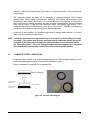
The instrument can automatically perform a ß calibration check (Beta span test) by measuring
alternately the ß flux in air and the ß flux passing through the reference aluminum membranes.
The calculated mass thickness values of the two membranes, are compared with their
associated nominal values. The test gives the calculated mass thickness values and the
percentage deviations from the respective nominal values.
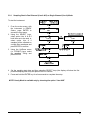
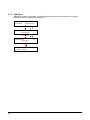
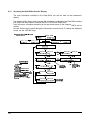
7.4.1 Starting the test (STATUS: Sampling)
At the beginning of every operating cycle the instrument automatically performs the beta span
test (see section 2.6 “QC Mass Measurement System Calibration”).
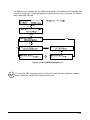
The beta span test can even be performed during the normal sampling and measurement cycles
without stopping the operating cycles. Following the procedure described below, it is possible to
choose whether the instrument will be programmed to perform the beta span test at the
beginning of the following mass measurement cycle.
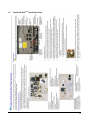
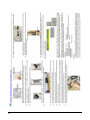
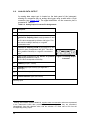
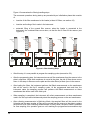
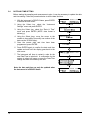
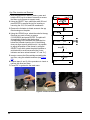
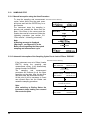
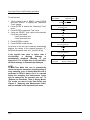
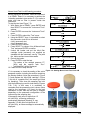
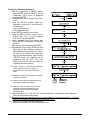
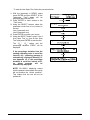
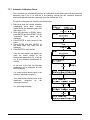
- With the instrument in SAMPLING Status, press and
hold the ESC key for at least 5 seconds to access the
Menu code (access to support tools).
- Enter code 951 using the Select keys and press
ENTER to access the function that activates or
deactivates the beta span test at the beginning of the
next sampling cycle.
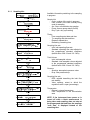
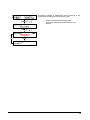
- Using the YES/NO keys, select “ON” to activate the
test or “OFF” to deactivate it and press ENTER to
confirm. If “ON” is selected, the beta span test will
be performed only at the beginning of the cycle
following the current sampling cycle.
04/05/06 12:30:00
<
03/05/06 15:27:12
Status :SAMPLING
ENTER for menu
Press ESC and hold for at least 5 sec.
Menu code: 000
Menu code: 951
ENTER
Beta test activation: OFF
NOTE 1: the test takes 10 minutes in Hourly Mode
and 25 minutes in Multi-Time Mode. That time will be
deducted from the programmed sampling time
(timing) of the cycle in progress
NOTE 2: In Hourly Mode the test is performed only if
a blank session is not expected during the cycle.
134
ON
OFF
ENTER
04/05/06 12:30:00
Status :SAMPLING
<
03/05/06 15:28:15
ENTER for menu