1
EX-94232 User’s manual
Chapter 2
EX-94232 User’s manual
2.4
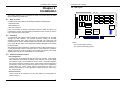
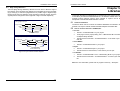
PCB Layout
Installation
144 mm
This chapter describes how to install the EX-94232 card. Please follow the follow
steps to install the EX-94232 card.
What You Have
In addition to this User's Manual, the package includes the following items:
EX-94232 board
Driver/utilities CD
CPLD
This user’s manual
CN1
If any of these items is missing or damaged, contact the dealer from whom you
purchased the product. Save the shipping materials and carton in case you want to
ship or store the product in the future
2.2
4
3
2
1
JP1
Unpacking
Your EX-94232 card contains sensitive electronic components that can be easily
damaged by static electricity. The operator should be wearing an anti-static
wristband, grounded at the same point as the anti-static mat. Inspect the card
module carton for obvious damage. Shipping and handling may cause damage to
your module. Be sure there are no shipping and handing damages on the module
before processing.
Where
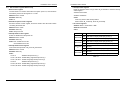
CN1: 37-pin D-type connector
JP1: Card number setting jumper
After opening the card module carton, extract the system module and place it only on
a grounded anti-static surface component side up. Again inspect the module for
damage. Press down on all the socketed IC's to make sure that they are properly
seated. Do this only with the module place on a firm flat surface.
2.3
PCI Bus
Controller
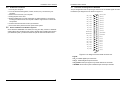
Hardware Installation Outline
PCI configuration
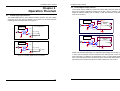
The PCI cards are equipped with plug and play PCI controller, it can request
base addresses and interrupt according to PCI standard. The system BIOS
will install the system resource based on the PCI cards’ configuration registers
and system parameters (which are set by system BIOS). Interrupt assignment
and memory usage (I/O port locations) of the PCI cards can be assigned by
system BIOS only. These system resource assignments are done on a
board-by-board basis. It is not suggested to assign the system resource by
any other methods.
PCI slot selection
The PCI card can be inserted to any PCI slot without any configuration for
system resource.
7
8
110 mm
2.1