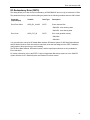
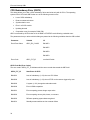
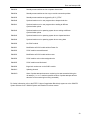
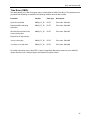
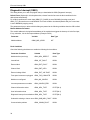
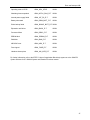
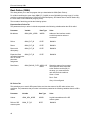
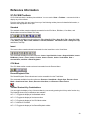
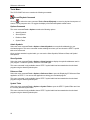
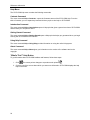
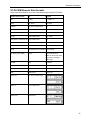
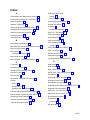
1
SIMATIC S7-PLCSIM V5.3 incl. SP1 User Manual Edition: 01/2005 A5E00425539-01 Copyright and Safety Guidelines This manual contains notices which you should observe to ensure your own personal safety, as well as to protect the product and connected equipment. These notices are highlighted in the manual by a warning triangle and are marked as follows according to the level of danger: Danger Indicates an imminently hazardous situation that, if not avoided, will result in death or serious injury. Warning Indicates a potentially hazardous situation that, if not avoided, could result in death or severe injury. Caution Used with the safety alert symbol indicates a potentially hazardous situation that, if not avoided, may result in minor or moderate injury. Caution Used without the safety alert symbol indicates a potentially hazardous situation that, if not avoided, may result in property damage. Notice Used without the safety alert symbol indicates a potential situation that, if not avoided, may result in an undesirable result or state. Qualified Personnel The device/system may only be set up and operated in conjunction with this manual. Only qualified personnel should be allowed to install and work on this equipment. Qualified persons are defined as persons who are authorized to commission, to ground, and to tag circuits, equipment, and systems in accordance with established safety practices and standards. Correct Usage Note the following: Caution This device and its components may only be used for the applications described in the catalog or the technical descriptions and only in connection with devices or components from other manufacturers that have been approved or recommended by Siemens. This product can only function correctly and safely if it is transported, stored, set up, and installed correctly, and operated and maintained as recommended. Trademarks Siemens® and SIMATIC® are registered trademarks of SIEMENS AG. STEP 7™ and S7™are trademarks of SIEMENS AG. Copyright Siemens Energy & Automation, Inc. 2005 All rights reserved The reproduction, transmission or use of this document or its contents is not permitted without express written authority. Offenders will be liable for damages. All rights, including rights created by patent grant or registration of a utility model or design, are reserved. Disclaimer of Liability We have checked the contents of this manual for agreement with the hardware and software described. Because deviations cannot be precluded entirely, we cannot guarantee full agreement. However, the data in this manual are reviewed regularly and any necessary corrections included in subsequent editions. Suggestions for improvement are welcomed. Siemens Energy & Automation, PCbA One Internet Plaza Johnson City, TN 37602-4991, USA © Siemens Energy & Automation, Inc. 2005 Technical data subject to change. 이 기기는 업무용(A급) 전자파 적합기기로서 판매자 또는 사용자는 이 점을 주의하시기 바라며 가정 외의 지역에서 사용하는 것을 목적으로 합니다. Preface S7-PLCSIM allows you to simulate the operation of an S7 programmable logic controller. You can test control programs from S7-PLCSIM without connecting to S7 hardware. S7-PLCSIM provides a graphical user interface for viewing and modifying control program variables, running the simulated PLC in single or continuous scan mode, and changing the operating mode of the simulated controller. Audience This manual is intended for engineers, programmers, and maintenance personnel who have knowledge and experience with S7 programmable logic controllers and STEP 7 programming. Scope This document describes the features and the operation of S7-PLCSIM V5.3 incl. SP1. Other Manuals You can find additional information in the online help for STEP 7 and in the following manuals: • Programming with STEP 7 Manual. This manual provides basic information on designing and programming control programs. Use this manual when creating a control program with the STEP 7 automation software. • System Software for S7-300/400 System and Standard Functions Reference Manual. This manual provides you with descriptions of the system functions, organization blocks, and standard functions that you use when developing a control program. • Working with STEP 7 Getting Started Manual. This manual explains how to use the STEP 7 automation software. This manual provides you with an overview of the procedures used to configure a PLC and to develop control programs. To find these and other manuals, select the Start > Simatic > Documentation menu command from the Start menu of the computer where STEP 7 is installed. Additional Assistance North America and South America Europe and Africa Asia and Pacific region Telephone: +1 (800) 333-7421 Telephone: +49 (0) 180 5050 222 Telephone: +86 10 64 75 75 75 Fax: +1 (423) 262-2200 Fax: +49 (0) 180 5050 223 Fax: +86 10 64 74 74 74 [email protected] [email protected] [email protected] iii Contents Product Overview................................................................................................1 S7-PLCSIM Features..................................................................................................... 1 Getting Started............................................................................................................... 4 Differences from a Real S7 PLC.................................................................................... 5 S7-PLCSIM Simulation View Window ........................................................................... 7 CPU Operating Modes................................................................................................... 7 CPU Indicators............................................................................................................... 8 Memory Areas ............................................................................................................... 8 Simulation Tasks.................................................................................................9 Starting the Simulation................................................................................................... 9 Using Help ................................................................................................................... 10 Help Buttons ........................................................................................................................... 10 Options Button Menu Commands........................................................................................... 10 Help Browser Tabs ................................................................................................................. 10 Opening a Simulated PLC ........................................................................................... 11 Opening a Layout ........................................................................................................ 12 Selecting Scan Mode Options ..................................................................................... 12 Changing CPU Operating Modes ................................................................................ 12 Monitoring the Simulated Program .............................................................................. 13 Using the Slider Control............................................................................................... 14 Using S7-PLCSIM to Debug Your Program................................................................. 14 Using Interrupt OBs in Your Program .......................................................................... 15 Resetting the CPU Memory ......................................................................................... 16 Resetting Timers.......................................................................................................... 16 Cycling Power for a Simulated CPU ............................................................................ 16 Using Symbolic Addressing ......................................................................................... 16 Configuring an MPI Address........................................................................................ 16 Using Record/Playback ............................................................................................... 17 Monitoring the Scan Cycle........................................................................................... 20 Saving a Layout ........................................................................................................... 20 Saving a Simulated PLC.............................................................................................. 21 Closing a Simulated PLC............................................................................................. 22 Ending the Simulation Session .................................................................................... 22 Simulating a CPU 317-T .............................................................................................. 22 View Objects......................................................................................................23 CPU View Object ......................................................................................................... 24 ACCUs & Status Word View Object ............................................................................ 24 Block Regs View Object .............................................................................................. 24 Stacks View Object...................................................................................................... 24 v Contents Input Variable View Object .......................................................................................... 25 Output Variable View Object........................................................................................ 25 Bit Memory View Object .............................................................................................. 26 Timer View Object ....................................................................................................... 26 Counter View Object.................................................................................................... 26 Generic Variable View Object...................................................................................... 27 Vertical Bits Variable View Object ............................................................................... 27 Error and Interrupt OBs ....................................................................................29 Hardware Interrupt (OB40-OB47)................................................................................ 30 I/O Redundancy Error (OB70) ..................................................................................... 31 CPU Redundancy Error (OB72) .................................................................................. 32 Communication Redundancy Error (OB73) ................................................................. 34 Time Error (OB80) ....................................................................................................... 35 Diagnostic Interrupt (OB82) ......................................................................................... 36 Insert/Remove Module Interrupt (OB83)...................................................................... 38 Priority Class Error (OB85) .......................................................................................... 39 Rack Failure (OB86) .................................................................................................... 40 Reference Information ......................................................................................43 S7-PLCSIM Toolbars................................................................................................... 43 Standard ................................................................................................................................. 43 Insert ....................................................................................................................................... 43 CPU Mode .............................................................................................................................. 43 Record/Playback Files ............................................................................................................ 43 Toolbar Shortcut Key Combinations ....................................................................................... 43 S7-PLCSIM Menus ...................................................................................................... 44 File Menu ................................................................................................................................ 45 Edit Menu................................................................................................................................ 46 View Menu .............................................................................................................................. 47 Insert Menu ............................................................................................................................. 48 PLC Menu ............................................................................................................................... 49 Execute Menu ......................................................................................................................... 50 Tools Menu ............................................................................................................................. 52 Window Menu ......................................................................................................................... 53 Help Menu............................................................................................................................... 54 "What's This?" Help Button..................................................................................................... 54 S7-PLCSIM Numeric Data Formats............................................................................. 55 Troubleshooting Tips ................................................................................................... 56 vi Product Overview The S7-PLCSIM software enables you to run and test your program on a simulated programmable logic controller (PLC) that exists on your computer or programming device (such as a PG 740, Power PG or Field PG). Because the simulation exists completely within the STEP 7 software, you do not need to be connected to any S7 hardware (CPU or I/O modules). With the simulated S7 PLC, you can test and debug programs for S7-300, S7-400, and WinAC 3.x controllers. S7-PLCSIM does not support the hardware configuration for WinAC 4.x controllers; however, you can test your WinAC 4.x control program logic if you modify your hardware configuration to use an S7300, S7-400, or WinAC 3.x controller. S7-PLCSIM provides a simple interface for monitoring and modifying different parameters used by the program (such as for turning inputs on and off). You can also use the various applications of the STEP 7 software while you are running your program on the simulated PLC. This allows you to use such tools as the variable table (VAT) to monitor and modify variables. S7-PLCSIM Features S7-PLCSIM simulates an S7 controller and contains the following memory areas: Memory Area Description Timers T 0 to T 2047 Memory bits 131,072 bits (16 Kbytes) of M memory Total addressable I/O memory 131,072 bits (16 Kbytes) of I/O memory Process image (setable; updated every scan) Maximum: 131,072 bits (16 Kbytes) Preset: 8192 bits (1024 bytes) Local data (setable) Maximum: 64 Kbytes Preset: 32 Kbytes Logic blocks and data blocks 2048 function blocks (FBs) and functions (FCs) System function blocks (SFBs) SFB0, SFB1, SFB2, SFB3, SFB4, SFB5, SFB8, SFB9, SFB12, SFB13, SFB14, SFB15, SFB16, SFB19, SFB20, SFB21, SFB22, SFB23, SFB32, SFB33, SFB34, SFB35, SFB36, SFB37, SFB41, SFB42, SFB43, SFB44, SFB46, SFB47, SFB48, SFB49, SFB52, SFB53, SFB54, SFB60, SFB61, SFB62, SFB63, SFB64, and SFB65 4095 data blocks (DBs) Note that SFB12, SFB13, SFB14, SFB15, SFB16, SFB19, SFB20, SFB21, SFB22, SFB23, SFB41, SFB42, SFB43, SFB44, SFB46, SFB47, SFB48, SFB49, SFB60, SFB61, SFB62, SFB63, SFB64, and SFB65 are NOPs (do not perform any operation). You do not need to modify a program that calls a NOP. 1 Product Overview System functions (SFCs) SFC0, SFC1, SFC2, SFC3, SFC4, SFC5, SFC6, SFC7, SFC8, SFC9, SFC10, SFC11, SFC12, SFC13, SFC14, SFC15, SFC17, SFC18, SFC19, SFC20, SFC21, SFC22, SFC23, SFC24, SFC25, SFC26, SFC27, SFC28, SFC29, SFC30, SFC31, SFC32, SFC33, SFC34, SFC35, SFC36, SFC37, SFC38, SFC39, SFC40, SFC41, SFC42, SFC43, SFC44, SFC46, SFC47, SFC48, SFC49, SFC50, SFC51, SFC52, SFC54, SFC55, SFC56, SFC57, SFC58, SFC59, SFC60, SFC61, SFC62, SFC64, SFC65, SFC66, SFC67, SFC68, SFC69, SFC72, SFC73, SFC74, SFC79, SFC80, SFC81, SFC82, SFC83, SFC84, SFC87, SFC90, SFC102, SFC103, SFC105, SFC106, SFC107, SFC108, SFC126, and SFC127 For SFC26 and SFC27, S7-PLCSIM supports only an input parameter of 0. Note that SFC7, SFC11, SFC12, SFC25, SFC35, SFC36, SFC37, SFC38, SFC48, SFC60, SFC61, SFC62, SFC65, SFC66, SFC67, SFC68, SFC69, SFC72, SFC73, SFC74, SFC81, SFC82, SFC83, SFC84, SFC87, SFC102, SFC103, SFC105, SFC106, SFC107, SFC108, SFC126, and SFC127 are NOPs (do not perform any operation). You do not need to modify a program that calls a NOP. Organization blocks OB1 (free cycle) (OBs) OB20 to OB23 (time-delay interrupt) OB10 to OB17 (time-of-day interrupt) OB30 to OB38 (cyclic interrupt) OB40 to OB47 (hardware interrupt) OB55 (status interrupt) OB56 (update interrupt) OB57 (manufacturer specific interrupt) OB61 to OB64 (synchronous cycle interrupt) OB70 (I/O redundancy error) OB72 (CPU redundancy error) OB80 (time error) OB82 (diagnostic interrupt) OB84 (CPU hardware fault) OB86 (rack failure) OB88 (processing interrupt) OB100 (warm restart) OB73 (communication error) OB81 (power supply error) OB83 (insert/remove interrupt) OB85 (priority class error) OB87 (communication error) OB90 (background OB) OB101 (hot restart) OB121 (programming error) OB102 (cold restart) OB122 (I/O access error) Note that OB55, OB56, OB57, OB61, OB62, OB63, OB64, OB81, OB84, OB87, OB88, and OB90 are NOPs (do not perform any operation). You do not need to modify a program that calls a NOP. 2 Product Overview In addition, S7-PLCSIM provides the following features: • A button on the SIMATIC Manager turns the simulation on or off. Clicking on the simulation button opens the S7-PLCSIM software with its simulated CPU. When S7-PLCSIM is running, any new connection goes automatically to the simulated CPU. • The simulated PLC runs programs intended for S7-300 or S7-400 CPUs, including the CPU 317-T. • You can create view objects that allow you to access the input and output memory areas, accumulators, and registers of the simulated PLC. You can also access memory through symbolic addressing. • You can choose to have the timers run automatically or set and reset them manually. You can reset timers individually or all at once. • You can change the CPU operating mode (STOP, RUN, and RUN-P) as with a real CPU. In addition, S7-PLCSIM provides a Pause feature that allows you to halt the CPU momentarily without affecting the state of the program. • You can use interrupt OBs with the simulated PLC to test the behavior of your program. • You can record a series of events (manipulate input and output memory areas, bit memory, timers and counters) and play back your recording in order to automate program tests. You can use all of the STEP 7 tools to monitor and modify the activities of the simulated PLC, and to debug your program. Although the simulated PLC exists entirely in software (requiring no special hardware), STEP 7 works as if the simulated PLC were an S7 PLC, with few differences. 3 Product Overview Getting Started If you are new to S7-PLCSIM, the following procedures will help you get started. Simulation mode is available from the SIMATIC Manager, provided you don't have any existing connections to real PLCs. To begin using S7-PLCSIM, follow these steps: 1. Open the SIMATIC Manager. 2. Click or select the menu command Options > Simulate Modules. This action starts the S7PLCSIM application and opens a CPU view object (with the default MPI address of 2). 3. From the SIMATIC Manager, navigate to the S7_ZEBRA example project. This project is supplied with the STEP 7 software, V 5.x and higher (project file name ZEN01_09_STEP7_Zebra). 4. Within the S7_ZEBRA example project, navigate to the "Blocks" object. (See the SIMATIC Manager online Help for an overview of STEP 7 objects.) or select the menu command PLC > Download to 5. From the SIMATIC Manager, click download the "Blocks" object to the simulated PLC. 6. At the prompt, "Do you want to load the system data?", choose No if you do not want to download a hardware configuration to the simulated PLC, or Yes in order to download a hardware configuration (for instance, in order to use clock memory). 7. From the S7-PLCSIM application, create additional "view objects" for monitoring information from the simulated PLC: • or select the menu command Insert > Input Variable. The view object displays Click IB0 (Input Byte 0). • or select the menu command Insert > Output Variable to insert a second view Click object, QB0 (Output Byte 0). • or select the menu command Insert > Timer three times to insert three Timer Click view objects. Type 2, 3, and 4 (for Timers T 2, T 3, and T 4) in their respective text boxes, pressing the Enter key after each entry. 8. Select the PLC menu in S7-PLCSIM and verify that there is a bullet (•) beside Power On. 9. Select the Execute > Scan Mode menu command and verify that there is a bullet (•) beside Continuous Scan. 10. Put the simulated CPU in RUN mode by clicking either the RUN or RUN-P check box. 11. Click bit 0 of IB0, to simulate turning on input 0.0, and watch the effect on the timers and on QB0. or select the menu command File > Save PLC As... to save the current state of the 12. Click simulated PLC as a new file. Using STEP 7 to Monitor Program Simulation You can also use the STEP 7 tools to monitor the simulation of your program, as follows: 1. When you have created the view objects (step 7, above), go to the SIMATIC Manager. 2. Click or select View > Online to switch to online mode. 3. Navigate to the "Blocks" object in the ZEBRA example project, and open FC1. This action invokes the "LAD/STL/FBD" application. 4. When the simulated CPU is in RUN mode and you have turned on bit 0 of IB0 (step 11, above), go to the "LAD/STL/FBD" application window and select Debug > Monitor to see the effect of these changes on the program. 4 Product Overview Differences from a Real S7 PLC The simulated PLC provides the following features, which are not available in a real PLC: • The Pause command halts the simulated CPU and allows you to resume the execution of the program at the instruction where the program was halted. • You can change the operating mode (RUN, RUN-P, and STOP) as you do with a real CPU. Unlike with a real CPU, however, putting the simulated CPU in STOP mode does not change the state of the outputs. • Any change that you make with a view object immediately updates the contents of the memory location. The CPU does not wait until the beginning or end of the scan to update any changed data. • Execution control options allow you to select how the CPU runs the program: o Single Scan executes the program for one scan and then waits for you to start the next scan. o Continuous Scan executes the program like a real PLC: it starts a new scan immediately after the previous one finishes. • You can allow the timers to run automatically, or you can enter timer values manually. You can also reset timers globally or individually. • You can manually trigger the interrupt OBs: OB40 to OB47 (hardware interrupt), OB70 (I/O redundancy error), OB72 (CPU redundancy error), OB73 (communication redundancy error), OB80 (time error), OB82 (diagnostic interrupt), OB83 (insert/remove module), OB85 (program sequence error), and OB86 (rack failure). • Process image and peripheral memory: When you make a change to a process input value in a view object, S7-PLCSIM copies it immediately to peripheral memory. This way, when the peripheral input value is written to the process image register at the beginning of the next scan, the desired change is not lost. Correspondingly, when you make a change to a process output value, it is copied immediately to peripheral output memory. The following diagram illustrates the order of activities in the scan cycle: 5 Product Overview S7-PLCSIM also differs from a real PLC in the following ways: • Diagnostic buffers: S7-PLCSIM does not support all of the error messages written to the diagnostic buffer. For instance, bad batteries in the CPU or EEPROM errors cannot be simulated. However, most I/O and program errors can be simulated. • A transition in operating mode (such as from RUN to STOP) does not change the I/O to a "safe" state. • Function modules (FMs) are not supported. • Peer-to-peer communication (such as between two S7-400 CPUs in the same rack) is not supported. • S7-PLCSIM supports four accumulators like an S7-400 CPU does. For certain special cases, a program running on S7-PLCSIM with four accumulators can have different behavior from the same program running on an S7-300 CPU, which uses only two accumulators. • S7-PLCSIM does not support forcing variables. Differences with I/O Most of the CPUs in the S7-300 family autoconfigure I/O: once a module has been inserted into a physical controller, it is automatically recognized by the CPU. It is not possible to replicate the autoconfiguration feature with a simulated PLC. If you download a program to S7-PLCSIM from an S7-300 CPU that autoconfigures I/O, the system data does not include an I/O configuration. Consequently, when you use S7-PLCSIM with S7-300 programs, if you want to define which modules are supposed to be available to the CPU, you must first download a hardware configuration. To download a hardware configuration to S7-PLCSIM, you can create a project for one of the S7-300 CPUs that does not autoconfigure I/O, such as the CPU 315-2DP, CPU 316-2DP, or CPU 318-2. Put a copy of your hardware configuration into this project and download the hardware configuration to S7-PLCSIM. Once you have done this, you can download program blocks from any of your S7 projects and the I/O will be handled correctly. 6 Product Overview S7-PLCSIM Simulation View Window The simulation view window of S7-PLCSIM includes the workspace, title bar, status bar, window controls, and S7-PLCSIM menus and toolbars. The S7-PLCSIM workspace is where you display different types of view objects to monitor and modify data in the simulated PLC. button on the toolbar (menu command To open the simulated PLC, click on the Simulation On/Off Options > Simulate Modules) in the SIMATIC Manager. S7-PLCSIM starts and loads a CPU view object for your simulated PLC. You can also create a new simulated PLC, or open one that you have previously saved. • To create a new PLC for simulation, select the menu command File > New PLC. • To open a previously saved PLC, select the menu command File > Open PLC. To get familiar with S7-PLCSIM, use the procedures described in Getting Started. CPU Operating Modes RUN-P mode The CPU runs the program, and you can change the program and its parameters. In order to use the STEP 7 tools for modifying any of the parameters of the program while the program is running, you must put the CPU in RUN-P mode. You can use the view objects created within S7-PLCSIM to modify any data used by the program. RUN mode The CPU runs the program by reading the inputs, executing the program, and then updating the outputs. By default, you cannot download any program or use the STEP 7 tools to change any parameters (such as input values) when the CPU is in RUN mode. If you have configured CiR (Configuration in Run) elements in your STEP 7 project, however, you can download the CiR objects in RUN mode. With the simulated CPU in RUN mode, you can use the view objects created within S7-PLCSIM to modify any data used by the program. STOP mode The CPU does not run the program. Unlike STOP mode for real CPUs, the outputs are not set to predefined ("safe") values but remain at the state they were in when the CPU changed to STOP mode. You can download programs to the CPU while the CPU is in STOP mode. Changing from STOP mode to RUN mode starts execution of the program from the first instruction. The CPU operating modes, the CPU indicators, and the Memory Clear/Reset button are all displayed on the CPU view object. You can set the CPU operating mode with the Key Switch Position command. You can pause execution of the simulated PLC program when the CPU is in RUN or RUN-P mode. 7 Product Overview CPU Indicators The CPU view object provides a set of indicators that correspond to the LED indicators on a real CPU: • SF (system fault) alerts you that the CPU encountered a system error, causing a change in the operating mode. • DP (distributed peripherals, or remote I/O) indicates the status of communication with distributed (remote) I/O. • DC (power supply) indicates whether power to the CPU is on or off. • RUN indicates that the CPU is in RUN mode. • STOP indicates that the CPU is in STOP mode. Memory Areas You access data in the S7 PLC by addressing specific areas of memory. These areas perform specific functions: • PI (peripheral input): provides direct access to the input modules. • I (input): provides access to the process image of the peripheral inputs. These values are updated by the CPU at the beginning of every CPU scan cycle. • PQ (peripheral output): provides direct access to the output modules. These values are updated by the CPU at the end of every CPU scan cycle. • Q (output): provides access to the process image of the outputs. • M (bit memory): provides storage for data used within the program. • T (timer): provides storage for timers. • C (counter): provides storage for counters. You can also access data stored in the data blocks (DBs). 8 Simulation Tasks Starting the Simulation You can use one of the following methods to start S7-PLCSIM: • From the Windows Start menu, select the menu command Simatic > STEP 7 > S7-PLCSIM Simulating Modules. • From the SIMATIC Manager toolbar, click the Simulation On/Off > Simulate Modules menu command. button or select the Options in the Simatic Manager, any new connection goes When the Simulation On/Off button is turned on automatically to the simulated PLC. Any program that you download goes to the simulated PLC if the MPI address of the simulated PLC matches that of the STEP 7 project containing the program. If you click the Accessible Nodes button, the Accessible Nodes window shows the node address for the simulated PLC that you have created. , any new connection goes to the real PLC. If you click the When the simulation button is turned off Accessible Nodes button, the Accessible Nodes window shows the network of real PLCs. After you start S7-PLCSIM, you can open a simulated PLC or monitor the simulated program. You can continue PLC simulation until you end the simulation session. Notes Simulation mode is not available if you have any existing connections to real PLCs. You can have only one simulated PLC active at a time. 9 Simulation Tasks Using Help You can access the S7-PLCSIM Help through the Help menu or in any of the following ways: • To get Help about an object in the S7-PLCSIM window, click the Help button and then click the object. • To get help about any dialog or error message, click the Help button in the dialog or message box, or press F1. on the toolbar, The Help window provides the following buttons, menu commands and tabs: Help Buttons Hide Button / Show Button: Toggles the display of the navigation area (Table of Contents, Index, and Search tabs). To reduce the overall size of the help window, you can hide the navigation area; when you are ready to view new topics, click the Show button to restore the navigation area. Back Button: If you have examined more than one topic, this button allows you to move back to the previous topic(s). Print Button: Allows you to send a selected topic, or an entire book, to any printer that you have installed. Options Button Menu Commands Hide Tabs / Show Tabs: Toggles the display of the Table of Contents, Index, and Search tabs. To reduce the overall size of the help window, you can hide the tabs; when you are ready to search for new topics, you can show the tabs. Back: If you have examined more than one topic, this option allows you to move back to the previous topic(s). Forward: If you have moved back in the sequence of topics examined, this option allows you to move forward until you reach the topic that you were viewing when you started moving back. Home: Takes you to the web page that is defined as the home page for the S7-PLCSIM online help. Stop: Allows you to stop the browser from retrieving any more information pertaining to the current help page. This command is useful if a page contains a great deal of information (for example, large graphic files) that causes the page to take a long time to display completely. Refresh: Refreshes the display of the current help page. Internet Options: Allows you to define options for Internet browsing. Print: Allows you to send a selected topic, or an entire book, to any printer that you have installed. Search Highlight Off / Search Highlight On: Toggles the display of highlighting for topics that contain a term that you have specified in the Search field. The highlighting enables you to see exactly where in a given topic the term appears. Help Browser Tabs Contents Tab: Choose this tab to view the table of contents for the help system. Double-click any book icon to expand it and view the topics that it contains. Index Tab: Choose this tab to view an alphabetical list of index keywords for the help system. Search Tab: Choose this tab and type in a term that you wish to find. Double-click a topic from the list to view the topic. By default, the term is highlighted every place that it appears in the topic to make it easy to locate the term. To toggle highlighting off or on before displaying a topic, use the Options button. 10 Simulation Tasks Opening a Simulated PLC When you start S7-PLCSIM, the simulator opens with a new, untitled, simulated PLC. If this is your first time using S7-PLCSIM, you see only a CPU view object; otherwise, S7-PLCSIM displays the view objects from your previous work session. At this point, you have two choices: • You can begin work in S7-PLCSIM using the new simulated PLC. • You can open a simulated PLC that you have previously saved: use either the File > Recent Simulation command or the File > Open PLC command to select the appropriate .PLC file. The work that you did with this PLC (such as downloading a program or hardware configuration, or assigning values through a view object) is saved in the archived simulation, so when you open the simulation, you do not have to repeat those steps. You can begin work where you left off the last time. After you decide whether to work with a new or an archived PLC simulation, you can add or change the view objects displayed in S7-PLCSIM. If a layout is displayed when you open S7-PLCSIM, you can close it. You can use the toolbar or the View and Insert menus to add new view objects. You can use the menu command File > Open Layout to select a different layout if you have archived more than one layout. Changes to your layout do not cause changes to your program information; they only affect the way that the information is displayed. Note When you open a new or archived PLC simulation, any view objects that were displayed in S7-PLCSIM are automatically closed. If you intend to open an archived layout as well as a new or archived PLC simulation, open the simulated PLC before opening the layout. What Is the Difference between a .PLC File and a .LAY File? A .PLC file is used to save information about work that you do with a CPU view object (that is, a simulated PLC). It also records changes you make to data: if you assign a value to a memory area using any view object, that change is saved in the .PLC file. A .LAY file is used to save the physical layout of your workspace in S7-PLCSIM. If you arrange your view objects in a certain order and want to preserve that order for future work sessions, save the layout before you close S7-PLCSIM. The next time you open S7-PLCSIM, the view objects will be displayed in that order. (However, if you open a new or archived PLC simulation during that work session, S7-PLCSIM automatically closes your layout. If you want to use the same layout with the simulated PLC that you have opened, just re-open the .LAY file.) 11 Simulation Tasks Opening a Layout To open a previously saved layout of S7-PLCSIM view objects, select the menu command File > Open Layout. A layout is simply an arrangement of view objects. In other words, the .LAY file archives only the position and selected data format of the view objects in your simulation; the data values that are displayed in the view objects are not saved as part of the layout. When you work in S7-PLCSIM, you can open both a .PLC file and a .LAY file (if you have previously saved your simulated PLC and the layout of your view objects). These are not mutually exclusive actions; you do not have to choose only one. However, it is more efficient to open the simulated PLC (.PLC file) before the layout (.LAY file), because any time you open a new or archived PLC simulation, S7-PLCSIM automatically closes the open layout. You can also save a layout, save a simulated PLC, and close a simulated PLC. Selecting Scan Mode Options S7-PLCSIM offers you options for running the simulated program: • Single Scan: The CPU executes one scan and then waits for you to initiate another scan. Each scan consists of the CPU reading the peripheral inputs (PI), executing the program, and then writing the results to the peripheral outputs (PQ). The CPU then waits for you to run the next scan (using the Execute > Next Scan menu command or • ). Continuous Scan: The CPU executes one complete scan and then starts another scan. Each scan consists of the CPU reading the peripheral inputs (PI), executing the program, and then writing the results to the peripheral outputs (PQ). or select the menu command Execute > Scan Mode > Single To choose Single Scan mode, click Scan. Accessing a program one scan at a time allows you to see the changes in each scan. While a real CPU can execute faster than the editor can display data, the S7-PLCSIM Single Scan option allows you to "freeze" the state of the program from scan to scan. or select the menu command Execute > Scan Mode > To choose Continuous Scan mode, click Continuous Scan. (The default setting is Continuous Scan.) Changing CPU Operating Modes You can change the operating modes for the CPU. The simulated PLC responds to changes in the operating mode just like a real PLC. The checkboxes on the view object of the simulated PLC show the current operating mode. To change the operating mode, click the desired checkbox or use the menu command Execute > Key Switch Position > [mode]. The CPU operating modes on the simulated CPU function like the key switch on a real CPU: if you use the STEP 7 tools to change the operating mode, or if the CPU automatically changes mode (for example, encounters an error condition that causes the CPU to change from RUN to STOP), the checkboxes on the simulated CPU view object do not change. The LED indicator changes, but not the key switch. This alerts you that the CPU operating mode changed, possibly because of some error in the program. 12 Simulation Tasks Monitoring the Simulated Program You can display different types of view objects that allow you to monitor and modify the program running in the simulated PLC. The following seven view objects are activated from the Insert menu: • Input Variable: allows you to access the data stored in the process input (I) memory area. The default address is byte 0 (IB0). • Output Variable: allows you to access the data stored in the process output (Q) memory area. The default address is byte 0 (QB0). • Bit Memory: allows you to access the data stored in the bit memory (M) area. The default address is byte 0 (MB0). • Timer: allows you to access the timers used by the program. The default timer is T 0. • Counter: allows you to access the counters used by the program. The default counter is C 0. • Generic: allows you to access any of the memory areas in the simulated CPU, including the data blocks (DBs) for the program. • Vertical Bits: allows you to see the symbolic or absolute address of each bit and to monitor and modify data. The vertical bits variable view object can be used to show a bit representation of peripheral input and output variables, process image input and output variables, bit memory, and data blocks. You can also use symbolic addressing to address any of these view objects. The following three view objects are activated from the View menu: • Accumulators: allows you to display the data in the different accumulators within the simulated CPU, as well as the status word and address registers. This view object displays four accumulator fields to accommodate the four accumulators of the S7-400 CPU. Programs for an S7-300 CPU use only two accumulators. • Block Registers: allows you to display the contents of the data block address registers within the simulated CPU. It also displays the number of the logic block that is currently being executed and the number of the previous logic block, along with the number of the instruction (step address counter, or SAC) being executed. • Stacks: allows you to display the data stored in the nesting stack and the master control relay (MCR) stack within the simulated PLC. You can also simultaneously monitor the program in the STEP 7 "LAD/STL/FBD" application: 1. In the SIMATIC Manager, click or select View > Online to switch to online mode. 2. Navigate to the "Blocks" object in the S7_ZEBRA example project, and open FC1. 3. The "LAD/STL/FBD" application displays the program that is being executed by the simulated PLC. Use the menu commands to view the status of the instructions. 13 Simulation Tasks Using the Slider Control The slider control allows you to simulate values that change gradually or have a specific range, such as analog values. You can use the slider control for the following view objects: • Input Variable • Output Variable • Bit Memory You can access the memory area with either a memory address or a symbolic address. To specify a slider control for one of the variable view objects, you select a slider format representation from the Select Numeric Format drop-down list. You also select whether to represent the values as decimal (positive integers), integer (positive and negative integers), or real numbers. The selection options are determined by the size of the memory location being accessed: • Byte (B): decimal • Word (W): decimal and integer • Double word (D): decimal, integer, and real You can use either the mouse or the arrow keys to change the position of the slider control indicator. Changing the position of the indicator changes the value of the variable stored in the memory location. You can also enter a specific value in the “Value” field. You can also configure a minimum and maximum value for the slider control. Selecting a range of values does not affect the values that can be stored in the variable: the minimum and maximum values affect only the values that can be entered or displayed by the slider control. Selecting a range of values provides the following benefits: • You can simulate a specific range of values, for example, the range of values that would be generated by a specific analog module. • By limiting the range of values between the minimum and maximum, you can provide better resolution for entering data with the slider. You can always enter an exact value in the Value field of the view object. To select a minimum value for the slider, select Min from the Display Value, Min, or Max drop-down list of the view object. Then, enter the numeric value for the minimum in the Min field. To select a maximum value for the slider, select Max from the Display Value, Min, or Max drop-down list of the view object. Then, enter the numeric value for the maximum in the Max field. Using S7-PLCSIM to Debug Your Program S7-PLCSIM provides the following features to help you debug your program: 14 • The Pause command halts the simulated CPU immediately and allows you to resume the execution of the program at the instruction where the program was halted. • Any change that you make with a view object immediately updates the contents of the memory location. The CPU does not wait until the beginning or end of the scan to update any changed data. • Execution control options allow you to select how the CPU runs the program: o Single Scan executes the program for one scan and then waits for you to start the next scan. o Continuous Scan executes the program like a real PLC; it starts a new scan immediately after the previous one finishes. Simulation Tasks Using Interrupt OBs in Your Program You can use S7-PLCSIM to test how your program handles different interrupt OBs. S7-PLCSIM supports the following error and interrupt OBs: • OB40 to OB47 (hardware interrupt) • OB70 (I/O redundancy error) {417-H systems only} • OB72 (CPU redundancy error) {417-H systems only} • OB73 (communication redundancy error) {417-H systems only} • OB80 (time error) • OB82 (diagnostic interrupt) • OB83 (insert/remove module) • OB85 (priority class error) • OB86 (rack failure) Use the menu command Execute > Trigger Error OB to select a specific OB, and enter the header information in the dialog box. When you click the "OK" or "Apply" button, the simulated PLC generates the appropriate event and runs the program in the associated OB. The OBs that are available to be triggered from the Trigger Error OB menu depend on the I/O configuration for the simulated PLC. Input/Output Considerations In order to simulate interrupt OBs, you must download a hardware configuration that contains your I/O. For some cases your I/O is automatically included in the system data that STEP 7 downloads to S7-PLCSIM; in other cases, you must modify the configuration to one that does. S7-300 CPUs S7-300 CPUs such as the CPU 315-2DP, CPU 316-2DP, and CPU 318-2 download an I/O configuration; other CPUs autoconfigure the I/O to match the physical I/O installed in the rack. Projects already configured for one of the CPUs named above do not require modifications to the hardware configuration. For other CPUs, you must copy your hardware configuration and put the data into a project for a CPU that does not autoconfigure I/O, namely a CPU 315-2DP, CPU 316-2DP, or CPU 318-2 project. When you download the I/O information from the project, you can simulate interrupt OBs in S7-PLCSIM (and S7PLCSIM is also able to detect any I/O referencing errors that your program may contain). 15 Simulation Tasks Resetting the CPU Memory To reset the memory of the simulated CPU, select the menu command PLC > Clear/Reset, or click the MRES button on the CPU view object. This action resets the memory areas, deletes the program blocks, and deletes the hardware configuration of the simulated PLC. When you perform a memory clear/reset, the CPU automatically goes to STOP mode and all existing connections to the module are disconnected. Resetting Timers The Reset Timers dialog allows you to reset any or all of the timers used in your program to their default values. You can select "All Timers" to reset all of the timers in the program or you can select specific timers to reset. To reset all of the timers in your program, use the Reset Timers To reset an individual timer, use the Reset Timers toolbar button. button on the timer view object for the specific timer. Cycling Power for a Simulated CPU Select the PLC > Power On and Power Off menu commands to simulate turning power on and off to the CPU. Using Symbolic Addressing To use symbolic addressing in your simulated program: 1. Select the menu command Tools > Options > Attach Symbols. This menu command invokes a dialog. 2. Browse to the STEP 7 symbol table to be referenced. 3. Click the OK button. 4. Create view objects for variables that you want to address symbolically. 5. To turn on symbols for all view objects, select the menu command Tools > Options > Show Symbols. To hide the symbols, select the command again. For the Vertical Bits view object, bit values are displayed vertically, and the symbolic or absolute address is displayed beside each bit. For all other view objects, symbol tooltips are available for the address fields. Point to a field with the mouse to see its symbolic address and comment (separated by a colon) in a tooltip box. Configuring an MPI Address Use the MPI Address dialog box (menu command PLC > MPI Address) to configure the simulated PLC for a specific network node address. The new address is stored with the configuration of the simulated PLC when you use the Save PLC or Save PLC As menu command. Ensure that the node address for the offline program matches the node address for the program in the simulated PLC. button on the SIMATIC Manager toolbar is turned on, clicking the When the Simulation On/Off Accessible Nodes button shows you that the simulated PLC that is currently open. Note You cannot change the node address for the simulated PLC while you are using STEP 7 applications to monitor the program. Close these applications before changing the node address. 16 Simulation Tasks Using Record/Playback The Record/Playback dialog box allows you to record or play back a series of data changes. To access this window, do one of the following: • Choose the Tools > Record/Playback menu command. • Click the Record/Playback button. The key sequence Alt + F5 toggles the display of the Record/Playback toolbar button. This topic discusses the following subjects: • How to Record or Play Back an Event File • Troubleshooting Tips How to Record or Play Back an Event File Click the New Event File button to create a new event file. Click the Open Event File button to locate and open an existing event file. Click the Save Event File button to save the events that you have just recorded. Click the Play button to play back an existing recording of events. Click the Record button to begin recording a series of events. Use the view objects in your simulation to turn bits on and off or assign data values as desired. The recorder captures every change you make to memory areas. Click the Pause button to temporarily suspend recording or playback. The pause function is convenient because it allows you to pause the recording of events and resume later. If you need to perform some other activity (for instance, add new view objects or answer the telephone) before you are finished generating events, you can click Pause and thus avoid a long delay in your recording. Pause allows you to minimize the time lag between events as you record, in contrast to the Delta button, which affects the overall rate at which the recording is played back. Click the Stop button to stop recording, or playing back, events. The Delta button allows you to select a rate of speed before you play back a recording. Your selection affects the overall playback duration. However, if some events were recorded closer together, or further apart than others, the relative time intervals are preserved even as the overall playback time is reduced or increased by your Delta selection. There are two ways for you to confirm that you are successfully recording or playing back events: • Check the status bar of the Record/Playback dialog box to see whether it is in Recording, Playing, or Idle mode. • Watch the title bar of the Record/Playback dialog box. It should display a numeric value that increments each time you record or play back an event. 17 Simulation Tasks If you are satisfied with your recording, remember to save it by using the Save Event File button before you close S7-PLCSIM. Troubleshooting Tips Problem Solution I tried to record events, but when I played them back, nothing happened. Change the mode of S7-PLCSIM from STOP to RUN. The Play button is de-activated and I cannot play back a recording. You can record events in STOP mode provided that you had previously been recording in RUN mode. All events recorded in STOP mode have a Delta value of zero. Therefore, when you play back the recording, all of the events that you recorded during a single scan are displayed in such rapid succession that they appear to occur simultaneously. You must have an open event file before you can play back the recording of the events. Use the Open Event File button to select and open an event file. I recorded a series of If you close S7-PLCSIM without saving the recorded events in an event file, events and then button to save your work your work is lost. Use the Save Event File closed S7-PLCSIM. before you close S7-PLCSIM. The next time I opened S7-PLCSIM, I could not find the events. I recorded a series of events, but when I tried to play them back, nothing happened. Check the status bar of the Record/Playback dialog box to see what mode it is in. If it says Playing, watch the title bar to see when a numeric value appears. When events are played back, a counter in the title bar keeps track of how many have been played back. Note that if you start a recording but do not promptly begin to trigger events, the recorder captures the time lag. When you play back the recording, the first event will take an equally long time to occur. You can examine the event file to verify that in fact, your events have been properly recorded. You can adjust the playback speed of the recording by using the Delta I cannot remember which event file contains the sequence of events that I want to play back. 18 button. You can use long, descriptive file names to help differentiate your event files. If necessary, you can use a text editor to examine your files and locate the one with the correct sequence. The default storage location for event files is C:\Siemens\PLCSIM\S7wsi\S7EVENTS. However, if you upgraded from version 3.0 or 4.0 of S7-PLCSIM, the default storage location is C:\Siemens\STEP7\S7wsi\S7EVENTS. Simulation Tasks I changed a single bit, but when I played back my recording, the entire byte changed. If an Input Variable, Output Variable, Bit Memory, Generic Variable, or Vertical Bits View Object shows only one bit (e.g., Q0.0, Bits), a bit change is recorded correctly as only a change in that particular bit. However, if the view object displays all eight bits (e.g., QB0, Bits), a change to a single bit is recorded as a change in byte value instead of a change in that bit only. Consequently, it becomes possible that during playback of the recording, other bits within the byte could be represented as changing (for instance, process flags or Boolean inputs), when in fact they would not be affected during operation of a real PLC. I am trying to record When recording events with the CPU view object in Single Scan mode, note events in Single Scan the following: mode but the recorder does not function as I would expect. • You cannot start a recording in Single Scan mode unless you click the button to increment the scan count. The first event in Next Scan your recording must have a Delta value of 1 or higher. The Delta value is based on the number of scan cycles that have occurred since the previous event (which in this case was when you clicked the Record button). However, if you are beginning the recording in Single Scan mode, no scan cycles have elapsed. You must increment the scan. • When you record events in Single Scan mode, they have a Delta value of zero (because they are all occurring within the same scan). Therefore, when you play back the recording, all the events that you recorded during a single scan are displayed in such rapid sequence that they appear to occur simultaneously. To provide a discernable time lag between events, you would have to click the Next Scan button or switch between Continuous Scan mode and Single Scan mode for each event. My event file contains Events are recorded with German mnemonics in S7-PLCSIM regardless of German mnemonics your STEP 7 selection. You can disregard this phenomenon. even though that is not my selection in STEP 7. 19 Simulation Tasks Monitoring the Scan Cycle The menu command Execute > Scan Cycle Monitoring opens a dialog box that allows you to enable or disable scan cycle monitoring (watchdog timer) and set the maximum scan cycle monitoring time for the simulation. The maximum scan cycle time is the maximum time the process is allowed to take for one full scan cycle of the S7 user program in the OB1 and update of the relevant I/O. If this time is exceeded, the simulated PLC goes into STOP mode. Because program execution may be significantly slower in S7-PLCSIM than with an actual CPU (especially when other applications are running at higher priority), you can experience annoying timeouts. This dialog makes it possible for you to disable or extend the scan cycle monitoring without modifying the program for the target PLC. Note that this dialog does not reflect the monitoring time set in the hardware configuration, and any changes affect the simulation only. If "Enable Scan Cycle Monitoring" is selected, you can set the monitoring time to any value between 1 second (1000 ms) and 1 minute (60000 ms), inclusive. The default scan cycle monitoring time is 20000 ms. Saving a Layout To save the current layout of S7-PLCSIM view objects, select the menu command File > Save Layout. A layout is simply an arrangement of view objects. In other words, the .LAY file archives only the position and selected data format of the view objects in your simulation; the data values that are displayed in the view objects are not saved as part of the layout. You can save both the layout (.LAY file) and the PLC simulation (.PLC file) when you work. They are not mutually exclusive. For information about what is archived if you save a PLC simulation (.PLC file), see Saving a Simulated PLC. 20 Simulation Tasks Saving a Simulated PLC You can store the current state of the simulated PLC in one of the following ways: • Use the menu command File > Save PLC to archive the configuration of the PLC to the current file name. • Use the menu command File > Save PLC As to archive the configuration of the PLC to a new file. The following elements are saved when you save the PLC: • Program • Hardware configuration • The checkbox selection (key switch position) for the operating mode indicated on the CPU view object: namely, RUN-P, RUN, or STOP • Execution control option (continuous scan, single scan) • The status of the I/O • Timer values (T memory) • Symbolic addresses • Power on/off setting When you open a simulated PLC, whether it is a new PLC simulation or an archived PLC simulation, the simulated PLC is in STOP mode. If you archived a simulated PLC in RUN or RUN-P mode, when you open the archive, the checkbox of the CPU view object indicates your selection, but the CPU indicators show that the actual mode of the simulated PLC is STOP mode. To restore the simulated PLC to RUN or RUN-P mode, you must use the checkboxes in the CPU view object or the Execute > Key Switch Position command to cycle the simulated PLC to STOP mode and then back to RUN or RUN-P mode. If you have attached symbols, when you save the simulated PLC, the symbolic addresses are saved. However, by default when you open the archived PLC simulation, symbolic addresses are not displayed. To display symbolic addresses, use the Tools > Options > Show Symbols command. To save the configuration of the view objects, use the File > Save Layout menu command. Saving a simulated PLC does not close the simulated PLC. 21 Simulation Tasks Closing a Simulated PLC Use the menu command File > Close PLC to end the simulation of the program. This command closes the CPU view object and all opened views. Closing a simulated program can result in errors in applications which are currently connected to the simulator. Closing the simulated PLC does not end the simulation session. You can either exit S7-PLCSIM, or open another simulated PLC. Ending the Simulation Session After saving any simulated PLC or layout configuration, follow these steps to exit the S7-PLCSIM application: 1. Close any STEP 7 applications involved in the monitoring of the simulation. 2. Select the menu command File > Exit. Exiting S7-PLCSIM, like closing a simulated PLC, can result in errors in applications which are currently connected to the simulator. Simulating a CPU 317-T S7-PLCSIM can simulate control programs developed for a CPU 317-T with limitations. The simulation does not access any motion control devices. Calls to motion control function blocks simply return to the calling block with some limited error checking. Error checking includes: • Existence of instance DB • Existence of technology DB • Range checking of parameters with defined ranges S7-PLCSIM does set output parameters for a few of the MC commands as defined below, providing the input parameters are valid: MC Command Parameter Value(s) set MC_Power Statusword.DriveEnabled Statusword.Standstill True for enabled, false for disabled True MC_Stop Statusword.Stopping Statusword.Standstill True True MC_MoveAbsolute (MC_MvAbs) Position Input parameter position MC_ExternalEncoder (MC_ExEnc) Position Input parameter position 22 View Objects S7-PLCSIM provides several view objects that allow you to monitor and modify various components of the simulated PLC. These view objects are listed below: • CPU View Object • ACCUs & Status Word View Object • Block Regs View Object • Stacks View Object • Input Variable View Object • Output Variable View Object • Bit Memory View Object • Timers View Object • Counters View Object • Generic Variable View Object • Vertical Bits Variable View Object You can use symbolic addressing with view objects. If you do, tooltips are available for all view object fields that have symbols assigned to them. You can point to a view object field with the mouse to see its symbolic address and comment (separated by a colon) in a tooltip box. Note If you use an address in a view object that corresponds to F-System peripheral I/O, S7-PLCSIM displays a yellow background for that view object. 23 View Objects CPU View Object This view object is present by default when you open a new simulation. It allows you to view the status and change the operating mode of the simulated CPU. The operating modes on the CPU view object function like the key switch on a real CPU: if you use the STEP 7 tools to change the operating mode, or if the CPU automatically changes mode (for example, encounters an error condition that causes the CPU to change from RUN to STOP), the RUN/STOP indicators change, but not the key switch. This alerts you that the CPU changed operating mode, possibly because of some error in the program. The MRES button allows you to reset the memory and to delete the blocks and the hardware configuration of the simulated PLC. ACCUs & Status Word View Object To add this view object to a simulation, do one of the following: • Choose the menu command View > Accumulators • Click the CPU Accumulators button: This view object allows you to monitor the information that the CPU uses to execute the program: • Accumulators: allows you to monitor the contents of the CPU accumulators. The view object displays four accumulator fields to accommodate the S7-400 CPU; programs for the S7-300 CPU use only two accumulators. • Status word: allows you to monitor the bits of the status word. • Address registers: allows you to monitor the contents of the two address registers (AR1 and AR2). These address registers are used for the indirect addressing of data. Block Regs View Object To add this view object to a simulation, do one of the following: • Choose the menu command View > Block Registers • Click the Block Registers button: This view object allows you to monitor the contents of the data block address registers (DB1 and DB2). This view object also displays the number of the current logic block and the previous logic block, along with the number of the instruction (step address counter, or SAC) for each block. Stacks View Object To add this view object to a simulation, do one of the following: • Choose the menu command View > Stacks • Click the Nesting Stacks button: This view object allows you to monitor information stored in the following stacks of the CPU: 24 • The nesting stack stores up to seven entries. For each entry, the nesting stack stores the states of the RLO and OR bits of the status word. An entry in the nesting stack is made for each instruction that starts a new logic string. These instructions are: And (A), And Not (AN), Or (O), Or Not (ON), Exclusive Or (X), and Exclusive Or Not (XN). • The MCR stack stores up to eight levels of nesting for a master control relay (MCR). Each level shows the status of the RLO bit for an MCR instruction, which begins an MCR area. View Objects Input Variable View Object To add this view object to a simulation, do one of the following: • Choose the menu command Insert > Input Variable • Click on the Insert Input Variable button: This view object allows you to monitor and modify the following data: • Peripheral (external) input variables: you can access the peripheral input (PI) memory areas of the CPU. S7-PLCSIM displays a yellow background for the view object if the variable address corresponds to F-System peripheral I/O. • Process-image input variables: you can access the input (I) memory areas of the CPU. By default, the CPU overwrites the I memory with the PI memory at the beginning of every scan. If you change an I memory value, the simulator immediately copies the changed value to the peripheral area. This way, the desired change is not lost when the peripheral value overwrites the process input value on the next scan. The CPU reacts immediately to any changes made with this view object. (Any modifications made with a STEP 7 variable table take effect at the proper time in the CPU scan: inputs are read at the beginning of the scan, and outputs are written at the end.) You can choose the numeric data format for the input variable and you can also use symbolic addressing if you have attached symbols. You can also view input variables with a Vertical Bits View Object. Output Variable View Object To add this view object to a simulation, do one of the following: • Choose the menu command Insert > Output Variable • Click the Insert Output Variable button: This view object allows you to monitor and modify the following data: • Peripheral (external) output variables: you can access the peripheral output (PQ) memory areas of the CPU. S7-PLCSIM displays a yellow background for the view object if the variable address corresponds to F-System peripheral I/O. • Process-image output variables: you can access the output (Q) memory areas of the CPU. During the scan cycle, the program calculates output values and places them in the process-image output table. At the end of the scan cycle, the operating system reads the calculated output values from this table and sends them to the process outputs. The process-image output table maps the first 512 bytes (CPU-dependent) of the peripheral output memory. The CPU reacts immediately to any changes made with this view object. (Any modifications made with a STEP 7 variable table take effect at the proper time in the CPU scan: inputs are read at the beginning of the scan, and outputs are written at the end.) You can choose the numeric data format for the output variable and you can also use symbolic addressing if you have attached symbols. You can also view input variables with a Vertical Bits View Object. 25 View Objects Bit Memory View Object To access this view object, do one of the following: • Choose the menu command Insert > Bit Memory • Click on the Insert Bit Memory button: This view object allows you to monitor and modify bit memory: you can access the variables stored in the bit memory (M) area of the CPU. The bit memory (M) area provides storage for interim results calculated in the program. You designate what data format to use to access the data. You can choose the numeric data format for the bit memory and you can also use symbolic addressing if you have attached symbols. You can also view bit memory with a Vertical Bits View Object. Timer View Object To add this view object to a simulation, do one of the following: • Choose the menu command Insert > Timer • Click the Insert Timer button: This view object allows you to monitor and modify any timer used by your program. The timer view object displays the name of the timer, the actual timer value, and the time base. Note If you change the time base, the actual timer value changes, while the displayed value remains the same. This is because the actual timer value is the product of the displayed value and the time base. For example, if the value of timer T 0 is 600 and the time base is 10ms, this represents a timer of 6 seconds. If you change the time base to 100ms, then the actual timer value becomes 60 seconds. (600 * 100ms = 60 seconds) To reset all of the timers in your program, use the Reset Timers To reset an individual timer, use the Reset Timers toolbar button. button on the view object for that timer. You can use symbolic addressing for the timer if you have attached symbols. You can also configure the timers to be under either automatic or manual control from commands on the Execute menu. Counter View Object To add this view object to a simulation, do one of the following: • Choose the menu command Insert > Counter • Click the Insert Counter button: (or in German mnemonics) This view object allows you to monitor and modify the counters used by your program. It opens with a default memory location of C 0. You can choose the numeric data format for the counter and you can also use symbolic addressing if you have attached symbols. 26 View Objects Generic Variable View Object To add this view object to a simulation, do one of the following: • Choose the menu command Insert > Generic • Click the Insert Generic Variable button: This view object allows you to monitor and modify the following data: • Peripheral (external) input and output variables: you can access the peripheral input (PI) and peripheral output (PQ) memory areas of the CPU. S7-PLCSIM displays a yellow background for the view object if the variable address corresponds to F-System peripheral I/O. • Process-image input and output variables: you can access the input (I) and output (Q) memory areas of the CPU. By default, the CPU overwrites the I memory with the PI memory at the beginning of every scan. If you change an I memory value, the simulator immediately copies the changed value to the peripheral area. This way, the desired change is not lost when the peripheral value overwrites the process input value on the next scan. • Bit memory: you can access the variables stored in the bit memory (M) area of the CPU. • Timers and counters: you can access the timers and counters used by the program. • Data blocks: you can access the data stored in the data blocks of the program, for example, DB1.DBX 0.0 or DB1.DBW 0. The CPU reacts immediately to any changes made with this view object. Any modifications made with a STEP 7 variable table take effect at the proper time in the CPU scan; inputs are read at the beginning of the scan, and outputs are written at the end. You can choose the numeric data format for the generic variable and you can also use symbolic addressing if you have attached symbols. Vertical Bits Variable View Object To add this view object to a simulation, do one of the following: • Choose the menu command Insert > Vertical Bits • Click the Insert Vertical Bits button: You can use the Vertical Bits view object with bit or byte addresses. The Vertical Bits view object allows you to see the symbolic or absolute address of each bit and to monitor and modify the following data: • Peripheral (external) input and output variables: you can access the peripheral input (PI) and peripheral output (PQ) memory areas of the CPU. S7-PLCSIM displays a yellow background for the view object if the variable address corresponds to F-System peripheral I/O. • Process-image input and output variables: you can access the input (I) and output (Q) memory areas of the CPU. By default, the CPU overwrites the I memory with the PI memory at the beginning of every scan. If you change an I memory value, the simulator immediately copies the changed value to the peripheral area. This way, the desired change is not lost when the peripheral value overwrites the process input value on the next scan. • Bit memory: you can access the variables stored in the bit memory (M) area of the CPU. • Data blocks: you can access the data stored in the data blocks of the program. The CPU reacts immediately to any changes made with this view object. Any modifications made with a STEP 7 variable table take effect at the proper time in the CPU scan; inputs are read at the beginning of the scan, and outputs are written at the end. You can use symbolic addressing if you have attached symbols for variables represented with a Vertical View Object. 27 Error and Interrupt OBs S7-PLCSIM supports the following interrupt and error OBs: • OB40 to OB47 (hardware interrupt) • OB70 (I/O redundancy error) {417-H systems only} • OB72 (CPU redundancy error) {417-H systems only} • OB73 (communication redundancy error) {417-H systems only} • OB80 (time error) • OB82 (diagnostic interrupt) • OB83 (insert/remove module) • OB85 (priority class error) • OB86 (rack failure) To simulate the triggering of any of these OBs, select the S7-PLCSIM menu command Execute > Trigger Error OB and the OB or OB group that you want to trigger. Notice If values in the simulated PLC change after an error or interrupt OB has been triggered and is executing, S7-PLCSIM does not update the OB with the changed data. To cause the OB to use the changed data, you must close the OB dialog and reopen it. 29 Error and Interrupt OBs Hardware Interrupt (OB40-OB47) This dialog allows you to test the program that you downloaded in OB40 to OB47. The parameters that you select with this dialog are passed to the following variables when the OB is called: Parameter Variable Data Type Description Module address OB4x_MDL_ADDR WORD Logical base address of the module that triggers the interrupt. Module status OB4x_POINT_ADDR DWORD (Hex) For digital modules: bit field with the status of the inputs on the module. (Bit 0 corresponds to the first input.) For analog modules, CPs or FMs: interrupt status of the module (irrelevant to user). Interrupt OB (read-only) OB4x_OB_NUMBR BYTE OB number (40 to 47). For further information, refer to the STEP 7 Help on Organization Blocks help system or to the SIMATIC System Software for S7-300/400 System and Standard Functions manual. 30 Error and Interrupt OBs I/O Redundancy Error (OB70) This dialog allows you to test the loss of redundancy of PROFIBUS-DP and can only be used with H CPUs. The parameters that you select with this dialog are passed to the following variables when the OB is called: Parameter (Input/Output) Variable Data Type Description Error Event Class OB70_EV_CLASS BYTE Event class and IDs: * B#16#72: event entering state * B#16#73: event leaving state Error Code OB70_FLT_ID BYTE Error code (possible values): * B#16#A2 * B#16#A3 You must also enter values for DP Master Base Address, DP Master System ID, DP Slave Base Address, and DP Station Number. Each field needs to match the value that was assigned in the STEP 7 hardware configuration of the project that you are simulating. The DP Slave Base Address, DP Station Number, and the Input/Output selection are only available for Error Code 0xA3. For further information, refer to the STEP 7 Help on Organization Blocks help system or to the SIMATIC System Software for S7-300/400 System and Standard Functions manual. 31 Error and Interrupt OBs CPU Redundancy Error (OB72) This dialog allows you to test a CPU redundancy failure and exists only with H CPUs. The operating system of the H CPU calls OB72 when one of the following events occurs: • Loss of CPU redundancy • Reserve-master switchover • Synchronization error • Error in a SYNC module • Updating aborted • Comparison error (for example, RAM, PIQ) OB72 is executed by all CPUs that are in the RUN or STARTUP mode following a suitable event. The parameters that you select with this dialog are passed to the following variables when the OB is called: Parameter Variable ID Error Event Class OB72_EV_CLASS B#16#73 B#16#75 B#16#78 B#16#79 Error Code OB72_FLT_ID see fault ID table OB72 Fault IDs (Error Codes) The error code in OB72_FLT_ID indicates which event occurred that caused the OB72 call: OB72_FLT_ID Start Event of OB72 B#16#01 Loss of redundancy (1 of 2) due to a CPU failure B#16#02 Loss of redundancy (1 of 2) due to STOP on the reserve triggered by user B#16#03 H system (1 of 2) changed to redundant mode B#16#20 Error in RAM comparison B#16#21 Error comparing process image output value B#16#22 Error comparing memory bits, timers, or counters B#16#23 Different operating system data recognized B#16#31 Standby-master switchover due to master failure 32 Error and Interrupt OBs B#16#33 Standby-master switchover due to operator intervention B#16#34 Standby-master switchover due to sync module connection problem B#16#35 Standby-master switchover triggered by 90 "H_CTRL" B#16#40 Synchronization error in user program due to elapsed wait time B#16#41 Synchronization error in user program due to waiting at different synchronization points B#16#42 Synchronization error in operating system due to waiting at different synchronization points B#16#43 Synchronization error in operating system due to elapsed wait time B#16#44 Synchronization error in operating system due to wrong data B#16#50 No SYNC module B#16#51 Modification at SYNC module without Power On B#16#52 SYNC module removed/inserted B#16#53 Modification at SYNC module without reset B#16#54 SYNC module: rack number assigned twice B#16#55 SYNC module error/eliminated B#16#56 Illegal rack number set on the SYNC module B#16#C1 Updating aborted B#16#C2 Abort of update attempt because a monitoring time was exceeded during the nth attempt (1 <= n <= maximum possible number of update attempts after an abort due to the monitoring time being exceeded) For further information, refer to the STEP 7 Help on Organization Blocks help system or to the SIMATIC System Software for S7-300/400 System and Standard Functions manual. 33 Error and Interrupt OBs Communication Redundancy Error (OB73) This dialog allows you to test when the first loss of redundancy occurs in a fault-tolerant S7 connection and exists only with H CPUs. The parameters that you select with this dialog are passed to the following variables when the OB is called: Parameter Variable Data Type Description Error Event Class OB73_EV_CLASS BYTE Possible value of B#16#73 (loss of redundancy in communication) or B#16#72 (problem eliminated) Error Code OB73_FLT_ID BYTE Possible value of B#16#E0 For further information, refer to the STEP 7 Help on Organization Blocks help system or to the SIMATIC System Software for S7-300/400 System and Standard Functions manual. 34 Error and Interrupt OBs Time Error (OB80) This dialog allows you to test the program that you downloaded in OB80 (Time Error). The parameters that you select with this dialog are passed to the following variables when the OB is called: Parameter Variable Data Type Description Cycle time exceeded OB80_FLT_ID BYTE Error code: B#16#01 Requested OB is still being processed OB80_FLT_ID BYTE Error code: B#16#02 OB call buffer overflow for the current priority class OB80_FLT_ID BYTE Error code: B#16#07 OB80_FLT_ID BYTE Error code: B#16#05 OB80_FLT_ID BYTE Error code: B#16#06 Expired time of day interrupt: * due * on to a time jump return to run after hold For further information, refer to the STEP 7 Help on Organization Blocks help system or to the SIMATIC System Software for S7-300/400 System and Standard Functions manual. 35 Error and Interrupt OBs Diagnostic Interrupt (OB82) This dialog allows you to test the program that you downloaded in OB82 (Diagnostic Interrupt). Default Tests: (Optional) In this drop-down box, choose from the list to set the fault conditions for the desired test automatically. For all fault conditions the event class (OB82_EV_CLASS) is set to B#16#39 (incoming event) and OB82_FLT_ID uses the error code B#16#42. If no fault condition is selected (Module OK), the event class is set to B#16#38 (outgoing event). The parameters that you select with this dialog are passed to the following variables when the OB is called: Module Address Parameter The module address is the logical base address of the module that triggers the interrupt. It is the first input, if any; otherwise, it is the first output address. (Example: PIB 0) Parameter Variable Data Type Module address OB82_MDL_ADDR INT Fault Conditions Check the following checkboxes to enable the following fault conditions: Parameter Checkbox Variable Data Type Module defect (read-only) OB82_MDL_DEFECT BOOL Internal fault OB82_INT_FAULT BOOL External fault OB80_EXT_FAULT BOOL Channel fault OB82_PNT_INFO BOOL External voltage failed OB82_EXT_VOLTAGE BOOL Front panel connector unplugged OB82_FLD_CONNCTR BOOL Module not configured OB82_NO_CONFIG BOOL Incorrect parameters on module OB82_CONFIG_ERR BOOL Channel information exists OB82_MDL_TYPE BYTE (Bit 4) User information exists OB82_MDL_TYPE BYTE (Bit 5) Diagnostic interrupt from substitute OB82_MDL_TYPE BYTE (Bit 6) Submodule missing or has an error OB82_SUB_MDL_FAULT BOOL Communication problem 36 OB82_COMM_FAULT BOOL Error and Interrupt OBs Operating mode is STOP OB82_MDL_STOP BOOL Watchdog timer responded OB82_WTCH_DOG_FLT BOOL Internal power supply failed OB82_INT_PS_FLT BOOL Battery exhausted OB82_PRIM_BATT_FLT BOOL Entire backup failed OB82_BCKUP_BATT_FLT BOOL Expansion rack failure OB82_RACK_FLT BOOL Processor failure OB82_PROC_FLT BOOL EPROM fault OB82_EPROM_FLT BOOL RAM fault OB82_RAM_FLT BOOL ADC/DAC error OB82_ADU_FLT BOOL Fuse tripped OB82_FUSE_FLT BOOL Hardware interrupt lost OB82_HW_INTR_FLT BOOL For further information, refer to the STEP 7 Help on Organization Blocks help system or to the SIMATIC System Software for S7-300/400 System and Standard Functions manual. 37 Error and Interrupt OBs Insert/Remove Module Interrupt (OB83) This dialog allows you to test the program that you downloaded in OB83 (Insert/Remove Module Interrupt). For all fault conditions, the event class (OB83_EV_CLASS) is set to B#16#39 (incoming event). If no fault condition is selected (Module OK), the event class is set to B#16#38 (outgoing event). The parameters that you select with this dialog are passed to the following variables when the OB is called: Parameter Variable DataType Value / Description Module removed or not responding OB83_FLT_ID BYTE B#16#61 Module inserted: module type OB83_FLT_ID OK BYTE B#16#61 Module inserted: incorrect module type OB83_FLT_ID BYTE B#16#63 Module inserted: type ID cannot be read OB83_FLT_ID BYTE B#16#64 Module inserted: error in module parameter assignment OB83_FLT_ID BYTE B#16#65 Module address OB83_MDL_ADDR WORD Logical base address of the module affected; if a mixed module, it is the smallest logical address used in the module. If the I and O addresses in the mixed block are equal, the logical base address is the one that receives the event identifier. Example: PQW 0 For further information, refer to the STEP 7 Help on Organization Blocks help system or to the SIMATIC System Software for S7-300/400 System and Standard Functions manual. 38 Error and Interrupt OBs Priority Class Error (OB85) This dialog allows you to test the program that you downloaded in OB85 (Priority Class Error). OB85 is automatically triggered if an error occurs while the operating system is accessing a block (error code B#16#A3). Note that events B#16#A1, B#16#A2, B#16#B1, and B#16#B2 must be generated by other means, for example, by deleting one of the required blocks from your program. The parameters that you select with this dialog are passed to the following variables when the OB is called: Parameter Variable Data Type Integrated function: OB85_Z1 WORD Value No error resolution W#16#0100 Block not loaded W#16#0101 Area length error W#16#0102 Write protect error W#16#0103 IEC timer: OB85_Z1 WORD No error resolution W#16#0200 Block not loaded W#16#0201 Area length error W#16#0202 Write protect error W#16#0203 For further information, refer to the STEP 7 Help on Organization Blocks help system or to the SIMATIC System Software for S7-300/400 System and Standard Functions manual. 39 Error and Interrupt OBs Rack Failure (OB86) This dialog allows you to test the program that you downloaded in OB86 (Rack Failure). For all fault conditions the event class (OB86_EV_CLASS) is set to B#16#39 (incoming event). If no fault condition is selected (Rack Return, Rack Return with Discrepancy, DP Station Return and DP Station OK), the event class is set to B#16#38 (outgoing event). The two tabs of the dialog provide the following options: Expansion Rack FailureTab The parameters that you select in this tab are passed to the following variables when the OB is called: Parameter Variable Data Type Value IM address OB86_MDL_ADDR WORD Address of the interface module to which expansion racks are connected. Failure OB86_FLT_ID BYTE B#16#C1 Return OB86_FLT_ID BYTE B#16#C1 Return with discrepancy OB86_FLT_ID BYTE B#16#C2 Expansion Rack OB86_FLT_ID operational again but error in module parameter assignment BYTE B#16#C6 Rack Status OB86_RACKS_FLTD ARRAY OF BOOL Shows the status of up to twentyone expansion racks connected to the interface module (IM). In the array, you must select the rack with the fault conditions. Green = Good Red = Fault Gray = Not configured DP Failure Tab This tab allows you to test for DP system failure and view the status of the DP under various error conditions. The parameters that you select in this tab are passed to the following variables when the OB is called: Parameter Variable Data Type Value Subnet OB86_MDL_ADDR WORD Logical base address of the DP master system. Failure of DP master system OB86_FLT_ID BYTE B#16#C3 40 Error and Interrupt OBs Station failure OB86_FLT_ID BYTE B#16#C4 Station fault OB86_FLT_ID BYTE B#16#C5 Station return OB86_FLT_ID BYTE B#16#C4 Station OK OB86_FLT_ID BYTE B#16#C5 Station OB86_FLT_ID operational again but error BYTE B#16#C7 Station return OB86_FLT_ID with discrepancy BYTE B#16#C8 DP Status ARRAY OF BOOL OB86_RACKS_FLTD Shows the status of up to 126 DP stations. In the array, you must select the rack with the fault conditions. Green = Good Red = Fault Gray = Not configured For further information, refer to the STEP 7 Help on Organization Blocks help system or to the SIMATIC System Software for S7-300/400 System and Standard Functions manual. 41 Reference Information S7-PLCSIM Toolbars S7-PLCSIM includes the toolbars pictured below. You can use the View > Toolbars... command to hide or display any of the toolbars. From the online help, click any button from any of the following toolbar pictures for detailed information, or reference the appropriate menu topic: Standard The standard toolbar contains selected commands from the File Menu, Edit Menu, View Menu, and Window Menu as well as "What's This" help. The commands available from this toolbar are: File > New PLC, File > Open PLC, File > Save PLC, Edit > Cut, Edit > Copy, Edit > Paste, Window > Cascade, Window > Tile Ordered, View > Always On Top, and What's This Help. Insert The insert toolbar contains selected commands from the Insert Menu or the View Menu. The commands available from this toolbar are: Insert > Input Variable, Insert > Output Variable, Insert > Bit Memory, Insert > Timer, Insert > Counter, Insert > Generic, Insert > Vertical Bits, View > Accumulators, and View > Block Registers. CPU Mode The CPU Mode toolbar contains selected commands from the Execute Menu. Record/Playback Files The Record/Playback Files toolbar button is also accessible from the Tools Menu. The commands available from this toolbar are: Execute > Scan Mode > Single Scan, Execute > Scan Mode > Continuous Scan, Pause, Execute > Next Scan, and Execute > Reset Timers. Toolbar Shortcut Key Combinations You can toggle the display of any of these toolbars by concurrently pressing the Alt key and a function key. The following shortcut key combinations are available: ALT + F1 Toggles the display of the Standard toolbar. ALT + F2 Toggles the display of the Insert toolbar. ALT + F3 Toggles the display of the CPU Mode toolbar. ALT + F4 Closes S7-PLCSIM. ALT + F5 Toggles the display of the Record/Playback toolbar. 43 Reference Information S7-PLCSIM Menus S7-PLCSIM includes the following menus for performing operations with the simulated PLC: 44 • File • Edit • View • Insert • PLC • Execute • Tools • Window • Help Reference Information File Menu The S7-PLCSIM File menu contains the following commands: New PLC Command Click or select the menu command File > New PLC to create a new simulated PLC. Open PLC Command To find and open an existing (saved) simulation of a PLC, click Open PLC. or select the menu command File > Close PLC Command Select the menu command File > Close PLC to close the currently open simulated PLC. This command closes the CPU view object and all other currently open view objects. Closing a simulated PLC can result in errors in applications which are currently connected to the simulator. Save PLC Command Click or select the menu command File > Save PLC to save the current state of the simulated PLC. Save PLC As Command Select the menu command File > Save PLC As to save the current state of the simulated PLC as a new file. Open Layout Command To open a previously saved layout of S7-PLCSIM view objects, select the menu command File > Open Layout. Close Layout Command To close the current layout of S7-PLCSIM view objects, select the menu command File > Close Layout. Save Layout Command To save the current layout of S7-PLCSIM view objects, select the menu command File > Save Layout. Save Layout As Command To save the current layout of S7-PLCSIM view objects as a new file, select the menu command File > Save Layout As. Recent Simulation Command Use the menu command File > Recent Simulation to open a list of your four most recently used programs. Select file 1, 2, 3, or 4 from the list of recent simulations. Recent Layout Command Use the menu command File > Recent Layout to select from a list of your four most recently used layouts. Select file 1, 2, 3, or 4 from the list of recent layouts. Exit Command Select the menu command File > Exit to close the simulated PLC and to exit the S7-PLCSIM application. Exiting S7-PLCSIM can result in errors in applications which are currently connected to the simulator. 45 Reference Information Edit Menu The S7-PLCSIM Edit menu contains the following commands: Undo Command Select the menu command Edit > Undo to reverse the last action you performed. Undo only applies to editable text/numeric fields and to the commands of the Edit and Window menus. The Undo command is also available from the right-click menu of any editable text field. Cut Command Select the Edit > Cut command or click to remove selected text and put it on the clipboard. Copy Command Select the Edit > Copy command or click to copy selected text and put it on the clipboard. Paste Command Select the Edit > Paste command or click or copied) at the location of the cursor. 46 to insert the contents of the clipboard (whatever was last cut Reference Information View Menu The S7-PLCSIM View menu contains the following commands: Accumulators Command Select the menu command View > Accumulators or click to create an ACCUs & Status Word view object. This view object allows you to monitor accumulators, status word bits and address registers. Block Registers Command Select the menu command View > Block Registers or click or to create a Block Regs view object that allows you to monitor the contents of the data block address registers (DB1 and DB2). This view object also displays the number of the current logic block and the previous logic block, along with the number of the instruction (step address counter, or SAC) for each block. Stacks Command Select the menu command View > Stacks or click or to create a Stacks view object that allows you to monitor the nesting stack and the master control relay (MCR) stack. Toolbars Command Select the menu command View > Toolbars to choose which S7-PLCSIM toolbars you want to display. From the Toolbars dialog box, check or uncheck the selections corresponding to the following toolbars: • Standard • Insert • CPU Mode • Record/Playback Files Status Bar Command Select the menu command View > Status Bar to toggle on/off the display of the S7-PLCSIM status bar. The status bar, as shown below, appears at the bottom of the S7-PLCSIM window and contains information and messages that help you use S7-PLCSIM. Always On Top Command Select the menu command View > Always On Top or click to keep S7-PLCSIM in front of any other concurrently running applications. Repeat the action to return S7-PLCSIM to its normal state. 47 Reference Information Insert Menu The S7-PLCSIM Insert menu contains the following commands: Input Variable Command Click on or select the menu command Insert > Input Variable to create a view object that allows you to monitor and modify variables in the process input (I) memory area. This view object opens with a default memory location of IB0. Output Variable Command Click on or select the menu command Insert > Output Variable to create a view object that allows you to monitor and modify variables in the process output (Q) memory area. This view object opens with a default memory location of QB0 Bit Memory Command Click on or select the menu command Insert > Bit Memory to create a view object that allows you to monitor and modify variables that are stored in the bit memory (M) area of the CPU. This view object opens with a default memory location of MB0. Timer Command Click on or select the menu command Insert > Timer to create a view object that allows you to monitor and modify the timers that are used by the program. This view object opens with a default memory location of T 0. Counter Command Click on in German mnemonics) or select the menu command Insert > Counter to create a view object that allows you to monitor and modify the counters that are used by the program. This view object opens with a default memory location of C 0. Generic Command Click on or select the menu command Insert > Generic to create a view object that allows you to monitor and modify any of the variables used by the program, such as the input (I) or output (Q) memory areas. You can also access the data stored in the data blocks (DBs). Vertical Bits Command Click on or select the menu command Insert > Vertical Bits to create a view object displays the symbolic or absolute address next to each bit and allows you to monitor and modify any of the variables used by the program, such as the input (I) or output (Q) memory areas. You can also access the data stored in the data blocks (DBs). 48 Reference Information PLC Menu The S7-PLCSIM PLC menu contains the following commands: Power On Command Select the menu command PLC > Power On to simulate turning on the power to the PLC. Power Off Command Select the menu command PLC > Power Off to simulate turning off the power to the PLC. Clear/Reset Command Select the menu command PLC > Clear/Reset, or click the "MRES" button on the CPU view object to reset the memory, delete the program blocks, and delete the hardware configuration of the simulated PLC. When you perform a memory clear/reset, the CPU automatically goes to STOP mode and all existing connections to the module are disconnected. MPI Address Command Select the menu command PLC > MPI Address... to modify the network node address for the simulated PLC. The new address is stored with the configuration of the simulated PLC when you use the Save PLC or Save PLC As menu commands. 49 Reference Information Execute Menu The S7-PLCSIM Execute menu contains the following commands: Key Switch Position Command Select the menu command Execute > Key Switch Position and choose RUN-P, RUN, or STOP to put the simulated PLC in the desired operating mode. You can also change the mode by clicking the check-boxes in the CPU view object. Startup Switch Position Command Select the menu command Execute > Startup Switch Position and pick a restart option to determine what the simulated CPU will do when it is switched from STOP to RUN mode: • Warm Start: the operating system calls OB100 • Hot Start: • Cold Start: the operating system calls OB102 the operating system calls OB101 Scan Mode Command You can choose from two modes of execution for your simulated program: Single Scan and Continuous Scan. Single Scan Command Select the menu command Execute > Scan Mode > Single Scan or click to set up the CPU for executing the program one scan at a time. The CPU executes the complete program for one scan, then waits for you to request the next scan. Continuous Scan Command Select the menu command Execute > Scan Mode > Continuous Scan or click to set up the CPU for executing the program in a continuous cycle (in the same way that OB1 is executed by the CPU). The CPU executes the program when the operating mode is set to RUN, and stops when the operating mode is set to STOP. The scan starts by reading the peripheral inputs (PI) and updating the process-image input (I) memory. The CPU then executes the instructions of the program and updates the memory areas. The scan ends by writing the process-image output (Q) memory to the peripheral-output (PQ) memory. Next Scan Command Click on or select the menu command Execute > Next Scan to request that the simulated CPU execute the next scan (if the simulation is set for Single Scan). Pause Command Click on or select the menu command Execute > Pause to momentarily halt the execution of the program in the simulated PLC without changing any of the data (such as the state of the outputs). To resume the execution of the program, turn off the Pause function. The program then starts at the instruction where execution had been halted. If a STEP 7 application is connected to the simulated PLC, using Pause may cause the application to time out and disconnect. If this happens, turn off the Pause function and reconnect the STEP 7 application. 50 Reference Information Automatic Timers Command The timers in the simulated PLC can be set to either automatic or manual. Select the menu command Execute > Automatic Timers to set up the CPU for executing the timers automatically in the program. Manual Timers Command Select the menu command Execute > Manual Timers to set up the CPU to allow you to enter a specific value or to reset the timers in the program. To return to running the timers automatically, select the menu command Execute > Automatic Timers. Reset Timers Command The menu command Execute > Reset Timers opens a dialog box allowing you to set the time value for each timer to its default value. You can reset all of the timers used by the program, or you can reset timers individually. To reset all of the timers in your program, use the Reset Timers To reset an individual timer, use the Reset Timer toolbar button. button on the view object for that timer. Trigger Error OB Command The menu command Execute > Trigger Error OB allows you to test how your program handles different interrupt OBs. Scan Cycle Monitoring Command The menu command Execute > Scan Cycle Monitoring opens a dialog box allowing you to enable or disable scan cycle monitoring (watchdog timer) and set the maximum scan cycle monitoring time (in milliseconds) for the simulation. The maximum scan cycle time is the maximum time the process is allowed to take for one full scan cycle of the S7 user program in OB1 and for the update of the relevant I/O. If this time is exceeded, the simulated PLC goes into STOP mode. 51 Reference Information Tools Menu The S7-PLCSIM Tools menu contains the following commands: Record/Playback Command Click on or select the menu command Tools > Record/Playback to record or play back a sequence of events. The key sequence Alt + F5 toggles the display of the Record/Playback toolbar button. Options Command The menu command Tools > Options contains the following options: • Attach Symbols... • Show Symbols • Reference Data • Symbol Table Attach Symbols Select the menu command Tools > Options > Attach Symbols to use symbolic addressing in your simulated program. This menu command invokes a dialog box where you can choose the STEP 7 symbol table to be referenced. Once you have attached a symbol table, you can use the Show Symbols, Reference Data, and Symbol Data options. Show Symbols Select the menu command Tools > Options > Show Symbols to display the symbolic addresses used in your program. To hide the symbols, select the command again. This menu command is only available when a STEP 7 symbol table has been attached to the simulated program using the Attach Symbols option. Reference Data Select the menu command Tools > Options > Reference Data to open the Displaying S7 Reference Data application of STEP 7. You can use this application to debug your simulated program. This menu command is only available when a STEP 7 symbol table has been attached to the simulated program using the Attach Symbols option. Symbol Table Select the menu command Tools > Options > Symbol Table to open the STEP 7 Symbol Editor and view the currently attached symbol table. This menu command is only available when a STEP 7 symbol table has been attached to the simulated program using the Attach Symbols option. 52 Reference Information Window Menu The S7-PLCSIM Window menu contains the following commands: Cascade Command To arrange windows so that they overlap (starting in the upper-left corner of the S7-PLCSIM window), click or select the menu command Window > Cascade. Tile Ordered Command To arrange the S7-PLCSIM view objects side by side, with the CPU view object in the top left, click select the menu command Window > Tile Ordered. or Arrange Icons Command The menu command Window > Arrange Icons arranges all minimized view objects (view object icons) along the bottom edge of the S7-PLCSIM window. 1, 2, 3... 9 Command You can activate an open view object by selecting it from an alphabetical list in the Window menu. Select the number that corresponds to the desired view object. The currently active view object is indicated by a check mark. If you have more than 9 view objects open, you can select More Windows... to see a dialog box with a complete list. 53 Reference Information Help Menu The S7-PLCSIM Help menu contains the following commands: Contents Command The menu command Help > Contents... opens the Contents screen of the S7-PLCSIM Help. From the table of contents, you can expand any book and click any topic to view help on S7-PLCSIM. Introduction Command The menu command Help > Introduction opens a Help topic that gives a general overview of S7-PLCSIM and the tasks you can perform with it. Getting Started Command The menu command Help > Getting Started opens a Help topic that helps you get started when you begin working with S7-PLCSIM for the first time. Using Help Command The menu command Help > Using Help provides information on using the online Help system. About Command The menu command Help > About gives you information on the version of the software and on the copyright. "What's This?" Help Button To get information about S7-PLCSIM toolbars and features, follow these steps: 1. Click . The mouse pointer changes to a question-mark pointer . 2. Click the part of the screen about which you want more information. S7-PLCSIM displays the help topic on that item. 54 Reference Information S7-PLCSIM Numeric Data Formats Refer to the table below for the numeric data formats supported by S7-PLCSIM. Numeric Data Format Size Example Bits Bit, Byte = off ; = on Binary Byte, Word 1001_0011 Decimal Byte, Word, Double Word 232 Hex (Hexadecimal) Byte, Word, Double Word 9A S7 Format Byte, Word, Double Word dw#16#9a2ff23 Integer Word, Double Word 632, –2370 BCD (Binary-coded Decimal) Word, Double Word 400 Real Double Word 1.234567e+023 Char (Character) Byte, Word, Double Word 'C', 'AB' String 254 Alphanumeric Characters This is a string DT (DATE_AND_TIME) 8 Bytes 1993-12-25-08:01:01 Note: The DT numeric data format does not support milliseconds. S5TIME Word 3m5s00ms Date Word 1998-06-18 Time Double Word 9h26m53s703ms TOD Double Word 9:26:53.702 Slider: Dec Byte, Word, Double Word Slider: Int Word, Double Word Slider: Real Double Word 55 Reference Information Troubleshooting Tips The following table describes some problems that you can encounter when using S7-PLCSIM, and lists possible causes of the problem and recommended corrective actions. Problem Possible Causes or Corrections Your program does not download to the simulated CPU. Verify that the CPU is in either STOP mode or RUN-P mode. You cannot download your program if the simulated CPU is in RUN mode, unless you have configured CiR (Configuration in RUN) elements in STEP 7. CiR objects are the only objects that can be downloaded to S7-PLCSIM in RUN mode. If your program contains a System Data Block (SDB), verify that the CPU is in STOP mode. As with a real CPU, you can download SDBs only when the CPU is in STOP mode. Note: If the CPU view object is in RUN-P mode, STEP 7 prompts you to change to STOP so that the hardware configuration can be downloaded. Verify that the CPU and the program use the same node address. The node address defined for the program must match the node address of the CPU. When you attempt to close the simulated CPU, a message alerts you that there is a connection open. If you attempt to close the simulated CPU while one of the STEP 7 tools (such as S7 Status) is monitoring the program, STEP 7 alerts you to disconnect the STEP 7 tool from the simulated CPU. Always disconnect any STEP 7 tool by turning off the monitoring of the program status or by closing the tool before closing the simulated CPU. The S7-PLCSIM application does not respond and appears to be "locked up." Check the execution mode. S7-PLCSIM can appear to be locked up when paused or in Single Scan mode. You enter a peripheral variable and get an "Invalid Address" error, even though the address value is valid. Only the CPU 315-2DP, CPU 316-2DP, and CPU 318-2 CPUs download an I/O configuration. If you download a program from another S7-300 CPU, the system data does not include the I/O configuration. This causes errors when you attempt to access peripheral I/O in S7-PLCSIM. - or You get a peripheral access error in your program, even though your S7-300 project contains the correct configuration. 56 To correct this, create an CPU 315-2DP, CPU 316-2DP, or CPU 318-2 station and put a copy of your hardware configuration into it. Download the hardware configuration from the CPU 315-2DP, CPU 316-2DP, or CPU 3182 to S7-PLCSIM. Index A Continuous scan mode Accumulators and Status Word, viewing, 24 setting, 12 Accumulators similarity to S7-400 CPUs, 5 use in debugging, 14 Address registers, 24 Control program, monitoring, 13 Address, configuring, 16 Counter view object, 26 Always on top command (View menu), 47 Counters, 8 Arranging minimized view objects, 53 viewing and modifying, 26 Attaching symbols to simulation, 16 CPU 317-T, simulation, 22 Autoconfigured I/O, 15 CPU accumulators, 24 Automatic timers, using, 50 CPU indicators, 8 B Back button, help browser, 10 BCD (Binary-coded decimal) numeric format, 55 CPU mode toolbar, 43 CPU operating modes, 7 changing, 12 Binary numeric format, 55 CPU redundancy error (OB72), 32 Bit memory, 8 CPU view object, 24 viewing and modifying, 26 Creating new event file, 17 Bits numeric format, 55 Customer support, iii Block registers, viewing and modifying, 24 Cycling power for a simulated CPU, 16 C D C (counter), 8 Data blocks, 8 Cascading windows, 53 Data formats, 55 Changing CPU operating modes, 12 Date numeric format, 55 Character (Char), 55 DATE_AND_TIME numeric format, 55 CiR elements, 7 DC indicator, 8 Clear/Reset command (PLC menu), 16 Debugging with S7-PLCSIM, 14 Closing Decimal numeric format, 55 layout, 45 Delta button, record/playback, 17 simulated PLC, 22 Diagnostic buffer difference from real S7 PLC, 5 simulation with connections, 56 Diagnostic interrupt (OB82), 36 Cold start startup switch position, setting, 50 Difference, .LAY and .PLC file, 11 Communication redundancy error (OB73), 34 Differences from a real S7 PLC, 5 Configuring an MPI address, 16 Documentation, related, iii Contents command (Help menu), 54 Downloading, 4 Contents tab, help browser, 10 problems, 56 DP failure tab, 40 Index-1 Reference Information DP indicator, 8 DT (DATE_AND_TIME) numeric format, 55 E I I (input), 8 I/O (input/output) Edit menu, 46 considerations, interrupt OB simulation, 15 Enabling scan cycle monitoring, 20 differences from real S7 PLC, 5 Ending the simulation session, 22 I/O redundancy error (OB70), 31 Error OBs, 29 input variable, 25 OB70 (I/O redundancy error), 31 output variable, 25 OB72 (CPU redundancy error), 32 Icons, arranging minimized view objects, 53 OB73 (communication redundancy error), 34 Index tab, help browser, 10 OB80 (time error), 35 Indicators, 8 OB85 (priority class error), 39 Input, 8 OB86 (rack failure), 40 variable, viewing and modifying, 25 Event file playback, 17 Insert menu, 48 Execute menu, 50 Insert toolbar, 43 Expansion rack failure tab, 40 Insert/remove module interrupt (OB83), 38 F Features, S7-PLCSIM, 1 Integer numeric format, 55 Interrupt OBs, 5, 15, 29 File menu, 45 OB40-OB47 (hardware interrupt), 30 Formats, numeric data, 55 OB82 (diagnostic interrupt), 36 F-System peripheral I/O, 23, 25 OB83 (insert/remove module interrupt), 38 G Generic variables, viewing and modifying, 27 Getting started, 4 H Hardware configuration, 15 Hardware interrupt (OB40-OB47), 30 Help, 10 Introduction to S7-PLCSIM, 1 K Keyswitch position, 7 changing, 12 L Layout, 45 closing, 45 browser buttons, 10 opening, 12 F1 access, 10 recent files, 45 menu, 54 saving, 20 What's This? button, 54 Hexadecimal (Hex) numeric format, 55 Hide button, help browser, 10 LED indicators, 8 Locked-up S7-PLCSIM, 56 M Highlighting search term, online help, 10 M (bit memory), 8 Hot start startup switch position, setting, 50 Main window, 7 Manual timers, using, 50 Index-2 Reference Information Manuals, related, iii New PLC command (File menu), 7 Master control relay (MCR), 24 Next scan, executing, 12 Maximum Scan Cycle Time, 20 Node address, configuring, 16 Maximum slider value, 14 Numeric data formats, 55 MC commands, 22 Numeric format, slider view object, 14 MCR (master control relay), 24 Memory areas, 1, 8 O OB100, 50 differences from a real S7 PLC, 5 OB101, 50 peripheral, 5 OB102, 50 process, 5 OB40 to OB47, 30 resetting/clearing, 16 OB70, 31 Menus, 44 OB72, 32 edit, 46 OB73, 34 execute, 50 OB80, 35 file, 45 OB82, 36 help, 54 OB83, 38 insert, 48 OB85, 39 PLC, 49 OB86, 40 tools, 52 OBs, 29 view, 47 cold restart, 50 window, 53 communication redundancy error (OB73), 34 Minimum slider value, 14 CPU redundancy error (OB72), 32 Mode, scan, 12 diagnostic interrupt (OB82), 36 Modifying hardware configuration for OB simulation, 15 hardware interrupt (OB40-OB47), 30 Monitoring scan cycle, 20 simulated program, 13 simulation from STEP 7, 4 More windows, 53 Motion control simulation, 22 MPI address changing, 16 configured in STEP 7 project, 9 MRES, 16 N Nesting stacks, 24 hot restart, 50 I/O redundancy error (OB70), 31 insert/remove module interrupt (OB73), 38 priority class error (OB85), 39 rack failure (OB86), 40 time error (OB80), 35 using interrupt OBs, 15 warm restart, 50 Online help, 10 browser buttons, 10 F1 access, 10 menu, 54 What's This? button, 54 Index-3 Reference Information Open connection message, 56 Opening Q Q (output), 8 event file, 17 R layout, 12 Rack failure (OB86), 40 simulated PLC, 11 Real numeric data format, 55 Operating modes, 7 changing, 12 Real S7 PLC, S7-PLCSIM differences, 5 Recent layouts, accessing, 45 Options button, help browser, 10 Recent simulations, opening, 45 Options command (Tools menu), 52 Record/playback, 17 Output, 8 Redundancy error viewing and modifying, 25 P Pausing recording or playback, 17 Peripheral memory, 8 Communication (OB73), 34 CPU (OB72), 32 I/O (OB70), 31 Reference data command (tools menu), 52 access error, 56 Remove module interrupt (OB83), 38 input, 25 Resetting the CPU memory, 16 output, 25 Resetting timers, 16, 26 update differences from real S7 PLC, 5 Restart switch position, 50 vertical bits, 27 RUN mode, 7 PI (peripheral input), 8 LED indicator, 8 Playback, 17 setting keyswitch position, 50 PLC closing, 22 RUN-P mode, 7 setting keyswitch position, 50 menu, 49 S saving, 21 S5TIME numeric format, 55 simulation, 1, 4, 13 S7 format, numeric data, 55 Power on/off for a simulated CPU, 16 S7_ZEBRA project, getting started, 4 PQ (peripheral output), 8 S7-300 CPUs, 15 Print button, help browser, 10 S7-PLCSIM overview, 1 Priority class error (OB85), 39 Safe state not changed, 5 Process-image memory, 8 Saving input, 25 event file, 17 output, 25 layout, 20 update differences from a real S7 PLC, 5 simulated PLC, 21 vertical bits, 27 Scan cycle monitoring, 20 Product overview, 1 Scan mode options, 12 Program simulation, 1, 4, 13 Searching online help, 10 Index-4 Reference Information Selecting STEP 7 maximum slider value, 14 getting started, simulation, 4 minimum slider value, 14 simulation button, 9 numeric format, 14 symbol table, 52 scan mode options, 12 STOP mode, 7 SF indicator, 8 difference from real S7 PLC, 5 Shortcut key combinations, 43 LED indicator, 8 Show button, help browser, 10 setting keyswitch position, 50 Showing and attaching symbols, 16 Stopping record/playback, 17 SIMATIC manager, 4 String numeric data format, 55 Simulated PLC, 1 Strings, 55 closing, 22 Switch position, 50 ending session, 22 Symbol table, 16, 52 getting started, 4 Symbol tooltips, 16 monitoring, 13 Symbolic addressing, 16 opening, 11 T saving, 21 T (timer), 8 starting session, 9 Technical support, iii Simulating a CPU 317-T, 22 Telephone numbers, support, iii Simulation files, recent, 45 Tiling S7-PLCSIM windows, 53 Simulation on/off button, 9 Time error (OB80), 35 Simulation view window, 7 Time numeric format, 55 Single scan mode Timers, 8 setting, 12 automatic, 50 use in debugging, 14 difference from real S7 PLC, 5 Slider numeric format, 55 manual, 50 Slider view object, 14 resetting, 16 Stacks view object, 24 viewing and modifying, 26 Standard toolbar, 43 Tips, troubleshooting, 56 Starting the simulation, 9 Toolbars, using, 43 Startup switch position, setting, 50 Tools menu, 52 Station errors, 40 Tooltips, 16 Status bar, viewing, 47 Triggering an error or interrupt OB, 15 Status of record/playback, 17 Troubleshooting PLC simulation, 56 Status word, 24 general, 56 record/playback, 17 Turning simulation on/off, 9 Index-5 Reference Information U bit memory, 26 block regs, 24 Using help, 10, 54 cascading windows, 53 interrupt OBs in your program, 15 counters, 26 record/playback, 17 CPU, 24 S7-PLCSIM to debug your program, 14 F-System variable indication, 23 S7-PLCSIM to monitor simulated program, 13 generic variable, 27 slider control, 14 getting started, 4 symbolic addressing, 16 input variable, 25 view objects, 23 output variable, 25 V Variable view objects, 23 slider, 14 stacks, 24 F-System variable indication, 23 tiling windows, 53 generic, 27 timers, 26 input, 25 using, 13 output, 25 vertical bits variable, 27 vertical bits, 27 W Vertical bits variable, viewing and modifying, 27 Warm start startup switch position, setting, 50 View menu, 47 Watchdog timer enabling/disabling, 20 View objects, 23 Window menu, 53 ACCUs & status word, 24 arranging minimized icons, 53 Index-6 Z ZEBRA example project, getting started, 4 Response Form Your comments and recommendations will help us to improve the quality and usefulness of our publications. Please take the first available opportunity to fill out this questionnaire and return it to Siemens. Please give each of the following questions your own personal mark within a range from 1 (very good) to 5 (very poor). Do the contents meet your requirements? Is the information you need easy to find? Is the text easy to understand? Does the level of technical detail meet your requirements? Please rate the quality of the graphics and tables. Additional comments: _____________________________________________________ _____________________________________________________ _____________________________________________________ _____________________________________________________ _____________________________________________________ _____________________________________________________ _____________________________________________________ _____________________________________________________ _____________________________________________________ _____________________________________________________ _____________________________________________________ _____________________________________________________ _____________________________________________________ _____________________________________________________ _____________________________________________________ _____________________________________________________ _____________________________________________________ Please check any industry that applies to you: Automotive Chemical Electrical Machinery Food Instrument and Control Non electrical Machinery Petrochemical Pharmaceutical Plastic Pulp and Paper Textiles Transportation Other ___________________________ Mail your response to: Siemens Energy & Automation, Inc. ATTN: Technical Communications One Internet Plaza Johnson City TN USA 37604 Include this information: From Name: __________________________________________________________ Job Title: ________________________________________________________ Company Name:__________________________________________________ Street:___________________________________________________________ City and State:____________________________________________________ Country: _________________________________________________________ Telephone:_______________________________________________________