1
Quantum GIS
Coding and Compilation Guide
Version 1.5 ’Thethys’
Preamble
This document is the original Coding and Compilation Guide of the described software Quantum GIS.
The software and hardware described in this document are in most cases registered trademarks and
are therefore subject to the legal requirements. Quantum GIS is subject to the GNU General Public
License. Find more information on the Quantum GIS Homepage http://qgis.osgeo.org.
The details, data, results etc. in this document have been written and verified to the best of knowledge
and responsibility of the authors and editors. Nevertheless, mistakes concerning the content are
possible.
Therefore, all data are not liable to any duties or guarantees. The authors, editors and publishers do
not take any responsibility or liability for failures and their consequences. Your are always welcome
to indicate possible mistakes.
This document has been typeset with LATEX. It is available as LATEX source code via subversion and
online as PDF document via http://qgis.osgeo.org/documentation/manuals.html. Translated
versions of this document can be downloaded via the documentation area of the QGIS project as
well. For more information about contributing to this document and about translating it, please visit:
http://www.qgis.org/wiki/index.php/Community_Ressources
Links in this Document
This document contains internal and external links. Clicking on an internal link moves within the
document, while clicking on an external link opens an internet address. In PDF form, internal links
are shown in blue, while external links are shown in red and are handled by the system browser. In
HTML form, the browser displays and handles both identically.
Coding Compilation Guide Authors and Editors:
Tim Sutton
Tara Athan
Carson J.Q. Farmer
Davis Wills
Marco Hugentobler
Godofredo Contreras
Otto Dassau
Magnus Homann
Gary E. Sherman
Werner Macho
Jürgen E. Fischer
Martin Dobias
With thanks to Tisham Dhar for preparing the initial msys (MS Windows) environment
documentation, to Tom Elwertowski and William Kyngesburye for help in the MAC OSX Installation
Section and to Carlos Dávila. If we have neglected to mention any contributors, please accept our
apologies for this oversight.
c 2004 - 2010 Quantum GIS Development Team
Copyright °
Internet: http://qgis.osgeo.org
License of this document
Permission is granted to copy, distribute and/or modify this document under the terms of the GNU
Free Documentation License, Version 1.3 or any later version published by the Free Software Foundation; with no Invariant Sections, no Front-Cover Texts and no Back-Cover Texts. A copy of the
license is included in section 11 entitled "GNU Free Documentation License".
QGIS 1.5 Installation and Coding Guide
iii
Contents
Contents
Title
i
Preamble
ii
Table of Contents
iv
1 Writing a QGIS Plugin in C++
1.1 Why C++ and what about licensing . . . . . . . . . . . . . . . . . . . . . . . . . . . . .
1.2 Programming a QGIS C++ Plugin in four steps . . . . . . . . . . . . . . . . . . . . . .
1.3 Further information . . . . . . . . . . . . . . . . . . . . . . . . . . . . . . . . . . . . . .
1
1
1
19
2 Creating C++ Applications
2.1 Creating a simple mapping widget . . . . . . . . . . . . . . . . . . . . . . . . . . . . .
2.2 Working with QgsMapCanvas . . . . . . . . . . . . . . . . . . . . . . . . . . . . . . . .
20
20
23
3 Writing a QGIS Plugin in Python
3.1 Why Python and what about licensing . . . . . . . .
3.2 What needs to be installed to get started . . . . . . .
3.3 Programming a simple PyQGIS Plugin in four steps
3.4 Uploading the plugin to the repository . . . . . . . .
3.5 Further information . . . . . . . . . . . . . . . . . . .
.
.
.
.
.
27
27
27
28
31
32
4 Creating PyQGIS Applications
4.1 Designing the GUI . . . . .
4.2 Creating the MainWindow .
4.3 Finishing Up . . . . . . . .
4.4 Running the Application . .
.
.
.
.
.
.
.
.
.
.
.
.
.
.
.
.
.
.
.
.
.
.
.
.
.
.
.
.
.
.
.
.
.
.
.
.
.
.
.
.
.
.
.
.
.
.
.
.
.
.
.
.
.
.
.
.
.
.
.
.
.
.
.
.
.
.
.
.
.
.
.
.
.
.
.
.
.
.
.
.
.
.
.
.
.
.
.
.
.
.
.
.
.
.
.
.
.
.
.
.
.
.
.
.
.
.
.
.
.
.
.
.
.
.
.
.
.
.
.
.
.
.
.
.
.
.
.
.
.
.
.
.
.
.
.
.
.
.
.
.
.
.
.
.
.
.
.
.
.
.
33
33
34
39
40
5 Installation Guide
5.1 General Build Notes . . . . . . . . . . . . . . . . . . . . . . .
5.1.1 An overview of the dependencies required for building
5.2 Building under windows using msys . . . . . . . . . . . . . .
5.2.1 MSYS: . . . . . . . . . . . . . . . . . . . . . . . . . . .
5.2.2 Qt4.3 . . . . . . . . . . . . . . . . . . . . . . . . . . .
5.2.3 Flex and Bison . . . . . . . . . . . . . . . . . . . . . .
5.2.4 Python stuff: (optional) . . . . . . . . . . . . . . . . . .
5.2.5 Subversion: . . . . . . . . . . . . . . . . . . . . . . . .
5.2.6 CMake: . . . . . . . . . . . . . . . . . . . . . . . . . .
5.2.7 QGIS: . . . . . . . . . . . . . . . . . . . . . . . . . . .
5.2.8 Compiling: . . . . . . . . . . . . . . . . . . . . . . . .
5.2.9 Configuration . . . . . . . . . . . . . . . . . . . . . . .
5.2.10 Compilation and installation . . . . . . . . . . . . . . .
.
.
.
.
.
.
.
.
.
.
.
.
.
.
.
.
.
.
.
.
.
.
.
.
.
.
.
.
.
.
.
.
.
.
.
.
.
.
.
.
.
.
.
.
.
.
.
.
.
.
.
.
.
.
.
.
.
.
.
.
.
.
.
.
.
.
.
.
.
.
.
.
.
.
.
.
.
.
.
.
.
.
.
.
.
.
.
.
.
.
.
.
.
.
.
.
.
.
.
.
.
.
.
.
.
.
.
.
.
.
.
.
.
.
.
.
.
.
.
.
.
.
.
.
.
.
.
.
.
.
.
.
.
.
.
.
.
.
.
.
.
.
.
.
.
.
.
.
.
.
.
.
.
.
.
.
.
.
.
.
.
.
.
.
.
.
.
.
.
.
.
.
.
.
.
.
.
.
.
.
.
.
43
43
43
43
44
44
45
45
46
46
47
47
48
48
.
.
.
.
.
.
.
.
QGIS 1.5 Installation and Coding Guide
.
.
.
.
.
.
.
.
.
.
.
.
.
.
.
.
.
.
.
.
.
.
.
.
.
.
.
.
.
.
.
.
.
.
.
.
.
.
.
.
.
.
.
.
.
.
.
.
.
.
.
.
.
.
.
.
.
.
.
.
.
.
.
.
iv
Contents
5.3
5.4
5.5
5.6
5.7
5.2.11 Run qgis.exe from the directory where it’s installed (CMAKE_INSTALL_PREFIX)
5.2.12 Create the installation package: (optional) . . . . . . . . . . . . . . . . . . . . .
Building on Mac OSX using frameworks and cmake or Xcode . . . . . . . . . . . . . .
5.3.1 Install Xcode . . . . . . . . . . . . . . . . . . . . . . . . . . . . . . . . . . . . .
5.3.2 Install Qt4 from .dmg . . . . . . . . . . . . . . . . . . . . . . . . . . . . . . . . .
5.3.3 Install development frameworks for QGIS dependencies . . . . . . . . . . . . .
5.3.4 Install CMake for OSX . . . . . . . . . . . . . . . . . . . . . . . . . . . . . . . .
5.3.5 Install subversion for OSX . . . . . . . . . . . . . . . . . . . . . . . . . . . . . .
5.3.6 Check out QGIS from SVN . . . . . . . . . . . . . . . . . . . . . . . . . . . . .
5.3.7 Configure the build . . . . . . . . . . . . . . . . . . . . . . . . . . . . . . . . . .
5.3.8 Building . . . . . . . . . . . . . . . . . . . . . . . . . . . . . . . . . . . . . . . .
Building on GNU/Linux . . . . . . . . . . . . . . . . . . . . . . . . . . . . . . . . . . . .
5.4.1 Building QGIS with Qt4.x . . . . . . . . . . . . . . . . . . . . . . . . . . . . . .
5.4.2 Prepare apt . . . . . . . . . . . . . . . . . . . . . . . . . . . . . . . . . . . . . .
5.4.3 Install Qt4 . . . . . . . . . . . . . . . . . . . . . . . . . . . . . . . . . . . . . . .
5.4.4 Install additional software dependencies required by QGIS . . . . . . . . . . .
5.4.5 GRASS Specific Steps . . . . . . . . . . . . . . . . . . . . . . . . . . . . . . . .
5.4.6 Setup ccache (Optional) . . . . . . . . . . . . . . . . . . . . . . . . . . . . . . .
5.4.7 Prepare your development environment . . . . . . . . . . . . . . . . . . . . . .
5.4.8 Check out the QGIS Source Code . . . . . . . . . . . . . . . . . . . . . . . . .
5.4.9 Starting the compile . . . . . . . . . . . . . . . . . . . . . . . . . . . . . . . . .
5.4.10 Building Debian packages . . . . . . . . . . . . . . . . . . . . . . . . . . . . . .
5.4.11 Running QGIS . . . . . . . . . . . . . . . . . . . . . . . . . . . . . . . . . . . .
5.4.12 A practical case: Building QGIS and GRASS from source on Ubuntu with ECW
and MrSID formats support . . . . . . . . . . . . . . . . . . . . . . . . . . . . .
Creation of MSYS environment for compilation of Quantum GIS . . . . . . . . . . . . .
5.5.1 Initial setup . . . . . . . . . . . . . . . . . . . . . . . . . . . . . . . . . . . . . .
5.5.2 Installing dependencies . . . . . . . . . . . . . . . . . . . . . . . . . . . . . . .
5.5.3 Cleanup . . . . . . . . . . . . . . . . . . . . . . . . . . . . . . . . . . . . . . . .
Building with MS Visual Studio . . . . . . . . . . . . . . . . . . . . . . . . . . . . . . .
5.6.1 Setup Visual Studio . . . . . . . . . . . . . . . . . . . . . . . . . . . . . . . . .
5.6.2 Download/Install Dependencies . . . . . . . . . . . . . . . . . . . . . . . . . . .
5.6.3 Building QGIS with CMAKE . . . . . . . . . . . . . . . . . . . . . . . . . . . . .
Building under Windows using MSVC Express . . . . . . . . . . . . . . . . . . . . . .
5.7.1 System preparation . . . . . . . . . . . . . . . . . . . . . . . . . . . . . . . . .
5.7.2 Install the libraries archive . . . . . . . . . . . . . . . . . . . . . . . . . . . . . .
5.7.3 Install Visual Studio Express 2005 . . . . . . . . . . . . . . . . . . . . . . . . .
5.7.4 Install Microsoft Platform SDK2 . . . . . . . . . . . . . . . . . . . . . . . . . . .
5.7.5 Edit your vsvars . . . . . . . . . . . . . . . . . . . . . . . . . . . . . . . . . . .
5.7.6 Environment Variables . . . . . . . . . . . . . . . . . . . . . . . . . . . . . . . .
5.7.7 Building Qt4.3.2 . . . . . . . . . . . . . . . . . . . . . . . . . . . . . . . . . . .
5.7.8 Install Python . . . . . . . . . . . . . . . . . . . . . . . . . . . . . . . . . . . . .
QGIS 1.5 Installation and Coding Guide
48
49
49
49
50
50
56
56
57
58
60
61
61
62
62
63
63
64
64
64
65
66
67
67
72
72
73
76
77
77
78
82
82
83
83
84
84
87
88
89
91
v
Contents
5.7.9
5.7.10
5.7.11
5.7.12
5.7.13
5.7.14
5.7.15
Install SIP . . . . . . . . . . . . . . . . .
Install PyQt4 . . . . . . . . . . . . . . .
Install CMake . . . . . . . . . . . . . . .
Install Subversion . . . . . . . . . . . .
Initial SVN Check out . . . . . . . . . .
Create Makefiles using cmakesetup.exe
Running and packaging . . . . . . . . .
.
.
.
.
.
.
.
.
.
.
.
.
.
.
.
.
.
.
.
.
.
6 QGIS Coding Standards
6.1 Classes . . . . . . . . . . . . . . . . . . . . . . . . .
6.1.1 Names . . . . . . . . . . . . . . . . . . . . .
6.1.2 Members . . . . . . . . . . . . . . . . . . . .
6.1.3 Accessor Functions . . . . . . . . . . . . . .
6.1.4 Functions . . . . . . . . . . . . . . . . . . . .
6.2 Qt Designer . . . . . . . . . . . . . . . . . . . . . . .
6.2.1 Generated Classes . . . . . . . . . . . . . . .
6.2.2 Dialogs . . . . . . . . . . . . . . . . . . . . .
6.3 C++ Files . . . . . . . . . . . . . . . . . . . . . . . .
6.3.1 Names . . . . . . . . . . . . . . . . . . . . .
6.3.2 Standard Header and License . . . . . . . .
6.3.3 SVN Keyword . . . . . . . . . . . . . . . . . .
6.4 Variable Names . . . . . . . . . . . . . . . . . . . . .
6.5 Enumerated Types . . . . . . . . . . . . . . . . . . .
6.6 Global Constants . . . . . . . . . . . . . . . . . . . .
6.7 Editing . . . . . . . . . . . . . . . . . . . . . . . . . .
6.7.1 Tabs . . . . . . . . . . . . . . . . . . . . . . .
6.7.2 Indentation . . . . . . . . . . . . . . . . . . .
6.7.3 Braces . . . . . . . . . . . . . . . . . . . . . .
6.8 API Compatibility . . . . . . . . . . . . . . . . . . . .
6.9 Coding Style . . . . . . . . . . . . . . . . . . . . . .
6.9.1 Where-ever Possible Generalize Code . . . .
6.9.2 Prefer Having Constants First in Predicates .
6.9.3 Whitespace Can Be Your Friend . . . . . . .
6.9.4 Add Trailing Identifying Comments . . . . . .
6.9.5 Use Braces Even for Single Line Statements
6.9.6 Book recommendations . . . . . . . . . . . .
7 SVN Access
7.1 Accessing the Repository . .
7.2 Anonymous Access . . . . .
7.3 QGIS documentation sources
7.4 SVN Documentation . . . . .
.
.
.
.
QGIS 1.5 Installation and Coding Guide
.
.
.
.
.
.
.
.
.
.
.
.
.
.
.
.
.
.
.
.
.
.
.
.
.
.
.
.
.
.
.
.
.
.
.
.
.
.
.
.
.
.
.
.
.
.
.
.
.
.
.
.
.
.
.
.
.
.
.
.
.
.
.
.
.
.
.
.
.
.
.
.
.
.
.
.
.
.
.
.
.
.
.
.
.
.
.
.
.
.
.
.
.
.
.
.
.
.
.
.
.
.
.
.
.
.
.
.
.
.
.
.
.
.
.
.
.
.
.
.
.
.
.
.
.
.
.
.
.
.
.
.
.
.
.
.
.
.
.
.
.
.
.
.
.
.
.
.
.
.
.
.
.
.
.
.
.
.
.
.
.
.
.
.
.
.
.
.
.
.
.
.
.
.
.
.
.
.
.
.
.
.
.
.
.
.
.
.
.
.
.
.
.
.
.
.
.
.
.
.
.
.
.
.
.
.
.
.
.
.
.
.
.
.
.
.
.
.
.
.
.
.
.
.
.
.
.
.
.
.
.
.
.
.
.
.
.
.
.
.
.
.
.
.
.
.
.
.
.
.
.
.
.
.
.
.
.
.
.
.
.
.
.
.
.
.
.
.
.
.
.
.
.
.
.
.
.
.
.
.
.
.
.
.
.
.
.
.
.
.
.
.
.
.
.
.
.
.
.
.
.
.
.
.
.
.
.
.
.
.
.
.
.
.
.
.
.
.
.
.
.
.
.
.
.
.
.
.
.
.
.
.
.
.
.
.
.
.
.
.
.
.
.
.
.
.
.
.
.
.
.
.
.
.
.
.
.
.
.
.
.
.
.
.
.
.
.
.
.
.
.
.
.
.
.
.
.
.
.
.
.
.
.
.
.
.
.
.
.
.
.
.
.
.
.
.
.
.
.
.
.
.
.
.
.
.
.
.
.
.
.
.
.
.
.
.
.
.
.
.
.
.
.
.
.
.
.
.
.
.
.
.
.
.
.
.
.
.
.
.
.
.
.
.
.
.
.
.
.
.
.
.
.
.
.
.
.
.
.
.
.
.
.
.
.
.
.
.
.
.
.
.
.
.
.
.
.
.
.
.
.
.
.
.
.
.
.
.
.
.
.
.
.
.
.
.
.
.
.
.
.
.
.
.
.
.
.
.
.
.
.
.
.
.
.
.
.
.
.
.
.
.
.
.
.
.
.
.
.
.
.
.
.
.
.
.
.
.
.
.
.
.
.
.
.
.
.
.
.
.
.
.
.
.
.
.
.
.
.
.
.
.
.
.
.
.
.
.
.
.
.
.
.
.
.
.
.
.
.
.
.
.
.
.
.
.
.
.
.
.
.
.
.
.
.
.
.
.
.
.
.
.
.
.
.
.
.
.
.
.
.
.
.
.
.
.
.
.
.
.
.
.
.
.
.
.
.
.
.
.
.
.
.
.
.
.
.
.
.
.
.
.
.
.
.
.
.
.
.
.
.
.
.
.
.
.
.
.
.
.
.
.
.
.
.
.
.
.
.
.
.
.
.
.
.
.
.
.
.
.
.
.
.
.
.
.
.
.
.
.
.
.
.
.
.
.
.
.
.
.
.
.
.
.
.
.
.
.
.
.
.
.
.
.
.
.
.
.
.
.
.
.
.
.
.
.
.
.
.
.
.
.
.
.
.
.
.
.
.
91
91
92
92
92
93
94
.
.
.
.
.
.
.
.
.
.
.
.
.
.
.
.
.
.
.
.
.
.
.
.
.
.
.
95
95
95
95
96
96
96
96
97
97
97
97
98
98
98
99
99
99
99
100
100
101
101
101
101
102
102
103
.
.
.
.
103
103
104
104
104
vi
Contents
7.5 Development in branches . . . . . . . . . . . . . . . . . .
7.5.1 Purpose . . . . . . . . . . . . . . . . . . . . . . . .
7.5.2 Procedure . . . . . . . . . . . . . . . . . . . . . . .
7.5.3 Creating a branch . . . . . . . . . . . . . . . . . .
7.5.4 Merge regularly from trunk to branch . . . . . . . .
7.6 Submitting Patches . . . . . . . . . . . . . . . . . . . . . .
7.6.1 Patch file naming . . . . . . . . . . . . . . . . . . .
7.6.2 Create your patch in the top level QGIS source dir
7.6.3 Including non version controlled files in your patch
7.6.4 Getting your patch noticed . . . . . . . . . . . . . .
7.6.5 Due Diligence . . . . . . . . . . . . . . . . . . . . .
7.7 Obtaining SVN Write Access . . . . . . . . . . . . . . . .
7.7.1 Procedure once you have access . . . . . . . . . .
8 Unit Testing
8.1 The QGIS testing framework - an overview
8.2 Creating a unit test . . . . . . . . . . . . . .
8.3 Adding your unit test to CMakeLists.txt . . .
8.4 The ADD_QGIS_TEST macro explained . .
8.5 Building your unit test . . . . . . . . . . . .
8.6 Run your tests . . . . . . . . . . . . . . . .
9 HIG (Human Interface Guidelines)
10 GNU General Public License
10.1 Quantum GIS Qt exception for GPL
.
.
.
.
.
.
.
.
.
.
.
.
.
.
.
.
.
.
.
.
.
.
.
.
.
.
.
.
.
.
.
.
.
.
.
.
.
.
.
.
.
.
.
.
.
.
.
.
.
.
.
.
.
.
.
.
.
.
.
.
.
.
.
.
.
.
.
.
.
.
.
.
.
.
.
.
.
.
.
.
.
.
.
.
.
.
.
.
.
.
.
.
.
.
.
.
.
.
.
.
.
.
.
.
.
.
.
.
.
.
.
.
.
.
.
.
.
.
.
.
.
.
.
.
.
.
.
.
.
.
.
.
.
.
.
.
.
.
.
.
.
.
.
.
.
.
.
.
.
.
.
.
.
.
.
.
.
.
.
.
.
.
.
.
.
.
.
.
.
.
.
.
.
.
.
.
.
.
.
.
.
.
.
.
.
.
.
.
.
.
.
.
.
.
.
.
.
.
.
.
.
.
.
.
.
.
.
.
.
.
.
.
.
.
.
.
.
.
.
.
.
.
.
.
.
.
.
.
.
.
.
.
.
.
.
.
.
.
.
.
.
.
.
.
.
.
.
.
.
.
.
.
.
.
.
.
105
105
105
106
106
107
107
107
108
108
108
108
109
.
.
.
.
.
.
.
.
.
.
.
.
.
.
.
.
.
.
.
.
.
.
.
.
.
.
.
.
.
.
.
.
.
.
.
.
.
.
.
.
.
.
.
.
.
.
.
.
.
.
.
.
.
.
.
.
.
.
.
.
.
.
.
.
.
.
.
.
.
.
.
.
.
.
.
.
.
.
.
.
.
.
.
.
.
.
.
.
.
.
.
.
.
.
.
.
110
110
111
117
117
120
120
122
123
. . . . . . . . . . . . . . . . . . . . . . . . . . . . 128
11 GNU Free Documentation License
129
QGIS 1.5 Installation and Coding Guide
vii
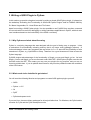
1 Writing a QGIS Plugin in C++
In this section we provide a beginner’s tutorial for writing a simple QGIS C++ plugin. It is based on a
workshop held by Dr. Marco Hugentobler.
QGIS C++ plugins are dynamically linked libraries (.so or .dll). They are linked to QGIS at runtime
when requested in the Plugin Manager, and extend the functionality of QGIS via access to the QGIS
GUI. In general, they can be divided into core and external plugins.
Technically the QGIS Plugin Manager looks in the lib/qgis directory for all .so files and loads them
when it is started. When it is closed they are unloaded again, except the ones enabled by the user
(See User Manual). For newly loaded plugins, the classFactory method creates an instance of the
plugin class and the initGui method of the plugin is called to show the GUI elements in the plugin
menu and toolbar. The unload() function of the plugin is used to remove the allocated GUI elements
and the plugin class itself is removed using the class destructor. To list the plugins, each plugin must
have a few external ’C’ functions for description and of course the classFactory method.
1.1 Why C++ and what about licensing
QGIS itself is written in C++, so it makes sense to write plugins in C++ as well. It is an objectoriented programming (OOP) language that is prefered by many developers for creating large-scale
applications.
QGIS C++ plugins take advantage of the functionalities provided by the libqgis*.so libraries. As these
libraries licensed under the GNU GPL, QGIS C++ plugins must also be licenced under the GPL. This
means that you may use your plugins for any purpose and you are not required to publish them. If
you do publish them however, they must be published under the conditions of the GPL license.
1.2 Programming a QGIS C++ Plugin in four steps
The C++ plugin example covered in this manual is a point converter plugin and intentionally kept
simple. The plugin searches the active vector layer in QGIS, converts all vertices of the layer’s
features to point features (keeping the attributes), and finally writes the point features to a delimited
text file. The new layer can then be loaded into QGIS using the delimited text plugin (see User
Manual).
Step 1: Make the plugin manager recognise the plugin
As a first step we create the QgsPointConverter.h and QgsPointConverter.cpp files. We then
add virtual methods inherited from QgisPlugin (but leave them empty for now), create the necessary
external ’C’ methods, and a .pro file (which is a Qt mechanism to easily create Makefiles). Then we
QGIS 1.5 Installation and Coding Guide
1
1 WRITING A QGIS PLUGIN IN C++
compile the sources, move the compiled library into the plugin folder, and load it in the QGIS Plugin
Manager.
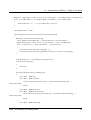
a) Create new pointconverter.pro file and add:
#base directory of the qgis installation
QGIS_DIR = /home/marco/src/qgis
TEMPLATE = lib
CONFIG = qt
QT += xml qt3support
unix:LIBS += -L/$$QGIS_DIR/lib -lqgis_core -lqgis_gui
INCLUDEPATH += $$QGIS_DIR/src/ui $$QGIS_DIR/src/plugins $$QGIS_DIR/src/gui \
$$QGIS_DIR/src/raster $$QGIS_DIR/src/core $$QGIS_DIR
SOURCES = qgspointconverterplugin.cpp
HEADERS = qgspointconverterplugin.h
DEST = pointconverterplugin.so
DEFINES += GUI_EXPORT= CORE_EXPORT=
b) Create new qgspointconverterplugin.h file and add:
#ifndef QGSPOINTCONVERTERPLUGIN_H
#define QGSPOINTCONVERTERPLUGIN_H
#include "qgisplugin.h"
/**A plugin that converts vector layers to delimited text point files.
The vertices of polygon/line type layers are converted to point features*/
class QgsPointConverterPlugin: public QgisPlugin
{
public:
QgsPointConverterPlugin(QgisInterface* iface);
~QgsPointConverterPlugin();
void initGui();
void unload();
private:
QgisInterface* mIface;
};
#endif
c) Create new qgspointconverterplugin.cpp file and add:
QGIS 1.5 Installation and Coding Guide
2
1.2 Programming a QGIS C++ Plugin in four steps
#include "qgspointconverterplugin.h"
#ifdef WIN32
#define QGISEXTERN extern "C" __declspec( dllexport )
#else
#define QGISEXTERN extern "C"
#endif
QgsPointConverterPlugin::QgsPointConverterPlugin(QgisInterface* iface): mIface(iface)
{
}
QgsPointConverterPlugin::~QgsPointConverterPlugin()
{
}
void QgsPointConverterPlugin::initGui()
{
}
void QgsPointConverterPlugin::unload()
{
}
QGISEXTERN QgisPlugin* classFactory(QgisInterface* iface)
{
return new QgsPointConverterPlugin(iface);
}
QGISEXTERN QString name()
{
return "point converter plugin";
}
QGISEXTERN QString description()
{
return "A plugin that converts vector layers to delimited text point files";
}
QGISEXTERN QString version()
{
return "0.00001";
QGIS 1.5 Installation and Coding Guide
3
1 WRITING A QGIS PLUGIN IN C++
}
// Return the type (either UI or MapLayer plugin)
QGISEXTERN int type()
{
return QgisPlugin::UI;
}
// Delete ourself
QGISEXTERN void unload(QgisPlugin* theQgsPointConverterPluginPointer)
{
delete theQgsPointConverterPluginPointer;
}
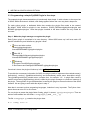
Step 2: Create an icon, a button and a menu for the plugin
This step includes adding a pointer to the QgisInterface object in the plugin class. Then we create a
QAction and a callback function (slot), add it to the QGIS GUI using QgisInterface::addToolBarIcon()
and QgisInterface::addPluginToMenu() and finally remove the QAction in the unload() method.
d) Open qgspointconverterplugin.h again and extend existing content to:
#ifndef QGSPOINTCONVERTERPLUGIN_H
#define QGSPOINTCONVERTERPLUGIN_H
#include "qgisplugin.h"
#include <QObject>
class QAction;
/**A plugin that converts vector layers to delimited text point files.
The vertices of polygon/line type layers are converted to point features*/
class QgsPointConverterPlugin: public QObject, public QgisPlugin
{
Q_OBJECT
public:
QgsPointConverterPlugin(QgisInterface* iface);
~QgsPointConverterPlugin();
void initGui();
void unload();
QGIS 1.5 Installation and Coding Guide
4
1.2 Programming a QGIS C++ Plugin in four steps
private:
QgisInterface* mIface;
QAction* mAction;
private slots:
void convertToPoint();
};
#endif
e) Open qgspointconverterplugin.cpp again and extend existing content to:
#include "qgspointconverterplugin.h"
#include "qgisinterface.h"
#include <QAction>
#ifdef WIN32
#define QGISEXTERN extern "C" __declspec( dllexport )
#else
#define QGISEXTERN extern "C"
#endif
QgsPointConverterPlugin::QgsPointConverterPlugin(QgisInterface* iface): \
mIface(iface), mAction(0)
{
}
QgsPointConverterPlugin::~QgsPointConverterPlugin()
{
}
void QgsPointConverterPlugin::initGui()
{
mAction = new QAction(tr("&Convert to point"), this);
connect(mAction, SIGNAL(activated()), this, SLOT(convertToPoint()));
mIface->addToolBarIcon(mAction);
mIface->addPluginToMenu(tr("&Convert to point"), mAction);
}
QGIS 1.5 Installation and Coding Guide
5
1 WRITING A QGIS PLUGIN IN C++
void QgsPointConverterPlugin::unload()
{
mIface->removeToolBarIcon(mAction);
mIface->removePluginMenu(tr("&Convert to point"), mAction);
delete mAction;
}
void QgsPointConverterPlugin::convertToPoint()
{
qWarning("in method convertToPoint");
}
QGISEXTERN QgisPlugin* classFactory(QgisInterface* iface)
{
return new QgsPointConverterPlugin(iface);
}
QGISEXTERN QString name()
{
return "point converter plugin";
}
QGISEXTERN QString description()
{
return "A plugin that converts vector layers to delimited text point files";
}
QGISEXTERN QString version()
{
return "0.00001";
}
// Return the type (either UI or MapLayer plugin)
QGISEXTERN int type()
{
return QgisPlugin::UI;
}
// Delete ourself
QGISEXTERN void unload(QgisPlugin* theQgsPointConverterPluginPointer)
{
delete theQgsPointConverterPluginPointer;
QGIS 1.5 Installation and Coding Guide
6
1.2 Programming a QGIS C++ Plugin in four steps
}
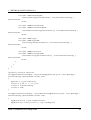
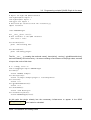
Step 3: Read point features from the active layer and write to text file
To read the point features from the active layer we need to query the current layer and the location
for the new text file. Then we iterate through all features of the current layer, convert the geometries
(vertices) to points, open a new file and use QTextStream to write the x- and y-coordinates into it.
f) Open qgspointconverterplugin.h again and extend existing content to
class QgsGeometry;
class QTextStream;
private:
void convertPoint(QgsGeometry* geom, const QString& attributeString, \
QTextStream& stream) const;
void convertMultiPoint(QgsGeometry* geom, const QString& attributeString, \
QTextStream& stream) const;
void convertLineString(QgsGeometry* geom, const QString& attributeString, \
QTextStream& stream) const;
void convertMultiLineString(QgsGeometry* geom, const QString& attributeString, \
QTextStream& stream) const;
void convertPolygon(QgsGeometry* geom, const QString& attributeString, \
QTextStream& stream) const;
void convertMultiPolygon(QgsGeometry* geom, const QString& attributeString, \
QTextStream& stream) const;
g) Open qgspointconverterplugin.cpp again and extend existing content to:
#include
#include
#include
#include
#include
#include
"qgsgeometry.h"
"qgsvectordataprovider.h"
"qgsvectorlayer.h"
<QFileDialog>
<QMessageBox>
<QTextStream>
void QgsPointConverterPlugin::convertToPoint()
{
qWarning("in method convertToPoint");
QgsMapLayer* theMapLayer = mIface->activeLayer();
QGIS 1.5 Installation and Coding Guide
7
1 WRITING A QGIS PLUGIN IN C++
if(!theMapLayer)
{
QMessageBox::information(0, tr("no active layer"), \
tr("this plugin needs an active point vector layer to make conversions \
to points"), QMessageBox::Ok);
return;
}
QgsVectorLayer* theVectorLayer = dynamic_cast<QgsVectorLayer*>(theMapLayer);
if(!theVectorLayer)
{
QMessageBox::information(0, tr("no vector layer"), \
tr("this plugin needs an active point vector layer to make conversions \
to points"), QMessageBox::Ok);
return;
}
QString fileName = QFileDialog::getSaveFileName();
if(!fileName.isNull())
{
qWarning("The selected filename is: " + fileName);
QFile f(fileName);
if(!f.open(QIODevice::WriteOnly))
{
QMessageBox::information(0, "error", "Could not open file", QMessageBox::Ok);
return;
}
QTextStream theTextStream(&f);
theTextStream.setRealNumberNotation(QTextStream::FixedNotation);
QgsFeature currentFeature;
QgsGeometry* currentGeometry = 0;
QgsVectorDataProvider* provider = theVectorLayer->dataProvider();
if(!provider)
{
return;
}
theVectorLayer->select(provider->attributeIndexes(), \
theVectorLayer->extent(), true, false);
//write header
QGIS 1.5 Installation and Coding Guide
8
1.2 Programming a QGIS C++ Plugin in four steps
theTextStream << "x,y";
theTextStream << endl;
while(theVectorLayer->nextFeature(currentFeature))
{
QString featureAttributesString;
currentGeometry = currentFeature.geometry();
if(!currentGeometry)
{
continue;
}
switch(currentGeometry->wkbType())
{
case QGis::WKBPoint:
case QGis::WKBPoint25D:
convertPoint(currentGeometry, featureAttributesString, \
theTextStream);
break;
case QGis::WKBMultiPoint:
case QGis::WKBMultiPoint25D:
convertMultiPoint(currentGeometry, featureAttributesString, \
theTextStream);
break;
case QGis::WKBLineString:
case QGis::WKBLineString25D:
convertLineString(currentGeometry, featureAttributesString, \
theTextStream);
break;
case QGis::WKBMultiLineString:
case QGis::WKBMultiLineString25D:
convertMultiLineString(currentGeometry, featureAttributesString \
theTextStream);
break;
case QGis::WKBPolygon:
case QGis::WKBPolygon25D:
convertPolygon(currentGeometry, featureAttributesString, \
QGIS 1.5 Installation and Coding Guide
9
1 WRITING A QGIS PLUGIN IN C++
theTextStream);
break;
case QGis::WKBMultiPolygon:
case QGis::WKBMultiPolygon25D:
convertMultiPolygon(currentGeometry, featureAttributesString, \
theTextStream);
break;
}
}
}
}
//geometry converter functions
void QgsPointConverterPlugin::convertPoint(QgsGeometry* geom, const QString& \
attributeString, QTextStream& stream) const
{
QgsPoint p = geom->asPoint();
stream << p.x() << "," << p.y();
stream << endl;
}
void QgsPointConverterPlugin::convertMultiPoint(QgsGeometry* geom, const QString& \
attributeString, QTextStream& stream) const
{
QgsMultiPoint mp = geom->asMultiPoint();
QgsMultiPoint::const_iterator it = mp.constBegin();
for(; it != mp.constEnd(); ++it)
{
stream << (*it).x() << "," << (*it).y();
stream << endl;
}
}
void QgsPointConverterPlugin::convertLineString(QgsGeometry* geom, const QString& \
attributeString, QTextStream& stream) const
{
QgsPolyline line = geom->asPolyline();
QgsPolyline::const_iterator it = line.constBegin();
for(; it != line.constEnd(); ++it)
{
stream << (*it).x() << "," << (*it).y();
QGIS 1.5 Installation and Coding Guide
10
1.2 Programming a QGIS C++ Plugin in four steps
stream << endl;
}
}
void QgsPointConverterPlugin::convertMultiLineString(QgsGeometry* geom, const QString& \
attributeString, QTextStream& stream) const
{
QgsMultiPolyline ml = geom->asMultiPolyline();
QgsMultiPolyline::const_iterator lineIt = ml.constBegin();
for(; lineIt != ml.constEnd(); ++lineIt)
{
QgsPolyline currentPolyline = *lineIt;
QgsPolyline::const_iterator vertexIt = currentPolyline.constBegin();
for(; vertexIt != currentPolyline.constEnd(); ++vertexIt)
{
stream << (*vertexIt).x() << "," << (*vertexIt).y();
stream << endl;
}
}
}
void QgsPointConverterPlugin::convertPolygon(QgsGeometry* geom, const QString& \
attributeString, QTextStream& stream) const
{
QgsPolygon polygon = geom->asPolygon();
QgsPolygon::const_iterator it = polygon.constBegin();
for(; it != polygon.constEnd(); ++it)
{
QgsPolyline currentRing = *it;
QgsPolyline::const_iterator vertexIt = currentRing.constBegin();
for(; vertexIt != currentRing.constEnd(); ++vertexIt)
{
stream << (*vertexIt).x() << "," << (*vertexIt).y();
stream << endl;
}
}
}
void QgsPointConverterPlugin::convertMultiPolygon(QgsGeometry* geom, const QString& \
attributeString, QTextStream& stream) const
{
QgsMultiPolygon mp = geom->asMultiPolygon();
QGIS 1.5 Installation and Coding Guide
11
1 WRITING A QGIS PLUGIN IN C++
QgsMultiPolygon::const_iterator polyIt = mp.constBegin();
for(; polyIt != mp.constEnd(); ++polyIt)
{
QgsPolygon currentPolygon = *polyIt;
QgsPolygon::const_iterator ringIt = currentPolygon.constBegin();
for(; ringIt != currentPolygon.constEnd(); ++ringIt)
{
QgsPolyline currentPolyline = *ringIt;
QgsPolyline::const_iterator vertexIt = currentPolyline.constBegin();
for(; vertexIt != currentPolyline.constEnd(); ++vertexIt)
{
stream << (*vertexIt).x() << "," << (*vertexIt).y();
stream << endl;
}
}
}
}
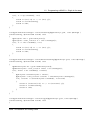
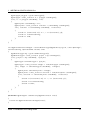
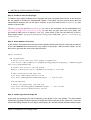
Step 4: Copy the feature attributes to the text file
At the end we extract the attributes from the active layer using QgsVectorDataProvider::fieldNameMap().
For each feature we extract the field values using QgsFeature::attributeMap() and add the contents (comma separated) behind the x- and y-coordinates
for each new point feature.
For this step there is no need for any furter change in
qgspointconverterplugin.h
h) Open qgspointconverterplugin.cpp again and extend existing content to:
#include
#include
#include
#include
#include
#include
#include
#include
#include
"qgspointconverterplugin.h"
"qgisinterface.h"
"qgsgeometry.h"
"qgsvectordataprovider.h"
"qgsvectorlayer.h"
<QAction>
<QFileDialog>
<QMessageBox>
<QTextStream>
#ifdef WIN32
#define QGISEXTERN extern "C" __declspec( dllexport )
#else
#define QGISEXTERN extern "C"
QGIS 1.5 Installation and Coding Guide
12
1.2 Programming a QGIS C++ Plugin in four steps
#endif
QgsPointConverterPlugin::QgsPointConverterPlugin(QgisInterface* iface): \
mIface(iface), mAction(0)
{
}
QgsPointConverterPlugin::~QgsPointConverterPlugin()
{
}
void QgsPointConverterPlugin::initGui()
{
mAction = new QAction(tr("&Convert to point"), this);
connect(mAction, SIGNAL(activated()), this, SLOT(convertToPoint()));
mIface->addToolBarIcon(mAction);
mIface->addPluginToMenu(tr("&Convert to point"), mAction);
}
void QgsPointConverterPlugin::unload()
{
mIface->removeToolBarIcon(mAction);
mIface->removePluginMenu(tr("&Convert to point"), mAction);
delete mAction;
}
void QgsPointConverterPlugin::convertToPoint()
{
qWarning("in method convertToPoint");
QgsMapLayer* theMapLayer = mIface->activeLayer();
if(!theMapLayer)
{
QMessageBox::information(0, tr("no active layer"), \
tr("this plugin needs an active point vector layer to make conversions \
to points"), QMessageBox::Ok);
return;
}
QgsVectorLayer* theVectorLayer = dynamic_cast<QgsVectorLayer*>(theMapLayer);
if(!theVectorLayer)
{
QGIS 1.5 Installation and Coding Guide
13
1 WRITING A QGIS PLUGIN IN C++
QMessageBox::information(0, tr("no vector layer"), \
tr("this plugin needs an active point vector layer to make conversions \
to points"), QMessageBox::Ok);
return;
}
QString fileName = QFileDialog::getSaveFileName();
if(!fileName.isNull())
{
qWarning("The selected filename is: " + fileName);
QFile f(fileName);
if(!f.open(QIODevice::WriteOnly))
{
QMessageBox::information(0, "error", "Could not open file", QMessageBox::Ok);
return;
}
QTextStream theTextStream(&f);
theTextStream.setRealNumberNotation(QTextStream::FixedNotation);
QgsFeature currentFeature;
QgsGeometry* currentGeometry = 0;
QgsVectorDataProvider* provider = theVectorLayer->dataProvider();
if(!provider)
{
return;
}
theVectorLayer->select(provider->attributeIndexes(), \
theVectorLayer->extent(), true, false);
//write header
theTextStream << "x,y";
QMap<QString, int> fieldMap = provider->fieldNameMap();
//We need the attributes sorted by index.
//Therefore we insert them in a second map where key / values are exchanged
QMap<int, QString> sortedFieldMap;
QMap<QString, int>::const_iterator fieldIt = fieldMap.constBegin();
for(; fieldIt != fieldMap.constEnd(); ++fieldIt)
{
sortedFieldMap.insert(fieldIt.value(), fieldIt.key());
}
QGIS 1.5 Installation and Coding Guide
14
1.2 Programming a QGIS C++ Plugin in four steps
QMap<int, QString>::const_iterator sortedFieldIt = sortedFieldMap.constBegin();
for(; sortedFieldIt != sortedFieldMap.constEnd(); ++sortedFieldIt)
{
theTextStream << "," << sortedFieldIt.value();
}
theTextStream << endl;
while(theVectorLayer->nextFeature(currentFeature))
{
QString featureAttributesString;
const QgsAttributeMap& map = currentFeature.attributeMap();
QgsAttributeMap::const_iterator attributeIt = map.constBegin();
for(; attributeIt != map.constEnd(); ++attributeIt)
{
featureAttributesString.append(",");
featureAttributesString.append(attributeIt.value().toString());
}
currentGeometry = currentFeature.geometry();
if(!currentGeometry)
{
continue;
}
switch(currentGeometry->wkbType())
{
case QGis::WKBPoint:
case QGis::WKBPoint25D:
convertPoint(currentGeometry, featureAttributesString, \
theTextStream);
break;
case QGis::WKBMultiPoint:
case QGis::WKBMultiPoint25D:
convertMultiPoint(currentGeometry, featureAttributesString, \
theTextStream);
break;
case QGis::WKBLineString:
QGIS 1.5 Installation and Coding Guide
15
1 WRITING A QGIS PLUGIN IN C++
case QGis::WKBLineString25D:
convertLineString(currentGeometry, featureAttributesString, \
theTextStream);
break;
case QGis::WKBMultiLineString:
case QGis::WKBMultiLineString25D:
convertMultiLineString(currentGeometry, featureAttributesString \
theTextStream);
break;
case QGis::WKBPolygon:
case QGis::WKBPolygon25D:
convertPolygon(currentGeometry, featureAttributesString, \
theTextStream);
break;
case QGis::WKBMultiPolygon:
case QGis::WKBMultiPolygon25D:
convertMultiPolygon(currentGeometry, featureAttributesString, \
theTextStream);
break;
}
}
}
}
//geometry converter functions
void QgsPointConverterPlugin::convertPoint(QgsGeometry* geom, const QString& \
attributeString, QTextStream& stream) const
{
QgsPoint p = geom->asPoint();
stream << p.x() << "," << p.y();
stream << attributeString;
stream << endl;
}
void QgsPointConverterPlugin::convertMultiPoint(QgsGeometry* geom, const QString& \
attributeString, QTextStream& stream) const
{
QgsMultiPoint mp = geom->asMultiPoint();
QgsMultiPoint::const_iterator it = mp.constBegin();
QGIS 1.5 Installation and Coding Guide
16
1.2 Programming a QGIS C++ Plugin in four steps
for(; it != mp.constEnd(); ++it)
{
stream << (*it).x() << "," << (*it).y();
stream << attributeString;
stream << endl;
}
}
void QgsPointConverterPlugin::convertLineString(QgsGeometry* geom, const QString& \
attributeString, QTextStream& stream) const
{
QgsPolyline line = geom->asPolyline();
QgsPolyline::const_iterator it = line.constBegin();
for(; it != line.constEnd(); ++it)
{
stream << (*it).x() << "," << (*it).y();
stream << attributeString;
stream << endl;
}
}
void QgsPointConverterPlugin::convertMultiLineString(QgsGeometry* geom, const QString& \
attributeString, QTextStream& stream) const
{
QgsMultiPolyline ml = geom->asMultiPolyline();
QgsMultiPolyline::const_iterator lineIt = ml.constBegin();
for(; lineIt != ml.constEnd(); ++lineIt)
{
QgsPolyline currentPolyline = *lineIt;
QgsPolyline::const_iterator vertexIt = currentPolyline.constBegin();
for(; vertexIt != currentPolyline.constEnd(); ++vertexIt)
{
stream << (*vertexIt).x() << "," << (*vertexIt).y();
stream << attributeString;
stream << endl;
}
}
}
void QgsPointConverterPlugin::convertPolygon(QgsGeometry* geom, const QString& \
attributeString, QTextStream& stream) const
{
QGIS 1.5 Installation and Coding Guide
17
1 WRITING A QGIS PLUGIN IN C++
QgsPolygon polygon = geom->asPolygon();
QgsPolygon::const_iterator it = polygon.constBegin();
for(; it != polygon.constEnd(); ++it)
{
QgsPolyline currentRing = *it;
QgsPolyline::const_iterator vertexIt = currentRing.constBegin();
for(; vertexIt != currentRing.constEnd(); ++vertexIt)
{
stream << (*vertexIt).x() << "," << (*vertexIt).y();
stream << attributeString;
stream << endl;
}
}
}
void QgsPointConverterPlugin::convertMultiPolygon(QgsGeometry* geom, const QString& \
attributeString, QTextStream& stream) const
{
QgsMultiPolygon mp = geom->asMultiPolygon();
QgsMultiPolygon::const_iterator polyIt = mp.constBegin();
for(; polyIt != mp.constEnd(); ++polyIt)
{
QgsPolygon currentPolygon = *polyIt;
QgsPolygon::const_iterator ringIt = currentPolygon.constBegin();
for(; ringIt != currentPolygon.constEnd(); ++ringIt)
{
QgsPolyline currentPolyline = *ringIt;
QgsPolyline::const_iterator vertexIt = currentPolyline.constBegin();
for(; vertexIt != currentPolyline.constEnd(); ++vertexIt)
{
stream << (*vertexIt).x() << "," << (*vertexIt).y();
stream << attributeString;
stream << endl;
}
}
}
}
QGISEXTERN QgisPlugin* classFactory(QgisInterface* iface)
{
return new QgsPointConverterPlugin(iface);
}
QGIS 1.5 Installation and Coding Guide
18
1.3 Further information
QGISEXTERN QString name()
{
return "point converter plugin";
}
QGISEXTERN QString description()
{
return "A plugin that converts vector layers to delimited text point files";
}
QGISEXTERN QString version()
{
return "0.00001";
}
// Return the type (either UI or MapLayer plugin)
QGISEXTERN int type()
{
return QgisPlugin::UI;
}
// Delete ourself
QGISEXTERN void unload(QgisPlugin* theQgsPointConverterPluginPointer)
{
delete theQgsPointConverterPluginPointer;
}
1.3 Further information
As you can see, you need information from many different sources to write QGIS C++ plugins. Plugin writers need to know C++, the QGIS plugin interface as well as Qt4 classes and tools. At the
beginning it is best to learn from examples and copy the mechanism of existing plugins.
There is a a collection of online documentation that may be usefull for QGIS C++ programers:
• QGIS Plugin Debugging: http://www.qgis.org/wiki/How_to_debug_QGIS_Plugins
• QGIS API Documentation: http://svn.qgis.org/api_doc/html/
• Qt documentation: http://doc.trolltech.com/4.3/index.html
QGIS 1.5 Installation and Coding Guide
19
2 CREATING C++ APPLICATIONS
2 Creating C++ Applications
Not everyone wants a full blown GIS desktop application. Sometimes you want to just have a widget inside your application that displays a map while the main goal of the application lies elsewhere.
Perhaps a database frontend with a map display? This Section provides two simple code examples by Tim Sutton, based on earlier work by Francis Bolduc. They are available in the qgis subversion repository together with more interesting tutorials. Check out the whole repository from:
https://svn.osgeo.org/qgis/trunk/code_examples/
2.1 Creating a simple mapping widget
With this tutorial we will create a simple mapping widget. It won’t do anything much - just load a
shape file and display it in a random colour. This should give you an idea of the potential for using
QGIS as an embedded mapping component.
We start by adding the neccessary includes for our app:
//
// QGIS Includes
//
#include <qgsapplication.h>
#include <qgsproviderregistry.h>
#include <qgssinglesymbolrenderer.h>
#include <qgsmaplayerregistry.h>
#include <qgsvectorlayer.h>
#include <qgsmapcanvas.h>
//
// Qt Includes
//
#include <QString>
#include <QApplication>
#include <QWidget>
We use QgsApplication instead of Qt’s QApplication, to take advantage of various static methods that
can be used to locate library paths and so on.
The provider registry is a singleton that keeps track of vector data provider plugins. It does all the work
for you of loading the plugins and so on. The single symbol renderer is the most basic symbology
class. It renders points, lines or polygons in a single colour which is chosen at random by default
(though you can set it yourself). Every vector layer must have a symbology associated with it.
QGIS 1.5 Installation and Coding Guide
20
2.1 Creating a simple mapping widget
The map layer registry keeps track of all the layers you are using. The vector layer class inherits from
maplayer and extends it to include specialist functionality for vector data.
Finally, the mapcanvas is our main map area. Its the drawable widget that our map will be dispalyed
on.
Now we can move on to initialising our application....
int main(int argc, char ** argv)
{
// Start the Application
QgsApplication app(argc, argv, true);
QString
QString
QString
QString
myPluginsDir
myLayerPath
myLayerBaseName
myProviderName
=
=
=
=
"/home/timlinux/apps/lib/qgis";
"/home/timlinux/gisdata/brazil/BR_Cidades/";
"Brasil_Cap";
"ogr";
We now have a qgsapplication and we have defined several variables. Since this tutorial was initially
tested on Ubuntu Linux 8.10, we have specified the location of the vector provider plugins as being
inside our development install directory. It would probaby make more sense in general to keep the
QGIS libs in one of the standard library search paths on your system (e.g. /usr/lib) but this way will
do for now.
The next two variables defined here point to the shapefile that is going to be used (though you will
likely want to substitute your own data here).
The provider name is important - it tells qgis which data provider to use to load the file. Typically you
will use ’ogr’ or ’postgres’.
Now we can go on to actually create our layer object.
// Instantiate Provider Registry
QgsProviderRegistry::instance(myPluginsDir);
First we get the provider registry initialised. Its a singleton class so we use the static instance call
and pass it the provider lib search path. As it initialises it will scan this path for provider libs.
Now we go on to create a layer...
QgsVectorLayer * mypLayer =
new QgsVectorLayer(myLayerPath, myLayerBaseName, myProviderName);
QGIS 1.5 Installation and Coding Guide
21
2 CREATING C++ APPLICATIONS
QgsSingleSymbolRenderer *mypRenderer = new
QgsSingleSymbolRenderer(mypLayer->geometryType());
QList <QgsMapCanvasLayer> myLayerSet;
mypLayer->setRenderer(mypRenderer);
if (mypLayer->isValid())
{
qDebug("Layer is valid");
}
else
{
qDebug("Layer is NOT valid");
}
// Add the Vector Layer to the Layer Registry
QgsMapLayerRegistry::instance()->addMapLayer(mypLayer, TRUE);
// Add the Layer to the Layer Set
myLayerSet.append(QgsMapCanvasLayer(mypLayer, TRUE));
The code is fairly self explanatory here. We create a layer using the variables we defined earlier.
Then we assign the layer a renderer. When we create a renderer, we need to specify the geometry
type, which we do by asking the vector layer for its geometry type. Next we add the layer to a layerset
(which is used by the QgsMapCanvas to keep track of which layers to render and in what order) and
to the maplayer registry. Finally we make sure the layer will be visible.
Now we create a map canvas on to which we can draw the layer.
// Create the Map Canvas
QgsMapCanvas * mypMapCanvas = new QgsMapCanvas(0, 0);
mypMapCanvas->setExtent(mypLayer->extent());
mypMapCanvas->enableAntiAliasing(true);
mypMapCanvas->setCanvasColor(QColor(255, 255, 255));
mypMapCanvas->freeze(false);
// Set the Map Canvas Layer Set
mypMapCanvas->setLayerSet(myLayerSet);
mypMapCanvas->setVisible(true);
mypMapCanvas->refresh();
Once again there is nothing particularly tricky here. We create the canvas and then we set its extents
to those of our layer. Next we tweak the canvas a bit to draw antialiased vectors. Next we set the
QGIS 1.5 Installation and Coding Guide
22
2.2 Working with QgsMapCanvas
background colour, unfreeze the canvas, make it visible and then refresh it.
// Start the Application Event Loop
return app.exec();
}
In the last step we simply start the Qt event loop and we are done. You can check out, compile and
run this example using cmake like this:
svn co
https://svn.osgeo.org/qgis/trunk/code_examples/1_hello_world_qgis_style
cd 1_hello_world_qgis_style
mkdir build
#optionally specify where your QGIS is installed (should work on all
platforms)
#if your QGIS is installed to /usr or /usr/local you can leave this next step
out
export LIB_DIR=/home/timlinux/apps
cmake ..
make
./timtut1
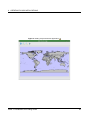
When we compile and run it here is what the running app looks like:
2.2 Working with QgsMapCanvas
In the previous Section (Section 2.1) we showed you how to use the QgsMapCanvas API to create
a simple application that loads a shapefile and displays the points in it. But what good is a map that
you can’t interact with?
In this second tutorial we will extend the previous tutorial by making it a QMainWindow application
with a menu, toolbar and canvas area. We show you how to use QgsMapTool - the base class for all
tools that are used to interact with the map canvas. The project will provide 4 toolbar icons for
• loading a map layer (layer name is hard coded in the application
• zooming in
• zooming out
• panning
QGIS 1.5 Installation and Coding Guide
23
2 CREATING C++ APPLICATIONS
Figure 1: Simple C++ Application
In the working directory for the tutorial code you will find a number of files including c++ sources,
icons and a simple data file under data. There is also the .ui file for the main window.
Note: You will need to edit the .pro file in the above svn directory to match your system.
Since much of the code is the same as the previous tutorial, we will focus on the MapTool specifics
- the rest of the implementation details can be investigated by checking out the project form SVN.
A QgsMapTool is a class that interacts with the MapCanvas using the mouse pointer. QGIS has a
number of QgsMapTools implemented, and you can subclass QgsMapTool to create your own. In
mainwindow.cpp you will see we have included the headers for the QgsMapTools near the start of
the file:
//
// QGIS Map tools
//
#include "qgsmaptoolpan.h"
#include "qgsmaptoolzoom.h"
//
// These are the other headers for available map tools
// (not used in this example)
//
//#include "qgsmaptoolcapture.h"
//#include "qgsmaptoolidentify.h"
//#include "qgsmaptoolselect.h"
//#include "qgsmaptoolvertexedit.h"
//#include "qgsmeasure.h"
QGIS 1.5 Installation and Coding Guide
24
2.2 Working with QgsMapCanvas
As you can see, I am only using two types of MapTool subclasses for this tutorial, but there are more
available in the QGIS library. Hooking up our MapTools to the canvas is very easy using the normal
Qt4 signal/slot mechanism:
//create the action behaviours
connect(mActionPan, SIGNAL(triggered()), this, SLOT(panMode()));
connect(mActionZoomIn, SIGNAL(triggered()), this, SLOT(zoomInMode()));
connect(mActionZoomOut, SIGNAL(triggered()), this, SLOT(zoomOutMode()));
connect(mActionAddLayer, SIGNAL(triggered()), this, SLOT(addLayer()));
Next we make a small toolbar to hold our toolbuttons. Note that the mpAction* actions were created
in designer.
//create a little toolbar
mpMapToolBar = addToolBar(tr("File"));
mpMapToolBar->addAction(mpActionAddLayer);
mpMapToolBar->addAction(mpActionZoomIn);
mpMapToolBar->addAction(mpActionZoomOut);
mpMapToolBar->addAction(mpActionPan);
Now we create our three map tools:
//create the maptools
mpPanTool = new QgsMapToolPan(mpMapCanvas);
mpPanTool->setAction(mpActionPan);
mpZoomInTool = new QgsMapToolZoom(mpMapCanvas, FALSE); // false = in
mpZoomInTool->setAction(mpActionZoomIn);
mpZoomOutTool = new QgsMapToolZoom(mpMapCanvas, TRUE ); //true = out
mpZoomOutTool->setAction(mpActionZoomOut);
Again nothing here is very complicated - we are creating tool instances, each of which is associated
with the same mapcanvas, and a different QAction. When the user selects one of the toolbar icons,
the active MapTool for the canvas is set. For example when the pan icon is clicked, we do this:
void MainWindow::panMode()
{
mpMapCanvas->setMapTool(mpPanTool);
}
QGIS 1.5 Installation and Coding Guide
25
2 CREATING C++ APPLICATIONS
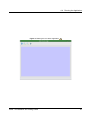
Figure 2: QMainWindow application with a menu, toolbar and canvas area
Conclusion
As you can see extending our previous example into something more functional using MapTools is
really easy and only requires a few lines of code for each MapTool you want to provide.
You can check out and build this tutorial using SVN and CMake using the following steps:
svn co https://svn.osgeo.org/qgis/trunk/code_examples/2_basic_main_window
cd 2_basic_main_window
mkdir build
#optionally specify where your QGIS is installed (should work on all platforms)
#if your QGIS is installed to /usr or /usr/local you can leave this next step out
export LIB_DIR=/home/timlinux/apps
cmake ..
make
./timtut2
QGIS 1.5 Installation and Coding Guide
26
3 Writing a QGIS Plugin in Python
In this section we provide a beginner’s tutorial for writing a simple QGIS Python plugin. It is based on
the workshop "Extending the Functionality of QGIS with Python Plugins" held at FOSS4G 2008 by
Dr. Marco Hugentobler, Dr. Horst Düster and Tim Sutton.
Apart from writing a QGIS Python plugin, it is also possible to use PyQGIS from a python command
line console which is useful for debugging or writing standalone applications in Python, with their own
user interfaces based on the functionality of the QGIS core library.
3.1 Why Python and what about licensing
Python is a scripting language that was designed with the goal of being easy to program. It has
a mechanism for automatically releasing memory that is no longer used (garbagge collector). A
further advantage is that many programs that are written in C++ or Java offer the possibility to write
extensions in Python, e.g. OpenOffice or Gimp. Therefore it is a good investment of time to learn the
Python language.
PyQGIS plugins take advantage of the functionality of libqgis_core.so and libqgis_gui.so. As both
libqgis_core.so and libqgis_gui.so are licensed under GNU GPL, QGIS Python plugins must also be
licenced under the GPL. This means you may use your plugins for any purpose, and you are not
forced to publish them. If you do publish them however, they must be published under the conditions
of the GPL license.
3.2 What needs to be installed to get started
You will need the following libraries and programs to create QGIS python plugins yourself:
• QGIS
• Python >= 2.5
• Qt
• PyQT
• PyQt development tools
If you use Linux, there are binary packages for all major distributions. For Windows, the PyQt installer
contains Qt, PyQt and the PyQt development tools.
QGIS 1.5 Installation and Coding Guide
27
3 WRITING A QGIS PLUGIN IN PYTHON
3.3 Programming a simple PyQGIS Plugin in four steps
The example plugin demonstrated here is intentionally kept simple. It adds a button to the menu bar
of QGIS. When the button is clicked, a file dialog appears where the user may load a shape file.
For each python plugin, a dedicated folder that contains the plugin files needs to be created.
By default, QGIS looks for plugins in two locations: $QGIS_DIR/share/qgis/python/plugins and
$HOME/.qgis/python/plugins. Note that plugins installed in the latter location are only visible for
one user.
Step 1: Make the plugin manager recognise the plugin
Each Python plugin is contained in its own directory. When QGIS starts up it will scan each OS
specific subdirectory and initialize any plugins it finds.
•
Linux and other unices:
./share/qgis/python/plugins
/home/$USERNAME/.qgis/python/plugins
•
Mac OS X:
./Contents/MacOS/share/qgis/python/plugins
/Users/$USERNAME/.qgis/python/plugins
•
Windows:
C:\Program Files\QGIS\python\plugins
C:\Documents and Settings\$USERNAME\.qgis\python\plugins
Once that is done, the plugin will show up in the
Plugin Manager...
To provide the neccessary information for QGIS, the plugin needs to implement the methods name(),
description(), version(), qgisMinimumVersion() and authorName() which return descriptive strings.
The qgisMinimumVersion() should return a simple form, for example “1.0“. A plugin also needs a
method classFactory(QgisInterface) which is called by the plugin manager to create an instance of
the plugin. The argument of type QGisInterface is used by the plugin to access functions of the QGIS
instance. We are going to work with this object in step 2.
Note that in contrast to other programing languages, indention is very important. The Python interpreter throws an error if it is not correct.
For our plugin we create the plugin folder ’foss4g_plugin’ in $HOME/.qgis/python/plugins. Then we
add two new textfiles into this folder, foss4gplugin.py and __init__.py.
The file foss4gplugin.py contains the plugin class:
# -*- coding: utf-8 -*-
QGIS 1.5 Installation and Coding Guide
28
3.3 Programming a simple PyQGIS Plugin in four steps
# Import the PyQt and QGIS libraries
from PyQt4.QtCore import *
from PyQt4.QtGui import *
from qgis.core import *
# Initialize Qt resources from file resources.py
import resources
class FOSS4GPlugin:
def __init__(self, iface):
# Save reference to the QGIS interface
self.iface = iface
def initGui(self):
print ’Initialising GUI’
def unload(self):
print ’Unloading plugin’
The file __init__.py contains the methods name(), description(), version(), qgisMinimumVersion()
and authorName() and classFactory . As we are creating a new instance of the plugin class, we need
to import the code of this class:
# -*- coding: utf-8 -*from foss4gplugin import FOSS4GPlugin
def name():
return "FOSS4G example"
def description():
return "A simple example plugin to load shapefiles"
def version():
return "0.1"
def qgisMinimumVersion():
return "1.0"
def authorName():
return "John Developer"
def classFactory(iface):
return FOSS4GPlugin(iface)
At this point the plugin already has the neccessary infrastructure to appear in the QGIS
Plugin Manager... to be loaded or unloaded.
QGIS 1.5 Installation and Coding Guide
29
3 WRITING A QGIS PLUGIN IN PYTHON
Step 2: Create an Icon for the plugin
To make the icon graphic available for our program, we need a so-called resource file. In the resource
file, the graphic is contained in hexadecimal notation. Fortunately, we don’t need to worry about its
representation because we use the pyrcc compiler, a tool that reads the file resources.qrc and
creates a resource file.
The file foss4g.png and the resources.qrc we use in this workshop can be downloaded from
http://karlinapp.ethz.ch/python_foss4g, you can also use your own icon if you prefer, you
just need to make sure it is named foss4g.png. Move these 2 files into the directory of the example plugin $HOME/.qgis/python/plugins/foss4g_plugin and enter: pyrcc4 -o resources.py
resources.qrc.
Step 3: Add a button and a menu
In this section, we implement the content of the methods initGui() and unload(). We need an instance
of the class QAction that executes the run() method of the plugin. With the action object, we are
then able to generate the menu entry and the button:
import resources
def initGui(self):
# Create action that will start plugin configuration
self.action = QAction(QIcon(":/plugins/foss4g_plugin/foss4g.png"), "FOSS4G plugin",
self.iface.getMainWindow())
# connect the action to the run method
QObject.connect(self.action, SIGNAL("activated()"), self.run)
# Add toolbar button and menu item
self.iface.addToolBarIcon(self.action)
self.iface.addPluginMenu("FOSS-GIS plugin...", self.action)
def unload(self):
# Remove the plugin menu item and icon
self.iface.removePluginMenu("FOSSGIS Plugin...", self.action)
self.iface.removeToolBarIcon(self.action)
Step 4: Load a layer from a shape file
In this step we implement the real functionality of the plugin in the run() method. The Qt4 method
QFileDialog::getOpenFileName opens a file dialog and returns the path to the chosen file. If the user
cancels the dialog, the path is a null object, which we test for. We then call the method addVectorLayer
QGIS 1.5 Installation and Coding Guide
30
3.4 Uploading the plugin to the repository
of the interface object which loads the layer. The method only needs three arguments: the file path,
the name of the layer that will be shown in the legend and the data provider name. For shapefiles,
this is ’ogr’ because QGIS internally uses the OGR library to access shapefiles:
def run(self):
fileName = QFileDialog.getOpenFileName(None,QString.fromLocal8Bit("Select a file:"),
"", "*.shp *.gml")
if fileName.isNull():
QMessageBox.information(None, "Cancel", "File selection canceled")
else:
vlayer = self.iface.addVectorLayer(fileName, "myLayer", "ogr")
Signal ’activated ()’ in python plugins is deprecated
When writing your python plugin, remember that the activated () signal of the ’QAction class’, used
to signal the plugin it has been activated, is deprecated. This signal has disappeared from Qt4 and if
Qt4 is not compiled with the Qt3 backward compatibility, it is simply non existent, so no plugin can be
called at all.
Please replace activated () with triggered ().
3.4 Uploading the plugin to the repository
If you have written a plugin you consider to be useful and you want to share with other users you are
welcome to upload it to the QGIS User-Contributed Repository.
• Prepare a plugin directory containing only the necessary files (ensure that there is no compiled
.pyc files, Subversion .svn directories etc).
• Make a zip archive of it, including the directory. Be sure the zip file name is exactly the same
as the directory inside (except the .zip extension of course), if not the Plugin Installer will be
unable to relate the available plugin with its locally installed instance.
• Upload it to the repository: http://pyqgis.org/admin/contributed (you will need to register
at first time). Please pay attention when filling the form. The Version Number field is especially important, and if filled out incorrectly it may confuse the Plugin Installer and cause false
notifications of available updates.
QGIS 1.5 Installation and Coding Guide
31
3 WRITING A QGIS PLUGIN IN PYTHON
3.5 Further information
As you can see, you need information from many different sources to a write PyQGIS plugin. Plugin
authors need to know Python, the QGIS plugin interface, as well as the Qt4 classes and tools. In
the beginning, it is best to learn from examples and copy the mechanism of existing plugins. Using
the QGIS plugin installer, which itself is a Python plugin, it is possible to download many existing
Python plugins and to study their behaviour. It is also possible to use the on-line Python plugin
generator to create a base plugin to work off of. This on-line tool will help you to build a minimal
plugin that you can use as a starting point in your development. The result is a ready to install
QGIS 1.0 plugin that implements an empty dialog with Ok and Close buttons. It is available here:
http://www.pyqgis.org/builder/plugin_builder.py
There is a a collection of on-line documentation that may be useful for PyQGIS programmers:
• QGIS wiki: http://wiki.qgis.org/qgiswiki/PythonBindings
• QGIS API documentation: http://doc.qgis.org/index.html
• Qt documentation: http://doc.trolltech.com/4.3/index.html
• PyQt: http://www.riverbankcomputing.co.uk/pyqt/
• Python tutorial: http://docs.python.org/
• A book about desktop GIS and QGIS. It contains a chapter about PyQGIS plugin programing:
http://www.pragprog.com/titles/gsdgis/desktop-gis
You can also write plugins for QGIS in C++. See Section 1 for more information about that.
QGIS 1.5 Installation and Coding Guide
32
4 Creating PyQGIS Applications
One of the goals of QGIS is to provide not only an application, but a set of libraries that can be used
to create new applications. This goal has been realized with the refactoring of libraries that took
place after the release of 0.8. Since the release of 0.9, development of standalone applications using
either C++ or Python is possible. We recommend you use QGIS 1.0.0 or greater as the basis for your
python applications because since this version we now provide a stable consistent API.
In this chapter we’ll take a brief look at the process of creating a standalone Python application. The
QGIS blog has several examples for creating PyQGIS1 applications. We’ll use one of them as a
starting point to get a look at how to create an application.
The features we want in the application are:
• Load a vector layer
• Pan
• Zoom in and out
• Zoom to the full extent of the layer
• Set custom colors when the layer is loaded
This is a pretty minimal feature set. Let’s start by designing the GUI using Qt Designer.
4.1 Designing the GUI
Since we are creating a minimalistic application, we’ll take the same approach with the GUI. Using
Qt Designer, we create a simple MainWindow with no menu or toolbars. This gives us a blank slate
to work with. To create the MainWindow:
1. Create a directory for developing the application and change to it
2. Run Qt Designer
3. The New Form dialog should appear. If it doesn’t, choose New Form... from the File menu.
4. Choose Main Window from the templates/forms list
5. Click Create
6. Resize the new window to something manageable
7. Find the Frame widget in the list (under Containers) and drag it to the main window you just
1
An application created using Python and the QGIS bindings
QGIS 1.5 Installation and Coding Guide
33
4 CREATING PYQGIS APPLICATIONS
created
8. Click outside the frame to select the main window area
9. Click on the Lay Out in a Grid tool. When you do, the frame will expand to fill your entire main
window
10. Save the form as mainwindow.ui
11. Exit Qt Designer
Now compile the form using the PyQt interface compiler:
pyuic4 -o mainwindow_ui.py mainwindow.ui
This creates the Python source for the main window GUI. Next we need to create the application
code to fill the blank slate with some tools we can use.
4.2 Creating the MainWindow
Now we are ready to write the MainWindow class that will do the real work. Since it takes up quite a
few lines, we’ll look at it in chunks, starting with the import section and environment setup:
1 # Loosely based on:
2 #
Original C++ Tutorial 2 by Tim Sutton
3 #
ported to Python by Martin Dobias
4 #
with enhancements by Gary Sherman for FOSS4G2007
5 # Licensed under the terms of GNU GPL 2
6
7 from PyQt4.QtCore import *
8 from PyQt4.QtGui import *
9 from qgis.core import *
10 from qgis.gui import *
11 import sys
12 import os
13 # Import our GUI
14 from mainwindow_ui import Ui_MainWindow
15
16 # Environment variable QGISHOME must be set to the 1.0 install directory
17 # before running this application
18 qgis_prefix = os.getenv("QGISHOME")
QGIS 1.5 Installation and Coding Guide
34
4.2 Creating the MainWindow
Some of this should look familiar from our plugin, especially the PyQt4 and QGIS imports. Some
specific things to note are the import of our GUI in line 14 and the import of our CORE library on line
9.
Our application needs to know where to find the QGIS installation. Because of this, we set the
QGISHOME environment variable to point to the install directory of QGIS 1.x In line 20 we store this
value from the environment for later use.
Next we need to create our MainWindow class which will contain all the logic of our application.
21 class MainWindow(QMainWindow, Ui_MainWindow):
22
23
def __init__(self):
24
QMainWindow.__init__(self)
25
26
# Required by Qt4 to initialize the UI
27
self.setupUi(self)
28
29
# Set the title for the app
30
self.setWindowTitle("QGIS Demo App")
31
32
# Create the map canvas
33
self.canvas = QgsMapCanvas()
34
# Set the background color to light blue something
35
self.canvas.setCanvasColor(QColor(200,200,255))
36
self.canvas.enableAntiAliasing(True)
37
self.canvas.useQImageToRender(False)
38
self.canvas.show()
39
40
# Lay our widgets out in the main window using a
41
# vertical box layout
42
self.layout = QVBoxLayout(self.frame)
43
self.layout.addWidget(self.canvas)
44
45
# Create the actions for our tools and connect each to the appropriate
46
# method
47
self.actionAddLayer = QAction(QIcon("(qgis_prefix + \
"/share/qgis/themes/classic/mActionAddLayer.png"),
48
49
"Add Layer", self.frame)
50
self.connect(self.actionAddLayer, SIGNAL("activated()"), self.addLayer)
51
self.actionZoomIn = QAction(QIcon("(qgis_prefix + \
"/share/qgis/themes/classic/mActionZoomIn.png"), \
QGIS 1.5 Installation and Coding Guide
35
4 CREATING PYQGIS APPLICATIONS
"Zoom In", self.frame)
52
53
54
55
56
57
58
59
60
61
62
63
64
65
66
67
68
69
70
71
72
73
74
75
76
77
self.connect(self.actionZoomIn, SIGNAL("activated()"), self.zoomIn)
self.actionZoomOut = QAction(QIcon("(qgis_prefix + \
"/share/qgis/themes/classic/mActionZoomOut.png"), \
"Zoom Out", self.frame)
self.connect(self.actionZoomOut, SIGNAL("activated()"), self.zoomOut)
self.actionPan = QAction(QIcon("(qgis_prefix + \
"/share/qgis/themes/classic/mActionPan.png"), \
"Pan", self.frame)
self.connect(self.actionPan, SIGNAL("activated()"), self.pan)
self.actionZoomFull = QAction(QIcon("(qgis_prefix + \
"/share/qgis/themes/classic/mActionZoomFullExtent.png"), \
"Zoom Full Extent", self.frame)
self.connect(self.actionZoomFull, SIGNAL("activated()"),
self.zoomFull)
# Create a toolbar
self.toolbar = self.addToolBar("Map")
# Add the actions to the toolbar
self.toolbar.addAction(self.actionAddLayer)
self.toolbar.addAction(self.actionZoomIn)
self.toolbar.addAction(self.actionZoomOut);
self.toolbar.addAction(self.actionPan);
self.toolbar.addAction(self.actionZoomFull);
# Create the map tools
self.toolPan = QgsMapToolPan(self.canvas)
self.toolZoomIn = QgsMapToolZoom(self.canvas, False) # false = in
self.toolZoomOut = QgsMapToolZoom(self.canvas, True) # true = out
Lines 21 through 27 are the basic declaration and initialization of the MainWindow and the set up of
the user interface using the setupUi method. This is required for all applications.
Next we set the title for the application so it says something more interesting than MainWindow (line
30). Once that is complete, we are ready to complete the user interface. When we created it in
Designer, we left it very sparse—just a main window and a frame. You could have added a menu and
the toolbar using Designer, however we’ll do it with Python.
In lines 33 through 38 we set up the map canvas, set the background color to a light blue, and enable
antialiasing. We also tell it not to use a QImage for rendering (trust me on this one) and then set the
QGIS 1.5 Installation and Coding Guide
36
4.2 Creating the MainWindow
canvas to visible by calling the show method.
Next we set the layer to use a vertical box layout within the frame and add the map canvas to it in line
43.
Lines 48 to 63 set up the actions and connections for the tools in our toolbar. For each tool, we create
a QAction using the icon we defined in the QGIS classic theme. Then we connect up the activated
signal from the tool to the method in our class that will handle the action. This is similar to how we
set things up in the plugin example.
Once we have the actions and connections, we need to add them to the toolbar. In lines 66 through
72 we create the toolbar and add each tool to it.
Lastly we create the three map tools for the application (lines 75 through 77). We’ll use the map
tools in a moment when we define the methods to make our application functional. Let’s look at the
methods for the map tools.
78
79
80
81
82
83
84
85
86
87
88
89
90
91
92
# Set the map tool to zoom in
def zoomIn(self):
self.canvas.setMapTool(self.toolZoomIn)
# Set the map tool to zoom out
def zoomOut(self):
self.canvas.setMapTool(self.toolZoomOut)
# Set the map tool to
def pan(self):
self.canvas.setMapTool(self.toolPan)
# Zoom to full extent of layer
def zoomFull(self):
self.canvas.zoomFullExtent()
For each map tool, we need a method that corresponds to the connection we made for each action.
In lines 79 through 88 we set up a method for each of the three tools that interact with the map. When
a tool is activated by clicking on it in the toolbar, the corresponding method is called that “tells” the
map canvas it is the active tool. The active tool governs what happens when the mouse is clicked on
the canvas.
The zoom to full extent tool isn’t a map tool—it does its job without requiring a click on the map.
When it is activated, we call the zoomFullExtent method of the map canvas (line 92). This completes
the implementation of all our tools except one—the Add Layer tool. Let’s look at it next:
93
# Add an OGR layer to the map
QGIS 1.5 Installation and Coding Guide
37
4 CREATING PYQGIS APPLICATIONS
94
95
96
97
98
99
100
101
102
103
104
105
106
107
108
109
110
111
112
113
114
115
116
117
118
119
def addLayer(self):
file = QFileDialog.getOpenFileName(self, "Open Shapefile", ".", "Shapefiles
(*.shp)")
fileInfo = QFileInfo(file)
# Add the layer
layer = QgsVectorLayer(file, fileInfo.fileName(), "ogr")
if not layer.isValid():
return
# Change the color of the layer to gray
symbols = layer.renderer().symbols()
symbol = symbols[0]
symbol.setFillColor(QColor.fromRgb(192,192,192))
# Add layer to the registry
QgsMapLayerRegistry.instance().addMapLayer(layer);
# Set extent to the extent of our layer
self.canvas.setExtent(layer.extent())
# Set up the map canvas layer set
cl = QgsMapCanvasLayer(layer)
layers = [cl]
self.canvas.setLayerSet(layers)
In the addLayer method we use a QFileDialog to get the name of the shapefile to load. This is done
in line 96. Notice that we specify a “filter” so the dialog will only show files of type .shp.
Next in line 97 we create a QFileInfo object from the shapefile path. Now the layer is ready to be
created in line 100. Using the QFileInfo object to get the file name from the path we specify it for
the name of the layer when it is created. To make sure that the layer is valid and won’t cause any
problems when loading, we check it in line 102. If it’s bad, we bail out and don’t add it to the map
canvas.
Normally layers are added with a random color. Here we want to tweak the colors for the layer to
make a more pleasing display. Plus we know we are going to add the world_borders layer to the
map and this will make it look nice on our blue background. To change the color, we need to get the
symbol used for rendering and use it to set a new fill color. This is done in lines 106 through 108.
All that’s left is to actually add the layer to the registry and a few other housekeeping items (lines 111
through 119). This stuff is standard for adding a layer and the end result is the world borders on a
QGIS 1.5 Installation and Coding Guide
38
4.3 Finishing Up
light blue background. The only thing you may not want to do is set the extent to the layer, if you are
going to be adding more than one layer in your application.
That’s the heart of the application and completes the MainWindow class.
4.3 Finishing Up
The remainder of the code shown below creates the QgsApplication object, sets the path to the QGIS
install, sets up the main method and then starts the application. The only other thing to note is that
we move the application window to the upper left of the display. We could get fancy and use the Qt
API to center it on the screen.
120 def main(argv):
121
# create Qt application
122
app = QApplication(argv)
123
124
# Initialize qgis libraries
125
QgsApplication.setPrefixPath(qgis_prefix, True)
126
QgsApplication.initQgis()
127
128
# create main window
129
wnd = MainWindow()
130
# Move the app window to upper left
131
wnd.move(100,100)
132
wnd.show()
133
134
# run!
135
retval = app.exec_()
136
137
# exit
138
QgsApplication.exitQgis()
139
sys.exit(retval)
140
141
142 if __name__ == "__main__":
143
main(sys.argv)
QGIS 1.5 Installation and Coding Guide
39
4 CREATING PYQGIS APPLICATIONS
4.4 Running the Application
Now we can run the application and see what happens. Of course if you are like most developers,
you’ve been testing it out as you went along.
Before we can run the application, we need to set some environment variables.
export LD_LIBRARY_PATH=$HOME/qgis/lib%$
export PYTHONPATH=$HOME/qgis/share/qgis/python
export QGISHOME=$HOME/qgis%$
set PATH=C:\qgis;%PATH%
set PYTHONPATH=C:\qgis\python
set QGISHOME=C:\qgis
We assume
•
•
QGIS is installed in your home directory in qgis.
QGIS is installed in C:\qgis.
When the application starts up, it looks like this:
To add the world_borders layer, click on the Add Layer tool and navigate to the data directory. Select
the shapefile and click Open to add it to the map. Our custom fill color is applied and the result is
shown in Figure 4.
Creating a PyQGIS application is really pretty simple. In less than 150 lines of code we have an
application that can load a shapefile and navigate the map. If you play around with the map, you’ll
notice that some of the built-in¨features
¥ of the canvas also work, including mouse wheel scrolling and
panning by holding down the Space bar and moving the mouse.
§
¦
Some sophisticated applications have been created with PyQGIS and more are in the works. This is
pretty impressive, considering that this development has taken place even before the official release
of QGIS 1.0.
QGIS 1.5 Installation and Coding Guide
40
4.4 Running the Application
Figure 3: Starting the new demo application
QGIS 1.5 Installation and Coding Guide
41
4 CREATING PYQGIS APPLICATIONS
Figure 4: Adding a layer the demo application
QGIS 1.5 Installation and Coding Guide
42
5 Installation Guide
The following chapters provide build and installation information for QGIS Version 1.5. This document
corresponds almost to a LATEX conversion of the INSTALL.t2t file coming with the QGIS sources from
July, 27th 2010.
A current version is also available at the wiki, see: http://www.qgis.org/wiki/Installation_Guide
5.1 General Build Notes
Since version 0.8.1 QGIS no longer uses the autotools for building. QGIS, like a number of major
projects (eg. KDE 4.0), now uses CMake (http://www.cmake.org) for building from source. The
configure script in this directory simply checks for the existence of cmake and provides some clues
to build QGIS.
5.1.1 An overview of the dependencies required for building
”’Required build deps:”’ * CMake >= 2.6.0 * Flex, Bison
”’Required runtime deps:”’ * Qt >= 4.4.0 * Proj >= 4.4.x * GEOS >= 3.0 * Sqlite3 >= 3.0.0 *
GDAL/OGR >= 1.4.x
”’Optional dependencies:”’ * for GRASS plugin - GRASS >= 6.0.0 (libraries compiled with exceptions
support) * for georeferencer - GSL >= 1.8 * for postgis support and SPIT plugin - PostgreSQL >=
8.0.x * for gps plugin - expat >= 1.95 * for mapserver export and PyQGIS - Python >= 2.3 (2.5+
preferred) * for PyQGIS - SIP >= 4.8, PyQt >= must match Qt version * for GPS tracking - Qwt >=
5.0
”’Recommended runtime deps:”’ * for gps plugin - gpsbabel
5.2 Building under windows using msys
Note: For a detailed account of building all the dependencies yourself you can visit Marco Pasetti’s
website here:
http://www.webalice.it/marco.pasetti/qgis+grass/BuildFromSource.html
QGIS 1.5 Installation and Coding Guide
43
5 INSTALLATION GUIDE
Read on to use the simplified approach with pre-built libraries...
5.2.1 MSYS:
MSYS provides a unix style build environment under windows. We have created a zip archive that
contains just about all dependencies.
Get this:
http://download.osgeo.org/qgis/win32/msys.zip
and unpack to c:\msys
If you wish to prepare your msys environment yourself rather than using our pre-made one, detailed
instructions are provided elsewhere in this document.
5.2.2 Qt4.3
Download qt4.3 opensource precompiled edition exe and install (including the download and install
of mingw) from here:
http://qt.nokia.com/downloads
When the installer will ask for MinGW, you don’t need to download and install it, just point the installer
to c:\msys\mingw
When Qt installation is complete:
Edit C:\Qt\4.3.0\bin\qtvars.bat and add the following lines:
set PATH=%PATH%;C:\msys\local\bin;c:\msys\local\lib
set PATH=%PATH%;"C:\Program Files\Subversion\bin"
I suggest you also add C:\Qt\4.3.0\bin\ to your Environment Variables Path in the windows system
preferences.
If you plan to do some debugging,
C:\Qt\4.3.0\bin\qtvars.bat compile_debug
you’ll need to compile debug version of Qt:
Note: there is a problem when compiling debug version of Qt 4.3, the script ends with this message
QGIS 1.5 Installation and Coding Guide
44
5.2 Building under windows using msys
"mingw32-make: *** No rule to make target ‘debug’. Stop.". To compile the debug version you have
to go out of src directory and execute the following command:
c:\Qt\4.3.0 make
5.2.3 Flex and Bison
*** Note I think this subsection can be removed as it should be installed int the msys image already.
TS
Get Flex http://sourceforge.net/project/showfiles.php?group_id=23617\&package_id=16424
(the zip bin) and extract it into c:\msys\mingw\bin
5.2.4 Python stuff: (optional)
Follow this subsection in case you would like to use Python bindings for QGIS. To be able to compile
bindings, you need to compile SIP and PyQt4 from sources as their installer doesn’t include some
development files which are necessary.
Download and install Python - use Windows installer
(It doesn’t matter to what folder you’ll install it)
http://python.org/download/
Download SIP and PyQt4 sources
http://www.riverbankcomputing.com/software/sip/download http://www.riverbankcomputing.com/softw
Extract each of the above zip files in a temporary directory. Make sure to get versions that match
your current Qt installed version.
QGIS 1.5 Installation and Coding Guide
45
5 INSTALLATION GUIDE
Compile SIP
c:\Qt\4.3.0\bin\qtvars.bat
python configure.py -p win32-g++
make
make install
Compile PyQt
c:\Qt\4.3.0\bin\qtvars.bat
python configure.py
make
make install
Final python notes
You can delete the directories with unpacked SIP and PyQt4 sources after a successfull install, they’re
not needed anymore.
5.2.5 Subversion:
In order to check out QGIS sources from the repository, you need Subversion client. This installer
should work fine:
http://subversion.tigris.org/files/documents/15/36797/svn-1.4.3-setup.exe
5.2.6 CMake:
CMake is build system used by Quantum GIS. Download it from here:
http://www.cmake.org/files/v2.4/cmake-2.4.6-win32-x86.exe
QGIS 1.5 Installation and Coding Guide
46
5.2 Building under windows using msys
5.2.7 QGIS:
Start a cmd.exe window ( Start -> Run -> cmd.exe ) Create development directory and move into it
md c:\dev\cpp
cd c:\dev\cpp
Check out sources from SVN For svn head:
svn co https://svn.osgeo.org/qgis/trunk/qgis
For svn 0.8 branch
svn co https://svn.osgeo.org/qgis/branches/Release-0_8_0 qgis0.8
5.2.8 Compiling:
As a background read the generic building with CMake notes at the end of this document.
Start a cmd.exe window ( Start -> Run -> cmd.exe ) if you don’t have one already. Add paths to
compiler and our MSYS environment:
c:\Qt\4.3.0\bin\qtvars.bat
For ease of use add c:\Qt\4.3.0\bin\ to your system path in system properties so you can just type
qtvars.bat when you open the cmd console. Create build directory and set it as current directory:
cd c:\dev\cpp\qgis
md build
cd build
QGIS 1.5 Installation and Coding Guide
47
5 INSTALLATION GUIDE
5.2.9 Configuration
cmakesetup ..
NOTE: You must include the ’..’ above.
Click ’Configure’ button. When asked, you should choose ’MinGW Makefiles’ as generator.
There’s a problem with MinGW Makefiles on Win2K. If you’re compiling on this platform, use ’MSYS
Makefiles’ generator instead.
All dependencies should be picked up automatically, if you have set up the Paths correctly. The
only thing you need to change is the installation destination (CMAKE_INSTALL_PREFIX) and/or set
’Debug’.
For compatibility with NSIS packaging cripts I recommend to leave the install prefix to its default
c:\program files\
When configuration is done, click ’OK’ to exit the setup utility.
5.2.10 Compilation and installation
make make install
5.2.11 Run qgis.exe from the directory where it’s installed (CMAKE_INSTALL_PREFIX)
Make sure to copy all .dll:s needed to the same directory as the qgis.exe binary is installed to, if not
already done so, otherwise QGIS will complain about missing libraries when started.
The best way to do this is to download both the QGIS current release installer package from
http://qgis.org/uploadfiles/testbuilds/ and install it. Now copy the installation dir from
C:\Program Files\Quantum GIS into c:\Program Files\qgis-0.8.1 (or whatever the current version
is. The name should strictly match the version no.) After making this copy you can uninstall the
release version of QGIS from your c:\Program Files directory using the provided uninstaller. Double
check that the Quantum GIS dir is completely gone under program files afterwards.
Another possibility is to run qgis.exe when your path contains c:\msys\local\bin and
c:\msys\local\lib directories, so the DLLs will be used from that place.
QGIS 1.5 Installation and Coding Guide
48
5.3 Building on Mac OSX using frameworks and cmake or Xcode
5.2.12 Create the installation package: (optional)
Downlad and install NSIS from (http://nsis.sourceforge.net/Main_Page)
Now using windows explorer, enter the win_build directory in your QGIS source tree. Read the
READMEfile there and follow the instructions. Next right click on qgis.nsi and choose the option
’Compile NSIS Script’.
5.3 Building on Mac OSX using frameworks and cmake or Xcode
In this approach I will try to avoid as much as possible building dependencies from source and rather
use frameworks wherever possible.
The base system here is Mac OS X 10.4 (Tiger). Included are a few notes for building on Mac OS X
10.5 (Leopard) and 10.6 (Snow Leopard).
Snow Leopard note: A cmake/qt/sip bug currently exists where a 32-bit cmake build fails to provide
python bindings. This means that python plugin support is currently lacking for 32-bit builds using
cmake in Snow Leopard. See the Xcode build method to if you require python support.
5.3.1 Install Xcode
I recommend to get the latest Xcode dmg from the Apple XDC Web site (http:/developer.apple.com).
The Mac system install disks come with a copy of Xcode, but it’s likely out of date. Install Xcode after
the ˜1gb download is complete.
/!\ Note: It may be that you need to create some symlinks after installing Xcode (in particular if you
are using Xcode 2.5 on Tiger):
cd /Developer/SDKs/MacOSX10.4u.sdk/usr/
sudo mv local/ local_
sudo ln -s /usr/local/ local
QGIS 1.5 Installation and Coding Guide
49
5 INSTALLATION GUIDE
5.3.2 Install Qt4 from .dmg
You need a minimum of Qt-4.4.0. I suggest getting the latest.
Snow Leopard note: If you are building on Snow Leopard, you will need to decide between 32-bit
support in the older, Qt Carbon branch, or 64-bit support in the Qt Cocoa branch. Appropriate
installers are available for both as of Qt-4.5.2. Qt 4.6+ is recommended for Cocoa.
http://qt.nokia.com/downloads
If you want debug frameworks, Qt also provides a dmg with these. These are in addition to the
non-debug frameworks.
Once downloaded open the dmg and run the installer. Note you need admin privileges to install.
Qt note: Starting in Qt 4.4, libQtCLucene was added, and in 4.5 libQtUiTools was added, both in
/usr/lib. When using a system SDK (which will happen in the Xcode build), these libraries will not be
found. To fix this problem, add symlinks to /usr/local:
sudo ln -s /usr/lib/libQtUiTools.a /usr/local/lib/
sudo ln -s /usr/lib/libQtCLucene.dylib /usr/local/lib/
These should then be found automatically on Leopard and above. Earlier systems may need
some help by adding ’-L/usr/local/lib’ to CMAKE_SHARED_LINKER_FLAGS, CMAKE_MODULE_LINKER_FLAGS and CMAKE_EXE_LINKER_FLAGS in the cmake build.
5.3.3 Install development frameworks for QGIS dependencies
Download William Kyngesburye’s excellent GDAL Complete package that includes PROJ, GEOS,
GDAL, SQLite3, and image libraries, as frameworks. There is also a GSL framework.
http://www.kyngchaos.com/wiki/software/frameworks
Once downloaded, open and install the frameworks.
William provides an additional installer package for Postgresql (for PostGIS support). Qgis just needs
the libpq client library, so unless you want to setup the full Postgres + PostGIS server, all you need is
the client-only package. It’s available here:
QGIS 1.5 Installation and Coding Guide
50
5.3 Building on Mac OSX using frameworks and cmake or Xcode
http://www.kyngchaos.com/wiki/software/postgres
Also available is a GRASS application:
http://www.kyngchaos.com/wiki/software/grass
Additional Dependencies : General compatibility note
There are some additional dependencies that, at the time of writing, are not provided as frameworks
or installers so we will need to build these from source. If you are wanting to build Qgis as a 64-bit
application, you will need to provide the appropriate build commands to produce 64-bit support in
dependencies. Likewise, for 32-bit support on Snow Leopard, you will need to override the default
system architecture, which is 64-bit, according to instructions for individual dependency packages.
Stable release versions are preferred. Beta and other development versions may have problems and
you are on your own with those.
Additional Dependencies : Expat
Snow Leopard note: Snow Leopard includes a usable expat, so this step is not necessary on Snow
Leopard.
Get the expat sources:
http://sourceforge.net/project/showfiles.php?group_id=10127
Double-click the source tarball to unpack, then, in Terminal.app, cd to the source folder and:
./configure
make
sudo make install
Additional Dependencies : Python
Leopard and Snow Leopard note: Leopard and Snow Leopard include a usable Python 2.5 and 2.6,
respectively. So there is no need to install Python on Leopard and Snow Leopard. You can still install
Python from python.org if preferred.
QGIS 1.5 Installation and Coding Guide
51
5 INSTALLATION GUIDE
Make sure you install at least the latest Python 2.5 from
http://www.python.org/download/
Python 3 is a major change, and may have compatibility issues, so try it at your own risk.
Additional Dependencies : SIP
Retrieve the python bindings toolkit SIP from
http://www.riverbankcomputing.com/software/sip/download
Double-click the source tarball to unpack it, then, in Terminal.app, cd to the source folder and (this
installs by default into the Python framework, and is appropriate only for python.org Python installs):
python configure.py
make
sudo make install
Leopard notes
If building on Leopard, using Leopard’s bundled Python, SIP wants to install in the system path – this
is not a good idea. Use this configure command instead of the basic configure above:
python configure.py -n -d /Library/Python/2.5/site-packages -b /usr/local/bin \
-e /usr/local/include -v /usr/local/share/sip -s MacOSX10.5.sdk
Snow Leopard notes
Similar to Leopard, you should install outside the system Python path. Also, you need to specify the
architecture you want (requires at least SIP 4.9), and make sure to run the versioned python binary
(this one responds to the ’arch’ command, ’python’ does not). If you are using 32-bit Qt (Qt Carbon):
python2.6 configure.py -n -d /Library/Python/2.6/site-packages -b /usr/local/bin \
-e /usr/local/include -v /usr/local/share/sip --arch=i386 -s MacOSX10.6.sdk
For 64-bit Qt (Qt Cocoa), use this configure line:
QGIS 1.5 Installation and Coding Guide
52
5.3 Building on Mac OSX using frameworks and cmake or Xcode
python2.6 configure.py -n -d /Library/Python/2.6/site-packages -b /usr/local/bin \
-e /usr/local/include -v /usr/local/share/sip --arch=x86_64 -s MacOSX10.6.sdk
Additional Dependencies : PyQt
Retrieve the python bindings toolkit for Qt from
http://www.riverbankcomputing.com/software/pyqt/download
Double-click the source tarball to unpack it, then, in Terminal.app, cd to the source folder and (this
installs by default into the Python framework, and is appropriate only for python.org Python installs):
python configure.py
yes
There is a problem with the configuration that needs to be fixed now (it affects PyQwt compilation
later). Edit pyqtconfig.py and change the qt_dir line to:
’qt_dir’: ’/usr’,
Then continue with compilation and installation:
make
sudo make install
Leopard notes
If building on Leopard, using Leopard’s bundled Python, PyQt wants to install in the system path –
this is not a good idea. Use this configure command instead of the basic configure above:
python configure.py -d /Library/Python/2.5/site-packages -b /usr/local/bin
If there is a problem with undefined symbols in QtOpenGL on Leopard, edit QtOpenGL/makefile and
add -undefined dynamic_lookup to LFLAGS. Then make again.
Snow Leopard notes
Similar to Leopard, you should install outside the system Python path. Also, you need to specify the
architecture you want (requires at least PyQt 4.6), and make sure to run the versioned python binary
(this one responds to the ’arch’ command, which is important for pyuic4, ’python’ does not). If you
are using 32-bit Qt (Qt Carbon):
QGIS 1.5 Installation and Coding Guide
53
5 INSTALLATION GUIDE
python2.6 configure.py -d /Library/Python/2.6/site-packages -b /usr/local/bin \
--use-arch i386
For 64-bit Qt (Qt Cocoa), use this configure line:
python2.6 configure.py -d /Library/Python/2.6/site-packages -b /usr/local/bin \
--use-arch x86_64
Additional Dependencies : Qwt/PyQwt
The GPS tracking feature uses Qwt. Some popular 3rd-party plugins use PyQwt. You can take care
of both with the PyQwt source from:
http://pyqwt.sourceforge.net/
Double-click the tarball to unpack it. The following assumes PyQwt v5.2.0 (comes with Qwt 5.2.1).
Now, first edit qwtconfig.pri in the qwt-5.2 subdir and change some settings so you don’t get a bloated
debug static library (too bad they are not configurable from qmake). Scroll down to the ’release/debug
mode’ block. Edit the last ’CONFIG +=’ line, within an ’else’ block, and change ’debug’ to ’release’.
Like so:
else {
CONFIG
}
+= release
# release/debug
Also uncomment (remove # prefix) the line ’CONFIG += QwtDll’. Like so:
CONFIG
+= QwtDll
Save and close.
Now, cd into the qwt-5.2 subdir in a Terminal. Type these commands to build and install:
qmake -spec macx-g++
make
sudo make install
QGIS 1.5 Installation and Coding Guide
54
5.3 Building on Mac OSX using frameworks and cmake or Xcode
The Qwt shared library is now installed in /usr/local/qwt-5.x.x[-svn] (x.x is the minor.point version, and
it may be an SVN version). Remember this for QGIS and PyQwt configuration.
Now for PyQwt. Still in the Terminal:
cd ../configure
python configure.py --extra-include-dirs=/usr/local/qwt-5.2.1-svn/include \
--extra-lib-dirs=/usr/local/qwt-5.2.1-svn/lib --extra-libs=qwt
make
sudo make install
Make sure to use the qwt install path from the Qwt build above.
Finally, if you run into problems with the library not being properly linked after you build qgis, you may
need to fix that as follows and then rebuild qgis (this is not needed when bundling all Qt/PyQt related
components, which is recommended, and default in the Xcode build):
sudo install_name_tool -id /usr/local/qwt-5.2.1-svn/lib/libqwt.5.dylib \
/usr/local/qwt-5.2.1-svn/lib/libqwt.5.dylib
Snow Leopard note
If using Qt Carbon, you need to specify which architectures to build, otherwise it will default to a
combination that does not work (ie x86_64 for a Carbon Qt). This is not needed for Qt Cocoa.
Configure as follows:
python configure.py --extra-cflags="-arch i386" --extra-cxxflags="-arch i386" \
--extra-lflags="-arch i386" --extra-include-dirs=/usr/local/qwt-5.2.1-svn/include \
--extra-lib-dirs=/usr/local/qwt-5.2.1-svn/lib --extra-libs=qwt
Additional Dependencies : Bison
Leopard and Snow Leopard note: Leopard and Snow Leopard include Bison 2.3, so this step can be
skipped on Leopard and Snow Leopard.
The version of bison available by default on Mac OS X 10.4 is too old so you need to get a more
recent one on your system. Download at least version 2.3 from:
ftp.gnu.org/gnu/bison/
QGIS 1.5 Installation and Coding Guide
55
5 INSTALLATION GUIDE
Now build and install it to a prefix of /usr/local. Double-click the source tarball to unpack it, then cd to
the source folder and:
./configure --prefix=/usr/local
make
sudo make install
5.3.4 Install CMake for OSX
(Only needed for a cmake build.)
Get the latest source release from here:
http://www.cmake.org/cmake/resources/software.html
Binary installers are available for OS X, but they are not recommended (2.4 versions install in /usr
instead of /usr/local, and 2.6 versions are a strange application). Instead, download the source,
double-click the source tarball, then cd to the source folder and:
./bootstrap --docdir=/share/doc/CMake --mandir=/share/man
make
sudo make install
5.3.5 Install subversion for OSX
Leopard and Snow Leopard note: Leopard and Snow Leopard (Xcode 3+) include SVN, so this step
can be skipped on Leopard and Snow Leopard.
The [http://sourceforge.net/projects/macsvn/MacSVN] project has a downloadable build of svn.
If you are a GUI inclined person you may want to grab their gui client too. Get the command line
client here:
curl -O http://ufpr.dl.sourceforge.net/sourceforge/macsvn/Subversion_1.4.2.zip
QGIS 1.5 Installation and Coding Guide
56
5.3 Building on Mac OSX using frameworks and cmake or Xcode
Once downloaded open the zip file and run the installer.
You
also
need
to
install
BerkleyDB
available
from
the
http://sourceforge.net/projects/macsvn/. At the time of writing the file was here:
same
curl -O http://ufpr.dl.sourceforge.net/sourceforge/macsvn/Berkeley_DB_4.5.20.zip
Once again unzip this and run the installer therein.
Lastly we need to ensure that the svn commandline executeable is in the path. Add the following line
to the end of /etc/bashrc using sudo:
sudo vim /etc/bashrc
And add this line to the bottom before saving and quiting:
export PATH=/usr/local/bin:$PATH:/usr/local/pgsql/bin
/usr/local/bin needs to be first in the path so that the newer bison (that will be built from source further
down) is found before the bison (which is very old) that is installed by MacOSX
Now close and reopen your shell to get the updated vars.
5.3.6 Check out QGIS from SVN
Now we are going to check out the sources for QGIS. First we will create a directory for working in
(or some folder of your choice):
mkdir -p ~/dev/cpp cd ~/dev/cpp
Now we check out the sources:
Trunk:
svn co https://svn.osgeo.org/qgis/trunk/qgis qgis
For a release branch version x.y.z:
QGIS 1.5 Installation and Coding Guide
57
5 INSTALLATION GUIDE
svn co https://svn.qgis.org/qgis/branches/Release-x_y_z qgis-x.y.z
The first time you check out QGIS sources you will probably get a message like this:
Error validating server certificate for ’https://svn.qgis.org:443’:
- The certificate is not issued by a trusted authority. Use the fingerprint to
validate the certificate manually! Certificate information:
- Hostname: svn.qgis.org
- Valid: from Apr 1 00:30:47 2006 GMT until Mar 21 00:30:47 2008 GMT
- Issuer: Developer Team, Quantum GIS, Anchorage, Alaska, US
- Fingerprint: 2f:cd:f1:5a:c7:64:da:2b:d1:34:a5:20:c6:15:67:28:33:ea:7a:9b
(R)eject, accept (t)emporarily or accept (p)ermanently?
I suggest you press ’p’ to accept the key permanently.
5.3.7 Configure the build
There are 2 different methods to build QGIS: the traditional CMake method, and the new Xcode
project (starting with QGIS 1.1). The Xcode project has additional bundling steps, though some
optional QGIS features must be explicitly stated in a user configuration file. The CMake build handles
optional features, and some bundling steps are available with scripts in the mac directory.
Configure the CMake build
CMake supports out of source build so we will create a ’build’ dir for the build process. OS X uses
${HOME}/Applications as a standard user app folder (it gives it the system app folder icon). If you
have the correct permissions you may want to build straight into your /Applications folder. The instructions below assume you are building into a pre-existing ${HOME}/Applications directory ...
cd qgis
mkdir build
cd build
cmake -D CMAKE_INSTALL_PREFIX=~/Applications -D CMAKE_BUILD_TYPE=Release ..
To use the application build of GRASS on OSX, you can optionally use the following cmake invocation
(minimum GRASS 6.3 required, substitute the GRASS version as required):
QGIS 1.5 Installation and Coding Guide
58
5.3 Building on Mac OSX using frameworks and cmake or Xcode
cmake -D CMAKE_INSTALL_PREFIX=~/Applications -D CMAKE_BUILD_TYPE=Release \
-D GRASS_INCLUDE_DIR=/Applications/GRASS-6.4.app/Contents/MacOS/include \
-D GRASS_PREFIX=/Applications/GRASS-6.4.app/Contents/MacOS \
..
Or, to use a Unix-style build of GRASS, use the following cmake invocation (minimum GRASS version
as stated in the Qgis requirements, substitute the GRASS path and version as required):
cmake -D CMAKE_INSTALL_PREFIX=~/Applications -D CMAKE_BUILD_TYPE=Release \
-D GRASS_INCLUDE_DIR=/user/local/grass-6.4.0/include \
-D GRASS_PREFIX=/user/local/grass-6.4.0 \
..
Leopard note: To find the custom install of SIP on Leopard, add ’-D SIP_BINARY_PATH=/usr/local/bin/sip’ to the cmake commands above, before the ’..’ at the end, ie:
cmake -D CMAKE_INSTALL_PREFIX=~/Applications -D CMAKE_BUILD_TYPE=Release \
-D SIP_BINARY_PATH=/usr/local/bin/sip \
..
Snow Leopard note: To handle the appropriate version of Qt (32-bit or 64-bit), you will need to invoke
cmake based on which version of Qt you installed. Also, SIP/PyQt detection will fail for 32bit because
Python runs 64bit.
For 32-bit Qt (Carbon) with GRASS-6.4, create a 32bit python script and add arch flags to the configuration:
sudo cat >/usr/local/bin/python32 <<EOF
#!/bin/sh
exec arch -i386 /usr/bin/python2.6 \${1+"\$@"}
EOF
sudo chmod +x /usr/local/bin/python32
cmake -D CMAKE_INSTALL_PREFIX=~/Applications -D CMAKE_BUILD_TYPE=Release \
-D SIP_BINARY_PATH=/usr/local/bin/sip \
-D CMAKE_CXX_FLAGS="-arch i386" -D CMAKE_OSX_ARCHITECTURES=i386 \
-D GRASS_INCLUDE_DIR=/Applications/GRASS-6.4.app/Contents/MacOS/include \
-D GRASS_PREFIX=/Applications/GRASS-6.4.app/Contents/MacOS \
-D PYTHON_EXECUTABLE=/usr/local/bin/python32 \
..
QGIS 1.5 Installation and Coding Guide
59
5 INSTALLATION GUIDE
For 64-bit Qt (Cocoa) with GRASS-6.4:
cmake -D CMAKE_INSTALL_PREFIX=~/Applications -D CMAKE_BUILD_TYPE=Release \
-D SIP_BINARY_PATH=/usr/local/bin/sip \
-D CMAKE_CXX_FLAGS="-arch x86_64" -D CMAKE_OSX_ARCHITECTURES=x86_64 \
-D GRASS_INCLUDE_DIR=/Applications/GRASS-6.4.app/Contents/MacOS/include \
-D GRASS_PREFIX=/Applications/GRASS-6.4.app/Contents/MacOS \
..
Configure the Xcode build
In the mac/xcode folder in the source, duplicate the ’qgis_user-template.xcconfig’ file and name it
’qgis_user.xcconfig’. A default build will use the KyngChaos frameworks, Postgres, GRASS 6.4, the
python.org Python 2.5 (for Tiger) or the system Python (for Leopard and Snow Leopard) and extra
dependencies as described above, and compile for the current OSX architecture and version, so no
extra configuration is necessary.
See the mac/xcode/readme.rtf for details, if you need to customize the build. The default build will also
bundle the Qt frameworks, Postgres library, and other dependency libraries to create a self-contained
package. The KyngChaos frameworks and GRASS application are not bundled.
5.3.8 Building
Building with Cmake
Now we can start the build process:
make
If all built without errors you can then install it:
make install
or, for a Unix-style build
QGIS 1.5 Installation and Coding Guide
60
5.4 Building on GNU/Linux
sudo make install
Building with Xcode
Open the Xcode project file in the mac/xcode directory. Select ’Release’ build configuration and select
the ’Full Qgis’ target, then build. If you use ccache, there have been compilation problems reported,
so it is suggested that you disable ccache support.
Alternatively, from within the mac/xcode directory, build with the command:
xcodebuild
The Qgis application will be found in the ’build/$SDKSYS/Release’ folder in the xcode folder, where
$SDKSYS is the system you configured for in your qgis_user.xcconfig. Copy this to whereever you
like.
5.4 Building on GNU/Linux
5.4.1 Building QGIS with Qt4.x
Requires: Ubuntu Hardy / Debian derived distro
These notes are current for Ubuntu 7.10 - other versions and Debian derived distros may require
slight variations in package names.
These notes are for if you want to build QGIS from source. One of the major aims here is to show
how this can be done using binary packages for *all* dependencies - building only the core QGIS
stuff from source. I prefer this approach because it means we can leave the business of managing
system packages to apt and only concern ourselves with coding QGIS!
This document assumes you have made a fresh install and have a ’clean’ system. These instructions
should work fine if this is a system that has already been in use for a while, you may need to just skip
those steps which are irrelevant to you.
QGIS 1.5 Installation and Coding Guide
61
5 INSTALLATION GUIDE
5.4.2 Prepare apt
The packages qgis depends on to build are available in the "universe" component of Ubuntu. This is
not activated by default, so you need to activate it:
1. Edit your /etc/apt/sources.list file. 2. Uncomment the all the lines starting with "deb"
Also you will need to be running (K)Ubuntu ’edgy’ or higher in order for all dependencies to be met.
Now update your local sources database:
sudo apt-get update
5.4.3 Install Qt4
sudo apt-get install libqt4-core libqt4-debug \
libqt4-dev libqt4-gui libqt4-qt3support libqt4-sql lsb-qt4 qt4-designer \
qt4-dev-tools qt4-doc qt4-qtconfig uim-qt gcc libapt-pkg-perl resolvconf
*A Special Note:* If you are following this set of instructions on a system where you already have Qt3
development tools installed, there will be a conflict between Qt3 tools and Qt4 tools. For example,
qmake will point to the Qt3 version not the Qt4. Ubuntu Qt4 and Qt3 packages are designed to live
alongside each other. This means that for example if you have them both installed you will have three
qmake exe’s:
/usr/bin/qmake -> /etc/alternatives/qmake
/usr/bin/qmake-qt3
/usr/bin/qmake-qt4
The same applies to all other Qt binaries. You will notice above that the canonical ’qmake’ is managed
by apt alternatives, so before we start to build QGIS, we need to make Qt4 the default. To return Qt3
to default later you can use this same process.
You can use apt alternatives to correct this so that the Qt4 version of applications is used in all cases:
sudo
sudo
sudo
sudo
update-alternatives
update-alternatives
update-alternatives
update-alternatives
--config
--config
--config
--config
QGIS 1.5 Installation and Coding Guide
qmake
uic
designer
assistant
62
5.4 Building on GNU/Linux
sudo
sudo
sudo
sudo
sudo
update-alternatives
update-alternatives
update-alternatives
update-alternatives
update-alternatives
--config
--config
--config
--config
--config
qtconfig
moc
lupdate
lrelease
linguist
Use the simple command line dialog that appears after running each of the above commands to
select the Qt4 version of the relevant applications.
5.4.4 Install additional software dependencies required by QGIS
sudo apt-get install gdal-bin libgdal1-dev libgeos-dev proj \
libgdal-doc libhdf4g-dev libhdf4g-run python-dev \
libgsl0-dev g++ libjasper-dev libtiff4-dev subversion \
libsqlite3-dev sqlite3 ccache make libpq-dev flex bison cmake txt2tags \
python-qt4 python-qt4-dev python-sip4 sip4 python-sip4-dev
Debian users should use libgdal-dev above rather
*Note:* For python language bindings SIP >= 4.5 and PyQt4 >= 4.1 is required! Some stable
GNU/Linux distributions (e.g. Debian or SuSE) only provide SIP < 4.5 and PyQt4 < 4.1. To include support for python language bindings you may need to build and install those packages from
source.
If you do not have cmake installed already:
sudo apt-get install cmake
5.4.5 GRASS Specific Steps
/!\ *Note:* If you don’t need to build with GRASS support, you can skip this subsection.
Now you can install grass from dapper:
sudo apt-get install grass libgrass-dev
QGIS 1.5 Installation and Coding Guide
63
5 INSTALLATION GUIDE
5.4.6 Setup ccache (Optional)
You should also setup ccache to speed up compile times:
cd /usr/local/bin
sudo ln -s /usr/bin/ccache gcc
sudo ln -s /usr/bin/ccache g++
5.4.7 Prepare your development environment
As a convention I do all my development work in $HOME/dev/<language>, so in this case we will
create a work environment for C++ development work like this:
mkdir -p ${HOME}/dev/cpp
cd ${HOME}/dev/cpp
This directory path will be assumed for all instructions that follow.
5.4.8 Check out the QGIS Source Code
There are two ways the source can be checked out. Use the anonymous method if you do not have
edit privaleges for the QGIS source repository, or use the developer checkout if you have permissions
to commit source code changes.
1. Anonymous Checkout
cd ${HOME}/dev/cpp
svn co https://svn.osgeo.org/qgis/trunk/qgis qgis
2. Developer Checkout
cd ${HOME}/dev/cpp
svn co --username <yourusername> https://svn.osgeo.org/qgis/trunk/qgis qgis
QGIS 1.5 Installation and Coding Guide
64
5.4 Building on GNU/Linux
The first time you check out the source you will be prompted to accept the qgis.org certificate. Press
’p’ to accept it permanently:
Error validating server certificate for ’https://svn.qgis.org:443’:
- The certificate is not issued by a trusted authority. Use the
fingerprint to validate the certificate manually! Certificate
information:
- Hostname: svn.qgis.org
- Valid: from Apr 1 00:30:47 2006 GMT until Mar 21 00:30:47 2008 GMT
- Issuer: Developer Team, Quantum GIS, Anchorage, Alaska, US
- Fingerprint:
2f:cd:f1:5a:c7:64:da:2b:d1:34:a5:20:c6:15:67:28:33:ea:7a:9b (R)eject,
accept (t)emporarily or accept (p)ermanently?
5.4.9 Starting the compile
/!\ *Note:* The next subsection describes howto build debian packages
I compile my development version of QGIS into my ˜/apps directory to avoid conflicts with Ubuntu
packages that may be under /usr. This way for example you can use the binary packages of QGIS
on your system along side with your development version. I suggest you do something similar:
mkdir -p ${HOME}/apps
Now we create a build directory and run ccmake:
cd qgis
mkdir build
cd build
ccmake ..
When you run ccmake (note the .. is required!), a menu will appear where you can configure various
aspects of the build. If you do not have root access or do not want to overwrite existing QGIS
installs (by your packagemanager for example), set the CMAKE_BUILD_PREFIX to somewhere you
have write access to (I usually use /home/timlinux/apps). Now press ’c’ to configure, ’e’ to dismiss
any error messages that may appear. and ’g’ to generate the make files. Note that sometimes ’c’
needs to be pressed several times before the ’g’ option becomes available. After the ’g’ generation is
complete, press ’q’ to exit the ccmake interactive dialog.
QGIS 1.5 Installation and Coding Guide
65
5 INSTALLATION GUIDE
Now on with the build:
make
make install
It may take a little while to build depending on your platform.
5.4.10 Building Debian packages
Instead of creating a personal installation as in the previous step you can also create debian package.
This is done from the qgis root directory, where you’ll find a debian directory.
First you need to install the debian packaging tools once:
apt-get install build-essential
First you need to create an changelog entry for your distribution. For example for Ubuntu Lucid:
dch -l ~lucid
--force-distribution --distribution lucid "lucid build"
The QGIS packages will be created with:
dpkg-buildpackage -us -uc -b
/!\ *Note:* If dpkg-buildpackage complains about unmet build dependencies you can install them
using apt-get and re-run the command.
/!\ *Note:* If you have libqgis1-dev installed, you need to remove it first using dpkg -r
libqgis1-dev. Otherwise dpkg-buildpackage will complain about a build conflict.
The packages are created in the parent directory (ie. one level up). Install them using dpkg. E.g.:
sudo dpkg -i \
../qgis_1.0preview16_amd64.deb \
../libqgis-gui1_1.0preview16_amd64.deb \
../libqgis-core1_1.0preview16_amd64.deb \
../qgis-plugin-grass_1.0preview16_amd64.deb \
../python-qgis_1.0preview16_amd64.deb
QGIS 1.5 Installation and Coding Guide
66
5.4 Building on GNU/Linux
5.4.11 Running QGIS
Now you can try to run QGIS:
$HOME/apps/bin/qgis
If all has worked properly the QGIS application should start up and appear on your screen.
5.4.12 A practical case: Building QGIS and GRASS from source on Ubuntu with ECW and
MrSID formats support
The following procedure has been tested on Ubuntu 8.04, 8.10 and 9.04 32bit. If you want to use
different versions of the software (gdal, grass, qgis), just make the necessary adjustments to the
following code. This guide assumes that you don’t have installed any previous version of gdal, grass
and qgis.
Step 1: install base packages
First you need to install the necessary packages required to download the source code and compile
it. Open the terminal and issue the following command:
sudo apt-get install build-essential g++ subversion
Step 2: compile and install the ecw libraries
Go to the ERDAS web site http://www.erdas.com/ and follow the links "”’products –> ECW JPEG2000
Codec SDK –> downloads”’" then download the "”’Image Compression SDK Source Code 3.3”’"
(you’ll need to make a registration and accept a license).
Uncompress the arquive in a proper location (this guide assumes that all the downloaded source
code will be placed in the user home) and the enter the newly created folder
cd /libecwj2-3.3
Compile the code with the standard commands
QGIS 1.5 Installation and Coding Guide
67
5 INSTALLATION GUIDE
./configure
then
make
then
sudo make install
leave the folder
cd ..
Step 3: download the MrSID binaries
Go to the LIZARDTECH web site http://www.lizardtech.com/ and follow the links "”’download –>
Developer SDKs”’", then download the "”’GeoExpress SDK for Linux (x86) - gcc 4.1 32-bit”’" (you’ll
need to make a registration and accept a license).
Uncompress the downloaded file. The resulting directory name should be similar to "Geo_DSDK7.0.0.2167"
Step 4: compile and install the gdal libraries
Download the latest gdal source code
svn checkout https://svn.osgeo.org/gdal/trunk/gdal gdal
then copy a few files from the MrSID binaries folder to the folder with the gdal source code (”’replace
"USERNAME" with your actual account username”’)
cp /home/USERNAME/Geo_DSDK-7.0.0.2167/include/*.* /home/USERNAME/gdal/frmts/mrsid/
enter the gdal source code folder
QGIS 1.5 Installation and Coding Guide
68
5.4 Building on GNU/Linux
cd /gdal
and run configure with a few specific parameters
./configure --without-grass --with-mrsid=../Geo_DSDK-7.0.0.2167 --without-jp2mrsid
at the end of the configuration process you should read something like
...
GRASS support:
...
...
...
ECW support:
MrSID support
...
no
yes
yes
then compile normally
make
and
sudo make install
finish the process by creating the necessary links to the most recent shared libraries
sudo ldconfig
at this point you may want to check if gdal was compiled correctly with MrSID and ECW support by
issuing one (or both) of the following commands
gdalinfo --formats | grep ’ECW’
gdalinfo --formats | grep ’SID’
leave the folder
QGIS 1.5 Installation and Coding Guide
69
5 INSTALLATION GUIDE
cd ..
Step 5: compile and install GRASS
Before downloading and compile GRASS source code you need to install a few other libraries and
programs. We can do this trough apt
sudo apt-get install flex bison libreadline5-dev libncurses5-dev lesstif2-dev \
debhelper dpatch libtiff4-dev tcl8.4-dev tk8.4-dev fftw-dev xlibmesa-gl-dev \
libfreetype6-dev autoconf2.13 autotools-dev libgdal1-dev proj libjpeg62-dev \
libpng12-dev libpq-dev unixodbc-dev doxygen fakeroot cmake python-dev \
python-qt4-common python-qt4-dev python-sip4 python2.5-dev sip4 \
libglew1.5-dev libxmu6 libqt4-dev libgsl0-dev python-qt4 swig python-wxversion \
python-wxgtk2.8 libwxgtk2.8-0 libwxbase2.8-0 tcl8.4-dev tk8.4-dev tk8.4 \
libfftw3-dev libfftw3-3
At this point we can get the GRASS source code: you may want to download it trough svn or maybe
you want just to download the latest available source code arquive. For example the GRASS 6.4rc4
is available at http://grass.itc.it/grass64/source/grass-6.4.0RC4.tar.gz
Uncompress the arquive, enter the newly created folder and run configure with a few specific parameters
CFLAGS="-fexceptions" ./configure --with-tcltk-includes=/usr/include/tcl8.4 \
--with-proj-share=/usr/share/proj --with-gdal=/usr/local/bin/gdal-config \
--with-python=/usr/bin/python2.5-config
The additional gcc option -fexceptions is necessary to enable exceptions support in GRASS libraries.
It is currently the only way to avoid QGIS crashes if a fatal error happens in GRASS library. See also
http://trac.osgeo.org/grass/ticket/869
Then as usual (it will take a while)
make
and
sudo make install
QGIS 1.5 Installation and Coding Guide
70
5.4 Building on GNU/Linux
leave the folder
cd ..
you have now compiled and installed GRASS (also with the new wxpyhton interface) so you may
want to give it a try
grass64 -wxpython
Step 6: compile and install QGIS
As for GRASS you can obtain the QGIS source code from different sources, for instance from svn or just by downloading one of the source code arquives available at
http://www.qgis.org/download/sources.html
For example download the QGIS 1.1.0 source code here
http://download.osgeo.org/qgis/src/qgis_1.1.0.tar.gz
uncompress the arquive and enter the newly created folder
cd /qgis_1.1.0
then run ccmake
ccmake .
press the "c" key, then when the option list will appear we need to manually configure the "GRASS_PREFIX" parameter. Scroll down until the "GRASS_PREFIX" will appear, press enter and manually
set it to
/usr/local/grass-6.4.0RC4
then press enter again.
Press the "c" again and the option "Press [g] to generate and exit" will appear. Press the "g" key to
generate and exit.
then as usual (it will take a while)
QGIS 1.5 Installation and Coding Guide
71
5 INSTALLATION GUIDE
make
and
sudo make install
At the end of the process you should have QGIS and GRASS working with MrSID and ECW raster
format support.
To run QGIS just use this command
qgis
5.5 Creation of MSYS environment for compilation of Quantum GIS
5.5.1 Initial setup
MSYS
This is the environment that supplies many utilities from UNIX world in Windows and is needed by
many dependencies to be able to compile.
Download from here:
http://puzzle.dl.sourceforge.net/sourceforge/mingw/MSYS-1.0.11-2004.04.30-1.exe
Install to c:\msys
All stuff we’re going to compile is going to get to this directory (resp. its subdirs).
MinGW
Download from here:
QGIS 1.5 Installation and Coding Guide
72
5.5 Creation of MSYS environment for compilation of Quantum GIS
http://puzzle.dl.sourceforge.net/sourceforge/mingw/MinGW-5.1.3.exe
Install to c:\msys\mingw
It suffices to download and install only g++ and mingw-make components.
Flex and Bison
Flex and Bison are tools for generation of parsers, they’re needed for GRASS and also QGIS compilation.
Download the following packages:
http://gnuwin32.sourceforge.net/downlinks/flex-bin-zip.php
http://gnuwin32.sourceforge.net/downlinks/bison-bin-zip.php
http://gnuwin32.sourceforge.net/downlinks/bison-dep-zip.php
Unpack them all to c:\msys\local
5.5.2 Installing dependencies
Getting ready
Paul Kelly did a great job and prepared a package of precompiled libraries for GRASS. The package
currently includes:
• zlib-1.2.3
• libpng-1.2.16-noconfig
• xdr-4.0-mingw2
• freetype-2.3.4
• fftw-2.1.5
• PDCurses-3.1
• proj-4.5.0
QGIS 1.5 Installation and Coding Guide
73
5 INSTALLATION GUIDE
• gdal-1.4.1
It’s available for download here:
http://www.stjohnspoint.co.uk/grass/wingrass-extralibs.tar.gz
Moreover he also left the notes how to compile it (for those interested):
http://www.stjohnspoint.co.uk/grass/README.extralibs
Unpack the whole package to c:\msys\local
GRASS
Grab sources from CVS or use a weekly snapshot, see:
http://grass.itc.it/devel/cvs.php
In MSYS console go to the directory where you’ve unpacked or checked out sources (e.g.
c:\msys\local\src\grass-6.3.cvs)
Run these commands:
export PATH="/usr/local/bin:/usr/local/lib:$PATH"
./configure --prefix=/usr/local --bindir=/usr/local \
--with-includes=/usr/local/include --with-libs=/usr/local/lib \
--with-cxx --without-jpeg --without-tiff --with-postgres=yes \
--with-postgres-includes=/local/pgsql/include --with-pgsql-libs=/local/pgsql/lib \
--with-opengl=windows --with-fftw --with-freetype \
--with-freetype-includes=/mingw/include/freetype2 --without-x --without-tcltk \
--enable-x11=no --enable-shared=yes --with-proj-share=/usr/local/share/proj
make
make install
It should get installed to c:\msys\local\grass-6.3.cvs
By the way, these pages might be useful:
• http://grass.gdf-hannover.de/wiki/WinGRASS_Current_Status
• http://geni.ath.cx/grass.html
QGIS 1.5 Installation and Coding Guide
74
5.5 Creation of MSYS environment for compilation of Quantum GIS
GEOS
Download the sources:
http://geos.refractions.net/geos-2.2.3.tar.bz2
Unpack to e.g. c:\msys\local\src
To compile, I had to patch the sources: in file source/headers/timeval.h line 13. Change it from:
#ifdef _WIN32
to:
#if defined(_WIN32) && defined(_MSC_VER)
Now, in MSYS console, go to the source directory and run:
./configure --prefix=/usr/local
make
make install
SQLITE
You can use precompiled DLL, no need to compile from source:
Download this archive:
http://www.sqlite.org/sqlitedll-3_3_17.zip
and copy sqlite3.dll from it to c:\msys\local\lib
Then download this archive:
http://www.sqlite.org/sqlite-source-3_3_17.zip
and copy sqlite3.h to c:\msys\local\include
GSL
Download sources:
QGIS 1.5 Installation and Coding Guide
75
5 INSTALLATION GUIDE
ftp://ftp.gnu.org/gnu/gsl/gsl-1.9.tar.gz
Unpack to c:\msys\local\src
Run from MSYS console in the source directory:
./configure
make
make install
EXPAT
Download sources:
http://dfn.dl.sourceforge.net/sourceforge/expat/expat-2.0.0.tar.gz
Unpack to c:\msys\local\src
Run from MSYS console in the source directory:
./configure
make
make install
POSTGRES
We’re going to use precompiled binaries. Use the link below for download:
http://wwwmaster.postgresql.org/download/mirrors-ftp
copy contents of pgsql directory from the archive to c:\msys\local
5.5.3 Cleanup
We’re done with preparation of MSYS environment.
Now you can delete all stuff in
c:\msys\local\src - it takes quite a lot of space and it’s not necessary at all.
QGIS 1.5 Installation and Coding Guide
76
5.6 Building with MS Visual Studio
5.6 Building with MS Visual Studio
This subsection describes a process where you build all dependencies yourself. See the subsection
after this for a simpler procedure where we have all the dependencies you need pre-packaged and
we focus just on getting Visual Studio Express set up and building QGIS.
Note that this does not currently include GRASS or Python plugins.
5.6.1 Setup Visual Studio
This subsection describes the setup required to allow Visual Studio to be used to build QGIS.
Express Edition
The free Express Edition lacks the platform SDK which contains headers and so on that are needed
when building QGIS. The platform SDK can be installed as described here:
http://msdn.microsoft.com/vstudio/express/visualc/usingpsdk/
Once this is done, you will need to edit the <vsinstalldir>\Common7\Tools\vsvars file as follows:
Add %PlatformSDKDir%\Include\atl and %PlatformSDKDir%\Include\mfc to the
@set INCLUDE entry.
This will add more headers to the system INCLUDE path. Note that this will only work when you use
the Visual Studio command prompt when building. Most of the dependencies will be built with this.
You will also need to perform the edits described here to remove the need for a library that Visual
Studio Express lacks:
http://www.codeproject.com/wtl/WTLExpress.asp
All Editions
You will need stdint.h and unistd.h. unistd.h comes with GnuWin32 version of flex & bison binaries
(see later). stdint.h can be found here:
http://www.azillionmonkeys.com/qed/pstdint.h.
Copy both of these to <vsinstalldir>\VC\include.
QGIS 1.5 Installation and Coding Guide
77
5 INSTALLATION GUIDE
5.6.2 Download/Install Dependencies
This subsection describes the downloading and installation of the various QGIS dependencies.
Flex and Bison
Flex and Bison are tools for generation of parsers, they’re needed for GRASS and also QGIS compilation.
Download the following packages and run the installers:
http://gnuwin32.sourceforge.net/downlinks/flex.php
http://gnuwin32.sourceforge.net/downlinks/bison.php
To include PostgreSQL support in Qt
If you want to build Qt with PostgreSQL support you need to download PostgreSQL, install it and
create a library you can later link with Qt.
Download from .../binary/v8.2.5/win32/postgresql-8.2.5-1.zip from an PostgreSQL.org Mirror and install.
PostgreSQL is currently build with MinGW and comes with headers and libraries for MinGW. The
headers can be used with Visual C++ out of the box, but the library is only shipped in DLL and
archive (.a) form and therefore cannot be used with Visual C++ directly.
To create a library copy following sed script to the file mkdef.sed in PostgreSQL lib directory:
/Dump of file / {
s/Dump of file \([^ ]*\)$/LIBRARY \1/p
a\
EXPORTS
}
/[ ]*ordinal hint/,/^[ ]*Summary/ {
/^[ ]\+[0-9]\+/ {
s/^[ ]\+[0-9]\+[ ]\+[0-9A-Fa-f]\+[
}
QGIS 1.5 Installation and Coding Guide
]\+[0-9A-Fa-f]\+[
]\+\([^
=]\+\).*$/ \1/p
78
5.6 Building with MS Visual Studio
}
and process execute in the Visual Studio C++ command line (from Programs menu):
cd c:\Program Files\PostgreSQL\8.2\bin
dumpbin /exports ..\bin\libpq.dll | sed -nf ../lib/mkdef.sed >..\lib\libpq.def
cd ..\lib
lib /def:libpq.def /machine:x86
You’ll need an sed for that to work in your path (e.g. from cygwin or msys).
That’s almost it. You only need to the include and lib path to INCLUDE and LIB in vcvars.bat respectively.
Qt
Build Qt following the instructions here:
http://wiki.qgis.org/qgiswiki/Building_QT_4_with_Visual_C%2B%2B_2005
Proj.4
Get proj.4 source from here:
http://proj.maptools.org/
Using the Visual Studio command prompt (ensures the environment is setup properly), run the following in the src directory:
nmake -f makefile.vc
Install by running the following in the top level directory setting PROJ_DIR as appropriate:
set PROJ_DIR=c:\lib\proj
mkdir %PROJ_DIR%\bin
mkdir %PROJ_DIR%\include
mkdir %PROJ_DIR%\lib
QGIS 1.5 Installation and Coding Guide
79
5 INSTALLATION GUIDE
copy
copy
copy
copy
src\*.dll %PROJ_DIR%\bin
src\*.exe %PROJ_DIR%\bin
src\*.h %PROJ_DIR%\include
src\*.lib %PROJ_DIR%\lib
This can also be added to a batch file.
GSL
Get gsl source from here:
http://david.geldreich.free.fr/downloads/gsl-1.9-windows-sources.zip
Build using the gsl.sln file
GEOS
Get geos from svn (svn checkout http://svn.refractions.net/geos/trunk geos).
geos\source\makefile.vc as follows:
Edit
Uncomment lines 333 and 334 to allow the copying of version.h.vc to version.h.
Uncomment lines 338 and 339.
Rename geos_c.h.vc to geos_c.h.in on lines 338 and 339 to allow the copying of geos_c.h.in to
geos_c.h.
Using the Visual Studio command prompt (ensures the environment is setup properly), run the following in the top level directory:
nmake -f makefile.vc
Run the following in top level directory, setting GEOS_DIR as appropriate:
set GEOS_DIR="c:\lib\geos"
mkdir %GEOS_DIR%\include
mkdir %GEOS_DIR%\lib
mkdir %GEOS_DIR%\bin
QGIS 1.5 Installation and Coding Guide
80
5.6 Building with MS Visual Studio
xcopy /S/Y source\headers\*.h %GEOS_DIR%\include
copy /Y capi\*.h %GEOS_DIR%\include
copy /Y source\*.lib %GEOS_DIR%\lib
copy /Y source\*.dll %GEOS_DIR%\bin
This can also be added to a batch file.
GDAL
Get gdal from svn (svn checkout https://svn.osgeo.org/gdal/branches/1.4/gdal gdal).
Edit nmake.opt to suit, it’s pretty well commented.
Using the Visual Studio command prompt (ensures the environment is setup properly), run the following in the top level directory:
nmake -f makefile.vc
and
nmake -f makefile.vc devinstall
PostGIS
Get PostGIS and the Windows version of PostgreSQL from here:
http://postgis.refractions.net/download/
Note the warning about not installing the version of PostGIS that comes with the PostgreSQL installer.
Simply run the installers.
Expat
Get expat from here:
http://sourceforge.net/project/showfiles.php?group_id=10127
QGIS 1.5 Installation and Coding Guide
81
5 INSTALLATION GUIDE
You’ll need expat-win32bin-2.0.1.exe.
Simply run the executable to install expat.
CMake
Get CMake from here:
http://www.cmake.org/HTML/Download.html
You’ll need cmake-<version>-win32-x86.exe. Simply run this to install CMake.
5.6.3 Building QGIS with CMAKE
Get QGIS source from svn (svn co https://svn.osgeo.org/qgis/trunk/qgis qgis).
Create a ’Build’ directory in the top level QGIS directory. This will be where all the build output will be
generated.
Run Start>All Programs>CMake–>CMake.
In the ’Where is the source code:’ box, browse to the top level QGIS directory. In the ’Where to build
the binaries:’ box, browse to the ’Build’ directory you created in the top level QGIS directory. Fill in
the various *_INCLUDE_DIR and *_LIBRARY entries in the ’Cache Values’ list. Click the Configure
button. You will be prompted for the type of makefile that will be generated. Select Visual Studio 8
2005 and click OK. All being well, configuration should complete without errors. If there are errors, it
is usually due to an incorrect path to a header or library directory. Failed items will be shown in red
in the list. Once configuration completes without error, click OK to generate the solution and project
files. With Visual Studio 2005, open the qgis.sln file that will have been created in the Build directory
you created earlier. Build the ALL_BUILD project. This will build all the QGIS binaries along with all
the plugins. Install QGIS by building the INSTALL project. By default this will install to c:\Program
Files\qgis<version> (this can be changed by changing the CMAKE_INSTALL_PREFIX variable in
CMake). You will also either need to add all the dependency dlls to the QGIS install directory or add
their respective directories to your PATH.
5.7 Building under Windows using MSVC Express
This subsection of the document is in draft form and is not ready to be used yet.
QGIS 1.5 Installation and Coding Guide
82
5.7 Building under Windows using MSVC Express
Tim Sutton, 2007
5.7.1 System preparation
I started with a clean XP install with Service Pack 2 and all patches applied. I have already compiled all the dependencies you need for gdal, expat etc, so this tutorial wont cover compiling those
from source too. Since compiling these dependencies was a somewhat painful task I hope my precompiled libs will be adequate. If not I suggest you consult the individual projects for specific build
documentation and support. Lets go over the process in a nutshell before we begin:
* Install XP (I used a Parallels virtual machine) * Install the premade libraries archive I have made for
you * Install Visual Studio Express 2005 sp1 * Install the Microsoft Platform SDK * Install command
line subversion client * Install library dependencies bundle * Install Qt 4.3.2 * Check out QGIS sources
* Compile QGIS * Create setup.exe installer for QGIS
5.7.2 Install the libraries archive
Half of the point of this subsection of the MSVC setup procedure is to make things as simple as
possible for you. To that end I have prepared an archive that includes all dependencies needed to
build QGIS except Qt (which we will build further down). Fetch the archive from:
http://qgis.org/uploadfiles/msvc/qgis_msvc_deps_except_qt4.zip
Create the following directory structure:
c:\dev\cpp\
And then extract the libraries archive into a subdirectory of the above directory so that you end up
with:
c:\dev\cpp\qgislibs-release
/!\ Note that you are not obliged to use this directory layout, but you should adjust any instructions
that follow if you plan to do things differently.
QGIS 1.5 Installation and Coding Guide
83
5 INSTALLATION GUIDE
5.7.3 Install Visual Studio Express 2005
First thing we need to get is MSVC Express from here:
http://msdn2.microsoft.com/en-us/express/aa975050.aspx
The page is really confusing so don’t feel bad if you cant actually find the download at first! There
are six colored blocks on the page for the various studio family members (vb / c# / j# etc). Simply
choose your language under the ’select your language’ combo under the yellow C++ block, and your
download will begin. Under internet explorer I had to disable popup blocking for the download to be
able to commence.
Once the setup commences you will be prompted with various options. Here is what I chose :
* Send usage information to Microsoft (No) * Install options: * Graphical IDE (Yes) * Microsoft MSDN
Express Edition (No) * Microsoft SQL Server Express Edition (No) * Install to folder: C:\Program
Files\Microsoft Visual Studio 8\ (default)
It will need to download around 90mb of installation files and reports that the install will consume
554mb of disk space.
5.7.4 Install Microsoft Platform SDK2
Go to this page:
http://msdn2.microsoft.com/en-us/express/aa700755.aspx
Start by using the link provided on the above page to download and install the platform SDK2.
The actual SDK download page is once again a bit confusing since the links for downloading are
hidden amongst a bunch of other links. Basically look for these three links with their associated
’Download’ buttons and choose the correct link for your platform:
PSDK-amd64.exe
PSDK-ia64.exe
PSDK-x86.exe
1.2 MB
1.3 MB
1.2 MB
Download
Download
Download
When you install make sure to choose ’custom install’. These instructions assume you are installing
into the default path of:
C:\Program Files\Microsoft Platform SDK for Windows Server 2003 R2\
QGIS 1.5 Installation and Coding Guide
84
5.7 Building under Windows using MSVC Express
We will go for the minimal install that will give us a working environment, so on the custom installation
screen I made the following choices:
Configuration Options
+ Register Environmental Variables
Microsoft Windows Core SDK
+ Tools
+ Tools (AMD 64 Bit)
+ Tools (Intel 64 Bit)
+ Build Environment
+ Build Environment (AMD 64 Bit)
+ Build Environment (Intel 64 Bit)
+ Build Environment (x86 32 Bit)
+ Documentation
+ Redistributable Components
+ Sample Code
+ Source Code
+ AMD 64 Source
+ Intel 64 Source
Microsoft Web Workshop
+ Build Environment
+ Documentation
+ Sample Code
+ Tools
Microsoft Internet Information Server (IIS) SDK
Microsoft Data Access Services (MDAC) SDK
+ Tools
+ Tools (AMD 64 Bit)
+ Tools (AMD 64 Bit)
+ Tools (x86 32 Bit)
+ Build Environment
+ Tools (AMD 64 Bit)
+ Tools (AMD 64 Bit)
+ Tools (x86 32 Bit)
+ Documentation
+ Sample Code
Microsodt Installer SDK
Microsoft Table PC SDK
Microsoft Windows Management Instrumentation
Microsoft DirectShow SDK
Microsoft Media Services SDK
Debuggin Tools for Windows
QGIS 1.5 Installation and Coding Guide
(Yes)
(Yes)
(No unless this applies)
(No unless this applies)
(No unless this applies)
(No unless this applies)
(Yes)
(No)
(Yes)
(No)
(No)
(No)
(No)
(Yes) (needed for shlwapi.h)
(Yes)
(No)
(No)
(No)
(No)
(Yes) (needed by GDAL for odbc)
(No)
(No)
(Yes)
(No)
(No)
(Yes)
(No)
(No)
(No)
(No)
(No)
(No)
(No)
(Yes)
85
5 INSTALLATION GUIDE
Note that you can always come back later to add extra bits if you like.
Note that installing the SDK requires validation with the Microsoft Genuine Advantage application.
Some people have a philosophical objection to installing this software on their computers. If you are
one of them you should probably consider using the MINGW build instructions described elsewhere
in this document.
The SDK installs a directory called
C:\Office10
Which you can safely remove.
After the SDK is installed, follow the remaining notes on the page link above to get your MSVC
Express environment configured correctly. For your convenience, these are summarised again below,
and I have added a couple more paths that I discovered were needed:
1) open Visual Studio Express IDE
2) Tools -> Options -> Projects and Solutions -> VC++ Directories
3) Add:
Executable files:
C:\Program Files\Microsoft Platform SDK for Windows Server 2003 R2\Bin
Include files:
C:\Program Files\Microsoft Platform SDK
C:\Program Files\Microsoft Platform SDK
C:\Program Files\Microsoft Platform SDK
Library files: C:\Program Files\Microsoft
for Windows Server 2003 R2\Include
for Windows Server 2003 R2\Include\atl
for Windows Server 2003 R2\Include\mfc
Platform SDK for Windows Server 2003 R2\Lib
4) Close MSVC Express IDE
5) Open the following file with notepad:
C:\Program Files\Microsoft Visual Studio 8\VC\VCProjectDefaults\corewin_express.vsprops
and change the property:
AdditionalDependencies="kernel32.lib"
To read:
QGIS 1.5 Installation and Coding Guide
86
5.7 Building under Windows using MSVC Express
AdditionalDependencies="kernel32.lib user32.lib gdi32.lib winspool.lib comdlg32.lib
advapi32.lib shell32.lib ole32.lib oleaut32.lib uuid.lib"
The notes go on to show how to build a mswin32 application which you can try if you like - I’m not
going to recover that here.
5.7.5 Edit your vsvars
Backup your vsvars32.bat file in
C:\Program Files\Microsoft Visual Studio 8\Common7\Tools
and replace it with this one:
@SET VSINSTALLDIR=C:\Program Files\Microsoft Visual Studio 8
@SET VCINSTALLDIR=C:\Program Files\Microsoft Visual Studio 8\VC
@SET FrameworkDir=C:\WINDOWS\Microsoft.NET\Framework
@SET FrameworkVersion=v2.0.50727
@SET FrameworkSDKDir=C:\Program Files\Microsoft Visual Studio 8\SDK\v2.0
@if "%VSINSTALLDIR%"=="" goto error_no_VSINSTALLDIR
@if "%VCINSTALLDIR%"=="" goto error_no_VCINSTALLDIR
@echo Setting environment for using Microsoft Visual Studio 2005 x86 tools.
@rem
@rem Root of Visual Studio IDE installed files.
@rem
@set DevEnvDir=C:\Program Files\Microsoft Visual Studio 8\Common7\IDE
@set PATH=C:\Program Files\Microsoft Visual Studio 8\Common7\IDE;C:\Program
Files\Microsoft Visual Studio 8\VC\BIN;C:\Program Files\Microsoft Visual
Studio 8\Common7\Tools;C:\Program Files\Microsoft Visual Studio
8\SDK\v2.0\bin;C:\WINDOWS\Microsoft.NET\Framework\v2.0.50727;C:\Program
Files\Microsoft Visual Studio 8\VC\VCPackages;%PATH%
@rem added by Tim
@set PATH=C:\Program Files\Microsoft Platform SDK for Windows Server
2003 R2\Bin;%PATH%
@set INCLUDE=C:\Program Files\Microsoft Visual Studio 8\VC\INCLUDE;%INCLUDE%
QGIS 1.5 Installation and Coding Guide
87
5 INSTALLATION GUIDE
@rem added by Tim
@set INCLUDE=C:\Program Files\Microsoft Platform SDK for Windows Server
2003 R2\Include;%INCLUDE%
@set INCLUDE=C:\Program Files\Microsoft Platform SDK for Windows Server
2003 R2\Include\mfc;%INCLUDE%
@set INCLUDE=%INCLUDE%;C:\dev\cpp\qgislibs-release\include\postgresql
@set LIB=C:\Program Files\Microsoft Visual Studio 8\VC\LIB;C:\Program
Files\Microsoft Visual Studio 8\SDK\v2.0\lib;%LIB%
@rem added by Tim
@set LIB=C:\Program Files\Microsoft Platform SDK for Windows Server
2003 R2\Lib;%LIB%
@set LIB=%LIB%;C:\dev\cpp\qgislibs-release\lib
@set LIBPATH=C:\WINDOWS\Microsoft.NET\Framework\v2.0.50727
@goto end
:error_no_VSINSTALLDIR
@echo ERROR: VSINSTALLDIR variable is not set.
@goto end
:error_no_VCINSTALLDIR
@echo ERROR: VCINSTALLDIR variable is not set.
@goto end
:end
5.7.6 Environment Variables
Right click on ’My computer’ then select the ’Advanced’ tab. Click environment variables and create
or augment the following ”’System”’ variables (if they don’t already exist):
Variable Name:
Value:
-------------------------------------------------------------------------EDITOR
vim
INCLUDE
C:\Program Files\Microsoft Platform SDK for Windows Server
2003 R2\Include\.
LIB
C:\Program Files\Microsoft Platform SDK for Windows Server
QGIS 1.5 Installation and Coding Guide
88
5.7 Building under Windows using MSVC Express
2003 R2\Lib\.
LIB_DIR
PATH
C:\dev\cpp\qgislibs-release
C:\Program Files\CMake 2.4\bin;
%SystemRoot%\system32;
%SystemRoot%;
%SystemRoot%\System32\Wbem;
C:\Program Files\Microsoft Platform SDK for Windows Server
2003 R2\Bin\.;
C:\Program Files\Microsoft Platform SDK for Windows Server
2003 R2\Bin\WinNT\;
C:\Program Files\svn\bin;C:\Program Files\Microsoft Visual
Studio 8\VC\bin;
C:\Program Files\Microsoft Visual Studio 8\Common7\IDE;
"c:\Program Files\Microsoft Visual Studio 8\Common7\Tools";
c:\Qt\4.3.2\bin;
"C:\Program Files\PuTTY"
QTDIR
c:\Qt\4.3.2
SVN_SSH
"C:\\Program Files\\PuTTY\\plink.exe"
5.7.7 Building Qt4.3.2
You need a minimum of Qt 4.3.2 here since this is the first version to officially support building the
open source version of Qt for windows under MSVC.
Download Qt 4.x.x source for windows from
http://qt.nokia.com/downloads
Unpack the source to
c:\Qt\4.x.x\
Compile Qt
Open the Visual Studio C++ command line and cd to c:\Qt\4.x.x where you extracted the source and
enter:
QGIS 1.5 Installation and Coding Guide
89
5 INSTALLATION GUIDE
configure -platform win32-msvc2005
nmake
nmake install
Add -qt-sql-odbc -qt-sql-psql to the configure line if your want odbc and PostgreSQL support build
into Qt.
Note: For me in some cases I got a build error on qscreenshot.pro. If you are only interested in having
the libraries needed for building Qt apps, you can probably ignore that. Just check in c:\Qt\4.3.2\bin
to check all dlls and helper apps (assistant etc) have been made.
Configure Visual C++ to use Qt
After building configure the Visual Studio Express IDE to use Qt:
1) open Visual Studio Express IDE
2) Tools -> Options -> Projects and Solutions -> VC++ Directories
3) Add:
Executable files:
$(QTDIR)\bin
Include files:
$(QTDIR)\include
$(QTDIR)\include\Qt
$(QTDIR)\include\QtCore
$(QTDIR)\include\QtGui
$(QTDIR)\include\QtNetwork
$(QTDIR)\include\QtSvg
$(QTDIR)\include\QtXml
$(QTDIR)\include\Qt3Support
$(LIB_DIR)\include
(needed during qgis compile to find stdint.h and unistd.h)
Library files:
$(QTDIR)\lib
Source Files:
$(QTDIR)\src
Hint: You can also add
QGIS 1.5 Installation and Coding Guide
90
5.7 Building under Windows using MSVC Express
QString = t=<d->data, su>, size=<d->size, i>
to AutoExp.DAT in C:\Program Files\Microsoft Visual Studio 8\Common7\Packages\Debugger before
[Visualizer]
That way the Debugger will show the contents of QString when you point at or watch a variable in the
debugger. There are probably much more additions - feel free to add some - I just needed QString
and took the first hit in google I could find.
5.7.8 Install Python
Download http://python.org/ftp/python/2.5.1/python-2.5.1.msi and install it.
5.7.9 Install SIP
Download http://www.riverbankcomputing.com/Downloads/sip4/sip-4.7.1.zip and extract it
into your c:\dev\cpp directory. From a Visual C++ command line cd to the directory where you
extract SIP and run:
c:\python25\python configure.py -p win32-msvc2005
nmake
nmake install
5.7.10 Install PyQt4
Download http://www.riverbankcomputing.com/Downloads/PyQt4/GPL/PyQt-win-gpl-4.3.1.zip and
extract it into your c:\dev\cpp directory. From a Visual C++ command line cd to the directory where
you extracted PyQt4 and run:
c:\python25\python configure.py -p win32-msvc2005
QGIS 1.5 Installation and Coding Guide
91
5 INSTALLATION GUIDE
nmake
nmake install
5.7.11 Install CMake
Download and install cmake 2.4.7 or better, making sure to enable the option
Update path for all users
5.7.12 Install Subversion
You ”’must”’ install the command line version if you want the CMake svn scripts to work. Its a bit tricky
to find the correct version on the subversion download site as they have som misleadingly named
similar downloads. Easiest is to just get this file:
http://subversion.tigris.org/downloads/1.4.5-win32/apache-2.2/svn-win32-1.4.5.zip
Extract the zip file to
C:\Program Files\svn
And then add
C:\Program Files\svn\bin
To your path.
5.7.13 Initial SVN Check out
Open a cmd.exe window and do:
QGIS 1.5 Installation and Coding Guide
92
5.7 Building under Windows using MSVC Express
cd \
cd dev
cd cpp
svn co https://svn.osgeo.org/qgis/trunk/qgis
At this point you will probably get a message like this:
C:\dev\cpp>svn co https://svn.osgeo.org/qgis/trunk/qgis
Error validating server certificate for ’https://svn.qgis.org:443’:
- The certificate is not issued by a trusted authority. Use the
fingerprint to validate the certificate manually!
Certificate information:
- Hostname: svn.qgis.org
- Valid: from Sat, 01 Apr 2006 03:30:47 GMT until Fri, 21 Mar 2008 03:30:47 GMT
- Issuer: Developer Team, Quantum GIS, Anchorage, Alaska, US
- Fingerprint: 2f:cd:f1:5a:c7:64:da:2b:d1:34:a5:20:c6:15:67:28:33:ea:7a:9b
(R)eject, accept (t)emporarily or accept (p)ermanently?
Press ’p’ to accept and the svn checkout will commence.
5.7.14 Create Makefiles using cmakesetup.exe
I wont be giving a detailed description of the build process, because the process is explained in
the first subsection (where you manually build all dependencies) of the windows build notes in this
document. Just skip past the parts where you need to build GDAL etc, since this simplified install
process does all the dependency provisioning for you.
cd qgis
mkdir build
cd build
cmakesetup ..
Cmakesetup should find all dependencies for you automatically (it uses the LIB_DIR environment to
find them all in c:\dev\cpp\qgislibs-release). Press configure again after the cmakesetup gui appears
and when all the red fields are gone, and you have made any personalisations to the setup, press ok
to close the cmake gui.
Now open Visual Studio Express and do:
QGIS 1.5 Installation and Coding Guide
93
5 INSTALLATION GUIDE
File -> Open -> Project / Solution
Now open the cmake generated QGIS solution which should be in :
c:\dev\cpp\qgis\build\qgisX.X.X.sln
Where X.X.X represents the current version number of QGIS. Currently I have only made release
built dependencies for QGIS (debug versions will follow in future), so you need to be sure to select
’Release’ from the solution configurations toolbar.
Next right click on ALL_BUILD in the solution browser, and then choose build.
Once the build completes right click on INSTALL in the solution browser and choose build. This will
by default install qgis into c:\program files\qgisX.X.X.
5.7.15 Running and packaging
To run QGIS you need to at the minimum copy the dlls from c:\dev\cpp\qgislibs-release\bin into the
c:\program files\qgisX.X.X directory.
QGIS 1.5 Installation and Coding Guide
94
6 QGIS Coding Standards
The following chapters provide coding information for QGIS Version 1.5. This document corresponds
almost to a LATEX conversion of the CODING.t2t file coming with the QGIS sources from July, 27th
2010.
These standards should be followed by all QGIS developers.
6.1 Classes
6.1.1 Names
Class in QGIS begin with Qgs and are formed using mixed case.
Examples:
QgsPoint
QgsMapCanvas
QgsRasterLayer
6.1.2 Members
Class member names begin with a lower case m and are formed using mixed case.
mMapCanvas
mCurrentExtent
All class members should be private. Public class members are STRONGLY discouraged
QGIS 1.5 Installation and Coding Guide
95
6 QGIS CODING STANDARDS
6.1.3 Accessor Functions
Class member values should be obtained through accesssor functions. The function should be
named without a get prefix. Accessor functions for the two private members above would be:
mapCanvas()
currentExtent()
6.1.4 Functions
Function names begin with a lowercase letter and are formed using mixed case. The function name
should convey something about the purpose of the function.
updateMapExtent()
setUserOptions()
6.2 Qt Designer
6.2.1 Generated Classes
QGIS classes that are generated from Qt Designer (ui) files should have a Base suffix. This identifies
the class as a generated base class.
Examples:
QgsPluginMangerBase
QgsUserOptionsBase
QGIS 1.5 Installation and Coding Guide
96
6.3 C++ Files
6.2.2 Dialogs
All dialogs should implement the following: * Tooltip help for all toolbar icons and other relevant
widgets * WhatsThis help for all widgets on the dialog * An optional (though highly recommended)
context sensitive Help button that directs the user to the appropriate help page by launching their web
browser
6.3 C++ Files
6.3.1 Names
C++ implementation and header files should be have a .cpp and .h extension respectively. Filename
should be all lowercase and, in the case of classes, match the class name.
Example:
Class QgsFeatureAttribute source files are
qgsfeatureattribute.cpp and qgsfeatureattribute.h
/!\ Note: in case it is not clear from the statement above, for a filename to match a class name it
implicitly means that each class should be declared and implemented in its own file. This makes it
much easier for newcomers to identify where the code is relating to specific class.
6.3.2 Standard Header and License
Each source file should contain a header section patterned after the following example:
/***************************************************************************
qgsfield.cpp - Describes a field in a layer or table
-------------------------------------Date
: 01-Jan-2004
Copyright
: (C) 2004 by Gary E.Sherman
Email
: sherman at mrcc.com
/***************************************************************************
QGIS 1.5 Installation and Coding Guide
97
6 QGIS CODING STANDARDS
*
*
*
This program is free software; you can redistribute it and/or modify *
*
it under the terms of the GNU General Public License as published by *
*
the Free Software Foundation; either version 2 of the License, or
*
*
(at your option) any later version.
*
*
*
***************************************************************************/
6.3.3 SVN Keyword
Each source file should contain the $Id$ keyword. This will be expanded by SVN to contain useful
information about the file, revision, last committer, and date/time of last checkin.
Place the keyword right after the standard header/license that is found at the top of each source file:
/* $Id$ */
You also need to set
svn propset svn:keywords "Id"
for the new files.
6.4 Variable Names
Variable names begin with a lower case letter and are formed using mixed case.
Examples:
mapCanvas
currentExtent
6.5 Enumerated Types
Enumerated types should be named in CamelCase with a leading capital e.g.:
QGIS 1.5 Installation and Coding Guide
98
6.6 Global Constants
enum UnitType
{
Meters,
Feet,
Degrees,
UnknownUnit
} ;
Do not use generic type names that will conflict with other types. e.g. use "UnkownUnit" rather than
"Unknown"
6.6 Global Constants
Global constants should be written in upper case underscore separated e.g.:
const long GEOCRS_ID = 3344;
6.7 Editing
Any text editor/IDE can be used to edit QGIS code, providing the following requirements are met.
6.7.1 Tabs
Set your editor to emulate tabs with spaces. Tab spacing should be set to 2 spaces.
6.7.2 Indentation
Source code should be indented to improve readability. There is a .indent.pro file in the QGIS src
directory that contains the switches to be used when indenting code using the GNU indent program.
If you don’t use GNU indent, you should emulate these settings.
QGIS 1.5 Installation and Coding Guide
99
6 QGIS CODING STANDARDS
6.7.3 Braces
Braces should start on the line following the expression:
if(foo == 1)
{
// do stuff
...
}else
{
// do something else
...
}
6.8 API Compatibility
From QGIS 1.0 we will provide a stable, backwards compatible API. This will provide a stable basis
for people to develop against, knowing their code will work against any of the 1.x QGIS releases
(although recompiling may be required).Cleanups to the API should be done in a manner similar to
the Trolltech developers e.g.
class Foo
{
public:
/** This method will be deprecated, you are encouraged to use
doSomethingBetter() rather.
@see doSomethingBetter()
*/
bool doSomething();
/** Does something a better way.
@note This method was introduced in QGIS version 1.1
*/
bool doSomethingBetter();
}
QGIS 1.5 Installation and Coding Guide
100
6.9 Coding Style
6.9 Coding Style
Here are described some programming hints and tips that will hopefully reduce errors, development
time, and maintenance.
6.9.1 Where-ever Possible Generalize Code
If you are cut-n-pasting code, or otherwise writing the same thing more than
once, consider consolidating the code into a single function.
This will: * allow changes to be made in one location instead of in multiple places * help prevent code
bloat * make it more difficult for multiple copies to evolve differences over time, thus making it harder
to understand and maintain for others
6.9.2 Prefer Having Constants First in Predicates
Prefer to put constants first in predicates.
"0 == value" instead of "value == 0"
This will help prevent programmers from accidentally using "=" when they meant to use "==", which
can introduce very subtle logic bugs. The compiler will generate an error if you accidentally use "="
instead of "==" for comparisons since constants inherently cannot be assigned values.
6.9.3 Whitespace Can Be Your Friend
Adding spaces between operators, statements, and functions makes it easier for humans to parse
code.
Which is easier to read, this:
if (!a&&b)
or this:
QGIS 1.5 Installation and Coding Guide
101
6 QGIS CODING STANDARDS
if ( ! a && b )
6.9.4 Add Trailing Identifying Comments
Adding comments at the end of function, struct and class implementations makes it easier to find
them later.
Consider that you’re at the bottom of a source file and need to find a very long function – without
these kinds of trailing comments you will have to page up past the body of the function to find its
name. Of course this is ok if you wanted to find the beginning of the function; but what if you were
interested at code near its end? You’d have to page up and then back down again to the desired part.
e.g.,
void foo::bar()
{
// ... imagine a lot of code here
} // foo::bar()
6.9.5 Use Braces Even for Single Line Statements
Using braces for code in if/then blocks or similar code structures even for single line statements
means that adding another statement is less likely to generate broken code.
Consider:
if (foo)
bar();
else
baz();
Adding code after bar() or baz() without adding enclosing braces would create broken code. Though
most programmers would naturally do that, some may forget to do so in haste.
So, prefer this:
QGIS 1.5 Installation and Coding Guide
102
if (foo)
{
bar();
}
else
{
baz();
}
6.9.6 Book recommendations
• Effective C++, Scott Meyers
• More Effective C++, Scott Meyers
• Effective STL, Scott Meyers
• Design Patterns, GoF
You should also really read this article from Qt Quarterly on
http://doc.trolltech.com/qq/qq13-apis.html
7 SVN Access
This page describes how to get started using the QGIS Subversion repository
7.1 Accessing the Repository
To check out QGIS HEAD:
svn --username [your user name] co https://svn.osgeo.org/qgis/trunk/qgis
QGIS 1.5 Installation and Coding Guide
103
7 SVN ACCESS
7.2 Anonymous Access
You can use the following commands to perform an anonymous checkout from the QGIS Subversion
repository. Note we recommend checking out the trunk (unless you are a developer or really HAVE
to have the latest changes and don’t mind lots of crashing!).
You must have a subversion client installed prior to checking out the code. See the Subversion
website for more information. The Links page contains a good selection of SVN clients for various
platforms.
To check out a branch
svn co https://svn.osgeo.org/qgis/branches/<branch name>
To check out SVN stable trunk:
svn co https://svn.osgeo.org/qgis/trunk/qgis qgis_trunk
Note: If you are behind a proxy server, edit your ˜/subversion/servers file to specify your proxy settings
first!
Note: In QGIS we keep our most stable code in the version 1_0 branch. Trunk contains code for
the so called ’unstable’ release series. Periodically we will tag a release off trunk, and then continue
stabilisation and selective incorporation of new features into trunk.
See the INSTALL file in the source tree for specific instructions on building development versions.
7.3 QGIS documentation sources
If you’re interested in checking out Quantum GIS documentation sources:
svn co https://svn.osgeo.org/qgis/docs/trunk qgis_docs
You can also take a look at DocumentationWritersCorner for more information.
7.4 SVN Documentation
The repository is organized as follows:
QGIS 1.5 Installation and Coding Guide
104
7.5 Development in branches
http://wiki.qgis.org/images/repo.png
See the Subversion book http://svnbook.red-bean.com for information on becoming a SVN master.
7.5 Development in branches
7.5.1 Purpose
The complexity of the QGIS source code has increased considerably during the last years. Therefore
it is hard to anticipate the side effects that the addition of a feature will have. In the past, the QGIS
project had very long release cycles because it was a lot of work to reetablish the stability of the
software system after new features were added. To overcome these problems, QGIS switched to a
development model where new features are coded in svn branches first and merged to trunk (the
main branch) when they are finished and stable. This section describes the procedure for branching
and merging in the QGIS project.
7.5.2 Procedure
• Initial announcement on mailing list: Before starting, make an announcement on the developer mailing list to see if another developer is already working on the same feature. Also contact
the technical advisor of the project steering committee (PSC). If the new feature requires any
changes to the QGIS architecture, a request for comment (RFC) is needed.
• Create a branch: Create a new svn branch for the development of the new feature (see UsingSubversion for the svn syntax). Now you can start developing.
• Merge from trunk regularly: It is recommended to merge the changes in trunk to the branch
on a regular basis. This makes it easier to merge the branch back to trunk later.
• Documentation on wiki: It is also recommended to document the intended changes and the
current status of the work on a wiki page.
• Testing before merging back to trunk: When you are finished with the new feature and
happy with the stability, make an announcement on the developer list. Before merging back,
the changes will be tested by developers and users. Binary packages (especially for OsX and
Windows) will be generated to also involve non-developers. In trac, a new Component will be
QGIS 1.5 Installation and Coding Guide
105
7 SVN ACCESS
opened to file tickets against. Once there are no remaining issues left, the technical advisor of
the PSC merges the changes into trunk.
7.5.3 Creating a branch
We prefer that new feature developments happen out of trunk so that trunk remains in a stable state.
To create a branch use the following command:
svn copy https://svn.osgeo.org/qgis/trunk/qgis \
https://svn.osgeo.org/qgis/branches/qgis_newfeature
svn commit -m "New feature branch"
7.5.4 Merge regularly from trunk to branch
When working in a branch you should regularly merge trunk into it so that your branch does not
diverge more than necessary. In the top level dir of your branch, first type ‘svn info‘ to determine
the revision numbers of your branch which will produce output something like this:
timlinux@timlinux-desktop:~/dev/cpp/qgis_raster_transparency_branch svn info
Caminho: .
URL: https://svn.osgeo.org/qgis/branches/raster_transparency_branch
Raiz do Repositorio: https://svn.osgeo.org/qgis
UUID do repositorio: c8812cc2-4d05-0410-92ff-de0c093fc19c
Revisao: 6546
Tipo de No: diretorio
Agendado: normal
Autor da Ultima Mudanca: timlinux
Revisao da Ultima Mudanca: 6495
Data da Ultima Mudanca: 2007-02-02 09:29:47 -0200 (Sex, 02 Fev 2007)
Propriedades da Ultima Mudanca: 2007-01-09 11:32:55 -0200 (Ter, 09 Jan 2007)
The second revision number shows the revision number of the start revision of your branch and the
first the current revision. You can do a dry run of the merge like this:
svn merge --dry-run -r 6495:6546 https://svn.osgeo.org/qgis/trunk/qgis
QGIS 1.5 Installation and Coding Guide
106
7.6 Submitting Patches
After you are happy with the changes that will be made do the merge for real like this:
svn merge -r 6495:6546 https://svn.osgeo.org/qgis/trunk/qgis
svn commit -m "Merged upstream changes from trunk to my branch"
7.6 Submitting Patches
There are a few guidelines that will help you to get your patches into QGIS easily, and help us deal
with the patches that are sent to use easily.
7.6.1 Patch file naming
If the patch is a fix for a specific bug, please name the file with the bug number in it e.g.
bug777fix.diff, and attach it to the original bug report in trac (https://trac.osgeo.org/qgis/).
If the bug is an enhancement or new feature, its usually a good idea to create a ticket in trac
(https://trac.osgeo.org/qgis/) first and then attach you
7.6.2 Create your patch in the top level QGIS source dir
This makes it easier for us to apply the patches since we don’t need to navigate to a specific place
in the source tree to apply the patch. Also when I receive patches I usually evaluate them using
kompare, and having the patch from the top level dir makes this much easier. Below is an example
of you you can include multiple changed files into your patch from the top level directory:
cd qgis
svn diff src/ui/somefile.ui src/app/somefile2.cpp > bug872fix.diff
QGIS 1.5 Installation and Coding Guide
107
7 SVN ACCESS
7.6.3 Including non version controlled files in your patch
If your improvements include new files that don’t yet exist in the repository, you should indicate to svn
that they need to be added before generating your patch e.g.
cd qgis
svn add src/lib/somenewfile.cpp
svn diff > bug7887fix.diff
7.6.4 Getting your patch noticed
QGIS developers are busy folk. We do scan the incoming patches on bug reports but sometimes
we miss things. Don’t be offended or alarmed. Try to identify a developer to help you - using the
["Project Organigram"] and contact them asking them if they can look at your patch. If you don’t
get any response, you can escalate your query to one of the Project Steering Committee members
(contact details also available on the ["Project Organigram"]).
7.6.5 Due Diligence
QGIS is licensed under the GPL. You should make every effort to ensure you only submit patches
which are unencumbered by conflicting intellectual property rights. Also do not submit code that you
are not happy to have made available under the GPL.
7.7 Obtaining SVN Write Access
Write access to QGIS source tree is by invitation. Typically when a person submits several (there is
no fixed number here) substantial patches that demonstrate basic competance and understanding
of C++ and QGIS coding conventions, one of the PSC members or other existing developers can
nominate that person to the PSC for granting of write access. The nominator should give a basic
promotional paragraph of why they think that person should gain write access. In some cases we
will grant write access to non C++ developers e.g. for translators and documentors. In these cases,
the person should still have demonstrated ability to submit patches and should ideally have submtted
QGIS 1.5 Installation and Coding Guide
108
7.7 Obtaining SVN Write Access
several substantial patches that demonstrate their understanding of modifying the code base without
breaking things, etc.
7.7.1 Procedure once you have access
Checkout the sources:
svn co https://svn.osgeo.org/qgis/trunk/qgis qgis
Build the sources (see INSTALL document for proper detailed instructions)
cd qgis
mkdir build
ccmake ..
(set your preferred options)
make
make install (maybe you need to do with sudo / root perms)
Make your edits
cd ..
Make your changes in sources. Always check that everything compiles before making any commits.
Try to be aware of possible breakages your commits may cause for people building on other platforms
and with older / newer versions of libraries.
Add files (if you added any new files). The svn status command can be used to quickly see if you
have added new files.
svn status src/pluguns/grass/modules
Files listed with ? in front are not in SVN and possibly need to be added by you:
svn add src/pluguns/grass/modules/foo.xml
Commit your changes
svn commit src/pluguns/grass/modules/foo.xml
QGIS 1.5 Installation and Coding Guide
109
8 UNIT TESTING
Your editor (as defined in EDITOR environment variable) will appear and you should make a comment
at the top of the file (above the area that says ’don’t change this’. Put a descriptive comment and
rather do several small commits if the changes across a number of files are unrelated. Conversely
we prefer you to group related changes into a single commit.
Save and close in your editor. The first time you do this, you should be prompted to put in your
username and password. Just use the same ones as your trac account.
8 Unit Testing
As of November 2007 we require all new features going into trunk to be accompanied with a unit test.
Initially we have limited this requirement to qgis_core, and we will extend this requirement to other
parts of the code base once people are familiar with the procedures for unit testing explained in the
sections that follow.
8.1 The QGIS testing framework - an overview
Unit testing is carried out using a combination of QTestLib (the Qt testing library) and CTest (a framework for compiling and running tests as part of the CMake build process). Lets take an overview of
the process before I delve into the details:
• There is some code you want to test, e.g. a class or function. Extreme programming advocates suggest that the code should not even be written yet when you start building your tests,
and then as you implement your code you can immediately validate each new functional part
you add with your test. In practive you will probably need to write tests for pre-existing code
in QGIS since we are starting with a testing framework well after much application logic has
already been implemented.
• You create a unit test. This happens under <QGIS Source Dir>/tests/src/core in the case of
the core lib. The test is basically a client that creates an instance of a class and calls some
methods on that class. It will check the return from each method to make sure it matches the
expected value. If any one of the calls fails, the unit will fail.
• You include QtTestLib macros in your test class. This macro is processed by the Qt meta
object compiler (moc) and expands your test class into a runnable application.
• You add a section to the CMakeLists.txt in your tests directory that will build your test.
QGIS 1.5 Installation and Coding Guide
110
8.2 Creating a unit test
• You ensure you have ENABLE_TESTING enabled in ccmake / cmakesetup. This will ensure your tests actually get compiled when you type make.
• You optionally add test data to <QGIS Source Dir>/tests/testdata if your test is data driven
(e.g. needs to load a shapefile). These test data should be as small as possible and wherever
possible you should use the existing datasets already there. Your tests should never modify this
data in situ, but rather may a temporary copy somewhere if needed.
• You compile your sources and install. Do this using normal make && (sudo) make install
procedure.
• You run your tests. This is normally done simply by doing make test after the make install
step, though I will explain other aproaches that offer more fine grained control over running
tests.
Right with that overview in mind, I will delve into a bit of detail. I’ve already done much of the
configuration for you in CMake and other places in the source tree so all you need to do are the easy
bits - writing unit tests!
8.2 Creating a unit test
Creating a unit test is easy - typically you will do this by just creating a single .cpp file (not .h file is
used) and implement all your test methods as public methods that return void. I’ll use a simple test
class for QgsRasterLayer throughout the section that follows to illustrate. By convention we will name
our test with the same name as the class they are testing but prefixed with ’Test’. So our test implementation goes in a file called testqgsrasterlayer.cpp and the class itself will be TestQgsRasterLayer.
First we add our standard copyright banner:
/***************************************************************************
testqgsvectorfilewriter.cpp
-------------------------------------Date
: Frida Nov 23 2007
Copyright
: (C) 2007 by Tim Sutton
Email
: [email protected]
***************************************************************************
*
*
*
This program is free software; you can redistribute it and/or modify *
*
it under the terms of the GNU General Public License as published by *
*
the Free Software Foundation; either version 2 of the License, or
*
*
(at your option) any later version.
*
*
*
QGIS 1.5 Installation and Coding Guide
111
8 UNIT TESTING
***************************************************************************/
Next we use start our includes needed for the tests we plan to run. There is one special include all
tests should have:
#include <QtTest>
Note that we use the new style Qt4 includes - i.e. QtTest is included not qttest.h
Beyond that you just continue implementing your class as per normal, pulling in whatever headers
you may need:
//Qt includes...
#include <QObject>
#include <QString>
#include <QObject>
#include <QApplication>
#include <QFileInfo>
#include <QDir>
//qgis includes...
#include <qgsrasterlayer.h>
#include <qgsrasterbandstats.h>
#include <qgsapplication.h>
Since we are combining both class declaration and implementation in a single file the class declaration comes next. We start with our doxygen documentation. Every test case should be properly
documented. We use the doxygen ingroup directive so that all the UnitTests appear as a module in
the generated Doxygen documentation. After that comes a short description of the unit test:
/** \ingroup UnitTests
* This is a unit test for the QgsRasterLayer class.
*/
The class must inherit from QObject and include the Q_OBJECT macro.
class TestQgsRasterLayer: public QObject
{
Q_OBJECT;
QGIS 1.5 Installation and Coding Guide
112
8.2 Creating a unit test
All our test methods are implemented as private slots. The QtTest framework will sequentially call
each private slot method in the test class. There are four ’special’ methods which if implemented will
be called at the start of the unit test (initTestCase), at the end of the unit test (cleanupTestCase).
Before each test method is called, the init() method will be called and after each test method is
called the cleanup() method is called. These methods are handy in that they allow you to allocate
and cleanup resources prior to running each test, and the test unit as a whole.
private slots:
// will be called before the first testfunction is executed.
void initTestCase();
// will be called after the last testfunction was executed.
void cleanupTestCase(){};
// will be called before each testfunction is executed.
void init(){};
// will be called after every testfunction.
void cleanup();
Then come your test methods, all of which should take no parameters and should return void.
The methods will be called in order of declaration. I am implementing two methods here which
illustrates to types of testing. In the first case I want to generally test the various parts of the class
are working, I can use a functional testing approach. Once again, extreme programmers would
advocate writing these tests before implementing the class. Then as you work your way through
your class implementation you iteratively run your unit tests. More and more test functions should
complete sucessfully as your class implementation work progresses, and when the whole unit test
passes, your new class is done and is now complete with a repeatable way to validate it.
Typically your unit tests would only cover the public API of your class, and normally you do not need
to write tests for accessors and mutators. If it should happen that an acccessor or mutator is not
working as expected you would normally implement a regression test to check for this (see lower
down).
//
// Functional Testing
//
/** Check if a raster is valid. */
void isValid();
// more functional tests here ...
Next we implement our regression tests. Regression tests should be implemented to replicate the
conditions of a particular bug. For example I recently received a report by email that the cell count
QGIS 1.5 Installation and Coding Guide
113
8 UNIT TESTING
by rasters was off by 1, throwing off all the statistics for the raster bands. I opened a bug (ticket
#832) and then created a regression test that replicated the bug using a small test dataset (a 10x10
raster). Then I ran the test and ran it, verifying that it did indeed fail (the cell count was 99 instead of
100). Then I went to fix the bug and reran the unit test and the regression test passed. I committed
the regression test along with the bug fix. Now if anybody breakes this in the source code again in
the future, we can immediatly identify that the code has regressed. Better yet before committing any
changes in the future, running our tests will ensure our changes don’t have unexpected side effects like breaking existing functionality.
There is one more benifit to regression tests - they can save you time. If you ever fixed a bug that
involved making changes to the source, and then running the application and performing a series of
convoluted steps to replicate the issue, it will be immediately apparent that simply implementing your
regression test before fixing the bug will let you automate the testing for bug resolution in an efficient
manner.
To implement your regression test, you should follow the naming convention of regression<TicketID>
for your test functions. If no trac ticket exists for the regression, you should create one first. Using this
approach allows the person running a failed regression test easily go and find out more information.
//
// Regression Testing
//
/** This is our second test case...to check if a raster
reports its dimensions properly. It is a regression test
for ticket #832 which was fixed with change r7650.
*/
void regression832();
// more regression tests go here ...
Finally in our test class declaration you can declare privately any data members and helper methods
your unit test may need. In our case I will declare a QgsRasterLayer * which can be used by any of
our test methods. The raster layer will be created in the initTestCase() function which is run before
any other tests, and then destroyed using cleanupTestCase() which is run after all tests. By declaring
helper methods (which may be called by various test functions) privately, you can ensure that they
wont be automatically run by the QTest executeable that is created when we compile our test.
private:
// Here we have any data structures that may need to
// be used in many test cases.
QgsRasterLayer * mpLayer;
QGIS 1.5 Installation and Coding Guide
114
8.2 Creating a unit test
};
That ends our class declaration. The implementation is simply inlined in the same file lower down.
First our init and cleanup functions:
void TestQgsRasterLayer::initTestCase()
{
// init QGIS’s paths - true means that all path will be inited from prefix
QString qgisPath = QCoreApplication::applicationDirPath ();
QgsApplication::setPrefixPath(qgisPath, TRUE);
#ifdef Q_OS_LINUX
QgsApplication::setPkgDataPath(qgisPath + "/../share/qgis");
#endif
//create some objects that will be used in all tests...
std::cout
std::cout
std::cout
std::cout
<<
<<
<<
<<
"Prefix
"Plugin
"PkgData
"User DB
PATH:
PATH:
PATH:
PATH:
"
"
"
"
<<
<<
<<
<<
QgsApplication::prefixPath().toLocal8Bit().data() << std::e
QgsApplication::pluginPath().toLocal8Bit().data() << std::e
QgsApplication::pkgDataPath().toLocal8Bit().data() << std::
QgsApplication::qgisUserDbFilePath().toLocal8Bit().data() <
//create a raster layer that will be used in all tests...
QString myFileName (TEST_DATA_DIR); //defined in CmakeLists.txt
myFileName = myFileName + QDir::separator() + "tenbytenraster.asc";
QFileInfo myRasterFileInfo ( myFileName );
mpLayer = new QgsRasterLayer ( myRasterFileInfo.filePath(),
myRasterFileInfo.completeBaseName() );
}
void TestQgsRasterLayer::cleanupTestCase()
{
delete mpLayer;
}
The above init function illustrates a couple of interesting things.
1. I needed to manually set the QGIS application data path so that resources such as srs.db can
be found properly. 2. Secondly, this is a data driven test so we needed to provide a way to generically locate the ’tenbytenraster.asc file. This was achieved by using the compiler define TEST_DATA_PATH. The define is created in the CMakeLists.txt configuration file under <QGIS Source
Root>/tests/CMakeLists.txt and is available to all QGIS unit tests. If you need test data for your test,
QGIS 1.5 Installation and Coding Guide
115
8 UNIT TESTING
commit it under <QGIS Source Root>/tests/testdata. You should only commit very small datasets
here. If your test needs to modify the test data, it should make a copy of if first.
Qt also provides some other interesting mechanisms for data driven testing, so if you are interested
to know more on the topic, consult the Qt documentation.
Next lets look at our functional test. The isValid() test simply checks the raster layer was correctly
loaded in the initTestCase. QVERIFY is a Qt macro that you can use to evaluate a test condition.
There are a few other use macros Qt provide for use in your tests including:
QCOMPARE ( actual, expected )
QEXPECT_FAIL ( dataIndex, comment, mode )
QFAIL ( message )
QFETCH ( type, name )
QSKIP ( description, mode )
QTEST ( actual, testElement )
QTEST_APPLESS_MAIN ( TestClass )
QTEST_MAIN ( TestClass )
QTEST_NOOP_MAIN ()
QVERIFY2 ( condition, message )
QVERIFY ( condition )
QWARN ( message )
Some of these macros are useful only when using the Qt framework for data driven testing (see the
Qt docs for more detail).
void TestQgsRasterLayer::isValid()
{
QVERIFY ( mpLayer->isValid() );
}
Normally your functional tests would cover all the range of functionality of your classes public API
where feasible. With our functional tests out the way, we can look at our regression test example.
Since the issue in bug #832 is a misreported cell count, writing our test if simply a matter of using
QVERIFY to check that the cell count meets the expected value:
void TestQgsRasterLayer::regression832()
{
QVERIFY ( mpLayer->getRasterXDim() == 10 );
QVERIFY ( mpLayer->getRasterYDim() == 10 );
// regression check for ticket #832
QGIS 1.5 Installation and Coding Guide
116
8.3 Adding your unit test to CMakeLists.txt
// note getRasterBandStats call is base 1
QVERIFY ( mpLayer->getRasterBandStats(1).elementCountInt == 100 );
}
With all the unit test functions implemented, there one final thing we need to add to our test class:
QTEST_MAIN(TestQgsRasterLayer)
#include "moc_testqgsrasterlayer.cxx"
The purpose of these two lines is to signal to Qt’s moc that his is a QtTest (it will generate a main
method that in turn calls each test funtion. The last line is the include for the MOC generated sources.
You should replace ’testqgsrasterlayer’ with the name of your class in lower case.
8.3 Adding your unit test to CMakeLists.txt
Adding your unit test to the build system is simply a matter of editing the CMakeLists.txt in the test
directory, cloning one of the existing test blocks, and then replacing your test class name into it. For
example:
# QgsRasterLayer test
ADD_QGIS_TEST(rasterlayertest testqgsrasterlayer.cpp)
8.4 The ADD_QGIS_TEST macro explained
I’ll run through these lines briefly to explain what they do, but if you are not interested, just do the step
explained in the above section and section.
MACRO (ADD_QGIS_TEST testname testsrc)
SET(qgis_${testname}_SRCS ${testsrc} ${util_SRCS})
SET(qgis_${testname}_MOC_CPPS ${testsrc})
QT4_WRAP_CPP(qgis_${testname}_MOC_SRCS ${qgis_${testname}_MOC_CPPS})
ADD_CUSTOM_TARGET(qgis_${testname}moc ALL DEPENDS ${qgis_${testname}_MOC_SRCS})
ADD_EXECUTABLE(qgis_${testname} ${qgis_${testname}_SRCS})
ADD_DEPENDENCIES(qgis_${testname} qgis_${testname}moc)
QGIS 1.5 Installation and Coding Guide
117
8 UNIT TESTING
TARGET_LINK_LIBRARIES(qgis_${testname} ${QT_LIBRARIES} qgis_core)
SET_TARGET_PROPERTIES(qgis_${testname}
PROPERTIES
# skip the full RPATH for the build tree
SKIP_BUILD_RPATH TRUE
# when building, use the install RPATH already
# (so it doesn’t need to relink when installing)
BUILD_WITH_INSTALL_RPATH TRUE
# the RPATH to be used when installing
INSTALL_RPATH ${QGIS_LIB_DIR}
# add the automatically determined parts of the RPATH
# which point to directories outside the build tree to the install RPATH
INSTALL_RPATH_USE_LINK_PATH true)
IF (APPLE)
# For Mac OS X, the executable must be at the root of the bundle’s executable folder
INSTALL(TARGETS qgis_${testname} RUNTIME DESTINATION ${CMAKE_INSTALL_PREFIX})
ADD_TEST(qgis_${testname} ${CMAKE_INSTALL_PREFIX}/qgis_${testname})
ELSE (APPLE)
INSTALL(TARGETS qgis_${testname} RUNTIME DESTINATION ${CMAKE_INSTALL_PREFIX}/bin)
ADD_TEST(qgis_${testname} ${CMAKE_INSTALL_PREFIX}/bin/qgis_${testname})
ENDIF (APPLE)
ENDMACRO (ADD_QGIS_TEST)
Lets look a little more in detail at the individual lines. First we define the list of sources for our
test. Since we have only one source file (following the methodology I described above where class
declaration and definition are in the same file) its a simple statement:
SET(qgis_${testname}_SRCS ${testsrc} ${util_SRCS})
Since our test class needs to be run through the Qt meta object compiler (moc) we need to provide a
couple of lines to make that happen too:
SET(qgis_${testname}_MOC_CPPS ${testsrc})
QT4_WRAP_CPP(qgis_${testname}_MOC_SRCS ${qgis_${testname}_MOC_CPPS})
ADD_CUSTOM_TARGET(qgis_${testname}moc ALL DEPENDS ${qgis_${testname}_MOC_SRCS})
Next we tell cmake that it must make an executeable from the test class. Remember in the previous
section on the last line of the class implementation I included the moc outputs directly into our test
class, so that will give it (among other things) a main method so the class can be compiled as an
executeable:
QGIS 1.5 Installation and Coding Guide
118
8.4 The ADD_QGIS_TEST macro explained
ADD_EXECUTABLE(qgis_${testname} ${qgis_${testname}_SRCS})
ADD_DEPENDENCIES(qgis_${testname} qgis_${testname}moc)
Next we need to specify any library dependencies. At the moment classes have been implemented
with a catch-all QT_LIBRARIES dependency, but I will be working to replace that with the specific Qt
libraries that each class needs only. Of course you also need to link to the relevant qgis libraries as
required by your unit test.
TARGET_LINK_LIBRARIES(qgis_${testname} ${QT_LIBRARIES} qgis_core)
Next I tell cmake to install the tests to the same place as the qgis binaries itself. This is something I
plan to remove in the future so that the tests can run directly from inside the source tree.
SET_TARGET_PROPERTIES(qgis_${testname}
PROPERTIES
# skip the full RPATH for the build tree
SKIP_BUILD_RPATH TRUE
# when building, use the install RPATH already
# (so it doesn’t need to relink when installing)
BUILD_WITH_INSTALL_RPATH TRUE
# the RPATH to be used when installing
INSTALL_RPATH ${QGIS_LIB_DIR}
# add the automatically determined parts of the RPATH
# which point to directories outside the build tree to the install RPATH
INSTALL_RPATH_USE_LINK_PATH true)
IF (APPLE)
# For Mac OS X, the executable must be at the root of the bundle’s executable folder
INSTALL(TARGETS qgis_${testname} RUNTIME DESTINATION ${CMAKE_INSTALL_PREFIX})
ADD_TEST(qgis_${testname} ${CMAKE_INSTALL_PREFIX}/qgis_${testname})
ELSE (APPLE)
INSTALL(TARGETS qgis_${testname} RUNTIME DESTINATION ${CMAKE_INSTALL_PREFIX}/bin)
ADD_TEST(qgis_${testname} ${CMAKE_INSTALL_PREFIX}/bin/qgis_${testname})
ENDIF (APPLE)
Finally the above uses ADD_TEST to register the test with cmake / ctest . Here is where the best
magic happens - we register the class with ctest. If you recall in the overview I gave in the beginning
of this section we are using both QtTest and CTest together. To recap, QtTest adds a main method
to your test unit and handles calling your test methods within the class. It also provides some macros
like QVERIFY that you can use as to test for failure of the tests using conditions. The output from
a QtTest unit test is an executeable which you can run from the command line. However when you
QGIS 1.5 Installation and Coding Guide
119
8 UNIT TESTING
have a suite of tests and you want to run each executeable in turn, and better yet integrate running
tests into the build process, the CTest is what we use.
8.5 Building your unit test
To build the unit test you need only to make sure that ENABLE_TESTS=true in the cmake configuration. There are two ways to do this:
1. Run ccmake .. (cmakesetup .. under windows) and interactively set the ENABLE_TESTS flag to
ON. 1. Add a command line flag to cmake e.g. cmake -DENABLE_TESTS=true ..
Other than that, just build QGIS as per normal and the tests should build too.
8.6 Run your tests
The simplest way to run the tests is as part of your normal build process:
make && make install && make test
The make test command will invoke CTest which will run each test that was registered using the
ADD_TEST CMake directive described above. Typical output from make test will look like this:
Running tests...
Start processing tests
Test project /Users/tim/dev/cpp/qgis/build
1/ 3 Testing qgis_applicationtest
2/ 3 Testing qgis_filewritertest
3/ 3 Testing qgis_rasterlayertest
***Exception: Other
*** Passed
*** Passed
0% tests passed, 3 tests failed out of 3
The following tests FAILED:
1 - qgis_applicationtest (OTHER_FAULT)
Errors while running CTest
make: *** [test] Error 8
If a test fails, you can use the ctest command to examine more closely why it failed. User the -R
option to specify a regex for which tests you want to run and -V to get verbose output:
QGIS 1.5 Installation and Coding Guide
120
8.6 Run your tests
[build] ctest -R appl -V
Start processing tests
Test project /Users/tim/dev/cpp/qgis/build
Constructing a list of tests
Done constructing a list of tests
Changing directory into /Users/tim/dev/cpp/qgis/build/tests/src/core
1/ 3 Testing qgis_applicationtest
Test command: /Users/tim/dev/cpp/qgis/build/tests/src/core/qgis_applicationtest
********* Start testing of TestQgsApplication *********
Config: Using QTest library 4.3.0, Qt 4.3.0
PASS
: TestQgsApplication::initTestCase()
Prefix PATH: /Users/tim/dev/cpp/qgis/build/tests/src/core/../
Plugin PATH: /Users/tim/dev/cpp/qgis/build/tests/src/core/..//lib/qgis
PkgData PATH: /Users/tim/dev/cpp/qgis/build/tests/src/core/..//share/qgis
User DB PATH: /Users/tim/.qgis/qgis.db
PASS
: TestQgsApplication::getPaths()
Prefix PATH: /Users/tim/dev/cpp/qgis/build/tests/src/core/../
Plugin PATH: /Users/tim/dev/cpp/qgis/build/tests/src/core/..//lib/qgis
PkgData PATH: /Users/tim/dev/cpp/qgis/build/tests/src/core/..//share/qgis
User DB PATH: /Users/tim/.qgis/qgis.db
QDEBUG : TestQgsApplication::checkTheme() Checking if a theme icon exists:
QDEBUG : TestQgsApplication::checkTheme()
/Users/tim/dev/cpp/qgis/build/tests/src/core/..//share/qgis/themes/default/
/mIconProjectionDisabled.png
FAIL! : TestQgsApplication::checkTheme() ’!myPixmap.isNull()’ returned FALSE. ()
Loc: [/Users/tim/dev/cpp/qgis/tests/src/core/testqgsapplication.cpp(59)]
PASS
: TestQgsApplication::cleanupTestCase()
Totals: 3 passed, 1 failed, 0 skipped
********* Finished testing of TestQgsApplication *********
-- Process completed
***Failed
0% tests passed, 1 tests failed out of 1
The following tests FAILED:
1 - qgis_applicationtest (Failed)
Errors while running CTest
Well that concludes this section on writing unit tests in QGIS. We hope you will get into the habit of
writing test to test new functionality and to check for regressions. Some aspects of the test system
(in particular the CMakeLists.txt parts) are still being worked on so that the testing framework works
in a truly platform way. I will update this document as things progress.
QGIS 1.5 Installation and Coding Guide
121
9 HIG (HUMAN INTERFACE GUIDELINES)
9 HIG (Human Interface Guidelines)
In order for all graphical user interface elements to appear consistant and to all the user to instinctively
use dialogs, it is important that the following guidelines are followed in layout and design of GUIs.
1. Group related elements using group boxes: Try to identify elements that can be grouped together and then use group boxes with a label to identify the topic of that group. Avoid using
group boxes with only a single widget / item inside.
2. Capitalise first letter only in labels: Labels (and group box labels) should be written as a phrase
with leading capital letter, and all remaing words written with lower case first letters
3. Do not end labels for widgets or group boxes with a colon: Adding a colon causes visual noise
and does not impart additional meaning, so don’t use them. An exception to this rule is when
you have two labels next to each other e.g.: Label1 PluginPath: Label2 [/path/to/plugins]
4. Keep harmful actions away from harmless ones: If you have actions for ’delete’, ’remove’ etc,
try to impose adequate space between the harmful action and innocuous actions so that the
users is less likely to inadvertantly click on the harmful action.
5. Always use a QButtonBox for ’OK’, ’Cancel’ etc buttons: Using a button box will ensure that the
order of ’OK’ and ’Cancel’ etc, buttons is consistent with the operating system / locale / desktop
environment that the user is using.
QGIS 1.5 Installation and Coding Guide
122
10 GNU General Public License
GNU GENERAL PUBLIC LICENSE
Version 2, June 1991
Copyright (C) 1989, 1991 Free Software Foundation, Inc. 59 Temple Place - Suite 330, Boston, MA
02111-1307, USA
Everyone is permitted to copy and distribute verbatim copies of this license document, but changing it is not
allowed.
Preamble
The licenses for most software are designed to take away your freedom to share and change it. By contrast,
the GNU General Public License is intended to guarantee your freedom to share and change free software–to
make sure the software is free for all its users. This General Public License applies to most of the Free Software
Foundation’s software and to any other program whose authors commit to using it. (Some other Free Software
Foundation software is covered by the GNU Library General Public License instead.) You can apply it to your
programs, too.
When we speak of free software, we are referring to freedom, not price. Our General Public Licenses are
designed to make sure that you have the freedom to distribute copies of free software (and charge for this
service if you wish), that you receive source code or can get it if you want it, that you can change the software
or use pieces of it in new free programs; and that you know you can do these things.
To protect your rights, we need to make restrictions that forbid anyone to deny you these rights or to ask you
to surrender the rights. These restrictions translate to certain responsibilities for you if you distribute copies of
the software, or if you modify it.
For example, if you distribute copies of such a program, whether gratis or for a fee, you must give the recipients
all the rights that you have. You must make sure that they, too, receive or can get the source code. And you
must show them these terms so they know their rights.
We protect your rights with two steps: (1) copyright the software, and (2) offer you this license which gives you
legal permission to copy, distribute and/or modify the software.
Also, for each author’s protection and ours, we want to make certain that everyone understands that there is
no warranty for this free software. If the software is modified by someone else and passed on, we want its
recipients to know that what they have is not the original, so that any problems introduced by others will not
reflect on the original authors’ reputations.
Finally, any free program is threatened constantly by software patents. We wish to avoid the danger that
redistributors of a free program will individually obtain patent licenses, in effect making the program proprietary.
To prevent this, we have made it clear that any patent must be licensed for everyone’s free use or not licensed
at all.
The precise terms and conditions for copying, distribution and modification follow. TERMS AND CONDITIONS
FOR COPYING, DISTRIBUTION AND MODIFICATION
QGIS 1.5 Installation and Coding Guide
123
10 GNU GENERAL PUBLIC LICENSE
0. This License applies to any program or other work which contains a notice placed by the copyright holder
saying it may be distributed under the terms of this General Public License. The "Program", below, refers to
any such program or work, and a "work based on the Program" means either the Program or any derivative
work under copyright law: that is to say, a work containing the Program or a portion of it, either verbatim or with
modifications and/or translated into another language. (Hereinafter, translation is included without limitation in
the term "modification".) Each licensee is addressed as "you".
Activities other than copying, distribution and modification are not covered by this License; they are outside its
scope. The act of running the Program is not restricted, and the output from the Program is covered only if its
contents constitute a work based on the Program (independent of having been made by running the Program).
Whether that is true depends on what the Program does.
1. You may copy and distribute verbatim copies of the Program’s source code as you receive it, in any medium,
provided that you conspicuously and appropriately publish on each copy an appropriate copyright notice and
disclaimer of warranty; keep intact all the notices that refer to this License and to the absence of any warranty;
and give any other recipients of the Program a copy of this License along with the Program.
You may charge a fee for the physical act of transferring a copy, and you may at your option offer warranty
protection in exchange for a fee.
2. You may modify your copy or copies of the Program or any portion of it, thus forming a work based on the
Program, and copy and distribute such modifications or work under the terms of Section 1 above, provided that
you also meet all of these conditions:
a) You must cause the modified files to carry prominent notices stating that you changed the files and the date
of any change.
b) You must cause any work that you distribute or publish, that in whole or in part contains or is derived from
the Program or any part thereof, to be licensed as a whole at no charge to all third parties under the terms of
this License.
c) If the modified program normally reads commands interactively when run, you must cause it, when started
running for such interactive use in the most ordinary way, to print or display an announcement including an
appropriate copyright notice and a notice that there is no warranty (or else, saying that you provide a warranty)
and that users may redistribute the program under these conditions, and telling the user how to view a copy of
this License. (Exception: if the Program itself is interactive but does not normally print such an announcement,
your work based on the Program is not required to print an announcement.)
These requirements apply to the modified work as a whole. If identifiable sections of that work are not derived
from the Program, and can be reasonably considered independent and separate works in themselves, then this
License, and its terms, do not apply to those sections when you distribute them as separate works. But when
you distribute the same sections as part of a whole which is a work based on the Program, the distribution of
the whole must be on the terms of this License, whose permissions for other licensees extend to the entire
whole, and thus to each and every part regardless of who wrote it.
Thus, it is not the intent of this section to claim rights or contest your rights to work written entirely by you;
rather, the intent is to exercise the right to control the distribution of derivative or collective works based on the
Program.
In addition, mere aggregation of another work not based on the Program with the Program (or with a work
based on the Program) on a volume of a storage or distribution medium does not bring the other work under
QGIS 1.5 Installation and Coding Guide
124
the scope of this License.
3. You may copy and distribute the Program (or a work based on it, under Section 2) in object code or
executable form under the terms of Sections 1 and 2 above provided that you also do one of the following:
a) Accompany it with the complete corresponding machine-readable source code, which must be distributed
under the terms of Sections 1 and 2 above on a medium customarily used for software interchange; or,
b) Accompany it with a written offer, valid for at least three years, to give any third party, for a charge no more
than your cost of physically performing source distribution, a complete machine-readable copy of the corresponding source code, to be distributed under the terms of Sections 1 and 2 above on a medium customarily
used for software interchange; or,
c) Accompany it with the information you received as to the offer to distribute corresponding source code. (This
alternative is allowed only for noncommercial distribution and only if you received the program in object code
or executable form with such an offer, in accord with Subsection b above.)
The source code for a work means the preferred form of the work for making modifications to it. For an executable work, complete source code means all the source code for all modules it contains, plus any associated
interface definition files, plus the scripts used to control compilation and installation of the executable. However,
as a special exception, the source code distributed need not include anything that is normally distributed (in
either source or binary form) with the major components (compiler, kernel, and so on) of the operating system
on which the executable runs, unless that component itself accompanies the executable.
If distribution of executable or object code is made by offering access to copy from a designated place, then
offering equivalent access to copy the source code from the same place counts as distribution of the source
code, even though third parties are not compelled to copy the source along with the object code.
4. You may not copy, modify, sublicense, or distribute the Program except as expressly provided under this
License. Any attempt otherwise to copy, modify, sublicense or distribute the Program is void, and will automatically terminate your rights under this License. However, parties who have received copies, or rights, from you
under this License will not have their licenses terminated so long as such parties remain in full compliance.
5. You are not required to accept this License, since you have not signed it. However, nothing else grants you
permission to modify or distribute the Program or its derivative works. These actions are prohibited by law if
you do not accept this License. Therefore, by modifying or distributing the Program (or any work based on the
Program), you indicate your acceptance of this License to do so, and all its terms and conditions for copying,
distributing or modifying the Program or works based on it.
6. Each time you redistribute the Program (or any work based on the Program), the recipient automatically
receives a license from the original licensor to copy, distribute or modify the Program subject to these terms
and conditions. You may not impose any further restrictions on the recipients’ exercise of the rights granted
herein. You are not responsible for enforcing compliance by third parties to this License.
7. If, as a consequence of a court judgment or allegation of patent infringement or for any other reason (not
limited to patent issues), conditions are imposed on you (whether by court order, agreement or otherwise) that
contradict the conditions of this License, they do not excuse you from the conditions of this License. If you
cannot distribute so as to satisfy simultaneously your obligations under this License and any other pertinent
obligations, then as a consequence you may not distribute the Program at all. For example, if a patent license
would not permit royalty-free redistribution of the Program by all those who receive copies directly or indirectly
through you, then the only way you could satisfy both it and this License would be to refrain entirely from
QGIS 1.5 Installation and Coding Guide
125
10 GNU GENERAL PUBLIC LICENSE
distribution of the Program.
If any portion of this section is held invalid or unenforceable under any particular circumstance, the balance of
the section is intended to apply and the section as a whole is intended to apply in other circumstances.
It is not the purpose of this section to induce you to infringe any patents or other property right claims or
to contest validity of any such claims; this section has the sole purpose of protecting the integrity of the
free software distribution system, which is implemented by public license practices. Many people have made
generous contributions to the wide range of software distributed through that system in reliance on consistent
application of that system; it is up to the author/donor to decide if he or she is willing to distribute software
through any other system and a licensee cannot impose that choice.
This section is intended to make thoroughly clear what is believed to be a consequence of the rest of this
License.
8. If the distribution and/or use of the Program is restricted in certain countries either by patents or by copyrighted interfaces, the original copyright holder who places the Program under this License may add an explicit
geographical distribution limitation excluding those countries, so that distribution is permitted only in or among
countries not thus excluded. In such case, this License incorporates the limitation as if written in the body of
this License.
9. The Free Software Foundation may publish revised and/or new versions of the General Public License from
time to time. Such new versions will be similar in spirit to the present version, but may differ in detail to address
new problems or concerns.
Each version is given a distinguishing version number. If the Program specifies a version number of this
License which applies to it and "any later version", you have the option of following the terms and conditions
either of that version or of any later version published by the Free Software Foundation. If the Program does
not specify a version number of this License, you may choose any version ever published by the Free Software
Foundation.
10. If you wish to incorporate parts of the Program into other free programs whose distribution conditions are
different, write to the author to ask for permission. For software which is copyrighted by the Free Software
Foundation, write to the Free Software Foundation; we sometimes make exceptions for this. Our decision will
be guided by the two goals of preserving the free status of all derivatives of our free software and of promoting
the sharing and reuse of software generally.
NO WARRANTY
11. BECAUSE THE PROGRAM IS LICENSED FREE OF CHARGE, THERE IS NO WARRANTY FOR THE
PROGRAM, TO THE EXTENT PERMITTED BY APPLICABLE LAW. EXCEPT WHEN OTHERWISE STATED
IN WRITING THE COPYRIGHT HOLDERS AND/OR OTHER PARTIES PROVIDE THE PROGRAM "AS IS"
WITHOUT WARRANTY OF ANY KIND, EITHER EXPRESSED OR IMPLIED, INCLUDING, BUT NOT LIMITED TO, THE IMPLIED WARRANTIES OF MERCHANTABILITY AND FITNESS FOR A PARTICULAR PURPOSE. THE ENTIRE RISK AS TO THE QUALITY AND PERFORMANCE OF THE PROGRAM IS WITH YOU.
SHOULD THE PROGRAM PROVE DEFECTIVE, YOU ASSUME THE COST OF ALL NECESSARY SERVICING, REPAIR OR CORRECTION.
12. IN NO EVENT UNLESS REQUIRED BY APPLICABLE LAW OR AGREED TO IN WRITING WILL ANY
COPYRIGHT HOLDER, OR ANY OTHER PARTY WHO MAY MODIFY AND/OR REDISTRIBUTE THE PRO-
QGIS 1.5 Installation and Coding Guide
126
GRAM AS PERMITTED ABOVE, BE LIABLE TO YOU FOR DAMAGES, INCLUDING ANY GENERAL, SPECIAL, INCIDENTAL OR CONSEQUENTIAL DAMAGES ARISING OUT OF THE USE OR INABILITY TO USE
THE PROGRAM (INCLUDING BUT NOT LIMITED TO LOSS OF DATA OR DATA BEING RENDERED INACCURATE OR LOSSES SUSTAINED BY YOU OR THIRD PARTIES OR A FAILURE OF THE PROGRAM
TO OPERATE WITH ANY OTHER PROGRAMS), EVEN IF SUCH HOLDER OR OTHER PARTY HAS BEEN
ADVISED OF THE POSSIBILITY OF SUCH DAMAGES.
QGIS 1.5 Installation and Coding Guide
127
10 GNU GENERAL PUBLIC LICENSE
10.1 Quantum GIS Qt exception for GPL
In addition, as a special exception, the QGIS Development Team gives permission to
link the code of this program with the Qt library, including but not limited to the following
versions (both free and commercial): Qt/Non-commerical Windows, Qt/Windows, Qt/X11,
Qt/Mac, and Qt/Embedded (or with modified versions of Qt that use the same license as
Qt), and distribute linked combinations including the two. You must obey the GNU General
Public License in all respects for all of the code used other than Qt. If you modify this file,
you may extend this exception to your version of the file, but you are not obligated to do
so. If you do not wish to do so, delete this exception statement from your version.
QGIS 1.5 Installation and Coding Guide
128
11 GNU Free Documentation License
Version 1.3, 3 November 2008
c 2000, 2001, 2002, 2007, 2008 Free Software Foundation, Inc.
Copyright °
<http://fsf.org/>
Everyone is permitted to copy and distribute verbatim copies of this license document, but changing
it is not allowed.
Preamble
The purpose of this License is to make a manual, textbook, or other functional and useful document
“free” in the sense of freedom: to assure everyone the effective freedom to copy and redistribute
it, with or without modifying it, either commercially or noncommercially. Secondarily, this License
preserves for the author and publisher a way to get credit for their work, while not being considered
responsible for modifications made by others.
This License is a kind of “copyleft”, which means that derivative works of the document must themselves be free in the same sense. It complements the GNU General Public License, which is a
copyleft license designed for free software.
We have designed this License in order to use it for manuals for free software, because free software
needs free documentation: a free program should come with manuals providing the same freedoms
that the software does. But this License is not limited to software manuals; it can be used for any
textual work, regardless of subject matter or whether it is published as a printed book. We recommend
this License principally for works whose purpose is instruction or reference.
1. APPLICABILITY AND DEFINITIONS
This License applies to any manual or other work, in any medium, that contains a notice placed by
the copyright holder saying it can be distributed under the terms of this License. Such a notice grants
a world-wide, royalty-free license, unlimited in duration, to use that work under the conditions stated
herein. The “Document”, below, refers to any such manual or work. Any member of the public is a
licensee, and is addressed as “you”. You accept the license if you copy, modify or distribute the work
in a way requiring permission under copyright law.
A “Modified Version” of the Document means any work containing the Document or a portion of it,
either copied verbatim, or with modifications and/or translated into another language.
QGIS 1.5 Installation and Coding Guide
129
11 GNU FREE DOCUMENTATION LICENSE
A “Secondary Section” is a named appendix or a front-matter section of the Document that deals
exclusively with the relationship of the publishers or authors of the Document to the Document’s
overall subject (or to related matters) and contains nothing that could fall directly within that overall
subject. (Thus, if the Document is in part a textbook of mathematics, a Secondary Section may not
explain any mathematics.) The relationship could be a matter of historical connection with the subject
or with related matters, or of legal, commercial, philosophical, ethical or political position regarding
them.
The “Invariant Sections” are certain Secondary Sections whose titles are designated, as being
those of Invariant Sections, in the notice that says that the Document is released under this License.
If a section does not fit the above definition of Secondary then it is not allowed to be designated as
Invariant. The Document may contain zero Invariant Sections. If the Document does not identify any
Invariant Sections then there are none.
The “Cover Texts” are certain short passages of text that are listed, as Front-Cover Texts or BackCover Texts, in the notice that says that the Document is released under this License. A Front-Cover
Text may be at most 5 words, and a Back-Cover Text may be at most 25 words.
A “Transparent” copy of the Document means a machine-readable copy, represented in a format
whose specification is available to the general public, that is suitable for revising the document
straightforwardly with generic text editors or (for images composed of pixels) generic paint programs
or (for drawings) some widely available drawing editor, and that is suitable for input to text formatters
or for automatic translation to a variety of formats suitable for input to text formatters. A copy made
in an otherwise Transparent file format whose markup, or absence of markup, has been arranged
to thwart or discourage subsequent modification by readers is not Transparent. An image format is
not Transparent if used for any substantial amount of text. A copy that is not “Transparent” is called
“Opaque”.
Examples of suitable formats for Transparent copies include plain ASCII without markup, Texinfo input
format, LaTeX input format, SGML or XML using a publicly available DTD, and standard-conforming
simple HTML, PostScript or PDF designed for human modification. Examples of transparent image
formats include PNG, XCF and JPG. Opaque formats include proprietary formats that can be read
and edited only by proprietary word processors, SGML or XML for which the DTD and/or processing
tools are not generally available, and the machine-generated HTML, PostScript or PDF produced by
some word processors for output purposes only.
The “Title Page” means, for a printed book, the title page itself, plus such following pages as are
needed to hold, legibly, the material this License requires to appear in the title page. For works in
formats which do not have any title page as such, “Title Page” means the text near the most prominent
appearance of the work’s title, preceding the beginning of the body of the text.
The “publisher” means any person or entity that distributes copies of the Document to the public.
A section “Entitled XYZ” means a named subunit of the Document whose title either is precisely XYZ
or contains XYZ in parentheses following text that translates XYZ in another language. (Here XYZ
QGIS 1.5 Installation and Coding Guide
130
stands for a specific section name mentioned below, such as “Acknowledgements”, “Dedications”,
“Endorsements”, or “History”.) To “Preserve the Title” of such a section when you modify the
Document means that it remains a section “Entitled XYZ” according to this definition.
The Document may include Warranty Disclaimers next to the notice which states that this License
applies to the Document. These Warranty Disclaimers are considered to be included by reference
in this License, but only as regards disclaiming warranties: any other implication that these Warranty
Disclaimers may have is void and has no effect on the meaning of this License.
2. VERBATIM COPYING
You may copy and distribute the Document in any medium, either commercially or noncommercially,
provided that this License, the copyright notices, and the license notice saying this License applies to
the Document are reproduced in all copies, and that you add no other conditions whatsoever to those
of this License. You may not use technical measures to obstruct or control the reading or further
copying of the copies you make or distribute. However, you may accept compensation in exchange
for copies. If you distribute a large enough number of copies you must also follow the conditions in
section 3.
You may also lend copies, under the same conditions stated above, and you may publicly display
copies.
3. COPYING IN QUANTITY
If you publish printed copies (or copies in media that commonly have printed covers) of the Document,
numbering more than 100, and the Document’s license notice requires Cover Texts, you must enclose
the copies in covers that carry, clearly and legibly, all these Cover Texts: Front-Cover Texts on the
front cover, and Back-Cover Texts on the back cover. Both covers must also clearly and legibly identify
you as the publisher of these copies. The front cover must present the full title with all words of the
title equally prominent and visible. You may add other material on the covers in addition. Copying
with changes limited to the covers, as long as they preserve the title of the Document and satisfy
these conditions, can be treated as verbatim copying in other respects.
If the required texts for either cover are too voluminous to fit legibly, you should put the first ones listed
(as many as fit reasonably) on the actual cover, and continue the rest onto adjacent pages.
If you publish or distribute Opaque copies of the Document numbering more than 100, you must either
include a machine-readable Transparent copy along with each Opaque copy, or state in or with each
Opaque copy a computer-network location from which the general network-using public has access
to download using public-standard network protocols a complete Transparent copy of the Document,
free of added material. If you use the latter option, you must take reasonably prudent steps, when you
begin distribution of Opaque copies in quantity, to ensure that this Transparent copy will remain thus
QGIS 1.5 Installation and Coding Guide
131
11 GNU FREE DOCUMENTATION LICENSE
accessible at the stated location until at least one year after the last time you distribute an Opaque
copy (directly or through your agents or retailers) of that edition to the public.
It is requested, but not required, that you contact the authors of the Document well before redistributing any large number of copies, to give them a chance to provide you with an updated version of the
Document.
4. MODIFICATIONS
You may copy and distribute a Modified Version of the Document under the conditions of sections 2
and 3 above, provided that you release the Modified Version under precisely this License, with the
Modified Version filling the role of the Document, thus licensing distribution and modification of the
Modified Version to whoever possesses a copy of it. In addition, you must do these things in the
Modified Version:
A. Use in the Title Page (and on the covers, if any) a title distinct from that of the Document, and
from those of previous versions (which should, if there were any, be listed in the History section
of the Document). You may use the same title as a previous version if the original publisher of
that version gives permission.
B. List on the Title Page, as authors, one or more persons or entities responsible for authorship of
the modifications in the Modified Version, together with at least five of the principal authors of
the Document (all of its principal authors, if it has fewer than five), unless they release you from
this requirement.
C. State on the Title page the name of the publisher of the Modified Version, as the publisher.
D. Preserve all the copyright notices of the Document.
E. Add an appropriate copyright notice for your modifications adjacent to the other copyright notices.
F. Include, immediately after the copyright notices, a license notice giving the public permission to
use the Modified Version under the terms of this License, in the form shown in the Addendum
below.
G. Preserve in that license notice the full lists of Invariant Sections and required Cover Texts given
in the Document’s license notice.
H. Include an unaltered copy of this License.
I. Preserve the section Entitled “History”, Preserve its Title, and add to it an item stating at least
the title, year, new authors, and publisher of the Modified Version as given on the Title Page. If
there is no section Entitled “History” in the Document, create one stating the title, year, authors,
and publisher of the Document as given on its Title Page, then add an item describing the
QGIS 1.5 Installation and Coding Guide
132
Modified Version as stated in the previous sentence.
J. Preserve the network location, if any, given in the Document for public access to a Transparent
copy of the Document, and likewise the network locations given in the Document for previous
versions it was based on. These may be placed in the “History” section. You may omit a network
location for a work that was published at least four years before the Document itself, or if the
original publisher of the version it refers to gives permission.
K. For any section Entitled “Acknowledgements” or “Dedications”, Preserve the Title of the section,
and preserve in the section all the substance and tone of each of the contributor acknowledgements and/or dedications given therein.
L. Preserve all the Invariant Sections of the Document, unaltered in their text and in their titles.
Section numbers or the equivalent are not considered part of the section titles.
M. Delete any section Entitled “Endorsements”. Such a section may not be included in the Modified
Version.
N. Do not retitle any existing section to be Entitled “Endorsements” or to conflict in title with any
Invariant Section.
O. Preserve any Warranty Disclaimers.
If the Modified Version includes new front-matter sections or appendices that qualify as Secondary
Sections and contain no material copied from the Document, you may at your option designate some
or all of these sections as invariant. To do this, add their titles to the list of Invariant Sections in the
Modified Version’s license notice. These titles must be distinct from any other section titles.
You may add a section Entitled “Endorsements”, provided it contains nothing but endorsements of
your Modified Version by various parties—for example, statements of peer review or that the text has
been approved by an organization as the authoritative definition of a standard.
You may add a passage of up to five words as a Front-Cover Text, and a passage of up to 25 words as
a Back-Cover Text, to the end of the list of Cover Texts in the Modified Version. Only one passage of
Front-Cover Text and one of Back-Cover Text may be added by (or through arrangements made by)
any one entity. If the Document already includes a cover text for the same cover, previously added
by you or by arrangement made by the same entity you are acting on behalf of, you may not add
another; but you may replace the old one, on explicit permission from the previous publisher that
added the old one.
The author(s) and publisher(s) of the Document do not by this License give permission to use their
names for publicity for or to assert or imply endorsement of any Modified Version.
5. COMBINING DOCUMENTS
QGIS 1.5 Installation and Coding Guide
133
11 GNU FREE DOCUMENTATION LICENSE
You may combine the Document with other documents released under this License, under the terms
defined in section 4 above for modified versions, provided that you include in the combination all of the
Invariant Sections of all of the original documents, unmodified, and list them all as Invariant Sections
of your combined work in its license notice, and that you preserve all their Warranty Disclaimers.
The combined work need only contain one copy of this License, and multiple identical Invariant Sections may be replaced with a single copy. If there are multiple Invariant Sections with the same name
but different contents, make the title of each such section unique by adding at the end of it, in parentheses, the name of the original author or publisher of that section if known, or else a unique number.
Make the same adjustment to the section titles in the list of Invariant Sections in the license notice of
the combined work.
In the combination, you must combine any sections Entitled “History” in the various original documents, forming one section Entitled “History”; likewise combine any sections Entitled “Acknowledgements”, and any sections Entitled “Dedications”. You must delete all sections Entitled “Endorsements”.
6. COLLECTIONS OF DOCUMENTS
You may make a collection consisting of the Document and other documents released under this
License, and replace the individual copies of this License in the various documents with a single copy
that is included in the collection, provided that you follow the rules of this License for verbatim copying
of each of the documents in all other respects.
You may extract a single document from such a collection, and distribute it individually under this
License, provided you insert a copy of this License into the extracted document, and follow this
License in all other respects regarding verbatim copying of that document.
7. AGGREGATION WITH INDEPENDENT WORKS
A compilation of the Document or its derivatives with other separate and independent documents or
works, in or on a volume of a storage or distribution medium, is called an “aggregate” if the copyright
resulting from the compilation is not used to limit the legal rights of the compilation’s users beyond
what the individual works permit. When the Document is included in an aggregate, this License
does not apply to the other works in the aggregate which are not themselves derivative works of the
Document.
If the Cover Text requirement of section 3 is applicable to these copies of the Document, then if the
Document is less than one half of the entire aggregate, the Document’s Cover Texts may be placed
on covers that bracket the Document within the aggregate, or the electronic equivalent of covers if
the Document is in electronic form. Otherwise they must appear on printed covers that bracket the
whole aggregate.
QGIS 1.5 Installation and Coding Guide
134
8. TRANSLATION
Translation is considered a kind of modification, so you may distribute translations of the Document
under the terms of section 4. Replacing Invariant Sections with translations requires special permission from their copyright holders, but you may include translations of some or all Invariant Sections
in addition to the original versions of these Invariant Sections. You may include a translation of this
License, and all the license notices in the Document, and any Warranty Disclaimers, provided that
you also include the original English version of this License and the original versions of those notices
and disclaimers. In case of a disagreement between the translation and the original version of this
License or a notice or disclaimer, the original version will prevail.
If a section in the Document is Entitled “Acknowledgements”, “Dedications”, or “History”, the requirement (section 4) to Preserve its Title (section 1) will typically require changing the actual title.
9. TERMINATION
You may not copy, modify, sublicense, or distribute the Document except as expressly provided under
this License. Any attempt otherwise to copy, modify, sublicense, or distribute it is void, and will
automatically terminate your rights under this License.
However, if you cease all violation of this License, then your license from a particular copyright holder
is reinstated (a) provisionally, unless and until the copyright holder explicitly and finally terminates
your license, and (b) permanently, if the copyright holder fails to notify you of the violation by some
reasonable means prior to 60 days after the cessation.
Moreover, your license from a particular copyright holder is reinstated permanently if the copyright
holder notifies you of the violation by some reasonable means, this is the first time you have received
notice of violation of this License (for any work) from that copyright holder, and you cure the violation
prior to 30 days after your receipt of the notice.
Termination of your rights under this section does not terminate the licenses of parties who have
received copies or rights from you under this License. If your rights have been terminated and not
permanently reinstated, receipt of a copy of some or all of the same material does not give you any
rights to use it.
10. FUTURE REVISIONS OF THIS LICENSE
The Free Software Foundation may publish new, revised versions of the GNU Free Documentation
License from time to time. Such new versions will be similar in spirit to the present version, but may
differ in detail to address new problems or concerns. See http://www.gnu.org/copyleft/.
Each version of the License is given a distinguishing version number. If the Document specifies that
a particular numbered version of this License “or any later version” applies to it, you have the option
QGIS 1.5 Installation and Coding Guide
135
11 GNU FREE DOCUMENTATION LICENSE
of following the terms and conditions either of that specified version or of any later version that has
been published (not as a draft) by the Free Software Foundation. If the Document does not specify
a version number of this License, you may choose any version ever published (not as a draft) by the
Free Software Foundation. If the Document specifies that a proxy can decide which future versions
of this License can be used, that proxy’s public statement of acceptance of a version permanently
authorizes you to choose that version for the Document.
11. RELICENSING
“Massive Multiauthor Collaboration Site” (or “MMC Site”) means any World Wide Web server that
publishes copyrightable works and also provides prominent facilities for anybody to edit those works.
A public wiki that anybody can edit is an example of such a server. A “Massive Multiauthor Collaboration” (or “MMC”) contained in the site means any set of copyrightable works thus published on the
MMC site.
“CC-BY-SA” means the Creative Commons Attribution-Share Alike 3.0 license published by Creative
Commons Corporation, a not-for-profit corporation with a principal place of business in San Francisco,
California, as well as future copyleft versions of that license published by that same organization.
“Incorporate” means to publish or republish a Document, in whole or in part, as part of another
Document.
An MMC is “eligible for relicensing” if it is licensed under this License, and if all works that were
first published under this License somewhere other than this MMC, and subsequently incorporated
in whole or in part into the MMC, (1) had no cover texts or invariant sections, and (2) were thus
incorporated prior to November 1, 2008.
The operator of an MMC Site may republish an MMC contained in the site under CC-BY-SA on the
same site at any time before August 1, 2009, provided the MMC is eligible for relicensing.
ADDENDUM: How to use this License for your documents
To use this License in a document you have written, include a copy of the License in the document
and put the following copyright and license notices just after the title page:
c YEAR YOUR NAME. Permission is granted to copy, distribute and/or modify
Copyright °
this document under the terms of the GNU Free Documentation License, Version 1.3 or
any later version published by the Free Software Foundation; with no Invariant Sections,
no Front-Cover Texts, and no Back-Cover Texts. A copy of the license is included in the
section entitled “GNU Free Documentation License”.
QGIS 1.5 Installation and Coding Guide
136
If you have Invariant Sections, Front-Cover Texts and Back-Cover Texts, replace the “with . . . Texts.”
line with this:
with the Invariant Sections being LIST THEIR TITLES, with the Front-Cover Texts being
LIST, and with the Back-Cover Texts being LIST.
If you have Invariant Sections without Cover Texts, or some other combination of the three, merge
those two alternatives to suit the situation.
If your document contains nontrivial examples of program code, we recommend releasing these
examples in parallel under your choice of free software license, such as the GNU General Public
License, to permit their use in free software.
QGIS 1.5 Installation and Coding Guide
137