1
2
INSTALLATION
Setup of the DCSGB1000 is relatively simple. Setup involves physically connecting the device
as well as installing software to produce a working system.
2.1
Hardware
1. Connect the strain gauge or load cell to the DCSGB1000. The datasheet contains
helpful diagrams for connecting quarter, half and full bridge/load cells to the amplifier.
Please refer to Section 8 within the datasheet. The datasheet can be viewed here.
2. The device will eventually be able to connect through RS-232 via the DB9 port, USB
and Ethernet. However, at present time, the device is only capable of communicating
over Ethernet. To this end, connect a RJ45 cable from your network’s switch or router
to the device.
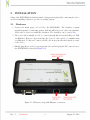
3. Finally, plug the provided power supply into the wall and plug the DC connector in to
the DCSGB1000 as shown in (Figure 2.1)
Figure 2.1: Hardware setup with Ethernet connection
Rev. 1
Preliminary
2
August 17, 2012