1
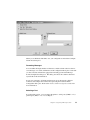
When you are finished, click OK to save your configuration, and exit the Configure
Alarm Areas dialog box.
Formatting Messages
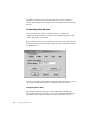
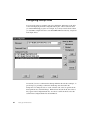
You can define the length, number of characters, and the column order for alarm or
event messages. To do this, click Format on the configuration dialog box for the task
you have selected, and enter the appropriate formatting options in the Message
Format Configuration dialog box. This dialog box shows the column content and
layout fields for block information.
To use areas common to all alarms and messages across the network, click Use
Common, and configure the common messages using the Advanced Alarm
Configuration dialog box. Refer to the Advanced Alarm Configuration section for
more information.
Selecting a Port
For each printer service, you can connect the printer to serial ports (COM) 1 or 2, to
parallel ports (LPT) 1 or 2, or to a USB port.
Chapter 6. Configuring iFIX Using the SCU
55