1
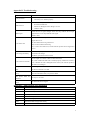
Under standby mode, press * key twice to display “+”to call international numbers. * key Help to lock the keypad with pressing left soft key first. Under players and FM mode, press * key to decrease volume. # key Under standby mode, press and hold this key to switch between current profile and silent profile. Under players and FM mode, press # key to increase volume. Status icons Icons might be displayed on screen. Icons Introductions Signal intensity New message Missed calls Keypad lock Battery status Alarm clock activated Silent Ring only Getting started First call 1> Insert the SIM cards (switch off the phone at first). For detailed installation guide, please refer to “Installing the SIM card”. 2> Charge the battery. Refer to “Battery and charging”. 3> Press and hold the End key to switch on the mobile phone. 4> If the display prompts, enter the four-digit password and press “OK“ key. 5> If the display prompts, enter the PIN code (provided together with the SIM card) and press” OK” key. 6> Enter area code and telephone number and then press the Call key/left soft key to dial out by SIM1/ SIM2 . Note: Before using the mobile phone, please insert valid SIM cards and charge the battery. Installing SIM cards and memory card When you register mobile phone, you can apply for two different telephone numbers and two SIM cards (Subscriber Identity Module). With the two cards, you can use the functions of the mobile phone. The SIM card saves the parameters required by the communication, and personal information, including PIN code (personal identity number), contacts, short messages and other system services. Since the mobile phone doesn’t have enough space, you may need to install a memory card (T-FLASH card). 4