1
Electronic controls
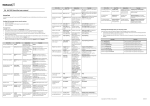
iZone 310 - Adjusting temperature controlled zones
Indicates current
zone being adjusted.
Press here to increase
the current zone set
point temperature.
Indicates current
temperature set point
required for this zone.
Press here to decrease
the current zone set
point temperature.
Press here to fully
open this zone.
Press here to close this
zone.
Press here to allow
iZone to automa'cally
control the
temperature in this
zone.
Indicates the current
temperature of the air
inside the air
condi'oning system
ductwork.
Indicates the actual
temperature in this
zone (as measured by
iZone).
Press here to go back to
the zone summary.
iZone
Scroll up or down to see
more zones.
43