1
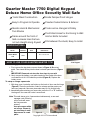
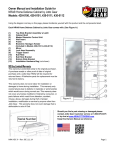
Quarter Master 7750 Digital Keypad
Deluxe Home Office Security Wall Safe
Inside Tamper-Proof Hinges
Solid Steel Construction
Easy to Program & Operate
Powder-Coated Interior & Exterior
Resists Hand & Mechanical
Tool Attacks
Code can be changed infinitely
Frame around the front of
Safe conceals lines that are
not cut straight along drywall
Pre-Drilled Holes for Anchoring to Wall
Anchor Bolts Included
Fits between the studs; Easy to install
SPECIFICATIONS
Model
Material
Quarter Master
7750
Steel
Bolt
Dimensions
22”H x 16”W x 4”D
HOW TO USE YOUR QUARTER MASTER 7750
7750 Keypad
Before using your safe:
1. First, remove the key plate cover as shown in Figure A, B and set
aside. Then insert the key into the door lock and open the door (Figure
C).
IMPORTANT: Please do not store the door keys in your safe!
2. Next, remove the battery cover plate located on the inside of the door
and install the 4 AA 1.5V batteries provided (Figure D). Replace the
battery cover.
Figure A
To setup or change a passcode:
1. With door open, locate the red button on the back of door near the hinge
(Figure E). Press the red button, listen for a beep and then enter your
new user passcode. New user passcodes may be 3 to 6 digits long.
2. Immediately after entering your new code, press the “A” or “B” button on
the keypad. Your new user code is now stored.
Note: This safe stores up to 2 passcodes simultaneously; a user and
manager code. Entering
a third code will erase
the first passcode
entered.
Your safe comes with a
set of keys. Please do
not store keys in safe!
Keep secure in a safe
Figure C
Figure D
21
place.
Copyright 2010 DTX International
Figure B
Figure E