1
Presets: Using the Presets, Making Your Own, and
Virtual Cartridges
The presets for Synthesizer One included with the plug-in package are
automatically installed when running the Synthesizer One installer. Many
presets were created at McDSP. These presets are grouped in folders as per their
application (Pads, Bass, Leads) *. Other presets from outside sound programmers
are in additional folders intermixed with the McDSP presets, identified by their
creator’s initials and/or facility name (GG Presets, JW Presets, etc.).
As more presets become available McDSP will post them to our site for
download.
Check out www.mcdsp.com periodically for more Synthesizer One sounds.
To make and save your own presets, see the “plug-in Librarian Functions”
section of Digidesign ™ ‘ s DigiRack plug-ins Guide.
* Many presets are named with reference to keyboards and synthesizers from other manufacturers. These
companies are not affiliated in any way with McDSP, nor do they endorse the Synthesizer One plug-In. The
trademarks of these companies are used solely for the purpose of describing the sounds produced by the
McDSP Synthesizer One plug-In. All Trademarks are property of their respective owners.
ProTools ™ is a registered trademark of Digidesign, Inc.
Using Virtual Cartridges
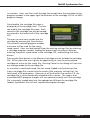
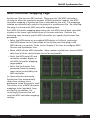
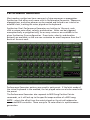
Synthesizer One has virtual cartridges
allowing up to 64 sounds to be saved in
a single file. These files can be loaded by
any Synthesizer One instance, and accessed
through the program number in the
cartridge LCD, and/or via MIDI program
change.
Pressing the Load button in the Memory
Cartridge section of the Synthesizer One
user interface loads a cartridge file. A
dialog box appears and the user can
navigate to Synthesizer One cartridge files anywhere on their system. There are
several cartridges included with the main Synthesizer One folder created by the
installer. Different cartridges can be loaded into each Synthesizer One instance
Page 10