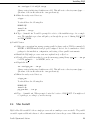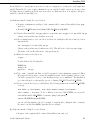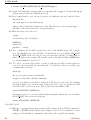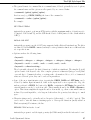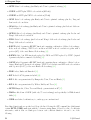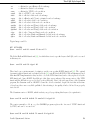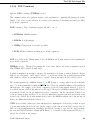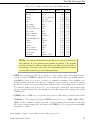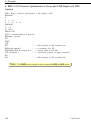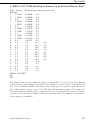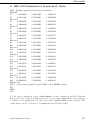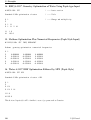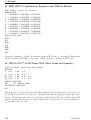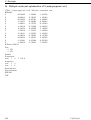
1
PQS Ab Initio Program Package version 3.3 User’s Manual c Parallel Quantum Solutions, 2007 www.pqs-chem.com Conventions used in this manual Filenames, commands typed in at the command prompt are written in typewriter font: pqs aspirin PQS input keywords are written in BOLD FACE CAPITALS. They must be typed as shown, with the proviso that they are not case sensitive, and only their first 4 characters are significant (although more characters can be added to facilitate reading). E.g., the following forms of the FORCE keyword (a command name) are equivalent: FORC FORCES force or Force. Text in angle brackets <. . . > requires the substitution of an appropriate text string or value. E.g. <command> represents any of the valid commands, <basisname> represents a valid basis set name, <integer> is an integer number, <string> is an arbitrary string etc . . . Optional input is set in square brackets. E.g. [THREs=<thr1> [,<thr2>]] means that the whole construct is optional (because of the outer square brackets). Here <thr1> and <thr2> are user-defined floating-point values. Contents 1 Overview 1 1.1 Program Capabilities . . . . . . . . . . . . . . . . . . . . . . . . . . . . . . . . . . . . . . 1 1.2 Input Formats: PQS Style and Pople Style . . . . . . . . . . . . . . . . . . . . . . . . . . 3 1.3 PQS Input and Output - Two Examples . . . . . . . . . . . . . . . . . . . . . . . . . . . 3 1.3.1 Example 1 . . . . . . . . . . . . . . . . . . . . . . . . . . . . . . . . . . . . . . . . 4 1.3.2 Example 2 . . . . . . . . . . . . . . . . . . . . . . . . . . . . . . . . . . . . . . . . 7 1.4 Running Jobs . . . . . . . . . . . . . . . . . . . . . . . . . . . . . . . . . . . . . . . . . . 10 1.5 Overview of PQS Commands . . . . . . . . . . . . . . . . . . . . . . . . . . . . . . . . . 12 2 Installing PQS 15 2.1 The PQS Root Directory . . . . . . . . . . . . . . . . . . . . . . . . . . . . . . . . . . . . 15 2.2 The PQS Scratch Directory . . . . . . . . . . . . . . . . . . . . . . . . . . . . . . . . . . 15 2.3 Linux Install . . . . . . . . . . . . . . . . . . . . . . . . . . . . . . . . . . . . . . . . . . . 16 2.3.1 Installing from RPM . . . . . . . . . . . . . . . . . . . . . . . . . . . . . . . . . . 17 2.3.2 Installing From Tar Archive . . . . . . . . . . . . . . . . . . . . . . . . . . . . . . 18 Mac Install . . . . . . . . . . . . . . . . . . . . . . . . . . . . . . . . . . . . . . . . . . . 19 2.4.1 Installing From Tar Archive . . . . . . . . . . . . . . . . . . . . . . . . . . . . . . 20 Windows Install . . . . . . . . . . . . . . . . . . . . . . . . . . . . . . . . . . . . . . . . . 23 2.4 2.5 Parallel Quantum Solutions i CONTENTS 2.5.1 2.6 Installing from MSI . . . . . . . . . . . . . . . . . . . . . . . . . . . . . . . . . . . 23 Obtaining a License . . . . . . . . . . . . . . . . . . . . . . . . . . . . . . . . . . . . . . . 24 2.6.1 Linux and Mac . . . . . . . . . . . . . . . . . . . . . . . . . . . . . . . . . . . . . 24 2.6.2 Windows . . . . . . . . . . . . . . . . . . . . . . . . . . . . . . . . . . . . . . . . . 25 3 The PQS Style Input File ii 26 3.1 General Conventions . . . . . . . . . . . . . . . . . . . . . . . . . . . . . . . . . . . . . . 26 3.2 Program Steps . . . . . . . . . . . . . . . . . . . . . . . . . . . . . . . . . . . . . . . . . 28 3.2.1 MEM . . . . . . . . . . . . . . . . . . . . . . . . . . . . . . . . . . . . . . . . . . 29 3.2.2 FILE . . . . . . . . . . . . . . . . . . . . . . . . . . . . . . . . . . . . . . . . . . . 31 3.2.3 CPU . . . . . . . . . . . . . . . . . . . . . . . . . . . . . . . . . . . . . . . . . . . 32 3.2.4 GEOM . . . . . . . . . . . . . . . . . . . . . . . . . . . . . . . . . . . . . . . . . . 32 3.2.5 BASIS . . . . . . . . . . . . . . . . . . . . . . . . . . . . . . . . . . . . . . . . . . 36 3.2.6 GUESS . . . . . . . . . . . . . . . . . . . . . . . . . . . . . . . . . . . . . . . . . 46 3.2.7 INTE . . . . . . . . . . . . . . . . . . . . . . . . . . . . . . . . . . . . . . . . . . 50 3.2.8 SCF . . . . . . . . . . . . . . . . . . . . . . . . . . . . . . . . . . . . . . . . . . . 51 3.2.9 FORCE . . . . . . . . . . . . . . . . . . . . . . . . . . . . . . . . . . . . . . . . . 58 3.2.10 NUMHESS . . . . . . . . . . . . . . . . . . . . . . . . . . . . . . . . . . . . . . . 58 3.2.11 HESS . . . . . . . . . . . . . . . . . . . . . . . . . . . . . . . . . . . . . . . . . . 59 3.2.12 POLAR . . . . . . . . . . . . . . . . . . . . . . . . . . . . . . . . . . . . . . . . . 60 3.2.13 NUMPOLAR . . . . . . . . . . . . . . . . . . . . . . . . . . . . . . . . . . . . . . 61 3.2.14 FREQ . . . . . . . . . . . . . . . . . . . . . . . . . . . . . . . . . . . . . . . . . . 62 3.2.15 NMR . . . . . . . . . . . . . . . . . . . . . . . . . . . . . . . . . . . . . . . . . . . 62 3.2.16 VCD . . . . . . . . . . . . . . . . . . . . . . . . . . . . . . . . . . . . . . . . . . . 64 PQS Manual CONTENTS 3.2.17 MP2 . . . . . . . . . . . . . . . . . . . . . . . . . . . . . . . . . . . . . . . . . . . 65 3.2.18 POP . . . . . . . . . . . . . . . . . . . . . . . . . . . . . . . . . . . . . . . . . . . 69 3.2.19 NBO . . . . . . . . . . . . . . . . . . . . . . . . . . . . . . . . . . . . . . . . . . . 70 3.2.20 PROPERTY . . . . . . . . . . . . . . . . . . . . . . . . . . . . . . . . . . . . . . 71 3.2.21 COSMO . . . . . . . . . . . . . . . . . . . . . . . . . . . . . . . . . . . . . . . . . 71 3.2.22 SEMI . . . . . . . . . . . . . . . . . . . . . . . . . . . . . . . . . . . . . . . . . . 75 3.2.23 FFLD . . . . . . . . . . . . . . . . . . . . . . . . . . . . . . . . . . . . . . . . . . 77 3.2.24 OPTIMIZE . . . . . . . . . . . . . . . . . . . . . . . . . . . . . . . . . . . . . . . 84 3.2.25 CLEAN . . . . . . . . . . . . . . . . . . . . . . . . . . . . . . . . . . . . . . . . . 94 3.2.26 DYNAMICS . . . . . . . . . . . . . . . . . . . . . . . . . . . . . . . . . . . . . . . 95 3.2.27 QMMM . . . . . . . . . . . . . . . . . . . . . . . . . . . . . . . . . . . . . . . . . 96 3.2.28 SCAN . . . . . . . . . . . . . . . . . . . . . . . . . . . . . . . . . . . . . . . . . . 98 3.2.29 PATH . . . . . . . . . . . . . . . . . . . . . . . . . . . . . . . . . . . . . . . . . . 99 4 The Pople Style Input File 101 4.1 Preamble . . . . . . . . . . . . . . . . . . . . . . . . . . . . . . . . . . . . . . . . . . . . 101 4.2 Route . . . . . . . . . . . . . . . . . . . . . . . . . . . . . . . . . . . . . . . . . . . . . . 102 4.3 Title . . . . . . . . . . . . . . . . . . . . . . . . . . . . . . . . . . . . . . . . . . . . . . . 103 4.4 Charge and Multiplicity . . . . . . . . . . . . . . . . . . . . . . . . . . . . . . . . . . . . 103 4.5 Geometry . . . . . . . . . . . . . . . . . . . . . . . . . . . . . . . . . . . . . . . . . . . . 104 4.6 CONV keyword . . . . . . . . . . . . . . . . . . . . . . . . . . . . . . . . . . . . . . . . . 104 5 The Gauntlet 5.1 105 Examples . . . . . . . . . . . . . . . . . . . . . . . . . . . . . . . . . . . . . . . . . . . . 105 1. H2 O RHF/6-31G* Geometry Optimization . . . . . . . . . . . . . . . . . . . . . . . . 107 Parallel Quantum Solutions iii CONTENTS 2. NH3 SVWN/6-311G** Z-matrix Geometry Optimization . . . . . . . . . . . . . . . . . 108 3. CH4 BLYP/6-31G* Geometry Optimization Plus Analytical Frequencies . . . . . . . . 109 4. H2 O B3LYP/3-21G Constrained Geometry Optimization . . . . . . . . . . . . . . . . . 110 5. HCN <=> HNC B3LYP/6-31G** Transition State Search Plus Frequencies . . . . . . 111 6. C3 H6 Cl2 RHF/STO-3G Constrained Optimization . . . . . . . . . . . . . . . . . . . . 112 7. H2 O B3LYP/6-31G* Different Basis on Hydrogens . . . . . . . . . . . . . . . . . . . . 113 8. O3 RHF/3-21G Optimization plus UHF Singlet and NBO . . . . . . . . . . . . . . . . 114 9. C6 H6 RHF/6-31G* NMR in an External Electric Field . . . . . . . . . . . . . . . . . . 115 10. H2 O BLYP/6-31G** Optimization, NMR, Numerical Frequencies and NBO in an External Electric Field . . . . . . . . . . . . . . . . . . . . . . . . . . . . . . . . . 116 11. (H2 )10 RHF/3-31G Optimization of Molecular Cluster . . . . . . . . . . . . . . . . . 117 12. CO adsorbed on Si RHF/3-21G Optimization of Adsorbed Molecule . . . . . . . . . . 118 13. C6 H3 F3 B3LYP/3-21G Optimization With Force Field Preoptimization and Hessian . 119 14. H2 O RHF/6-31G Optimization Using Pople Style Input . . . . . . . . . . . . . . . . 120 15. CH4 BLYP/6-31G* Optimization Plus Frequencies (Pople Style Input) . . . . . . . . 120 16. H2 O RHF/6-31G* Optimization Plus MP2 (Pople Style) . . . . . . . . . . . . . . . . 120 17. H2 O2 BPW91/VDZP Optimization, Numerical Frequencies and Raman Intensities . . 121 18. HF + H2 O RHF/6-31G* Interaction Energy . . . . . . . . . . . . . . . . . . . . . . . 122 19. C2 H∗5 UBLYP/6-311G Optimization Plus Charge/Spin Density . . . . . . . . . . . . . 122 20. H2 02 B3LYP/6-31G* Optimization Plus Molecular Dynamics . . . . . . . . . . . . . 123 21. C2 H4 HF/3-21G Potential Scan . . . . . . . . . . . . . . . . . . . . . . . . . . . . . . 123 22. C2 H4 HF/3-21G Optimized Potential Scan . . . . . . . . . . . . . . . . . . . . . . . . 124 23. H2 CO <=> H2 + CO BLYP/6-31G** Cartesian Reaction Path . . . . . . . . . . . . 124 24. HCN <=> HNC B3LYP/6-31G** Z-matrix Reaction Path . . . . . . . . . . . . . . . 125 iv PQS Manual CONTENTS 25. H2 O RHF/6-31G(3df,3pd) Dual Basis MP2 . . . . . . . . . . . . . . . . . . . . . . . 125 26. SeP(CH3 )3 QM/MM Geometry Optimization . . . . . . . . . . . . . . . . . . . . . . 126 27. CH3 OH RHF/DZP Geometry Optimization Plus Frequencies . . . . . . . . . . . . . 127 28. H2 O MP2/cc-pVQZ (G-functions) . . . . . . . . . . . . . . . . . . . . . . . . . . . . . 127 29. CH2 O B3LYP/cc-pVTZ Optimization Plus NMR With WAH Functional . . . . . . . 128 30. CO OLYP/6-311G* Optimization Plus NMR With Level Shift . . . . . . . . . . . . . 128 31a. HF MP2/PC-2 Optimization . . . . . . . . . . . . . . . . . . . . . . . . . . . . . . . 129 31b. HF MP2-SCS/PC-2 Optimization . . . . . . . . . . . . . . . . . . . . . . . . . . . . 129 32. NO PBE/6-311G* Optimization Plus Frequencies . . . . . . . . . . . . . . . . . . . . 130 33. CHFClCH2 OLYP/PC-2 Energy with FTC and Semidirect . . . . . . . . . . . . . . . 130 34. HCl BVP86/SVP Gas-phase and COSMO Optimization Plus Frequencies . . . . . . . 131 35. C2 H5 OH RHF/CEP-121 Optimization, Frequencies and NMR . . . . . . . . . . . . . 132 36. (H2 )2 MP2/6-311G* Ghost Atoms and Symmetry . . . . . . . . . . . . . . . . . . . . 132 37. CHFClBr RHF/3-21G Optimization, Frequencies, NMR and VCD . . . . . . . . . . . 133 38. C3 H6 B97/3-21G Optimization, Frequency and Full Population Analysis . . . . . . . 133 39. C3 H7 O2 N PM3 Multiple constraint optimization . . . . . . . . . . . . . . . . . . . . . 134 6 Running Jobs 135 6.1 Single Processor Jobs . . . . . . . . . . . . . . . . . . . . . . . . . . . . . . . . . . . . . . 135 6.2 Parallel Jobs . . . . . . . . . . . . . . . . . . . . . . . . . . . . . . . . . . . . . . . . . . . 137 6.3 6.2.1 PVM . . . . . . . . . . . . . . . . . . . . . . . . . . . . . . . . . . . . . . . . . . . 138 6.2.2 MPI . . . . . . . . . . . . . . . . . . . . . . . . . . . . . . . . . . . . . . . . . . . 141 Batch Job Execution . . . . . . . . . . . . . . . . . . . . . . . . . . . . . . . . . . . . . . 145 6.3.1 Sun Grid Engine . . . . . . . . . . . . . . . . . . . . . . . . . . . . . . . . . . . . 146 Parallel Quantum Solutions v CONTENTS 6.3.2 Other Batch Environments . . . . . . . . . . . . . . . . . . . . . . . . . . . . . . . 149 6.4 Program Files . . . . . . . . . . . . . . . . . . . . . . . . . . . . . . . . . . . . . . . . . . 150 6.5 Restarts and Checkpoints . . . . . . . . . . . . . . . . . . . . . . . . . . . . . . . . . . . 153 6.5.1 Geometry Optimization . . . . . . . . . . . . . . . . . . . . . . . . . . . . . . . . 153 6.5.2 Numerical Hessian . . . . . . . . . . . . . . . . . . . . . . . . . . . . . . . . . . . 154 7 SQM 156 7.1 Introduction . . . . . . . . . . . . . . . . . . . . . . . . . . . . . . . . . . . . . . . . . . . 156 7.2 Program Capabilities . . . . . . . . . . . . . . . . . . . . . . . . . . . . . . . . . . . . . . 158 7.3 Installation . . . . . . . . . . . . . . . . . . . . . . . . . . . . . . . . . . . . . . . . . . . 158 7.4 Input File . . . . . . . . . . . . . . . . . . . . . . . . . . . . . . . . . . . . . . . . . . . . 160 7.5 The .evib File . . . . . . . . . . . . . . . . . . . . . . . . . . . . . . . . . . . . . . . . . 162 7.6 Program Usage . . . . . . . . . . . . . . . . . . . . . . . . . . . . . . . . . . . . . . . . . 165 8 Frequently Asked Questions 166 List of Tables 168 List of Figures 170 Index 171 vi PQS Manual Chapter 1 Overview This documentation describes the general philosophy, the functionality, and the input file format for the PQS ab initio quantum chemistry suite of programs. The PQS input file, unlike the route information in some programs, is fairly easy to generate, change and read, and after a little practice it is as easy to work with (although perhaps less compact) than the input file for any other quantum chemistry program. PQSMol, the graphical interface to PQS featuring a flexible molecule builder, input generator, parallel job submission and post-job visualization, is described in a separate manual. There is also a more compact, Pople-style input, familiar to users of, e.g., the popular Gaussian program package, although this is only available for the more common job types. 1.1 Program Capabilities PQS has a wide range of capabilities, and is under continuous development and improvement. Current capabilities include: • An efficient vectorized Gaussian integral package allowing high angular momentum basis functions and general contractions. • Abelian point group symmetry throughout; utilizes full point group symmetry (up to Ih ) for geometry optimization step. • Closed-shell (RHF) and open-shell (UHF) SCF energies and gradients, including several initial wavefunction guess options. • Closed-shell (RHF) and open-shell (UHF) density functional energies and gradients including all popular exchange-correlation functionals: VWN local correlation, Becke 88 nonlocal exchange, Handy-Cohen optimized exchange (OPTX), Lee-Yang-Parr nonlocal correlation, B3LYP etc. . . • Fast and accurate pure DFT energies and gradients for large basis sets using the Fourier Transform Coulomb (FTC) method. • Efficient, flexible geometry optimization for all these methods including Eigenvector Following (EF) algorithm for minimization and saddle-point search, GDIIS algorithm for minimization, use of Parallel Quantum Solutions 1 1.1 Program Capabilities Cartesian, Z-matrix and delocalized internal coordinates. Includes new coordinates for efficient optimization of molecular clusters and adsorption/reaction on model surfaces. • Full range of geometrical constraints including fixed distances, planar bends, torsions and outof-plane bends between any atoms in the molecule and frozen (fixed) atoms. Atoms involved in constraints do not need to be formally bonded and - unlike with a Z matrix - desired constraints do not need to be satisfied in the starting geometry. • Analytical second derivatives for all these methods, including the calculation of vibrational frequencies, IR intensities and thermodynamic analysis. • Effective Core Potentials (ECPs), both relativistic and non-relativistic, including energies, gradients and analytical second derivatives. • NMR chemical shifts for closed-shell HF and DFT wavefunctions. • Vibrational Circular Dichroism. • Canonical, closed-shell MP2 energies and analytical gradients and dual-basis MP2 closed-shell energies (open-shell under development). • Numerical closed-shell MP2 second derivatives. • Potential scan, including scan plus optimization of all other degrees of freedom. • Reaction Path (IRC) following using either Z-matrix, Cartesian or mass-weighted Cartesian coordinates. • Population analysis, with bond orders and atomic valencies (free valencies for open-shell systems). Includes Charges from Electrostatic Potential (CHELP) and (optionally) Weinhold’s Natural Bond Order (NBO) analysis, including natural population and steric analysis. • Properties module with charge, spin-density and electric field gradient at the nucleus. • Polarizabilities and dipole and polarizability derivatives. • COSMO solvation model, including energies, analytical gradients and numerical second derivatives, for HF, DFT and canonical MP2 wavefunctions. Also available with NMR (closed-shell HF and DFT). • Full Semiempirical package, both open (unrestricted) and closed-shell energies and gradients, including MINDO/3, MNDO, AM1 and PM3. For the latter, all main group elements through the fourth row (except the noble gases) as well as Zinc and Cadmium, have been parameterized. • Molecular Mechanics using the Sybyl 5.2 and Universal Force Fields. • QM/MM using the ONIOM method. • Molecular dynamics using the simple Verlet algorithm. • Pople-style input for quick input generation and compatibility with other programs. 2 PQS Manual Overview 1.2 Input Formats: PQS Style and Pople Style The compact input format introduced by J. A. Pople in the Gaussian 70 program and its successors is widely used by quantum chemists. To assist users of the PQS suite who are familiar with this input, we have an alternative Pople-style input reader in PQS. The program recognizes Pople-style input by a hash mark (#) as the first non-zero character on any input line. The Pople-style input is converted internally to standard PQS-style input, which is saved in the file <jobname>.pqs. Note: the Pople-style input is compatible with the input of other programs, notably the Gaussian series, only in its general features. It is not guaranteed that an input file designed for any other program will work correctly for PQS, or that a Pople-style PQS input file will run correctly with any other program system. Because of the difference in the features of different programs, complete compatibility is impossible to achieve. Nevertheless, our Pople-style input should appear familiar to many quantum chemists. Note also that the Pople-style input, because of its simplicity, does not recognize all of the PQS keywords, only the more routine ones. To access all features of PQS, use the PQS input, or edit the <jobname>.pqs file generated by the program from an initial Pople-style input file. 1.3 PQS Input and Output - Two Examples Native PQS input consists of a series of commands, instructing the program to perform a program step. A command line begins with a single reserved keyword on a separate input line, and may be followed by options, separated by spaces. Options have the form of either a single keyword (e.g. BOHR) or KEYWORD=<value> where value is either a numerical value, a set of 2 or 3 (but not more than 3) numerical values, or a single character string. Commands are processed sequentially, but loops may be set up to execute the same group of commands repeatedly via the JUMP command. Only the first four characters of each keyword are significant, but more can be used to facilitate reading. Job output is written to standard output and is typically saved on job completion in the output file <jobname>.out. As well as the full output, there is a summary output (or short output) which is saved in the file <jobname>.log. The log file contains only output considered to be of direct interest to the user, such as the final energy, optimized geometry and any computed molecular properties. The log file can be saved as a reliable summary of a successful job, whilst the larger output file can be deleted. Before giving an overview of the program modules and a detailed description of the PQS input file and keywords, we begin with a couple of examples, describing the input file, how to actually submit and run the job, and showing the log file that each job produces. Parallel Quantum Solutions 3 1.3 PQS Input and Output - Two Examples 1.3.1 Example 1 Our first example is a full geometry optimization for water, followed by an NMR chemical shift calculation, using the B3LYP hybrid density functional and the 6-31G* basis set. The input file for this, water.inp, is: TITLE Water geometry optimization + NMR chemical shifts GEOM=pqs GEOP O 0 0 0 H 0 0.8 0.6 H 0 -.8 0.6 BASIS=6-31G* GUESS=HUCKEL OPTI !---------SCF DFT=B3LYP ! | basic optimization loop FORCE ! | JUMP !---------NMR Anatomy of the Input File This input uses nine command keywords: TITLe, GEOM, BASIs, GUESs, OPTImize, SCF, FORCe, JUMP and NMR. The TITLe command is trivial and simply gives a job title or heading. The title string given will be echoed in the output and log files. (In fact the entire input file will be echoed.) The GEOM command controls input of the molecular geometry. GEOM=pqs means that we use the PQS native style to define the initial molecular geometry. PQS has a flexible geometry reader, and can read a number of different input formats, e.g., Z-matrix or Protein Database (pdb) styles, and geometries from several graphical modeling programs. The GEOP (Geometry Parameters) option requests the printing of chemically relevant bond distances, angles and torsions. The GEOM command is followed by the molecular geometry in PQS format (in the simplest case - as here - the atomic symbol and X, Y, Z Cartesian coordinates, default in Å, free format) The BASIs command specifies the Gaussian basis set, in this case the 6-31G* basis of Pople and coworkers. PQS has a flexible basis set input, and can read basis sets from the input file or from an external file, and can augment the specified basis with additional basis functions. The BASIs command is required in all ab initio calculations. The GUESs command specifies the initial wavefunction guess for the molecule, in this case an extended Hückel wavefunction. In most cases the GUESs command is optional; if it is left out, a well-defined sequence of default guesses is tried automatically by the program. 4 PQS Manual Overview The OPTI command specifies a geometry optimization. This is a so-called loop command, which involves repeated execution of a sequence of commands until some condition is reached which exits the loop. The JUMP command denotes the end of the command sequence. Thus in this example the commands OPTI, SCF and FORCE will be executed repeatedly until some appropriate exit condition is satisfied (hopefully convergence to the optimized geometry). The PQS optimization module has a rich set of options, but in standard cases no additional options are required. The SCF and FORCe commands, respectively, specify a self-consistent field calculation, followed by the evaluation of the nuclear gradient, i.e., the forces on the atoms. The gradients are required for the geometry optimization. The SCF command has an option, DFT=B3LYP which specifies that the hybrid B3LYP exchange-correlation functional is to be used. Finally, the command NMR initiates the calculation of NMR chemical shifts. The log file (the short output file) produced by running water.inp is: ======================================================================== PQS Ab Initio Program Package running on dirac Date : Tue Oct 24 9:43:37 2006 Executable : /home/pqs1/PQSv33/INTEL64/pqs.x Type : ELF 64-bit LSB executable, AMD x86-64, version 1 (SYSV), for GNU/Linux 2.4.1, statically linked, stripped Intsize : 1 ======================================================================== TITLE Water geometry optimization + NMR chemical shifts GEOM=PQS GEOP O 0 0 0 H 0 0.8 0.6 H 0 -.8 0.6 BASIS=6-31G* GUESS=HUCKEL OPTI SCF DFT=B3LYP FORCE JUMP NMR Empirical Formula: H2O Cartesian Coordinates in Standard Orientation ATOM 1 o 2 h 3 h Coordinates (Angstroms) X Y Z 0.000000 0.000000 -0.400000 0.000000 0.800000 0.200000 0.000000 -0.800000 0.200000 Parallel Quantum Solutions 5 1.3 PQS Input and Output - Two Examples Point Group: C2v Number of degrees of freedom: Charge: 0.000000 Multiplicity: 1 Wavefunction: RDFT Basis set: 6-31g-d Number of contracted basis functions: 2 XC potential: b3lyp 19 ** Cycle 1 Energy -76.406968491 RMSG 0.02925 RMSD 0.07618 ** ** Cycle 2 Energy -76.408906347 RMSG 0.00300 RMSD 0.01613 ** ** Cycle 3 Energy -76.408955138 RMSG 0.00018 RMSD 0.00064 ** ** Cycle 4 Energy -76.408955243 RMSG 0.00002 RMSD 0.00004 ** CONVERGED GEOMETRY Coordinates (Angstroms) X Y 0.00000000000000 0.00000000000000 0.00000000000000 0.76155207034049 0.00000000000000 -0.76155207034049 o h h dipole/D = 0.000000 0.000000 2.095284 Z -0.39913730451687 0.19956865225844 0.19956865225844 total= 2.095284 -----------------------------------------------------------------------NMR SHIELDINGS -----------------------------------------------------------------------O Atom= 1 Isotropic shielding= 316.58563 Anisotropy= 39.87370 H Atom= 2 Isotropic shielding= 31.95379 Anisotropy= 17.39368 H Atom= 3 Isotropic shielding= 31.95379 Anisotropy= 17.39368 -----------------------------------------------------------------------Charge: 0.000000 Multiplicity: 1 Wavefunction: RDFT Basis set: 6-31g-d Number of contracted basis functions: Energy is: dipole/D = XC potential: b3lyp 19 -76.408955243 au 0.000000 0.000000 2.095284 total= 2.095284 ======================================================================== Total master CPU time = 0.05 Elapsed = 0.05 min Termination on Tue Oct 24 9:43:41 2006 6 PQS Manual Overview ======================================================================== The log file starts with a header indicating which machine you are running on (here dirac), the date and time the job was started, the location and type of the PQS executable, and the integer size (the number of integers in a double word, 8 bytes). The entire input file is then echoed. Then follows output from the GEOM command: the empirical formula, Cartesian coordinates (possibly reoriented), the point group symmetry and the number of degrees of freedom. This is followed by the charge and multiplicity, the theoretical method (here restricted (closed-shell) DFT with the B3LYP functional) and the basis set. There is then a summary of each optimization cycle, showing the cycle number, the energy, and the root-mean-square gradient and displacement, respectively. This particular optimization converged in four cycles. The final converged geometry is printed, together with the final dipole moment. The chemical shifts for each atom (from the NMR module) are then given, together with a final summary giving the optimized energy. This format is fairly typical of the log file. The precise content depends, of course, on the actual job. 1.3.2 Example 2 Our second example is a Pople-style input file: a DFT geometry optimization on triplet dioxygen with a good quality basis set (o2.com). (It has the input extension .com to distinguish it from PQS style input which has the default extension .inp) %MEM=3 # BPW91/6-311G(2df,2pd) OPT Bond distance in triplet O2 by BPW91 and a good basis 0 O O 3 1 R R=1.2 The Pople input style is recognized by the hash mark as the first character of the main command line. The very first line in the input sets the maximum amount of memory that can be utilized by the job (in this example 3,000,000 MWords, i.e., 24 MB this is a reduction from the default, which is 5,000,000 MWords; it is included here only to demonstrate this feature, as this small job does not need even this much Parallel Quantum Solutions 7 1.3 PQS Input and Output - Two Examples memory). The second line is the main command line (also called the route card ). It defines the quantum chemical method used (DFT using the BPW91 functional), the basis set, and the type of calculation (a geometry optimization). An empty line concludes this section. Line 4 is the title, again terminated by an empty line. Line 6 defines the molecular charge (0) and multiplicity (3). Line 7 onwards defines the molecular geometry in Z- matrix format, using the variable R as the O-O bond length. This section is also terminated by a blank line. Line 10 onwards defines initial values for the geometry parameters (in this case the initial value for the O-O bond distance, R); again a blank line is used as a terminator. The Pople input should be familiar to users of the popular Gaussian series of programs, and we have adhered to many of the standard input conventions used in Gaussian. Within PQS, the Pople style input is translated internally to PQS style, and a new file (with the extension .pqs - here o2.pqs) is written and used to run the job. Note: The Pople input style has been provided primarily as an aid to potential users who are familiar with Gaussian and similar packages that use this input style. We do not recommend its general use within PQS. The log file (the short output file) produced by running o2.com is: ======================================================================== PQS Ab Initio Program Package running on dirac Date : Tue Oct 24 10: 0:16 2006 Executable : /home/pqs1/PQSv33/INTEL64/pqs.x Type : ELF 64-bit LSB executable, AMD x86-64, version 1 (SYSV), for GNU/Linux 2.4.1, statically linked, not stripped Intsize : 1 ======================================================================== \%MEM=3 \# BPW91/6-311G(2df,2pd) OPT Bond distance in triplet O2 by BPW91 and a good basis 0 O O 3 1 R R=1.2 Empirical Formula: O2 Cartesian Coordinates in Standard Orientation 8 PQS Manual Overview Coordinates (Angstroms) ATOM X Y Z 1 o 0.000000 0.000000 -0.600000 2 o 0.000000 0.000000 0.600000 Point Group: D*h Number of degrees of freedom: SCF Energy: -149.467868275 iterations: Charge: 0.000000 Multiplicity: 3 Wavefunction: UDFT Basis set: 6-311g-2df2pd Number of contracted basis functions: 6 1 basis: 3-21g XC potential: bpw91 60 ** Cycle 1 Energy -150.369899116 RMSG 0.02997 RMSD 0.02857 ** ** Cycle 2 Energy -150.370423795 RMSG 0.00706 RMSD 0.00881 ** ** Cycle 3 Energy -150.370457186 RMSG 0.00048 RMSD 0.00064 ** ** Cycle 4 Energy -150.370457362 RMSG 0.00001 RMSD 0.00002 ** CONVERGED GEOMETRY Coordinates (Angstroms) X Y 0.00000000000000 0.00000000000000 0.00000000000000 0.00000000000000 o o Z -0.61005740412078 0.61005740412078 dipole/D = 0.000000 0.000000 0.000000 total= 0.000000 Expectation value of S**2: 2.0038500 Multiplicity: 3.0025650 Empirical Formula: O2 Cartesian Coordinates in Standard Orientation Coordinates (Angstroms) ATOM X Y Z 1 o 0.000000 0.000000 -0.610057 2 o 0.000000 0.000000 0.610057 Point Group: D*h Number of degrees of freedom: Charge: 0.000000 Multiplicity: Parallel Quantum Solutions 1 3 9 1.4 Running Jobs Wavefunction: UDFT Basis set: 6-311g-2df2pd Number of contracted basis functions: Energy is: XC potential: bpw91 60 -150.370457362 au dipole/D = 0.000000 0.000000 0.000000 total= 0.000000 Expectation value of S**2: 2.0038500 Multiplicity: 3.0025650 ======================================================================== Total master CPU time = 0.27 Elapsed = 0.27 min Termination on Tue Oct 24 10: 0:32 2006 ======================================================================== The log file is similar to that produced for the first example, water.inp. The only major difference is that, as the system is not a closed-shell, the expectation value for hS 2 i and the corresponding multiplicity are printed out for an unrestricted wavefunction. As can be seen, the spin contamination is very small (hS 2 i should be exactly 2 for a triplet, compared to a calculated value of 2.00385). Note: Before the optimization is started using the requested 6-311G(2df,2pd) basis set, a preliminary SCF is done for 6 iterations only using the smaller 3-21G basis. This is a recommended procedure within PQS to provide a better initial wavefunction guess to start off the larger basis set calculation. 1.4 Running Jobs A detailed description on how to run jobs, in particular parallel jobs on Linux and Mac systems, is given in Chapter 6. The following lines serve only as an introduction. To run, say the input file water.inp, on a Linux or Mac system in the background on a single processor, using a terminal console, cd to the directory where the input file is located and type pqs water & at the prompt. This assumes that PQS has been installed and correctly configured on your system (see Chapter 2). For input extensions other than the default .inp, type the whole input file name, e.g., pqs o2.com & On a Windows system, open a DOS window, or “Command prompt” (Start → Programs → Command Prompt), change to the directory containing the input file and run the job by typing at the DOS prompt 10 PQS Manual Overview pqs water Note that Linux and Mac are case sensitive while DOS/Windows is not. In both cases, the results will appear in the file water.out. The summary output is in water.log. These files can be viewed with a text editor (such as vi or emacs in Linux, Notepad or Wordpad under Windows, or TextEdit on a Mac). The program also generates a number of internal files (e.g. water.coord or water.basis), both in the current directory and in the scratch directory. These are sometimes needed to continue a calculation. In the present case we can get rid of them by typing tidy water at the Linux/DOS prompt. On a Mac, this command is named pqs tidy. For a successful calculation, you should have the directory containing the pqs script (pqs.bat under Windows) in your search path (otherwise, you will have to explicitly specify its location, e.g., /usr/local/share/PQS/pqs or "C:\Program Files\PQS\PQS 3.3\pqs", not just pqs as above). PQS uses three environment variables to get the location (path) of the installation directory, the basis set library, and the scratch directory. In this order, they are PQS ROOT, PQS BASDIR and PQS SCRDIR. Generally you should not need to worry about these variables, as they are set at installation time, or by the execution scripts. They can be changed at run time, and detailed instructions on how to do this will be provided later. In order to run PQS jobs, you need to have a valid license installed in your system. Small single processor jobs (like water.inp above) can be ran freely, but in order to run larger calculations, or to use the parallel version, a license file is required. To check the status of your license type pqs -check this will print out the results of the license checking for all the PQS executables (single processor and parallel) installed in your system. Note: The pqs -check command will check for the PQS license proper, and also for the license for the NBO module. NBO is an optional add-on module to the PQS program, and its license is sold separately. The NBO license is not needed for the normal operation of PQS. It is needed only to access the functionality described under the NBO input keyword (see below). In order to obtain a license, you have to generate a “lockcode file” by entering the command pqs -lockcode. This will generate a file pqs lockcode containing the lockcode for your host. Edit pqs lockcode with a text editor and fill in the contact information in the header, then e-mail the file to [email protected]. A license file will be e-mailed back to you. Once you have received the license file, you should save it in the PQS ROOT directory. The license file must be named pqs lic. Parallel Quantum Solutions 11 1.5 Overview of PQS Commands 1.5 Overview of PQS Commands The program structure is modular, each command module does a specific task, e.g., read input, set up basis set, construct initial MO guess, solve SCF equations etc. . . The modules communicate in two ways; through files or via a common storage area in memory (henceforth known as the “depository”). Some information is stored both on file and in the depository. Simple, commonly used, single item data are stored both in the memory and on the .control file. Module specific and matrix (or vector) data are usually stored on a separate file (e.g., the molecular geometry is stored on the .coord file, the gradient vector on the .grad file etc. . . ). All data useful for either a restart or for potential use in another run with, e.g., a different basis set, are kept at the end of the job. These files can be archived into a single file using the script archive. Temporary, job-specific, files are deleted on job completion. The files generated by the various modules are described in section 6.4. A summary of the program commands is given below. MEMOry (%MEM) Reserves virtual memory for the job (total available and in core/disk usage for integrals). If present, this must be the very first line of the input. If included later, it has no effect. FILE This command changes the scratch directory (if different from the default). It can also take files (e.g., geometry, molecular orbitals) from another calculation with a different file name. TITLe Defines a title. CPU This command is now obsolete and is maintained for backward compatibility only. GEOM Reads in geometry (in various formats, either as Cartesian coordinates or a Z-matrix), determines point group symmetry, orients molecule, and calculates geometrical parameters. BASIs Sets up basis set (including ECPs), either from the basis set library, an optional file, or directly from the input. It is also possible to augment an existing basis sets with extra basis functions. GUESs Generates the initial SCF guess. Invoked automatically in most cases and is needed only to override the default or in special cases, e.g., UHF INTE Sets up thresholds for integral evaluation. Needed only in special cases. SCF Solves ab initio SCF equations for closed-shell restricted and open-shell unrestricted wavefunctions. Does standard Hartree-Fock (HF) plus full range of DFT functionals. FORCe Calculates the forces on the nuclei (negative gradient or first derivative) for ab initio SCF and MP2 wavefunctions. Note that the MP2 gradient code is preliminary and is currently serial only. NUMHess Calculates Hessian matrix by finite-difference on analytical gradients. 12 PQS Manual Overview HESS Calculates Hessian matrix analytically. Available for all SCF wavefunctions (closed and openshell, HF and all DFT functionals). NUMPolar Calculates polarizability (and optionally dipole and polarizability derivatives) by finitedifference on the energy/analytical gradients in an external field. FREQ Does vibrational and thermodynamic analysis, using the Hessian matrix produced by the HESS or NUMHESS modules. NMR Calculates NMR chemical shifts. Also activates VCD rotational strengths. MP2 Canonical MP2 energy and wavefunction. POP Mulliken and Löwdin population analysis program. Includes CHELP and Cioslowski atomic charges. NBO F. Weinhold’s Natural Bond Orbital analysis (NBO version 5.0). PROPerty Preliminary properties package. Computes charge and spin-density at the nucleus and the electric field gradient. COSMo A. Klamt’s Conductor-like Screening solvation model (COSMO). SEMI Calculates energy and gradient for semiempirical wavefunctions. Includes MINDO/3, MNDO, AM1 and PM3. FFLD Calculates energy and gradient (and optionally the Hessian) for molecular mechanics force fields. Currently the Sybyl 5.2 and Universal force fields are available. OPTImize Geometry optimization. CLEAn Removes files associated with a geometry optimization. DYNAmics Direct Newtonian molecular dynamics. QMMM General QM/MM energies and gradients using Morokuma’s ONIOM method. SCAN Potential scan, including scan + optimization. PATH Follows a reaction path downhill from a transition state. Path can be defined in Z-Matrix coordinates, Cartesian coordinates or mass weighted Cartesians. JUMP Jumps back to the next jump target in the input file for iterative loops (e.g., geometry optimization, reaction path, etc...). It can be used with an optional integer argument, e.g., JUMP 5, requesting a jump back 5 input cards. STOP Instructs the program to stop. TEXT Prints arbitrary text. Parallel Quantum Solutions 13 1.5 Overview of PQS Commands Note: There has been a change in the input for geometry optimizations compared to earlier versions. The first entry to the OPTIMIZE module now only determines (and if necessary generates) the coordinates in which the optimization is to be carried out; it does not calculate an actual step until the second and subsequent entries. Consequently the preliminary SCF and FORCE calculations that were needed to compute an initial energy and gradient are no longer required. Additionally, the GUESS card is no longer necessary (although including it will do no harm) unless specific GUESS options are desired, e.g., to swap orbital occupancies. Also the JUMP command (which defines iterative loops) no longer needs a JUMP integer (how many cards to jump back to the beginning of the loop) which is now automatically determined by the program. 14 PQS Manual Chapter 2 Installing PQS This chapter will describe in detail the installation of the PQS program for Linux, Windows and Mac systems. If you are using a PQS hardware product like the QuantumCubeTM , then the software is already installed, and you can safely skip this chapter. The PQS installation is a very simple procedure that uses system utilities and automated shell scripts in order to minimize user intervention. Before outlining this procedure, it is useful to discuss the two main points of the PQS setup: the PQS root directory and the PQS scratch directory. 2.1 The PQS Root Directory The PQS root directory (PQS ROOT hereafter) is the directory containing the PQS software. This directory does not require large amounts of disk space (200 MB should be more than enough), and its contents should be accessible to all the users that want to run PQS jobs. In a multi-user environment PQS ROOT should thus be part of a system directory. In case PQS is to be used in a computer cluster, PQS ROOT should be available to all the compute nodes, i.e., it should belong to a disk partition that is shared by all cluster nodes (the alternative to this would be to do a separate PQS install for each compute node). The default PQS ROOT (/usr/local/share/PQS on Linux and Mac, "%ProgramFiles%\PQS\PQS 3.3" on Windows) usually meets the requirements of a typical multi-user and/or cluster setup. The location of PQS ROOT can be changed at runtime using the environment variable PQS ROOT (on either Linux, Mac or Windows). 2.2 The PQS Scratch Directory The PQS scratch directory (PQS SCRDIR hereafter) is the directory where the temporary files needed during a calculation are written. The amount of storage space used by PQS SCRDIR will depend heavily on the type of calculation you are planning to run. Small and medium size jobs (up to ≈ 400-500 basis functions) can be ran with less than 10 GB of scratch space (we recommend at least 2 GB as the very minimum), but large and very large jobs, specially large MP2 calculations, might require much more, Parallel Quantum Solutions 15 2.3 Linux Install say ≈ 100 GB (see page 65). The efficiency of I/O intensive jobs (like MP2) can be increased by placing PQS SCRDIR on a fast-access storage device (for instance, a striped RAID array). In a multi-user setup it is desirable to have a separate PQS SCRDIR for each PQS user, to avoid jobs interfering with each other. In a cluster environment, PQS SCRDIR should be local to each compute node, in order to maximize the total storage available to the job and the efficiency of the calculation. The default location on a Linux or Mac system is PQS SCRDIR=/scr/${USER} (e.g.: /scr/bob for user ’bob’) and on Windows is PQS SCRDIR=%TEMP%. The PQS SCRDIR location can be changed at runtime via the environment variable PQS SCRDIR. 2.3 Linux Install PQS for Linux is available both as a single-processor and as a multi-processor executable. The parallel executable requires additional software to allow communication between the processes. Different versions are available that use different communication toolkits, namely Parallel Virtual Machine (PVM), and Message Passing Interface (version 1 and version 2). Here are the detailed software requirements for each PQS Linux executable: • Common to all versions: – Linux operating system – Bash command shell – Common utilities such as tar, gzip, grep, sed, etc. • Parallel PVM version: – PVM message passing software. The PQS program is linked against PVM version 3.4.5. • Parallel MPI1 version: – MPI1 message passing software. The PQS program is linked against MPICH1 version 1.2.7p1. • Parallel MPI2 version: – MPI2 message passing software. The PQS program is linked against MPICH2 version 1.0.3. Note: MPI is the de facto standard for communication among processes for which many implementations are available, both open source and commercial. Although all the MPI implementations adhere to the same application programming interface, the underlying details of each specific MPI flavor differ, and this might create portability issues. The PQS MPI executables that are currently available at the PQS web site are statically linked against the MPICH libraries (MPICH1 or MPICH2, see wwwunix.mcs.anl.gov/mpi/mpich) for communication over Ethernet interfaces, and there is no guarantee that they will work with a different MPI implementation, or for different hardware. Special combinations of MPI flavors/hardware might need an ad hoc version of the program. Contact the PQS customer support ([email protected]) for enquires. 16 PQS Manual Installing PQS PQS for Linux is available as a Red-hat package manager (RPM) file or as a compressed (gzip) tar archive. The rpm package is very easy to use, and will install the software in standard system directories that should be OK for most system configurations. You will need root access to your system and must have the rpm utility available in order to install the PQS rpm distribution. If you cannot meet the previously stated requirements, or you want to install PQS in a custom location (in particular, if you want to do a single user install, see below) you should download the gzipped tar distribution. The distribution files can be downloaded from the PQS web site at http://www.pqs-chem.com. 2.3.1 Installing from RPM • Requires: root privileges, rpm utility program • Defaults: PQS ROOT=/usr/local/share/PQS, PQS SCR=/scr/${USER} a) Single Processor Version: a.1 Download the main PQS rpm package for your architecture, say pqs-3.3-1.x86 64.rpm (change version/architecture identifier as needed). a.2 As user root, type: rpm -ivh pqs-3.3-1.x86 64.rpm (substitute the appropriate file name for the rpm package you have downloaded). a.3 Create a scratch directory for each PQS user: mkdir -p /scr/<uname>; chown <uname>.users /scr/<uname> where <uname> = user name. To use a different location for PQS SCRDIR you can set the environment variable PQS SCRDIR, for instance (using bash syntax): export PQS_SCRDIR=/myscr/${USER} you can add a line similar to the above example to a system-wide configuration file, or instruct the users to modify their $HOME/.bashrc files accordingly. b) Parallel Version: b.1 Make sure your system has message passing parallel software such as PVM (recommended), MPICH1 or MPICH2 installed and properly configured. Refer to the documentation of these packages for the installation, configuration, and testing of these parallel environments. b.2 Install the PQS single processor version as explained in a) above. b.3 Download the parallel rpm for the message passing library you have chosen: pqs pvm-....rpm for PVM, pqs mpi1-... for MPICH1, and so on. b.4 As user root, type: rpm -ivh pqs pvm....rpm (substitute the appropriate file name for the rpm package you have downloaded). Parallel Quantum Solutions 17 2.3 Linux Install 2.3.2 Installing From Tar Archive If you choose to install from the tar ball, you have the option of performing a multi-user install or a single-user install. The multi-user install (default) is suitable if there will be more than one user running PQS jobs. This is the installation method to use in a cluster environment. Root privileges are required. In case PQS is to be ran by just one user and on only one compute node, you may choose the single-user install. This method does not require root privileges, and the default locations are chosen so that the PQS software is installed under the user home directory. Make sure there is enough free disk space available to install and run PQS jobs. c) Multi-user install of Single Processor Version: • Requires: root privileges, bash command shell, GNU utilities (tar, gzip, sed, etc.) • Defaults: PQS ROOT=/usr/local/share/PQS, PQS SCR=/scr/${USER} c.1 Download the main PQS .tar.gz package for your architecture, say pqs-3.3-1.x86 64.tar.gz (change version/architecture identifier as needed). c.2 Unpack the file: tar -xvzf pqs-3.3-1-x86_64.tar.gz (change version/architecture identifier as needed). This will create a directory named pqs-... (the name of the tar file without the .tar.gz extension). c.3 Enter the newly created directory: cd pqs-... You should have the following files: README.PQS install.sh pqs-dist....tar.gz c.4 As user root, type: ./install.sh. You will be prompted for a choice of the installation type: choose multi-user. The installation procedure will guide you through the process of defining PQS ROOT and PQS SCRDIR and (optionally) creating separate scratch directories for each PQS user. d) Single-user install of Single Processor Version: • Requires: bash command shell, GNU utilities (tar, sed, etc.) • Defaults: PQS ROOT=${HOME}/PQS, PQS SCR=${HOME}/pqsscr d.1 Download the main PQS .tar.gz package for your architecture, say pqs-3.3-1.x86 64.tar.gz (change version/architecture identifier as needed). d.2 Unpack the file: 18 PQS Manual Installing PQS tar -xvzf pqs-3.3-1-x86_64.tar.gz (change version/architecture identifier as needed). This will create a directory named pqs-... (the name of the tar file without the .tar.gz extension). d.3 Enter the newly created directory: cd pqs-... You should have the following files: README.PQS install.sh pqs-dist....tar.gz d.4 Type: ./install.sh. You will be prompted for a choice of the installation type: choose singleuser. The installation procedure will guide you through the process of defining PQS ROOT and PQS SCRDIR. e) Parallel Version: e.1 Make sure your system has message passing parallel software such as PVM (recommended), MPICH1 or MPICH2 installed and properly configured. Refer to the documentation of these packages for the installation, configuration, and testing of these parallel environments. e.2 Install the PQS single processor version as explained in c) or d) above. e.3 Download the parallel tar archive for your chosen message passing library: pqs pvm-...tar.gz for PVM, pqs mpi1-... for MPICH1, and so on. e.4 Unpack the file: tar -xvzf pqs_pvm....tar.gz (change version/architecture identifier as needed). This will create a directory named pqs-... (the name of the tar file without the .tar.gz extension). e.5 Enter the newly created directory: cd pqs_pvm... You should have the following files: README.PQS install.sh pqs_pvm-dist....tar.gz e.6 Type: ./install.sh. When prompted, enter the location of PQS ROOT. You might need root privileges, according to your chosen setup. 2.4 Mac Install PQS for Mac OS is available both as a single-processor and as a multi-processor executable. The parallel executable requires additional software to allow communication between the processes. Different versions Parallel Quantum Solutions 19 2.4 Mac Install are available that use different communication toolkits, namely Parallel Virtual Machine (PVM), and Message Passing Interface (version 1 and version 2). Here are the detailed software requirements for each PQS Mac executable: • Common to all versions: – Mac OS X operating system (version 10.4 or later) – Bash command shell – Common utilities such as tar, gzip, grep, sed, etc. • Parallel PVM version: – PVM message passing software. The PQS program is linked against PVM version 3.4.5. • Parallel MPI1 version: – MPI1 message passing software. The PQS program is linked against MPICH1 version 1.2.7p1. • Parallel MPI2 version: – MPI2 message passing software. The PQS program is linked against MPICH2 version 1.0.3. Note: MPI is the de facto standard for communication among processes for which many implementations are available, both open source and commercial. Although all the MPI implementations adhere to the same application programming interface, the underlying details of each specific MPI flavor differ, and this might create portability issues. The PQS MPI executables that are currently available at the PQS web site are statically linked against the MPICH libraries (MPICH1 or MPICH2, see wwwunix.mcs.anl.gov/mpi/mpich) for communication over Ethernet interfaces, and there is no guarantee that they will work with a different MPI implementation, or for different hardware. Special combinations of MPI flavors/hardware might need an ad hoc version of the program. Contact the PQS customer support ([email protected]) for enquires. PQS for Mac is available as a compressed (gzip) tar archive. You might need administrator access to your system, depending on the type of installation you choose (see below). The distribution files can be downloaded from the PQS web site at http://www.pqs-chem.com. 2.4.1 Installing From Tar Archive When you install from the tar ball, you have the option of performing a multi-user install or a single-user install. The multi-user install (default) is suitable if there will be more than one user running PQS jobs. This is the installation method to use in a cluster environment. Administrator privileges are required. 20 PQS Manual Installing PQS In case PQS is to be ran by just one user and on only one compute node, you may choose the single-user install. This method does not require administrator access, and the default locations are chosen so that the PQS software is installed under the user home directory. Make sure there is enough free disk space available to install and run PQS jobs. a) Multi-user install of Single Processor Version: • Requires: administrator privileges, bash command shell, common Unix utilities (tar, gzip, sed, etc.) • Defaults: PQS ROOT=/usr/local/share/PQS, PQS SCR=/scr/${USER} a.1 Download the main PQS .tar.gz package for your architecture, say pqs-3.3-1.mac-i386.tar.gz (change version/architecture identifier as needed). a.2 On a terminal window, cd to the directory where the distribution file was downloaded, then unpack the file: tar -xvzf pqs-3.3-1-mac-i386.tar.gz (change version/architecture identifier as needed). This will create a directory named pqs-... (the name of the tar file without the .tar.gz extension). a.3 Enter the newly created directory: cd pqs-... You should have the following files: README.Mac install.sh pqs-dist....tar.gz a.4 Type: sudo ./install.sh. First you will be prompted for the administrator password: Enter the password at the prompt to execute the installation script. At the beginning of the procedure you will be prompted for a choice of the installation type: choose multi-user. The installation procedure will guide you through the process of defining PQS ROOT and PQS SCRDIR. a.5 Create a scratch directory for each PQS user (the following assumes the default PQS SCRDIR location): sudo mkdir -p /scr/<uname>; sudo chown <uname>.<uname> /scr/<uname> where <uname> = user name. To use a different location for PQS SCRDIR you can set the environment variable PQS SCRDIR, for instance (using bash syntax): export PQS_SCRDIR=/myscr/${USER} you can add a line similar to the above example to a system-wide configuration file, or instruct the users to modify their $HOME/.profile files accordingly. b) Single-user install of Single Processor Version: • Requires: bash command shell, common Unix utilities (tar, sed, etc.) Parallel Quantum Solutions 21 2.4 Mac Install • Defaults: PQS ROOT=${HOME}/PQS, PQS SCR=${HOME}/pqsscr b.1 Download the main PQS .tar.gz package for your architecture, say pqs-3.3-1.mac-i386.tar.gz (change version/architecture identifier as needed). b.2 On a terminal window, cd to the directory where the distribution file was downloaded, then unpack the file: tar -xvzf pqs-3.3-1-mac-i386.tar.gz (change version/architecture identifier as needed). This will create a directory named pqs-... (the name of the tar file without the .tar.gz extension). b.3 Enter the newly created directory: cd pqs-... You should have the following files: README.Mac install.sh pqs-dist....tar.gz b.4 Type: ./install.sh. You will be prompted for a choice of the installation type: Choose singleuser. The installation procedure will guide you through the process of defining PQS ROOT and PQS SCRDIR. At the end of the process you are given the possibility of creating symbolic links to the PQS execution scripts. The default location for the symbolic links is ${HOME}/bin, e.g. /Users/bob/bin for the user ’bob’. b.5 To be able to access the PQS software, you have to make sure the PQS execution scripts are located in a directory included in your search path. To check if the software is accessible, open a terminal window and type: which pqs If you get a negative answer, something like: no pqs in /bin /sbin /usr/bin /usr/sbin you need to modify the search path to include the PQS directory or the directory containing the symbolic links to the execution scripts. Using a text editor, edit your .profile file (this is an hidden file located in your home directory) and add a line similar to this: export PATH=${PATH}:${HOME}/bin this assumes you chose to create the symbolic links in step b.4. Alternatively, you can include the PQS ROOT directory in the search path: export PATH=${PATH}:${HOME}/PQS c) Parallel Version: c.1 Make sure your system has message passing parallel software such as PVM (recommended), MPICH1 or MPICH2 installed and properly configured. Refer to the documentation of these packages for the installation, configuration, and testing of these parallel environments. 22 PQS Manual Installing PQS c.2 Install the PQS single processor version as explained in a) or b) above. c.3 Download the parallel tar archive for your chosen message passing library: pqs pvm-...tar.gz for PVM, pqs mpi1-... for MPICH1, and so on. c.4 Unpack the file: tar -xvzf pqs_pvm....tar.gz (change version/architecture identifier as needed). This will create a directory named pqs-... (the name of the tar file without the .tar.gz extension). c.5 Enter the newly created directory: cd pqs_pvm... You should have the following files: README.Mac install.sh pqs_pvm-dist....tar.gz c.6 Type: ./install.sh (sudo ./install.sh if you are doing a multi-user install). When prompted, enter the location of PQS ROOT. You might need administrator privileges, according to your chosen setup. 2.5 Windows Install For the Windows platform PQS is packaged together with PQSMol - the Graphical User Interface (GUI) front end to PQS. The package is distributed in the Microsoft Installer (MSI) format (an equivalent format to RPM under Linux). 2.5.1 Installing from MSI • Requires: Administrator privileges, Windows Installer • Defaults: PQS ROOT="%PROGRAMFILES%\PQS\PQS 3.3" (usually "c:\Program Files\PQS\PQS 3.3"), PQS SCR="%TEMP%" (usually c:"\temp") 1 Download the PQS.msi package. 2 Using an administrative account open Start->Control Panel->Add or Remove Programs. 3 Select the Add New Programs item in the task bar on the left side of the window. 4 Click on the CD or Floppy button. 5 In the Install Program From Floppy Disk or CD-ROM dialog click on the Next button. Parallel Quantum Solutions 23 2.6 Obtaining a License 6 In the Run Installation Program dialog click on the Browse button, select the downloaded PQS.msi file and press the Finish button to start the Windows Installer. 7 Read the End-User License Agreement and if you agree with its content, check the I accept the terms in the License Agreement check box and press the Next button. 8 Choose an installation type by clicking on one of the three buttons Typical, Custom or Complete and press the Install button to finish the installation. Tip: Steps 2–6 above can be bypassed by opening the folder containing the PQS.msi file on a Windows explorer, then double-clicking on the PQS.msi file. 2.6 Obtaining a License After you have installed the software, you need to obtain a license in order to run PQS calculations. You can run small single-processor jobs without a license, but in order to run larger calculations, or to use the parallel version or any other PQS software, a license file is required. 2.6.1 Linux and Mac The first step in obtaining a license is generating the “lockcode” file. To do this type: pqs -lockcode in a terminal window. This command should produce a file called pqs lockcode containing the lockcode for your host. If you are in a cluster environment, you need to repeat this procedure for every compute node on which you want to be able to run PQS jobs. You might want to use a script for this, for instance (bash syntax): for node in n1 n2 n3 n4 n5 n6 n7 n8; do rsh $node pqs -lockcode done All the corresponding lockcodes will be appended to the existing pqs lockcode file. Once you have the pqs lockcode file, edit it with a text editor and fill in the contact information in the header, then e-mail the file to [email protected]. A license file will be e-mailed back to you. Once you have received the license file, you should save it in the PQS ROOT directory. The license file must be named pqs lic, and its permission should be set to allow reading by each user running PQS jobs. 24 PQS Manual Installing PQS After you have installed the license, you can test it by typing pqs -check. Note: The pqs -check command will check for the PQS license proper, and also for the license for the NBO module. NBO is an optional add-on module to the PQS program, and its license is sold separately. The NBO license is not needed for the normal operation of PQS. It is needed only to access the functionality described under the NBO input keyword (see page 70). 2.6.2 Windows The simplest way to obtain a license is to launch the PQSMol GUI by selecting Start->Program Files->PQS->PQSMol from the Windows start menu. If no valid PQS license is found on the machine a license dialog is displayed. The dialog contains a text area with the lockcode text. Fill in the text area with the requested contact information. At the bottom of the the license dialog click on the Send button, to launch your default email client. The contact information along with the lockcode, which uniquely identifies your machine, is passed into the body of the email message. Based on the information in this email, PQS will generate licenses for both PQS and PQSMol and email them to you. Once you receive the license strings, execute PQSMol from an administrative account and paste them into the text entries at the bottom of the license dialog. At this point PQS and PQSMol are fully installed and may be executed by all users on the system. Parallel Quantum Solutions 25 Chapter 3 The PQS Style Input File 3.1 General Conventions • Keywords in BOLD FACE CAPITALS must be typed as shown, with the proviso that they are not case sensitive, and only their first 4 characters are significant (although more characters can be added to facilitate reading). E.g., the following forms of the FORCE keyword (a command name) are equivalent: FORC FORCES force or Force. To emphasize this point, the first 4 characters of a keyword will be printed in BOLD CAPITAL letters throughout this document, although this is not necessary in the actual input. • A line must be shorter than 300 characters. • All keywords corresponding to program steps must start in the first column on each line with at least one blank space between all keywords on the same line. • A question mark or an exclamation mark in column 1 of a line renders the whole line a comment line; it has no effect on the computation. • An exclamation mark anywhere on a line makes the rest of the line, beyond the exclamation mark, a comment (Fortran style). This is convenient to add comments to the input, or to temporarily suppress some input options without removing them permanently. Unknown commands are considered comments and are printed in the output but not processed. • Text in angle brackets <. . . > requires the substitution of an appropriate text string or value. E.g. <command> represents any of the valid commands, <basisname> represents a valid basis set name, <integer> is an integer number, <string> is an arbitrary string etc . . . • Optional input is set in square brackets. E.g. [THREs=<thr1> [,<thr2>]] means that the whole construct is optional (because of the outer square brackets). Here <thr1> and <thr2> are user-defined floating-point values. If this option is present, it can have any of the following forms: THRE=9.5, or threshold=10, or Threshold=10.4, or THRE=9,7, or THRE=(10.5,7). This last form shows that if several numerical parameters belong to a single keyword, then they can be enclosed in parentheses, separated by commas. 26 PQS Manual The PQS Style Input File • The general format of a command line is a command name, followed optionally by a set of options; the command name and the options are all separated by one or more blanks: <command> [option] [option] [option]. . . In a few cases (e.g. GEOM, BASIs), the form of the command is: <command>=<value> [option] [option]. . . For example: SCF ITER=15 THRE=4 instructs the program to perform an SCF iteration, with the maximum number of iterations set to 15 (instead of the default 50), and the SCF threshold set to 1.0E-4 (instead of the default which is 1.0E-5). BASIs=6-31G* NEXT instructs the program to use the 6-31G* basis, augmented with additional basis functions. The latter are defined below the BASIS command, and may be extra polarization functions or a different basis set on specific atoms. • Options can have the following forms: <keyword> <keyword>=<integer> or <integer>, <integer> or <integer>,<integer>, <integer> <keyword>=<real> or <real>, <real> or <real>,<real>, <real> <keyword>=<character string>. They begin with a keyword, the first 4 characters of which are significant. The simplest (logical) options consist of the keyword only. More complex options set a numerical (integer or real) value or several (up to 3) numerical values, or a string value. As mentioned above, if 2 or 3 numerical values are set in an option, they can be enclosed in parentheses. • Some of the more input-intensive steps, in particular GEOM, BASIs and OPTImize can be followed by further input information, either in the input itself or in a separate file. E.g., the nuclear positions for GEOM, the basis set for BASIs, constraints for OPTImize. In general, the extra information can also be read from a file. This is usually shown by the FILE=<filename> option. This feature simplifies the input file and is often useful, e.g., when a customized basis set is shared by several input files, or for large molecules where the geometry data take up too much space. • Character strings can be optionally enclosed in quotes (either single ’, or double " quotes). This can be used to enter file names containing spaces or other special characters (mostly useful on Windows systems). For instance, the line: GEOM=CAR FILE="molecule 1.car" instructs the program to read the input geometry (in CAR format) from the file ’molecule 1.car’. Parallel Quantum Solutions 27 3.2 Program Steps 3.2 Program Steps Currently we have the following reserved words for program steps (some quite trivial). Most will be discussed separately below, except TITLE, TEXT, STOP and JUMP. CPU Defines computer parameters. %MEM Requests memory. TITLe=<title> Defines a title. FILE Defines archive and scratch files. TEXT=<arbitrary text> Prints text. GEOMetry Molecular geometry and symmetry. NUCLei A synonym of GEOM. BASIs Basis set. GUESs SCF guess. INTEgrals Parameters for integral computation. SCF SCF iteration. FORCe Gradient evaluation. NUMHess Numerical Hessian calculation. HESS Analytical Hessian calculation. NUMPolar Numerical polarizabilities and polarizability derivatives. FREQuency Vibrational frequencies. NMR NMR chemical shieldings (+ VCD rotational strengths). MP2 Canonical MP2 energy. POP Population analysis. NBO Weinhold’s natural bond order analysis. PROP Properties computed at the nucleus. COSMo Klamt’s conductor-like screening solvation model. SEMI Semiempirical energy and gradient. FFLD Molecular mechanics energy, gradient and Hessian. 28 PQS Manual The PQS Style Input File OPTImize Geometry optimization step. CLEAn Removes files associated with geometry optimization. DYNAmics Direct classical molecular dynamics. QMMM General QM/MM using ONIOM method. SCAN Potential scan step. PATH Reaction path step. JUMP Go back in the program unless a condition is satisfied. STOP Instructs the program to stop. 3.2.1 MEM Command Options: %MEM=<integer> [CORE=<integer>] [DISK=<integer>] Alternative form: MEMOry=<integer> Controls the amount of memory (in 8-byte double words or in megawords, MW) requested for the job. The default (if no %MEM card is present) is 5 MW=5,000,000 double words. If <integer> is small (<2000) it will be assumed to be in megawords (e.g., 7 will be interpreted as 7,000,000 double words); if <integer> is large (>2000), it is interpreted as words. Note: The %MEM command, if present, must be the very first line of the input. If included later, it has no effect. There are two options which control the amount of storage available for the in-core and disk storage of integrals (for use in semi-direct SCF). Thus %MEM=3 CORE=8 requests 3,000,000 words for the main program plus an additional 8,000,000 words of core memory exclusively to store integrals. Unlike physical memory, the units for disk storage are MB not MW. Thus DISK=1000 requests 1000 MB (i.e., 1 GB) of disk space for integral storage. Note that at least 100 MB of disk storage must be requested with this option, i.e., DISK must be at least 100. If it is less than this, the command will be ignored. Parallel Quantum Solutions 29 3.2 Program Steps Table 3.1: High water memory usage for a series of PQS single-processor runs (upper half) and parallel runs (bottom half). System Annulene Job Natom B3LYP/6-31G** OPT+NMR 36 Nbasis 360 Yohimbine P4 O6 S4 BLYP/6-31G* E only B3LYP/DZP E+NMR 52 14 442 274 α-pinene Lactic Acid C60 B3LYP/6-311G(df,p) E only MP2/6-31G* E only B3LYP/3-21G OPT+FREQ (numerical) 26 12 60 346 102 540 Taxol BVWN/3-21G E+NMR 113 660 C24 H54 Si3 RHF/TZ2P E+NMR 81 915 C120 BLYP/3-21G E only 120 1080 High water 1794319 SCF 1794319 FORCE 2395432 NMR 2508752 SCF 1482268 SCF 1747789 NMR 1678157 SCF 1860887 MP2 3180732 SCF 3180732 FORCE 3203120 FREQ 4830156 SCF 4830156 NMR 10994632 SCF 17576048 NMR 12908826 SCF Tip: From a practical point of view, when writing to disk data does not go direct to the hard drive but into an I/O buffer. Only when the buffer is full is the data physically written to the disk. PQS does not specify any buffer size when files are opened and the default under Linux is to keep expanding the buffer until no more physical memory is available. As the I/O buffer resides in physical memory, storing integrals “on disk” is essentially equivalent to storing them in “in-core” memory provided the buffer size is not exceeded. Once this happens, real disk access occurs and, because I/O speed is very much less than CPU speed, the program slows down significantly. Consequently, semi-direct SCF calculations that request more disk storage than the available memory are nearly always slower than the same job ran fully direct. When requesting memory you should clearly be aware of the configuration of your machine, i.e., how much RAM memory you have and how much swap space has been configured on your system. The absolute maximum of memory a program can request is the sum of RAM and swap space, which is the maximum allowed by the operating system. E.g., with 2 GB of RAM and 2.5 GB swap space, you have a total of 4.5 GB=562.5 MW. This means that two similar processes, both running on the same node, can each have 281 MW. Of course, a single program cannot use all the available memory as continuously running service programs also need some memory. In a parallel run, the slaves as well as the master need memory. The memory demand for the slaves is currently set at 100% of the memory of the master, and this cannot be changed by the input. This means that if a computer node runs the master process and 2 slaves, and the memory demand of the master is 10 MW then the total memory demand is 30 MW. In addition, the slaves also allocate 100% of the in-core integral storage space specified. If the master node cannot accommodate the full number of slave processes (for instance 1 master and 2 30 PQS Manual The PQS Style Input File slaves in a dual processor node) because of restrictions on the total memory available, consider running one less slave process on the master. This can be done by asking for one fewer processors than the number available when you submit your job (see Section 6.2). It is often difficult for the first-time user of PQS to know how much memory is needed for a given job; this will depend on the size of the system (number of atoms), the basis set and the methodology used. Table 3.1 gives the high water mark – which is the maximum amount of dynamically allocated memory (in double words) used – for a number of different jobs and should serve as a guide as to how much memory to actually request via %MEM. Note: The high water is different if the job is run in parallel or in single-processor mode (it is less in parallel). Parallel jobs need memory on each slave as well as on the master, so even though the high water on the master is less, parallel jobs use more physical memory. 3.2.2 FILE Command Options: [CHK=<string>] [SCR=<string>] [SAVE=<string>] E.g. FILE CHK=<path and file basename> SCR=<scratch directory path> SAVE=<basename> In most cases this command can be omitted as the defaults are usually appropriate. However, in some cases, notably for restarting calculations, it may be needed. Note: The default basename for all files associated with a particular job is that of the input file. If the CHK=<oldfile> option is defined, the program copies the files from a previous calculation (oldfile.control, oldfile.coord, oldfile.mos etc...) to the current jobname (jobname.control, jobname.coord, jobname.mos). The main use of this is to start a calculation with the coordinates, molecular orbitals, and other data determined in a previous run, e.g., with a smaller basis. For example, the command FILE CHK=C60-3-21G in the input deck C60-6-311G.inp will cause the files (e.g., C60-3-21G.mos) of the previous small calculation to be copied to the current jobname (C60-6-311G.mos). This is useful to, e.g., get starting orbitals. Note that this example assumes that all files are in the current working directory; if this is not the case, the full file path must be given. The SCR option redefines the scratch directory (in which all temporary runtime files are stored). If Parallel Quantum Solutions 31 3.2 Program Steps it is not given, the scratch directory is taken from the environmental variable PQS SCRDIR. The value of this variable is system dependent and it is usually set at installation time. On Linux systems, the default value is /scr/$USER, i.e., /scr/guest for user guest. Before starting the calculation, the program checks the scratch directory location (either directly specified by the SCR keyword or assumed from the environment or program defaults), and stops if the directory does not exists, or if the directory attributes do not allow writing by the running process. There is normally no need to include this command unless scratch file locations different from the default are desired. Tip: If the file name or directory path includes spaces (frequent on Windows systems), it must be surrounded by quote characters (either single ’, or double " quotes). E.g. SCR="c:/Program Files/PQS/scr" SAVE=<string>: the value of <string> entered here will be used as basename for the current job. The default basename (if the SAVE option is not present) is the job name. 3.2.3 CPU Command Options: [INTS=<integer>] [ACCU=<integer>] [CACHe=<integer>] [MEMR=<integer>] [DOUB=<integer>] This command is now obsolete. It is maintained for backward compatibility only. 3.2.4 GEOM Command Options: GEOM[=<string>] [FILE=<string>] [BOHR] [SYMM=<real>] [AXES] [GEOP] [D2HS] [CHARge=<integer>] [MULT=<integer>] [NOORient] [NOCM] [PRINt=<integer>] [FIELd=<real>,<real>,<real>] GEOM: gives the style of the geometry input. NUCL is a synonym for GEOM. GEOM alone, with no option specified, is equivalent to GEOM=READ. For compatibility with earlier versions of the PQS software, the geometry style can also be defined separately as STYLe=<string>. The following input styles are defined: • READ: reads the geometry from an existing .coord file (see later). • TX90: old TX90: (2X,A8,F10.2,3F10.6) gives name, atomic number(real!), x, y, z N=C 6.0 0.0 1.123 -.975266 • PQS: standard input format: symbol, x, y, z, (atomic number(real!), atomic mass) 32 PQS Manual The PQS Style Input File C 0.0 1.123 -.975266 8.0 13.003355 The last two fields are optional (a default atomic mass will be provided). This format also allows different molecules/groups of atoms to be defined by inserting $molecule as a designator, e.g. H 3.831 -6.435 -0.145 H 3.374 -7.746 -0.163 $molecule H 4.444 -0.057 1.298 H 3.528 0.026 0.256 to designate two hydrogen molecules. Separate molecules/structures need to be defined in order to carry out cluster/surface optimizations or for QM/MM (see later). • PQB: this is the format used by PQSMol, the graphical interface to the PQS program. • PDB: Protein Database format. • MOP: MOPAC Z-matrix format. • CAR: Biosym .car file. Note: .car files must be in a separate file and cannot be included in the input stream e.g. GEOM=CAR FILE=molecule.car • MOL: MDL .mol file. Note: .mol files must be in a separate file and cannot be included in the input stream e.g. GEM=MOL FILE=molecule.mol • ZMAT: Gaussian Z-matrix. • HIN: Hyperchem input (several structures are possible). Atomic Symbols The program stores up to 8 characters for the atomic symbol. For a real atom, the first two (or just the first for a single symbol atom) must be those of a genuine atom in the periodic table. Dummy atoms (see below) should begin with the symbols x (NOT xe, which will be taken as xenon), q or du. Atoms can be numbered (numbers will be ignored). Additional symbols other than numbers are considered as “special symbols” and are used to set different basis sets on different types of the same atom. Dummy atoms (atoms not carrying basis sets) and ghost atoms (atoms without nuclear charge carrying basis sets) are discussed further at the end of this section. FILE=<filename>: take the molecular geometry from this file. This can be used in conjunction with various GEOM options. Parallel Quantum Solutions 33 3.2 Program Steps Tip: If the file name contains spaces (frequent on Windows systems), it must be surrounded by quote characters (either single ’, or double " quotes). E.g. GEOM=PQB FILE="molecule 1.pqb" BOHR: the coordinates are given in atomic units. The default, if this keyword is absent, is Angstroms. Note that atomic units are used internally by the program, and in its internal files, e.g., .coord. CHARge=<integer>: total molecular charge. MULTiplicity=<integer>: multiplicity (1 - singlet, 2 - doublet, 3 - triplet etc...). The default charge and multiplicity, if these keywords are not present, is 0 and 1, respectively (corresponding to an uncharged closed-shell singlet). SYMM=<real>: symmetry threshold. This is used to symmetrize a molecule whose coordinates are not exactly symmetrical. The default is 10−5 Bohr. If, after a symmetry operation, the coordinates of corresponding nuclei coincide within this margin, it is assumed that the molecule is symmetrical but numerical errors (e.g., in a force field optimization) obscure the symmetry. Exact symmetry is subsequently enforced. This feature is also useful if the molecular symmetry is violated during a geometry optimization, due, e.g., to numerical errors in the gradient. To switch off symmetry during a calculation, specify SYMM=0 or SYMM=0.0. Many modeling programs have fairly large errors in the optimized geometry, requiring a symmetry threshold as large as 0.1 (Bohr). A too large threshold will confuse the symmetrizer. D2HS: An older symmetry algorithm for Abelian point group symmetry only. It can sometimes find symmetry which the default symmetrizer misses. It is possible to use both in succession, as in GEOM=MOPAC FILE=molecule.mop D2HS GEOM SYMM=0.1 SYMM=0.3 AXES: causes the program to calculate the principal axes of inertia. It would transform the molecule to the principal axis system before symmetrization. This was sometimes useful but was removed when the new symmetry algorithm was introduced. GEOP: prints out all bonded interatomic distances, all bond angles and all proper dihedral angles. This is much more useful than the indiscriminate printing of all bond distances and angles in some programs, as the latter grows with the square and cube of the number of atoms, and leads to much unnecessary printout. Equivalent to PRINt=3 (see below). NOORient: suppresses the symmetry orientation of the molecule. The latter may lead to an interchange of coordinate axes if the molecular symmetry changes, e.g., during the calculation of a numerical Hessian. NOCM: suppresses the shifting of the center of mass to the origin. FIELd=<real>,<real>,<real>: 34 applies an external electric field of the value given (in atomic units) PQS Manual The PQS Style Input File along the X, Y and Z axes, respectively. PRINt=<integer>: controls the amount of printout (larger integer - more printout). Dummy Atoms Dummy atoms are used to mimic the effects of an applied field (by defining point charges) and – for dummy atoms with no charge – to calculate properties (currently only the chemical shift) at particular points in space. Consider the following input TEXT= Water with dummy atoms GEOM=PQS O1 0.0 0.0 -0.405840 H2 -0.793353 0.0 0.202920 H3 0.793353 0.0 0.202920 X 0.0 0.0 10.000000 X 0.0 0.0 -10.000000 X 0.50 0.50 0.50 -1.00 -1.00 1.00 This defines point charges along the z-axis at a distance of ±10 Å to mimic the effects of an applied field. It also assigns a dummy center at (0.5, 0.5, 0.5) at which point a chemical shift will be calculated. Note the order of the atomic centers here. All real atoms come first, followed by all charged dummy atoms, followed by all uncharged dummy atoms. You can give your input in any order, but it will be reordered internally by the program to the ordering shown. This is done for ease of symmetry recognition and for geometry optimization, if requested. Charged dummy atoms are included when determining the overall molecular symmetry (the applied field may break symmetry) but uncharged dummies are ignored. For geometry optimization and vibrational frequencies, all dummy atoms are ignored. You can optimize molecular geometries and compute vibrational frequencies in the presence of an applied field. Note that, for symmetry purposes, all charged dummy atoms with the same symbol (e.g. x) will be considered as the same type of “atom” and if the charges are different, they may be flagged as symmetry-breaking, and the program will stop. To avoid this, and still use symmetry, differently charged dummy atoms should be given different symbols. (See input examples 9 and 10). Note: Dummy atoms for charges are deprecated, having now been essentially superceded by the FIELd option. The two methods should give very similar results for all computed properties except the energy (which includes additional interactions between the charges if point charges are used). Parallel Quantum Solutions 35 3.2 Program Steps Ghost Atoms Ghost atoms are “real” atoms for which the atomic charge has been set to zero. The ghost atom will be assigned its usual complement of basis functions, but with a zero charge, there will be no real atom there. In this way, basis functions can be centered at points in space, e.g., to take account of basis set superposition error. For example O1 0.0 0.0 -0.405840 0.0 will assign a zero charge to the “oxygen” atom, keeping all its basis functions. Ghost atoms are included when determining the molecular symmetry and will be recognized during a geometry optimization. The dummy center will “move”, and its position will be optimized with respect to the real atoms (whatever this means?) Dummy and ghost atoms may only be input using TX90 or PQS formats, or from a coord file. Any other file format may be converted to Cartesian by running PQS with the GEOM command only. The file .coord will contain the geometry, in standard format, in Bohr units. This can be augmented with dummy or ghost atoms and read in using the command GEOM or with GEOM=PQS BOHR FILE=<coord-file>. The GEOM command (without an option) reads the geometry from the file .coord in Bohr units. 3.2.5 BASIs Command This command may be optionally followed by an equal sign (=) and a legal basis set name. Options: BASIs[=<string>] [FILE=<string>] [NEXT] [DUMMy] [PRINt] Some basis sets are built into the program itself to facilitate testing. However, the program takes all standard basis sets from a basis set library if it finds one. The location of the basis set library is determined from the environmental variable PQS BASDIR (default: $PQS ROOT/BASDIR under Linux or %PQS ROOT%\BASDIR under Windows). A number of basis sets are available in several formats, including the TEXAS/TX90/TX93 format used by PQS, on the Basis Set Exchange web site hosted by PNNL at https://bse.pnl.gov/bse/portal. Most of the basis sets in the PQS BASDIR directory have been taken from this site. Note that we have corrected several minor errors and omissions, and changed the format of exponents and contraction coefficients to ensure higher accuracy. We acknowledge the public service of PNNL for supporting this basis library. The most important basis sets available in the library are listed in tables 3.2, 3.3, and 3.4. To use any of the basis sets listed in these tables, simply specify BASIs=<basis set name> where <basis set name> is one of the names given in the tables, E.g., BASIs=cc-pVTZ, or BASIs=vdzp ahlrichs. 36 PQS Manual The PQS Style Input File Table 3.2: Pople-Type Basis Sets Name STO-2G STO-3G STO-6G 3-21G 4-21G 4-22G 4-31G 6-31G m6-31G 6-311G Type minimal minimal minimal split-valence split-valence split-valence split valence split-valence improved 6-31G for transition metals valence triple-zeta Available Elements H–Ca, Sr H–Sr, Te H–Kr H–Sr, Te H, B, C, N, O, F H–Ar H–Ne, P, S, Cl H–Kr H–Kr H–Ca, Ga, Ge, As, Br, Kr Note: The Pople-Type basis can be supplemented with polarization and diffuse functions, e.g. m6-31G*, 6-311+G**, or similarly in the (d,p) notation: m6-31G(d), 6-31+G(d,p), 6-311G(d). Table 3.3: Dunning Correlation-Consistent Basis Sets Name cc-pVDZ cc-pVTZ cc-pVQZ cc-pV5Z cc-pV6Z cc-pCVDZ cc-pCVTZ cc-pCVQZ cc-pCV5Z polarized polarized polarized polarized polarized polarized polarized polarized polarized Type valence double-zeta valence triple-zeta valence quadruple-zeta valence quintuple-zeta valence sextuple-zeta core/valence double-zeta core/valence triple-zeta core/valence quadruple-zeta core/valence quintuple-zeta Available Elements H, He, B–Ne, Al–Ar H, He, B–Ne, Al–Ar H–Ar, Ga–Kr H–Ar, Ga–Kr H, B–Ne B–Ne B–Ne B–Ne B–Ne Note: The Dunning basis sets are available with additional diffuse functions as, e.g. aug-cc-pVDZ etc. . . (the aug-cc-pV6Z basis is only available for H, B, C, N, O). There are additional basis sets in the EXTRA subdirectory, and extra polarization sets in the POL subdirectory. There is a file Table that lists the filenames of the root basis sets, and a file Symbols which describes all the basis sets in more detail. In addition to the default basis library, basis sets can be read in from files using the FILE option. E.g., BASIS FILE=mybasis.bas will read the basis from the named file. Parallel Quantum Solutions 37 3.2 Program Steps Table 3.4: Other Basis Sets Name svp ahlrichs vdz ahlrichs vdzp ahlrichs dz ahlrichs dzp ahlrichs tzv ahlrichs dz dunning dzp dunning tz dunning dzvp-dfta dzvp2-dfta vtz gamess midi midi1 mini mini-sc pc-n (n=0-4) aug-pc-n (n=0-4) a Type Ahlrichs polarized split-valence Ahlrichs valence double-zeta Ahlrichs polarized valence double-zeta Ahlrichs double-zeta Ahlrichs polarized double zeta Ahlrichs triple zeta valence (1994) Dunning double-zeta Dunning polarized double-zeta Dunning triple-zeta polarized valence double-zeta double-polarized valence double-zeta valence triple-zeta from GAMESS Huzinaga valence double-zeta ditto + polarization (NOT for C) Huzinaga minimal ditto, but rescaled exponents Jensen polarization-consistent ditto, but with extra diffuse functions Available Elements H–Kr H–Kr H–Kr H–Kr H–Kr H–Kr H, Li, B–Ne, Al–Cl H, Li, B–Ne, Al–Cl H, Li–Ne H–Xe H–F, Al–Ar, Sc–Zn H,Be–Ar H–Na, Al–Ar, K,Cs H, C–F, Si–Cl, Br, I H–Ca H–Ca H, C–F, Si–Cl H, C–F, Si–Cl Basis set specifically optimized for DFT wavefunctions. Tip: If the file name contains spaces (frequent on Windows systems), it must be surrounded by quote characters (either single ’, or double " quotes). E.g. BASIs FILE="My Basis.bas" Basis sets, both standard and via the FILE option, can be augmented via the NEXT command BASIS=6-311G NEXT FOR C D 0.8 FOR O D 0.8 F 0.9 This input will take the standard 6-311G basis for carbon and oxygen, and add to it a 5d polarization function on C with exponent 0.8, and 5-component d and 7-component f polarization functions on O with exponents 0.8 and 0.9, respectively. Different basis sets for the same atom type can be handled by specifying a “special character” (!@#$%^&*+=<>?) on the atomic symbol during the GEOM input. %MEM=1 38 core=2 PQS Manual The PQS Style Input File TEXT= Water with different basis set on each H GEOM=PQS O1 0.0 0.0 -0.405840 H2 -0.793353 0.0 0.202920 H3$ 0.793353 0.0 0.202920 BASIS=6-31G* NEXT FOR H$ BASIS=3-21G GUESS This input will perform a calculation on water with the 6-31G* basis set on O and one of the H atoms, and the 3-21G basis on the other H atom. When assigning the original basis set, only atoms without “special symbols” will be recognized (numbers are ignored). Thus only atoms O1 and H2 will be given a basis. The symbol H3$ is interpreted as H$ and will not be recognized in the standard basis. A full basis for the “special symbol” atoms must then be given, as in the example above. This feature is often very useful for NMR chemical shift calculations, using Chesnut’s attenuated basis method [1] (i.e., using smaller basis sets for other atoms than for the atom of interest). Note that if the NEXT command is used both with an extra basis set and with extra basis functions, e.g., FOR FOR F C$ C$ 0.8 BASIS=6-311G* the extra basis functions (F in this case) must be given after the basis set. The opposite FOR F FOR C$ 0.8 C$ BASIS=6-311G* will not work. Note: Unlike most other input keywords, basis set input is FORMATTED. The general rule is that any field (whether number or character string) occupies 10 columns with character strings starting on the first column of the field. Thus the string FOR C indicating the start of a basis input for carbon must have FOR starting in column 1 with the C starting in column 11. A detailed specification of the basis set format is given below. DUMMy: Atoms which pass through the BASIS module without being assigned any basis functions will be flagged, and the program will stop. If you genuinely desire that an atomic center be given no basis functions (just a point charge, or dummy atom) you should add this keyword. Parallel Quantum Solutions 39 3.2 Program Steps To add a GHOST atom (i.e., an atom with no charge but with basis functions, e.g., for an estimate of the basis set superposition error) the atomic charge should be set to zero in the GEOM module. PRINt: prints full details of the basis set Format For Basis Set Specification This information is only necessary if non-standard basis sets are used. The basis set information is formatted. Each piece of data occupies a field 10 characters long, i.e., the first field occupies columns 1–10, the second columns 11–20, etc... The basis set data for a particular atom is preceded by a line containing the keyword FOR in columns 1–3, and the atom name in columns 11–18. This is followed by the data for each primitive shell: type, exponent, and contraction coefficients (format (A3,7X,10F10.5)). A non-blank shell type signals the beginning of a new contraction, or, if it is not one of the legal basis function types, the end of the basis set data. The first field, the shell type should be blank for all primitive shells, except for the very first shell in the contraction. The following shell types are available: blank S P L D D6 F F10 G G15 H H21 I28 signals the continuation of a contraction, with the same shell type s type p type sp type, i.e., a set of s and p functions sharing the same exponents but different contraction coefficients spherical harmonic (5 component) d functions Cartesian (6 component) d functions spherical harmonic (7 component) f functions Cartesian (10 component) f functions spherical harmonic (9 component) g functions Cartesian (15 component) g functions spherical harmonic (11 component) h functions Cartesian (21 component) h functions Cartesian (28 component) i functions The next piece of data is the exponent in atomic units (a−2 0 ). It is followed by up to 9 contraction coefficients, starting in columns 21,31,. . . 101. A single contraction coefficient with a value of 1.0 can be omitted. For L type functions, two contraction coefficients are given: the first one for the S functions, and the next for the P functions. For the usual segmented contractions, only a single contraction coefficient is given, unless the basis function is of L type. If there is more than one non-zero contraction coefficient, and the function type is not L, it is assumed that general (Raffenetti) contractions are employed [2]. In the general contraction scheme, more than one contracted basis function is formed from the same set of primitive functions. Their most prominent representatives are the correlation consistent (cc) basis sets of Dunning and coworkers (see the references in your <PQS BASDIR/Symbols> file). Atomic natural orbitals (ANOs) are also of this type but they are, in general, very inefficient. 40 PQS Manual The PQS Style Input File Examples FOR S L L C 172.256 25.9109 5.53335 3.66498 .770545 .195857 .0617669 .358794 .700713 -.395897 1.21584 .23646 .860619 This is the 3-21G basis for carbon. Its first contraction consists of 3 primitive s functions with exponents 172.256, 25.9109 and 5.53335, contracted to a single 1s core function. The next contraction consists of two sp (L) type shells (exponents 3.66498 and 0.770545). The contraction coefficients for the s type orbital are –0.395897 and 1.21584; the p contraction coefficients are 0.23646 and 0.860619. These form the inner part of the 2s and 2p orbitals. The last shell is an uncontracted sp function with exponent 0.195857. According to the rules of Fortran, the numbers must fit in their fields (10 character long) but they can be shifted right and left within the field. They are lined up in the above example but this is optional. Numbers in exponential format, e.g., 3.1763E5 are permitted. However, in this case the numbers must be right justified, i.e., the characters E5 must occupy columns 19 and 20. For a general contraction: FOR S S S S N 45840.0000 6868.00000 1563.00000 442.400000 144.300000 52.180000 20.340000 8.381000 3.529000 1.428000 0.554700 0.206700 0.000092 0.000717 0.003749 0.015532 0.053146 0.146787 0.304663 0.397684 0.217641 -0.000020 -0.000159 -0.000824 -0.003478 -0.011966 -0.035388 -0.080077 -0.146722 -0.116360 This is the s part of the cc-pVQZ (correlation-consistent polarized valence quadruple zeta) basis for nitrogen. This basis employs general contraction in the 1s-2s region. Effective Core Potentials Effective Core Potentials (ECPs) can be used to model the effect of core electrons for heavy atoms (typically fourth-row or higher, but can be used even for second-row elements) in order to reduce the Parallel Quantum Solutions 41 3.2 Program Steps complexity of the calculation. They are often constructed on the basis of relativistic calculations, and can thus be seen as an indirect way of introducing relativistic effects. ECPs (aka pseudopotentials) usually fall into two categories: “large core”, which include in the definition of the core all but the outermost electrons, and “small core”, which leave the two outermost electronic shells in the valence space. The latter generally provide better results, but are more expensive to use, due to the larger number of electrons that are left to be treated explicitly. To use pseudopotentials in a PQS run, simply use one of the ECP library basis sets provided, or explicitly add a pseudopotential specification to the basis set input using the NEXT option, as described below. ECPs are supported in every computational step: energy, gradient, analytical and numerical Hessian, and NMR, for Hartree-Fock and DFT wavefunctions, as well as energy, gradient, and numerical Hessian at the MP2 level. When ECPs are to be used in the calculation, the output file will contain a summary description of the pseudopotentials involved, located immediately after the basis set specification. Information is provided on the number of electrons that are to be simulated by pseudopotentials, the number of ECPs involved, as well as the corrected value of nuclear repulsion energy, as in the following example: Pseudopotentials will be used: 84 electrons simulated by 13 pseudopotentials ( Nuclear repulsion energy after psp correction: 46 radial terms) 451.404073102 au If the PRINT option is present, a detailed specification of the ECPs will be printed after the basis set output. ECP Library Basis Sets The simplest way to introduce pseudopotentials in a PQS calculation is to use one of the built-in ECP basis sets described below. To do this, use one of the names listed as the basis set name for the calculation. Note that many of these bases contain not only the pseudopotential specification and valence basis set for the atomic centers carrying an ECP core, but also a matching basis for light elements (i.e., elements without an ECP core). Five types of pseudopotentials are available: • Stevens-Basch-Krauss-Jaisen-Cundari compact effective potentials (CEP) [3]. These large core ECPs are listed in Table 3.5. They are available with three different contractions of the valence basis. • Hay-Wadt Los Alamos National Laboratory (LANL) relativistic ECP [4]. 42 PQS Manual The PQS Style Input File Table 3.5: CEP pseudopotential basis Name Type cep-4g large core, minimal basis cep-31 large core, double-zeta basis cep-121 large core, triple-zeta basis Note: Available Elements H–Rn H–Rn H–Rn The different contractions of the CEP basis apply only to elements H–Ar Table 3.6: LANL relativistic ECP Name lanl1mb lanl1dz lanl2mb lanl2dz lanl2dzdp Note: Type large core, minimal basis large core, double-zeta basis small core, minimal basis small core, double-zeta basis ditto, plus diffuse and polarization Available Elements H–La, Hf–Bi H–La, Hf–Bi H–La, Hf–Bi H–La, Hf–Bi, U–Pu H, C–F, Si–Cl, Ge–Br, Sn–I, Pb, Bi The lanl1 and lanl2 basis differ only for metals K–La, Hf–Au In this set there are both large core and small core pseudopotentials, available with a minimal and a double-zeta valence basis. They are listed in Table 3.6. • Christiansen-Ross-Ermler-Nash-Bursten (CRENB) shape-consistent relativistic ECP [5]. In this set there are large core pseudopotentials coupled with a small valence basis, and small core pseudopotentials coupled with a large valence basis. They are listed in Table 3.7. • Stuttgart-Cologne relativistic ECP [6] Several large and small core ECPs, coupled with a variety of valence basis are available from this set, see Table 3.8. We have organized them into two main library files, for large core and small core pseudopotentials, covering a large number of elements, plus additional sets covering only a limited number of elements but with some special ECPs or valence basis definitions. Additional pseudopotentials and basis sets can be downloaded from the Stuttgart-Cologne group web page at http://www.theochem.uni-stuttgart.de/pseudopotentials/index.en.html. • Karlsruhe def2 basis sets [7]. Basis sets of split-valence, triple-zeta valence and quadruple-zeta valence quality for H–Rn (except lanthanides) developed by the Ahlrichs group at Karlsruhe, Germany. These basis sets use the Stuttgart–Cologne pseudopotentials (above) commencing with Rb (fourth row and greater). Two sets of polarization functions are available, see Table 3.9. The central idea behind these basis sets is a balanced description (similar errors) across the entire periodic table at each basis set level. Parallel Quantum Solutions 43 3.2 Program Steps Table 3.7: CRENB relativistic ECP Name crenbs crenbl Type large core, small basis small core, large basis Available Elements H–Ca, Sc–Kr, Y–Xe, La, Hf–Rn, Rf H–Np Table 3.8: Stuttgart-Cologne relativistic ECP Name Type srlc large core, double-zeta+ basis srsc small core, double-zeta+ basis srlc-cc-pvtz large core + cc-pvtz basis srlc-aug-cc-pvtz ditto + aug-cc-pvtz basis srlc-cc-pvqz ditto + cc-pvqz basis srlc-aug-cc-pvqz ditto + aug-cc-pvqz basis srsc-cc-pvdz small core+ cc-pvdz basis srsc-aug-cc-pvdz ditto + aug-cc-pvdz basis srsc-cc-pvtz ditto + cc-pvtz basis srsc-aug-cc-pvtz ditto + aug-cc-pvtz basis srsc-cc-pvqz ditto + cc-pvqz basis srsc-aug-cc-pvqz ditto + aug-cc-pvqz basis srsc-cc-pv5z ditto + cc-pv5z basis srsc-aug-cc-pv5z ditto + aug-cc-pv5z basis srsc-ano small core, ano basis srsc-ano-seg ditto + segmented ano basis Available Elements H–Ca, Zn–Sr, Cd–Lu, La, Hg–Rn Ac–Lr K–Rn, Ac–Lr Ga-Kr, In-Xe Ga–Br, In–I Ga–Kr, In–Xe Ga–Br, In–I Ga–Kr, In–Xe, Tl–Rn Ga–Kr, In–Xe, Tl–Rn Ga–Kr, In–Xe, Tl–Rn Ga–Kr, In–Xe, Tl–Rn Ga–Kr, In–Xe, Tl–Rn Ga–Kr, In–Xe, Tl–Rn Ga–Kr, In–Xe, Tl–Rn Ga–Kr, In–Xe, Tl–Rn La–Lu, Ac–Lr La–Lu, Ac–Lr User-Defined Pseudopotentials The PQS implementation of ECPs is consistent with the form of the pseudopotential operator first defined by Kahn and Goddard in 1972 [8]: Vpsp = (Z − nc ) + Vl + l−1 X (Vl − Vi ) Pi i=0 where Z is the atomic number, n is the number of core electrons, r is the radial distance, Pi are angular momentum projectors, Vl is the local term and (Vl −Vi ) are the semi-local terms. Both local and semi-local terms are given as linear combinations of Gaussian components V = m X n cj rnj −2 exp −γj r2 o j=1 where cj are expansion coefficients, nj are integers (usually in the range 0–2), and γj are the exponents of the Gaussian terms. Thus, for each pseudopotential the following information needs to be specified: the number of core electrons nc and the maximum value of angular momentum l, then for the local term 44 PQS Manual The PQS Style Input File Table 3.9: Def2 basis set Purpose of the Calculation Method Explorative Qualitative Quantitative Reference DFT def2-svp def2-tzvp def2-qzvp HF def2-svpp def2-tzvpp def2-qzvpp MP2, CC def2-svpp def2-tzvpp def2-qzvpp and for each of the semi-local terms in turn, the number of expansion terms m, and a series of values for cj , nj and γj . User-defined ECPs can be added to the input file using the NEXT option (as for normal basis set augmentation). As for the latter case, the input starts with a formatted line containing the word FOR in columns 1–3, and an atomic symbol in columns 11–18. The rest of the pseudopotential input is in free format (i.e., fields must be separated by at least one space). The second line must contain the keyword ECP, followed by the number of core electrons nc and the maximum angular momentum l. The keyword PSP may be used instead of ECP. Next comes the specification of the local potential term: one line containing the number of expansion terms m, followed by m lines each containing a triplet of values for cj , nj and γj in that order. Specification of the semi-local potential terms follows, comprising l sections, each starting with a line containing an m value, followed by m lines containg cj , nj and γj values. Examples FOR AL ECP 10 2 1 ----- d potential -----3.03055000 1 1.95559000 2 ----- s-d potential ----6.04650000 0 7.78858000 18.87509000 2 1.99025000 2 ----- p-d potential ----3.29465000 0 2.83146000 6.87029000 2 1.38479000 This is the specification of the CEP pseudopotential for aluminum. There are 10 core electrons and the maximum l value is 2. The local part (d potential) has only one expansion term with c=−3.03055, n=1, and γ=1.95559, respectively. The s-d semi-local potential is given as linear combination of two terms, with c1 =6.0465, n1 =0, γ1 =7.78858, and c2 =18.8759, n2 =2, and γ2 =1.99025, respectively. The second semi-local potential (p-d) is defined in a similar way. Note that the comments have been added only for the sake of clarity – they may be omitted from the actual input. If the ECP specification follows the basis set input for the same atomic center, the initial line (the one containing the FOR keyword) may be omitted, as in the following example, which provides the complete specification of the lanl2mb pseudopotential and basis set for iron: Parallel Quantum Solutions 45 3.2 Program Steps FOR S FE 6.422000 -.392788 .095044 1.826000 .771264 -.223080 0.713500 .492023 -.242981 0.102100 .000000 .586952 0.036300 .000000 .542852 P 19.480000 -.047028 2.389000 .624884 0.779500 .472254 P 0.074000 .517173 0.022000 .584079 D 37.080000 .028292 10.100000 .153707 3.220000 .385911 0.962800 .505331 0.226200 .317387 ECP 10 2 3 ----- d potential -----10.00000000 1 392.61497870 -63.26675180 2 71.17569790 -10.96133380 2 17.73202810 5 ----- s-d potential ----3.00000000 0 126.05718950 18.17291370 1 138.12642510 339.12311640 2 54.20988580 317.10680120 2 9.28379660 -207.34216490 2 8.62890820 5 ----- p-d potential ----5.00000000 0 83.17594900 5.95359300 1 106.05599380 294.26655270 2 42.82849370 154.42446350 2 8.77018050 -95.31642490 2 8.03978180 3.2.6 GUESs Command Options: GUESs[=<string>] [FILE=<string>] [UHFS] [SWAP=<integer>,<integer>] [SWAB=<integer>,<integer>] [MIX=<integer>,<integer>] [ANGLe=<real>] [PRINt=<integer>] The GUESS command provides an initial set of MOs to start off an SCF calculation. In most cases, this command is unnecessary, as the SCF program sets the starting orbitals automatically. The GUESS command may optionally be followed by an equal sign and a guess type: • GUESS=PM3|AM1|MNDO|MINDO semiempirical guess available for any elements for which 46 PQS Manual The PQS Style Input File the corresponding semiempirical method has been parameterized (see the SEMI command for a list of available atoms) • GUESS=HUCKEL extended Hückel guess available for H–Kr • GUESS=CORE modified core guess available for all elements • GUESS=ATOM guess computed by superposition of atomic densities • GUESS=READ use transformed SCF vectors from a previous calculation. This can be either a previous ab initio calculation with the same or a smaller basis set (fewer basis functions), or a semiempirical calculation. Tip: GUESS=READ has a suboption FILE=<filename> where <filename> is the name of the file containing the initial guess MOs. Normally MOs will be read from the current MOs file in the working directory; however if you have a specific set of MOs available that you wish to use (e.g., from a related job) then these can be read via the FILE option. You can specify a full directory path in <filename>; however the file extension—which must be .mos (.mob for beta MOs)—should not be given. Additionally there must be a basis file with the same filename (and extension .basis) in the same location as the MOS file for this option to work properly. The simplest guess is the modified core guess which gets the initial MOs by diagonalizing just the oneelectron part of the Hamiltonian, modified to omit the potential from distant nuclei. Unfortunately this is usually the worst option. The extended Hückel guess [9, 10] involves setting up and diagonalizing the so-called Hückel Hamiltonian, given by Hii = hii Hij = 0.5K (hii + hjj ) Sij where hii is taken to be the orbital energy, i , associated with orbital i, and S is the overlap matrix. K is a constant, typically taken to be 1.75. In our implementation of the extended Hückel method, we have used the scaled mini basis as an underlying minimal basis set, and we take (estimated rather crudely) different values for K depending on the atom type and the iteration (first row-first row has a different K than first row-third row, for example). This Hückel guess performs better than we expected, and is in fact the only option for systems containing transition metals. The MOs obtained from the Hückel method are given in terms of a particular minimal basis. These are then projected onto the actual basis via [11] t t t C1 = S−1 11 S12 C2 C2 S12 S1 1 S12 C2 − 1 2 where 1 represents the actual basis and 2 the minimal Huckel basis. This projection scheme is general, and is also used when reading in converged MOs from a previous calculation (either with the same or a different basis set). Parallel Quantum Solutions 47 3.2 Program Steps The semiempirical guess sets up and solves the SCF equations using the requested semiempirical method. Because semiempirical theory does not explicitly consider atomic cores, the final semiempirical MOs are valence MOs only and the missing core orbitals need to be added before they can be used in the ab initio code. In the current implementation, these are simply taken to have a coefficient 1 for the core and zero for all other basis functions. The underlying basis functions for the semiempirical MOs are in fact Slater orbitals, and each Slater orbital is expanded into three Gaussians using standard fitting coefficients [12]. The core orbitals are also expanded, either in the STO-3G basis, or in Huzinaga’s MINI-SC basis [13]. This set of MOs is then projected onto the actual basis in the same way as for the Hückel guess. The best option is usually GUESS=READ and this is the default for a geometry optimization (i.e., to use the converged MOs from the previous geometry to start off the SCF at the current geometry). The best guess for a cold start is usually PM3, and this is the default if no guess type is specified. PM3 is available for all main group elements through the fourth row, except for the rare gases, and also for zinc and cadmium. It is not available for any other transition metals, for which either the HUCKEL (third row) or CORE guesses must be used. The HUCKEL guess is often better than PM3 for closed-shell systems containing third row main group elements. If no guess type is specified, then the PM3, HUCKEL and CORE guesses are attempted, in that order, until one of them works. Note that the options that are available with the SEMI command in case of SCF convergence problems cannot be used with the GUESS command, which simply uses the default values. If you experience problems with any of the semiempirical guess options, you should converge the wavefunction using the full semiempirical module and use GUESS=READ to read in the converged MOs. Other options are: UHFS: requests an unrestricted singlet wavefunction. PRINt=<integer>: controls the amount of printout (larger integer - more printout). SWAP=<integer1>,<integer2>: this swaps the occupancies of occupied and virtual alpha/closed-shell MOs. The first integer should point to an occupied orbital; the second to a virtual (integer1 < integer2). If no orbitals are specified, then the HOMO and LUMO are swapped. SWAB=<integer1>,<integer2>: same as SWAP, only for beta orbitals. MIX=<integer1>,<integer2>: unrestricted wavefunctions only. Mixes alpha and beta occupied and virtual MOs. This typically destroys any molecular symmetry (which, if present, should be turned off via SYMM=0 on the GEOM card) and is usually used in an attempt to converge to a lower energy UHF singlet (as opposed to a closed-shell RHF singlet). The mixing is given by (integer1 < integer2) Ψα (1) = cos(A)Ψα (1) + sin(A)Ψβ (2) Ψβ (1) = cos(A)Ψβ (1) + sin(A)Ψα (2) where A is the rotation angle. This angle can be specified by 48 PQS Manual The PQS Style Input File ANGLe=<real>: where <real> is the rotation angle in degrees. The default is A = 30◦ . Note: SWAP and MIX do NOT work directly with GUESS=CORE Practical Aspects From a practical point of view the GUESs options perform best when the basis set is small, e.g., STO-3G or 3-21G. For medium-sized and large molecules with the 6-31G* and larger basis sets, better performance (i.e., more rapid convergence) is usually achieved by starting with a few SCF cycles (say 6) using a smaller basis. For example BASIS=3-21G GUESS SCF ITER=6 BASIS=6-31G* GUESS=READ SCF As pointed out below, the two GUESs commands here are optional and can be omitted with no ill effects. They are included here only to show the logic of the calculation. With very large basis sets, a staggered approach may be best, e.g. BASIS=3-21G GUESS SCF DFTP=B3LYP ITER=6 BASIS=6-31G* GUESS=READ SCF DFTP=B3LYP ITER=6 BASIS=6311G(2d,p) GUESS=READ SCF DFTP=B3LYP Tip: We have now included standard defaults within the SCF module and in most cases it is no longer necessary to include a GUESs card in the input deck. The GUESs card must be present only if you wish to force a particular (non-default) guess type or if you want to manipulate the final guess MOs (e.g., with SWAP or MIX). Parallel Quantum Solutions 49 3.2 Program Steps Note: The restriction in previous versions of the program (3.2 and earlier) with GHOST atoms (see GEOM) to the CORE guess only has now been removed. 3.2.7 INTE Command Options: [THREshold=<real>[,<real>]] [LIMIts=<integer><integer>,<integer>] [ROUTe=<integer>] [ONEL] [STABle=±1] [PRINt=<integer>] This command can be used to redefine the precision of the integrals used in the final and the preliminary SCF iterations, the blocking parameters, and the integral strategy (route). It is usually not needed. In a typical SCF, a “sloppy” threshold is used either for the first 10 cycles or until the Brillouin criterion (a measure of SCF convergence) reaches 10−3 (whichever comes sooner); thereafter a tighter threshold is used to achieve convergence. The default thresholds are 10−7 and 10−10 , respectively. For larger molecules containing basis sets with diffuse functions or for medium/large UHF calculations, it is a good idea to increase the final integral threshold to 10−11 or 10−12 . THREshold=<real>[,<real>]: Final and optionally also the starting integral threshold, in “pH” form, i.e., its negative logarithm is given (thus 7 corresponds to 1.0E-7). LIMIts=<integer><integer>,<integer>: Integral blocking parameters limxmem, limblks and limpair. The default values are 300,000, 300 and 100 for SCF. For FORCES and NMR, the default limxmem is 800,000. It is not recommended to change these parameters. If there is a severe memory problem, decreasing limxmem or the other two parameters may help. Also, slightly increasing them may result in minor performance enhancements. For high angular momentum basis functions (g and in particular h and i functions), it is necessary to increase limxmem and often decrease limpair. Note that if you change one of these parameters, values for all three must be given. ROUTe=<integer>: Values are 1 or 2. Manually sets the integral route, i.e., the path through the integral code. Needed only in exceptional cases. ROUTe=2 is more efficient if there are many identical atoms while ROUTe=1 is better if all atoms are different. Usually, the program determines this information internally, but it can be forced to take a different route. ONEL: only one-electron integrals are calculated (used only for testing). STABle=±1: -1 switches on stability checking for two-electron integrals; +1 switches it off (i.e., assumes all integrals are stable). Under certain circumstances, most notably for basis functions with very large exponents (normally upwards of a million) the standard integral evaluation algorithm is unstable. The potential for instability is detected during basis set read-in, and STABle is set accordingly. Switching on stability checking will detect any instabilities and use a modified algorithm to evaluate the unstable integrals. Checking for instabilities does take time, and so if this option is invoked the calculation will take longer. The default can be overridden by specifically setting STABle here. 50 PQS Manual The PQS Style Input File PRINt=<integer>: It must be 1 or 2. If it is 1, the one-electron integrals are printed, if 2, the 2-electron ones. Both options, particularly the latter, can produce extremely voluminous output, so they should be used only for small molecules. 3.2.8 SCF Command Options: [DFTP=<string>] [THREshold=<real>] [ITERations=<integer>] [DIIS=<real>] [LVSHift=<real>] [PSEUdo=<real>] [STHReshold=<real>] [NODD[=<integer>]] [VIRT=<integer>] [GRID=<real>] [FACTor=<real>] [LOCAlize=<string>] [GRANularity=<integer>] [ANNEal=<real>] [SEMI] [PWAVe] [PRINt=<integer>] The SCF command controls the SCF module of PQS. Note: Only RHF (Restricted Hartree-Fock) and UHF (Unrestricted Hartree-Fock) SCF has been implemented so far, no ROHF. The type of the calculation will be automatically set according to the multiplicity to RHF or UHF. DFTP=<string> (or DFT=<string>): calculation. Possible values include: The DFT exchange-correlation potential to be used in the • HFS Slater local exchange [14]. • SVWN Slater local exchange plus Vosko, Wilk and Nusair local correlation [15] using the RPA fit (this is the “wrong” functional but is the one used by Gaussian). • SVWN5 Ditto, but using the “correct” Ceperley-Alder fit (this is the functional recommended in the original 1980 paper). • HFB Slater local exchange plus Becke’s 1988 nonlocal exchange [16]. • BVWN as HFB plus VWN local correlation (RPA fit). • BVWN5 as HFB plus VWN local correlation (CA fit). • BLYP Slater local exchange plus Becke’s 1988 nonlocal exchange plus Lee, Yang and Parr’s nonlocal correlation [17]. • BP86 Slater local exchange plus Becke’s 1988 nonlocal exchange plus Perdew’s 1986 local and nonlocal correlation [18]. • BVP86 as BP86 but with Perdew’s 1986 local correlation replaced by VWN local correlation (CA fit) - used with COSMO. • BPW91 Slater local exchange plus Becke’s 1988 nonlocal exchange plus Perdew and Wang’s 1991 nonlocal correlation [19]. Parallel Quantum Solutions 51 3.2 Program Steps • OPTX Slater local exchange plus Handy and Cohen’s optimized exchange [20]. • OVWN as OPTX plus VWN local correlation (RPA fit) • OVWN5 as OPTX plus VWN local correlation (CA fit) • OLYP Slater local exchange plus Handy and Cohen’s optimized exchange plus Lee, Yang and Parr’s nonlocal correlation. • OP86 Slater local exchange plus Handy and Cohen’s optimized exchange plus Perdew’s 1986 nonlocal correlation. • OPW91 Slater local exchange plus Handy and Cohen’s optimized exchange plus Perdew and Wang’s 1991 nonlocal correlation. • PW91 Slater local exchange plus Perdew and Wang’s 1991 nonlocal exchange plus Perdew and Wang’s 1991 nonlocal correlation. • B3LYP hybrid 3-parameter HF-DFT functional comprising combination of Slater local exchange, Becke nonlocal exchange, VWN local correlation and LYP nonlocal correlation together with a portion (20%) of the exact Hartree-Fock exchange [21]. • B3PW91 ditto, but LYP functional replaced by PW91 and VWN replaced by VWN5 (original 3-parameter hybrid recommended by Becke) [21]. • O3LYP hybrid 3-parameter HF-DFT functional comprising linear combination of Slater local exchange, Handy and Cohen nonlocal exchange, VWN5 local correlation and LYP nonlocal correlation with a portion (11.61%) of the exact Hartree-Fock exchange [22]. • PBE Perdew, Burke and Ernzerhof [23]. • B97 Becke’s 1997 10-parameter hybrid [24]. • B97-1 ditto as reparameterized by Hamprecht, Cohen, Tozer and Handy [25]. • B97-2 ditto as reparameterized by Wilson, Bridley and Tozer [26]. • HCTH Hamprecht, Cohen, Tozer and Handy - parameterization 407 [27]. • WAH modified form of B3LYP (with only 5% exact exchange) used specifically for NMR chemical shifts [28]. • USER user defined combinations, i.e., make up your own functional. User-defined functionals are specified as follows: the line following the SCF command line (which must contain DFTP=USER) must start with the 5 character string $user, followed by a list of coefficients xf=<real>, with at least one blank space between each coefficient definition. xf can be one of the following: 52 PQS Manual The PQS Style Input File ax xs xvwn xvwn5 xb88 xoptx xp86l xp86nl xpw91x xpw91l xpw91nl xlyp xpbex xpbec coefficient for exact Hartree-Fock exchange coefficient for Slater local exchange coefficient for VWN local correlation ditto for VWN5 local correlation ditto for Becke’s 1988 nonlocal exchange ditto for Handy and Cohen’s optimized nonlocal exchange ditto for Perdew’s 1986 local correlation ditto for Perdew’s 1986 nonlocal correlation ditto for Perdew and Wang’s 1991 nonlocal exchange ditto for Perdew and Wang’s 1991 local correlation ditto for Perdew and Wang’s 1991 nonlocal correlation ditto for Lee, Yang and Parr’s nonlocal correlation ditto for Perdew, Burke and Ernzerhof’s 1996 nonlocal exchange ditto for Perdew, Burke and Ernzerhof’s 1996 nonlocal correlation Typical usage would be SCF DFTP=USER $user ax=0.17 xs=0.83 xvwn=0.27 xbec=0.73 The Becke Half-and-Half functional [29], for which there is not a specific keyword in PQS, can be accessed in this way via $user ax=0.50 xs=0.50 xlyp=1.00 There has been a certain amount of confusion over the very popular B3LYP functional [30]. The original 3-parameter hybrid functional, as defined by Becke [21], was effectively B3PW91. When Gaussian released their first DFT implementation they had not coded the PW91 functional, and so they replaced it by the LYP functional – hence B3LYP. In addition to this, they erroneously used the wrong version of the VWN functional (the RPA fit as opposed to the Ceperley-Alder fit). Due to the wide-spread use of the Gaussian program, the Gaussian version of B3LYP became the de facto standard, despite the fact that at the time of its release there were very little published data attesting to its quality, if indeed it had been properly tested at all. The Gaussian version of B3LYP, which is what you get by specifying this keyword, is equivalent to $user ax=0.20 xs=0.80 xb88=0.72 xvwn5=0.19 xlyp=0.81 The version currently coded in, e.g., the GAMESS program, replaces the “incorrect” VWN5 functional by VWN, and can be accessed via $user ax=0.20 xs=0.80 xb88=0.72 xvwn=0.19 xlyp=0.81 Parallel Quantum Solutions 53 3.2 Program Steps Note: Our own recent work suggests that both the OLYP and O3LYP functionals are as good as, if not better, than B3LYP for general organic chemistry [31], although this does not hold for transition metals [32]. THREshold=<real>: maximum Brillouin matrix element at convergence in pH form; default is 5.0 (which is 1.0 × 10⁻⁵ ). If you need a tighter convergence than the default (e.g., for numerical frequencies on a floppy molecule) then make sure the integral threshold is appropriate. A good rule of thumb is to set the final integral threshold to at least twice the Brillouin threshold (in pH form), e.g., if the SCF threshold is 5.5, the integral threshold should be 11. ITERations=<integer>: maximum iteration count, default is 50. DIIS=<real>: DIIS is a method for accelerating SCF convergence which is now used in virtually all SCF codes [33]. Not switched on until the maximum Brillouin element is less than this value, default 2.0. LVSHift=<real>: artificially shifts the energies of the virtual orbitals to help convergence (typical values from 0.1 to 4.0) [34]. The default is an initial level shift of unity for DFT wavefunctions and zero (i.e., no level shift) for HF, except for the core guess, when the default is again unity. After the first cycle, the actual shift is controlled during the SCF procedure by the HOMO-LUMO gap, except that the level shift on a particular SCF cycle cannot be less than 30% of its initial value. PSEUdo=<real>: uses pseudo diagonalization [35] instead of full diagonalization of the Fock matrix. Switched on when the maximum Brillouin element is less than the requested threshold (default is 0.005). For unrestricted wavefunctions, or for restricted wavefunctions and less than 250 basis functions, pseudo diagonalization is switched off by default. STHReshold=<real>: threshold for suppressing linear combinations with very low norm in a nearly linearly dependent basis sets, using a penalty function approach [36]. Default is 6.0 in pH form, corresponding to 10−6 . If the lowest eigenvalue of the overlap matrix is smaller than STHR then the procedure is activated, and the inverse square of the overlap matrix, multiplied by STHR2 × 10−8 , is added to the Fock matrix. (For the default STHR, this factor is 10−20 .) If the basis set is too linearly dependent (e.g., has several interacting diffuse functions), the integral threshold should be tightened (see the INTE command, above). NODD[=<integer>]: switch off use of difference densities after <integer> SCF cycles. The default is to use difference densities to construct a difference Fock matrix; however sometimes this can hinder convergence due to numerical problems. Difference densities are no longer used by default if there is no convergence after 30 cycles. Note that the last cycle (at convergence) always uses full densities. Specifying NODD alone will use full densities every cycle. GRID=<real>: controls grid quality in DFT calculations. Larger values, more grid points. Suggested values are between 1.0 and 2.5 (default 1.25). GRID controls both the number of radial grid points and also the maximum number of angular points per radial shell (i.e., the degree of “grid pruning”). 54 PQS Manual The PQS Style Input File Note: During the initial SCF cycles, whit the coarse integral threshold, GRID is set to 60% of its final value. FACTor=<real>: is an alias for the option GRID above, for compatibility with older PQS versions. LOCAlize=<string>: Calculate localized orbitals using the method specified. Currently the Boys [37] and the Pipek-Mezey [38] localizations are implemented (LOCA=Boys or LOCA=Pipek). GRANularity=<integer>: This has an effect only for parallel jobs. The default is 20. To decrease the communication overhead, the program at first assigns GRAN integral blocks to the slaves. Toward the end of the calculation, this is reduced to single blocks. Too small value for GRAN results in excess communication cost, too high a value involves the risk that one slave finishes much later than the rest, resulting in idle time. ANNEal=<real>: UHF only at present. If this option is specified, then the molecular orbitals are given fractional occupancies according to Fermi-Dirac statistics: i − F ni = 1 + exp kT −1 . Here ni is the occupation number of orbital i, i is its orbital energy, F is the Fermi energy, k is Boltzmann’s constant and T is the absolute temperature. The Fermi level is calculated from the condition that the total number of electrons is correct. The real number specified is the value of kT in atomic units Eh . A value around 0.2 is reasonable. The temperature is reduced by 30% in each SCF cycle, hence the name, annealing. PRINt=<integer>: controls the amount of printout (larger integer - more printout) In particular, a value of 3 will print the MO coefficients. VIRT=<integer>: keyword above). number of virtual orbitals to print if MO printout is requested (see the PRINt Semidirect DFT SEMI: Activates semi-direct mode for both integral evaluation and storage and the DFT part of the calculation. The DFT part of this was actually available in previous releases (from PQS v. 2.5) as an undocumented feature. It was documented in the PQS v. 3.2 manual. The normal DFT SCF algorithm is “fully direct” in that all quantities are recomputed on every SCF cycle. We have implemented a “semidirect” algorithm, which saves certain DFT quantities and reuses them on the next cycle; specifically these are the atomic integration grids, the density over the grid and the potential over the grid. This enables delta densities and delta potentials to be used when computing the exchange-correlation energy which can lead to significant savings for larger systems. These ideas Parallel Quantum Solutions 55 3.2 Program Steps have been discussed in a published article [39] , for which see for more details. To activate semidirect DFT simply add the keyword SEMI onto the SCF command line. Note that several files (three for each symmetry-unique atom) are written to your scratch directory, both on the master and on the slave nodes for parallel jobs. These may not all be deleted, especially on a job crash, and so you should check your scratch directory periodically (on each node) and remove dead files when using this option. The original meaning of “semidirect” was the storage of some integrals, typically the more computationally expensive ones, so that they could be reused on subsequent SCF cycles as opposed to being continuously recalculated. This has now been fully implemented, both for integrals stored in core memory or on disk. (Note that this is either one or the other, not both.) The amount of in-core memory or disk space available to store integrals is specified on the memory card, via the options CORE or DISK (see the %MEM command). Integrals are computed (using the final accuracy threshold) on the first SCF cycle and either stored in core memory or written to disk until the amount of storage requested has been exhausted. These integrals are then reused on subsequent SCF iterations. All remaining integrals are recalculated as usual. Note: In order to use semidirect integral storage, either CORE or DISK must be specified, along with a corresponding storage value. In-core storage is specified in MW and disk storage in MB. (DISK must be at least 100 MB or it will be ignored.) Specifying SEMI on the SCF command line without a corresponding DISK/CORE specification on the %MEM card will do semidirect on the DFT part of the calculation only. Because of the huge disparity between CPU and I/O speed, semidirect calculations that request a large amount of disk storage are nearly always slower than the corresponding fully-direct calculation. (See the comments under the %MEM command regarding I/O buffer size.) Fourier Transform Coulomb (FTC) PWAVe: Activates the Fourier Transform Coulomb (FTC) method, an alternative approach for evaluating a large part of the Coulomb term in closed-shell DFT calculations. Available for pure (i.e., non-hybrid) DFT functionals only. Cannot be used for Hartree-Fock calculations, only DFT. This is a potentially useful feature currently available for pure (i.e., non-hybrid) DFT closed-shell calculations of energies, gradients and geometry optimizations which can provide substantial savings in computational time with essentially no loss in accuracy [40]. It involves computing a large part of the Coulomb potential (and its derivative for the forces) using a plane wave expansion of (part of) the original Gaussian basis set. The FTC method can be considered as being related to the so-called “resolution of the identity” RI-DFT approach which expands the density in an auxiliary basis [41]. However, unlike the situation in RI-DFT where the auxiliary basis is typically a set of Gaussian functions slightly larger than the original basis set [42], in the FTC method it is an essentially infinite plane wave basis. This makes FTC potentially much more accurate than RI-DFT. It also scales better with respect to both system and basis size. 56 PQS Manual The PQS Style Input File The current implementation is only preliminary and does not realize the full potential of the method. It is closed-shell only and does not make use of any symmetry that the system may have. For small basis sets (STO-3G, 3-21G) it is slower than the traditional, all-integral algorithm, but as the system size and (especially) basis set increase, so do the savings. With large basis sets containing multiple valenceshell and polarization functions, savings of up to an order of magnitude or more over the conventional calculation can be achieved. For small molecules, the FTC method requires a lot more memory than the traditional all-integral algorithm, but for larger systems the additional memory requirement over the traditional algorithm is small. To access the FTC method, simply add the keyword PWAVe to the SCF command line, e.g., SCF DFTP=OLYP PWAV. Practical Aspects In most cases the standard SCF procedure will converge to the ground state wavefunction. Sometimes, e.g., if there are particular convergence problems or if high value level shifts have been used, convergence may be to an excited state. It is always a good idea to check the final orbital energies; if the orbital energy of the (supposed) LUMO is lower than that of the HOMO then it is virtually certain that you have converged to an excited state. This can normally be rectified by restarting the calculation, swapping the HOMO and LUMO. (See the GUESS options.) Although the wrong orbital energy ordering is normally a clear sign of convergence to an excited state, the correct energy ordering is unfortunately not a cast-iron guarantee that you have the ground state. The only way to be sure is to do a stability check on the wavefunction. This capability is currently unavailable in PQS but is under development and is planned for a future release. Savings Significant savings can result with judicious use of the semidirect and FTC options. For integral semidirect, the maximum savings ensue when a large percentage of the total number of integrals can be stored. This occurs for small and medium-sized systems. As the system and basis set size increase, savings decrease. There is little point doing any integral storage for large systems. For DFT semidirect on the other hand, savings tend to increase with increasing system size, so it is always worth specifying SEMI with large DFT calculations, regardless of the functional type. FTC is best used for medium and large systems with large basis sets. As the FTC part of the calculation does not use symmetry, maximum savings will occur with unsymmetrical molecules. With highly symmetrical systems the gain from FTC may be offset by the current inability to utilize the molecular symmetry. Because FTC calculations typically compute only a small percentage of the integrals that are needed for a traditional all-integral calculation, the integral semidirect option can be utilized with effect for larger systems when FTC is employed than otherwise. Parallel Quantum Solutions 57 3.2 Program Steps 3.2.9 FORCe Command Options: [THR1=<real>] [PRINt=<integer>] [THR2=<real>] [LIMIts=<integer><integer>,<integer>] The FORCe command calculates the forces (negative gradient) for all ab initio methods supported (HF, DFT and MP2). The FORCE module will automatically adapt to the algorithm used in the preceeding energy calculation. For example, if FTC were used in the SCF step it will also be used when computing the gradient. THR1=<real>: i.e. 1.0E-11. one-electron integral threshold in pH format, e.g. 12 means 1.0E-12. Default is 11, THR2=<real>: one-electron integral threshold in pH format. Default is 10, i.e. 1.0E-10. LIMIts=<integer><integer>,<integer>: the integral blocking parameters limxmem, limblks and limpair. See the comments to the INTE command. PRINt=<integer>: print level (needed only for diagnostics). Tip: Do NOT change the two-electron integral threshold here for an MP2 force. The same threshold used in the MP2 energy step MUST be used in the force. 3.2.10 NUMHess Command Options: [FDSTep=<real>] [PRINt=<integer>] [FILE=<string>] Calculates the Hessian (second derivative) matrix numerically using central differences on the (analytical) gradient. Analytical Hessians are now available for all Hartree-Fock and DFT wavefunctions, both closedand open-shell (unrestricted), and so the numerical code should only be needed for: (1) Semiempirical wavefunctions; (2) MP2 wavefunctions; or (3) all wavefunctions when the COSMO solvation model is switched on. It might still be advantageous to use the numerical code over the analytical for highly symmetrical systems or if there are difficulties with the analytical code. It may also be advantageous to compute the Hessian numerically for small systems with large basis sets where the FTC method has been used. This extends to larger systems with high symmetry. (Although FTC cannot utilize symmetry, the finite-difference steps typically produce geometries where much, if not all, of the symmetry is lost, allowing FTC to be used with advantage.) This is a loop command, requiring a terminating JUMP card. Typical usage would be: NUMH 58 PQS Manual The PQS Style Input File GEOM NOORIENT PRINT=1 SCF LOCA=PIPEK MP2 FORCE JUMP Tip: If the Hessian is being calculated numerically for a vibrational frequency analysis on a floppy molecule both the integral and SCF thresholds should be tightened (see the INTE and SCF keywords). FDSTep=<real>: controls the finite-difference step (values in au). Recommended step sizes for medium-sized molecules are 0.005 for HF and semiempirical wavefunctions and 0.02 for DFT. The default if this keyword is not present is 0.02 au. PRINt=<integer>: controls the amount of printout (larger integer - more printout). FILE=<string>: reads in a list of atoms for which a partial Hessian will be computed, e.g., for a TS search, calculating Hessian rows and columns for atoms in the “active site”. The first line in the file should be a text-only title (it is ignored); thereafter atoms are listed by number (in the same order as in the geometry input), maximum 10 per line (free format). Tip: In a complex input, involving the calculation of several properties at the final geometry, the NUMHess loop (typically followed by FREQ) should either be done LAST or an additional GEOM card should be inserted to restore the geometry. 3.2.11 HESS Command Options: [THR1=<real>] [THR2=<real>,<real>,<real>] [THREshold=<real>] [ITERations=<integer>] [RESEt=<integer>] [GRID=<real>] [PRINt=<integer>] Calculates the Hessian (second derivative) matrix analytically. Now available for Hartree-Fock and DFT (all supported functionals) wavefunctions, both closed- and open-shell (unrestricted). The current version is somewhat memory intensive, although more efficient than in some other programs. THR1=<real>: one-electron integral threshold in pH format. Default is 10, i.e., 1.0E-10. THR2=<real>,<real>,<real>: two-electron integral thresholds in pH format. The first is the threshold for the direct contribution of the two-electron second derivatives; the second is for both the contribution from two-electron first derivatives and the final integral threshold for the coupled perturbed Hartree-Fock (CPHF); the third is the loose integral threshold for the CPHF. The defaults are 10, 9 and 8, respectively. Parallel Quantum Solutions 59 3.2 Program Steps THREshold=<real>: convergence threshold for the CPHF in pH format. Default is 5, i.e., 1.0E-5. ITERations=<integer>: maximum number of iterations during the CPHF. Default is 30. RESEt=<integer>: resets CPHF if convergence not achieved after reset iterations. Default is 20. Note: The CPHF procedure normally converges fairly rapidly (usually in 10 or less cycles). There is rarely any need to charge either ITER or RESEt from their default values. GRID=<real>: controls grid quality in DFT calculations. Similar to same keyword in the SCF command. Bigger number, more grid points. The default is to use the same value as was used for the corresponding SCF energy, but we have found on rare occasions (so far only with high symmetry) that it is necessary to increase the grid quality beyond that of the SCF to achieve convergence. We would not recommend setting GRID to less than the value used in the SCF. PRINt=<integer>: print level (needed only for diagnostics). Memory and Disk Requirements Disk requirements are fairly modest, but memory demands can be high. The greatest memory demand occurs during derivative Fock matrix construction and, especially, the CPHF step. Each symmetry-unique atom requires storage for three derivative Fock matrices (corresponding to X, Y and Z perturbations); additionally there are several other matrices of similar dimension in the CPHF step. Total storage during the CPHF is about 3 × 3 × NA × (N × (N + 1))/2, where NA is the number of atoms and N is the number of basis functions. With, say, 100 atoms and N =1000, this comes to well over 3 GB. The memory demand can be reduced by doing multiple passes over the atoms, i.e., constructing derivative Fock matrices or solving the CPHF equations for only as many atoms as can be comfortably accommodated in the available memory. Perhaps surprisingly, multiple passes in the CPHF step usually have only a small effect on the job time. For parallel jobs, each slave needs as much memory as the master, so for very large jobs you may need to reduce the number of processes running on a node. Note that the parallel efficiency in the CPHF, although improved recently, is not great, and can fall off noticeably beyond 8 processors. 3.2.12 POLAr Command The POLAr command computes the polarizability analytically, by solving the coupled-perturbed HartreeFock equations. It is currently available for closed-shell Hartree-Fock wavefunctions only and consequently is of limited use. 60 PQS Manual The PQS Style Input File 3.2.13 NUMPolar Command Options: [DIPD] [POLD] [FIELd=<real>] [PRINt=<integer>] Calculates the polarizability tensor and (optionally) the dipole and polarizability derivatives. The latter can be used to calculate Raman intensities during a standard vibrational analysis (via the NUMPolar calculates its quantities numerically and is available for all supported wavefunctions. The polarizability is determined by finite-difference on the energy in the presence of an external field; the dipole and polarizability derivatives are determined by finite-difference on the gradient in the field. Note that the field is automatically invoked by the NUMP command - there is no need to include the field explicitly on the GEOM command line. NUMP requires a numerical loop, including an energy (and a gradient if derivative quantities are required). In this, it is similar to the NUMH command for the numerical Hessian. However, unlike for the Hessian, the number of finite-difference calculations is fixed regardless of the system size. For the polarizability and dipole derivatives, six calculations are needed, with external fields applied along the X, Y and Z axes, respectively. For polarizability derivatives, twelve calculations are needed, with additional external fields along the X & Y, X & Z and Y & Z axes simultaneously. Polarizability derivatives are second derivative quantities and their numerical calculation is consequently less accurate than for the dipole derivatives. Tightening the various thresholds (on the integrals and SCF convergence) is often required, especially for larger systems, to get reliable results. Typical usage would be: (i) for the polarizability alone (ii) for dipole/polarizability derivatives NUMP GEOM NOORIENT SCF THRE=6.0 JUMP NUMP POLD GEOM NOORIENT SCF THRE=6.0 FORCE JUMP PRINT=1 PRINT=1 DIPD: calculate dipole derivatives. POLD: calculate polarizability derivatives. FIELd=<real>: applied field (default is 0.0005 au) PRINt=<integer>: controls the amount of printout (larger integer - more printout). If no additional options are specified, just the polarizability is calculated. At the end of the calculation any derivative quantities computed will be found (as Cartesians) in the .deriv file. The polarizability derivatives require the gradient at the initial geometry, and so a FORCe command should be ran before starting the NUMP loop (see input example 17). Parallel Quantum Solutions 61 3.2 Program Steps Tip: In a complex input, involving the calculation of several properties at the final geometry, the NUMP loop (typically followed by FREQ) should either be done LAST or an additional GEOM card should be inserted after it to restore the geometry. 3.2.14 FREQ Command Options: [TEMPerature=<real>[,<real>,<real>]] [PRINt=<integer>] [PRESsure=<real>[,<real>,<real>]] Calculates vibrational frequencies from an existing Hessian matrix (taken from the .hess file), infrared (and possibly Raman) intensities using dipole moment and polarizability derivatives (taken from the .deriv file), VCD rotational strengths, as well as thermodynamic parameters in the rigid rotor/harmonic oscillator approximation. TEMPerature=<temp>[,<tend>,<tstep>]: Temperature (degree Kelvin) for the thermodynamic analysis. If <tend> and <tstep> are specified, the thermodynamic quantities will be computed for all temperatures in the range <temp>–<tend> using <tstep> as step size. PRESsure=<pres>[,<pend>,<pstep>]: Pressure (Atm) for the thermodynamic analysis. If <pend> and <pstep> are specified, the thermodynamic quantities will be computed for all pressures in the range <pemp>–<pend> using <pstep> as step size. PRINt=<integer>: Controls the amount of printout (larger integer - more printout). Note: FREQ will carry out a frequency analysis on any Hessian matrix that is in the .hess file, including the approximate Hessian left over from a geometry optimization. For a reliable analysis, make sure that an exact Hessian is available (via HESS or NUMHess) before the FREQ command line. 3.2.15 NMR Command Options: [FOR=<integer>] [THR1=<real>] [THR2=<real>,<real>] [THREshold=<real>] [ITERations=<integer>] [GAUGe=<integer>] [LIMIts=<integer>,<integer>,<integer>] [LVSHift=<real>] [NOCPhf ] [MALKin=<string>] [VCD] [PRINt=<integer>] [HYDRogen] [BOROn] [CARBon] [NITRogen] [OXYGen] [FLUOrine] [SODIum] [MAGNesium] [ALUMinum] [SILIcon] [PHOSphorous] [SULFur] [CHLorine] [DUMMy] This command calculates nuclear magnetic shieldings by the GIAO (Gauge-Including Atomic Orbital) method [43, 44]. Available for HF and all supported DFT [45, 46] wavefunctions. Closed-Shell ONLY. The PQS NMR module is very efficient, and the convergence of the coupled-perturbed Hartree-Fock step 62 PQS Manual The PQS Style Input File has recently been improved. In most applications the defaults will work well and only NMR is needed. FOR=<integer>: This option, if present, instructs the program to calculate NMR shieldings only for the n-th nucleus where n is the integer. n must be between 1 and the total number of nuclei, otherwise no shielding is calculated. The default is to calculate shieldings for all symmetry-unique nuclei. If several nuclear shieldings need to be calculated, the NMR card must be repeated. This will not repeat the whole calculation. Note that the savings obtained by calculating only a few nuclei are not great because most of the work goes into calculating the first-order wavefunction, and this has to be done whether one or a 100 shieldings are calculated. An alternative way to specify the atoms for which magnetic shieldings must be calculated is to list the name of the atom on the NMR card (see options HYDROgen to CHLOrine and DUMMy below). THR1=<real>: This is the neglect threshold for the one-electron GIAO integrals, in pH form, i.e., the <real>=-log(threshold1). The default is 10 (threshold1=1.0E-10). THR2=<real>,<real>: These are integral thresholds, thre2 and thre3, in the coupled-perturbed Hartree-Fock program, in pH form (see above). Thre3 is used in the preliminary CPHF steps. The default is currently 10 (i.e., 1.0E-10) for both. THREshold=<real>: Required accuracy for the first-order density matrix in the Coupled-Perturbed Hartree-Fock equations, in pH form. The default is 5, i.e., 1.0E-5. ITERations=<integer>: Sets the maximum number of CPHF cycles. The default is 30 which is normally adequate. If a calculation fails to converge in 30 cycles, it probably never will. GAUGe=<integer>: The gauge origin will be the n-th atom if n is the integer. PRINt=<integer>: Controls the amount of printout (larger integer - more printout). LIMIts=<integer>,<integer>,<integer>: See INTE and FORCe for this option. It is usually not required but may be necessary for high angular momentum functions (g,h,. . . ) and large basis sets. LVSHift=<real>: This option specifies a level shift for the virtual orbitals. Using of an appropriate level shift can dramatically improve the accuracy of calculated NMR shieldings [47]. The recommended level shift [47] is 0.025 Eh for the BLYP, B3LYP, OLYP and O3LYP functionals. Note: This option should not be confused with the use of a level shift to improve SCF convergence. NOCPhf : This logical option suppresses the solution of the coupled-perturbed Hartree-Fock (or KohnSham) equations. It is automatically invoked for the Wilson-Amos-Handy (WAH) functional, see [28]. Parallel Quantum Solutions 63 3.2 Program Steps MALKin=<string>: This character option directs the program to perform the Malkin correction on the orbital energies [48], in effect a variable level shift. Malkin et al. [48] calculate the level shift using the simple Slater (HFS) functional [14] even if the DFT functional used is different. Our program allows the specification of the functional to be used to calculate the level shifts. MALKin=HFS recovers the original Malkin correction, while MALKin=B3LYP (in a B3LYP calculation) is more consistent, in that the same functional is used to determine the exchange-correlation energy and the level shift (in this case B3LYP). See [47]. VCD: Does the necessary calculations (of the atomic axial tensors) for the computation of VCD rotational strengths. Note: The actual calculation is in two parts, with the first part done in the NMR module, and the second in the Hessian module. The final rotational strengths are evaluated and printed in the Frequency module. HYDRogen, BOROn, CARBon, NITRogen, OXYGen, FLUOrine, SODIum, MAGNesium, ALUMinum, SILIcon, PHOSphorous, SULFur, CHLorine, DUMMy: Calculate and print magnetic shieldings only for the atom types listed on the NMR card. Specifying the atoms this way is frequently simpler than using the FOR card. Tip: The atoms listed above are the only ones included in the program. To calculate, e.g. thallium magnetic shieldings, either use the FOR card, or simply calculate all shieldings (no option cards). Note: To convert the calculated NMR shieldings into (relative) chemical shifts requires subtraction of the calculated shieldings from those of a standard. A larger shielding results in a lower shift; if the shielding of the atom is larger than that of the standard, the shift will be negative. For consistency, nuclear magnetic shieldings for the standard should be computed at the same level of theory as the calculated shieldings. 3.2.16 Vibrational Circular Dichroism (VCD) Allows the computation of VCD rotational strengths in chiral molecules. The implementation of this in PQS is similar to that of Stephens and coworkers [49]. Strictly speaking, this is not a separate command, but an option to the NMR command. However, it requires both an NMR and a Hessian calculation, and they must be done in the correct order, with the NMR part first. Typical usage would be NMR VCD HESS 64 PQS Manual The PQS Style Input File FREQ The actual rotational strengths are printed out as a part of the frequency analysis. See input example 37. 3.2.17 MP2 Command Options: [MAXDisk=<real>] [NOFRozen] [THREshold=<real>] [CORE=<real>] [ORBS=<integer>,<integer>] [SCS[=<real>,<real>]] [DUAL] [GRAD] [RESTart] [PMIJ=<integer>] [PRINt=<integer>] Calculates canonical second-order Møller-Plesset (MP2) correlation energies (also called second-order Many-Body Perturbation Theory, MPPT(2)). Note: Although canonical (not local) MP2 energies are calculated, there are efficiency/accuracy advantages in localizing orbitals, and LOCA=PIPEK is now compulsory in the preceeding SCF step MAXDisk=<real>: Maximum amount of scratch disk storage allowed (in GB); in parallel jobs the maximum disk storage per process. The default value is 20 GB. The bulk of the disk storage is required for the half-transformed integrals; if there is insufficient space to store all transformed integrals, the job will crash. The second half-transformation step can be done in multiple passes and requires only a couple of GB (maximum), although it may use more if this is available. If a calculation crashes in the sort phase, the half-transformed integral file is not removed and the calculation can be restarted. Disk storage required for the half-transformed integrals is given by S = 5N (N + 1)(n2 + 2)/2 where S is the storage in bytes, N is the number of basis functions and n is the number of correlated orbitals. This formula holds for non-symmetrical systems, for (Abelian) symmetry S should be divided approximately by the number of symmetry operations, with the proviso that only symmetry operations that transform atoms into different atoms count, e.g., for naphthalene (D2h ) the molecular plane leaves all atoms stationary, and thus the number of effective symmetry operations is 4 not 8. In a parallel job, disk storage is evenly distributed across the nodes, so the storage calculated via the above formula should be divided by the number of slaves. Disk storage actually requested should account for the second half-transformation as well. Maximally, this can be twice as much as that required for the half-transformed integrals, so — if available — you should ask for twice the calculated value of S. Do not ask for more disk storage than is available on your system. If you are limited by disk capacity, the second-half transformation can be carried out (with multiple passes) in as little as 2-3 GB. For example, consider C72 , no symmetry, 6-311G* basis set. Here N =1332 and n=148 for a frozen-core calculation. The disk storage needed for the half-transformed integrals is 97.2 GB. The recommended Parallel Quantum Solutions 65 3.2 Program Steps value for MAXDisk for a single-processor job is 200 and should be at least 100. Run in parallel on, say, 4 processors, these values can comfortably be reduced to 50 (recommended) and 27 (minimum). Note: On a restart, MAXDisk refers only to the disk space needed for the second half-transformation and hence can be set if necessary as low as a few GB. Tip: Previous versions of the program limited individual files to 2 GB because many Unix/Linux systems could not handle files larger than that. From PQS v.3.1 we switched to large file handling and only one file will be open for both the half-transformed integrals and the bins file during the second half-transformation. If your operating system does not support large files, you should either upgrade or use previous versions of PQS (e.g., PQS v.3.0) to run large MP2 jobs. NOFRozen: Core orbitals will also be correlated; the default is to correlate only the valence orbitals. THREshold=<real>: Integral threshold in Ph form. E.g., THREsh=9 sets the integral threshold to 1.0E-9. The default threshold is set to the lower of 1.0E-10 or the square of the lowest eigenvalue of the overlap matrix (which is calculated in the SCF step). The latter is a good measure of basis set stability - too low a value and the basis has severe linear-dependency problems. The threshold has a double effect. First, a lower threshold lowers the computational cost but also the accuracy. The threshold for a single-point MP2 energy can normally be lower than for the SCF (but should not be reduced if an MP2 gradient is subsequently calculated). Regardless of the magnitude of the lowest eigenvalue, the threshold will not be set lower than 1.0E-12 unless forced (not recommended). Half-transformed integrals are stored in integer form, occupying 5 bytes of storage - if the threshold is set too low, large integrals may overflow this storage. Formerly the calculation simply stopped, but we have now introduced an automatic threshold reduction which reduces the threshold for any integrals which would otherwise overflow (albeit with some potential for loss of accuracy in the final computed MP2 energy). Integral overflow is unlikely to happen with the default threshold and the usual basis sets but very large basis sets, especially if they contain diffuse functions, may cause this problem. CORE=<real>: E.g., CORE=−2.7. Orbitals with energies lower than this value are considered to be core orbitals and are not correlated. The default is −3.0 au. ORBS=<istart>,<iend>: Correlate only orbitals between istart and iend (inclusive). SCS[=<real>,<real>]: Spin-component scaled MP2. This was originally introduced by Grimme [50], who considered separate scaling of the MP2 energy contributions from antiparallel-spin (αβ “singlet”) and parallel-spin (αα, ββ “triplet”) electron pairs. Grimme’s final least-squares scaling factors were 6/5 for the “singlet” scaling and 1/3 for the “triplet”. A later paper from the Head-Gordon group [51] — scaled opposite-spin (SOS) MP2 — eliminated the “triplet” contribution altogether, and scaled the “singlet” contribution by 1.3. 66 PQS Manual The PQS Style Input File The two optional parameters to the SCS option are read-in scaling factors for the “singlet” and “triplet” contributions, respectively. Specifying SCS alone, without any scaling factors, is equivalent to Grimme’s original scaling. The Head-Gordon scaling can be accessed via SCS=1.3,0.0. SCS scaling is also available in the MP2 gradient allowing for scaled MP2 geometry optimizations. DUAL: Dual basis set calculation [52]. The idea here is that high angular momentum functions may be needed to adequately describe electron correlation, but have little effect in the SCF. This allows one to use a smaller basis for the SCF, and a larger one during the MP2 step. First complete a small basis SCF calculation, then include in the input file BASIS=<larger basis> GUESS=READ MP2 DUAL <other possible MP2 options> Tip: The larger basis set must be an extension of the smaller. Note also that the GUESS card is mandatory and there is no SCF between the GUESS and the MP2 cards. GRAD: Forces the program to compute and store quantities needed for a subsequent MP2 gradient calculation even if the FORCe keyword is not included in the input file. Normally for timing or diagnostic purposes only. RESTart: If this option is present, the program assumes that the half-transformation is finished, and the half-transformed integrals are present on the file /PQS SCRDIR/<jobname>.htr and only the sorting and second half-transformation are carried out. PMIJ=<integer>: Print the exchange matrix for pair (integer). The orbital pairs are numbered as Nij = i ∗ (i − 1)/2 + j i ≥ j. Diagnostic only. PRINt=<integer>: Print level. Much output can be produced by using PRINt=3 or higher. Degeneracy The current implementation cannot handle, in general, symmetries with degenerate representations. Most likely, an error message, “Orbitals do not conform to symmetry”, will appear. Two remedies are available: (1) distort the system slightly (10−4 au) to break the symmetry, or switch off symmetry (with SYMM=0.0 on the GEOM card). Parallel Quantum Solutions 67 3.2 Program Steps Memory requirements The greatest memory demand arises in the calculation of integrals. The program must be able to hold all integrals (M ν|Lσ) where M and L are shells and ν, and σ are contracted basis functions. This adds up to S 2 N 2 where S is the largest shell size (5 for D’s, 7 for F’s etc. . . ), and N is the number of basis functions. For large shells (e.g. G15 or H21) this is a considerable amount of memory. However, it scales only quadratically with the number of basis functions. This memory ought to be real memory, and the program must be told this, or else severe paging problems may occur. For calculations employing f functions (S 2 =49), at least 400 MB fast memory is needed for N =1000, and at least 256 MB for N =800. This is not especially restrictive but for larger shells (G15 etc. . . ) the problem becomes more severe. We have recently modified the MP2 integral routines to alleviate this memory bottleneck, but it is still fairly demanding. For further details on the MP2 algorithm, both serial and parallel, see the published literature [53, 54]. MP2 Gradient Analytical gradients are now available for closed-shell, canonical MP2 wavefunctions. The code is still somewhat preliminary (for example there is no symmetry and it is serial only) but we have included it because, despite its inefficiencies, it is still faster and can handle larger systems than in many other programs. Full details of the algorithm have been published [55] but from a practical point of view the memory requirements are somewhat greater and disk requirements two-three times greater than for the corresponding MP2 energy calculation. The time (elapsed) required to compute an MP2 gradient is typically around three times longer than for the corresponding MP2 energy (summing times for both the SCF and MP2 steps). As far as PQS input is concerned, there is no specific MP2 gradient keyword, and the MP2 gradient is computed as part of the FORCe keyword. A typical MP2 geometry optimization loop would be OPTIM SCF LOCA=PIPEK MP2 FORCE JUMP with the program itself determining which wavefunction to compute the gradient for (HF or MP2) by parsing the input file. See example 31 in the RUNNING JOBS section. 68 PQS Manual The PQS Style Input File 3.2.18 POP Command Options: POP[=<string>] [PTHRsh=<real>] This command carries out population analysis on the wavefunction, computing and printing out atomic charges, bond orders, atomic valencies, free valencies (for unrestricted wavefunctions) and (optionally) gross orbital occupancies. POP[=<string>]: Type of analysis requested. Should be one of • MULLiken: Mulliken analysis. • LOWdin: Löwdin analysis. • CHELp: Charges from electrostatic potential. • FULL: All three analyses, including gross orbital occupancies. POP alone, without any defining string, does both Mulliken and Löwdin analyses without printing the gross orbital occupancies. PTHRsh=<real>: Threshold for printing the bond orders. Only bond orders of magnitude greater than PTHRsh will be printed (default 0.01). Population analysis is an attempt to interpret the wavefunction in terms of classical chemical concepts such as bond order (single, double, triple bonds etc. . . ) and atomic valency. In open-shell systems, atoms with a high free valency are presumably more “reactive” than atoms where the free valency is lower. The essential quantity in a Mulliken analysis [56] is PS (density × overlap), whereas in a Löwdin anal1 1 ysis [57] it is the symmetrized equivalent S 2 PS 2 . Use of these two quantities influences the analysis in different ways. For example, gross orbital occupancies (gi ) in a Löwdin analysis satisfy 0 ≤ gi ≤2 for closed-shell systems, which is just what we would expect, whereas for a Mulliken analysis this does not necessarily hold and one can get unphysical negative occupancies. On the other hand, Löwdin bond orders are always positive and hence do not allow for unfavorable (negative) interactions between atoms in a molecule. Overall, the Löwdin analysis is more stable; the Mulliken analysis can be thrown way off if there are diffuse functions in the basis set [58]. CHELP is now a fairly common procedure which involves computing the electrostatic potential on a grid of points surrounding the molecule and deriving charges on the various atoms that best reproduce it. There are various implementations, including some that also attempt to reproduce the dipole moment; the version in PQS follows that of Singh and Kollman [59], as amended by Breneman and Wiberg [60] , and produces best-fit atomic charges. Parallel Quantum Solutions 69 3.2 Program Steps Note: If dipole derivatives are available on the .deriv file (from a numerical or analytical Hessian calculation), then the population analysis of Cioslowski [61] is carried out, which derives atomic charges from the trace of the dipole derivatives tensor. These charges often appear to be chemically more “sensible” than those derived from the other analyses. 3.2.19 NBO Command This is the NBO program of Prof. Frank Weinhold (University of Wisconsin). PQS (optionally) includes NBO version 5.0. The official NBO program manual is provided with the PQS documentation and should be consulted for a full list of options, keywords and references. NBO 5.0 has a limitation of 200 atoms and 2000 basis functions. The NBO program performs an analysis of a many-electron molecular wavefunction in terms of localized electron-pair bonding units. It can determine natural atomic orbitals (NAOs), natural hybrid orbitals (NHOs), natural bond orbitals (NBOs), and natural localized molecular orbitals (NLMOs), and use these to carry out a natural population analysis (NPA), an NBO energy analysis, and other localized analyses of wavefunction properties, including natural resonance theory (NRT) analysis. There are two methods for accessing NBO within a PQS run. For the basic NBO analysis, simply add the keyword NBO after the SCF keyword. For additional NBO options, specify NBO as above, then on the next line type $NBO followed by the desired NBO keyword(s), followed by $END. Then on the next line type ENDNBO. For example, to request a molecular dipole moment analysis in addition to the basic NBO analysis (using the additional NBO keyword DIPOLE). ... SCF NBO $NBO DIPOLE $END ENDNBO ... Note: The NBO keyword alone gives an NPA analysis by default. See input examples 8 and 10. 70 PQS Manual The PQS Style Input File 3.2.20 PROPerty Command Options: [SPIN] [PRINt=<integer>] [EFG] [RADF=<real>] [LMAX=<integer>] [FACTor=<real>] Computes selected properties at the nucleus for each atom in the system. Currently the charge and spin (for open shell) densities and the electric field gradient are available for HF and DFT wavefunctions. All properties are calculated numerically over atom-centered grids (similar to those used for DFT wavefunctions). There are two methods coded for computing the charge/spin density, the standard delta function approach (which involves expectation values evaluated at the nucleus) and a Gaussian-weighted operator originally developed by Rassolov and Chipman [62] for MCSCF wavefunctions and extended for use with DFT wavefunctions [63]. The latter has a short effective range about the nucleus and samples more of the wavefunction than does the delta function method; in this way it is hoped to reduce the basis set dependence of the delta function method and compensate somewhat for the fact that Gaussian basis functions do not have the correct asymptotic behavior near the nucleus. SPIN: Calculates the charge and spin densities (for open shell). Both delta function (Fermi contact) and Rassolov/Chipman densities will be computed. EFG: Calculates the electric field gradient. RADF=<real>: Sets the radial factor for the Rassolov-Chipman operator. Typical values are 0.1 to 0.5 (default 0.35). LMAX=<integer>: Orbitals are expanded in spherical harmonics and LMAX sets the maximum angular momentum value used in the expansion. The default is LMAX=4 which is normally perfectly adequate. LMAX should be a positive integer between 0 and 17. Do NOT set LMAX greater than 17 as the default angular grid used (with 110 angular points) cannot integrate beyond this value. FACTor=<real>: Controls radial grid quality. Larger values, more radial grid points. Suggested values are between 0.5 and 2.0 (default 1.0). See the SCF command. PRINt=<integer>: Controls the amount of printout (larger integer - more printout). 3.2.21 COSMo Command Options: [EPSI=<real>] [RSOL=<real>] [SOLV=<string>] [RADI=<string>] [OFF] [ROUT=<real>] [DISE=<real>] [LCAV=<integer>] [NPPA=<integer>] [NSPA=<integer>] [AMPR=<real>] [PHSR=<real>] Requests a calculation using the Conductor-like Screening Model (COSMO) [64] to model the effect of a solvent on the system under study. In this model the solute forms a cavity in a dielectric continuum representing the solvent. The size of the cavity is defined by the solvent accessible surface (SAS), which is Parallel Quantum Solutions 71 3.2 Program Steps constructed on the basis of the molecular geometry. COSMO is available for energies, gradients and NMR using Hartree-Fock, MP2 and DFT wavefunctions. (Second-derivatives are accessible via the NUMHess command.) It is switched on by the presence of the COSMo keyword (and any associated options) in the input deck (normally after the geometry and basis set have been defined). All subsequent SCF, FORCE and NMR commands will be affected. It can be switched off by adding the line COSMo OFF later in the input file. Note that COSMO performs best for polar solvents (large dielectric permittivity values) and results for weak dielectrics are less reliable The default settings of the COSMO module have been tailored for application of the COSMO-RS (COSMO for real solvents) theory [65]. In particular, the COSMO module will produce a file (.cosmo) that can be used as input to the COSMOtherm suite of programs for the calculation of solvation mixture thermodynamics. The COSMOtherm package is distributed by COSMOlogic GmbH & Co.KG (web site: http://www.cosmologic.de). The COSMO-RS parameters have been optimized for DFT calculations using the BVP86 functional and the svp ahlrichs and tzvp ahlrichs basis sets, thus the recommended settings for running a COSMO-RS calculation are DFTP=BVP86 on the SCF command line, and BASIS=svp ahlrichs or BASIS=tzvp ahlrichs as basis set choice. Note: The heart of the COSMO code was kindly provided by COSMOlogic. Due to technical limitations, gradients with COSMO switched on are not as numerically reliable as normal non-COSMO gradients. Consequently, during geometry optimizations you may see the energy rise slightly at the end of the optimization, i.e., the gradient “zero” is not the true energy minimum. Such discrepancies are usually chemically insignificant. EPSI=<real>: Electrical permittivity of the dielectric continuum. The default is infinity if no solvent is specified, otherwise it is the value for the chosen solvent. RSOL=<real>: Additional (atomic) radius (Å) for solvent accessible surface (SAS) construction. The default is 1.3 Å if no solvent is specified, otherwise it is the value for the chosen solvent. SOLV=<string>: Name of the solvent to be used. The default corresponds to the settings for a COSMO-RS calculation (for which the SOLV keyword must not be present). Specifying the solvent will set the values of EPSI and RSOL (see above) to predefined values for the chosen solvent, as listed in Table 3.10. Solvents that are not listed in the table can be simulated by explicitly entering appropriate values for RSOL and EPSI. RADI=<string>: Type of atomic radii to be used for SAS construction. Should be one of • BONDI: Use van der Waals radii from A. Bondi, J. Chem. Phys. 68 (1964) 441 • COSMO: Use the COSMO optimized radius if available, otherwise use 1.17× times the Bondi radius. This is the default. 72 PQS Manual The PQS Style Input File Table 3.10: Predefined solvents of the PQS COSMO module Solvent water methanol ethanol acetone ether acetonitrile nitromethane carbontetrachloride chloroform dichloromethane dichloroethane dimethylsulphoxide aniline benzene toluene chlorobenzene tetrahydrofuran cyclohexane n-heptane Alias(es) RSOL (Å) EPSI h2o 1.39 78.39 ch3oh 1.86 32.63 c2h5oh, ch3ch2oh 2.18 24.55 ch3coch3 2.38 20.70 ch3ch2och2ch3 2.79 4.34 ch3cn 2.16 36.64 ch3no2 2.16 38.20 ccl4 2.69 2.23 chcl3 2.48 4.90 ch2cl2 2.27 8.93 ch2clch2cl 2.51 10.36 dmso 2.46 46.70 c6h5nh2 2.80 6.89 c6h6 2.63 2.25 c6h5ch3 2.82 2.38 c6h5cl 2.81 5.62 thf 2.56 7.58 c6h12 2.82 2.02 heptane, c7h16 3.13 1.92 Note: The internally defined Bondi atomic radii do not cover the entire periodic table (although all of the commonly used elements are defined). If the program encounters an atom for which an atomic radius is not defined, it will stop with an error message. To proceed in such a case, the corresponding radius must be entered as a user-defined value via one of the following methods • USER: User-defined radii. These are read from one or more additional lines in the input file immediately following theCOSMO command line. These additional lines must begin with the character string$RADI followed by one or more occurrences of <symbol>=<radius>, where <symbol> is a string identifying an atomic center (the use of numbers or special symbols to match the symbols used in the geometry section is permitted) and <radius> is the corresponding atomic radius (Å). Note that user-defined radii do not need to cover all the atomic centers in the system under study; any atoms with undefined radii after parsing the user-defined input will be assigned the default COSMO value. • USERB: Same as USER above, except that every atom not defined will be given the Bondi radius. • <filename>: If the string following the RADI keyword is not one of BONDI, COSMO, USER or USERB, it will be assumed to indicate the name of a file containing the user-defined atomic radii. The format of this user supplied file is the same as for USER (above), except that the initial $RADI string may be omitted. Some examples of input for user-defined atomic radii are given below: Parallel Quantum Solutions 73 3.2 Program Steps GEOM=PQS O 0.000000 0.000000 H -0.793353 0.000000 H 0.793353 0.000000 COSMO RADI=USER $radi h=1.5 o=1.8 -0.405840 0.202920 0.202920 will assign a radius of 1.5 Å to hydrogen and 1.8 Å to oxygen. GEOM=PQS O 0.000000 H -0.793353 H 0.793353 COSMO RADI=USER $radi h=1.5 0.000000 0.000000 0.000000 -0.405840 0.202920 0.202920 will assign a radius of 1.5 Å to hydrogen leaving oxygen with the default (1.72 Å). GEOM=PQS O 0.000000 0.000000 H -0.793353 0.000000 H$ 0.793353 0.000000 COSMO RADI=USER $radi h=1.5 o=1.8 $radi h$=1.3 -0.405840 0.202920 0.202920 will assign a radius of 1.5 Å to the first hydrogen, 1.8 Å to oxygen and 1.3 Å to the second hydrogen. OFF: Turns off COSMO for all subsequent steps. This is useful if you wish to do several calculations, with and without COSMO, in the same input file. (See input example 33.) The following options are for fine tuning and are meant for advanced users ROUT=<real>: Factor for outer sphere construction (default 0.85). The outer sphere is used for the outlying charge correction. DISE=<real>: Cutoff for use of basis grid points during SAS construction (default 10.0). LCAV=<integer>: Type of cavity 0=open; 1=closed (default). NPPA=<integer>: Total number of basis grid points per atom (default 1082) NSPA=<integer>: Number of segments for non-hydrogen atoms (default 92). 74 PQS Manual The PQS Style Input File AMPR=<real>: Amplitude factor for coordinate randomization during SAS construction. Should be 0.00001 (default) or smaller. PHSR=<real>: Phase offset for coordinate randomization (default 0.0). 3.2.22 SEMI Command Options: SEMI[=<string>] [ETHR=<real>] [DTHR=<real>] [LVSHift=<real>] [DIIS=<real>] [ITER=<integer>] [NOGUess] [PRINt=<integer>] Semiempirical theories of various types have been around since the early days of quantum chemistry. One of the first (and simplest) is Hückel theory [66] which, at the time, was very successful in predicting the relative energy levels of the π orbitals in aromatic hydrocarbons. Modern semiempirical methods share most of the concepts underlying the more rigorous ab initio theories, such as atomic orbitals and their linear combination to form molecular orbitals, but they usually consider only orbitals in the valence shell (typically assigning one s and one p valence AO to each atom, except hydrogen which gets only an s orbital). Only the most important integrals are computed, with the effects of the “missing” integrals and the atomic “core” being parameterized using upwards of a dozen adjustable parameters along with a number of atomic constants for each element. These parameters are fit by attempting to reproduce well-defined experimental (and sometimes ab initio) data. A common family of semiempirical methods are the various NDO approximations introduced by Pople and coworkers [67]. The first of these was CNDO (“complete neglect of differential overlap”) [68] followed by INDO (“intermediate neglect of differential overlap”) [69] and then MINDO/1 (“modified intermediate neglect of differential overlap, version 1”) [70]. There is also Zerner’s ZINDO [71], which was parameterized to reproduce excitation energies from UV spectroscopy. The man most associated with the semiempirical methods in common use today is Michael Dewar. His scientific autobiography “A Semiempirical Life” is available as an ACS monograph [72]. The PQS semiempirical module has four semiempirical methods available; Dewar was directly involved in developing three of them, MINDO/3 [73], MNDO [74] and AM1 [75], and indirectly involved in the fourth, PM3 [76]. The first two are continuations of the NDO approximation; AM1 is a more refined theory, with more adjustable parameters and somewhat fewer approximations. PM3 is a continuation of AM1, with a modified scheme for parameter fitting and a larger set of experimental values involved in the fit. For more details see the original literature. The best of the four methods overall is probably PM3, which has also been parameterized for many more elements than the other three methods. Because of the limitation of just an s and a p orbital in the valence shell, semiempirical methods can in general only be used for main group elements. Recently, Thiel has included d-orbitals and has parameterized the first-row transition metals within a MNDO approximation [77] (this is currently unavailable in PQS). Atoms that have been parameterized for the various semiempirical wavefunctions are listed on Table 3.11. As can be seen, PM3 is available for all main group elements through the fourth row, except for the rare Parallel Quantum Solutions 75 3.2 Program Steps Table 3.11: Parameterized atoms for the semiempirical methods implemented in PQS. Atom PM3 1 H Y 3 Li Y 4 Be Y 5 B Y 6 C Y 7 N Y 8 O Y 9 F Y 11 Na Y 12 Mg Y 13 Al Y 14 Si Y 15 P Y 16 S Y 17 Cl Y 19 K Y AM1 Y Y Y Y Y Y Y Y Y Y Y Y - MNDO Y Y Y Y Y Y Y Y Y Y Y Y Y - MINDO Y Y Y Y Y Y Y Y Y Y - Atom PM3 20 Ca Y 30 Zn Y 31 Ga Y 32 Ge Y 33 As Y 34 Se Y 35 Br Y 37 Rb Y 38 Sr Y 48 Cd Y 49 In Y 50 Sn Y 51 Sb Y 52 Te Y 53 I Y AM1 Y Y Y Y Y MNDO Y Y Y Y Y MINDO - gases. Also included are the formal transition metals, Zinc and Cadmium. (These metals have completely filled d-shells, with a doubly occupied 4s shell; chemically they have much in common with the alkaline earths.) AM1 is parameterized for the same set of elements as MNDO, except for Lithium which is unavailable. MINDO/3 is only available for selected first and second row elements. The semiempirical module in PQS calculates both energies and gradients for both closed and open-shell (unrestricted) wavefunctions. SEMI[=<string>]: SEMI may be optionally followed by an equal sign and a Semiempirical method. (One of PM3, AM1, MNDO or MINDO, see above). The default if no method is given is PM3 Most of the other options control the SCF step and are similar to those in the main ab initio SCF module, although in several instances they have been implemented differently. ETHR=<real>: Convergence criterion on the energy change in Ph form (default is 10−9 ). Note: Internally energies in the semiempirical module are heats of formation in Kcal/mol; they are converted into atomic units on the .control file. DTHR=<real>: Convergence criterion on the maximum difference in the density matrix (compared element by element) in Ph form. The default is 10−5 , but typical values obtained in practice are much less than this due to the tight energy criterion. LVSHift=<real>: 76 Artificially shifts the energies of the virtual orbitals to help convergence (see the PQS Manual The PQS Style Input File SCF command). The default value is zero, i.e., no level shift. If you experience convergence problems, try increasing the value to, say, 4.0. Larger level shifts slow down the SCF convergence rate but should, at least in theory, guarantee convergence. DIIS=<real>: Criterion for switching on DIIS (see the SCF command) which will not be utilized until the maximum difference in the density matrix between SCF cycles is less than this value (default 0.1). ITER=<integer>: Maximum number of SCF cycles (default is 200). NOGUess: The default during a semiempirical geometry optimization is to use the converged orbitals from the previous geometry as starting orbitals for the next SCF; if this option is specified, the SCF will start with a new guess every time. Should rarely be used except for QM/MM calculations. (See RUNNING JOBS, example 26.) PRINt=<integer>: Controls the amount of printout (larger integer - more printout). Because SEMI automatically includes calculation of the gradient, there is no need to include a FORCE command in an optimization loop, which typically would be OPTIM SEMI JUMP Tip: Prior semiempirical calculations are often useful as an aid to ab initio calculations, for example to preoptimize a molecular geometry prior to starting an ab initio optimization or for calculating a cheap starting Hessian. (See input example 5). 3.2.23 FFLD Command Options: FFLD[=<string>] [PRINt=<integer>] [CUTOff =<real>] [FILE=<string>] [HESS] [PREOpt] Calculates energies, gradients and (optionally) the Hessian matrix using a molecular mechanics force field. This is a preliminary module for a number of different mechanics force fields that we plan to introduce. The existing module is included mainly as an aid to ab initio calculations on larger organic systems, for example to preoptimize a molecular geometry prior to starting an ab initio optimization or for calculating a cheap starting Hessian. Note: Mechanics force fields cannot, in general, be used as an aid to locating transition states. Parallel Quantum Solutions 77 3.2 Program Steps FFLD[=<string>]: FFLD may be optionally followed by an equal sign and a force field type. Currently two forcefields are available: Sybyl 5.2 [78] and UFF (universal force field) [79]. The default, if no force field is selected, is Sybyl 5.2. CUTOff =<real>: Ignores the van der Waals term in the force field for all interatomic distances greater than the cutoff value given (in Å). If no value is given, a default of 10 Å is used. FILE=<string>: Where <string> is the name of a file containing user-defined atomic connectivities and Sybyl/UFF bonding types (see later). Tip: If the file name contains spaces (frequent on Windows systems), it must be surrounded by quote characters (either single ’, or double " quotes). E.g. FFLD=SYBYL 5.2 FILE="molecule 1.ffld". HESS: Calculate the Hessian matrix at the current geometry by finite-difference on analytical gradients. PREOpt: Starting from the current geometry, take a few steepest descent steps to lower the energy and hopefully get a more reasonable starting structure prior to a full ab initio optimization. Note: This preoptimization is done entirely within the force field module and not as a part of the optimization step. PRINt=<integer>: Controls the amount of printout (large integer - more output). The Sybyl 5.2 Force Field This is a fairly basic force field containing the following terms: 1. Bond Stretching 1 Es = Cs (R − R0 )2 2 where R0 is an “equilibrium” bond length and Cs is a scaling parameter for each defined bond type; if no parameters are known R0 is taken as the initial bond length, R, and Cs =600. 2. Non-Bonded van der Waals interaction (1,3 and H-bonds excluded) Ev = Cv 78 1 R Rv 12 − 2 R Rv 6 PQS Manual The PQS Style Input File Table 3.12: Standard Sybyl atom types and their numerical values. Value 1 2 3 4 5 6 7 8 9 10 11 12 13 14 15 16 Symbol C.3 C.2 C.ar C.1 N.3 N.2 N.1 O.3 O.2 S.3 N.ar P.3 H Br Cl F Type carbon sp3 carbon sp2 carbon aromatic carbon sp nitrogen sp3 nitrogen sp2 nitrogen sp oxygen sp3 oxygen sp2 sulphur sp3 nitrogen aromatic phosphorus sp3 hydrogen bromine chlorine fluorine Value 17 18 19 20 21 22 23 24 25 26 27 28 29 30 31 32 Symbol I S.2 N.pl3 LP Na K Ca Li Al Du Si N.am S.O S.O2 N.4 Type iodine sulphur sp2 nitrogen trigonal planar lone pair (REDUNDANT ) sodium potassium calcium lithium aluminum dummy atom (REDUNDANT ) silicon nitrogen amide sulphoxide sulphur sulphone sulphur nitrogen sp3 positive charge unknown atom type where Rv is the sum of the van der Waals radii for the two atoms and Cv is a scaling parameter taken as the square root of the product of the hardness parameters for each atom; if no hardness parameters are known Cv =1. 3. Bending 1 Eb = Cb (Θ − Θ0 )2 2 where Θ0 is an “equilibrium” bond angle and Cb is a scaling parameter for each defined bond angle; if no parameters are known Θ0 is taken as the initial bond angle, Θ, and Cb =0.02. 4. Torsion " 1 s Et = Ct 1 + 2 |s| cos(|s|φ) # where Ct is a scaling parameters for each torsion φ and s is a small integer depending on the bond type; if no parameters are known for the two central atoms of the torsion then s=3 and Ct =0.2. 5. Out-of-Plane Bend 1 Ep = Cp d2 2 where d is the distance from the central atom to the plane defined by its three attached atoms and Cp is a scaling parameter. Only well-defined atom types have an out-of-plane bend contribution. Parallel Quantum Solutions 79 3.2 Program Steps Table 3.13: Standard Sybyl bond types. Value 1 2 3 4 5 Type single bond double bond triple bond amide bond aromatic bond The Sybyl 5.2 force field was coded from an old Sybyl theory manual and directly from the original reference [78], both from 1989. As with many other mechanics force fields, carbon, nitrogen and a few other atoms that are in different bonding environments within a molecule are considered as being different atom types as far as the Sybyl force field is concerned, and each atom type has its own specific parameters. Force field parameters are defined only for the atom types listed (see Tables 3.12 and 3.13), although van der Waals radii are defined for all atoms up to and including Xenon. There are defaults for most parameters, so the force field can be used even for molecules for which it was not originally defined. In these cases, “equilibrium” bond lengths and angles will be assumed to have values as calculated from the original input geometry. Side effects of this assumption are: (1) slightly different starting structures for the same system will optimize to different final geometries; and (2) if optimized structures are reoptimized, they will again change. The UFF Force Field This is a general force field covering the entire periodic table. Unlike many other forcefields (e.g., the Sybyl force field as discussed above), UFF parameters are estimated using general rules based on the element only. It contains the following terms: 1. Bond Stretching 1 Es = Kij (RRij )2 2 where R is the current interatomic distance in angstroms, Rij is the sum of standard radii for atoms i and j, plus a bond-order correction plus an electronegativity correction, and Kij is a stretching force constant. Rij = Ri + Rj Rbo Ren where Rbo = 0.1332(Ri + Rj ) log(n) (n=bond order, C-N amide bond order is 1.41; bond order in aromatic rings is 1.5) and √ Ren = 2Ri Rj 80 Xi − q Xj (Xi Ri + Xj Rj ) PQS Manual The PQS Style Input File Table 3.14: Standard UFF atom types and their numerical values.a Value 1 2 3 4 5 6 7 8 9 10 11 12 13 14 15 16 17 18 19 20 21 22 23 24 25 26 27 28 29 30 31 32 a Symbol H Hb He4+4 Li Be3+2 B3 B2 C3 CR C2 C1 N3 NR N2 N1 O3 O3z OR O2 O1 F Ne4+4 Na Mg3+2 Al3 Si3 P 3+3 P 3+5 P 3+q S 3+2 S 3+4 S 3+6 Type Value normal hydrogen 33 bridging hydrogen 34 helium (square-planar) 35 lithium 36 beryllium sp3 37 boron sp3 38 boron sp2 39 carbon sp3 40 carbon aromatic 41 carbon sp2 42 carbon sp 43 nitrogen sp3 44 nitrogen aromatic 45 nitrogen sp2 46 nitrogen sp 47 oxygen sp3 48 oxygen in zeolites 49 oxygen aromatic 50 oxygen sp2 51 oxygen sp 52 fluorine 53 neon (square-planar) 54 sodium 55 magnesium sp3 56 aluminum sp3 57 silicon sp3 58 phosphorus 59 phosphorus sp3 60 4-coordinate phosphorus in phosphines 61 normal divalent sulphur 62 sulphur in e.g. SO2 63 sulphur sp3 64 Symbol SR S2 Cl Ar4+4 K Ca6+2 Sc3+3 Ti3+4 Ti6+4 V 3+5 Cr6+3 Mn6+2 Fe3+2 Fe6+2 Co6+3 Ni4+2 Cu3+1 Zn3+2 Ga3+3 Ge3 As3+3 Se3+2 Br Kr4+4 Rb Sr6+2 Y 3+3 Zr3+4 Nb3+5 Mo6+6 Mo3+6 Tc6+5 Type sulphur aromatic sulphur sp2 chlorine argon (square-planar) potassium calcium (octahedral) scandium (tetrahedral) titanium (tetrahedral) titanium (octahedral) vanadium (tetrahedral) chromium (octahedral) manganese (octahedral) iron (tetrahedral) iron (octahedral) cobalt (octahedral) nickel (square-planar) copper (tetrahedral) zinc (tetrahedral) gallium (tetrahedral) germanium (tetrahedral) arsenic selenium bromine krypton (square-planar) rubidium strontium (octahedral) yttrium (tetrahedral) zirconium (tetrahedral) niobium (tetrahedral) molybdenum (octahedral) molybdenum (tetrahedral) technetium (octahedral) The value after the “+” sign indicates the formal oxidation state. (Xi is the GMP electronegativity of atom i) The stretching force constants are atom-based and are 3 obtained from a generalization of Badgers rules. They are given by Kij = 664.12(Zi Zj )/Rij (Zi , Zj are effective atomic charges). 2. Non-Bonded van der Waals interaction (1,3 interactions excluded) " Ev = Dij Xij X 12 Xij −2 X where Dij is the well depth Dij = Parallel Quantum Solutions 6 # q Di Dj (Di , Dj are individual atom parameters), Xij is the van 81 3.2 Program Steps Table 3.15: Standard UFF atom types and their numerical values (continued from Table 3.14)a . Value 65 66 67 68 69 70 71 72 73 74 75 76 77 78 78 79 80 81 82 83 84 85 86 87 88 89 90 91 92 93 94 95 96 a Symbol Ru6+2 Rh6+3 Pd4+2 Ag1+1 Cd3+2 In3+3 Sn3 Sb3+3 Te3+2 I Xe4+4 Cs Ba6+2 La3+3 Ce6+3 Pr6+3 Nd6+3 Pm6+3 Sm6+3 Eu6+3 Gd6+3 Tb6+3 Dy6+3 Ho6+3 Er6+3 Tm6+3 Yb6+3 Lu6+3 Hf3+4 Ta3+5 W 6+6 W 3+4 W 3+6 Type Value ruthenium (octahedral) 97 rhodium (octahedral) 98 palladium (square-planar) 99 silver (linear) 100 cadmium (tetrahedral) 101 indium (tetrahedral) 102 tin (tetrahedral) 103 antimony 104 tellurium 105 iodine 106 xenon (square-planar) 107 cesium 108 barium (octahedral) 109 lanthanum (tetrahedral) 110 cerium (octahedral) 111 praseodymium (octahedral) 112 neodymium (octahedral) 113 promethium (octahedral) 114 samarium (octahedral) 115 europium (octahedral) 116 gadolinium (octahedral) 117 terbium (octahedral) 118 dysprosium (octahedral) 119 holmium (octahedral) 120 erbium (octahedral) 121 thulium (octahedral) 122 ytterbium (octahedral) 123 lutetium (octahedral) 124 hafnium (tetrahedral) 125 tantalum (tetrahedral) 126 tungsten (octahedral) tetravalent tungsten (tetrahedral) hexavalent tungsten (tetrahedral) Symbol Type Re6+5 rhenium (octahedral) Re3+7 rhenium (tetrahedral) Os6+6 osmium (octahedral) Ir6+3 iridium (octahedral) Pt4+2 platinum (square-planar) Au4+3 gold (square-planar) Hg1+3 mercury (linear) Tl3+3 thallium sp2 Pb3 lead sp3 Bi3+3 bismuth Po3+2 polonium At astatine Rn4+4 radon (square-planar) Fr francium Ra6+2 radium (octahedral) Ac6+3 actinium (octahedral) Th6+4 thorium (octahedral) Pa6+4 protactinium (octahedral) U 6+4 uranium (octahedral) Np6+4 neptunium (octahedral) Pu6+4 plutonium (octahedral) Am6+4 americium (octahedral) Cm6+3 curium (octahedral) Bk6+3 berkelium (octahedral) Cf6+3 californium (octahedral) Es6+3 einsteinium (octahedral) Fm6+3 fermium (octahedral) Md6+3 mendelevium (octahedral) No6+3 nobelium (octahedral) Lr6+3 lawrencium (octahedral) The value after the “+” sign indicates the formal oxidation state. q der Waals bond length Xij = Xi Xj (Xi , Xj are individual atom parameters), and X is the actual distance between atoms i and j. 3. Bending (a) general nonlinear bend Eb = Kijk [C0 + C1 + C2 cos(2Θ)] 82 PQS Manual The PQS Style Input File Θ is the current bond angle and Kijk is the bending force constant between atoms i, j and k. The three expansion coefficients are given by C2 = 1/(4 sin2 (Θ0 )), C1 = −4C2 cos(Θ0 ), C0 = C2 (2 cos2 (Θ0 ) − 1), where Θ0 is the idealized equilibrium angle at the central atom (j). (b) linear, trigonal-planar, square-planar and octahedral Kijk [1 − L cos(nΘ)] Eb = n2 (linear: n=1, L=−1; trigonal-planar: n=3, L=1; square planar/octahedral: n=4, L=1) The bending force constants in both cases are given by Kijk = i h 664.12 Zi Zk 2 R R 3R R 1 − cos (Θ ) − R cos(Θ ) . ij jk ij jk 0 ik 0 5 Rij Rjk Rik 4. Torsion 1 Et = V [1 − cos(nΦ0 ) cos(nΦ)] 2 V is the torsional barrier and Φ0 is the idealized dihedral angle. Specific general cases include (j-k is the central bond of the torsion): j=sp3 hybridized center; k=sp3 hybridized center where n=3 and Φ0 =180◦ (or 60◦ ) and V = Vj Vk , with Vj , Vk being an individual main group atom value (non main-group elements are assigned V =0). The torsional terms for pairs of sp3 hybridized group 6 central atoms are exceptions: Here Vj =2 for oxygen and Vj =6.8 for the remaining group 6 elements, with n=2 and Φ0 =90◦ . (a) q (b) j=sp2 hybridized center; k=sp3 hybridized center where n=6, Φ0 =0◦ and V =1.0 For a single bond involving an sp3 hybridized group 6 central atom and an sp2 atom of another column, V is defined as in (c), below, with n=2 and Φ0 =90◦ . For a single bond where the sp2 hybridized center in (b) is connected to another sp2 hybridized center (e.g., propene) then n=3, Φ0 =180◦ and V =2.0. (c) j=sp2 hybridized center, k=sp2 hybridized center where n=2, Φ0 =180◦ and q V = 5 Uj Uk [1 + 4.18 log(Bij )] . Bij is the bond order between i and j (U j constants take values 2.0, 1.25, 0.7, 0.2 and 0.1 for the second through the sixth period / first through the fifth rows of the periodic table). 5. Inversion Ep = Kijkl [C0 + C1 cos(Yijkl ) + C2 cos(2Yijkl )] This term applies to exactly 3 atoms (j,k,l) bonded to a central atom (i) Yijkl is the angle between the il axis and the ijk plane. Central atoms for which an inversion term is defined are: C, N, P, As, Sb, Bi. The inversion force constants (Kijkl ) for all other atoms are set to zero. For sp2 hybridized and aromatic carbon atoms: C0 =1.0, C1 =-1.0, C2 =0.0. If carbon is bonded to sp2 hybridized oxygen Kijkl =50.0, otherwise Kijkl =6.0. Parallel Quantum Solutions 83 3.2 Program Steps The UFF force field was coded directly from the original reference [79]. PQS also thanks Dr. Marcus G. Martin, Sandia Laboratories, for supplying unpublished electronegativity parameters from his UFF implementation in the Towhee molecular mechanics package. There are a number of typos in the original paper. Several of these are corrected in the web page document http:/towhee.sourceforge.net/forcefields/uff.html. In particular, the expression for the angle bend force constants (eq. 13 in the original paper [79]) is obviously incorrect. However, there are other mistakes, including the expression for the angle bend energy for linear systems (eq. 10) which has a sign error. The implementation in PQS corrects all known errors. As befits a forcefield that covers the entire periodic table (up to Lawrencium, element 103), UFF has many more atom types than Sybyl, which is principally an organic forcefield. As with Sybyl, several atoms have more than one atom type, depending on the bonding, and in total there are 126 different atom types recognized by UFF. A complete listing, taken from Table 1 in ref. [79], is given in Tables 3.14 and 3.15. The five standard bond types (single, double, triple, amide and aromatic) covered in the Sybyl forcefield (Table 3.13) transfer over to UFF as well. Unlike Sybyl, there is no allowance in UFF for unrecognized atom types, and so certain compounds simply cannot be treated with UFF. For example, although all elements are covered, many metals must have a well-defined coordination (usually octahedral) or they will either not be properly recognized or distort significantly if a geometry optimization is attempted. In particular, UFF simply does not recognize a trigonal bipyramidal configuration around a central atom. On a more positive note, UFF is one of the few, general force fields that can treat organometallic systems at all – just don’t expect perfection. Tip: When the force field module is first invoked it will try, based on the input geometry, to define the atomic connectivity and the Sybyl/UFF bond types. It will then, based on this data, assign the atom types. The actual force field parameters that will be used for your system can be printed out by setting the print flag to 4 or higher. These preliminary parameters can be overridden by reading in predefined data in a given file using the FILE option. The first line in the file should be a title line with user comments (it is not read by the program) followed by one or more lines containing bonding data: atom I atom J bond type (free format), all integers. This shows that atoms I and J are bonded and gives the (integer) bond type. There should be no blank lines anywhere in the file. 3.2.24 OPTImize Command Options: [COORd=<string>] [REGEnerate=<string>] [CUTOff =<real>] [TYPE=<string>] [MODE=<integer>] [GDIIs[=<integer>]] [DMAX=<real>] [GTOL=<real>] [DTOL=<real>] [ETOL=<real>] [STOL=<real>] [HESS=<string>] [UPDAte=<string>] [PROJect=<string>] [TRAN] [OPTCycle=<integer>] [CTOL=<real>] [LINEar=<real>] [BACK=<string>] [NOTOrs] [SCAL=<real>] [HCNVrt] [QMMM] [PRINt=<integer>] [FILE=<string>] 84 PQS Manual The PQS Style Input File This is a loop command, requiring a terminating JUMP card. Typical usage would be: OPTIM SCF FORCE JUMP PQS contains a powerful suite of algorithms for geometry optimization, referred to collectively as OPTIMIZE. Capabilities include optimization of minima and transition states, optimization in Cartesian, Z-matrix and delocalized internal coordinates, and optimization with a wide range of constraints including constrained interatomic distances, angles, torsions and out-of-plane bends, and frozen (fixed) atoms. Note that desired constraints do not need to be satisfied in the starting geometry. The main factors that affect the efficiency of a geometry optimization are: (1) the initial guess geometry; (2) the optimization algorithm; (3) the quality of the initial starting Hessian; and (4) the coordinates used to describe the system. Perhaps surprisingly, most of the advances in geometry optimization in recent years have come, not from any major improvements in the algorithms used, but rather from a better choice of coordinates. A good set of coordinates should ideally be decoupled to the maximum extent possible so that changes in the value of one coordinate should have a minimal impact on the other coordinates. Nearly all modern optimization algorithms use the Hessian matrix (the second derivative of the energy with respect to coordinate displacements), or a suitable approximation to it, to help calculate the next step, and the Hessian is easier to estimate (and to improve) if the coordinates are decoupled as off-diagonal matrix elements are small and can often be ignored. The default coordinates used by OPTIMIZE are delocalized internals [80]. These are automatically generated from input Cartesian coordinates using a simple algorithm based on the atomic connectivity. Delocalized internals combine features from both natural internal coordinates [81] and redundant internal coordinates [82], introduced earlier by Pulay and coworkers, and reduce both harmonic and anharmonic coupling between coordinates to the maximum extent possible on a purely geometric basis. Geometric constraints (including fixed atoms) can be imposed by a very powerful Schmidt-Orthogonalization procedure [80], and this has been extended to include constraints that are not satisfied in the starting geometry [83] using a Lagrange-Multiplier algorithm originally developed for Cartesian coordinates [84]. Special delocalized cluster coordinates have also been developed for the efficient optimization of molecular clusters [85] and for adsorption/reaction on model surfaces. The standard optimization algorithm in OPTIMIZE is the Eigenvector Following (EF) algorithm [86]. This can locate both minima and transition states, and is capable of taking corrective action if the system is in the wrong region of the potential energy surface appropriate to the stationary point being sought (i.e., if the current estimate of the Hessian matrix has the wrong eigenvalue structure). Another option, which has been coded for minimization only, is GDIIS [87]. COORd=<string>: Coordinate system used to carry out optimization. It can be one of • cart Cartesian coordinates Parallel Quantum Solutions 85 3.2 Program Steps • deloc/int delocalized internal coordinates • zmat z-matrix coordinates • surface surface adsorption/reaction • cluster cluster coordinates (includes inverse-distance) the default (if the COORd keyword is absent) is to use delocalized internals with automatic switch to Cartesians if there are any problems (e.g., with the back-transformation). Tip: For optimizing the structures of single molecules delocalized internals are the coordinates of choice. For optimizing molecular clusters (containing two or more weakly interacting molecules) use coord=cluster, while for a molecular system being adsorbed/reacting on a model surface, you should specify coord=surface. In these two latter cases, the individual molecules in the cluster or the surface/molecule interface should be separated in the geometry input by $molecule (see GEOMetry command). For a surface/molecule system, the surface coordinates should be given first. Note: If a given coordinate system is specified there is NO automatic switch to Cartesians if problems are encountered. For a z-matrix optimization, the geometry MUST be given in z-matrix form AND “coord=zmat” MUST be specified. REGEnerate=<string>: Regenerate “best” set of delocalized internal coordinates on each optimization cycle. There are two options, regenerate just the delocalized internals using the same set of underlying primitives or regenerate both the internal coordinates and the underlying primitives (specify REGEnerate=all). The latter is recommended for cluster optimizations with a specific cutoff. The default is to generate delocalized internals on first cycle ONLY and use these throughout the optimization. Note: In single-molecule optimizations, use of this option does not usually gain and is NOT RECOMMENDED. CUTOff =<real>: Distance cutoff for bonding in surface/cluster optimizations (in Å). The default is 5 Å for cluster optimizations and 3 Å for surfaces. TYPE=<string>: Type of stationary point sought: • min search for a minimum (default) • ts search for a transition state. 86 PQS Manual The PQS Style Input File MODE=<integer>: Which Hessian mode (eigenvector) to follow (i.e., to maximize along) during a transition state search The default is to follow (maximize along) the lowest Hessian mode. Note: The number entered here must be greater than 0 and NOT greater than the total number of Hessian modes (degrees of freedom). Following different Hessian modes from the same starting point can lead to different transition states. GDIIs[=<integer>]: Use the Pulay Geometry DIIS algorithm instead of the default Eigenvector Following (EF) algorithm. The option can be optionally followed by an integer number specifying the maximum allowed size of the iterative subspace. Specifying GDIIs alone will give a default subspace size depending on system size (typical values are around 4). Tip: Do not set N too large. GDIIS can ONLY be used for minimization. DMAX=<real>: Maximum allowed optimization step size. Default: 0.3. GTOL=<real>: Convergence criterion on maximum allowed gradient component. The default is 0.0003 au. Do not set it lower than 10−6 au. DTOL=<real>: Convergence criterion on maximum predicted displacement. The default is 0.0003. Do not set it lower than 10−6 . ETOL=<real>: Convergence criterion on energy change from previous cycle. The default is 10−6 Eh . Do not set it lower than 10−8 . Tip: In order to converge, the criterion for GTOL must be satisfied, together with any one of DTOL or ETOL, not necessarily both. To ensure, e.g., that DTOL is satisfied, set ETOL so low that it will almost never be satisfied, and vice versa. STOL=<real>: RMS gradient tolerance for steepest descent step (If RMS gradient > STOL, steepest descent step will be taken). The default is 0.3. Do not set it lower than 10−3 . HESS=<string>: Initial Hessian matrix. Can be one of • unit take unit matrix as starting Hessian • default force internal initial guess The default (if no HESS option is specified) is to read The Hessian from the .hess file if one exists, otherwise estimate a (nominally diagonal) Hessian (note that the default starting Hessian for a Cartesian optimization is a unit matrix). Parallel Quantum Solutions 87 3.2 Program Steps UPDAte=<string>: Hessian update. Valid values are • no no Hessian update (when have exact Hessian) • ms Murtagh-Sargent update • powell Powell update • bofill Powell/Murtagh-Sargent update • bfgs BFGS update • bfgs-safe BFGS update with safeguards The default is bfgs for a standard minimization, bfgs-safe for a GDIIS minimization and bofill for a transition state search. Note: The BFGS update tends to preserve the positive-definite nature of the Hessian. If bfgs-safe is specified then the update will be skipped if the update does not preserve positive definiteness. PROJect=<string>: Project out translations and rotations from Hessian matrix during Cartesian optimization. Possible values are • no do not project • partial project out translations • full project out translations and rotations (default). TRAN: Inclusion of gradient term when transforming Hessian from Cartesian to internal coordinates (default: do not include gradient term). Note: The gradient term should normally only be included when an exact transformation is desired. At a stationary point, the gradient should be zero and this term is zero in any case. OPTCycle=<integer>: Maximum number of optimization cycles (default: 50). CTOL=<real>: Tolerance for satisfying imposed constraints (default: 10−6 ). LINEar=<real>: Tolerance for near-linear bond angle during generation of primitive internals. The default: 165.0◦ , do not set much below this. If a given primitive bond angle is greater than the value 88 PQS Manual The PQS Style Input File entered here, then it will be replaced during the generation of delocalized internals by the special colinear bend. BACK=<string>: Sets back transformation algorithm for internal coordinates. Possible values are • full full back transformation using exact inverse • zmat O(N) Z-matrix back transformation (default). NOTOrs: Do not use torsions when generating delocalized internals. This can be useful to reduce the (often large) number of primitive internals in the coordinate space in situations where all the deformational degrees of freedom can be spanned using bends alone. Often useful for surface optimizations where each atom is connected to many neighbours. SCAL=<real>: Scaling factor for inverse-distance coordinates used in cluster optimizations (coord=cluster, see above). The default is 1.00, typical values range from 1.00 to 10.00. Tip: For weakly interacting clusters use the default. As the intermolecular interactions get stronger, scaling should be increased. For clusters of up to 10 water molecules, a scaling factor of 5.0 has been successfully used. Too large scaling factors tend to give a smoother optimization, but slow down the rate of convergence. HCNVrt: Hessian transformation flag (delocalized internals → Cartesians). At the end of a successful optimization an approximate Hessian matrix in Cartesian coordinates is available in the .hess file. If the optimization was performed using delocalized internal coordinates, the Hessian is tranformed from internal into Cartesian coordinates. Normally this is done once only, at the end of the optimization. If this keyword is present, the transformation will be done every cycle QMMM: Must be included for a QM/MM optimization. PRINt=<integer>: Sets the value of print flag: • 0 NO printout (except for error messages) • 1 summary and warning printout only • 2 standard printout (default) • 3 slightly more printout (including gradient) • 4 heavier printout (including full Hessian) • 5 heavier still (includes iterative printout) • 6 very heavy (including internal generation) Parallel Quantum Solutions 89 3.2 Program Steps • 7 debug printout. [FILE=<string>] Specifies the name of a file containing additional input for the OPTImize command (see below). Tip: If the file name contains spaces (frequent on Windows systems), it must be surrounded by quote characters (either single ’, or double " quotes). E.g. OPTI FILE="molecule 1.opt". Note also that now the additional input of geometrical constraints and connectivity data does NOT need to be on a separate file, but can be specified in the input cards following the OPTImize command, as described below. Additional Input Options: Constraints and Connectivity Geometrical constraints (fixed values for various internal coordinates) and additional bond connectivity (sometimes needed to ensure that a full set of internal coordinates can be generated) can be input either directly following the OPTImize command line or via a user-defined file (option FILE above). Note: Formerly only the latter option was available. Constraints $constraint defines the beginning of the constraints section and $endconstraint the end. See example below: $constraint stre I J bend I J K tors I J K outp I J K linc I J K linp I J K $endconstraint L L L L value value value value value value angstrom degrees degrees degrees degrees degrees value > 0.0 180.0 ≥ value ≥ 0.0 180.0 ≥ value ≥ -180.0 ditto ditto ditto • stre distance constraint between any two (different) atoms. • bend planar bend constraint between any three (different) atoms. J is the middle atom of the bend. 90 PQS Manual The PQS Style Input File • tors dihedral angle (proper torsion) constraint between any four (different) atoms. The connectivity is I-J-K-L, with J-K being the central “bond”, the torsion is the angle the plane I-J-K makes with the plane J-K-L. • outp out-of-plane-bend constraint between any four (different) atoms. This is the angle made by bond I-L with the plane J-K-L (L is the central atom). • linc colinear bending constraint between any four (different) atoms. The bending of I-J-K in the plane J-K-L. • linp perpendicular bending constraint between any four (different) atoms. The bending of I-J-K perpendicular to the plane J-K-L linc/linp are special angles used when four atoms are near-linear. I, J, K, L are integers indicating the positions of the atoms involved in the constraint in the order they appear in the Cartesian coordinate list defining the molecular geometry. Frozen Atoms $fix defines the beginning of the frozen atom section and $endfix the end. See example below: $fix atom fixed $endfix format (I4,2X,A3) • atom integer indicating which atom in the Cartesian coordinate list is to be fixed; • fixed character string (upper case): X, Y, Z, XY, XZ, YZ, XYZ indicates which Cartesian coordinate or coordinates are to be fixed (XYZ fixes (freezes) the entire atom). Tip: If all atomic coordinates (XYZ) are frozen then the optimization can be carried out in delocalized internals, which are much more efficient. (Previously this option was not available.) However, in order to do this all the frozen atoms must be formally connected; if they are not, then additional connectivity should be specified to ensure that they are (see below). Additional Atom Connectivity Normally delocalized internal coordinates are generated automatically from the input Cartesian coordinates. This is done by first determining the atomic connectivity list, i.e., which atoms are formally bonded, Parallel Quantum Solutions 91 3.2 Program Steps and then constructing a set of individual primitive internal coordinates comprising all bond stretches, all planar bends and all proper torsions that can be generated based on the atomic connectivity. The delocalized internals are in turn constructed from this set of primitives. The atomic connectivity depends simply on distance and default bond lengths between all pairs of atoms are available in the code. In order for delocalized internals to be generated successfully, all atoms in the molecule MUST be formally bonded so as to form a closed system. Formerly, for molecular complexes with long, weak bonds or in certain transition states where parts of the molecule are rearranging or dissociating, the standard atomic connectivity algorithm separated the system into two or more distinct parts, and the generation of delocalized internals failed. Additional connectivity needed to be input in order to connect the disparate fragments. This should no longer be necessary as the connectivity algorithm has now been modified and should successfully generate a full set of delocalized internals for virtually all systems. Note: It should only be necessary to specify additional atomic connectivity in the case where there is a subset of frozen atoms, not all of which are formally bonded (see above). $connect defines the beginning of the additional connectivity section and $endconnect the end. See example below: $connect atom list $endconnect format (I4,2X,8I4) • atom atom for which additional connectivity is being defined; • list list of up to 8 atoms considered as being bonded to the given atom. Surface Constraints In optimizations involving model surfaces, one or more (or sometimes all) layers of surface atoms may be kept fixed. $surface defines the beginning of the surface constraints section and $endsurface the end. See example below: $surface fixed <list> $endsurface • <list> either a list of surface atoms to be fixed (format (10X,10I4), the 10X starts from the 92 PQS Manual The PQS Style Input File beginning of the line and includes the fixed string) or the character string all to fix all surface atoms Dummy Atoms $dummy defines the beginning of the dummy atom section and $enddummy the end. See example below: $dummy idum type $enddummy list format (I4,2X,I4,2X,7I4) • idum center number of dummy atom (should be one greater than total number of real atoms for first dummy atom; two greater for second and so on); • type which type of dummy atom (either 1, 2 or 3; see below); • list list of up to 7 atoms defining position of dummy atom. Dummy atoms are used to help define constraints during constrained optimizations in Cartesian coordinates. They CANNOT be used with delocalized internals. All dummy atoms are defined with reference to a list of real atoms and dummy atom coordinates will be generated from the coordinates of the real atoms in its defining list. There are three types of dummy atom 1. Positioned at the arithmetic mean of the up to 7 real atoms in the defining list 2. Positioned a unit distance along the normal to a plane defined by three atoms, centered on the middle atom of the three 3. Positioned a unit distance along the bisector of a given angle Once defined, dummy atoms can then be used to define standard internal (distance, angle) constraints as per the constraints section, above. Note: The use of dummy atoms of type 1 has never really progressed beyond the experimental stage. Avoid if possible. Will not always work. Parallel Quantum Solutions 93 3.2 Program Steps Rules for dummy atom placement in dihedral constraints Bond and dihedral angles cannot be constrained in Cartesian optimizations to exactly ±0◦ or ±180◦ . This is because the corresponding constraint normals are zero vectors. Also dihedral constraints near these two limiting values (within, say, 20◦ ) tend to oscillate and are difficult to converge. These difficulties can be overcome by defining dummy atoms and redefining the constraints with respect to the dummy atoms. For example, a dihedral constraint of 180◦ can be redefined to two constraints of 90◦ with respect to a suitably positioned dummy atom. The same thing can be done with a 180◦ bond angle (long a familiar usage in Z-matrix construction). Typical usage is as follows: (i) Internal coordinates (ii) Cartesian coordinates $constraint tors I J K L $endconstraint $dummy M 2 I J K $enddummy $constraint tors I J K M tors M J K L $endconstraint 180.0 The atom order is important to get the correct signature on the dihedral angles. For a 0◦ dihedral constraint, J and K should be switched in the definition of the second torsion constraint in Cartesian coordinates. Note: In the vast majority of cases the above discussion is somewhat academic, as internal constraints are now best imposed using delocalized internal coordinates AND there is no restriction on the constraint values. 3.2.25 CLEAn Command Options: CLEAn[=ALL] Cleans up (removes) specific files after a geometry optimization. This command was introduced primarily to prevent a second or subsequent optimization in the same input file from using the .opt and .optchk files left over from a previous failed optimization. OPTIMIZE is designed so that if a given optimization fails, any restart will automatically attempt to continue from where the previous job left off by reading intermediate data from an .optchk file, assuming one exists. If an input deck contains multiple optimization steps, either explicit or implicit (e.g., in an 94 PQS Manual The PQS Style Input File optimized potential scan), it may be desirable to continue with the current optimization even if the previous one failed. Adding the CLEAn command at the end of an optimization loop will delete both the .opt and .optchk files, ensuring that the next optimization starts properly. Note: After a successful geometry optimization, these files are automatically deleted. There is one option, CLEAn=ALL which deletes the hess file as well. This prevents any subsequent optimization from picking up the previous Hessian matrix, and forces a new initial Hessian estimation. This may seem counterintuitive, as it is normally a good idea for a related optimization to make use of the previous optimization’s Hessian, but sometimes this is not always the case. One such situation is during an optimized potential scan where a bond length is being stretched to a fairly large value. (See the SCAN command.) Optimized potential scans are effectively constrained optimizations with the scanned variable as the constraint. Constrained optimizations can break down if the Hessian matrix develops very small eigenvalues, something that will almost inevitably occur if the same Hessian is updated repeatedly as a bond length stretches. Under these circumstances it is best to start with a newly estimated Hessian at the start of each optimization following incrementation of the scanned variable. This can be accomplished via the CLEAn command as in the following example input deck: SCAN OPTIM SCF FORCE JUMP CLEAN=ALL JUMP 3.2.26 DYNAmics Command Options: STEP=<real> TEMPerature=<real> MAXCycle=<integer> [SEED=<integer>] Initiates a direct classical molecular dynamics run. This is a loop command, requiring a terminating JUMP card. Typical usage would be: GEOM SYMM=0 (needed if the initial geometry is symmetrical - see below) DYNAmics STEP=40 TEMP=000 MAXC=5001 SCF FORCe JUMP Parallel Quantum Solutions 95 3.2 Program Steps Note: Symmetry must be suppressed when carrying out a dynamics run because the atoms are started with random velocities which destroys the symmetry anyway. This can be accomplished by inserting a GEOM SYMM=0.0 card in front of the DYNAm card. The preceding optimization step (if the user chooses to perform one) can use symmetry. (See input example 18). STEP=<real>: This is the time step in atomic units. The atomic unit of time is η/Eh ≈ 2.4188843 10−17 s = 0.024 188 843 fs, and thus 41 au ≈ 1 fs. Note: Chemical reactions may take a very long time to occur, even if the temperature, and thus the available energy, is more than sufficient to surmount the barrier. A common trick to circumvent this difficulty is to start the trajectory from the transition state. TEMPerature=<real>: Initial starting temperature in degrees Kelvin. Note: In the current implementation, there is no thermostat. The temperature is thus not accurate, it serves only as an orientation value. The initial kinetic energy given to the atoms is kT (not kT/2). In a system of harmonic oscillators, the average kinetic energy is equal to the average potential energy, and thus the average kinetic energy, if the dynamics run was started at the energy minimum, will develop toward the approximately correct value kT/2. MAXCycle=<integer>: Maximum number of dynamics cycles, i.e., the length of the run. SEED=<integer>: The program uses a seed, which is derived from the time and thus is truly random, to initialize the random number generator which is needed to set the initial velocities. A disadvantage of this method for is that a dynamics run is impossible to reproduce. The SEED option allows the user to set the random seed. If SEED is not specified, the random seed is printed out and can be used in subsequent jobs. Note: The trajectory is written to the file <jobname>.trajec. This file contains the Cartesian coordinates of the atoms in each time step. 3.2.27 QMMM Command Options: [PRINt=<integer>] 96 PQS Manual The PQS Style Input File The idea behind QM/MM methods is to define a (small) region of the system of interest which will be computed using a fairly accurate, high-level model, and a (much larger) region for which a less accurate, low-level model can be used. For example, in a large model protein or enzyme, most of the chemistry takes place around the “active site” – this can be modeled using quantum mechanics, while a mechanics force field can be used for the rest of the system; hence the name QM/MM. The term has now been generalized to refer to a high level calculation for one (or more) regions of the system and a lower level (not necessarily molecular mechanics) for the rest. The major problem with QM/MM is how to treat the interaction between the two regions. The approach which we have adopted is the so-called ONIOM method, as popularized by Morokuma and coworkers [88]. If any formal bonds are “broken” between the QM and MM regions, then “link atoms” (usually hydrogen) are added to saturate the free valency. Three calculations are done, the full system at the MM level, and the inner region (including any extra link hydrogen atoms) at the QM level and again at the MM level. The QM/MM energy is defined as: full inner inner EQM/MM = EMM + EQM − EMM With this simple definition, it is straightforward to define QM/MM gradients and Hessians (although the latter are not yet included in our code) as well as other molecular properties. A useful reference, from which our own algorithm was coded, is the work of Dapprich et al. [89]. Tip: If you plan to do a “QM/QM” calculation with, e.g., a large basis set for the “inner” region and a small basis for the rest of the system, this can be done within the existing code without invoking QM/MM. See the BASIS command for details. To designate the “inner” (QM) part of your molecule the $molecule designator (see the GEOM command) should be used. Atoms before the $molecule will be treated by the chosen QM method; all atoms after the $molecule will be treated by the low level method. The current QM/MM module is only preliminary and needs to be revised. There are no options to the command line other than PRINt. Tip: QMMM is a rather complex command. It will almost invariably be used as part of a geometry optimization. A full example showing how to place the QMMM cards in the input deck for a QM/MM optimization is given in the Examples section (example 26). Parallel Quantum Solutions 97 3.2 Program Steps 3.2.28 SCAN Command Carries out a potential scan, i.e., changes one variable while keeping the others fixed. By combining with OPTIMIZE, it is possible to carry out a scan on one variable while optimizing all remaining degrees of freedom. SCAN is a loop command, requiring a terminating JUMP card. Typical usage would be: SCAN ZMAT <scan definition> GEOM=ZMAT PRINT=1 SCF JUMP The input card for SCAN must be EITHER of the form SCAN coord <atom list> FROM e.g. SCAN tors I J K L FROM <range> <step> -30.0 30.0 5.0 OR of the form (for a Z-matrix scan) SCAN ZMAT <z-matrix variable> e.g. SCAN ZMAT L1 FROM 1.0 FROM <range> 1.6 0.05 <step> There are no other options. A potential scan alone is best done via a Z matrix, as this is the only way to define and fix the remaining variables. (The scan can be done in delocalized internal coordinates, but the remaining variables will be ill-defined, being linear combinations of stretches, bends and torsions rather than the well-defined individual internal coordinates that make up the Z matrix.) For an optimized scan, it doesn’t matter how the remaining degrees of freedom are defined (only the scan variable is important) as they will be optimized in any case, so this can be done in Z-matrix coordinates or (best) delocalized internals. For input examples, see the Examples section. An optimized scan using delocalized internals is done effectively in the same way as a constrained optimization, with the scanned variable as the constraint. It is possible to do a constrained optimized scan by specifying additional constraints for the optimization loop; the scanned variable is simply added to the constraint list. Tip: If your molecule has symmetry which the variable to be scanned breaks (e.g., ethane scanning the H-C-C-H torsion) then you should distort the starting geometry slightly yourself prior to starting the scan. Note: It is not possible to do a potential scan in Cartesian or surface/cluster coor- dinates. 98 PQS Manual The PQS Style Input File See also the CLEAn command. 3.2.29 PATH Command Options: [COORd=<string>] [DMAX=<real>] [DTOL=<real>] [ITERations=<integer>] [SIGN=<integer>] [PRINT=<integer>] Follows a reaction path downhill from the transition state to the reactant and/or product. This is a double loop command, requiring two PATH cards and a terminating JUMP card. Typical usage would be: PATH SCF PATH FORCE JUMP During the line search, the program loops between the two PATH commands. Whenever a gradient is needed following a successful line search the second PATH is “by-passed” and the program loops between the first PATH and the JUMP command. The concept of a reaction path, although seemingly well-defined chemically (i.e., how the atoms in the system move to get from reactants to products), is somewhat ambiguous mathematically because, using the usual definitions, it depends on the coordinate system. Stationary points on a potential energy surface are independent of coordinates, but the path connecting them is not, and so different coordinate systems will produce different reaction paths. There are even different definitions of what constitutes a “reaction path;” the one used in PQS is based on the intrinsic reaction coordinate (IRC), first defined in this context by Fukui [90]. This is essentially a series of steepest descent paths going downhill from the transition state. The reaction path is most unlikely to be a straight line and so by taking a finite step length along the direction of the gradient you will leave the “true” path. A series of small steepest descent steps will zig-zag along the actual reaction path (this is known as “stitching”). Ishida et al. [91] developed a predictor-corrector algorithm, involving a second gradient calculation after the initial steepest descent step, followed by a line search along the gradient bisector to get back on the path; this was subsequently improved by Schmidt et al. [92], and is the method we have adopted. For the first step downhill from the transition state this approach cannot be used (as the gradient is zero); instead a step is taken along the Hessian mode corresponding to the imaginary frequency. The reaction path can be defined and followed in Z-matrix coordinates, Cartesian coordinates or massweighted Cartesians. The latter represents the “true” IRC as defined by Fukui [90]. However, if the main reason for following the reaction path is simply to determine which minima a given transition state connects (perhaps the major use), then it doesn’t matter which coordinates are used. Parallel Quantum Solutions 99 3.2 Program Steps Note: In order to use PATH you must know (and input) the transition state geometry and you must have the exact Hessian available in the .hess file. COORd=<string>: Coordinate system used to define and follow the reaction path. Can be one of • cart Cartesian coordinates • mwgt mass-weighted Cartesian coordinates • zmat z-matrix coordinates. The default is mass-weighted Cartesians. DMAX=<real>: Approximate maximum step size between points on reaction path. Default: 0.15. DTOL=<real>: Convergence criterion on step size. Default: 0.005. Normally the maximum step size will be taken. However, towards the end of the path, i.e., near the reactants or products, the gradient will be reduced and the step size will be smaller. If the predicted step size gets below DTOL, then the reaction path search will stop. Note: The algorithm is not designed to follow the reaction path all the way to the minimum, and normal termination is after a specific number of steps (see ITER). ITERations=<integer>: Number of points to find on reaction path. Default: 20. SIGN=<integer>: Defines downhill direction from transition state. Default:+1. Must be either +1 (follow eigenmode downhill) or -1 (change sign of eigenmode). In all likelihood you won’t know the direction prior to the Hessian diagonalization, but setting SIGN=-1 will go in the opposite direction (i.e., towards the other minimum). PRINT=<integer>: Sets value of print flag (higher value, more printout). 100 PQS Manual Chapter 4 The Pople Style Input File The Pople style input has the following general format: 1. Preamble: %MEM, %CHK, %RWF cards 2. Route information 3. Title 4. Charge and multiplicity 5. Molecular geometry, possibly in two parts: geometry and parameters 6. Optional CONV keyword (no run, only input conversion to PQS input is requested). The same typographic conventions apply to the Pople style input as to PQS input. These are: Case does not matter; characters following an exclamation mark (!) are removed as comments; in general, only the first 4 characters of a word are significant. The route and title sections must be terminated by a blank card. The first route card must have a hash sign (#) as its first non-blank character. If the CONV option is used, the whole input preceding the CONV command must also be terminated by a blank. 4.1 Preamble • %MEM=n: If n < 2000, n Megawords (8n Megabytes) of memory are requested. If n > 2000, n words (8 bytes) are requested. n may be a real number, e.g., 3.5. • %CHK=<old job>: This option has two effects. First, all files <old job>.* are copied to <jobname>.*, allowing the calculation to start with data from <old job>. Second, the program saves its own files under the jobname <old job>. It is thus a combination of the CHK and SAVE options of the PQS FILE command (see section 3.2.2). Parallel Quantum Solutions 101 4.2 Route • %RWF=<path>. Redefines the location of the scratch directory. This has the same effect as the SCR option of the PQS FILE command (see section 3.2.2). 4.2 Route The route card is often a single line but can be written in 2 or more lines. It is terminated by a blank line. The route card has the following information: • Print flag: The first non-blank character on the route card MUST be a hash sign (#). The hash sign is optionally followed by the letter P (#P), signaling that the print option is on. The Pople style input has only one print option which is on or off for all program steps. It can thus produce copious amounts of printing. If finer control of printing is needed, use the PQS input, or edit the .pqs file generated from the Pople style input. • Method/Basis set: The next field, separated from the first (# or #P) by one or more blank spaces, is the method/basis information: <method>/<basis>. Currently <method> is limited to (R)HF, (R)HFS, (R)SVWN, (R)SVWN5, (R)BVWN, (R)BVWN5, (R)BLYP and (R)B3LYP, the same eight methods with R replaced by U, and (R)MP2. The first R can be omitted in the restricted methods. For more details of these methods see the SCF command. The <basis> field can be any of the basis sets listed in the PQS description (BASIs command), not just the Pople-style basis sets. Note: The method and basis must be separated by a slash (/) without spaces . • Calculation type: This can be absent, in which case a single point energy is calculated, with a few properties. Possible calculation types are currently: – SP: Single point (default) – FORCE: Calculate forces (negative gradients) on the nuclei – OPT: Geometry optimization – FREQ: Calculate force constants and vibrational frequencies – NMR: Calculate NMR chemical shifts – DYNA: run a direct ab initio classical molecular dynamics trajectory – MP2: run an MP2 calculation after other job steps (e.g. optimization) • Options for the program steps: – GEOM=<geometry type>: Possible types are ZMAT (default), CART (PQS Cartesian input), and many other types described in the PQS input description (GEOM command). 102 PQS Manual The Pople Style Input File – UNIT=BOHR: Changes the default coordinate unit from Angstrom (10−10 m) to Bohr (0.529177 × 10⁻¹⁰ m). – NOSYmmetry: Suppresses symmetry. SYMM=<real> (e.g. SYMM=0.05) sets a threshold for symmetrization of an approximately symmetrical molecule, as obtained, e.g., from a graphical modeling program. NOSYm is equivalent to SYMM=0.0. See the GEOM command for more details. – GUESs=<guess type>: Allowed types are MINDo, HUCKel, READ. – SCF=TIGHT: Requests tighter SCF thresholds. This is the default for all but single point calculations. – SCFCycle=<integer>: Maximum number of SCF cycles, default is 50. – VSHIft=<real>: Level shift applied to the virtual orbitals, in atomic units. Note that this definition is not the same as in some other programs where VSHIFT is expressed as an integer, 1 meaning 1.0E-4 hartree. – COOR=<coordinate type for optimization>: Possibilities are CART, ZMAT. The default is delocalized coordinates. – OPTCycle=<integer>: The maximum number of optimization cycles. – TS (logical flag): Transition state optimization is requested. – GDIIs=<integer>: The maximum number of steps stored in a geometry DIIS procedure. – MAXD=<integer or real>: The maximum amount of disk space the MP2 procedure can use, in megawords ( 1 MW = 8 MB). – STEP=<real>: The time step for a molecular dynamics run, in atomic units (1 au of time is about 0.024 fs). – MAXCycle=<integer>: The maximum number of molecular dynamics cycles. – TEMP=real: The approximate initial temperature of a molecular dynamics run. – POP[=<string>]: Population Analysis. Possible values are MULLiken, LOWDin, FULL, NBO. (POP alone requests Mulliken and Löwdin charges, valencies and free valencies but no bond orders). See the description of the population analysis module and the NBO module earlier in this manual. 4.3 Title The title section is constituted by one or more text lines containing the calculation title, terminated by a blank line. 4.4 Charge and Multiplicity This section contains the charge and multiplicity of the molecule as 2 integer numbers on the same line. Parallel Quantum Solutions 103 4.5 Geometry 4.5 Geometry Geometry specification, terminated by a blank line. If there are any parameters in a Z matrix input, they must be preceded by an empty line. 4.6 CONV keyword The Pople style input stream can be optionally terminated by a blank card followed by the keyword CONV. This tells the input reader that it should only transform the Pople style input to PQS style input but should not run the job. E.g., let us assume that the Pople style input is in the file nic2h2.com. The command pqs nic2h2.com transforms the file nic2h2.com , shown left, to nic2h2.pqs, right: %MEM=5 # BLYP/6-31G* FORCE VSHIFT=5 Nickel-acetylene complex 0 1 Ni X 1 C 2 C 2 H 3 H 4 1.9 0.62 0.62 1.06 1.06 CONV 104 1 1 2 2 90. 90 3 180. 180. 1 90. 180. 1 90. %MEM=5 TITLE=Nickel-acetylene complex GEOM=ZMAT GEOP SYMM=0.000010 Ni X 1 1.9 C 2 0.62 1 90. C 2 0.62 1 90. 3 180. H 3 1.06 2 180. 1 90. H 4 1.06 2 180. 1 90. VARIABLES BASIS=3-21G SCF ITER=6 DFTP=blyp LVSH=5.00 BASIS=6-31g* SCF LOCA=PIPEK DFTP=blyp LVSH=5.00 FORCE PQS Manual Chapter 5 The Gauntlet PQS comes with an extensive series of test jobs that are collectively referred to as “The Gauntlet”. These can be used to stress test the capabilities of the program and of the computer system on which the program is running, and can also serve as input examples for job preparation. The gauntlet jobs, together with their output files, can be found inside PQS ROOT in the GAUNTLET directory. They are divided in the following subdirectories: • EXAMPLES. All the test examples described in the next section. Most use the PQS input style, but tests 13–16 use the Pople style input. These jobs are generally very fast, with execution times ranging from few seconds up to a few minutes. They are meant to test the program capabilities, and should not be used to judge the program performance. All but test31 can be ran in parallel (again, the parallel efficiency of the program should not be judged based on these runs). • POPLE. Further test jobs using the Pople style input. • SMALL. Contains primarily small jobs (total runtime per job measured in minutes). These jobs should be ran in single processor mode. • MID. Larger jobs. In single processor mode these calculation may take up to an hour each. They can be ran also in parallel up to four processors. • BIG. Long jobs, including large geometry optimizations. They should be ran in parallel with 4 or 8 processors. • XL. Very large jobs (up to 1500 basis functions) to test program performance. Run only in 4- or 8processors mode. 5.1 Examples This section contains 38 input files, selected to allow a rapid test of the capabilities of the PQS program, and also serve as examples for input preparation. The job types are summarized in Table 5.1. The Parallel Quantum Solutions 105 5.1 Examples Table 5.1: PQS input examples. Test 1 2 3 4 5 6a Molecule H2 O NH3 CH4 H2 O HCN * ) HNC C3 H6 Cl2 Theory Level RHF/6-31G* SVWN/6-311G** BLYP/6-31G* B3LYP/3-21G B3LYP/6-31G** RHF/STO-3G 6b C3 H6 Cl2 RHF/STO-3G 7 8 9 10 H2 O O3 C 6 H6 H2 O B3LYP/6-31G* HF/3-21G RHF/6-31G* B3LYP/6-31G** 11 12 13 (H2 )10 CO on Si C6 H3 F3 RHF/3-21G RHF/3-21G B3LYP/3-21G 14 15 16 17 18 19 20 21 22 23 24 25 26 27 28 29 30 31a 31b 32 33 34 H2 O CH4 H2 O H2 O2 HF + H2 O C2 H∗5 H2 O2 C 2 H4 C 2 H4 H2 CO * ) H2 + CO HCN * ) HNC H2 O SeP(CH3 )3 CH3 OH H2 O CH2 O CO HF HF NO C2 H3 F2 Cl HCl RHF/6-31G* BLYP/6-31G* RHF/6-31G* BPW91/VDZP RHF/6-31G UBLYP/6-31G** B3LYP/6-31G* RHF/3-21G RHF/3-21G BLYP/6-31G** B3LYP/6-31G** RHF/6-311G(3df,3pd) RHF/QMMM RHF/DZP RHF/cc-pVQZ B3LYP/cc-pVTZ OLYP/6-311G** MP2/PC-2 MP2-SCS/PC-2 PBE/6-311G** OLYP/PC-2 BVP86/SVP 35 36 37 38 39 C2 H5 OH (H2 )2 CHFClBr C 3 H6 C3 H7 O2 N RHF/CEP-121 MP2/6-311G** RHF/3-21G B97/3-21G PM3 106 Job Type Geometry optimization Z-matrix geometry optimization Optimization + analytical frequencies Constrained optimization Transition State + Frequencies Constrained optimization in delocalized internal coordinates Constrained optimization in Cartesian coordinates with dummy atoms Different basis on each hydrogen RHF Optimization + UHF singlet and NBO analysis NMR in an external electric field Optimization, NMR, NBO and frequencies in an external electric field Optimization of molecular cluster Optimization of adsorbed molecule Cartesian optimization with force field preoptimization and Hessian Optimization with Pople style input Optimization + frequencies, Pople style Optimization + MP2 energy, Pople style Optimization + frequencies with Raman intensities Energy with HF as ghost atoms Optimization + nuclear properties Optimization + molecular dynamics Z-matrix potential scan along C-C bond Optimized potential scan along C-C bond Cartesian reaction path Z-matrix reaction path Dual basis MP2 QM/MM geometry optimization Optimization + frequencies MP2 (spherical G functions) Optimization + WAH NMR shieldings Optimization + NMR with level shift Optimization Optimization Optimization + frequencies Optimization with FTC + semidirect Optimization + frequencies in gas phase and water via COSMO Optimization + frequencies + NMR Ghost atoms and symmetry optimization, Frequencies, NMR and VCD optimization, Frequencies and population analysis Multiple constraint optimization Page 107 108 109 110 111 112 112 113 114 115 116 117 118 119 120 120 120 121 122 122 123 123 124 124 125 125 126 127 127 128 128 129 129 130 130 131 132 132 133 133 134 PQS Manual The Gauntlet corresponding input and output files can be found in the directory ${PQS ROOT}/GAUNTLET/EXAMPLES ("%PQS ROOT%\GAUNTLET\EXAMPLES" on Windows). 1. Standard RHF/6-31G* Geometry Optimization of Water TEXT= Standard 6-31G* optimization of water GEOM=zmat O H 1 L1 H 1 L1 2 A1 VARIABLES L1 1.0 A1 105.0 BASIS=6-31G* GUESS OPTIM --------------GUESS=READ | SCF | Basic Optimization Loop FORCE | JUMP --------------- Note: Even though the input geometry is via a Z-matrix, the optimization will be carried out using (default) delocalized internal coordinates (not Z-matrix coordinates). Note further that in PQS version 2.3 and higher the GUESS commands and the integer on the JUMP card are no longer necessary. They are given for the sake of completeness and to show the proper position of the GUESS command in the job input. Parallel Quantum Solutions 107 5.1 Examples 2. SVWN/6-311G** Z-matrix Optimization of Ammonia TEXT= Ammonia Z-matrix optimization SVWN/6-311G** GEOM=zmat N X 1 1.0 H 1 L1 X A1 H 1 L1 X A1 3 120.0 H 1 L1 X A1 3 -120.0 VARIABLES L1 1.0 A1 105.0 BASIS=6-311GDP GUESS OPTIM coord=zmat --------------GEOM=zmat | GUESS=READ | Z-matrix Optimization Loop SCF dftp=svwn | FORCE | JUMP 5 --------------- Note: This illustrates the difference between the Z-matrix optimization loop and the standard (non-Z-matrix) optimization loop in example 1. The extra GEOM card (with option zmat) must be included, as must the coord=zmat option with the OPTIM card. Because of the extra GEOM card, the JUMP loop is now 5 (one more than previously). 108 PQS Manual The Gauntlet 3. BLYP/6-31G* Optimization Plus Analytical Frequencies for Methane %MEM=6 TEXT= Methane geometry optimization + analytical frequencies GEOM=PQS C 0.0000000 0.0000000 0.0000000 H 0.6293118 -.6293118 0.6293118 H -.6293118 0.6293118 0.6293118 H 0.6293118 0.6293118 -.6293118 H -.6293118 -.6293118 -.6293118 BASIS=6-31G* OPTIM gtol=0.00005 -----------GUESS=READ | SCF dftp=blyp | Optimization Loop FORCE | JUMP 4 -----------HESS FREQ As with examples 1 and 2, none of the GUESS commands or the integer on the JUMP cards are strictly necessary. They are given for the sake of completeness and to show the proper position of the GUESS command in the job input. In most subsequent examples, unnecessary GUESS cards will be omitted. Parallel Quantum Solutions 109 5.1 Examples 4. Constrained Optimization on Water TEXT= Water constrained optimization GEOM=zmat O H 1 L1 H 1 L1 2 A1 VARIABLES L1 1.0 A1 105.0 BASIS=3-21G INTE thresh=10,8 OPTIM gtol=0.00005 print=4 $constraint stre 2 3 1.8 $endconstraint SCF dftp=b3lyp FORCE JUMP H---H fixed Here we have a constrained optimization with the constraint directly embedded in the input file. The stretch coordinate (distance) between atoms 2 and 3 (the two hydrogens) will be constrained to 1.8 Å. This stretch coordinate will not normally be one of the primitives generated as the two H atoms are not formally bonded; it will be added to the coordinate set in order to impose the constraint. Note: The desired constraint value is not satisfied in the starting geometry; this can be handled by the OPTIMIZE module. 110 PQS Manual The Gauntlet ) HNC Transition State Search Plus Frequencies 5. HCN * TEXT= HCN <---> HNC TS GEOM=zmat C N 1 L1 H 1 L2 2 A1 VARIABLES L1 1.126 L2 1.2 A1 90.0 NUMHESS fdstep=0.005 GEOM noorient print=1 SEMI=PM3 JUMP GEOM print=1 BASIS=6-31G** OPTIM type=ts print=4 SCF dftp=b3lyp FORCE JUMP HESS FREQ search + frequencies B3LYP/6-31G** ------| Preliminary Numerical Hessian Loop | using semiempirical PM3 ------- ------| Optimization | Loop ------------- Final Analytical Hessian for ab initio Note: Transition state searches are rarely successful without a good starting Hessian. In this example an initial Hessian is calculated numerically before starting the main optimization loop; this is done using PM3. (The recommended finite-difference step size for semiempirical wavefunctions is 0.005 a.u.) PM3-generated starting Hessians are not always suitable for transition state searches, but should certainly be tried if nothing better is available. There are no problems at all in this case. The main level of theory is B3LYP/6-31G**. The optimization will be done in delocalized internal coordinates and the optimization options include TYPE=ts for a TS search. (Actually in this example the same coordinates are generated as are present in the Z-matrix, and a Z-matrix optimization should give an identical performance.) The final DFT Hessian is calculated analytically. Parallel Quantum Solutions 111 5.1 Examples Figure 5.1: 1,2-dichloropropane 6. Constrained Optimization on 1,2-dichloropropane Showing Use of Dummy Atoms TEXT= Constrained optimization test 1,2-dichloropropane GEOM=car file=dichloroprop.car BASIS=STO-3G OPTIM coord=deloc/cart print=3 file=dichloroprop.opt0 SCF FORCE JUMP Contents of user file dichloroprop.opt0: 1. Delocalized internal coordinates $constraint stre 2 3 bend 1 3 9 tors 6 2 1 $endconstraint 8 2.5 110.0 180.0 ------| | Constraints defined with respect | to real atoms in the molecule ------- 2. Cartesian coordinates $dummy 12 2 6 2 1 $enddummy $constraint stre 2 3 2.5 bend 1 3 9 110.0 tors 6 2 1 12 90.0 tors 12 2 1 8 90.0 $endconstraint 112 ------| Dummy atom defined first ------------| | | Torsion constraints defined with respect | to dummy and real atoms ------PQS Manual The Gauntlet The two optimizations impose exactly the same set of constraints. However, because of the impossibility of directly imposing 0◦ or 180◦ torsion constraints in Cartesian coordinates, in the latter optimization the torsion is redefined as two 90.0◦ constraints with respect to a dummy atom perpendicular to the constraint planes. Carrying out the optimization using delocalized internals is far more efficient, as well as being more straightforward to set up. Note: In both examples, constraints are added via an external file; alternatively the file contents could have been embedded directly into the input file, immediately following the OPTIM command line (see example 4). 7. B3LYP/6-31G* Water With Different Basis Set on Each Hydrogen %MEM =3000000 core=2000000 TEXT= Water with different basis set on each H GEOM=pqs O1 0.0 0.0 -0.405840 H2 -0.793353 0.0 0.202920 H3$ 0.793353 0.0 0.202920 BASIS=6-31G* NEXT FOR H$ S 5.447178 0.156285 0.824547 0.904691 S 0.183192 INTE thresh=10,8 OPTIM coord=internal gtol=0.00005 print=4 SCF dftp=b3lyp semi FORCE JUMP GEOM geop NMR This small job will be ran in semidirect mode, with 2 million words of memory reserved for integral storage (sufficient in this case to store all integrals). Note the use of the “special symbol” (in this case a $) to get a different basis from the standard for one of the H atoms. Despite the fact that the initial coordinates show C2v symmetry, only Cs symmetry will be used during the optimization and the final geometry will break C2v symmetry (due to the different basis functions on the H atoms). The NMR shieldings will also be different for each H atom. Tip: The geop option on the final GEOM card will cause the converged O-H bond lengths to be printed out, making explicit the extent of the symmetry breaking. Parallel Quantum Solutions 113 5.1 Examples 8. RHF/3-21G Z-matrix Optimization of Ozone plus UHF Singlet and NBO Analysis TEXT= Ozone Z-matrix optimization + GEOM=ZMAT O O 1 L1 O 1 L1 2 A1 VARIABLES L1 1.4 A1 120.0 BASIS=3-21G OPTIM coord=zmat dmax=0.15 print=4 GEOM=zmat print=1 SCF FORCE JUMP NBO ! --GEOM=read symm=0.0 ! --GUESS=READ UHFS MIX angle=45.0 ! --INTE thresh=10,8 ! --SCF NBO ! --- Note: 114 UHF singlet + NBO NBO analysis on RHF wavefunction no symmetry for UHF mixing alpha & beta MOs restoring original integral threshold NBO analysis on UHF wavefunction The GUESS card is required in order to access the UHFS and MIX options. PQS Manual The Gauntlet 9. RHF/6-31G* NMR Shielding for Benzene in an External Electric Field TEXT= Benzene NMR Shielding along principal axis GEOM=PQS C -1.207353 -0.697066 0.0 C -1.207353 0.697066 0.0 C 0.0 1.394131 0.0 C 1.207353 0.697066 0.0 C 1.207353 -0.697066 0.0 C 0.0 -1.394131 0.0 H -2.142871 -1.237187 0.0 H -2.142871 1.237187 0.0 H 0.0 2.474375 0.0 H 2.142871 1.237187 0.0 H 2.142871 -1.237187 0.0 H 0.0 -2.474375 0.0 Q 5.0 0.0 50.0 9.0 Q -5.0 0.0 50.0 9.0 Q 0.0 5.0 50.0 9.0 Q 0.0 -5.0 50.0 9.0 X 5.0 0.0 -50.0 -9.0 X -5.0 0.0 -50.0 -9.0 X 0.0 5.0 -50.0 -9.0 X 0.0 -5.0 -50.0 -9.0 X 0.0 0.0 0.0 X 0.0 0.0 0.5 X 0.0 0.0 -0.5 X 0.0 0.0 1.0 X 0.0 0.0 -1.0 BASIS=6-31G* DUMMY SCF NMR Here dummy atoms are used to mimic the effects of a uniform field. Note the location of the dummies and their charges. Single dummy atoms at (0,0,±50) could have been used instead, but the field would have been less uniform. Dummy atoms with a positive charge have been given the symbol Q, whereas those with a negative charge are denoted by X. This helps with symmetry recognition (C2v in this case). The nuclear magnetic shielding will be computed at all carbon atoms, all hydrogens and at the five positions given by the last five dummies (all along the principal axis). These dummies are not included in the symmetry determination. Parallel Quantum Solutions 115 5.1 Examples 10. BLYP/6-31G** Optimization, Numerical Frequencies, NMR and NBO Analysis for Water in an Electric Field TEXT= Water various showing use of dummy atoms GEOM=PQS O 0.00 0.0 -0.405840 X 0.00 0.00 -50.000000 9.0 X 0.00 0.00 50.000000 -9.0 H -0.793353 0.00 0.202920 X 0.50 0.50 0.50 H 0.793353 0.0 0.202920 BASIS=6-31G** DUMMY OPTIM coord=internal print=3 SCF DFTP=BLYP FORCE JUMP NMR NBO NUMHESS fdstep=0.02 ------GEOM NOORIENT PRINT=1 | Numerical Hessian SCF DFTP=BLYP | Loop FORCE | JUMP ------GEOM NOORIENT PRINT=1 FREQ Here dummy atoms are used to mimic the effects of a uniform field. The uncharged dummy atom at (0.5,0.5,0.5) will be excluded from the symmetry determination (hence the system will be recognized as C2v ), but will be included in both the NMR and NBO analyses. The charged dummy atoms along the principal axis will be excluded from all molecular property determinations. Note: The numerical Hessian plus frequency should be the last properties computed as the numerical Hessian loop will destroy the converged MO and binary density files. The GEOM card in the numerical Hessian loop must include noorient and should also include print=1. The finite-difference (central differences are used) step size of 0.02 a.u. is the current recommended value for DFT wavefunctions. Note also the use of noorient on the final GEOM card before the frequency analysis (the geometry should not be reoriented in the presence of an applied field – compare this with example 17). 116 PQS Manual The Gauntlet 11. RHF/3-21G Optimization of 10-molecule H2 Cluster TEXT= Randomly generated 10-molecule H2 Cluster GEOM=PQS h1 9.312880896 0.068981920 1.583083577 h2 9.184311798 0.569133067 2.084799449 $molecule h3 9.703799891 2.750525348 2.238102939 h4 9.594408699 3.447999309 2.096810187 $molecule h5 6.990854245 0.262543127 2.119289305 h6 6.942340403 0.970578861 1.997914649 $molecule h7 9.934168615 4.165684282 0.419657171 h8 9.609286136 4.718387243 0.747332028 $molecule h9 7.572245704 0.701916772 3.784739353 h10 6.995634965 1.078738605 3.994323134 $molecule h11 5.249253820 0.135389887 1.060880149 h12 5.043662023 0.803819832 1.232150174 $molecule h13 7.628550909 4.250882101 0.974189438 h14 7.346010396 3.805632099 1.464417237 $molecule h15 5.316176578 2.694413190 2.119907053 h16 5.951167335 2.806792553 2.440153235 $molecule h17 7.067429324 3.464539696 4.384161347 h18 6.943045015 4.111988363 4.673537861 $molecule h19 10.367557821 5.385222847 2.469758640 h20 10.040050347 5.746285829 2.999638227 BASIS=3-21G OPTIM coord=cluster regen=all gtol=0.00005 etol=0.0000001 print=3 SCF FORCE JUMP Note the various optimization options: coord=cluster for cluster optimization (with the individual hydrogen molecules separated by $molecule in the geometry input; regen=all for regenerating the coordinates at every optimization cycle; and reduced values of gtol and etol for tight convergence. The default distance cutoff of 5Å is used for determining the intermolecular bonding. Parallel Quantum Solutions 117 5.1 Examples 12. RHF/3-21G Optimization of CO Adsorbed on Model Si Surface TEXT= RHF/3-21G CO adsorbed on model GEOM=PQS Si -1.223460 0.000000 Si 0.611730 1.059547 Si 0.611730 -1.059547 Si 0.000000 0.000000 $molecule C 0.000000 0.000000 O 0.000000 0.000000 BASIS=3-21G OPTIM coord=surface cutoff=3.0 print=4 SCF FORCE JUMP Si surface -0.337432 -0.337432 -0.337432 -2.020958 1.915467 3.117787 file=surface.opt0 Contents of user file surface.opt0: $surface fixed all $endsurface In this example, CO is being adsorbed onto a model silicon surface consisting of a top layer of 3 Si atoms forming an equilateral triangle, and a bottom “layer” of a single Si atom below the mid-point of the triangle. The whole system has C3v symmetry with all Si atoms of the surface frozen. As with constraints (example 4) the contents of the file surface.opt0 could have been embedded directly into the input file immediately following the OPTIM command. 118 PQS Manual The Gauntlet 13. B3LYP/3-21G Cartesian Optimization of 1,3,5-trifluorobenzene With Force Field Preoptimization and Hessian %MEM=2000000 TEXT=1,3,5-trifluorobenzene Force Field GEOM=TX92 C 0.695062606 1.203883748 C 1.389792019 0.000000000 C 0.695062606 -1.203883748 C -0.695062606 -1.203883748 C -1.389792019 0.000000000 C -0.695062606 1.203883748 F 1.359947507 -2.355498178 F -2.719895015 0.000000000 F 1.359947507 2.355498178 H 2.469685167 0.000000000 H -1.234842583 -2.138810094 H -1.234842583 2.138810094 OPTIM FFLD print=4 JUMP FFLD print=1 HESS BASIS=3-21G OPTIM print=3 coord=cart SCF DFTP=B3LYP FORCE JUMP preoptimization + Hessian 0.000000000 0.000000000 0.000000000 0.000000000 0.000000000 0.000000000 0.000000000 0.000000000 0.000000000 0.000000000 0.000000000 0.000000000 Here we have a force field preoptimization on 1,3,5-trifluorobenzene followed by a full force field Hessian calculated at the optimized force field geometry before starting an ab initio optimization which will use Cartesian coordinates. The print flag is set during the force field optimization so that it will print out all the force field parameters and all energy terms (stretching energy, bending energy etc. . . ) at each optimization cycle. Parallel Quantum Solutions 119 5.1 Examples 14. RHF/6-31G* Geometry Optimization of Water Using Pople-type Input # RHF/6-31G* OPT ! ---- Route section Standard 6-31G* optimization of water ! ---- Title 0 O H H ! ---- Charge and multiplicity 1 1 1 L1 A1 L1 L1 2 A1 1.0 105.0 15. Methane Optimization Plus Numerical Frequencies (Pople Style Input) #P BLYP/6-31G* Methane 0 C H H H H OPT FREQ GEOM=CART geometry optimization + numerical frequencies 1 0.0000000 0.6293118 -0.6293118 0.6293118 -0.6293118 0.0000000 -0.6239118 0.6239118 0.6239118 -0.6239118 0.0000000 0.6239118 0.6239118 -0.6239118 -0.6239118 16. Water 6-31G* RHF Optimization Followed by MP2 (Pople Style) # RHF/6-31G* OPT MP2 Standard 6-31G* optimization of water + MP2 0 1 O H 1 L1 H 1 L1 2 A1 L1 1.0 A1 105.0 This shortened input style will be familiar to users of programs such as Gaussian. 120 PQS Manual The Gauntlet 17. BPW91/VDZP Optimization of H2 O2 With Numerical Frequencies Including Polarizability Derivatives for Raman Intensities TEXT= H2O2 optimization + frequency including polarizability derivatives GEOM=ZMAT O O 1 L1 H 1 L2 2 A1 H 2 L2 1 A1 3 D1 VARIABLES L1 1.4 L2 1.0 A1 105.0 D1 120.0 BASIS=vdzp_ahlrichs OPTIM SCF DFTP=BPW91 THRE=6.0 FORCE JUMP NUMHESS fdstep=0.02 -------GEOM NOORIENT PRINT=1 | Numerical Hessian SCF DFTP=BPW91 THRE=6.0 | Loop FORCE | JUMP -------GEOM print=1 --- additional geometry to restore symmetry SCF DFTP=BPW91 THRE=6.0 --- restore energy at optimized geometry FORCE --- ditto restore gradient NUMPolar dipd pold -------GEOM noorient print=1 | Numerical polarizability SCF DFTP=BPW91 THRE=6.0 | derivatives Loop FORCE | JUMP -------GEOM print=1 --- additional geometry to restore symmetry FREQ --- will include both IR & Raman intensities Parallel Quantum Solutions 121 5.1 Examples 18. RHF/6-31G* HF + H2O Interaction Energy – HF as Ghost Atoms TITLE= HF + H2O interaction energy: GEOM=PQS H 0.000000 0.000000 F 0.920300 0.000000 O -1.808600 0.000000 H -2.366997 -0.756170 H -2.366997 0.756170 BASIS=6-31G* SCF HF as ghost atoms 0.000000 0.000000 0.000000 0.000000 0.000000 0.0 0.0 This job is part of a calculation to determine the basis set superposition error (BSSE) for the HF + H2 O interaction. In this particular input, the energy of H2 O is being calculated in the presence of the basis set for HF. 19. Ethyl Radical Optimization Plus Charge/Spin Density and Electric Field Gradient TEXT = Ethyl Radical UBLYP/6-311G** OPT + nuclear properties GEOM=PQS MULT=2 C -0.1341 0.7105 0.0000 C -0.0900 -0.8090 0.0000 H -0.5832 1.1308 -0.8976 H -0.5832 1.1308 0.8976 H -1.1161 -1.1991 0.0000 H 0.4255 -1.1809 -0.8891 H 0.4255 -1.1809 0.8891 BASIS=3-21G SCF DFTP=BLYP ITER=6 BASIS=6-311G** OPTIM SCF DFTP=BLYP FORCE JUMP PROP SPIN EFG 122 PQS Manual The Gauntlet 20. Hydrogen Peroxide Optimization Plus 30 Steps Molecular Dynamics TEXT= B3LYP/6-31G* Optimization + Dynamics for Hydrogen Peroxide GEOM=ZMAT O O 1 L1 H 1 L2 2 A1 H 2 L2 1 A1 3 D1 VARIABLES L1 1.4 L2 1.0 A1 105.0 D1 120.0 BASIS=6-31G* OPTIM SCF DFTP=B3LYP FORCE JUMP GEOM SYMM=0.0 DYNA STEP=50 TEMP=800 MAXC=30 -------SCF DFTP=B3LYP | dynamics FORCE | loop JUMP -------- 21. Ethylene Z-Matrix Potential Scan Along C-C Bond TEXT= C2H4 HF/3-21G Z-matrix potential scan GEOM=ZMAT GEOP C C 1 L1 H 1 1.0 2 120.0 H 1 1.0 2 120.0 3 180.0 H 2 1.0 1 120.0 3 180.0 H 2 1.0 1 120.0 5 180.0 VARIABLES L1 1.2 BASIS=3-21G SCAN ZMAT L1 FROM 1.2 1.5 0.05 -------GEOM=ZMAT print=1 | potential scan SCF | loop JUMP -------- Parallel Quantum Solutions 123 5.1 Examples 22. Ethylene Optimized Potential Scan Along C-C Bond TEXT= C2H4 HF/3-21G optimized potential scan GEOM=ZMAT GEOP C C 1 L1 H 1 1.0 2 120.0 H 1 1.0 2 120.0 3 180.0 H 2 1.0 1 120.0 3 180.0 H 2 1.0 1 120.0 5 180.0 VARIABLES L1 1.2 BASIS=3-21G SCAN stre 1 2 FROM 1.2 1.5 0.05 ------OPTIM ------| SCF | optimization | potential scan FORCE | loop | loop JUMP ------| JUMP ------Note the order of the commands: the optimization loop is inside the potential scan loop. This job will scan the C-C distance and optimize the molecular geometry at each scanned distance. The optimization will be carried out in delocalized internals. ) H2 + CO Cartesian Reaction Path 23. H2 CO * TEXT H2CO <---> H2 + CO reaction path search GEOM=PQS GEOP c -0.48011661324879 -0.05270447746945 0.00000000000000 o -0.68486418742763 -1.21833101973701 0.00000000000000 h 1.18428634708622 0.33221463198601 0.00000000000000 h -0.01930554640980 0.93882086522045 0.00000000000000 BASIS=6-31G** PATH coord=cart sign=+1 print=3 ITER=10 -----SCF DFTP=BLYP | reaction path PATH | loop FORCE | JUMP -----A reaction path search downhill from the transition state. The input geometry must be that of the transition state at the level of theory being used; additionally the exact transition state Hessian matrix must be available on the .hess file. Here the path will be defined in Cartesian coordinates with the initial step being along the negative Hessian eigenmode (the mode corresponding to the negative eigenvalue) in a positive sense (i.e., exactly as output from the Hessian diagonalization – to search downhill in the opposite direction repeat this job with sign=-1). Ten points on the reaction path will be found (in addition to the initial transition state geometry). 124 PQS Manual The Gauntlet ) HNC Z-matrix Reaction Path 24. HCN * TEXT HCN <--> HNC reaction path search GEOM=ZMAT C N 1 L1 H 1 L2 2 A1 VARIABLES L1 1.191655 L2 1.188583 A1 71.6011 BASIS=6-31G** PATH coord=zmat print=3 sign=-1 ITER=10 GEOM=ZMAT print=1 SCF DFTP=B3LYP PATH FORCE JUMP 25. Water Dual Basis MP2 %MEM=6 TITLE= H2O dual basis MP2 GEOM=PQS O 0.0 0.0 0.0 H 0.0 0.8 0.6 H 0.0 -0.8 0.6 BASIS=3-21G SCF ITER=5 BASIS=6-311G(d,p) SCF LOCA=PIPEK MP2 BASIS=6-311G(3df,3dp) GUESS=READ MP2 DUAL MAXDisk=50 SCF LOCA=PIPEK MP2 Parallel Quantum Solutions ! --- conventional MP2 with 6-311G** basis ! --- larger basis must be an extension of smaller ! --- dual basis MP2; 6-311G** for SCF ! 6-311G(3df,3dp) for MP2 ! --- conventional MP2 with 6-311G(3df,3dp) 125 5.1 Examples 26. QM/MM Geometry Optimization on SeP(CH3 )3 TEXT= Test of new QM/MM module GEOM=PQS SYMM=0.005 BOHR se .00000000000000 .00000000000000 .00000000000000 p 3.98883557319641 .00000000000000 .00000000000000 $molecule c 5.30083513259888 2.72307753562927 -1.50575280189514 c 5.32141399383545 .00000000000000 3.09815073013306 c 5.30085372924805 -2.72307753562927 -1.50573432445526 h 7.38374853134155 2.66850209236145 -1.37349081039429 h 4.63818359375000 4.45043897628784 -.55669420957565 h 4.76076984405518 2.78649663925171 -3.48898339271545 h 7.41268062591553 .00000000000000 2.96388578414917 h 4.73644876480103 -1.68607091903687 4.13668775558472 h 4.73643016815186 1.68607091903687 4.13668775558472 h 7.38376760482788 -2.66850209236145 -1.37347209453583 h 4.63822126388550 -4.45043897628784 -.55667573213577 h 4.76078891754150 -2.78649663925171 -3.48896479606628 OPTIM QMMM print=3 SEMI NOGUESS print=3 ! ----- MM part: PM3 calculation on full system QMMM print=3 ! ----- defines model system by adding link atoms SEMI NOGUESS print=3 ! ----- MM part: PM3 calculation on model system QMMM ! ----- prepares for QM part BASIS=STO-3G SCF LVSH=3.0 ! ----- QM part: SCF calculation on model system FORCE QMMM ! ----- restores full system JUMP In this example, the Se=P part of SeP(CH3)3 will be treated quantum mechanically (RHF/STO-3G) and the methyl groups are all treated semiempirically (PM3). Note the use of the $molecule designator to separate the QM (upper) from the MM (lower) part of the system. A higher than normal print flag is set to provide more detail in the output file. 126 PQS Manual The Gauntlet 27. Methanol Geometry Optimization Plus Analytical Frequencies %MEM=9 TEXT= Methanol RHF/DZP optimization + analytical frequencies GEOM=ZMAT C O 1 L1 H 1 L2 2 A1 H 1 L3 2 A2 3 D1 H 1 L3 2 A2 3 -D1 H 2 L4 1 A3 3 180.0 VARIABLES L1 1.4 L2 1.08 L3 1.08 L4 1.0 A1 109.5 A2 109.5 A3 108.0 D1 120.0 BASIS=DZP_dunning OPTIM SCF FORCE JUMP HESS FREQ 28. MP2/cc-pVQZ Energy for Water (Includes G-functions) %MEM=10 TITLE= MP2/cc-pvqz GEOM=pqs O 0 0 H 0 0.758161 H 0 -.758161 BASIS=3-21G SCF ITER=5 BASIS=cc-pvqz SCF THRE=5.5 MP2 THRE=10.5 for water (includes spherical g functions) 0.118234 -.472936 -.472936 Parallel Quantum Solutions 127 5.1 Examples 29. B3LYP/cc-pVTZ Optimization of Formaldehyde Plus NMR With WAH Functional TITLE= Formaldehyde B3LYP/cc-pvtz optimization + WAH NMR GEOM=ZMAT C O C L1 H C L2 O A1 H C L2 O A1 3 180.0 VARIABLES L1 1.2 L2 1.08 A1 120.0 BASIS=6-31G* SCF DFTP=B3LYP ITER=5 BASIS=cc-pvtz OPTIM SCF DFTP=B3LYP FORCE JUMP SCF DFTP=WAH NMR 30. OLYP/6-311G** Optimization of CO Plus NMR With Level Shift TITLE= CO OLYP/6-311G** optimization + NMR with level shift GEOM=PQS C 0.0 0.0 0.0 O 0.0 0.0 1.128 BASIS=3-21G SCF DFTP=OLYP ITER=5 BASIS=6-311G** OPTIM SCF DFTP=OLYP FORCE JUMP NMR LVSH=0.025 128 PQS Manual The Gauntlet 31a. MP2/PC-2 Optimization of Hydrogen Fluoride %MEM=10 TITLE= HF MP2/PC-2 optimization GEOM=PQS H 0.0 0.0 0.0 F 0.0 0.0 1.0 BASIS=pc-0 SCF ITER=5 BASIS=pc-2 OPTIM SCF THRE=6.0 LOCA=PIPEK MP2 FORCE JUMP 31b. MP2-SCS/PC-2 Optimization of Hydrogen Fluoride %MEM=10 TITLE= HF MP2/PC-2 optimization GEOM=PQS H 0.0 0.0 0.0 F 0.0 0.0 1.0 BASIS=pc-0 SCF ITER=5 BASIS=pc-2 OPTIM SCF THRE=6.0 LOCA=PIPEK MP2 SCS FORCE JUMP Two MP2 optimizations, the first using regular MP2 the second using spin-component scaled (SCS) MP2. Parallel Quantum Solutions 129 5.1 Examples 32. PBE/6-311G** Optimization Plus Analytical Frequencies for NO %MEM=9 TITLE= NO PBE/6-311G** optimization + analytical frequencies GEOM=PQS MULT=2 N 0.0 0.0 0.0 O 0.0 0.0 1.128 BASIS=3-21G SCF DFTP=PBE ITER=5 BASIS=6-311G** OPTIM SCF DFTP=PBE FORCE JUMP HESS FREQ 33. OLYP/PC-2 Energy with FTC and Semidirect for CHFClCH2 F %MEM=30 CORE=10 TITLE= CHFClCH2F OLYP/PC-2 FTC + semidirect GEOM=PQS c -0.657640 -0.119772 -0.174228 cl -0.670475 1.644447 -0.173545 h 1.167983 -0.241420 -1.034052 f -1.342668 -0.619081 1.033700 h -1.173453 -0.461608 -1.035296 c 0.655721 -0.585532 -0.173024 f 1.342668 -0.089308 1.035296 h 0.663109 -1.644447 -0.170884 BASIS=3-21G SCF DFTP=OLYP ITER=6 BASIS=pc-2 SCF DFTP=OLYP SEMI PWAVE POP Because of the nature of the basis set, the FTC method is faster than the standard all-integral algorithm for this calculation, even for such a relatively small system. 130 PQS Manual The Gauntlet 34. BVP86 Optimization Plus Frequency for HCl in gas phase Plus in Water Using COSMO %MEM=9 TITLE= HCl BVP86/svp_ahlrichs opt + freq + COSMO GEOM=PQS H 0.0 0.0 0.0 Cl 0.0 0.0 1.4 BASIS=svp_ahlrichs OPTIM SCF DFTP=BVP86 FORCE JUMP HESS FREQ COSMO SOLV=WATER OPTIM SCF DFTP=BVP86 FORCE JUMP NUMHESS fdstep=0.02 GEOM NOORIENT print=1 SCF DFTP=BVP86 FORCE JUMP GEOM print=1 FREQ COSMO OFF SCF DFTP=BVP86 FORCE Here we are first carrying out a standard optimization plus vibrational analysis of HCl (i.e., in the gas phase), followed by an optimization using the COSMO solvation model with water as the solvent. Analytical second derivatives are not available with COSMO, so the Hessian matrix is calculated numerically. At the end of the calculation COSMO is switched off and a single-point energy plus gradient are computed to determine the energy of the COSMO optimized geometry and the residual forces in the gas phase at the COSMO-optimized geometry. Parallel Quantum Solutions 131 5.1 Examples 35. RHF/CEP-121 Optimization, Frequency and NMR for Ethanol TEXT= ethanol ecp test job cep basis GEOM=PQS GEOP C -1.282208929 -0.260589603 0.015650763 H -1.338952086 -0.842127894 0.945243893 C -0.004407982 0.567846618 -0.032066673 H -1.331051729 -0.955863284 -0.834513160 H -2.163200295 0.394178188 -0.037210856 H 0.022643530 1.177808866 -0.950049011 H 0.045402298 1.252220956 0.824503097 O 1.191141650 -0.242010134 0.059924695 H 1.189850477 -0.846145158 -0.703537329 BASIS=cep-121 print OPTIM SCF FORCe JUMP HESS FREQ NMR A standard optimization of ethanol (no symmetry) using an ECP basis set. An analytical Hessian (plus vibrational analysis) and NMR are done at the optimized geometry, both using the ECP basis. 36. MP2/6-311G** for H2 Dimer With Ghost Atoms and Symmetry TITLE= H2 dimer ghost atoms with symmetry GEOM=PQS H 0.36 1.00 0.0 H -0.36 1.00 0.0 H$ 0.36 -1.00 0.0 0.0 H$ -0.36 -1.00 0.0 0.0 BASIS=6-311G** NEXT FOR H$ BASIS=6-311G** SCF THRE=6.0 LOCA=PIPEK MP2 This shows how to use ghost atoms and still utilize symmetry. If the special $ symbol were not used on the ghost H atoms, then the job would stop, complaining that symmetry (D2h ) was being broken, as the charges on all the hydrogen atoms are not the same. Giving the ghost H atoms a different symbol (H$ instead of H) allows the program to recognize a different type of hydrogen atom, lowers the symmetry to C2v and enables the job to run. 132 PQS Manual The Gauntlet 37. RHF/3-21G Optimization, Frequency, NMR and VCD for CHFClBr TEXT=Test of VCD GEOM=PQS c -0.03155715494684 f -0.03948600303304 cl 1.64766123566997 h -0.55725000123065 br -1.01936807645943 BASIS=3-21G OPTIM SCF THRE=6.0 FORCE JUMP NMR VCD HESS FREQ 0.05784758579888 1.39983830048394 -0.53244336383942 -0.32537841681946 -0.59986410562394 0.13730601371952 0.12931336665829 0.17971931585716 1.00930665044019 -1.45564534667514 Note the order of the key words for the VCD analysis. 38. B97/3-21G Optimization, Frequency and Full Population Analysis on Cyclopropane %MEM=5 CORE=5 TEXT=cyclopropane Test GEOM=PQS SYMM=0.005 c 0.43212770207642 h -1.44959369213872 h 0.72479684606936 h 0.72479684606936 h 0.72479684606936 c -0.86425540415284 h 0.72479684606936 h -1.44959369213872 c 0.43212770207642 BASIS=3-21G OPTIM SCF DFTP=B97 SEMI FORCE JUMP HESS FREQ POP=FULL Parallel Quantum Solutions Job 0.74846713535435 0.00000000000000 -1.25538496255781 1.25538496255781 1.25538496255781 0.00000000000000 -1.25538496255781 0.00000000000000 -0.74846713535435 0.00000000000000 -0.90285062495995 0.90285062495995 -0.90285062495995 0.90285062495995 0.00000000000000 -0.90285062495995 0.90285062495995 0.00000000000000 133 5.1 Examples 39. Multiple constraint optimization of 2-aminopropionic acid TITLE= 2-aminopropionic acid Multiple GEOM=PQS H -0.033086 1.169295 N -0.070432 0.176872 C -0.073029 -0.851293 C 1.154853 -0.742968 O 1.948633 0.177758 C -1.347330 -0.713890 H 0.774958 0.039270 O 1.328319 -1.713145 H 2.124181 -1.552627 H -2.244634 -0.778874 H -0.079658 -1.845221 H -1.351803 0.257040 H -1.388230 -1.516545 OPTImize PRINT=3 $fix 2 XYZ 3 XYZ $endfix $constraint bend 1 2 7 110.0 #composite stre 3 4 stre 3 6 #endcomposite $endconstraint SEMI=PM3 JUMP 134 constraint test 1.037328 1.465463 0.402646 -0.466683 -0.363854 -0.468542 2.126502 -1.360929 -1.853694 0.165780 0.882325 -0.987249 -1.221647 PQS Manual Chapter 6 Running Jobs PQS comes with a series of utilities that facilitates the submission and handling of calculations on Linux, Mac and Windows environments. First of all, PQS is now available with a fully functional GUI, PQSMol, which provides a convenient way of building molecules, preparing input, submitting jobs (single processor and parallel) and visualizing the results. In addition to using PQSMol, PQS calculations can also be launched from the command line, either using the utility scripts that are distributed with the program, or by directly calling the PQS executables. Jobs can be ran interactively or in batch mode. The functioning of PQSMol is described in a separate manual. This chapter covers the topic of running PQS jobs using the command line interface to the program. 6.1 Single Processor Jobs The best way to submit PQS jobs is via the pqs (pqs.bat on Windows) wrapper script located in the PQS ROOT directory. In a terminal window on Linux and Mac, or in a Command Prompt window under Windows, simply type pqs jobname where jobname is the name of the input file without the .inp extension. On Linux and Mac, a job can be ran in the background by terminating the command line with an ampersand (&): pqs jobname & If the extension of the input file is not the default .inp, you have to type the full input file name, e.g. pqs jobname.ext Parallel Quantum Solutions 135 6.1 Single Processor Jobs where the input file extension is .ext. Besides the .inp extension, a commonly used input file extension is .com, used for Pople-style input files. The pqs script assumes that the input file has one of the following four extensions: .inp, .com, .pqs or .input. The program will function for other extensions, but it may not save any old output files correctly (see below). The Pople style input converter produces an intermediate input file jobname.pqs which can be edited by hand and ran with the command pqs jobname.pqs The (detailed) output of the program will be in the file jobname.out; a concise output can be found in jobname.log. The pqs script checks whether there already is a file jobname.out, and, if so, renames the old file to jobname.old. If jobname.old already exists, the output will be appended to it. All files produced by running PQS using the pqs script will be given the prefix jobname; thus the control file will be called jobname.control, the coord file jobname.coord and so on. On successful job completion, all files necessary for a restart, or to resubmit the job at a higher level of theory, will be saved in the directory from which the job was submitted. On Linux and Mac, these files can be collected into a job archive using the archive script. Simply typing archive jobname at the command prompt will archive and compress all necessary files into a tar file jobname.tgz. Files can be restored by typing tar -xvzf jobname.tgz. The archive script is not yet implemented for Windows. Unwanted files can be removed using the tidy script (tidy jobname). This is recommended before a job is resubmitted after a failed run, as some modules, in particular the optimizer, may pick up incorrect information from the intermediate files. If a job crashes or is deleted manually, other modules (e.g., the force field, the scan) may also show this problem. If a job fails to run for no apparent reason, please try first to use tidy. The tidy script will delete all files with the base filename jobname except the input file (.inp), output file (.out), the summary log file (.log) and the old outputs (.old). It will also delete files in the PQS SCRDIR directory. Tip: On Mac systems the PQS tidy command has been renamed pqs tidy due to name conflict with an existing command. Note: Using tidy without an argument will assume the argument pqsjob. Typing tidy all will delete all PQS files in both the current and scratch directories. Make sure you DO NOT enter the tidy all command if there are PQS jobs currently running on your system (including parallel jobs), as this will cause any running job to crash. An alternative to using the pqs job script is submission “by hand”, e.g. ${PQS_ROOT}/pqs.x jobname[.ext] 136 PQS Manual Running Jobs for Linux and Mac, and "%PQS_ROOT%"\pqsv3.3.exe jobname[.ext] for Windows. Note: In case of submission “by hand”, you have to make sure the environment variables PQS ROOT and PQS SCRDIR are explicitly defined, especially if their location is different from the default (see Chapter 2), otherwise the program may generate an error. Finally, under Linux or Mac the program will accept the syntax ${PQS_ROOT}/pqs.x < input-file > output-file In this case all files created by PQS (other than the output file, which has been specifically named) will be given the prefix pqsjob. DO NOT submit different jobs using this syntax at the same time in the same directory – this will cause severe filename conflicts. Different jobs can be safely submitted from the same directory using the pqs job script; however, you should make sure that any files explicitly named in the input (e.g. by the SCR option of the FILE command, see page 31) are different for different jobs. As scratch files are usually not explicitly defined, generally this is not a limitation. Note: If the job name/input file contains spaces, it must be quoted using double quote characters, as in pqs "molecule one". This syntax can be used with or without the wrapper script. On Linux and Mac, one can also use the form pqs molecule\ one. If the jobname contains spaces, then all the files produced by PQS will contain spaces in their names too. We strongly discourage the practice of including spaces in file names, as it easily leads to confusion. 6.2 Parallel Jobs This section explains how to run PQS in parallel under Linux or Mac. A parallel PQS version for Windows is under development, but it is not yet available. The most computationally intensive parts of the PQS ab initio program package are implemented for parallel execution using the message-passing paradigm. This coarse-grained parallelism and relatively limited communication provide good scaling up to a few dozen processors. Our implementation uses the SPMD (Single Program, Multiple Data) “master-slave” model for wide applicability. The program will act as a master (driving the calculation) or as a slave depending on the Parallel Quantum Solutions 137 6.2 Parallel Jobs context of the parallel execution environment. The master takes the input from the standard input; the workers do not read the input file. The communication interface of the program could easily accommodate any message-passing system. Presently we have two parallel implementations available: the first using the widely used, flexible and efficient Parallel Virtual Machine (PVM) software, and the second using the industry-standard Message Passing Interface (MPI). Note: In our experience, the PVM version generally provides better performance on small clusters, and is somewhat easier to use. There are two prerequisites for a PQS parallel run: (i)message passing software (PVM or MPI) must be installed and configured on your system (see Chapter 2), and (ii) the user must be able to remotely execute commands on the computational nodes that are to be involved in the calculation. The latter is usually achieved via communication layer software like rsh or ssh. Details on how to configure these communication software are not provided here, as they depend heavily on the local hardware and software setup. The user is referred to the documentation of each package and to the local user guide. Note: If you are using a PQS hardware product, the parallel environment is already configured and ready to be used. 6.2.1 PVM Using the PQS PVM version is the recommended way of running parallel jobs. As suggested by the name, within PVM the calculation is ran in a virtual machine that is usually composed of a subset of the available compute nodes. The composition of the virtual machine can be specified by the user or, in case of batch execution, can be determined by a queue managing software. A simple way of manually setting up a virtual machine is via the PVM console. At a terminal window prompt, type pvm this will bring up the PVM console prompt (pvm>). If your host is already part of a virtual machine, the message pvmd already running will be printed. Several commands can be typed at the console prompt, here are some of the most useful: • help display the list of available console commands • conf display the virtual machine configuration 138 PQS Manual Running Jobs • add <hostname> add a host to the virtual machine • delete <hostname> delete a host • ps display the processes running on the virtual machine • quit exit the console leaving the virtual machine running • reset reset the virtual machine, killing all processes currently running • halt stop the virtual machine (killing all processes) and exit the console. Once a virtual machine is up and running (remember to use the quit command to exit the PVM console leaving the virtual machine active), parallel PQS jobs can be executed using the pqs script (as for the single processor case) by typing pqs jobname nslaves where nslaves is a positive integer number indicating the number of slave processes to start. Omitting nslaves, or entering a number smaller than 2, will start a single processor job. Note: The pqs script is not meant to be used to run more than 1 job on a PVM virtual machine. Before starting the calculation, the pqs script issues a reset command to the virtual machine, and this has the effect of killing any job currently running on that PVM virtual machine. The reset command is sometimes necessary to free the virtual machine of hanging processes left by crashed jobs. If you want to run more than 1 calculation on a PVM virtual machine at the same time, the additional calculations have to be submitted without using the wrapper script, as explained below. The most efficient way of running parallel jobs is to start a slave process for each processor available in the virtual machine. For instance: suppose we have a virtual machine composed of two hosts, n1 and n2, each with 2 dual core processors. In this case, each host has effectively 4 CPUs, thus the total number of processors in the virtual machine is 8. The job aspirin can be started on this virtual machine, using 8 slaves, by typing pqs aspirin 8 Tip: For production runs, it is never a good idea to start more slaves than there are processors available, because in such a case the worker processes will have to compete with each other for CPU time, and this will result in an overall inefficiency of the calculation. In the case of very large jobs, on the other hand, it may be necessary to reduce the number of slave processes, especially if the job demands a large amount of memory, to avoid overwhelming the system resources. Parallel Quantum Solutions 139 6.2 Parallel Jobs As for the single processor case, PVM parallel jobs can be ran without using the pqs wrapper script. For instance, the job of the above example could be executed as /usr/local/share/PQS/pqs_pvm.x -np 9 aspirin Note: (i) the name of the PVM executable is pqs pvm.x, (ii) the full path to the executable must be specified, and (iii) the number of processes to start is entered via the command line option -np. The latter is the total number of processes, including the master (in this case: 1 master + 8 slaves = 9 total processes). As can be seen from the above example, the master process is not assigned to a processor of its own, but it is just “overloaded” into a processor already carrying a slave. This can be done without jeopardizing the efficiency of the job, because the master process does very little computation itself (the most computationally demanding tasks are done by the workers), moreover, when the master is computing the slaves are idle and vice versa. Thus master and workers are never in direct competition for CPU time. In the examples discussed until now, we have assumed that the PVM virtual machine was already set up before starting the PQS job. If this is not the case, PQS has the capability of starting and configuring the virtual machine itself. This feature might be necessary in case of batch execution, when the batch environment does not initialize the PVM virtual machine. This capability is accessed by defining a “machine file” containing the list of hosts that are to be part of the virtual machine (the format of the machine file is one host name per line), then specifying the machine file via the -f command line option to the PQS executable. Thus the aspirin example above could be ran, without setting up the virtual machine machine first, by creating a machine file, say pvm.machine, containing the virtual machine composition (one host name per line) as in n1 n2 then entering the command /usr/local/share/PQS/pqs_pvm.x -f pvm.machine -np 9 aspirin Note: In order for the -f option to be effective, there must be no PVM virtual machine running on the host where the calculation is started. If there is a virtual machine already active, the program will use the existing setup and will ignore the -f option. 140 PQS Manual Running Jobs If there is no PVM virtual machine running, and no -f option is given, the program will look for the default machine file ${HOME}/.txhosts. If no machine file is found, the program will start a virtual machine including only the current host. Finally, the machine file can be specified also with the wrapper script, as in pqs aspirin 8 -f pvm.machine Before starting the job, the program prints out information about the virtual machine configuration. This can be found at the beginning of the output file, right before the echoing of the job input. For instance: The existing virtual machine is used. Master process on: slater 2 slaves working on your job Slave on: slater Slave on: slater In this example, the program has used an existing virtual machine composed of just one host (slater) and has started the master process and two slaves on it. The same job, this time started with the -f pvm.machine option, will produce The virtual machine setup is based on: pvm.machine Master process on: slater 2 slaves working on your job Slave on: slater Slave on: slater 6.2.2 MPI The second parallel implementation of PQS uses the MPI parallel environment. MPI is the de facto standard for communication among processes for which there exist many implementations, both open source and commercial. Two main specifications of the MPI model are available: MPI-1 and MPI-2, and PQS is available for both frameworks. Parallel Quantum Solutions 141 6.2 Parallel Jobs Note: Although all the MPI implementations adhere to the same application programming interface, the underlying details of each specific MPI flavor differ, and this might create portability issues. The PQS MPI executables that are currently available at the PQS web site are statically linked against the MPICH libraries (MPICH1 or MPICH2, see www-unix.mcs.anl.gov/mpi/mpich) for communication over Ethernet interfaces, and there is no guarantee that they will work with a different MPI implementation, or for different hardware. Special combinations of MPI flavors/hardware might need an ad hoc version of the program. Contact the PQS customer support ([email protected]) for enquires. The remainder of this section provides instructions on how to run the PQS MPI parallel version. These instructions apply to the MPICH environment and are based on the typical setup that can be found on a PQS hardware system like the QuantumCubeTM . Different MPI implementations or different local setup might require changes to the commands and procedures described here. In these cases, the user should consult the local MPI guide. Note: If you are using a PQS hardware system, only one of the two MPICH environments described below, most likely MPICH2, might be active on your machine. MPICH1 Running the MPICH1 version of PQS is similar to running the PVM version using a “machine file” to specify the hosts where the calculation is to be ran. The composition of the machine file can be specified by the user, or can be decided by queuing software. Following the example discussed in the PVM section, say we want to execute the job aspirin using 8 slave processes, 4 running on the host n1 and 4 on n2: the first step is to prepare a machine file, mpi.machine, containing the list of hosts where to run the processes, one line per process. In our case we want to start a total of 9 processes (1 master + 8 workers), thus the mpi.machine file should look like this n1 n2 n1 n2 n1 n2 n1 n2 n1 142 PQS Manual Running Jobs Tip: MPI will start one process for each host specified in the machine file, starting with the master (rank 0) followed by the slaves. Given a list of hosts (n1 and n2 in this case), the best way of ensuring a good load balance is to fill the machine file in round robin fashion, going through the available hosts one at a time and restarting from the beginning as necessary. Once the machine file is setup, the MPI calculation is started using the mpirun command. This command takes as arguments the number of processes to start (option -np), the machine file (-machinefile), and the program to be executed followed by the arguments of the latter: mpirun -np 9 -machinefile mpi.machine /usr/local/share/PQS/pqs_mpi1.x aspirin Note: (i) the name of the MPICH1 executable is pqs mpi1.x. (ii) the full path to the executable must be specified. (iii) the number of processes to start is entered via the mpirun option -np. The latter is the total number of processes, including the master (in this case: 1 master + 8 slaves = 9 total processes). (iv) the order of the options is important: -np and -machinefile are options of the mpirun command, thus they must be entered before specifying the MPI executable to be ran (pqs mpi1.x) and its arguments. If the machine file is not specified, mpirun will look for the default machine file machines.LINUX usually located in the MPICH1 installation directory (for instance: /usr/local/share/mpich1/share/). The above example illustrates the detailed command line for starting an MPICH1 calculations, but an easier way to run the job is to use the pqs wrapper script: pqs aspirin 8 -f mpi.machine -mpi1 The -mpi1 option tells the script to start a parallel job using the PQS MPICH1 executable. The other arguments are the same as in the PVM case: job name (aspirin), number of slaves (8) and machine file (-f mpi.machine). MPICH2 Running parallel jobs using MPICH2 is very similar to using PVM: also in this case a parallel environment needs to be explicitly setup before starting the job. The setup can be done interactively by the user, or can be left to a batch queue system. The parallel environment is created by running a copy of the MPD daemon on each host belonging to it. The various instances of the MPD daemon use a form of authentication to communicate with each other. This authentication is provided by a “secret word” that is read from the configuration file .mpd.conf Parallel Quantum Solutions 143 6.2 Parallel Jobs (this is a hidden file) located in the user home directory of each host included in the MPD ring. The secret word is specified by a line similar to MPD_SECRETWORD=w6YdorT0 where the part following the = sign is the actual secret word (you might want to use a different one). The .mpd.conf file has to be avaliable on each host running a MPD daemon, it has to be readable and writable only by the user who owns it (unix mask 600), and, of course, the secret word has to be the same on all hosts. In the case of a cluster, where the user home directories are shared on all nodes, this file needs to be setup only once. Here is a simple bash procedure that can be used to setup the .mpd.conf file (substitute the secret word with one of your liking): cd ${HOME} echo "MPD_SECRETWORD=w6YdorT0" > .mpd.conf chmod 600 .mpd.conf Note: If you are using a PQS hardware system, the .mpd.conf file should already have been created, although you might want to edit it to change the secret word value. As in the previous cases, the composition of the MPD ring is specified by a machine file. Returning to our familiar aspirin example, the MPICH2 machine file, say mpd.machine, will look like the following: n1:4 n2:4 There is one line for each host that is to be part of the ring, containing the host name and, after a colon, the number of processors belonging to the host. The MPD daemon is started by the command mpdboot: mpdboot --totalnum=2 --file=mpd.machine --ncpus=4 --rsh=rsh here --totalnum=2 indicates the total number of MPD daemons to start (e.g. the number of hosts in the MPD ring, 2 in our example), --file=mpd.machine identifies the machine file, --ncpus=4 is to tell MPD the number of processors of the current host (the one on which the command is typed), and --rsh=rsh specifies the command to use for remote execution, rsh in our example. The latter is system dependent: rsh is the appropriate value for a QuantumCubeTM , but other systems might require ssh, depending on the local configuration. A short form of the above line is 144 PQS Manual Running Jobs mpdboot -n 2 -f mpd.machine --ncpus=4 -r rsh The mpdboot command will always start one occurrence of the MPD daemon on the host where the command is entered, and the number of CPUs of that host has to be specified on the command line by the option --ncpus. If there is an entry for that same host in the machine file, that entry will be ignored. Thus in our example, assuming that we enter the mpdboot command on the host n1, the entry n1:4 of the mpd.machine file will be ignored. Specifying the correct number of CPUs available for each host, both in the command line and in the machine file, is important for achieving a good load balancing of the calculation. Tip: The configuration of a running MPD ring can be displayed with the command mpdtrace. The ring can be stopped by typing mpdallexit. Once the MPD ring is up and running, the aspirin job can be started using the command mpiexec: mpiexec -np 9 /usr/local/share/PQS/pqs_mpi2.x aspirin Note: (i) the name of the PQS MPICH2 executable is pqs mpi2.x, (ii) the full path to the executable must be specified, (iii) the number of processes to start is given as an argument to the mpiexec command (-np option), and (iv) the machine file does not have to be specified here. The pqs wrapper script supports MPICH2 parallel jobs via the -mpi2 option, thus instead of the above command one could simply type pqs aspirin 8 -mpi2 6.3 Batch Job Execution This section covers the topic of running PQS in a batch queue environment. A job queuing system is usually the most efficient way of utilizing the resources of a computer cluster, especially if there are several users that are running large jobs at the same time. A batch queue ensures an optimal load balance of the system and a fair share of the computational resources between the different users. In many large computer cluster, the batch execution is the only environment where the submission of large parallel jobs is allowed. The commands for running PQS on a batch queue are essentially the same as the one discussed in the previous two sections. The only difference is that in case of batch execution the commands, instead of being typed at the command prompt, are collected into a script that is then submitted to the queue. Parallel Quantum Solutions 145 6.3 Batch Job Execution The first part of this section describes the use of the Sun Grid Engine (SGE), which is the job queuing utility available in the PQS hardware systems like the QuantumCubeTM . Then general guidelines will be given that can be applied to other batch systems as well. 6.3.1 Sun Grid Engine The Sun Grid Engine (SGE) is the queuing software available on all PQS hardware systems. This software has been released by SUN as part of their “open source” initiative, and, in its workings, bears many similarities to other batch queue systems. SGE supports several parallel environments, including PVM and MPI. The basic commands are: • qstat -f displays the current status of the queue • qsub <jobscript> submits a job to the queue • qdel <jobid> deletes a job from the queue The submission and monitoring of jobs can also be controlled via a graphical interface to SGE that can be accessed by typing the command qmon at the Linux prompt. The simplest way to submit PQS jobs to the SGE queue is via the pqs sge script that comes with the PQS distribution. This script works in the same way as the pqs wrapper script described previously. The difference is that pqs sge, instead of running the job interactively, will create a job script “on the fly,” and will submit it using the qsub command. The detailed usage is pqs_sge jobname for a single processor job, and pqs_sge jobname nslaves [-pvm | -mpi1 | -mpi2] for a parallel job. As for the interactive case, jobname is the name of the PQS input file without the .inp extension, nslaves is the number of slaves to start in the calculation (a positive integer number), and the parallel environment to be used can be specified by one of the options -pvm, -mpi1 or -mpi2. The default parallel environment, if none of the previous options is present, is PVM. In case of a single processor job (when nslaves is omitted, or it is less than 2), the parallel environment specification is meaningless and is ignored. 146 PQS Manual Running Jobs Note: On a PQS hardware system, the recommended environment for PQS parallel batch jobs is PVM (the default). SGE should be configured to support also one of the MPI environments, most likely MPICH2. As with the interactive case, if the job input file does not end in one of the default extensions (.inp, .input, .com, .pqs), its entire name, including the extension, must be entered as an argument of the pqs sge script. In alternative to the pqs sge automatic submission script, a PQS job can be submitted “by hand” by creating a suitable job script and entering the qsub command. Here we give some examples of job scripts for the the SGE queue. These are the same as those generated “on the fly” by the pqs sge command. Note: The following examples are based on the typical setup of a PQS QuantumCubeTM , they might need some customization on a different computer system. Single Processor Jobs We start with an example of a single processor SGE job script. Here we give the script test1.sge to run the PQS job “test1” in single processor mode. The job is submitted by typing qsub test1.sge. #$ -S /bin/bash #$ -N test1 #$ -cwd #$ -v PATH,TMPDIR #$ -v PQS_ROOT=/usr/local/share/PQS #$ -v PQS_SCRDIR=/scr/pqs1 #$ -v PQS_BASDIR=/usr/local/share/PQS/BASDIR /usr/local/share/PQS/pqs.x test1 Commands to the queue are prefixed by #$. The first line (option -S) tells the queue to use the bash shell to interpret the commands, then follows the specification of the job name (option -N). The name given here (test1) is the name that will appear when the status of the job is checked with the command qstat -f, and will also be the prefix for the SGE job output and error files (these are distinct from the files produced by the PQS calculation). If the SGE job name is not specified, a default value will be generated by the queue. The next line (-cwd) tells the queue to use the current directory as working directory for the job. This means that the PQS input file, test1.inp must be located in the current directory. The PQS output and checkpoint files will be created there too. Parallel Quantum Solutions 147 6.3 Batch Job Execution Some environment variables are then exported to the job (-v option), in particular PQS ROOT, PQS SCRDIR and PQS BASDIR. Note: This example assumes that the job is to be ran by the user “pqs1”. In case the job is submitted by a different user, the line defining the PQS SCRDIR location must be edited and the user name changed. The last line is the actual command for starting the calculation. PVM Jobs The following script, aspirin pvm.sge, can be used to submit the parallel job aspirin to run with 8 slaves using the PVM environment. #$ -S /bin/bash #$ -N aspirin #$ -cwd #$ -pe pvm 8 #$ -v PATH,TMPDIR #$ -v PQS_ROOT=/usr/local/share/PQS #$ -v PQS_SCRDIR=/scr/pqs1 #$ -v PQS_BASDIR=/usr/local/share/PQS/BASDIR /usr/local/share/PQS/pqs_pvm.x -np 9 aspirin By comparison to the single processor case, one can see that we have one more command to the queue, the -pe line. This specifies the parallel environment for the job. In this case we instruct SGE to use PVM, and to reserve eight slots for the calculation. The SGE scheduler will decide which actual processors to assign to the job, and will setup the PVM virtual machine accordingly. The last line starts the calculation. Note: As for the interactive case, the total number of processes to start is one more than the number of slaves, to allow for the master process. MPICH1 Jobs For the MPICH1 case, the script has to be modified as follows #$ -S /bin/bash #$ -N aspirin 148 PQS Manual Running Jobs #$ -cwd #$ -pe mpi 8 #$ -v PATH,TMPDIR #$ -v PQS_ROOT=/usr/local/share/PQS #$ -v PQS_SCRDIR=/scr/pqs1 #$ -v PQS_BASDIR=/usr/local/share/PQS/BASDIR mpirun -np 9 -machinefile ${TMPDIR}/machines /usr/local/share/PQS/pqs_mpi1.x aspirin Now we request the MPI parallel environment (we assume that SGE is configured to work with MPICH1). The SGE scheduler will assign the slots to the calculation and will create a machine file in the default location ${TMPDIR}/machines. This machine file is then used for starting the job with the mpirun command. MPICH2 Jobs Finally, the appropriate script for the MPICH2 environment is #$ -S /bin/bash #$ -N aspirin #$ -cwd #$ -pe mpi 8 #$ -v PATH,TMPDIR #$ -v PQS_ROOT=/usr/local/share/PQS #$ -v PQS_SCRDIR=/scr/pqs1 #$ -v PQS_BASDIR=/usr/local/share/PQS/BASDIR mpiexec -np 9 /usr/local/share/PQS/pqs_mpi2.x aspirin In this case there is no machine file. The SGE scheduler will assign 8 processors to the job, then will start the MPD ring accordingly. The job is ran by the mpiexec command. 6.3.2 Other Batch Environments The procedures described in the previous section can provide the general guidelines for running PQS jobs in batch environments other than SGE, although the actual commands might need some adaptation. The first point is to determine which parallel environments are supported by the queuing software, in order to choose which PQS executable to run. If a choice is possible, we recommend to use the PVM executable. It is also important to know whether the parallel environment is initialized by the queue system itself, or if it is the job that has to do the initialization. In the PVM case, if the batch software does not setup Parallel Quantum Solutions 149 6.4 Program Files the virtual machine, then the PQS executable has to be ran with the -f machinefile option in order to create the virtual machine (see section 6.2.1). Usually the queuing software will create a kind of “machine file,” specifying the hosts assigned to the job, that can be used (possibly after some manipulation) as input for the -f option of the PVM executable, or as machine file for the mpirun command. Sometimes this information is provided in the form of environment variables. In the MPICH2 case, if the batch system does not setup the MPD ring, then the job script must contain the mpdboot command with the appropriate options (see section 6.2.2). When using PQS on a batch system, it is always a good idea to explicitly define the PQS environment variables. Thus, every job script should contain the lines (for bash syntax) export PQS_ROOT=/usr/local/share/PQS export PQS_SCRDIR=/scr/pqs1 export PQS_BASDIR=/usr/local/share/PQS/BASDIR or some equivalent form. Be sure to modify the actual values of the variables (specifically the user name in PQS SCRDIR) to meet your local configuration. Finally, keep in mind that PQS follows a master-slave model, where the actual calculation is carried out by the slaves, but the master process is needed to coordinate the job. When requesting slots from the queue system, you should request one slot for each worker process that you intend to start, but then, when actually executing the job, you should start one additional process to allow for the master. 6.4 Program Files This section describes the files the PQS modules produce (first write to a particular file). Only the filename extension is given here; the actual file is prefixed with a <jobname> determined at job submission. Thus, e.g., .control denotes the file <jobname>.control. • GEOM (geometry input) – .control this module is the first to write to the .control file – .coord contains atomic symbols, Cartesian coordinates, atomic charges and atomic masses format (A8,2X,5F20.14) – .zmat z-matrix and parameter list (if z-matrix input) – .sym contains symmetry information: point group symbol, number of atoms, number of symmetry operations, number of degrees of freedom, rotation matrix (relating initial to final orientation), number and list of symmetry-unique atoms, symmetry operations (as 3x3 matrices), equivalent atoms array. 150 PQS Manual Running Jobs • BASIs (basis set definition) – .basis contains basis set information: number of contracted basis functions, number of shells, number of primitive shells, definition of basis set (function type, exponents, contraction coefficients). – .basis2 copy of .basis (for use with SCF guess using different basis). • GUESS (SCF starting orbitals) – .mos binary file containing initial guess alpha/closed-shell MOs – .mob binary file containing initial guess beta spin MOs (for UHF). • SCF (SCF and DFT iterations). Produces several temporary binary files, updates .mos/.mob files with latest SCF orbital coefficients, may produce any of the following files, depending on the specific job type: – .los binary file containing localized alpha/closed-shell MOs – .lob binary file containing localized beta spin MOs (for UHF) – .nos binary file containing naturalized orbitals – .potS FTC potential file (deleted in a subsequent gradient step) – .potM ditto, • FORCe (Gradient of the energy) – .grad contains atomic symbols and Cartesian forces format (A8,2X,3F20.14). • MP2 (Traditional canonical MP2 energies). Produces several (potentially very large) temporary binary files: – .htr half-transformed integrals – .bins bin-sort integral files. By default, these files are deleted upon job completion; however the .htr files will be kept if the KEEP option is specified. • NUMHess (Hessian – force constant – matrix from numerical differentiation of forces) – .hess Hessian matrix in Cartesian coordinates. Format: keyword indicating Hessian type, Hessian dimension, lower triangle, one row at a time in free format. – .deriv dipole moment derivatives format (10X,3F20.14) – .hesschk binary file containing data pertinent to next finite-difference step. Can be used for restarts. • HESS (Analytical Hessian matrix calculation). Produces several (potentially large) temporary binary files. – .hess Hessian matrix in Cartesian coordinates. Format: keyword indicating Hessian type, Hessian dimension, lower triangle, one row at a time in free format. Parallel Quantum Solutions 151 6.4 Program Files – .deriv dipole moment derivatives format (10X,3F20.14) – .aat atomic axial tensors (in a VCD job). Format (10X,3F20.14). • NUMPol (Dipole moment and polarizability derivatives via numerical differentiation) – .deriv dipole and polarizability derivatives. Format (10X,3F20.14) – .polchk binary file containing data pertinent to next finite-difference step. Can be used for restarts. • NMR (NMR chemical shifts). May produce temporary binary files. • POP (Population analysis) – .chelp ASCII file containing various results of the CHELP analysis. • NBO (Weinhold’s Natural Bond Orbital analysis). Opens some internal scratch files which are deleted on exit. • SEMI (Semiempirical SCF calculations). Produces several temporary files which are deleted on exit. – .grad contains atomic symbols and Cartesian forces format (A8,2X,3F20.14). • FFLD (Force field module) – .grad – .hess (optionally) – .ffchk binary file containing details of force field parameters. • COSMo (Solvation model). Produces several (potentially large) temporary binary files – .cosmo ASCII file containing data for the application of COSMO-RS (COSMO for Real Solvents) theory. • OPTImize (Geometry optimization) – .opt internal file containing optimization options – .optchk binary file containing data pertinent to next optimization cycle can be used for restarts – .hess approximate (updated) Hessian matrix in Cartesian coordinates. Format: keyword indicating Hessian type, Hessian dimension, lower triangle, one row at a time in free format. – .hprim primitive Hessian in internal coordinates (only if new delocalized internals are generated every cycle). Format: same as for .hess. • DYNAmics (Direct Newtonian molecular dynamics) – .trajec trajectory file. • QMMM (Combined quantum mechanics – molecular mechanics) – .qmmm binary file containing data pertinent to next QM/MM step. Can be used for restarts. 152 PQS Manual Running Jobs • SCAN (Potential scan, including scan plus optimization) – .scan binary file containing data pertinent to next step in potential scan. Can be used for restarts. • PATH (Reaction path) – .path binary file containing data pertinent to next step in path search. Can be used for restarts. 6.5 Restarts and Checkpoints Files saved and available on successful job completion include: • .control general data about the job • .coord final geometry in Cartesian coordinates • .sym symmetry data • .basis basis set data • .mos alpha spin/closed-shell SCF MOs (binary file) • .mob beta spin SCF MOs (binary file) • .hess Cartesian Hessian, either exact or approximated depending on the type of job (see previous section) • .deriv dipole moment derivatives (from NUMHESS) • .zmat final Z-matrix (Z-matrix optimization only) This collection of files constitutes the checkpoint or data archive for that job. Much of this data can be reused for, e.g., running a similar job on the same system at a higher level of theory or with a different basis set. 6.5.1 Geometry Optimization A typical example is reoptimizing a molecule at a higher level of theory. Assume you have the data archive for a RHF/3-21G optimization of a particular molecule and you want to reoptimize the geometry at B3LYP/6-31G*. Input would be as follows: Parallel Quantum Solutions 153 6.5 Restarts and Checkpoints FILE save=molecule TEXT= B3LYP/6-31G* optimization from RHF/3-21G archive GEOM=read ! -------------- get geometry from old <coord> BASIS=6-31G* GUESS=READ ! -------------- use old MOs as initial guess OPTIM ! -------------- will automatically pick up any GUESS=READ ! pre-existing .hess file SCF dftp=b3lyp FORCE JUMP The following files need to be available in the directory in which the new job is being ran: .control, .coord, .basis, .mos, .hess. Geometry optimizations can easily be restarted from the .optchk file following job crashes. This is not necessarily the case if the job aborts with an error message. The OPTIMIZE module is set up to automatically read data from the .optchk file if one exists. To restart a job that crashes somewhere in the main optimization loop use TEXT= Restart following GEOM=read BASIS=6-31G* OPTIM SCF dftp=b3lyp FORCE JUMP job crash ! -------------- must use current geometry ! -------------! will automatically pick up data from .optchk file Tip: The original input geometry (if one was given in the input file) must be removed and either replaced with the current geometry or (better) by a direct read from the latest .coord file (as shown above). Note: The geometry optimization restart is different from earlier versions of PQS (3.1 and earlier) in that there is no longer any need to add SCF and FORCE cards before the OPTIM card as was previously the case. 6.5.2 Numerical Hessian Frequency runs that crash in the numerical Hessian loop can be restarted from the .hesschk file. The restart procedure is very similar to the restart of a geometry optimization from the .optchk file. To 154 PQS Manual Running Jobs successfully restart you need the files .control, .coord and .hesschk. Here is an example: Initial job TEXT= Numerical Hessian + frequencies on previously converged geometry GEOM=pqs file=molecule.tex BASIS=6-31G* GUESS NUMHESS fdstep=0.02 GEOM noorient print=1 GUESS=READ SCF dftp=b3lyp FORCE JUMP 5 GEOM print=1 FREQ Restart job TEXT= Numerical Hessian + frequencies Restart GEOM=read noorient ! --------------BASIS=6-31G* ! GUESS SCF dftp=b3lyp ! --------------FORCE ! NUMHESS fdstep=0.02 ! --------------GEOM noorient print=1 ! GUESS=READ SCF dftp=b3lyp FORCE JUMP GEOM print=1 FREQ Parallel Quantum Solutions read in geometry on loop that crashed from .coord recalculate energy and gradient will automatically pick up data from .hesschk file 155 Chapter 7 SQM 7.1 Introduction SQM is an add-on module for the PQS program which scales force constants to produce a Scaled Quantum Mechanical (SQM) Force Field. This can correct for deficiencies in the calculated (harmonic) force constants, giving a better fit to experimentally observed vibrational fundamentals and infrared (IR) intensities. The method has considerable predictive power and is often of great help in understanding and assigning experimental vibrational spectra. The first ab initio calculations of harmonic force constants were carried out at the Hartree-Fock level of theory. Hartree-Fock theory overestimates harmonic force constants significantly and empirical scaling is needed to produce force constants which can reproduce experimental vibrational frequencies. The scaling compensates for basis set deficiencies, anharmonicity and mostly for the lack of electron correlation. The need for empirical correction diminishes but is not completely eliminated if the quality of the wavefunction improves by adding electron correlation and increasing the size of the basis. The first scaling methods applied to ab initio force constants used several different scale factors to correct for systematic errors in different types of molecular deformations, e.g., stretches, bends and torsions. This procedure requires the transformation of the molecular force field (the Hessian matrix) to chemically meaningful internal coordinates and cannot be applied directly to the calculated frequencies. It is thus less convenient than global scaling using a single scaling factor. Global scaling can be applied directly to the frequencies, the scale factor for frequencies being near 0.9, corresponding to a scale factor of 0.81 for force constants. Because of its simplicity, global scaling became popular, but using multiple scale factors yields much better results as was convincingly demonstrated by Blom and Altona in a series of papers starting in the mid 1970s [93]. Their method forms the basis of the SQM procedure which has been in widespread use for over 20 years [94]. In the original SQM procedure, the molecular geometry was expressed in terms of a full set of nonredundant natural internal coordinates [81]. Natural internals use individual bond displacements as stretching coordinates and localized linear combinations of bond angles and torsions as deformational coordinates. (They are the precursors to the delocalized internal coordinates used in PQS, which are linear combinations of all stretches, bends and torsions in the molecule [80].) On the basis of chemical intuition, 156 PQS Manual SQM Table 7.1: Recommended SQM scaling factor for standard organic molecules. Scale Type stretch stretch stretch stretch stretch bend bend bend bend torsion linear bends a Atomsa X-X C-Cl C-H N-H O-H X-X-X X-X-H H-C-H H-N-H all all Value 0.9207 1.0438 0.9164 0.9242 0.9527 1.0144 0.9431 0.9016 0.8753 0.9523 0.8847 X denotes a non-hydrogen atom(C, N or O). the natural internal coordinates of all molecules under consideration are sorted into groups sharing a common scaling factor, and factors for each group are determined by a least-squares fit to experimental vibrational frequencies. Force constants, originally calculated in Cartesian coordinates, are transformed into an internal coordinate representation, and scaling is applied to the elements of the internal force constant matrix (not to the individual vibrational frequencies) according to 1 Fij (scaled) = (si sj ) 2 Fij , where si and sj are scaling factors for internal coordinates i and j, respectively. The accuracy obtained by selective scaling in this way is naturally greater than if just a single overall scaling factor were used. Additionally, scaling the force constant matrix also affects the resultant normal modes, and hence the calculated intensities (which are unaffected if only the frequencies are scaled), leading to better agreement with experimental intensities. The SQM procedure has been widely used in the interpretation of vibrational spectra. A further important role is the development of transferable scale factors which can be used to modify calculated force constants and so predict the vibrational spectrum a priori. The SQM module uses a modified scaling procedure involving the scaling of individual valence coordinates [95] (not the linear combinations present in natural internal coordinates). This has immediate advantages in terms of ease of use, as no natural internals need to be generated (a procedure which may fail for complicated molecular topologies), and it simplifies the classification and presorting of the coordinates. In addition, the extra flexibility involved in the scaling of individual primitive internals generally leads to an increase in accuracy and to more transferable scale factors. The user is encouraged to view the references provided, especially ref. 95. Parallel Quantum Solutions 157 7.2 Program Capabilities 7.2 Program Capabilities SQM capabilities include 1. Scaling a force constant matrix using a set of one or more precalculated scale factors. Eleven optimized scale factors are available for standard organics containing H, C, N, O and Cl for force constants calculated at B3LYP/6-31G*. This is one of the most cost-effective and reliable theoretical methods currently available [95]. The recommended scale factors are listed in table 7.1. 2. Adjusting atomic masses to give normal modes, frequencies and intensities for isotopomers. 3. Optimizing scale factors to give the best least-squares fit to a set of experimental vibrational frequencies. 4. Carrying out a total energy distribution analysis [96] to determine how much a given primitive (stretch, bend or torsion) contributes to a particular normal mode. 5. Determining invariant diagonal force constants for all the stretches, bends and torsions in a molecule. 7.3 Installation SQM is distributed in a separate package from the PQS program, and is available for Linux, Mac and Windows systems. As with PQS, the location of the software is given by the PQS ROOT directory (see chapter 2). SQM is available as a RPM file (Linux only), as a tar archive (Linux and Mac), or in MSI format (Windows only). Here follow detailed installation instructions for each version. Installing from RPM • Requires: Linux operating system, root privileges, rpm utility program • Defaults: PQS ROOT=/usr/local/share/PQS, 1 Download the main SQM rpm package, say sqm-1.0-1.i386.rpm (change version identifier as needed). 2 As user root, type: rpm -ivh sqm-1.0-4.1386.rpm (substitute the appropriate file name for the rpm package you have downloaded). 158 PQS Manual SQM Installing From Tar Archive • Requires: Linux or Mac OS operating ssytem, root or administrator privileges, bash command shell, Unix utilities (tar, gzip, sed, etc.) • Defaults: PQS ROOT=/usr/local/share/PQS, 1 Download the SQM .tar.gz package, say sqm-1.0-1.i386.tar.gz (change version identifier as needed). 2 Unpack the file: tar -xvzf sqm-1.0-1.i386.tar.gz (change version identifier as needed). This will create a directory named sqm-... (the name of the tar file without the .tar.gz extension). 3 Enter the newly created directory: cd sqm-... You should have the following files: README.PQS install.sh sqm-dist....tar.gz 4 Type: ./install.sh (sudo ./install.sh on a Mac). When prompted, enter the location of PQS ROOT. Here you can accept the default value or enter one of your choosing. If you install SQM together with PQS, you must use the same PQS ROOT value for both programs. You might need root or administrator privileges, according to your chosen setup. Installing from MSI • Requires: Administrator privileges, Windows Installer • Defaults: PQS ROOT="%PROGRAMFILES%\PQS\PQS 3.3" (usually "c:\Program Files\PQS\PQS 3.3") 1 Download the SQM.msi package. 2 Using an administrative account open Start->Control Panel->Add or Remove Programs. 3 Select the Add New Programs item in the task bar on the left side of the window. 4 Click on the CD or Floppy button. Parallel Quantum Solutions 159 7.4 Input File 5 In the Install Program From Floppy Disk or CD-ROM dialog click on the Next button. 6 In the Run Installation Program dialog click on the Browse button, select the downloaded SQM.msi file and press the Finish button to start the Windows Installer. 7 Read the End-User License Agreement and if you agree with its content, check the I accept the terms in the License Agreement check box and press the Next button. 8 Choose an installation type by clicking on one of the three buttons Typical, Custom or Complete and press the Install button to finish the installation. Tip: Steps 2–6 above can be bypassed by opening the folder containing the SQM.msi file on a Windows explorer, then double-clicking on the SQM.msi file. Obtaining a License In order to run SQM you need to obtain a license. For this you need first to generate the lockcode for your machine. At a terminal window prompt, or in a DOS command window under Windows, type sqm -lockcode This will produce a file called pqs lockcode containing the lockcode for your host. If you have already generated the lockcode file (for instance during the PQS installation) you do not need to repeat this operation. Once you have the pqs lockcode file, edit it with a text editor and fill in the contact information in the header, then e-mail the file to [email protected]. A license file will be e-mailed back to you. Save the license file in the PQS ROOT directory. The license file must be named pqs lic. After you have installed the license, you can test it by typing sqm -check 7.4 Input File A sample input file for formamide (HCONH2 ) with all keywords shown is given below: 160 PQS Manual SQM $molecules formamide $scaling stre X stre C stre N bend X bend X bend H tors H tors H $print_ted 3.0 $print_level 4 $max_atoms 10 $end X H H X X N X X X H H X X X H 1 2 3 4 5 6 7 7 0.9202 0.9163 0.9239 1.0108 0.9438 0.8765 0.9525 0.9525 fixed fixed fixed fixed fixed fixed $molecules: file prefix names for .hess, .deriv, .evib files. SQM needs molecular geometries, force constant (Hessian) matrices and dipole (and possibly quadrupole) derivatives as input. The latter are available following a PQS frequency run in the files jobname.hess and jobname.deriv – in this example these files are called formamide.hess and formamide.deriv. These files must exist. SQM will still function if the .deriv file is missing, but no IR intensities will be available. Various molecules can be grouped together (for example to determine the best scale factors for the whole set). In this case all the file prefix names should be given, one per line with no blank lines, following the $molecules keyword. $scaling: scaling parameters. The fields are: <scale type> <atom types> <scale group> <value> <action> • <scale type>: can be one of stre, bend, rots, linc or linp, corresponding to stretches, planar bends, proper torsions, and colinear and coplanar bend, respectively. Out-of-plane bends (outp) are currently not accessible. • <atom types>: up to four atomic symbols (X for any non-hydrogen atom) depending on the scale type. • <scale group>: scale factors with the same (integer) scale group number will be grouped together during any optimization of the scale factors. The scale group number should start at 1 and must be listed consecutively as shown in the example input. • <value>: initial scale factor value. • <action>: either fixed (for a fixed scale factor) or optimize. The default if this field is blank is to optimize the scale factor. Parallel Quantum Solutions 161 7.5 The .evib File In the formamide example, there are seven scale factors, with the two different torsions in the molecule grouped together. The scale factors for the N-H stretch and the H-N-H bend will be optimized to give the best least-squares fit to a set of experimental frequencies, keeping all the other scale factors fixed at their initial input values. Note: When applying the scale factors, SQM takes each scale factor in turn in the order they appear in the input file and scales any Hessian element that fits. Care must be taken that scale factors involving the use of “X” – for a general non-hydrogen atom – appear first in the list of each scale type (stre, bend, tors, linc, linp) as, if these appear subsequent to a specific atom type (say a C-C stretch), then the specific atoms will be taken as general non-hydrogen atoms and the wrong scale factor will be applied. Note also that “X” cannot be used in place of a hydrogen atom. Thus if all torsions, say, in a given molecule/set of molecules are to be scaled with the same scale factor, then any torsions involving hydrogen must be specifically provided. Thus tors X X X X alone will not scale any torsions involving hydrogen; you also need to specify both tors H X X X and tors H X X H to scale these torsions. The other input options are: $print ted=<real>: print threshold for total energy distribution analysis. This analysis gives the percentage contribution of each primitive stretch, bend and torsion in the molecule to each normal mode. The default if no value is given is 5.0, i.e., only primitives which contribute 5% or more to a given normal mode will be printed for that mode. $print level=<integer>: controls the amount of printout (larger integer – more printout). In particular, a value of 4 will print the normal modes. Values higher than 4 will progressively output more and more intermediate quantities constructed during the SQM procedure and are essentially for debug printout. $max atoms=<integer>: for allocating memory. Should be set to at least the number of atoms in the largest molecule under consideration (the default is 50). $end: terminates the input. It must be present. 7.5 The .evib File The .evib file contains both the molecular geometry and, if scale factors are being optimized, the experimental vibrational frequencies. The formamide.evib file is given below: $coordinates angstrom C 0.4121292508 0.0816374866 O 0.4653658528 -1.1331720094 H 1.3139166617 0.7266945306 162 0.0000000000 0.0000000000 0.0000000000 PQS Manual SQM N -0.7368390692 H -1.6267160783 H -0.7250294253 $frequencies J.Raman 0.0 608. 646. 841. 0.0d0 1090. 1309. 1391. 1602. 1692. 2882. 3190. 0.0 $end 0.8133281236 0.0000000000 0.3334309776 0.0000000000 1.8221287816 0.0000000000 Spectros. 25 (1994) 183 The $coordinates section contains the geometry in Cartesian coordinates. The format is: atomic symbol X Y Z atomic mass (A8,2X,4F20.14). This is essentially the same format as the PQS .coord file except that the atomic charge is missing. Coordinates can be given either in Bohr or angstrom; the units are specified following the $coordinates string as shown. If no units are specified, the default is Bohr. There are two ways of specifying isotopomers. The atomic mass can be given following the coordinates (as per the above format) or the isotope can be specified as a part of the atomic symbol, e.g., H-2 will use deuterium instead of hydrogen for that atom, C-13 will give carbon 13. If neither of these options is specified, then the isotopically averaged atomic mass will be used. The SQM program has built-in isotopically averaged atomic masses for all elements up to and including Xenon (N=54). There are also up to four individual isotope masses for each of these elements (if an element has more than four isotopes, then the four with the highest percentage abundance are available). The atomic masses for any atoms not included in the above description must be specified in the $coordinates section. The $frequencies section contains the experimental (or other) frequencies that will be used in the least-squares fit. The format is <frequency> (in cm−1 ) <weight> with each frequency on a separate line. weight=<real>: gives the weight each vibrational frequency is given in the least-squares fit. Frequencies that are not known accurately can be given a lower weight in the fitting; conversely frequencies that are regarded as being reliable or for which a good agreement is particularly desired can be given a higher weighting. The default if no weight is given is 1000 × the inverse experimental frequency (in cm−1 ). If the experimental frequency for a particular vibration is very suspect, or if it is not known at all, it should be given a zero weight. The number of fundamentals a molecule has is given — for a non-linear Parallel Quantum Solutions 163 7.5 The .evib File system it is 3N-6, where N is the number of atoms. Quite often there are less than 3N-6 vibrational fundamentals that are reliably known. In this case, the $frequencies section should have one or more lines containing zeroes (which correspond to an unknown frequency with a zero weight in the fit). It may be necessary to vary the position of these zero lines in the input depending on the accuracy of the fit; note also that although frequencies should generally be given in increasing order, it may be that two fairly close values with different symmetries may need to be switched. This can often be easily detected if one mode is strongly IR active whilst the other is only weakly active or IR inactive; the theoretical mode with the large IR intensity should be fit to the experimentally IR active mode. It is not so uncommon to find experimentally assigned bands that you simply cannot fit at all because they have, in fact, been misassigned. The SQM procedure, when used correctly with a good theoretical method (such as B3LYP/6-31G*), usually gives average errors in band positions of around 8 cm−1 , and maximum errors of the order of 20–30 cm−1 . If you find maximum errors significantly outside this range, there is a good chance that the experimental assignment is wrong. $end: terminates the input. It must be present. Note: In the formamide example, both the lowest and the highest frequency fundamentals are not known experimentally (hence the two zero lines) and the fundamental assigned experimentally at 841 cm−1 is considered to be unreliable and has been given zero weight in the fit. The source of the experimental data (J. Raman Spectros. 25 (1994) 183) has been given after the $frequencies keyword as a reminder to the user. Invariant (“relaxed”) Force Constants Force constants in internal coordinates can be obtained by a suitable transformation of the Cartesian force constant matrix. Diagonal elements of the internal coordinate force constant matrix give individual stretching, bending and torsional force constants. Unfortunately, the values of these internal coordinate force constants depend on which primitive internals have been chosen to describe the molecular geometry. For example, if a given stretch is present in two sets of internal coordinates (which contain different bends and/or torsions), both sets of which can be used to describe a molecular geometry, then the stretching force constant calculated using one set of coordinates will not have the same value in the other set. This fact is perhaps not as widely known as it ought to be. However, if the force constants are defined not as the diagonal elements of the Hessian matrix in internal coordinates, but instead as the inverse of the diagonal elements of the inverse Hessian, then the two stretching force constants in the example above will be the same. In this way force constants in internal coordinates can be defined in an invariant way, independent of the precise choice of coordinates. The inverse Hessian matrix is known as the compliance matrix. Invariant force constants defined in this manner can be output from the SQM program by setting $print level to 4. 164 PQS Manual SQM 7.6 Program Usage As with PQS, the best way to run SQM jobs is via the sqm (sqm.bat on Windows) wrapper script located in the PQS ROOT directory. At a terminal window prompt, or in a Command Prompt window under Windows, simply type sqm jobname where jobname is the name of the input file without the .inp extension. Output will be in jobname.out and the files jobname.evib, jobname.hess and (optionally) jobname.deriv must exist. The SQM program produces three temporary Fortran IO files: fort.37, fort.38 and fort.39. These are currently not specifically named and so only one SQM job should be ran in a given directory at any one time. Parallel Quantum Solutions 165 Chapter 8 Frequently Asked Questions 1. I am unable to run PQS in parallel. When I try to start PVM, I get a cryptic message “Cannot start pvmd” (the PVM daemon). What is the problem? Assuming that the network is functioning, the most likely cause of this problem is that a previous parallel calculation has been killed manually or because a computer was shut down or crashed (e.g., in a power outage). PVM keeps a file, pvmd.nnn where nnn is the user’s Unix number (usually around 500 for ordinary users in Linux) in the /tmp directory. The presence of this file signals that a PVM job is already running and prevents another PVM job starting. This file is normally removed at the end of the job, except when the job or the machine dies. In the latter case, the file need to be manually removed before it is possible to start the PVM daemon again. Note: In PQS hardware systems like the QuantumCubeTM , you can enter the command cluster -pvmreset to reset the PVM status for the current user. This command will kill all the PVM daemons currently running on every node of the cluster, and delete any leftover PVM temporary files. Be careful not to enter this command if you have any job running, or it will be killed. 2. My small jobs are running OK but a large job keeps crashing, seemingly with lack of memory, even though I have increased the memory allocation beyond what may be conceivably needed. What should I do? Check if the %MEM card is the very first card of the input deck. Due to the programming model used, dynamic memory allocation must be the first statement executed. 3. My energy is going up in the early stages of SCF, becoming unreasonable. What is the reason? This is possible for heavier elements, in particular transition metals. The problem is the quality of the initial guess, in particular the guess for the core orbitals. Start the calculation with a small basis set (3-21G or even STO-3G) for a limited number of cycles, and use level shift. A value of 2-3 Eh is recommended but particularly difficult cases may require level shifts over 5 Eh . Run only the preliminary calculation with high level shift, as large shifts slow down SCF convergence in the final stages. 4. A calculation which ran perfectly well last week keeps crashing with a file read error. Why? 166 PQS Manual Frequently Asked Questions This is probably an optimization, force field, scan, or path job, or a dual-basis MP2 job. The program stores information accumulated during the job in intermediate files, such as the .optchk file. If the calculation is killed or crashes, these files remain behind and the program tries to use the information on them. This may lead to format errors. Run tidy <jobname> before running PQS. 5. I am unable to get a semiempirical guess. The semiempirical program does not converge. What should I do? Use a level shift. The syntax is the same as for SCF. LVSH=1 is often effective. 6. I am trying to get an open-shell singlet wavefunction (e.g., for ozone, O3 but the wavefunction stubbornly gives the closed-shell solution. I have tried GUESS=UHFS MIX but it does not help. Where is the error? In this case, the UHFS wavefunction must break the spatial symmetry (C2v for O3 ). Keeping the symmetry forces the system into the closed-shell state. Use SYMM=0.0 on the GEOM card. 7. My SCF calculation has converged but I forgot to do a population analysis and compute nuclear properties. I have the converged .mos file, but when I read it in to repeat the SCF it takes several cycles to converge. Why doesn’t it converge immediately? The default in an SCF is to start the calculation with a loose integral threshold, then tighten the threshold for the final convergence. The final orbitals which are saved on the .mos file are typically converged with the tight threshold; if these are used with the loose threshold, they will need additional (unnecessary) cycles to converge. When reading in converged orbitals from a previous calculation, you should use the tight threshold from the start. Add the line INTE THRE=10,10 before the SCF card; this should result in immediate (2 cycle) convergence in the SCF step. Parallel Quantum Solutions 167 List of Tables 3.1 High water memory usage for a series of PQS runs. . . . . . . . . . . . . . . . . . . . . . 30 3.2 Pople-Type Basis Sets . . . . . . . . . . . . . . . . . . . . . . . . . . . . . . . . . . . . . 37 3.3 Dunning Correlation-Consistent Basis Sets . . . . . . . . . . . . . . . . . . . . . . . . . . 37 3.4 Other Basis Sets . . . . . . . . . . . . . . . . . . . . . . . . . . . . . . . . . . . . . . . . 38 3.5 CEP pseudopotential basis . . . . . . . . . . . . . . . . . . . . . . . . . . . . . . . . . . . 43 3.6 LANL relativistic ECP . . . . . . . . . . . . . . . . . . . . . . . . . . . . . . . . . . . . . 43 3.7 CRENB relativistic ECP . . . . . . . . . . . . . . . . . . . . . . . . . . . . . . . . . . . . 44 3.8 Stuttgart-Cologne relativistic ECP . . . . . . . . . . . . . . . . . . . . . . . . . . . . . . 44 3.9 Def2 basis set . . . . . . . . . . . . . . . . . . . . . . . . . . . . . . . . . . . . . . . . . . 45 3.10 Predefined solvents of the PQS COSMO module . . . . . . . . . . . . . . . . . . . . . . . 73 3.11 Parameterized atoms for the semiempirical methods implemented in PQS. . . . . . . . . 76 3.12 Standard Sybyl atom types and their numerical values. . . . . . . . . . . . . . . . . . . . 79 3.13 Standard Sybyl bond types. . . . . . . . . . . . . . . . . . . . . . . . . . . . . . . . . . . 80 3.14 Standard UFF atom types and their numerical values . . . . . . . . . . . . . . . . . . . . 81 3.15 Standard UFF atom types and their numerical values (continued) . . . . . . . . . . . . . 82 5.1 168 PQS input examples. . . . . . . . . . . . . . . . . . . . . . . . . . . . . . . . . . . . . . . 106 PQS Manual LIST OF TABLES 7.1 Recommended SQM scaling factor for standard organic molecules. . . . . . . . . . . . . . 157 Parallel Quantum Solutions 169 List of Figures 5.1 170 1,2-dichloropropane . . . . . . . . . . . . . . . . . . . . . . . . . . . . . . . . . . . . . . . 112 PQS Manual Index $coordinates SQM keyword, 163 $end SQM keyword, 162, 164 $frequencies SQM keyword, 163 $max atoms SQM keyword, 162 $molecule, 33, 86, 97 $molecules SQM keyword, 161 $print level SQM keyword, 162 $print ted SQM keyword, 162 $scaling SQM keyword, 161 %CHK Pople style input, 101 %MEM, 12, 29–31 options CORE, 29 DISK, 29 Pople style input, 101 %RWF Pople style input, 102 ALUMinum option of NMR, 64 AM1 semiempirical method, 76 AMPR option of COSMo, 75 ANGLe option of GUESs, 49 ANNEal option of SCF, 55 Parallel Quantum Solutions archive command, 12, 136 atomic symbol, 33 for dummy atom, 33 special character in, 33, 113 AXES option of GEOM, 34 BACK option of OPTImize, 89 BASIs, 4, 12, 36–46 files used by, 151 options DUMMy, 39 FILE, 37 NEXT, 38 PRINt, 40 basis set augmentation, 38 correlation-consistent, 37 different on same atom type, 38, 113 Dunning, 37 effective core potentials, see ECP input format, 40 other, 38 Pople style input, 102 Pople-type, 37 superposition error, 36, 122 batch environment other, 149 SGE, 146 jobs, 145–150 MPI1, 148 MPI2, 149 PVM, 148 single processor, 147 BOHR 171 INDEX option of GEOM, 34 BOROn option of NMR, 64 CUTOff option of FFLD, 78 option of OPTImize, 86 CARBon option of NMR, 64 CHARge option of GEOM, 34 charge, 34 Pople style input, 103 CHK option of FILE, 31 CHLOrine option of NMR, 64 CLEAn, 13, 94–95 cluster coordinates, 85, 86, 117 CONV Pople style input, 104 COOR Pople style input, 103 COORd option of OPTImize, 85 option of PATH, 100 coordinates for geometry optimization, 85 CORE option of %MEM, 29 option of MP2, 66 COSMo, 13, 71–75 example, 131 files used by, 152 options AMPR, 75 DISE, 74 EPSI, 72 LCAV, 74 NPPA, 74 NSPA, 74 OFF, 74 PHSR, 75 RADI, 72 ROUT, 74 RSOL, 72 SOLV, 72 predefined solvents, 73 CPU, 12, 32 CTOL option of OPTImize, 88 D2HS option of GEOM, 34 delocalized internal coordinates, 85, 86 DFTP option of SCF, 51 DIIS option of SCF, 54 option of SEMI, 77 DIPD option of NUMPolar, 61 DISE option of COSMo, 74 DISK option of %MEM, 29 DMAX option of OPTImize, 87 option of PATH, 100 DTHR option of SEMI, 76 DTOL option of OPTImize, 87 option of PATH, 100 DUAL option of MP2, 67 DUMMy option of BASIs, 39 option of NMR, 64 dummy atom, 35 example, 115, 116 in geometry optimization, 93, 112 symbol, 33 DYNAmics, 13, 95–96 example, 123 files used by, 152 options MAXCycle, 96 SEED, 96 STEP, 96 TEMPerature, 96 Pople style input, 102 172 ECP, 41 CEP, 43 PQS Manual INDEX CRENB, 44 def2, 45 example, 132 input format, 44 LANL, 43 Stuttgart-cologne, 44 EF algorithm, 85, 87 effective core potentials, see ECP EFG option of PROPerty, 71 eigenvector following algorithm, see EF algorithm environment variables, 11, 15–24 in batch jobs, 150 EPSI option of COSMo, 72 ETHR option of SEMI, 76 ETOL option of OPTImize, 87 FACTor option of PROPerty, 71 option of SCF, 55 FDSTep option of NUMHess, 59 FFLD, 13, 77–84 example, 119 files used by, 152 options CUTOff, 78 FILE, 78 HESS, 78 PRINt, 78 FIELd option of GEOM, 34 option of NUMPolar, 61 FILE option of BASIs, 37 option of FFLD, 78 option of GEOM, 33 option of GUESs, 47 option of NUMHess, 59 option of OPTImize, 90 FILE, 12, 31–32 options CHK, 31 SAVE, 32 Parallel Quantum Solutions SCR, 31 FLUOrine option of NMR, 64 FOR option of NMR, 63 FORCe, 5, 12, 58 files used by, 151 options LIMIts, 58 PRINt, 58 THR1, 58 THR2, 58 Pople style input, 102 force field Sybyl, 78 UFF, 80 FREQ, 13, 62 example, 109 Raman intensities, 121 options PRESsure, 62 PRINt, 62 TEMPerature, 62 Pople style input, 102 GAUGe option of NMR, 63 GDIIS option of OPTImize, 87 GDIIs Pople style input, 103 GEOM, 4, 12, 32–36 files used by, 150 options AXES, 34 BOHR, 34 CHARge, 34 D2HS, 34 FIELd, 34 FILE, 33 GEOP, 34 MULTiplicity, 34 NOCM, 34 NOORient, 34 PRINt, 35 SYMM, 34 Pople style input, 102 173 INDEX geometry, 32 format CAR, 33 HIN, 33 MOL, 33 MOP, 33 PDB, 33 PQB, 33 PQS, 32 READ, 32 TX90, 32 ZMAT, 33 optimization, see OPTImize Pople style input, 104 GEOP option of GEOM, 34 ghost atom, 36 example, 122, 132 GRAD option of MP2, 67 GRANularity option of SCF, 55 graphical user interface, see PQSMol GRID option of HESS, 60 option of SCF, 54 GTOL option of OPTImize, 87 GUESs, 4, 12, 46–50 example MIX, 114 UHFS, 114 files used by, 151 options ANGLe, 49 FILE, 47 MIX, 48 PRINt, 48 SWAB, 48 SWAP, 48 UHFS, 48 Pople style input, 103 guess type AM1, 46 ATOM, 47 CORE, 47 174 HUCKEL, 47 MINDO, 46 MNDO, 46 PM3, 46 READ, 47 semiempirical, 46 GUI, see PQSMol HCNVrt option of OPTImize, 89 HESS option of FFLD, 78 option of OPTImize, 87 HESS, 13, 59–60 example, 109 files used by, 151 options GRID, 60 ITERations, 60 PRINt, 60 RESEt, 60 THR1, 59 THR2, 59 THREshold, 60 HYDRogen option of NMR, 64 installation, 15–25 Linux, 16 Mac, 19 msi, 23 multi-user, 18, 21 rpm, 17 single-user, 18, 21 SQM, 158–160 tar archive, 18, 20 Windows, 23 INTE, 12, 50–51 options LIMIts, 50 ONEL, 50 PRINt, 51 ROUTe, 50 STABle, 50 THREshold, 50 ITERations option of HESS, 60 PQS Manual INDEX LCAV option of COSMo, 74 license checking, 25 file, see pqs lic Linux, 24 Mac, 24 SQM, 160 Windows, 25 LIMIts option of FORCe, 58 option of INTE, 50 option of NMR, 63 LINEar option of OPTImize, 88 LMAX option of PROPerty, 71 LOCAlize option of SCF, 55 lockcode file, see pqs lockcode log file, 3, 7, 8 LVSHift option of NMR, 63 option of SCF, 54 option of SEMI, 76 semiempirical method, 76 MIX option of GUESs, 48 MNDO semiempirical method, 76 MODE option of OPTImize, 87 molecular dynamics, see DYNAmics MP2, 13, 65–68 example, 120, 127, 129, 132 dual basis, 125 SCS, 129 files used by, 151 options CORE, 66 DUAL, 67 GRAD, 67 MAXDisk, 65 NOFRozen, 66 ORBS, 66 PMIJ, 67 PRINt, 67 RESTart, 67 SCS, 66 THREshold, 66 Pople style input, 102 msi installation, 23 multi-user installation, 18, 21 MULTiplicity option of GEOM, 34 multiplicity, 34 Pople style input, 103 MAGNesium option of NMR, 64 MALKin option of NMR, 64 MAXCycle option of DYNAmics, 96 Pople style input, 103 MAXDisk option of MP2, 65 Pople style input, 103 MEMOry, see %MEM method Pople style input, 102 MINDO NBO, 13, 70 example, 114 files used by, 152 NEXT option of BASIs, 38 NITRogen option of NMR, 64 NMR, 5, 13, 62–64 example, 115, 116 level shift, 128 WAH, 128 files used by, 152 options ALUMinum, 64 option option option option of of of of NMR, 63 PATH, 100 SCF, 54 SEMI, 77 JUMP, 13, 29 Parallel Quantum Solutions 175 INDEX BOROn, 64 CARBon, 64 CHLOrine, 64 DUMMy, 64 FLUOrine, 64 FOR, 63 GAUGe, 63 HYDRogen, 64 ITERations, 63 LIMIts, 63 LVSHift, 63 MAGNesium, 64 MALKin, 64 NITRogen, 64 NOCPhf, 63 OXYGen, 64 PHOSphorous, 64 PRINt, 63 SILIcon, 64 SODIum, 64 SULFur, 64 THR1, 63 THR2, 63 THREshold, 63 VCD, 64 Pople style input, 102 NOCM option of GEOM, 34 NOCPhf option of NMR, 63 NODD option of SCF, 54 NOFRozen option of MP2, 66 NOGUess option of SEMI, 77 NOORient option of GEOM, 34 NOTOrs option of OPTImize, 89 NPPA option of COSMo, 74 NSPA option of COSMo, 74 NUMHess, 12, 58–59 example, 111, 116, 121 176 files used by, 151 options FDSTep, 59 FILE, 59 PRINt, 59 restart, 154 NUMPolar, 13, 61–62 example, 121 files used by, 152 options DIPD, 61 FIELd, 61 POLD, 61 PRINt, 61 OFF option of COSMo, 74 ONEL option of INTE, 50 ONIOM, 97 OPTCycle option of OPTImize, 88 Pople style input, 103 OPTImize, 5, 13, 84–94 example cluster, 117 constrained, 110, 112, 134 delocalized internals, 107 surface, 118 transition state, 111 z-matrix, 108 files used by, 152 options BACK, 89 COORd, 85 CTOL, 88 CUTOff, 86 DMAX, 87 DTOL, 87 ETOL, 87 FILE, 90 GDIIS, 87 GTOL, 87 HCNVrt, 89 HESS, 87 LINEar, 88 MODE, 87 PQS Manual INDEX NOTOrs, 89 OPTCycle, 88 PRINt, 89 PROJect, 88 QMMM, 89 REGEnerate, 86 SCAL, 89 STOL, 87 TRAN, 88 TYPE, 86 UPDAte, 88 Pople style input, 102 restart, 153 ORBS option of MP2, 66 output file, 3 OXYGen option of NMR, 64 PATH, 13, 99–100 example Cartesian, 124 z-matrix, 125 files used by, 153 options COORd, 100 DMAX, 100 DTOL, 100 ITERations, 100 PRINt, 100 SIGN, 100 PHOSphorous option of NMR, 64 PHSR option of COSMo, 75 PM3 semiempirical method, 76 PMIJ option of MP2, 67 point charge, see dummy atom POLAr, 60 POLD option of NUMPolar, 61 POP, 13, 69–70 example, 133 files used by, 152 options Parallel Quantum Solutions PTHRsh, 69 Pople style input, 103 Pople style input, 7, 101–104 charge, 103 CONV, 104 example, 120 geometry, 104 multiplicity, 103 preamble, 101 route, 102 title, 103 population analysis type CHELp, 69 FULL, 69 LOWDin, 69 MULLiken, 69 pqs command, 10, 135–145 options -check, 11, 25 -f, 140, 143 -lockcode, 11, 24 -mpi1, 143 -mpi2, 145 pqs.bat, see pqs command PQS BASDIR, 11 in batch jobs, 150 pqs lic file, 11, 24 pqs lockcode file, 11, 24 PQS ROOT, 11, 15 in batch jobs, 150 PQS SCRDIR, 11, 15 in batch jobs, 150 pqs sge command, 146–147 options -mpi1, 146 -mpi2, 146 -pvm, 146 pqs tidy command, see tidy command PQSMol, 1, 135 preamble Pople style input, 101 PRESsure option of FREQ, 62 PRINt option of BASIs, 40 option of FFLD, 78 177 INDEX option of FORCe, 58 option of FREQ, 62 option of GEOM, 35 option of GUESs, 48 option of HESS, 60 option of INTE, 51 option of MP2, 67 option of NMR, 63 option of NUMHess, 59 option of NUMPolar, 61 option of OPTImize, 89 option of PATH, 100 option of PROPerty, 71 option of QMMM, 97 option of SCF, 55 option of SEMI, 77 print flag, see PRINt Pople style input, 102 PROJect option of OPTImize, 88 PROPerty, 13, 71 example, 122 options EFG, 71 FACTor, 71 LMAX, 71 PRINt, 71 RADF, 71 SPIN, 71 PSEUdo option of SCF, 54 pseudopotentials, see ECP PSP, see ECP PTHRsh option of POP, 69 PWAVe option of SCF, 56 QM/MM, see QMMM QMMM option of OPTImize, 89 QMMM, 13, 96–97 example, 126 files used by, 152 options PRINt, 97 178 RADF option of PROPerty, 71 RADI option of COSMo, 72 REGEnerate option of OPTImize, 86 RESEt option of HESS, 60 RESTart option of MP2, 67 restart NUMHess, 154 OPTImize, 153 RHF, 51 root directory, see PQS ROOT ROUT option of COSMo, 74 ROUTe option of INTE, 50 route Pople style input, 102 rpm installation, 17 RSOL option of COSMo, 72 SAVE option of FILE, 32 SCAL option of OPTImize, 89 SCAN, 13, 98–99 example optimized, 124 z-matrix, 123 files used by, 153 SCF, 5, 12, 51–57 example PWAVe, 130 semi-direct, 113, 130 files used by, 151 options ANNEal, 55 DFTP, 51 DIIS, 54 FACTor, 55 GRANularity, 55 GRID, 54 ITERations, 54 PQS Manual INDEX LOCAlize, 55 LVSHift, 54 NODD, 54 PRINt, 55 PSEUdo, 54 PWAVe, 56 SEMI, 55 STHReshold, 54 THREshold, 54 VIRT, 55 Pople style input, 103 SCFCycle Pople style input, 103 SCR option of FILE, 31 scratch directory, see PQS SCRDIR script archive, see archive command pqs.bat, see pqs command pqs sge, see pqs sge command pqs tidy, see tidy command pqs, see pqs command sqm.bat, see sqm command sqm, see sqm command tidy.bat, see tidy command tidy, see tidy command SCS option of MP2, 66 SEED option of DYNAmics, 96 SEMI option of SCF, 55 SEMI, 13, 75–77 files used by, 152 options DIIS, 77 DTHR, 76 ETHR, 76 ITERations, 77 LVSHift, 76 NOGUess, 77 PRINt, 77 semi-direct SCF, 29, 55, 113, 130 semiempirical method AM1, 76 MINDO, 76 Parallel Quantum Solutions MNDO, 76 PM3, 76 SGE batch environment, 146 SIGN option of PATH, 100 SILIcon option of NMR, 64 single-user installation, 18, 21 SODIum option of NMR, 64 SOLV option of COSMo, 72 SP Pople style input, 102 SPIN option of PROPerty, 71 SQM, 156–165 .evib file $coordinates, 163 $end, 164 $frequencies, 163 input file $end, 162 $max atoms, 162 $molecules, 161 $print level, 162 $print ted, 162 $scaling, 161 installation msi, 159 rpm, 158 tar, 159 license, 160 scaling factors, 157 usage, 165 sqm command, 165 sqm.bat, see sqm command STABle option of INTE, 50 STEP option of DYNAmics, 96 Pople style input, 103 STHReshold option of SCF, 54 STOL option of OPTImize, 87 179 INDEX STOP, 13, 29 SULFur option of NMR, 64 summary file, see log file Sun grid engine, see SGE surface coordinates, 85, 86, 118 SWAB option of GUESs, 48 SWAP option of GUESs, 48 Sybyl force field, 78–80 SYMM option of GEOM, 34 Pople style input, 103 UHF, 51 singlet, see UHFS UHFS option of GUESs, 48 universal force field, 80–84 UPDAte option of OPTImize, 88 tar archive installation, 18, 20 TEMPerature option of DYNAmics, 96 option of FREQ, 62 Pople style input, 103 TEXT, 13, 28 THR1 option of FORCe, 58 option of HESS, 59 option of NMR, 63 THR2 option of FORCe, 58 option of HESS, 59 option of NMR, 63 THREshold option of HESS, 60 option of INTE, 50 option of MP2, 66 option of NMR, 63 option of SCF, 54 tidy command, 11, 136 TITLe, 4, 12, 28 title, 28 Pople style input, 103 TRAN option of OPTImize, 88 transition state search, 86, 111 TS Pople style input, 103 TYPE option of OPTImize, 86 z-matrix, see geometry, format, ZMAT 180 VCD, 64–65 example, 133 option of NMR, 64 VIRT option of SCF, 55 VSHIft Pople style input, 103 PQS Manual Bibliography [1] a. D. B. Chestnut and C. K. Foley, Chem. Phys. Lett. 118 (1985) 316. b. D. B. Chestnut and K. D. Moore, J. Comput. Chem. 10 (1989) 648. [2] R. C. Raffenetti, J. Chem. Phys. 58 (1973) 4452. [3] a. W. J. Stevens, H. Basch and M. Krauss, J. Chem. Phys. 81 (1984) 6206. b. W. J. Stevens, M. Krauss, H. Basch and P. G. Jaisen, Can. J. Chem. 70 (1992) 612. c. T. R. Cundari and W. J. Stevens, J. Chem. Phys. 98 (1993) 5555. [4] P. J. Hay and W. R. Wadt, J. Chem. Phys. 82 (1985) 270, 284, 299. [5] a. L. F. Pacios and P. A. Christiansen, J. Chem. Phys. 82 (1985) 2664. b. M. M. Hurley, L. F. Pacios, P. A. Christiansen, R. B. Ross and W. C. Ermler, J. Chem. Phys. 84 (1986) 6840. c. L. A. LaJohn, P. A. Christiansen, R. B. Ross, T. Atashroo and W. C. Ermler, J. Chem. Phys. 87 (1987) 2812. d. R. B. Ross, J. M. Powers, T. Atashroo, W. C. Ermler, L. A. LaJohn and P. A. Christiansen, J. Chem. Phys. 93 (1990) 6658. e. W. C. Ermler, R. B. Ross and P. A. Christiansen, Int. J. Quantum Chem. 40 (1991) 829. f. C. S. Nash, B. E. Bursten and W. C. Ermler, J. Chem. Phys. 106 (1997) 5133. [6] A complete list of references for the Stuttgart-Cologne pseudopotentials can be found at http://www.theochem.uni-stuttgart.de/pseudopotentials/index.en.html. [7] F. Weigend and R. Ahlrichs, Phys. Chem. Chem. Phys. 7 (2005) 3297. [8] L. R. Kahn and W. A. Goddard III, J. Chem. Phys. 52 (1972) 2685. [9] M. Wolfsberg and L. Helmholtz, J. Chem. Phys. 20 (1952) 837. [10] R. Hoffmann, J. Chem. Phys. 39 (1973) 1397. [11] D. Cremer and J. Gauss, J. Comput. Chem. 7 (1986) 274. [12] W. J. Hehre, R. F. Stewart and J. A. Pople, J. Chem. Phys. 51 (1969) 2657. Parallel Quantum Solutions 181 BIBLIOGRAPHY [13] J. Andzelm, M. Klobukowski, E. Radzio-Andzelm, Y. Sakai and H. Tatewaki in Gaussian Basis Sets For Molecular Calculations ed. S. Huzinaga (Elsevier, Amsterdam, 1984). [14] J. C. Slater, Quantum Theory of Molecules and Solids, Vol.4 (McGraw-Hill, New York, 1974). [15] S. H. Vosko, L. Wilk and M. Nusair, Can. J. Phys. 58 (1980) 1200. [16] A. D. Becke, Phys. Rev. A 38 (1988) 3098. [17] a. C. Lee, W. Yang and R. G. Parr, Phys. Rev. B37 (1988) 785. b. B. Miehlich, A. Savin, H. Stoll and H. Preuss, Chem. Phys. Lett. 157 (1989) 200. [18] The P86 functional contains a local part – J. P. Perdew and A. Zunger, Phys. Rev. B23 (1981) 5048 – and a nonlocal part – J. P. Perdew, Phys. Rev. B33 (1986) 8822. [19] J. P. Perdew, in Electronic Structure of Solids, ed. P. Ziesche and H. Eschrig (Akademie, Berlin, 1991). [20] N. C. Handy and A. J. Cohen, Mol. Phys. 99 (2001) 403. [21] A. D. Becke, J. Chem. Phys. 98 (1993) 5648. [22] W-M Hoe, A. J. Cohen and N. C. Handy, Chem. Phys. Lett. 341 (2001) 319. [23] J. P. Perdew, K. Burke and M. Ernzerhof, Phys. Rev. Lett. 77 (1986) 3865. [24] A. D. Becke, J. Chem. Phys. 107 (1997) 8554. [25] F. A. Hamprecht, A. J. Cohen, D. J. Tozer and N. C. Handy, J. Chem. Phys. 109 (1998) 6264. [26] P. J. Wilson, T. J. Bradley and D. Tozer, J. Chem. Phys. 115 (2001) 9233. [27] A. D. Doese and N. C. Handy, J. Chem. Phys. 114 (2001) 5497. [28] P. J. Wilson, R. D. Amos and N. C. Handy, Chem. Phys. Lett. 312 (1999) 475. [29] A. D. Becke, J. Chem. Phys. 98 (1993) 1372. [30] R. H. Hertwig and W. Koch, Chem. Phys. Lett. 268 (1997) 345. [31] J. Baker and P. Pulay, J. Chem. Phys. 117 (2002) 1441. [32] J. Baker and P. Pulay, J. Comput. Chem. 24 (2003) 1184. [33] a. P. Pulay, Chem. Phys. Lett. 73 (1980) 393. b. P. Pulay J. Comput. Chem. 3 (1982) 556. [34] V. R. Saunders and I. H. Hillier, Int. J. Quant. Chem. 7 (1973) 699. [35] J. J. P. Stewart, P. Császár and P. Pulay, J. Comput. Chem. 3 (1982) 227. [36] P. Pulay, J. Baker and K. Wolinski, to be published. 182 PQS Manual BIBLIOGRAPHY [37] S. F. Boys, in Quantum Theory of Atoms, Molecules and the Solid State, ed. P. O. Löwdin (Academic Press, New York, 1968) p. 253. [38] J. Pipek and P. G. Mezey, J. Chem. Phys. 90 (1989) 4916. [39] A. V. Mitin, J. Baker, K. Wolinski and P. Pulay, J. Comput. Chem. 24 (2003) 154. [40] a. L. Füsti-Molnar and P. Pulay, J. Chem. Phys. 117 (2002) 7827. b. L. Füsti-Molnar, J. Chem. Phys. 119 (2003) 11080. c. J. Baker, L. Füsti-Molnar and P. Pulay, J. Phys. Chem. A 108 (2004) 3040. d. J. Baker, K. Wolinski and P. Pulay, submitted for publication. [41] B. I. Dunlap, Phys. Rev. A42 (1990) 1127. [42] K. Eichkorn, O. Treutler, H. Öhm, M. Häser and R. Ahlrichs, Chem. Phys. Lett. 240 (1995) 283. [43] R. Ditchfield, J. Chem. Phys. 65 (1976) 3123. [44] K. Wolinski, J. F. Hinton and P. Pulay, J. Am. Chem. Soc. 112 (1990) 8251. [45] G. Rauhut, S. Puyear, K. Wolinski and P. Pulay, J. Phys. Chem. 100 (1996) 6310. [46] G. Schreckenbach and T. Ziegler, J. Phys. Chem. 102 (1995) 606. [47] G. Magyarfalvi and P. Pulay, J. Chem. Phys. 119 (2003) 1350. [48] V. G. Malkin, O. L. Malkina, M. E. Casida and D. R. Salahub, J. Am. Chem. Soc. 116 (1994) 5898. [49] J. R. Cheeseman, M. J. Frisch, F. J. Devlin and P. J. Stephens Chem. Phys. Lett. 252 (1996) 211. [50] S. Grimme, J. Chem. Phys. 118 (2003) 9095. [51] Y. Jung, R. C. Lohan, A. D. Dutoi and M. Head-Gordon, J. Chem. Phys. 121 (2004) 9793. [52] K. Wolinski and P. Pulay, J. Chem. Phys. 118 (2003) 9497. [53] P. Pulay, S. Saebo and K. Wolinski, Chem. Phys. Lett. 344 (2001) 543. [54] J. Baker and P. Pulay, J. Comput. Chem. 23 (2002) 1150. [55] S. Saebo, J. Baker, K. Wolinski and P. Pulay, J. Chem. Phys. 120 (2004) 11423. [56] R. S. Mulliken, J. Chem. Phys. 23 (1955) 1833. [57] P. O. Löwdin, Phys. Rev. 97 (1955) 1474. [58] J. Baker, Theoret. Chim. Acta 68 (1985) 221. [59] U. C. Singh and P. A. Kollman, J. Comput. Chem. 5 (1984) 129. [60] C. M. Breneman and K. B. Wiberg, J. Comput. Chem. 11 (1990) 361. Parallel Quantum Solutions 183 BIBLIOGRAPHY [61] J. Cioslowski, J. Am. Chem. Soc. 111 (1989) 8333. [62] V. A. Rassolov and D. M. Chipman, J. Chem. Phys. 105 (1996) 1470. [63] B. Wang, J. Baker and P. Pulay, Phys. Chem. Chem. Phys. 2 (2000) 2131. [64] a. A. Klamt and G. Schüürmann, J. Chem. Soc. Perkin Trans. 2 (1993) 799. b. J. Andzelm, C. Kölmel and A. Klamt, J. Chem. Phys. 103 (1995) 9312. c. A. Klamt and V. Jonas, J. Chem. Phys. 105 (1996) 9972. d. K. Baldridge and A. Klamt, J. Chem. Phys. 106 (1997) 6622. [65] a. A. Klamt, J. Phys. Chem. A 99 (1995) 224. b. A. Klamt, V. Jonas, T. Burger and J. C. W. Lohrenz, J. Phys. Chem. A 102 (1998) 5074. [66] E. Hückel, Z. Phys. 70 (1931) 204; ibid. 76 (1932) 628. [67] J. A. Pople and D. L. Beveridge, Approximate Molecular Orbital Theory (McGraw-Hill, New York, 1970). [68] J. A. Pople and G. A. Segal, J. Chem. Phys. 43 (1965) S136; ibid. 44 (1966) 3289. [69] J. A. Pople, D. L. Beveridge and P. A. Dobosh, J. Chem. Phys. 47 (1967) 2026. [70] M. J. S. Dewar and N. C. Baird, J. Chem. Phys. 50 (1969) 1262. [71] M. C. Zerner, G. H. Loew, R. F. Kirchner and U. T. Mueller-Westerhoff, J. Am. Chem. Soc. 102 (1980) 589. [72] M. J. S. Dewar, A Semiempirical Life (ACS, Washington, 1992). [73] R. C. Bingham, M. S. J. Dewar and D. H. Lo, J. Am. Chem. Soc. 97 (1975) 1285. [74] M. J. S. Dewar and W. Thiel, J. Am. Chem. Soc. 99 (1977) 4899. [75] M. J. S. Dewar, E. Zoebisch, E. F. Healy and J. J. P. Stewart,J. Am. Chem. Soc. 107 (1985) 3902. [76] J. J. P. Stewart, J. Comput. Chem. 10 (1989) 209, 221; ibid. 11 (1990) 543. [77] W. Thiel and A. A. Voityuk, J. Am. Chem. Soc. 100 (1996) 616. [78] M. Clark, R. D. Cramer and N. van Opdenbosch, J. Comput. Chem. 10 (1989) 982. [79] A. K. Rappé, C. J. Casewit, K. S. Colwell, W. A. Goddard and W. M. Skiff, J. Am. Chem. Soc. 114 (1992) 10024. [80] J. Baker, A. Kessi and B. Delley, J. Chem. Phys. 105 (1996) 192. [81] a. P. Pulay, G. Fogarasi, F. Pang, J. Boggs, J. Am. Chem. Soc. 101 (1979) 2550. b. G. Fogarasi, X. Zhou, P. W. Taylor, P. Pulay, J. Am. Chem. Soc. 114 (1992) 8191. [82] P. Pulay and G. Fogarasi, J. Chem. Phys. 96 (1992) 2856. 184 PQS Manual BIBLIOGRAPHY [83] J. Baker, J. Comput. Chem. 18 (1997) 1079. [84] J. Baker, J. Comput. Chem. 13 (1992) 240. [85] J. Baker and P. Pulay, J. Comput. Chem. 21 (2000) 69. [86] J. Baker, J. Comput. Chem. 7 (1986) 385. [87] P. Császár and P. Pulay, J. Mol. Struct. (Theochem) 114 (1984) 31. [88] M. Svensson, S. Humbel, R. D. J. Froese, T. Matsubara, S. Sieber and K. Morokuma, J. Phys. Chem. 100 (1996) 19357. [89] S. Dapprich, I. Komáromi, K. S. Byun, K. Morokuma and M. J. Frisch, J. Mol. Struct. (Theochem) 461 (1999) 1. [90] K. Fukui, J. Phys. Chem. 74 (1970) 4161. [91] K. Ishida, K. Morokuma and A. Komornicki, J. Chem. Phys. 66 (1977) 2153. [92] M. W. Schmidt, M. S. Gordon and M. Dupuis, J. Am. Chem. Soc. 107 (1985) 2585. [93] a. C. E. Blom and C. Altona, Mol. Phys. 31 (1976) 1377. b. C. E. Blom, L. P. Otto and C. Altona, Mol. Phys. 32 (1976) 1137. c. C. E. Blom and C. Altona, Mol. Phys. 33 (1977) 875; ibid. 34 (1977) 177. [94] P. Pulay, G. Fogarasi, G. Pongor, J. E. Boggs and A. Vargha, J. Am. Chem. Soc. 105 (1983) 7037. [95] J. Baker, A. A. Jarzecki and P. Pulay, J. Phys. Chem. A 102 (1998) 1412. [96] P. Pulay and F. Török, Acta. Chim. Acad. Sci. Hung. 47 (1965) 273. Parallel Quantum Solutions 185