1
Troubleshooting Methodology
615
For example, you might receive a call from a user who cannot log onto the network in
two out of every five attempts. The user might say that she could previously log onto
the network without errors and that she thinks the errors have recently become more
frequent. Because the error doesn’t occur every time, it is probably caused by damaged
or improperly installed connectivity hardware or by a segment length that exceeds IEEE
802 specifications. Because the errors are increasing in frequency, they are probably
caused by hardware that is sustaining progressively more damage and will eventually fail.
Assuming that no one else in this user’s department is receiving similar errors, you might
examine the cable connecting the user’s workstation to the wall jack. Quite possibly, a
chair rolling over it could damage this cable.
Even if a cable does not show obvious physical damage, it may still have flaws. For example, it might have been poorly manufactured or damaged internally from age or misuse.
If you suspect a flawed cable, the quickest way to test your theory may be to replace the
cable and note whether the errors disappear. Alternately, you could use a cable tester to
verify the quality of a cable.You will learn more about cable testers later in this chapter.
Other physical components (such as NICs, hubs, or ports on any device) may also have
flaws. Often, you can perform diagnostics on the device to determine whether it works
correctly. For example, in Chapter 6, you learned that most NIC manufacturers ship a
diagnostics program on a floppy disk with the NIC. In some cases, you may need to
replace (or “swap out”) a part. Later in this chapter, you will learn about the techniques
and potential hazards of swapping equipment.
Finally, if symptoms seem to point to a physical connectivity problem, but you cannot
find any loose or missing connections or flawed cables, the problem may relate to a network segment whose length exceeds IEEE 802 standards. Recall from Chapter 4 that
the different types of networks must adhere to maximum segment lengths. For example, a 10BaseT network segment (the total amount of cabling between the connectivity
device and a node) cannot exceed 100 meters. If your segment spans a greater distance,
the devices at the end of the segment will experience intermittent connectivity errors
or excessive transmission delays. If you have exceeded the maximum segment length,
you must rearrange that segment to bring devices closer to the connectivity equipment.
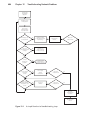
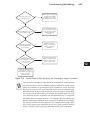
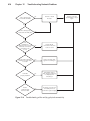
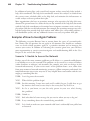
The flowchart in Figure 12-4 illustrates how a logical approach to checking physical
connectivity can help you solve a network problem.The steps in this flowchart apply to
a typical problem: a user’s inability to log onto the network.They assume that you have
already ruled out user error and that you have successfully reproduced the problem
under both your and the user’s login IDs.
12