1
Troubleshooting Methodology
603
5. Implement a solution.
6. Test the solution.
7. Recognize the potential effects of the solution. For example, if you have to
reassign IP addresses, how will the change of an IP address on a server affect
its clients? Or, in another case, if you upgrade the type of client software used
on a workstation, how will that affect a user’s daily routine?
8. Document the solution. Make sure that both you and your colleagues understand the cause of the problem and how you solved it. This information
should be kept in a centrally available repository, such as an online database.
Depending on your findings, you may skip from one step to another step further down
in the list, eliminating the need to carry out the intervening steps. For example, if you
determine that a NIC has been improperly seated in a workstation’s system board, you
may skip directly to Step 5 (in this case, reinstall the NIC) without analyzing recent
changes to the network. Above all, use common sense in your troubleshooting efforts.
As you read through the following sections, you will understand how the suggested troubleshooting steps are interrelated and how answering a question under one step might
prompt you to skip to another step.
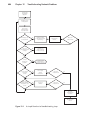
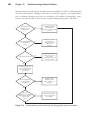
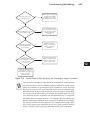
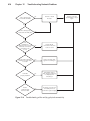
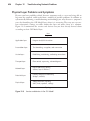
The flowchart in Figure 12-1 illustrates how these steps are related. Each decision step
in the flowchart is discussed in more detail in the following sections, and in some sections the flowchart is expanded to reflect different outcomes based on different findings.
The following sections also explain how to narrow down the possible causes of a problem by answering specific questions. In particular, you can question users to get clues
about the problem. Finally, the chapter describes ways to test your attempted resolution
of a network problem.
Tip
In addition to the organized method of troubleshooting described in this section, a good, general rule for troubleshooting can be stated as follows: Pay
attention to the obvious! Although some questions may seem too simple to
bother asking, don’t discount them. You can often save much time by checking cable connections first. Every networking professional can tell a story
about spending half a day trying to figure out why a computer wouldn’t connect to the network, only to discover that the network cable was not plugged
into the wall jack or the device’s NIC.
12