1
Active Directory IntegrationActive Directory Feature
Active Directory Integration
This chapter covers the following topics:
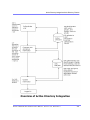
• ”How Information is Transferred from Active Directory to Ektron
CMS200/300” on page 516
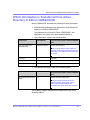
• ”Which Information is Transferred from Active Directory to
Ektron CMS200/300” on page 517
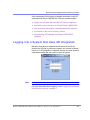
• ”Logging into a System that Uses AD Integration” on page 519
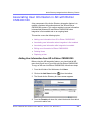
• ”Associating User Information in AD with Ektron CMS200/300”
on page 520
• ”User Groups” on page 524
• ”The Screens of the Active Directory Feature” on page 530
• ”Setup Guidelines” on page 544
• ”Disabling AD Integration” on page 545
How Information is Transferred from Active
Directory to Ektron CMS200/300
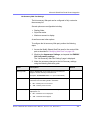
Ektron CMS200/300 does not write to the AD – it only reads from
it. This results in the following changes to how user information is
handled within Ektron CMS200/300.
• Once you enable AD integration, all changes to user and user
group information must be made in the AD -- the Ektron
CMS200/300 Edit User and User Group screens change to
primarily view screens.
• When adding a new user or user group toEktron CMS200/300,
you can only select users and groups in the AD. If the user or
user group does not exist in the AD, create them there first,
and then import the user or group into Ektron CMS200/300.
Ektr on CM S2 00/30 0 Ad mi nistr ator Manual , Versi on 4. 5, R evision 4
516