1
.
GRMON2 User's Manual
1
GRMON2 User's Manual
GRMON2 User's Manual
GRMON2-UM
Version 2.0.69.1
November 2015
Kungsgatan 12
411 19 Gothenburg
Sweden
tel +46 31 7758650
fax +46 31 421407
www.aeroflex.com/gaisler
GRMON2 User's Manual
GRMON2 User's Manual
Copyright © 2015 Aeroflex Gaisler AB
2
GRMON2 User's Manual
iii
Table of Contents
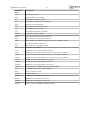
1. Introduction ...................................................................................................................... 1
1.1. Overview ............................................................................................................... 1
1.2. Supported platforms and system requirements .............................................................. 1
1.3. Obtaining GRMON ................................................................................................. 1
1.4. Installation ............................................................................................................. 1
1.5. License ................................................................................................................. 2
1.6. GRMON Evaluation version ..................................................................................... 2
1.7. Problem reports ...................................................................................................... 2
2. Debugging concept ............................................................................................................ 3
2.1. Overview ............................................................................................................... 3
2.2. Target initialization ................................................................................................. 4
2.2.1. LEON2 Target initialization ........................................................................... 5
2.2.2. Configuration file target initialization ............................................................... 5
2.3. Memory register reset values .................................................................................... 5
3. Operation ......................................................................................................................... 6
3.1. Overview ............................................................................................................... 6
3.2. Starting GRMON .................................................................................................... 6
3.2.1. Debug link options ....................................................................................... 6
3.2.2. Debug driver options .................................................................................... 6
3.2.3. General options ............................................................................................ 6
3.3. GRMON command-line interface (CLI) ...................................................................... 8
3.4. Common debug operations ....................................................................................... 9
3.4.1. Examining the hardware configuration ............................................................. 9
3.4.2. Uploading application and data to target memory .............................................. 10
3.4.3. Running applications ................................................................................... 11
3.4.4. Inserting breakpoints and watchpoints ............................................................. 11
3.4.5. Displaying processor registers ....................................................................... 12
3.4.6. Backtracing function calls ............................................................................ 12
3.4.7. Displaying memory contents ......................................................................... 13
3.4.8. Using the trace buffer .................................................................................. 14
3.4.9. Profiling .................................................................................................... 15
3.4.10. Attaching to a target system without initialization ............................................ 16
3.4.11. Multi-processor support .............................................................................. 16
3.4.12. Stack and entry point ................................................................................. 17
3.4.13. Memory Management Unit (MMU) support ................................................... 17
3.4.14. CPU cache support .................................................................................... 17
3.5. Tcl integration ...................................................................................................... 18
3.5.1. Shells ....................................................................................................... 18
3.5.2. Commands ................................................................................................ 18
3.5.3. API .......................................................................................................... 18
3.5.4. Links ........................................................................................................ 19
3.6. Symbolic debug information ................................................................................... 19
3.6.1. Multi-processor symbolic debug information .................................................... 20
3.7. GDB interface ...................................................................................................... 20
3.7.1. Connecting GDB to GRMON ....................................................................... 20
3.7.2. Executing GRMON commands from GDB ...................................................... 21
3.7.3. Running applications from GDB .................................................................... 21
3.7.4. Running SMP applications from GDB ............................................................ 21
3.7.5. Running AMP applications from GDB ........................................................... 22
3.7.6. GDB Thread support ................................................................................... 23
3.7.7. Virtual memory .......................................................................................... 25
3.7.8. Specific GDB optimization ........................................................................... 27
3.7.9. Limitations of GDB interface ........................................................................ 27
3.8. Thread support ..................................................................................................... 27
3.8.1. GRMON thread commands .......................................................................... 28
GRMON2 User's Manual
iv
3.9. Forwarding application console I/O ..........................................................................
3.10. EDAC protection .................................................................................................
3.10.1. Using EDAC protected memory ..................................................................
3.10.2. LEON3-FT error injection ..........................................................................
3.11. FLASH programming ...........................................................................................
3.11.1. CFI compatible Flash PROM ......................................................................
3.11.2. SPI memory device ...................................................................................
4. Debug link .....................................................................................................................
4.1. Serial debug link ...................................................................................................
4.2. Ethernet debug link ...............................................................................................
4.3. JTAG debug link ..................................................................................................
4.3.1. Xilinx parallel cable III/IV ...........................................................................
4.3.2. Xilinx Platform USB cable ...........................................................................
4.3.3. Altera USB Blaster or Byte Blaster ................................................................
4.3.4. FTDI FT4232/FT2232 .................................................................................
4.3.5. Amontec JTAGkey .....................................................................................
4.3.6. Actel FlashPro 3/3x/4 ..................................................................................
4.3.7. Digilent HS1 ..............................................................................................
4.4. USB debug link ....................................................................................................
4.5. PCI debug link .....................................................................................................
4.6. GRESB debug link ................................................................................................
4.7. User defined debug link .........................................................................................
4.7.1. API ..........................................................................................................
5. Debug drivers .................................................................................................................
5.1. AMBA AHB trace buffer driver ..............................................................................
5.2. Clock gating .........................................................................................................
5.2.1. Switches ....................................................................................................
5.3. DSU Debug drivers ...............................................................................................
5.3.1. Switches ....................................................................................................
5.3.2. Commands ................................................................................................
5.3.3. Tcl variables ..............................................................................................
5.4. Ethernet controller .................................................................................................
5.4.1. Commands ................................................................................................
5.5. GRPWM core .......................................................................................................
5.6. USB Host Controller .............................................................................................
5.6.1. Switches ....................................................................................................
5.6.2. Commands ................................................................................................
5.7. I2C .....................................................................................................................
5.8. I/O Memory Management Unit ................................................................................
5.9. Multi-processor interrupt controller ..........................................................................
5.10. L2-Cache Controller .............................................................................................
5.10.1. Switches ..................................................................................................
5.11. Statistics Unit .....................................................................................................
5.12. Leon2 support .....................................................................................................
5.12.1. Switches ..................................................................................................
5.13. On-chip logic analyzer driver .................................................................................
5.14. Memory controllers .............................................................................................
5.14.1. Switches ..................................................................................................
5.14.2. Commands ...............................................................................................
5.15. Memory scrubber ................................................................................................
5.16. MIL-STD-1553B Interface ....................................................................................
5.17. PCI ...................................................................................................................
5.17.1. PCI Trace ................................................................................................
5.18. SPI ...................................................................................................................
5.19. SpaceWire router .................................................................................................
5.20. SVGA frame buffer .............................................................................................
6. Support ..........................................................................................................................
A. Command index .............................................................................................................
28
29
29
30
31
31
32
34
35
35
36
37
37
39
40
40
40
41
41
43
43
44
44
46
46
46
46
46
46
47
48
48
48
48
49
49
49
49
49
50
50
50
50
53
53
53
54
55
56
56
57
58
62
62
62
63
64
65
GRMON2 User's Manual
v
B. Command syntax ............................................................................................................ 68
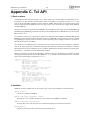
C. Tcl API ....................................................................................................................... 197
D. Fixed target configuration file format ................................................................................ 204
E. License key installation .................................................................................................. 206
F. Appending environment variables ..................................................................................... 207
G. Compatibility ................................................................................................................ 208
GRMON2 User's Manual
1
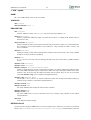
1. Introduction
1.1. Overview
GRMON is a general debug monitor for the LEON processor, and for SOC designs based on the GRLIB IP
library. Only LEON 3 and later are supported. GRMON includes the following functions:
• Read/write access to all system registers and memory
• Built-in disassembler and trace buffer management
• Downloading and execution of LEON applications
• Breakpoint and watchpoint management
• Remote connection to GNU debugger (GDB)
• Support for USB, JTAG, RS232, PCI, Ethernet and SpaceWire debug links
• Tcl interface (scripts, procedures, variables, loops etc.)
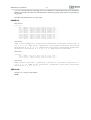
1.2. Supported platforms and system requirements
GRMON is currently provided for platforms: Linux-x86 (GLIBC 2.3.4), Windows XP Sp3 and Windows 7
1.3. Obtaining GRMON
The primary site for GRMON is Aeroflex Gaisler website [http://www.gaisler.com/], where the latest version of GRMON can be ordered and evaluation versions downloaded.
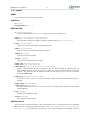
1.4. Installation
To install GRMON, extract the archive anywhere on the host computer. The archive contains a directory for
each OS that grmon supports. Each OS- folder contains additional directories as described in the list below.
grmon-pro-2.0.XX/<OS>/bin
grmon-pro-2.0.XX/<OS>/lib
grmon-pro-2.0.XX/<OS>/share
The bin directory contains the executable. For convenience the it is recommended to add the bin directory
of the host OS to the environment variable PATH. See Appendix F, Appending environment variables for
instructions on how to append environment variables.
GRMON must find the share directory to work properly. GRMON will try to automatically detect the
location of the folder. A warning will be printed when starting GRMON if it fails to find the share folder. If it fails to automatically detect the folder, then the environment variable GRMON_SHARE can be set
to point the share/grmon folder. For example on Windows it could be set to c:\opt\grmon-pro
\win32\share\grmon or on Linux it could be set to /opt/grmon-pro/linux/share/grmon.
The lib directory contains some additional libraries that GRMON requires. On the Windows platform the
lib directory is not available. On the Linux platform, if GRMON fails to start because of some missing libraries that are located in this directory, then add this path to the environment variable LD_LIBRARY_PATH
or add it the ld.so.cache (see man pages about ldconfig for more information).
In addition, some debug interfaces requires installation of third-party drivers, see Chapter 4, Debug link for
more information.
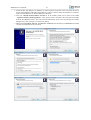
The professional versions use a HASP HL license key. See Appendix E, License key installation for installation of the HASP HL device drivers.
GRMON2 User's Manual
2
1.5. License
The GRMON license file can be found in the share folder of the installation. For example on Windows it
can be found in c:\opt\grmon-pro\win32\share\grmon or on Linux it could be found in /opt/
grmon-pro/linux/share/grmon.
1.6. GRMON Evaluation version
The evaluation version of GRMON can be downloaded from Aeroflex Gaisler website [http://
www.gaisler.com/]. The evaluation version may be used during a period of 21 days without purchasing a
license. After this period, any commercial use of GRMON is not permitted without a valid license. The
following features are not available in the evaluation version:
• Support for LEON2, LEON3-FT, LEON4
• FT memory controllers
• SpaceWire drivers
• Custom JTAG configuration
• Profiling
• TCL API (drivers, init scripts, hooks, I/O forward to TCL channel etc)
1.7. Problem reports
Please send bug reports or comments to [email protected].
Customers with a valid support agreement may send questions to [email protected]. Include a GRMON
log when sending questions, please. A log can be obtained by starting GRMON with the command line
switch -log filename.
The leon_sparc community at Yahoo may also be a source to find solutions to problems.
GRMON2 User's Manual
3
2. Debugging concept
2.1. Overview
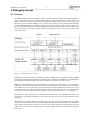
The GRMON debug monitor is intended to debug system-on-chip (SOC) designs based on the LEON processor. The monitor connects to a dedicated debug interface on the target hardware, through which it can
perform read and write cycles on the on-chip bus (AHB). The debug interface can be of various types: the
LEON3/4 processor supports debugging over a serial UART, 32-bit PCI, JTAG, Ethernet and SpaceWire
(using the GRESB Ethernet to SpaceWire bridge) debug interfaces. On the target system, all debug interfaces are realized as AHB masters with the Debug protocol implemented in hardware. There is thus no software support necessary to debug a LEON system, and a target system does in fact not even need to have
a processor present.
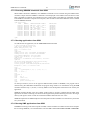
Figure 2.1. GRMON concept overview
GRMON can operate in two modes: command-line mode and GDB mode. In command-line mode, GRMON
commands are entered manually through a terminal window. In GDB mode, GRMON acts as a GDB gateway
and translates the GDB extended-remote protocol to debug commands on the target system.
GRMON is implemented using three functional layers: command layer, debug driver layer, and debug interface layer. The command layer takes input from the user and parses it in a Tcl Shell. It is also possible to
start a GDB server service, which has its own shell, that takes input from GDB. Each shell has it own set of
commands and variables. Many commands depends on drivers and will fail if the core is note present in the
target system. More information about Tcl integration can be found in the Section 3.5, “Tcl integration”.
The debug driver layer implements drivers that probes and initializes the cores. GRMON will scan the target
system at start-up and detect which IP cores are present. The drivers may also provides information to the
commands.
The debug interface layer implements the debug link protocol for each supported debug interface. Which
interface to use for a debug session is specified through command line options during the start of GRMON.
Only interfaces based on JTAG supports 8-/16-bit accesses, all other interfaces access subwords using readmodify-write. 32-bit accesses are supported by all interfaces. More information can be found in Chapter 4,
Debug link.
GRMON2 User's Manual
4
2.2. Target initialization
When GRMON first connects to the target system, it scans the system to detect which IP cores are present.
This is done by reading the plug and play information which is normally located at address 0xfffff000 on
the AHB bus. A debug driver for each recognized IP core is then initialized, and performs a core-specific
initialization sequence if required. For a memory controller, the initialization sequence would typically consist of a memory probe operation to detect the amount of attached RAM. For a UART, it could consist of
initializing the baud rate generator and flushing the FIFOs. After the initialization is complete, the system
configuration is printed:
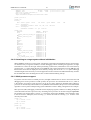
GRMON2 LEON debug monitor v2.0.15 professional version
Copyright (C) 2012 Aeroflex Gaisler - All rights reserved.
For latest updates, go to http://www.gaisler.com/
Comments or bug-reports to [email protected]
GRLIB build version: 4111
Detected frequency: 40 MHz
Component
LEON3 SPARC V8 Processor
AHB Debug UART
JTAG Debug Link
GRSPW2 SpaceWire Serial Link
LEON2 Memory Controller
AHB/APB Bridge
LEON3 Debug Support Unit
Generic UART
Multi-processor Interrupt Ctrl.
Modular Timer Unit
General Purpose I/O port
Vendor
Aeroflex
Aeroflex
Aeroflex
Aeroflex
European
Aeroflex
Aeroflex
Aeroflex
Aeroflex
Aeroflex
Aeroflex
Gaisler
Gaisler
Gaisler
Gaisler
Space Agency
Gaisler
Gaisler
Gaisler
Gaisler
Gaisler
Gaisler
Use command 'info sys' to print a detailed report of attached cores
grmon2>
More detailed system information can be printed using the ‘info sys’ command as listed below. The detailed
system view also provides information about address mapping, interrupt allocation and IP core configuration.
Information about which AMBA AHB and APB buses a core is connected to can be seen by adding the -v
option. GRMON assigns a unique name to all cores, the core name is printed to the left. See Appendix C,
Tcl API for information about Tcl variables and device names.
grmon2> info sys
cpu0
Aeroflex Gaisler LEON3 SPARC V8 Processor
AHB Master 0
ahbuart0 Aeroflex Gaisler AHB Debug UART
AHB Master 1
APB: 80000700 - 80000800
Baudrate 115200, AHB frequency 40000000.00
ahbjtag0 Aeroflex Gaisler JTAG Debug Link
AHB Master 2
grspw0
Aeroflex Gaisler GRSPW2 SpaceWire Serial Link
AHB Master 3
APB: 80000A00 - 80000B00
IRQ: 10
Number of ports: 1
mctrl0
European Space Agency LEON2 Memory Controller
AHB: 00000000 - 20000000
AHB: 20000000 - 40000000
AHB: 40000000 - 80000000
APB: 80000000 - 80000100
8-bit prom @ 0x00000000
32-bit sdram: 1 * 64 Mbyte @ 0x40000000
col 9, cas 2, ref 7.8 us
apbmst0
Aeroflex Gaisler AHB/APB Bridge
AHB: 80000000 - 80100000
dsu0
Aeroflex Gaisler LEON3 Debug Support Unit
AHB: 90000000 - A0000000
AHB trace: 128 lines, 32-bit bus
CPU0: win 8, hwbp 2, itrace 128, V8 mul/div, srmmu, lddel 1
stack pointer 0x43fffff0
icache 2 * 4096 kB, 32 B/line lru
dcache 1 * 4096 kB, 16 B/line
uart0
Aeroflex Gaisler Generic UART
APB: 80000100 - 80000200
IRQ: 2
GRMON2 User's Manual
irqmp0
gptimer0
grgpio0
5
Baudrate 38461
Aeroflex Gaisler Multi-processor Interrupt Ctrl.
APB: 80000200 - 80000300
Aeroflex Gaisler Modular Timer Unit
APB: 80000300 - 80000400
IRQ: 8
8-bit scalar, 2 * 32-bit timers, divisor 40
Aeroflex Gaisler General Purpose I/O port
APB: 80000800 - 80000900
2.2.1. LEON2 Target initialization
The plug and play information was introduced in the LEON3 processor (GRLIB), and is not available for
LEON2 systems. LEON2 mode can be enable by starting GRMON with the -leon2 switch or one of the
switches that correspond to a known LEON2 device, see Section 5.12, “Leon2 support”.
A LEON2 system has a fixed set of IP cores and address mapping, and GRMON will use an internal plug
and play table that describes this configuration. The plug and play table used for LEON2 is fixed, and no
automatic detection of present cores is attempted. Only those cores that need to be initialized by GRMON
are included in the table, so the listing might not correspond to the actual target. It is however possible
to load a custom configuration file that describes the target system configuration using see Section 2.2.2,
“Configuration file target initialization”
2.2.2. Configuration file target initialization
It is possible to provide GRMON with a configuration file that describes a static configuration by starting
GRMON with the switch -cfg filename.
The format of the plug and play configuration file is described in section Appendix D, Fixed target configuration file format. It can be used for both LEON3 and LEON2 systems. An example configuration file is
also supplied with the GRMON professional distribution in share/src/cfg/leon3.xml.
2.3. Memory register reset values
To ensure that the memory registers has sane values, GRMON will reset the registers when commands that
access the memories are issued, for example run, load commands and similar commands. To modify the
reset values, use the commands listed in Section 5.14.2, “Commands”.
GRMON2 User's Manual
6
3. Operation
3.1. Overview
A GRMON debug session typically consists of the following steps:
1.
2.
3.
4.
5.
6.
Starting GRMON and attaching to the target system
Examining the hardware configuration
Uploading application program
Setup debugging, for example insert breakpoints and watchpoint
Executing the application
Debugging the application and examining the CPU and hardware state
Step 2 though 6 is performed using the GRMON terminal interface or by attaching GDB and use the standard
GDB interface. The GDB section describes how GRMON specific commands are accessed from GDB.
The following sections will give an overview how the various steps are performed.
3.2. Starting GRMON
GRMON is started by giving the grmon command in a terminal window. Without options, GRMON will
default to connect to the target using the serial debug link. UART1 of the host (ttyS0 or COM1) will be
used, with a default baud rate of 115200 baud. On windows hosts, GRMON can be started in a command
window (cmd.exe) or in a MSYS shell.
Command line options may be split up in several different groups by function as below.
• The debug link options: setting up a connection to GRLIB target
• General options: debug session behavior options
• Debug driver options: configure the hardware, skip core auto-probing etc.
Below is an example of GRMON connecting to a GR712 evaluation board using the FTDI USB serial
interface, tunneling the UART output of APBUART0 to GRMON and specifying three RAM wait states
on read and write:
$ grmon -ftdi -u -ramws 3
3.2.1. Debug link options
GRMON connects to a GRLIB target using one debug link interface, the command line options selects which
interface the PC uses to connect to the target and optionally how the debug link is configured. All options
are described in Chapter 4, Debug link.
3.2.2. Debug driver options
The debug drivers provide an interface to view and access AMBA devices during debugging and they offer
device specific ways to configure the hardware when connecting and before running the executable. Drivers
usually auto-probe their devices for optimal configuration values, however sometimes it is useful to override
the auto-probed values. Some options affects multiple drivers. The debug driver options are described in
Chapter 5, Debug drivers.
3.2.3. General options
The general options are mostly target independent options configuring the behavior of GRMON. Some of
them affects how the target system is accessed both during connection and during the whole debugging
session. All general options are described below.
grmon [options]
GRMON2 User's Manual
7
Options:
-abaud baudrate
Set baud-rate for all UARTs in the system, however not the debug-link AHBUART. By default, 38400
baud is used.
-ambamb [maxbuses]
Enable auto-detection of AHBCTRL_MB system and (optionally) specifies the maximum number of
buses in the system if an argument is given. The optional argument to -ambamb is decoded as below:
0, 1: No Multi-bus (MB) (max one bus)
2..3: Limit MB support to 2 or 3 AMBA PnP buses
4 or no argument: Selects Full MB support
-c filename
Run the commands in the batch file at start-up.
-cfg filename
Load fixed PnP configuration from a xml-file.
-echo
Echo all the commands in the batch file at start-up. Has no effect unless -c is also set.
-edac
Enable EDAC operation in memory controllers that support it.
-freq sysclk
Overrides the detected system frequency. The frequency is specified in MHz.
-gdb [port]
Listen for GDB connection directly at start-up. Optionally specify the port number for GDB communications. Default port number is 2222.
-ioarea address
Specify the location of the I/O area. (Default is 0xfff00000).
-log filename
Log session to the specified file. If the file already exists the new session is appended. This should be
used when requesting support.
-ni
Read plug n' play and detect all system device, but don't do any target initialization. See Section 3.4.10,
“Attaching to a target system without initialization” for more information.
-nopnp
Disable the plug n' play scanning. GRMON won't detect any hardware and any hardware dependent
functionality won't work.
-nothreads
Disable thread support.
-u [device]
Put UART 1 in FIFO debug mode if hardware supports it, else put it in loop-back mode. Debug mode
will enable both reading and writing to the UART from the monitor console. Loop-back mode will only
enable reading. See Section 3.9, “Forwarding application console I/O”. The optional device parameter
is used to select a specific UART to be put in debug mode. The device parameter is an index starting
with 0 for the first UART and then increasing with one in the order they are found in the bus scan. If
the device parameter is not used the first UART is selected.
GRMON2 User's Manual
8
-ucmd filename
Load script specified by filename into all shells, including the system shell.
-udrv filename
Load script specified by filename into system shell.
3.3. GRMON command-line interface (CLI)
The GRMON2 command-line interface features a Tcl 8.5 interpreter which will interpret all entered commands substituting variables etc. before GRMON is actually called. Variables exported by GRMON can
also be used to access internal states and hardware registers without going through commands. The GRMON
Tcl interface is described in Section 3.5, “Tcl integration”.
GRMON dynamically loads libreadline.so if available on your host system, and uses the readline
library to enter and edit commands. Short forms of the commands are allowed, e.g lo, loa, or load, are all
interpreted as load. Tab completion is available for commands, Tcl variables, text-symbols, file names, etc.
If libreadline.so is not found, the standard input/output routines are used instead (no history, poor
editing capabilities and no tab-completion).
The commands can be separated in to three categories similar to the start-up options:
• Tcl internal commands and reserved key words
• GRMON built-in commands always available regardless of target
• GRMON commands accessing debug drivers
Tcl internal and GRMON built-in commands are available regardless of target hardware present whereas
debug driver commands may only be present on supported systems. The Tcl and driver commands are
described in Section 3.5, “Tcl integration” and Chapter 5, Debug drivers respectively. In Table 3.1 is a
summary of all GRMON built-in commands. For the full list of commands, see Appendix A, Command
index.
Table 3.1. BUILT-IN commands
batch
Execute batch script
bdump
Dump memory to a file
bload
Load a binary file
disassemble
Disassemble memory
dump
Dump memory to a file
dwarf
print or lookup dwarf information
eeload
Load a file into an EEPROM
exit
Exit GRMON
gdb
Controll the builtin GDB remote server
help
Print all commands or detailed help for a specific command
info
Show information
load
Load a file or print filenames of uploaded files
mem
AMBA bus 32-bit memory read access, list a range of addresses
memb
AMBA bus 8-bit memory read access, list a range of addresses
memh
AMBA bus 16-bit memory read access, list a range of addresses
nolog
Suppress stdout of a command
quit
Quit the GRMON console
reset
Reset drivers
shell
Execute shell process
GRMON2 User's Manual
9
silent
Suppress stdout of a command
symbols
Load, print or lookup symbols
usrsh
Run commands in threaded user shell
verify
Verify that a file has been uploaded correctly
wash
Clear or set memory areas
wmem
AMBA bus 32-bit memory write access
wmemb
AMBA bus 8-bit memory write access
wmemh
AMBA bus 16-bit memory write access
wmems
Write a string to an AMBA bus memory address
3.4. Common debug operations
This section describes and gives some examples of how GRMON is typically used, the full command reference can be found in Appendix A, Command index.
3.4.1. Examining the hardware configuration
When connecting for the first time it is essential to verify that GRMON has auto-detected all devices and
their configuration correctly. At start-up GRMON will print the cores and the frequency detected. From the
command line one can examine the system by executing info sys as below:
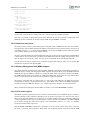
grmon2> info sys
cpu0
Aeroflex Gaisler LEON3-FT SPARC V8 Processor
AHB Master 0
cpu1
Aeroflex Gaisler LEON3-FT SPARC V8 Processor
AHB Master 1
greth0
Aeroflex Gaisler GR Ethernet MAC
AHB Master 3
APB: 80000E00 - 80000F00
IRQ: 14
grspw0
Aeroflex Gaisler GRSPW2 SpaceWire Serial Link
AHB Master 5
APB: 80100800 - 80100900
IRQ: 22
Number of ports: 1
grspw1
Aeroflex Gaisler GRSPW2 SpaceWire Serial Link
AHB Master 6
APB: 80100900 - 80100A00
IRQ: 23
Number of ports: 1
mctrl0
Aeroflex Gaisler Memory controller with EDAC
AHB: 00000000 - 20000000
AHB: 20000000 - 40000000
AHB: 40000000 - 80000000
APB: 80000000 - 80000100
8-bit prom @ 0x00000000
32-bit static ram: 1 * 8192 kbyte @ 0x40000000
32-bit sdram: 2 * 128 Mbyte @ 0x60000000
col 10, cas 2, ref 7.8 us
apbmst0
Aeroflex Gaisler AHB/APB Bridge
AHB: 80000000 - 80100000
dsu0
Aeroflex Gaisler LEON3 Debug Support Unit
AHB: 90000000 - A0000000
AHB trace: 256 lines, 32-bit bus
CPU0: win 8, hwbp 2, itrace 256, V8 mul/div, srmmu, lddel 1, GRFPU
stack pointer 0x407ffff0
icache 4 * 4096 kB, 32 B/line lru
dcache 4 * 4096 kB, 16 B/line lru
CPU1: win 8, hwbp 2, itrace 256, V8 mul/div, srmmu, lddel 1, GRFPU
stack pointer 0x407ffff0
icache 4 * 4096 kB, 32 B/line lru
dcache 4 * 4096 kB, 16 B/line lru
uart0
Aeroflex Gaisler Generic UART
APB: 80000100 - 80000200
IRQ: 2
Baudrate 38461, FIFO debug mode
irqmp0
Aeroflex Gaisler Multi-processor Interrupt Ctrl.
APB: 80000200 - 80000300
EIRQ: 12
gptimer0 Aeroflex Gaisler Modular Timer Unit
APB: 80000300 - 80000400
GRMON2 User's Manual
grgpio0
uart1
10
IRQ: 8
16-bit scalar, 4 * 32-bit timers, divisor 80
Aeroflex Gaisler General Purpose I/O port
APB: 80000900 - 80000A00
Aeroflex Gaisler Generic UART
APB: 80100100 - 80100200
IRQ: 17
Baudrate 38461
...
The memory section for example tells us that GRMON are using the correct amount of memory and memory
type. The parameters can be tweaked by passing memory driver specific options on start-up, see Section 3.2,
“Starting GRMON”. The current memory settings can be viewed in detail by listing the registers with info
reg or by accessing the registers by the Tcl variables exported by GRMON:
grmon2> info sys
...
mctrl0
Aeroflex Gaisler Memory controller with EDAC
AHB: 00000000 - 20000000
AHB: 20000000 - 40000000
AHB: 40000000 - 80000000
APB: 80000000 - 80000100
8-bit prom @ 0x00000000
32-bit static ram: 1 * 8192 kbyte @ 0x40000000
32-bit sdram: 2 * 128 Mbyte @ 0x60000000
col 10, cas 2, ref 7.8 us
...
grmon2> info reg
...
Memory controller with EDAC
0x80000000 Memory config register 1
0x1003c0ff
0x80000004 Memory config register 2
0x9ac05463
0x80000008 Memory config register 3
0x0826e000
...
grmon2> puts [format 0x%08x $mctrl0::
[TAB-COMPLETION]
mctrl0::mcfg1
mctrl0::mcfg2
mctrl0::mcfg3
mctrl0::pnp::
mctrl0::mcfg1:: mctrl0::mcfg2:: mctrl0::mcfg3::
grmon2> puts [format 0x%08x $mctrl0::mcfg1]
0x0003c0ff
grmon2> puts [format 0x%08x $mctrl0::mcfg2 ::
[TAB-COMPLETION]
mctrl0::mcfg2::d64
mctrl0::mcfg2::sdramcmd
mctrl0::mcfg2::rambanksz
mctrl0::mcfg2::sdramcolsz
mctrl0::mcfg2::ramrws
mctrl0::mcfg2::sdramrf
mctrl0::mcfg2::ramwidth
mctrl0::mcfg2::sdramtcas
mctrl0::mcfg2::ramwws
mctrl0::mcfg2::sdramtrfc
mctrl0::mcfg2::rbrdy
mctrl0::mcfg2::sdramtrp
mctrl0::mcfg2::rmw
mctrl0::mcfg2::se
mctrl0::mcfg2::sdpb
mctrl0::mcfg2::si
mctrl0::mcfg2::sdrambanksz
grmon2> puts [format %x $mctrl0::mcfg2::ramwidth]
2
3.4.2. Uploading application and data to target memory
A LEON software application can be uploaded to the target system memory using the load command:
grmon2> load v8/stanford.exe
40000000 .text
54.8kB / 54.8kB
4000DB30 .data
2.9kB /
2.9kB
Total size: 57.66kB (786.00kbit/s)
Entry point 0x40000000
Image /home/daniel/examples/v8/stanford.exe loaded
[===============>] 100%
[===============>] 100%
The supported file formats are SPARC ELF-32, ELF-64 (MSB truncated to 32-bit addresses), srecord and
a.out binaries. Each section is loaded to its link address. The program entry point of the file is used to set
the %PC, %NPC when the application is later started with run. It is also possible to load binary data by
specifying file and target address using the bload command.
One can use the verify command to make sure that the file has been loaded correctly to memory as below.
Any discrepancies will be reported in the GRMON console.
grmon2> verify v8/stanford.exe
40000000 .text
54.8kB /
4000DB30 .data
2.9kB /
Total size: 57.66kB (726.74kbit/s)
Entry point 0x40000000
54.8kB
2.9kB
[===============>] 100%
[===============>] 100%
GRMON2 User's Manual
11
Image of /home/daniel/examples/v8/stanford.exe verified without errors
On-going DMA can be turned off to avoid that hardware overwrites the loaded image by issuing the reset
command prior to load. This is important after the CPU has been executing using DMA in for example
Ethernet network traffic.
3.4.3. Running applications
After the application has been uploaded to the target with load the run command can be used to start execution. The entry-point taken from the ELF-file during loading will serve as the starting address, the first
instruction executed. The run command issues a driver reset, however it may be neccessary to perform a
reset prior to loading the image to avoid that DMA overwrites the image. See the reset command for details. Applications already located in FLASH can be started by specifying an absolute address. The cont
command resumes execution after a temporary stop, e.g. a breakpoint hit. go also affects the CPU execution,
the difference compared to run is that the target device hardware is not initialized before starting execution.
grmon2> reset
grmon2> load v8/stanford.exe
40000000 .text
54.8kB / 54.8kB
4000DB30 .data
2.9kB /
2.9kB
Total size: 57.66kB (786.00kbit/s)
Entry point 0x40000000
Image /home/daniel/examples/v8/stanford.exe loaded
grmon2> run
Starting
Perm Towers
34
67
Queens
33
Intmm
117
Mm
1117
Nonfloating point composite is
Floating point composite is
CPU 0:
CPU 1:
Puzzle
367
Quick
50
[===============>] 100%
[===============>] 100%
Bubble
50
Tree
250
FFT
1133
144
973
Program exited normally.
Power down mode
The output from the application normally appears on the LEON UARTs and thus not in the GRMON console.
However, if GRMON is started with the -u switch, the UART is put into debug mode and the output is
tunneled over the debug-link and finally printed on the console by GRMON. See Section 3.9, “Forwarding
application console I/O”. Note that older hardware (GRLIB 1.0.17-b2710 and older) has only partial support
for -u, it will not work when the APBUART software driver uses interrupt driven I/O, thus Linux and
vxWorks are not supported on older hardware. Instead, a terminal emulator should be connected to UART
1 of the target system.
Since the application changes (at least) the .data segment during run-time the application must be reloaded
before it can be executed again. If the application uses the MMU (e.g. Linux) or installs data exception
handlers (e.g. eCos), GRMON should be started with -nb to avoid going into break mode on a page-fault
or data exception. Likewise, when a software debugger is running on the target (e.g. GDB natively in Linux
user-space or WindRiver Workbench debugging a task) soft breakpoints ("TA 0x01" instruction) will result
in traps that the OS will handle and tell the native debugger. To prevent GRMON from interpreting it as its
own breakpoints and stop the CPU one must use the -nswb switch.
3.4.4. Inserting breakpoints and watchpoints
All breakpoints are inserted with the bp command. The subcommand (soft, hard, watch, bus, data, delete)
given to bp determine which type of breakpoint is inserted, if no subcommand is given bp defaults to a
software breakpoint.
Instruction breakpoints are inserted using bp soft or bp hard commands. Inserting a software breakpoint
will add a (TA 0x1) instruction by modifying the target's memory before starting the CPU, while bp hard
will insert a hardware breakpoint using one of the IU watchpoint registers. To debug instruction code in
read-only memories or memories which are self-modifying the only option is hardware breakpoints. Note
that it's possible to debug any RAM-based code using software breakpoints, even where traps are disabled
such as in trap handlers. Since hardware breakpoints triggers on the CPU instruction address one must be
aware that when the MMU is turned on, virtual addresses are triggered upon.
GRMON2 User's Manual
12
CPU data address watchpoints (read-only, write-only or read-write) are inserted using the bp watch command. Watchpoints can be setup to trigger within a range determined by a bit-mask where a one means that
the address must match the address pattern and a zero mask indicate don't care. The lowest 2-bits are not
available, meaning that 32-bit words are the smallest address that can be watched. Byte accesses can still be
watched but accesses to the neighboring three bytes will also be watched.
AMBA-bus watchpoints can be inserted using bp bus or bp data. When a bus watchpoint is hit the trace
buffer will freeze. The processor can optionally be put in debug mode when the bus watchpoint is hit. This
is controlled by the tmode command:
grmon2> tmode break N
If N = 0, the processor will not be halted when the watchpoint is hit. A value > 0 will break the processor
and set the AHB trace buffer delay counter to the same value.
For hardware supported break/watchpoints the target must have been configured accordingly, otherwise a
failure will be reported. Note also that the number of watchpoints implemented varies between designs.
3.4.5. Displaying processor registers
The current register window of a LEON processor can be displayed using the reg command or by accessing
the Tcl cpu namespace that GRMON provides. GRMON exports cpu and cpuN where N selects which
CPU's registers are accessed, the cpu namespace points to the active CPU selected by the cpu command.
grmon2> reg
INS
0: 00000008
1: 80000070
2: 00000000
3: 00000000
4: 00000000
5: 00000000
6: 407FFFF0
7: 00000000
psr: F34010E0
LOCALS
0000000C
00000020
00000000
00000000
00000000
00000000
00000000
00000000
OUTS
00000000
00000000
00000000
00000000
00000000
00000000
407FFFF0
00000000
wim: 00000002
GLOBALS
00000000
00000001
00000002
00300003
00040004
00005005
00000606
00000077
tbr: 40000060
y: 00000000
pc:
40003E44 be 0x40003FB8
npc: 40003E48 nop
grmon2> puts [format %x $::cpu::iu::o6]
407ffff0
Other register windows can be displayed using reg wN, when N denotes the window number. Use the float
command to show the FPU registers (if present).
3.4.6. Backtracing function calls
When debugging an application it is often most useful to view how the CPU entered the current function.
The bt command analyze the previous stack frames to determine the backtrace. GRMON reads the register
windows and then switches to read from the stack depending on the %WIM and %PSR register.
The backtrace is presented with the caller's program counter (%PC) to return to (below where the CALL
instruction was issued) and the stack pointer (%SP) at that time. The first entry (frame #0) indicates the
current location of the CPU and the current stack pointer. The right most column print out the %PC address
relative the function symbol, i.e. if symbols are present.
grmon2> bt
#0
#1
#2
#3
%pc
0x40003e24
0x40005034
0x40001064
0x4000cf40
%sp
0x407ffdb8
0x407ffe28
0x407fff70
0x407fffb0
<Fft+0x4>
<main+0xfc4>
<_start+0x64>
<_hardreset_real+0x78>
In order to display a correct backtrace for optimized code where optimized leaf functions are present a
symbol table must exist.
GRMON2 User's Manual
13
In a MP system the backtrace of a specific CPU can be printed, either by changing the active CPU with the
cpu command or by passing the CPU index to bt.
3.4.7. Displaying memory contents
Any memory location can be displayed and written using the mem commands listed in the table below.
Memory commands that are prefixed with a v access the virtual address space seen by doing MMU address
lookups for active CPU.
Table 3.2. Memory access commands
Command
Name
Description
mem
AMBA bus 32-bit memory read access, list a range of addresses
wmem
AMBA bus 32-bit memory write access
vmem
AMBA bus 32-bit virtual memory read access, list a range of addresses
memb
AMBA bus 8-bit memory read access, list a range of addresses
memh
AMBA bus 16-bit memory read access, list a range of addresses
vmemb
AMBA bus 8-bit virtual memory read access, list a range of addresses
vmemh
AMBA bus 16-bit virtual memory read access, list a range of addresses
vwmemb
AMBA bus 8-bit virtual memory write access
vwmemh
AMBA bus 16-bit virtual memory write access
vwmems
Write a string to an AMBA bus virtual memory address
vwmem
AMBA bus 32-bit virtual memory write access
wmemb
AMBA bus 8-bit memory write access
wmemh
AMBA bus 16-bit memory write access
wmems
Write a string to an AMBA bus memory address
Most debug links only support 32-bit accesses, only JTAG links support unaligned access. An unaligned
access is when the address or number of bytes are not evenly divided by four. When an unaligned data read
request is issued, then GRMON will read some extra bytes to align the data, but only return the requested
data. If a write request is issued, then an aligned read-modify-write sequence will occur.
The mem command requires an address and an optional length, if the length is left out 64 bytes are displayed.
If a program has been loaded, text symbols can be used instead of a numeric address. The memory content
is displayed in hexadecimal-decimal format, grouped in 32-bit words. The ASCII equivalent is printed at
the end of the line.
grmon> mem 0x40000000
40000000
40000010
40000020
40000030
a0100000
91d02000
91d02000
91d02000
29100004
01000000
01000000
01000000
81c52000
01000000
01000000
01000000
01000000
01000000
01000000
01000000
...)..... .....
. .............
. .............
. .............
29100004
81c52000
01000000
...)..... .....
2f100085
d025e178
11100033
31100037
11100033
40000af4
90100000
40000b4b
901223c0
..../...1..7....
& .%[email protected]
..#....3@.....#.
grmon> mem 0x40000000 16
40000000
a0100000
grmon> mem main 48
40003278
40003288
40003298
9de3bf98
d02620c0
901223b0
If the memory contents is SPARC machine code, the contents can be displayed in assembly code using the
disassemble command:
grmon2> disassemble 0x40000000 10
GRMON2 User's Manual
0x40000000:
0x40000004:
0x40000008:
0x4000000c:
0x40000010:
0x40000014:
0x40000018:
0x4000001c:
0x40000020:
0x40000024:
14
88100000
09100034
81c12034
01000000
a1480000
a7500000
10803401
ac102001
91d02000
01000000
grmon2> dis main
0x40004070: 9de3beb8
0x40004074: 15100035
0x40004078: d102a3f4
0x4000407c: 13100035
0x40004080: 39100088
0x40004084: 3710003a
0x40004088: d126e2e0
0x4000408c: d1272398
0x40004090: 400006a9
0x40004094: 901262f0
0x40004098: 11100035
0x4000409c: 40000653
0x400040a0: 90122300
0x400040a4: 7ffff431
0x400040a8: 3510005b
0x400040ac: 2510005b
clr %g4
sethi %hi(0x4000d000), %g4
jmp %g4 + 0x34
nop
mov %psr, %l0
mov %wim, %l3
ba 0x4000d01c
mov 1, %l6
ta 0x0
nop
<start+0>
<start+4>
<start+8>
<start+12>
<start+16>
<start+20>
<start+24>
<start+28>
<start+32>
<start+36>
save %sp, -328, %sp
sethi %hi(0x4000d400),
ld [%o2 + 0x3f4], %f8
sethi %hi(0x4000d400),
sethi %hi(0x40022000),
sethi %hi(0x4000e800),
st %f8, [%i3 + 0x2e0]
st %f8, [%i4 + 0x398]
call 0x40005b34
or %o1, 0x2f0, %o0
sethi %hi(0x4000d400),
call 0x400059e8
or %o0, 0x300, %o0
call 0x40001168
sethi %hi(0x40016c00),
sethi %hi(0x40016c00),
<main+0>
<main+4>
<main+8>
<main+12>
<main+16>
<main+20>
<main+24>
<main+28>
<main+32>
<main+36>
<main+40>
<main+44>
<main+48>
<main+52>
<main+56>
<main+60>
%o2
%o1
%i4
%i3
%o0
%i2
%l2
3.4.8. Using the trace buffer
The LEON processor and associated debug support unit (DSU) can be configured with trace buffers to store
both the latest executed instructions and the latest AHB bus transfers. The trace buffers are automatically
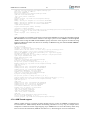
enabled by GRMON during start-up , but can also be individually enabled and disabled using tmode command. The command ahb is used to show the AMBA buffer. The command inst is used to show the instruction buffer. The command hist is used to display the contents of the instruction and the AMBA buffers
mixed together. Below is an example debug session that shows the usage of breakpoints, watchpoints and
the trace buffer:
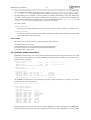
grmon2> lo v8/stanford.exe
40000000 .text
54.8kB / 54.8kB
4000DB30 .data
2.9kB /
2.9kB
Total size: 57.66kB (786.00kbit/s)
Entry point 0x40000000
Image /home/daniel/examples/v8/stanford.exe loaded
[===============>] 100%
[===============>] 100%
grmon2> bp Fft
Software breakpoint 1 at <Fft>
grmon2> bp watch 0x4000eae0
Hardware watchpoint 2 at 0x4000eae0
grmon2>
NUM
1 :
2 :
bp
ADRESS
0x40003e20
0x4000eae0
MASK
0xfffffffc
TYPE
(soft)
(watch rw)
SYMBOL
Fft+0
floated+0
grmon2> run
CPU 0:
CPU 1:
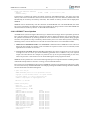
watchpoint 2 hit
0x40001024: c0388003
Power down mode
grmon2> inst
TIME
84675
84678
84679
84682
84685
84686
84689
84692
84693
84694
ADDRESS
40001024
4000101c
40001020
40001024
4000101c
40001020
40001024
4000101c
40001020
40001024
std
%g0, [%g2 + %g3]
INSTRUCTION
std %g0, [%g2 + %g3]
subcc %g3, 8, %g3
bge,a 0x4000101c
std %g0, [%g2 + %g3]
subcc %g3, 8, %g3
bge,a 0x4000101c
std %g0, [%g2 + %g3]
subcc %g3, 8, %g3
bge,a 0x4000101c
std %g0, [%g2 + %g3]
<_start+36>
RESULT
[4000eaf8 00000000 00000000]
[00000440]
[00000448]
[4000eaf0 00000000 00000000]
[00000438]
[00000440]
[4000eae8 00000000 00000000]
[00000430]
[00000438]
[ TRAP ]
grmon2> ahb
TIME
ADDRESS TYPE D[31:0] TRANS SIZE BURST MST LOCK RESP HIRQ
84664 4000eb08 write 00000000
2
2
1
0
0
0
0000
84667 4000eb0c write 00000000
3
2
1
0
0
0
0000
GRMON2 User's Manual
84671
84674
84678
84681
84685
84688
84692
84695
15
4000eb00
4000eb04
4000eaf8
4000eafc
4000eaf0
4000eaf4
4000eae8
4000eaec
write
write
write
write
write
write
write
write
00000000
00000000
00000000
00000000
00000000
00000000
00000000
00000000
2
3
2
3
2
3
2
3
2
2
2
2
2
2
2
2
1
1
1
1
1
1
1
1
0
0
0
0
0
0
0
0
0
0
0
0
0
0
0
0
0
0
0
0
0
0
0
0
0000
0000
0000
0000
0000
0000
0000
0000
grmon2> reg
INS
LOCALS
OUTS
GLOBALS
0: 80000200
00000000
00000000
00000000
1: 80000200
00000000
00000000
00000000
2: 0000000C
00000000
00000000
4000E6B0
3: FFF00000
00000000
00000000
00000430
4: 00000002
00000000
00000000
4000CC00
5: 800FF010
00000000
00000000
4000E680
6: 407FFFB0
00000000
407FFF70
4000CF34
7: 4000CF40
00000000
00000000
00000000
psr: F30010E7
wim: 00000002
pc:
npc:
std %g0, [%g2 + %g3]
subcc %g3, 8, %g3
40001024
4000101c
tbr: 40000000
y: 00000000
grmon2> bp del 2
grmon2> cont
Towers Queens
Intmm
Mm Puzzle
Quick Bubble
CPU 0: breakpoint 1 hit
0x40003e24: a0100018 mov %i0, %l0 <Fft+4>
CPU 1: Power down mode
grmon2>
grmon2> hist
TIME
30046975
30046976
30046980
30046981
30046985
30046990
30046995
30047000
30047005
30047010
ADDRESS
40003e20
40005030
40003e24
40005034
40003e28
40003e2c
40003e30
40003e34
40003e38
40003e3c
INSTRUCTIONS/AHB SIGNALS
AHB read
mst=0 size=2
or %l2, 0x1e0, %o3
AHB read
mst=0 size=2
call 0x40003e20
AHB read
mst=0 size=2
AHB read
mst=0 size=2
AHB read
mst=0 size=2
AHB read
mst=0 size=2
AHB read
mst=0 size=2
AHB read
mst=0 size=2
Tree
FFT
RESULT/DATA
[9de3bf90]
[40023de0]
[91d02001]
[40005034]
[b136201f]
[f83fbff0]
[82040018]
[d11fbff0]
[9a100019]
[9610001a]
When printing executed instructions, the value within brackets denotes the instruction result, or in the case
of store instructions the store address and store data. The value in the first column displays the relative time,
equal to the DSU timer. The time is taken when the instruction completes in the last pipeline stage (writeback) of the processor. In a mixed instruction/AHB display, AHB address and read or write value appears
within brackets. The time indicates when the transfer completed, i.e. when HREADY was asserted.
As the AHB trace is disabled when a breakpoint is hit, AHB accesses related to instruction cache fetches
after the time of break can be missed. The command ahb force can be used enable AHB tracing even when
the processor is in debug mode.
When switching between tracing modes with tmode the contents of the trace buffer will not be valid until
execution has been resumed and the buffer refilled.
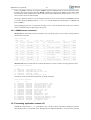
3.4.9. Profiling
GRMON supports profiling of LEON applications when run on real hardware. The profiling function collects
(statistical) information on the amount of execution time spent in each function. Due to its non-intrusive
nature, the profiling data does not take into consideration if the current function is called from within another
procedure. Even so, it still provides useful information and can be used for application tuning.
To increase the number of samples, use the fastest debug link available on the target system. I.a. do not use
I/O forwarding (start GRMON without the -u commandline option)
grmon2> lo v8/stanford.exe
GRMON2 User's Manual
16
40000000 .text
54.8kB / 54.8kB
4000DB30 .data
2.9kB /
2.9kB
Total size: 57.66kB (786.00kbit/s)
Entry point 0x40000000
Image /home/daniel/examples/v8/stanford.exe loaded
[===============>] 100%
[===============>] 100%
grmon2> profile on
grmon2> run
Starting
Perm Towers
CPU 0:
CPU 1:
Queens
Intmm
Interrupted!
0x40003ee4: 95a0c8a4
Interrupted!
0x40000000: 88100000
Mm
fsubs
clr
grmon2> prof
FUNCTION
Trial
__window_overflow_rettseq_ret
main
__window_overflow_slow1
Fft
Insert
Permute
tower
Try
Quicksort
Checktree
_malloc_r
start
outbyte
Towers
__window_overflow_rettseq
___st_pthread_mutex_lock
_start
Perm
__malloc_lock
___st_pthread_mutex_trylock
Puzzle
Quick
%f3, %f4, %f10
%g4
Bubble
Tree
FFT
<Fft+196>
<start+0>
SAMPLES
0000000096
0000000060
0000000051
0000000026
0000000023
0000000016
0000000013
0000000013
0000000013
0000000011
0000000007
0000000005
0000000004
0000000003
0000000002
0000000002
0000000002
0000000001
0000000001
0000000001
0000000001
RATIO(%)
27.35
17.09
14.52
7.40
6.55
4.55
3.70
3.70
3.70
3.13
1.99
1.42
1.13
0.85
0.56
0.56
0.56
0.28
0.28
0.28
0.28
3.4.10. Attaching to a target system without initialization
When GRMON connects to a target system, it probes the configuration and initializes memory and registers.
To determine why a target has crashed, or resume debugging without reloading the application, it might
be desirable to connect to the target without performing a (destructive) initialization. This can be done by
specifying the -ni switch during the start-up of GRMON. The system information print-out (info sys) will
then however not be able to display the correct memory settings. The use of the -stack option and the go
command might also be necessary in case the application is later restarted. The run command may not have
the intended effect since the debug drivers have not been initialized during start-up.
3.4.11. Multi-processor support
In systems with more than one LEON processor, the cpu command can be used to control the state and
debugging focus of the processors. In MP systems, the processors are enumerated with 0..N-1, where N
is the number of processors. Each processor can be in two states; enabled or disabled. When enabled, a
processor can be started by LEON software or by GRMON. When disabled, the processor will remain halted
regardless. One can pause a MP operating system and disable a CPU to debug a hanged CPU for example.
Most per-CPU (DSU) debugging commands such as displaying registers, backtrace or adding breakpoints
will be directed to the active processor only. Switching active processor can be done using the 'cpu active
N' command, see example below. The Tcl cpu namespace exported by GRMON is also changed to point
to the active CPU's namespace, thus accessing cpu will be the same as accessing cpu1 if CPU1 is the
currently active CPU.
grmon2> cpu
cpu 0: enabled
cpu 1: enabled
active
grmon2> cpu act 1
grmon2> cpu
cpu 0: enabled
cpu 1: enabled
active
GRMON2 User's Manual
17
grmon2> cpu act 0
grmon2> cpu dis 1
grmon2> cpu
cpu 0: enabled active
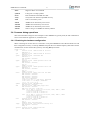
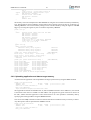
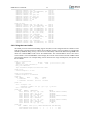
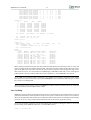
cpu 1: disabled
grmon2> puts $cpu::fpu::f1
-1.984328031539917
grmon2> puts $cpu0::fpu::f1
-1.984328031539917
grmon2> puts $cpu1::fpu::f1
2.3017966689845248e+18
Non-MP software can still run on the first CPU unaffected of the additional CPUs since it is the target
software that is responsible for waking other CPUs. All processors are enabled by default.
Note that it is possible to debug MP systems using GDB, but the user are required to change CPU itself.
GRMON specific commands can be entered from GDB using the monitor command.
3.4.12. Stack and entry point
The stack pointer is located in %O6 (%SP) register of SPARC CPUs. GRMON sets the stack pointer before
starting the CPU with the run command. The address is auto-detected to end of main memory, however it is
overridable using the -stack when starting GRMON or by issuing the stack command. Thus stack pointer
can be used by software to detect end of main memory.
The entry point (EP) determines at which address the CPU start its first instruction execution. The EP defaults
to main memory start and normally overridden by the load command when loading the application. ELFfiles has support for storing entry point. The entry point can manually be set with the ep command.
In a MP systems if may be required to set EP and stack pointer individual per CPU, one can use the cpu
command in conjunction with ep and stack.
3.4.13. Memory Management Unit (MMU) support
The LEON optionally implements the reference MMU (SRMMU) described in the SPARCv8 specification.
GRMON support viewing and changing the MMU registers through the DSU, using the mmu command.
GRMON also supports address translation by reading the MMU table from memory similar to the MMU.
The walk command looks up one address by walking the MMU table printing out every step taken and the
result. To simply print out the result of such a translation, use the va command.
The memory commands that are prefixed with a v work with virtual addresses, the addresses given are
translated before listing or writing physical memory. If the MMU is not enabled, the vmem command for
example is an alias for mem. See Section 3.4.7, “Displaying memory contents” for more information.
Many commands are affected by that the MMU is turned on, such as the disassemble command.
3.4.14. CPU cache support
The LEON optionally implements Level-1 instruction-cache and data-cache. GRMON supports the CPU's
cache by adopting certain operations depending on if the cache is activated or not. The user may also be
able to access the cache directly. This is however not normally needed, but may be useful when debugging
or analyzing different cache aspects. By default the L1-cache is turned on by GRMON , the cctrl command
can be used to change the cache control register. The commandline switches -nic and -ndc disables
instruction and data cache respectively.
With the icache and dcache commands it is possible to view the current content of the cache or check if
the cache is consistent with the memory. Both caches can be flushed instantly using the commands cctrl
GRMON2 User's Manual
18
flush. The data cache can be flushed instantly using the commands dcache flush. The instruction cache can
be flushed instantly using the commands icache flush.
The GRLIB Level-2 cache is supported using the l2cache command.
3.5. Tcl integration
GRMON has built-in support for Tcl 8.5. All commands lines entered in the terminal will pass through a
Tcl-interpreter. This enables loops, variables, procedures, scripts, arithmetics and more for the user. I.a. it
also provides an API for the user to extend GRMON.
3.5.1. Shells
GRMON creates several independent TCL shells, each with its own set of commands and variables. I.e.
changing active CPU in one shell does not affect any other shell. There are two shells available for the user,
the CLI shell and a GDB shell. The CLI shell is access from the terminal and the GDB shell is accessed from
GDB by using the command mon. There is also a system shell running in the background that GRMON
uses internally.
3.5.2. Commands
There are two groups of commands, the native Tcl commands and GRMON's commands. Information about
the native Tcl commands and their syntax can be found at the Tcl website [http://www.tcl.tk/]. The GRMON
commands' syntax documentation can be found in Appendix B, Command syntax.
The commands have three types of output:
1. Standard output. GRMON's commands prints information to standard output. This information is often structured in a human readable way and cannot be used by other commands. Most of the GRMON
commands print some kind of information to the standard output, while very few of the Tcl commands
does that. Setting the variable ::grmon::settings:suppress_output to 1 will stop GRMON
commands from printing to the standard output, i.e. the TCL command puts will still print it's output. It
is also possible to put the command silent in front of another GRMON command to suppress the output
of a single command, e.g. grmon2> puts [expr [silent mem 0x40000000 4] + 4]
2. Return values. The return value from GRMON is seldom the same as the information that is printed to
standard output, it's often the important data in a raw format. Return values can be used as input to other
commands or to be saved in variables. All TCL commands and many GRMON commands have return
values. The return values from commands are normally not printed. To print the return value to standard
output one can use the Tcl command puts. I.a. if the variable ::grmon::settings:echo_result
to 1, then GRMON will always print the result to stdout.
3. Return code. The return code from a command can be accessed by reading the variable errorCode
or by using the Tcl command catch. Both Tcl and GRMON commands will have an error message as
return value if it fails, which is also printed to standard output. More about error codes can be read about
in the Tcl tutorial or on the Tcler's Wiki [http://wiki.tcl.tk/].
For some of the GRMON commands it is possible to specify which core the commands is operation on.
This is implemented differently depending for each command, see the commands' syntax documentation
in Appendix B, Command syntax for more details. Some of these commands use a device name to specify
which core to interact with, see Appendix C, Tcl API for more information about device names.
3.5.3. API
It is possible to extend GRMON using Tcl. GRMON provides an API that makes it possible do write own
device drivers, implement hooks and to write advanced commands. See Appendix C, Tcl API for a detailed
description of the API.
GRMON will automatically load the scripts in GRMON appdata folder. On Linux the appdata folder
is located in ~/.grmon-2.0/ and on Windows it's typically located at C:\Documents and Set-
GRMON2 User's Manual
19
tings\username\Application Data\Aeroflex Gaisler\GRMON\2.0\. In the folder there
are two different sub folders where scripts may be found, <appdata>/scripts/sys and <appdata>/scripts/user. Scripts located in the sys-folder will be loaded into the system shell only, before
the Plug and Play area is scanned, i.e. drivers and fix-ups should be defined here. The scripts found in the
user-folder will be loaded into all shells (including the system shell), i.e. all user defined commands and
hooks should be defined there. In addition there are two commandline switches -udrv <filename> and
-ucmd <filename> to load scripts into the system shell or all shells.
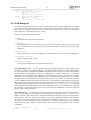
TCL API switches:
-udrv<filename>
Load script specified by filename into system shell. This option is mainly used for user defined drivers.
-ucmd<filename>
Load script specified by filename into all shells, including the system shell. This option is mainly used
for user defined procedures and hooks.
3.5.4. Links
More about Tcl, its syntax and other useful information can be found at:
Tcl Website [http://www.tcl.tk]
Tcl Commands [http://www.tcl.tk/man/tcl8.5/TclCmd/contents.htm]
Tcl Tutorial [http://www.tcl.tk/man/tcl8.5/tutorial/tcltutorial.html]
Tcler's Wiki [http://wiki.tcl.tk/]
3.6. Symbolic debug information
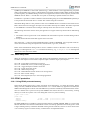
GRMON will automatically extract the symbol information from ELF-files, debug information is never read
from ELF-files. The symbols can be used to GRMON commands where an address is expected as below.
Symbols are tab completed.
grmon2> load v8/stanford.exe
40000000 .text
54.8kB / 54.8kB
4000DB30 .data
2.9kB /
2.9kB
Image /home/daniel/examples/v8/stanford.exe loaded
[===============>] 100%
[===============>] 100%
grmon2> bp main
Software breakpoint 1 at <main>
grmon2> dis strlen 5
0x40005b88: 808a2003
0x40005b8c: 12800012
0x40005b90: 94100008
0x40005b94: 033fbfbf
0x40005b98: da020000
andcc %o0, 0x3, %g0
bne 0x40005BD4
mov %o0, %o2
sethi %hi(0xFEFEFC00), %g1
ld [%o0], %o5
<strlen+0>
<strlen+4>
<strlen+8>
<strlen+12>
<strlen+16>
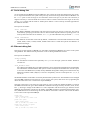
The symbols command can be used to display all symbols, lookup the address of a symbol, or to read in
symbols from an alternate (ELF) file:
grmon2> symbols load v8/stanford.exe
grmon2> symbols lookup main
Found address 0x40004070
grmon2> symbols list
0x40005ab8 GLOBAL
0x4000b6ac GLOBAL
0x4000d9d0 GLOBAL
0x4000bbe8 GLOBAL
0x4000abfc GLOBAL
0x40005ad4 GLOBAL
0x4000c310 GLOBAL
0x4000eaac GLOBAL
0x40001aac GLOBAL
0x40003c6c GLOBAL
0x400059e8 GLOBAL
...
FUNC
FUNC
OBJECT
FUNC
FUNC
FUNC
FUNC
OBJECT
FUNC
FUNC
FUNC
putchar
_mprec_log10
__mprec_tinytens
cleanup_glue
_hi0bits
_puts_r
_lseek_r
piecemax
Try
Uniform11
printf
Reading symbols from alternate files is necessary when debugging self-extracting applications (MKPROM),
when switching between virtual and physical address space (Linux) or when debugging a multi-core ASMP
GRMON2 User's Manual
20
system where each CPU has its own symbol table. It is recommended to clear old symbols with symbols
clear before switching symbol table, otherwise the new symbols will be added to the old table.
3.6.1. Multi-processor symbolic debug information
When loading symbols into GRMON it is possible to associate them with a CPU. When all symbols/images
are associated with CPU index 0, then GRMON will assume its a single-core or SMP application and lookup
all symbols from the symbols table associated with CPU index 0.
If different CPU indexes are specified (by setting active CPU or adding cpu# argument to the commands)
when loading symbols/images, then GRMON will assume its an AMP application that has been loaded.
GRMON will use the current active CPU (or cpu# argument) to determine which CPU index to lookup
symbols from.
grmon2> cpu active 1
grmon2> symbols ../tests/threads/rtems-mp2
Loaded 1630 symbols
grmon2> bp _Thread_Handler
Software breakpoint 1 at <_Thread_Handler>
grmon2> symbols ../tests/threads/rtems-mp1 cpu0
Loaded 1630 symbols
grmon2> bp _Thread_Handler cpu0
Software breakpoint 2 at <_Thread_Handler>
grmon2>
NUM
1 :
2 :
bp
ADRESS
0x40418408
0x40019408
MASK
TYPE
(soft)
(soft)
CPU
1
0
SYMBOL
_Thread_Handler+0
_Thread_Handler+0
3.7. GDB interface
This section describes the GDB interface support available in GRMON. Other tools that communicate over
the GDB protocol may also attach to GRMON, some tools such as Eclipse Workbench and DDD communicate with GRMON via GDB.
GDB must be built for the SPARC architecture, a native PC GDB does not work together with GRMON.
The toolchains that Aeroflex Gaisler distributes comes with a patched and tested version of GDB targeting
all SPARC LEON development tools.
Please see the GDB documentation available from the official GDB homepage [http://www.gnu.org/software/gdb/].
3.7.1. Connecting GDB to GRMON
GRMON can act as a remote target for GDB, allowing symbolic debugging of target applications. To initiate
GDB communications, start the monitor with the -gdb switch or use the GRMON gdb start command:
$ grmon -xilusb -gdb
...
Started GDB service on port 2222.
...
grmon2> gdb status
GDB Service is waiting for incoming connection
Port: 2222
Then, start GDB in a different window and connect to GRMON using the extended-remote protocol. By
default, GRMON listens on port 2222 for the GDB connection:
(gdb) target extended-remote :2222
Remote debugging using :2222
main () at stanford.c:1033
1033 {
(gdb) monitor gdb status
GDB Service is running
Port: 2222
(gdb)
GRMON2 User's Manual
21
3.7.2. Executing GRMON commands from GDB
While GDB is attached to GRMON, most GRMON commands can be executed using the GDB monitor
command. Output from the GRMON commands is then displayed in the GDB console like below. Some
DSU commands are naturally not available since they would conflict with GDB. All commands executed
from GDB are executed in a separate Tcl interpreter, thus variables created from GDB will not be available
from the GRMON terminal.
(gdb) monitor hist
TIME
ADDRESS
30046975 40003e20
30046976 40005030
30046980 40003e24
30046981 40005034
30046985 40003e28
30046990 40003e2c
30046995 40003e30
30047000 40003e34
30047005 40003e38
30047010 40003e3c
(gdb)
INSTRUCTIONS/AHB SIGNALS
AHB read
mst=0 size=2
or %l2, 0x1e0, %o3
AHB read
mst=0 size=2
call 0x40003e20
AHB read
mst=0 size=2
AHB read
mst=0 size=2
AHB read
mst=0 size=2
AHB read
mst=0 size=2
AHB read
mst=0 size=2
AHB read
mst=0 size=2
RESULT/DATA
[9de3bf90]
[40023de0]
[91d02001]
[40005034]
[b136201f]
[f83fbff0]
[82040018]
[d11fbff0]
[9a100019]
[9610001a]
3.7.3. Running applications from GDB
To load and start an application, use the GDB load and run command.
$ sparc-rtems-gdb v8/stanford.exe
(gdb) target extended-remote :2222
Remote debugging using :2222
main () at stanford.c:1033
1033 {
(gdb) load
Loading section .text, size 0xdb30 lma 0x40000000
Loading section .data, size 0xb78 lma 0x4000db30
Start address 0x40000000, load size 59048
Transfer rate: 18 KB/sec, 757 bytes/write.
(gdb) b main
Breakpoint 1 at 0x40004074: file stanford.c, line 1033.
(gdb) run
The program being debugged has been started already.
Start it from the beginning? (y or n) y
Starting program: /home/daniel/examples/v8/stanford.exe
Breakpoint 1, main () at stanford.c:1033
1033 {
(gdb) list
1028
/* Printcomplex( 6, 99, z, 1, 256, 17 ); */
1029
};
1030 } /* oscar */ ;
1031
1032 main ()
1033 {
1034
int i;
1035
fixed = 0.0;
1036
floated = 0.0;
1037
printf ("Starting \n");
(gdb)
To interrupt execution, Ctrl-C can be typed in GDB terminal (similar to GRMON). The program can be
restarted using the GDB run command but the program image needs to be reloaded first using the load
command. Software trap 1 (TA 0x1) is used by GDB to insert breakpoints and should not be used by the
application.
GRMON translates SPARC traps into (UNIX) signals which are properly communicated to GDB. If the
application encounters a fatal trap, execution will be stopped exactly before the failing instruction. The target
memory and register values can then be examined in GDB to determine the error cause.
GRMON implements the GDB breakpoint and watchpoint interface and makes sure that memory and cache
are synchronized.
3.7.4. Running SMP applications from GDB
If GRMON is running on the same computer as GDB, or if the executable is available on the remote computer
that is running GRMON, it is recommended to issue the GDB command set remote exec-file <remote-file-
GRMON2 User's Manual
22
path>. After this has been set, GRMON will automatically load the file, and symbols if available, when the
GDB command run is issued.
$ sparc-rtems-gdb /opt/rtems-4.11/src/rtems-4.11/testsuites/libtests/ticker/ticker.exe
GNU gdb 6.8.0.20090916-cvs
Copyright (C) 2008 Free Software Foundation, Inc.
License GPLv3+: GNU GPL version 3 or later <http://gnu.org/licenses/gpl.html>
This is free software: you are free to change and redistribute it.
There is NO WARRANTY, to the extent permitted by law. Type "show copying"
and "show warranty" for details.
This GDB was configured as "--host=i686-pc-linux-gnu --target=sparc-rtems"...
(gdb) target extended-remote :2222
Remote debugging using :2222
0x00000000 in ?? ()
(gdb) set remote exec-file /opt/rtems-4.11/src/rtems-4.11/testsuites/libtests/ticker/ticker.exe
(gdb) break Init
Breakpoint 1 at 0x40001318: file ../../../../../leon3smp/lib/include/rtems/score/thread.h, line 627.
(gdb) run
The program being debugged has been started already.
Start it from the beginning? (y or n) y
Starting program: /opt/rtems-4.11/src/rtems-4.11/testsuites/libtests/ticker/ticker.exe
If the executable is not available on the remote computer where GRMON is running, then the GDB command
load can be used to load the software to the target system. In addition the entry points for all CPU's, except
the first, must be set manually using the GRMON ep before starting the application.
$ sparc-rtems-gdb /opt/rtems-4.11/src/rtems-4.11/testsuites/libtests/ticker/ticker.exe
GNU gdb 6.8.0.20090916-cvs
Copyright (C) 2008 Free Software Foundation, Inc.
License GPLv3+: GNU GPL version 3 or later <http://gnu.org/licenses/gpl.html>
This is free software: you are free to change and redistribute it.
There is NO WARRANTY, to the extent permitted by law. Type "show copying"
and "show warranty" for details.
This GDB was configured as "--host=i686-pc-linux-gnu --target=sparc-rtems"...
(gdb) target extended-remote :2222
Remote debugging using :2222
trap_table () at /opt/rtems-4.11/src/rtems-4.11/c/src/lib/libbsp/sparc/leon3/../../sparc/shared/start
/start.S:69
69 /opt/rtems-4.11/src/rtems-4.11/c/src/lib/libbsp/sparc/leon3/../../sparc/shared/start/start.S: No
such file or directory.
in /opt/rtems-4.11/src/rtems-4.11/c/src/lib/libbsp/sparc/leon3/../../sparc/shared/start/start.S
Current language: auto; currently asm
(gdb) load
Loading section .text, size 0x1aed0 lma 0x40000000
Loading section .data, size 0x5b0 lma 0x4001aed0
Start address 0x40000000, load size 111744
Transfer rate: 138 KB/sec, 765 bytes/write.
(gdb) mon ep $cpu::iu::pc cpu1
(gdb) mon ep $cpu::iu::pc cpu2
(gdb) mon ep $cpu::iu::pc cpu3
Cpu 1 entry point: 0x40000000
(gdb) run
The program being debugged has been started already.
Start it from the beginning? (y or n) y
Starting program: /opt/rtems-4.11/src/rtems-4.11/testsuites/libtests/ticker/ticker.exe
3.7.5. Running AMP applications from GDB
If GRMON is running on the same computer as GDB, or if the executables are available on the remote
computer that is running GRMON, it is recommended to issue the GDB command set remote exec-file
<remote-file-path>. When this is set, GRMON will automatically load the file,and symbols if available,
when the GDB command run is issued. The second application needs to be loaded into GRMON using
the GRMON command load <remote-file-path> cpu1. In addition the stacks must also be set manually in
GRMON using the command stack <address> cpu# for both CPUs.
$ sparc-rtems-gdb /opt/rtems-4.10/src/samples/rtems-mp1
GNU gdb 6.8.0.20090916-cvs
Copyright (C) 2008 Free Software Foundation, Inc.
License GPLv3+: GNU GPL version 3 or later <http://gnu.org/licenses/gpl.html>
This is free software: you are free to change and redistribute it.
There is NO WARRANTY, to the extent permitted by law. Type "show copying"
and "show warranty" for details.
This GDB was configured as "--host=i686-pc-linux-gnu --target=sparc-rtems"...
(gdb) target extended-remote :2222
Remote debugging using :2222
(gdb) set remote exec-file /opt/rtems-4.10/src/samples/rtems-mp1
(gdb) mon stack 0x403fff00 cpu0
CPU 0 stack pointer: 0x403fff00
GRMON2 User's Manual
23
(gdb) mon load /opt/rtems-4.10/src/samples/rtems-mp2 cpu1
Total size: 177.33kB (1.17Mbit/s)
Entry point 0x40400000
Image /opt/rtems-4.10/src/samples/rtems-mp2 loaded
(gdb) mon stack 0x407fff00 cpu1
CPU 1 stack pointer: 0x407fff00
(gdb) run
Starting program: /opt/rtems-4.10/src/samples/rtems-mp1
NODE[0]: is Up!
NODE[0]: Waiting for Semaphore A to be created (0x53454d41)
NODE[0]: Waiting for Semaphore B to be created (0x53454d42)
NODE[0]: Waiting for Task A to be created (0x54534b41)
^C[New Thread 151060481]
Program received signal SIGINT, Interrupt.
[Switching to Thread 151060481]
pwdloop () at /opt/rtems-4.10/src/rtems-4.10/c/src/lib/libbsp/sparc/leon3/startup/bspidle.S:26
warning: Source file is more recent than executable.
26
retl
Current language: auto; currently asm
(gdb)
If the executable is not available on the remote computer where GRMON is running, then the GDB command
file and load can be used to load the software to the target system. Use the GRMON command cpu act
<num> before issuing the GDB command load to specify which CPU is the target for the software being
loaded. In addition the stacks must also be set manually in GRMON using the command stack <address>
cpu# for both CPUs.
$ sparc-rtems-gdb
GNU gdb 6.8.0.20090916-cvs
Copyright (C) 2008 Free Software Foundation, Inc.
License GPLv3+: GNU GPL version 3 or later <http://gnu.org/licenses/gpl.html>
This is free software: you are free to change and redistribute it.
There is NO WARRANTY, to the extent permitted by law. Type "show copying"
and "show warranty" for details.
This GDB was configured as "--host=i686-pc-linux-gnu --target=sparc-rtems".
(gdb) target extended-remote :2222
Remote debugging using :2222
0x40000000 in ?? ()
(gdb) file /opt/rtems-4.10/src/samples/rtems-mp2
A program is being debugged already.
Are you sure you want to change the file? (y or n) y
Reading symbols from /opt/rtems-4.10/src/samples/rtems-mp2...done.
(gdb) mon cpu act 1
(gdb) load
Loading section .text, size 0x2b3e0 lma 0x40400000
Loading section .data, size 0x1170 lma 0x4042b3e0
Loading section .jcr, size 0x4 lma 0x4042c550
Start address 0x40400000, load size 181588
Transfer rate: 115 KB/sec, 759 bytes/write.
(gdb) file /opt/rtems-4.10/src/samples/rtems-mp1
A program is being debugged already.
Are you sure you want to change the file? (y or n) y
Load new symbol table from "/opt/rtems-4.10/src/samples/rtems-mp1"? (y or n) y
Reading symbols from /opt/rtems-4.10/src/samples/rtems-mp1...done.
(gdb) mon cpu act 0
(gdb) load
Loading section .text, size 0x2b3e0 lma 0x40001000
Loading section .data, size 0x1170 lma 0x4002c3e0
Loading section .jcr, size 0x4 lma 0x4002d550
Start address 0x40001000, load size 181588
Transfer rate: 117 KB/sec, 759 bytes/write.
(gdb) mon stack 0x407fff00 cpu1
CPU 1 stack pointer: 0x407fff00
(gdb) mon stack 0x403fff00 cpu0
CPU 0 stack pointer: 0x403fff00
(gdb) run
The program being debugged has been started already.
Start it from the beginning? (y or n) y
Starting program: /opt/rtems-4.10/src/samples/samples/rtems-mp1
3.7.6. GDB Thread support
GDB is capable of listing a operating system's threads, however it relies on GRMON to implement lowlevel thread access. GDB normally fetches the threading information on every stop, for example after a
breakpoint is reached or between single-stepping stops. GRMON have to access the memory rather many
times to retrieve the information, GRMON. See Section 3.8, “Thread support” for more information.
GRMON2 User's Manual
24
Start GRMON with the -nothreads switch to disable threads in GRMON and thus in GDB too.
Note that GRMON must have access to the symbol table of the operating system so that the thread structures
of the target OS can be found. The symbol table can be loaded from GDB by one must bear in mind that the
path is relative to where GRMON has been started. If GDB is connected to GRMON over the network one
must make the symbol file available on the remote computer running GRMON.
(gdb) mon puts [pwd]
/home/daniel
(gdb) pwd
Working directory /home/daniel.
(gdb) mon sym load /opt/rtems-4.10/src/samples/rtems-hello
(gdb) mon sym
0x00016910 GLOBAL FUNC
imfs_dir_lseek
0x00021f00 GLOBAL OBJECT
Device_drivers
0x0001c6b4 GLOBAL FUNC
_mprec_log10
...
When a program running in GDB stops GRMON reports which thread it is in. The command info threads
can be used in GDB to list all known threads, thread N to switch to thread N and bt to list the backtrace
of the selected thread.
Program received signal SIGINT, Interrupt.
[Switching to Thread 167837703]
0x40001b5c in console_outbyte_polled (port=0, ch=113 `q`) at rtems/.../leon3/console/debugputs.c:38
38
while ((LEON3_Console_Uart[LEON3_Cpu_Index+port]->status & LEON_REG_UART_STATUS_THE) == 0);
(gdb) info threads
8
7
6
5
4
3
2
* 1
Thread 167837702 (FTPD Wevnt) 0x4002f760 in _Thread_Dispatch () at rtems/.../threaddispatch.c:109
Thread 167837701 (FTPa Wevnt) 0x4002f760 in _Thread_Dispatch () at rtems/.../threaddispatch.c:109
Thread 167837700 (DCtx Wevnt) 0x4002f760 in _Thread_Dispatch () at rtems/.../threaddispatch.c:109
Thread 167837699 (DCrx Wevnt) 0x4002f760 in _Thread_Dispatch () at rtems/.../threaddispatch.c:109
Thread 167837698 (ntwk ready) 0x4002f760 in _Thread_Dispatch () at rtems/.../threaddispatch.c:109
Thread 167837697 (UI1 ready) 0x4002f760 in _Thread_Dispatch () at rtems/.../threaddispatch.c:109
Thread 151060481 (Int. ready) 0x4002f760 in _Thread_Dispatch () at rtems/.../threaddispatch.c:109
Thread 167837703 (HTPD ready ) 0x40001b5c in console_outbyte_polled (port=0, ch=113 `q`)
at ../../../rtems/c/src/lib/libbsp/sparc/leon3/console/debugputs.c:38
(gdb) thread 8
[Switching to thread 8 (Thread 167837702)]#0 0x4002f760 in _Thread_Dispatch ()
at rtems/.../threaddispatch.c:109
109
_Context_Switch( &executing->Registers, &heir->Registers );
(gdb) bt
#0
#1
0x4002f760 in _Thread_Dispatch () at rtems/cpukit/score/src/threaddispatch.c:109
0x40013ee0 in rtems_event_receive(event_in=33554432, option_set=0, ticks=0, event_out=0x43fecc14)
at ../../../../leon3/lib/include/rtems/score/thread.inl:205
#2 0x4002782c in rtems_bsdnet_event_receive (event_in=33554432, option_set=2, ticks=0,
event_out=0x43fecc14) at rtems/cpukit/libnetworking/rtems/rtems_glue.c:641
#3 0x40027548 in soconnsleep (so=0x43f0cd70) at rtems/cpukit/libnetworking/rtems/rtems_glue.c:465
#4 0x40029118 in accept (s=3, name=0x43feccf0, namelen=0x43feccec) at rtems/.../rtems_syscall.c:215
#5 0x40004028 in daemon () at rtems/c/src/libnetworking/rtems_servers/ftpd.c:1925
#6 0x40053388 in _Thread_Handler () at rtems/cpukit/score/src/threadhandler.c:123
#7 0x40053270 in __res_mkquery (op=0, dname=0x0, class=0, type=0, data=0x0, datalen=0, newrr_in=0x0,
buf=0x0, buflen=0)
at ../rtems/cpukit/libnetworking/libc/res_mkquery.c:199
#8 0x00000008 in ?? ()
#9 0x00000008 in ?? ()
Previous frame identical to this frame (corrupt stack?)
In comparison to GRMON the frame command in GDB can be used to select a individual stack frame. One
can also step between frames by issuing the up or down commands. The CPU registers can be listed using
the info registers command. Note that the info registers command only can see the following registers for
an inactive task: g0-g7, l0-l7, i0-i7, o0-o7, PC and PSR. The other registers will be displayed as 0:
gdb) frame 5
#5 0x40004028 in daemon () at rtems/.../rtems_servers/ftpd.c:1925
1925
ss = accept(s, (struct sockaddr *)&addr, &addrLen);
(gdb) info reg
g0
g1
g2
g3
0x0
0
0x0
0
0xffffffff
0x0
0
-1
GRMON2 User's Manual
g4
g5
g6
g7
o0
o1
o2
o3
o4
o5
sp
o7
l0
l1
l2
l3
l4
l5
l6
l7
i0
i1
i2
i3
i4
i5
fp
i7
y
psr
wim
tbr
pc
npc
fsr
csr
0x0
0
0x0
0
0x0
0
0x0
0
0x3
3
0x43feccf0
0x43feccec
0x0
0
0xf34000e4
0x4007cc00
0x43fecc88
0x40004020
0x4007ce88
0x4007ce88
0x400048fc
0x43feccf0
0x3
3
0x1
1
0x0
0
0x0
0
0x0
0
0x40003f94
0x0
0
0x43ffafc8
0x0
0
0x4007cd40
0x43fecd08
0x40053380
0x0
0
0xf34000e0
0x0
0
0x0
0
0x40004028
0x4000402c
0x0
0
0x0
0
25
1140772080
1140772076
-213909276
1074252800
0x43fecc88
1073758240
1074253448
1074253448
1073760508
1140772080
1073758100
1140830152
1074253120
0x43fecd08
1074082688
-213909280
0x40004028 <daemon+148>
0x4000402c <daemon+152>
It is not supported to set thread specific breakpoints. All breakpoints are global and stops the execution of
all threads. It is not possible to change the value of registers other than those of the current thread.
3.7.7. Virtual memory
There is no way for GRMON to determine if an address sent from GDB is physical or virtual. If an MMU
unit is present in the system and it is enabled, then GRMON will assume that all addresses are virtual and
try to translate them. When debugging an application that uses the MMU one typically have an image with
physical addresses used to load data into the memory and a second image with debug-symbols of virtual
addresses. It is therefore important to make sure that the MMU is enabled/disabled when each image is used.
The example below will show a typical case on how to handle virtual and physical addresses when debugging with GDB. The application being debugged is Linux and it consists of two different images created
with Linuxbuild. The file image.ram contains physical addresses and a small loader, that among others
configures the MMU, while the file image contains all the debug-symbols in virtual address-space.
First start GRMON and start the GDB server.
$ grmon -nb -gdb -xilusb
Then start GDB in a second shell, load both files into GDB, connect to GRMON and then upload the application into the system. The addresses will be interpreted as physical since the MMU is disabled when
GRMON starts.
$ sparc-linux-gdb
GNU gdb 6.8.0.20090916-cvs
Copyright (C) 2008 Free Software Foundation, Inc.
License GPLv3+: GNU GPL version 3 or later <http://gnu.org/licenses/gpl.html>
This is free software: you are free to change and redistribute it.
There is NO WARRANTY, to the extent permitted by law. Type "show copying"
and "show warranty" for details.
This GDB was configured as "--host=i686-pc-linux-gnu --target=sparc-linux".
(gdb) file output/images/image.ram
Reading symbols from /home/user/linuxbuild-1.0.2/output/images/image.ram...(no d
ebugging symbols found)...done.
(gdb) symbol-file output/images/image
Reading symbols from /home/user/linuxbuild-1.0.2/output/images/image...done.
GRMON2 User's Manual
26
(gdb) target extended-remote :2222
Remote debugging using :2222
t_tflt () at /home/user/linuxbuild-1.0.2/linux/linux-2.6-git/arch/sparc/kernel/h
ead_32.S:88
88 t_tflt: SPARC_TFAULT
/* Inst. Access Exception
*/
Current language: auto; currently asm
(gdb) load
Loading section .text, size 0x10b0 lma 0x40000000
Loading section .data, size 0x50 lma 0x400010b0
Loading section .vmlinux, size 0x3f1a60 lma 0x40004000
Loading section .startup_prom, size 0x7ee0 lma 0x403f5a60
Start address 0x40000000, load size 4172352
Transfer rate: 18 KB/sec, 765 bytes/write.
The program must reach a state where the MMU is enabled before any virtual address can be translated.
Software breakpoints cannot be used since the MMU is still disabled and GRMON won't translate them
into a physical. Hardware breakpoints don't need to be translated into physical addresses, therefore set a
hardware assisted breakpoint at 0xf0004000, which is the virtual start address for the Linux kernel.
(gdb) hbreak *0xf0004000
Hardware assisted breakpoint 1 at 0xf0004000: file /home/user/linuxbuild-1.0.2/l
inux/linux-2.6-git/arch/sparc/kernel/head_32.S, line 87.
(gdb) cont
Continuing.
Breakpoint 1, trapbase_cpu0 () at /home/user/linuxbuild-1.0.2/linux/linux-2.6-gi
t/arch/sparc/kernel/head_32.S:87
87 t_zero: b gokernel; nop; nop; nop;
At this point the loader has enabled the MMU and both software breakpoints and symbols can be used.
(gdb) break leon_init_timers
Breakpoint 2 at 0xf03cff14: file /home/user/linuxbuild-1.0.2/linux/linux-2.6-git
/arch/sparc/kernel/leon_kernel.c, line 116.
(gdb) cont
Continuing.
Breakpoint 2, leon_init_timers (counter_fn=0xf00180c8 <timer_interrupt>)
at /home/user/linuxbuild-1.0.2/linux/linux-2.6-git/arch/sparc/kernel/leon_ke
rnel.c:116
116 leondebug_irq_disable = 0;
Current language: auto; currently c
(gdb) bt
#0 leon_init_timers (counter_fn=0xf00180c8 <timer_interrupt>)
at /home/user/linuxbuild-1.0.2/linux/linux-2.6-git/arch/sparc/kernel/leon_ke
rnel.c:116
#1 0xf03ce944 in time_init () at /home/user/linuxbuild-1.0.2/linux/linux-2.6-gi
t/arch/sparc/kernel/time_32.c:227
#2 0xf03cc13c in start_kernel () at /home/user/linuxbuild-1.0.2/linux/linux-2.6
-git/init/main.c:619
#3 0xf03cb804 in sun4c_continue_boot ()
#4 0xf03cb804 in sun4c_continue_boot ()
Backtrace stopped: previous frame identical to this frame (corrupt stack?)
(gdb) info locals
eirq = <value optimized out>
rootnp = <value optimized out>
np = <value optimized out>
pp = <value optimized out>
len = 13
ampopts = <value optimized out>
(gdb) print len
$2 = 13
If the application for some reason need to be reloaded, then the MMU must first be disabled via GRMON.
In addition all software breakpoints should be deleted before the application is restarted since the MMU has
been disabled and GRMON won't translate virtual addresses anymore.
(gdb) mon mmu mctrl 0
mctrl: 006E0000 ctx: 00000000 ctxptr: 40440800 fsr: 00000000
(gdb) load
Loading section .text, size 0x10b0 lma 0x40000000
Loading section .data, size 0x50 lma 0x400010b0
Loading section .vmlinux, size 0x3f1a60 lma 0x40004000
Loading section .startup_prom, size 0x7ee0 lma 0x403f5a60
Start address 0x40000000, load size 4172352
Transfer rate: 18 KB/sec, 765 bytes/write.
(gdb) delete
Delete all breakpoints? (y or n) y
far: 00000000
GRMON2 User's Manual
27
(gdb) hbreak *0xf0004000
Hardware assisted breakpoint 3 at 0xf0004000: file /home/user/linuxbuild-1.0.2/l
inux/linux-2.6-git/arch/sparc/kernel/head_32.S, line 87.
(gdb) run
The program being debugged has been started already.
Start it from the beginning? (y or n) y
Starting program: /home/user/linuxbuild-1.0.2/output/images/image.ram
Breakpoint 3, trapbase_cpu0 () at /home/user/linuxbuild-1.0.2/linux/linux-2.6-gi
t/arch/sparc/kernel/head_32.S:87
87 t_zero: b gokernel; nop; nop; nop;
Current language: auto; currently asm
(gdb) break leon_init_timers
Breakpoint 4 at 0xf03cff14: file /home/user/linuxbuild-1.0.2/linux/linux-2.6-git
/arch/sparc/kernel/leon_kernel.c, line 116.
(gdb) cont
Continuing.
Breakpoint 4, leon_init_timers (counter_fn=0xf00180c8 <timer_interrupt>)
at /home/user/linuxbuild-1.0.2/linux/linux-2.6-git/arch/sparc/kernel/leon_ke
rnel.c:116
116 leondebug_irq_disable = 0;
Current language: auto; currently c
3.7.8. Specific GDB optimization
GRMON detects GDB access to register window frames in memory which are not yet flushed and only
reside in the processor register file. When such a memory location is read, GRMON will read the correct
value from the register file instead of the memory. This allows GDB to form a function trace-back without
any (intrusive) modification of memory. This feature is disabled during debugging of code where traps are
disabled, since no valid stack frame exist at that point.
To avoid a huge number of cache-flushes GRMON auto-detects when GDB loads a new application to
memory, this approach however requires the user to restart the application after loading a file. Thus, loading
files during run-time may not work as expected.
3.7.9. Limitations of GDB interface
GDB must be built for the SPARC architecture, a native PC GDB does not work together with GRMON.
The toolchains that Aeroflex Gaisler distributes comes with a patched and tested version of GDB targeting
all SPARC LEON development tools.
Do not use the GDB where commands in parts of an application where traps are disabled (e.g.trap handlers).
Since the stack pointer is not valid at this point, GDB might go into an infinite loop trying to unwind false
stack frames. The thread support might not work either in some trap handler cases.
The step instruction commands si or stepi are implemented by GDB inserting software breakpoints through
GRMON. This is an approach that is not possible when debugging in read-only memory such as boot sequences executed in PROM/FLASH. One can instead use hardware breakpoints using the GDB command
hbreak manually.
3.8. Thread support
GRMON has thread support for some operating systems show below. The thread information is accessed
using the GRMON thread command. The GDB interface of GRMON is also thread aware and the related
GDB commands are described in the GDB documentation and in Section 3.7.6, “GDB Thread support”.
Supported operative systems
•
•
•
•
RTEMS
VXWORKS
eCos
Bare-metal
GRMON needs the symbolic information of the image that is being debugged in order to retrieve the addresses of the thread information. Therefore the symbols of the OS must be loaded automatically by the ELF-
GRMON2 User's Manual
28
loader using load or manually by using the symbols command. GRMON will traverse the thread structures
located in the target's memory when the thread command is issued (and on GDB's request). Bare-metal
threads will be used as a fallback if no OS threads can be found. In addition the startup switch -bmthreads
can be used to force bare-metal threads.
The target's thread structures are never changed, and they are never accessed unless the thread command
is executed. Starting GRMON with the -nothreads switch disables the thread support in GRMON and
thus in GDB too.
During debugging sessions it can help the developer a lot to view all threads, their stack traces and their
states to understand what is happening in the system.
3.8.1. GRMON thread commands
thread info lists all threads currently available in the operating system. The currently running thread is
marked with an asterisk.
grmon> thread info
Name | Type
| Id
| Prio | Ticks
| Entry point
| PC
| State
------------------------------------------------------------------------------------------------Int. | internal | 0x09010001 | 255 |
138 | _CPU_Thread_Idle_body
| 0x4002f760
| READY
------------------------------------------------------------------------------------------------UI1 | classic | 0x0a010001 | 120 |
290 | Init
| 0x4002f760
| READY
------------------------------------------------------------------------------------------------ntwk | classic | 0x0a010002 | 100 |
11 | rtems_bsdnet_schedneti | 0x4002f760
| READY
------------------------------------------------------------------------------------------------DCrx | classic | 0x0a010003 | 100 |
2 | rtems_bsdnet_schedneti | 0x4002f760
| Wevnt
------------------------------------------------------------------------------------------------DCtx | classic | 0x0a010004 | 100 |
4 | rtems_bsdnet_schedneti | 0x4002f760
| Wevnt
------------------------------------------------------------------------------------------------FTPa | classic | 0x0a010005 |
10 |
1 | split_command
| 0x4002f760
| Wevnt
------------------------------------------------------------------------------------------------FTPD | classic | 0x0a010006 |
10 |
1 | split_command
| 0x4002f760
| Wevnt
------------------------------------------------------------------------------------------------* HTPD | classic | 0x0a010007 |
40 |
79 | rtems_initialize_webse | 0x40001b60
| READY
-------------------------------------------------------------------------------------------------
thread bt ?id? lists the stack back trace. bt lists the back trace of the currently executing thread as usual.
grmon> thread bt 0x0a010003
#0
#1
#2
#3
#4
%pc
0x4002f760
0x40013ed8
0x40027824
0x4000b664
0x40027708
_Thread_Dispatch + 0x11c
rtems_event_receive + 0x88
rtems_bsdnet_event_receive + 0x18
websFooter + 0x484
rtems_bsdnet_schednetisr + 0x158
A backtrace of the current thread (equivalent to the bt command):
grmon> thread bt 0x0a010007
#0
#1
#2
#3
#4
#5
#6
#7
#8
#9
#10
#11
#12
#13
#14
%pc
0x40001b60
0x400017fc
0x4002dde8
0x4002df60
0x4002dfe8
0x400180a4
0x4004eb98
0x40036ee4
0x4001118c
0x4000518c
0x40004fb4
0x40004b0c
0x40004978
0x40053380
0x40053268
%sp
0x43fea130
0x43fea130
0x43fea198
0x43fea200
0x43fea270
0x43fea2d8
0x43fea340
0x43fea3c0
0x43fea428
0x43fea498
0x43fea500
0x43fea578
0x43fea770
0x43fea7d8
0x43fea840
console_outbyte_polled + 0x34
console_write_support + 0x18
rtems_termios_puts + 0x128
rtems_termios_puts + 0x2a0
rtems_termios_write + 0x70
rtems_io_write + 0x48
device_write + 0x2c
write + 0x90
trace + 0x38
websOpenListen + 0x108
websOpenServer + 0xc0
rtems_initialize_webserver + 0x204
rtems_initialize_webserver + 0x70
_Thread_Handler + 0x10c
__res_mkquery + 0x2c8
3.9. Forwarding application console I/O
If GRMON is started with -u [N] (N defaults to zero - the first UART), the LEON UART[N] is placed in
FIFO debug mode or in loop-back mode. Debug mode was added in GRLIB 1.0.17-b2710 and is reported
GRMON2 User's Manual
29
by info sys in GRMON as "DSU mode (FIFO debug)", older hardware is still supported using loop-back
mode. In both modes flow-control is enabled. Both in loop-back mode and in FIFO debug mode the UART
is polled regularly by GRMON during execution of an application and all console output is printed on the
GRMON console. When -u is used there is no point in connecting a separate terminal to UART1.
In addition it is possible to enable or disable UART forwarding using the command forward. Optionally it
is also possible to forward the I/O to a custom TCL channel using this command.
With FIFO debug mode it is also possible to enter text in GRMON which is inserted into the UART receive
FIFO. These insertions will trigger interrupts if receiver FIFO interrupts are enabled. This makes it possible
to use GRMON as a terminal when running an interrupt-driven O/S such as Linux or VxWorks.
The following restrictions must be met by the application to support either loop-back mode or FIFO debug
mode:
1. The UART control register must not be modified such that neither loop-back nor FIFO debug mode is
disabled
2. In loop-back mode the UART data register must not be read
This means that -u cannot be used with PROM images created by MKPROM. Also loop-back mode can
not be used in kernels using interrupt driven UART consoles (e.g. Linux, VxWorks).
RXVT must be disabled for debug mode to work in a MSYS console on Windows. This can be done by
deleting or renaming the file rxvt.exe inside the bin directory, e.g., C:\msys\1.0\bin. Starting with
MSYS-1.0.11 this will be the default.
3.9.1. UART debug mode
When the application is running with UART debug mode enabled the following key sequences will be
available. The sequences can be used to adjust the input to what the target system expects.
Ctrl+A B - Toggle delete to backspace conversion
Ctrl+A C - Send break (Ctrl+C) to the running application
Ctrl+A D - Toggle backspace to delete conversion
Ctrl+A E - Toggle local echo on/off
Ctrl+A H - Show a help message
Ctrl+A N - Enable/disable newline insertion on carriage return
Ctrl+A S - Show current settings
Ctrl+A Z - Send suspend (Ctrl+Z) to the running application
3.10. EDAC protection
3.10.1. Using EDAC protected memory
Some LEON Fault-Tolerant (FT) systems use EDAC protected memory. To enable the memory EDAC
during execution, GRMON should be started with the -edac switch. Before any application is loaded, the
wash command might be issued to write all RAM memory locations and thereby initialize the EDAC checksums. If a LEON CPU is present in the system GRMON will instruct the CPU to clear memory, clearing
memory on a CPU-less system over a slow debug-link can be very time consuming.
$ grmon -ramws 3 -edac
...
grmon2> wash
40000000
60000000
Finished washing!
8.0MB /
8.0MB
256.0MB / 256.0MB
[===============>] 100%
[===============>] 100%
By default wash writes to all EDAC protected writable memory (SRAM, SDRAM, DDR, etc.) areas which
has been detected or forced with a command line switch. start and stop parameters can also be given to wash
a range. Washing memory with EDAC disabled will not generate check bits, however it can be used to clear
or set a memory region even if the memory controller does not implement EDAC.
GRMON2 User's Manual
grmon2> wash 0x40000000 0x41000000
40000000
Finished washing!
30
16.0MB /
16.0MB
[===============>] 100%
If the memory controller has support for EDAC with 8-bit wide SRAM memory, the upper part of the
memory will consist of check bits. In this case the wash will only write to the data area (the check bits will
automatically be written by the memory controller). The amount of memory written will be displayed in
GRMON.
GRMON will not automatically write the check bits for flash PROMs. For 8-bit flash PROMs, the check
bits can be generated by the mkprom2 utility and included in the image. But for 32-bit flash PROMs the
check bits must be written by the user via the TCB field in MCFG3.
3.10.2. LEON3-FT error injection
All RAM blocks (cache and register-file memory) in LEON3-FT are Single Event Upset (SEU) protected.
Error injection function emulates SEU in LEON3-FT memory blocks and lets the user test the fault-tolerant operation of LEON3-FT by inserting random bit errors in LEON3-FT memory blocks during program
execution. An injected error flips a randomly chosen memory bit in one of the memory blocks, effectively
emulating a SEU. The user defines error rate and can choose between two error distribution modes:
1. Uniform error distribution mode. The 'ei un NR T' command instructs GRMON to insert NR errors
during the time period of T minutes. After T minutes has expired no more errors are inserted, but the
application will continue its execution.
2. Average error rate mode. With the 'ei av R' command the user selects at which rate errors are injected.
Average error rate is R errors per second. Randomly generated noise is added to every error injection
sample. The time between two samples vary between zero up to two periods depending on the noise,
where one period is 1/R seconds. Errors are inserted during the whole program execution.
GRMON can also perform error correction monitoring and report error injection statistics including number
of detected and injected errors and error coverage, see ei command reference.
Error injection is performed during the run-loop of GRMON, to improve the performance and accuracy other
services in the run-loop should be disabled. For example profiling and UART tunneling should be disabled,
and one should select the fastest debug-link.
$ grmon -ftdi -freq 80
GRMON2 LEON debug monitor v2.0.19a professional version
Copyright (C) 2012 Aeroflex Gaisler - All rights reserved.
For latest updates, go to http://www.gaisler.com/
Comments or bug-reports to [email protected]
JTAG chain (1): GR712RC
Commands missing help:
Device ID:
0x712
GRLIB build version: 3696
Detected frequency: 80 MHz
Component
LEON3-FT SPARC V8 Processor
LEON3-FT SPARC V8 Processor
JTAG Debug Link
GR Ethernet MAC
SatCAN controller
GRSPW2 SpaceWire Serial Link
GRSPW2 SpaceWire Serial Link
GRSPW2 SpaceWire Serial Link
GRSPW2 SpaceWire Serial Link
GRSPW2 SpaceWire Serial Link
GRSPW2 SpaceWire Serial Link
AMBA Wrapper for Core1553BRM
CCSDS Telecommand Decoder
CCSDS Telemetry Encoder
SLINK Master
Vendor
Aeroflex
Aeroflex
Aeroflex
Aeroflex
Aeroflex
Aeroflex
Aeroflex
Aeroflex
Aeroflex
Aeroflex
Aeroflex
Aeroflex
Aeroflex
Aeroflex
Aeroflex
Gaisler
Gaisler
Gaisler
Gaisler
Gaisler
Gaisler
Gaisler
Gaisler
Gaisler
Gaisler
Gaisler
Gaisler
Gaisler
Gaisler
Gaisler
GRMON2 User's Manual
31
Memory controller with EDAC
AHB/APB Bridge
LEON3 Debug Support Unit
AHB/APB Bridge
OC CAN AHB interface
Generic FT AHB SRAM module
Generic UART
Multi-processor Interrupt Ctrl.
Modular Timer Unit
SPI Controller
CAN Bus multiplexer
General Purpose Register
ASCS Master
General Purpose I/O port
General Purpose I/O port
AMBA Wrapper for OC I2C-master
Clock gating unit
AHB Status Register
Generic UART
Generic UART
Generic UART
Generic UART
Generic UART
Timer Unit with Latches
Aeroflex
Aeroflex
Aeroflex
Aeroflex
Aeroflex
Aeroflex
Aeroflex
Aeroflex
Aeroflex
Aeroflex
Aeroflex
Aeroflex
Aeroflex
Aeroflex
Aeroflex
Aeroflex
Aeroflex
Aeroflex
Aeroflex
Aeroflex
Aeroflex
Aeroflex
Aeroflex
Aeroflex
Gaisler
Gaisler
Gaisler
Gaisler
Gaisler
Gaisler
Gaisler
Gaisler
Gaisler
Gaisler
Gaisler
Gaisler
Gaisler
Gaisler
Gaisler
Gaisler
Gaisler
Gaisler
Gaisler
Gaisler
Gaisler
Gaisler
Gaisler
Gaisler
Use command 'info sys' to print a detailed report of attached cores
grmon> lo rtems-tasks
40000000, .text
113.9kB / 113.9kB
4001c7a0, .data
2.7kB /
2.7kB
Total size: 116.56kB (786.00kbit/s)
Entry point 0x40000000
Image /home/daniel/examples/v8/stanford.exe loaded
[===============>] 100%
[===============>] 100%
grmon> ei un 100 1
Error injection enabled
100 errors will be injected during 1.0 min
grmon> ei stat en
Error injection statistics enabled
grmon> run
...
grmon> ei stat
itag :
5/
dtag :
1/
IU RF :
4/
FPU RF:
0/
Total :
19/
grmon>
5
1
10
4
60
(100.0%)
(100.0%)
( 25.0%)
( 0.0%)
( 31.7%)
idata:
ddata:
5/
4/
18 ( 27.8%)
22 ( 18.2%)
The real time elapsed is always greater than LEON CPU experienced since the LEON is stopped during
error injection. Times and rates given to GRMON are relative the experienced time of the LEON. The time
the LEON is stopped is taken into account by GRMON, however minor differences is to be expected.
3.11. FLASH programming
3.11.1. CFI compatible Flash PROM
GRMON supports programming of CFI compatible flash PROMs attached to the external memory bus,
through the flash command. Flash programming is only supported if the target system contains one of the
following memory controllers MCTRL, FTMCTRL, FTSRCTRL or SSRCTRL. The PROM bus width can
be 8-, 16- or 32-bit. It is imperative that the PROM width in the MCFG1 register correctly reflects the width
of the external PROM.
To program 8-bit and 16-bit PROMs, GRMON must be able to do byte (or half-word) accesses to the target
system. To support this either connect with a JTAG debug link or have at least one working SRAM/SDRAM
bank and a CPU available in the target system.
Some flash chips provides lock protection to prevent the flash from being accidentally written. The user is
required to actively lock and unlock the flash. Note that the memory controller can disable all write cycles
to the flash also, however GRMON automatically enables PROM write access before the flash is accessed.
GRMON2 User's Manual
32
The flash device configuration is auto-detected, the information is printed out like in the example below.
One can verify the configuration so that the auto-detection is correct if problems are experienced. The block
lock status (if implement by the flash chip) can be viewed like in the following example:
grmon2> flash
Manuf.
Device
Device ID
User ID
:
:
:
:
Intel
MT28F640J3
09169e01734a9981
ffffffffffffffff
1 x 8 Mbytes = 8 Mbytes total @ 0x00000000
CFI information
Flash family :
Flash size
:
Erase regions :
Erase blocks :
Write buffer :
Lock-down
:
Region 0
:
1
64 Mbit
1
64
32 bytes
Not supported
64 blocks of 128 kbytes
grmon2> flash status
Block lock status: U =
Block
0 @ 0x00000000
Block
1 @ 0x00020000
Block
2 @ 0x00040000
Block
3 @ 0x00060000
...
Block 60 @ 0x00780000
Block 61 @ 0x007a0000
Block 62 @ 0x007c0000
Block 63 @ 0x007e0000
Unlocked; L = Locked; D = Locked-down
: L
: L
: L
: L
:
:
:
:
L
L
L
L
A typical command sequence to erase and re-program a flash memory could be:
grmon2> flash unlock all
Unlock complete
grmon2>
Erase
Block
Erase
flash erase all
in progress
@ 0x007e0000 : code = 0x80
complete
OK
grmon2> flash load rom_image.prom
...
grmon2> flash lock all
Lock complete
3.11.2. SPI memory device
GRMON supports programming of SPI memory devices that are attached to a SPICTRL or SPIMCTRL core.
The flash programming commands are available through the cores' debug drivers. A SPI flash connected to
the SPICTRL controller is programmed using 'spi flash', for SPIMCTRL connected devices the 'spim flash'
command is used instead. See the command reference for respective command for the complete syntax,
below are some typical use cases exemplified.
When interacting with a memory device via SPICTRL the driver assumes that the clock scaler settings have
been initialized to attain a frequency that is suitable for the memory device. When interacting with a memory
device via SPIMCTRL all commands are issued with the normal scaler setting unless the alternate scaler
has been enabled.
A command sequence to save the original first 32 bytes of data before erasing and programming the SPI
memory device connected via SPICTRL could be:
spi
spi
spi
spi
spi
set div16
flash select 1
flash dump 0 32 32bytes.srec
flash erase
flash load romfs.elf
The first command initializes the SPICTRL clock scaler. The second command selects a SPI memory
device configuration and the third command dumps the first 32 bytes of the memory device to the file
32bytes.srec. The fourth command erases all blocks of the SPI flash. The last command loads the ELFfile romfs.elf into the device, the addresses are determined by the ELF-file section address.
GRMON2 User's Manual
33
Below is a command sequence to dump the data of a SPI memory device connected via SPIMCTRL. The
first command tries to auto-detect the type of memory device. If auto-detection is successful GRMON will
report the device selected. The second command dumps the first 128 bytes of the memory device to the file
128bytes.srec.
spim flash detect
spim flash dump 0 128 128bytes.srec
GRMON2 User's Manual
34
4. Debug link
The default communication interface between GRMON and the target system is the host’s serial port connected to the AHB uart of the target system. Connecting using any of the other supported interfaces can
be performed by using the switches listed below. More switches that may affect the connection are listed
at each subsection.
-amontec
Connect to the target system using the Amontec USB/JTAG key.
-altjtag
Connect to the target system using Altera Blaster cable (USB or parallel).
-eth
Connect to the target system using Ethernet. Requires the EDCL core to be present
in the target system.
-d2xx
Connect to the target system using a JTAG cable based on a FTDI chip. (Windows)
-digilent
Connect to the target system Digilent HS1 cable.
-fpro
Connect to the target system using the Actel FlashPro cable. (Windows only)
-ftdi
Connect to the target system using a JTAG cable based on a FTDI chip. (Linux)
-gresb
Connect to the target system through the GRESB bridge. The target needs a SpW
core with RMAP.
-jtag
Connect to the target system the JTAG Debug Link using Xilinx Parallel Cable
III or IV.
-pci vid:did[:i] Connect to the target system through PCI. Board is identified by vendor id, device
id and optionally instance number. Requires a supported PCI core on the target
system.
-usb
Connect to the target system using the USB debug link. Requires the
GRUSB_DCL core to be present in the target.
-wildcard
Connect to the target system using a WildCard PC Card. Requires the WILD2AHB
core to be present in target.
-xilusb
Connect to the JTAG Debug Link using Xilinx Platform USB cable.
8-/16-bit access to the target system is only supported by the JTAG debug links, all other interfaces access
subwords using read-modify-write. All links supports 32-bit accesses. 8-bit access is generally not needed.
An example of when it is needed is when programming a 8 or 16-bit flash memory on a target system without
a LEON CPU available. Another example is when one is trying to access cores that have byte-registers,
for example the CAN_OC core, but almost all GRLIB cores have word-registers and can be accessed by
any debug link.
The speed of the debug links affects the performance of GRMON. It is most noticeable when loading large
applications, for example Linux or VxWorks. Another case when the speed of the link is important is during
profiling, a faster link will increase the number of samples. See Table 4.1 for a list of estimated speed of
the debug links.
Table 4.1. Estimated debug link application download speed
Name
Estimated speed
UART
~100 kbit/s
JTAG (Parallel port)
~200 kbit/s
JTAG (USB)
~1 Mbit/s
GRESB
~25 Mbit/s
USB
~30 Mbit/s
Ethernet
~35 Mbit/s
PCI
~50 Mbit/s
GRMON2 User's Manual
35
4.1. Serial debug link
To successfully attach GRMON using the AHB uart, first connect the serial cable between the uart connectors on target board and the host system. Then power-up and reset the target board and start GRMON. Use
the -uart option in case the target is not connected to the first uart port of your host. On some hosts, it
might be necessary to lower the baud rate in order to achieve a stable connection to the target. In this case,
use the -baud switch with the 57600 or 38400 options. Below is a list of start-up switches applicable for
the AHB uart interface.
Extra options for UART:
-uart <device>
By default, GRMON communicates with the target using the first uart port of the host. This can be
overridden by specifying an alternative device. Device names depend on the host operating system. On
Linux systems serial devices are named as /dev/tty## and on Windows they are named \\.\com#.
-baud <baudrate>
Use baud rate for the DSU serial link. By default, 115200 baud is used. Possible baud rates are 9600,
19200, 38400, 57600, 115200, 230400, 460800. Rates above 115200 need special uart hardware on
both host and target.
4.2. Ethernet debug link
If the target system includes a GRETH core with EDCL enabled then GRMON can connect to the system
using Ethernet. The default network parameters can be set through additional switches.
Extra options for Ethernet:
-eth [<ipnum>]
Use the Ethernet connection and optionally use ipnum for the target system IP number. Default is
192.168.0.51.
-eth_bufsize <kB>
Force EDCL Total Buffer Size. The EDCL hardware can be configured with different the packet buffer
size and Number of Packet Buffers. Both options are described by the Total Buffer Size. Use this option
to force the Total Buffer Size (in KB) used by GRMON during EDCL debug-link communication. By
default the smallest buffer (1kBytes) is used for compatibility reasons. Valid options are: 1, 2, 4, 8,
16, 32, 64.
The default IP address of the EDCL is normally determined at synthesis time. The IP address can be changed
using the edcl command. If more than one core is present i the system, then select core by appending the
name. The name of the core is listed in the output of info sys.
Note that if the target is reset using the reset signal (or power-cycled), the default IP address is restored.
The edcl command can be given when GRMON is attached to the target with any interface (serial, JTAG,
PCI ...), allowing to change the IP address to a value compatible with the network type, and then connect
GRMON using the EDCL with the new IP number. If the edcl command is issued through the EDCL interface, GRMON must be restarted using the new IP address of the EDCL interface. The current IP address
is also visible in the output from info sys.
grmon2> edcl
Device index: greth0
Edcl ip 192.168.0.51, buffer 2 kB
grmon2> edcl greth1
Device index: greth1
Edcl ip 192.168.0.52, buffer 2 kB
grmon2> edcl 192.168.0.53 greth1
Device index: greth1
Edcl ip 192.168.0.53, buffer 2 kB
GRMON2 User's Manual
36
grmon2> info sys greth0 greth1
greth0
Aeroflex Gaisler GR Ethernet MAC
APB: FF940000 - FF980000
IRQ: 24
edcl ip 192.168.0.51, buffer 2 kbyte
greth1
Aeroflex Gaisler GR Ethernet MAC
APB: FF980000 - FF9C0000
IRQ: 25
edcl ip 192.168.0.53, buffer 2 kbyte
4.3. JTAG debug link
The subsections below describe how to connect to a design that contains a JTAG AHB debug link (AHBJTAG). The following commandline options are common for all JTAG interfaces. If more than one cable of
the same type is connected to the host, then you need to specify which one to use, by using a commandline
option. Otherwise it will default to the first it finds.
Extra options common for all JTAG cables:
-jtaglist
List all available cables and exit application.
-jtagcable <n>
Specify which cable to use if more than one is connected to the computer. If only one cable of the same
type is connected to the host computer, then it will automatically be selected. It's also used to select
parallel port.
-jtagdevice <n>
Specify which device in the chain to debug. Use if more than one is device in the chain is debuggable.
-jtagcomver <version>
Specify JTAG debug link version.
-jtagcfg <filename>
Load a JTAG configuration file, defining unknown devices.
JTAG debug link version. The JTAG interface has in the past been unreliable in systems with very high
bus loads, or extremely slow AMBA AHB slaves, that lead to GRMON reading out AHB read data before
the access had actually completed on the AHB bus. Read failures have been seen in systems where the debug
interface needed to wait hundreds of cycles for an AHB access to complete. With version 1 of the JTAG
AHB debug link the reliability of the debug link has been improved. In order to be backward compatible
with earlier versions of the debug link, GRMON cannot use all the features of AHBJTAG version 1 before
the debug monitor has established that the design in fact contains a core with this version number. In order
to do so, GRMON scans the plug and play area. However, in systems that have the characteristics described
above, the scanning of the plug and play area may fail. For such systems the AHBJTAG version assumed by
GRMON during plug and play scanning can be set with the switch -fjtagcomver<version>. This will
enable GRMON to keep reading data from the JTAG AHB debug interface until the AHB access completes
and valid data is returned. Specifying the version in systems that have AHBJTAG version 0 has no benefit
and may lead to erroneous behavior.
JTAG chain devices. If more than one device in the JTAG chain are recognized as debuggable (FPGAs,
ASICs etc), then the device to debug must be specified using the commandline option -jtagdevice. In
addition, all devices in the chain must be recognized. GRMON automatically recognizes the most common
FPGAs, CPLDs, proms etc. But unknown JTAG devices will cause GRMON JTAG chain initialization to
fail. This can be solved by defining a JTAG configuration file. GRMON is started with -jtagcfg switch.
An example of JTAG configuration file is shown below. If you report the device ID and corresponding
JTAG instruction register length to Aeroflex Gaisler, then the device will be supported in future releases
of GRMON.
# JTAG Configuration file
# Name
Id
Mask
Ir length
Debug I/F
Instr. 1
Instr. 2
GRMON2 User's Manual
xc2v3000
xc18v04
ETH
0x01040093
0x05036093
0x103cb0fd
37
0x0fffffff
0x0ffeffff
0x0fffffff
6
8
16
1
0
0
0x2
0x3
Each line consists of device name, device id, device id mask, instruction register length, debug link and user
instruction 1 and 2 fields, where:
Name
String with device name
Id
Device identification code
Mask
Device id mask is ANDed with the device id before comparing with the identification codes
obtained from the JTAG chain. Device id mask allows user to define a range of identification
codes on a single line, e.g. mask 0x0fffffff will define all versions of a certain device.
Ir length
Length of the instruction register in bits
Debug I/F
Set debug link to 1 if the device implements JTAG Debug Link, otherwise set to 0.
Instr. 1
Code of the instruction used to access JTAG debug link address/command register (default
is 0x2). Only used if debug link is set to 1.
Instr. 2
Code of the instruction used to access JTAG debug link data register (default is 0x3). Used
only if debug link is set to 1.
The JTAG configuration file can not be used with Altera blaster cable (-altjtag).
4.3.1. Xilinx parallel cable III/IV
If target system has the JTAG AHB debug link, GRMON can connect to the system through Xilinx Parallel
Cable III or IV. The cable should be connected to the host computers parallel port, and GRMON should be
started with the -jtag switch. Use -jtagcable to select port. On Linux, you must have read and write
permission, i.e. make sure that you are a member of the group 'lp'. I.a. on some systems the Linux module
lp must be unloaded, since it uses the port.
Extra options for Xilinx parallel cable:
-jtag
Connect to the target system using a Xilinx parallel cable III/IV cable
4.3.2. Xilinx Platform USB cable
JTAG debugging using the Xilinx USB Platform cable is supported on Linux and Windows systems. The
platform cable models DLC9G and DLC10 are supported. The legacy model DLC9 is not supported. GRMON should be started with -xilusb switch. Certain FPGA boards have a USB platform cable logic implemented directly on the board, using a Cypress USB device and a dedicated Xilinx CPLD. GRMON can
also connect to these boards, using the --xilusb switch.
Extra options for Xilinx USB Platform cable:
-xilusb
Connect to the target system using a Xilinx USB Platform cable.
-xilmhz [6|3|1.5|0.75]
Set Xilinx Platform USB frequency. Valid values are 6, 3, 1.5 or 0.75 MHz. Default is 3 MHz.
On Linux systems, the Xilinx USB drivers must be installed by executing ’./setup_pcusb’ in the ISE
bin/bin/lin directory (see ISE documentation). I.a. the program fxload must be available in /sbin on
the used host, and libusb must be installed.
On Windows hosts follow the instructions below. the USB cable drivers should be installed from ISE or ISEWebpack. Xilinx ISE 9.2i or later is required. Then install the filter driver, from the libusb-win32 project
[http://libusb-win32.sourceforge.net], by running install-filter-win.exe from the libusb package.
GRMON2 User's Manual
38
1. Install the ISE, ISE-Webpack or iMPACT by following their instructions. This will install the drivers
for the Xilinx Platform USB cable. Xilinx ISE 9.2i or later is required. After the installation is complete,
make sure that iMPACT can find the Platform USB cable.
2. Then run libusb-win32-devel-filter-1.2.6.0.exe, which can be found in the folder
'<grmon-win32>/share/grmon/', where grmon-win32 is the path to the extracted win32 folder
from the the GRMON archive. This will install the libusb filter driver tools. Step through the installer
dialog boxes as seen in Figure 4.1 until the last dialog.
3. Make sure that 'Launch filter installer wizard' is checked, then press Finish. The wizard
can also be launched from the start menu.
GRMON2 User's Manual
39
Figure 4.1.
4. At the first dialog, as seen in Figure 4.2, choose 'Install a device filter' and press Next.
5. In the second dialog, mark the Xilinx USB cable. You can identify it either by name Xilinx USB
Cable in the 'Description' column or vid:03fd in the 'Hardware ID' column. Then press Install
to continue.
6. Press OK to close the pop-up dialog and then Cancel to close the filter wizard. You should now be able
to use the Xilinx Platform USB cable with both GRMON and iMPACT.
Figure 4.2.
4.3.3. Altera USB Blaster or Byte Blaster
For GRLIB systems implemented on Altera devices GRMON can use USB blaster or Byte Blaster cable to
connect to the system. GRMON is started with -altjtag switch. Drivers are included in the the Altera
Quartus software, see Actel's documentation on how to install on your host computer.
On Linux systems, the path to Quartus shared libraries has to be defined in the LD_LIBRARY_PATH
environment variable, i.e.
$ export LD_LIBRARY_PATH=$LD_LIBRARY_PATH:/usr/local/quartus/linux
$ grmon -altjtag
GRMON2 LEON debug monitor v2.0.15 professional version
GRMON2 User's Manual
40
...
On Windows, the path to the Quartus binary folder must the added to the environment variable PATH, see
Appendix F, Appending environment variables in how to this. The default installation path to the binary folder should be similar to C:\altera\11.1sp2\quartus\bin, where 11.1sp2 is the version of Quartus.
Extra options for Altera Blaster:
-altjtag
Connect to the target system using Altera Blaster cable (USB or parallel).
4.3.4. FTDI FT4232/FT2232
JTAG debugging using a FTDI FT2232/FT4232 chip in MPSSE-JTAG-emulation mode is supported in
Linux and Windows. GRMON has support for two different back ends, one based on libftdi and the other
based on FTDI's official d2xx library.
When using Windows, GRMON will use the d2xx back end per default. FTDI’s D2XX driver must be
installed. Drivers and installation guides can be found at FTDI's website [http://www.ftdichip.com].
In Linux, the libftdi back end is used per default. The user must also have read and write permission to the device file. This can be achieved by creating a udev rules file, /etc/udev/rules.d/51-ftdi.rules,
containing the lines below and then reconnect the USB cable.
ATTR{idVendor}=="0403", ATTR{idProduct}=="6010", MODE="666"
ATTR{idVendor}=="0403", ATTR{idProduct}=="6011", MODE="666"
ATTR{idVendor}=="0403", ATTR{idProduct}=="6014", MODE="666"
ATTR{idVendor}=="0403", ATTR{idProduct}=="cff8", MODE="666"
Extra options for FTDI:
-ftdi [libftdi|d2xx]
Connect to the target system using a JTAG cable based on a FTDI chip. Optionally a back end can be
specified. Defaults to libftdi on Linux and d2xx on Windows
-ftdifreq <div>
Set FTDI frequency divisor. The value can be in the range of 0-0xffff. The frequency will be approximately f = 12 MHz / (2 * (div + 1)). Default value of div is 0x05 ( i.e. f = 1 MHz).
-ftdivid <vid>
Set the vendor ID of the FTDI device you are trying to connect to. This can be used to add support for
3rd-party FTDI based cables.
-ftdipid <pid>
Set the product ID of the FTDI device you are trying to connect to. This can be used to add support
for 3rd-party FTDI based cables.
4.3.5. Amontec JTAGkey
The Amontec JTAGkey is based on a FTDI device, therefore see Section 4.3.4, “FTDI FT4232/FT2232”
about FTDI devices on how to connect. Note that the user does not need to specify VID/PID for the Amontec
cable. The drivers and installation guide can be found at Amontec's website [http://www.amontec.com].
4.3.6. Actel FlashPro 3/3x/4
JTAG debugging using the Actel FlashPro 3/3x/4 cable is only possible for GRLIB systems implemented
on Actel devices and on Windows hosts. This also requires FlashPro 9.1 SP1 software or later to be installed
on the host computer (to be downloaded from Actel's website). Windows support is detailed at the website.
GRMON is started with the -fpro switch and is only implemented for the GRMON professional version.
Technical support is provided through Aeroflex Gaisler only via [email protected].
GRMON2 User's Manual
41
Extra options for Actel FlashPro:
-fpro
Connect to the target system using the Actel FlashPro cable. (Windows)
4.3.7. Digilent HS1
JTAG debugging using a Digilent JTAG HS1 cable is supported on Linux and Windows systems. Start
GRMON with the -digilent switch to use this interface.
On Windows hosts, the Digilent Adept System software must be installed on the host computer, which can
be downloaded from Digilent's website.
On Linux systems, the Digilent Adept Runtime x86 must be installed on the host computer, which can be
downloaded from Digilent's website. The Adept v2.10.2 Runtime x86 supports the Linux distributions listed
below.
CentOS 4 / Red Hat Enterprise Linux 4
CentOS 5 / Red Hat Enterprise Linux 5
openSUSE 11 / SUSE Linux Enterprise 11
Ubuntu 8.04
Ubuntu 9.10
Ubuntu 10.04
On 64-bit Linux systems it's recommended to install the 32-bit runtime using the manual instructions from
the README provided by the runtime distribution. Note that the 32-bit Digilent Adept runtime depends on
32-bit versions of FTID's libd2xx library and the libusb-1.0 library.
Extra options for Digilent HS1:
-digilent
Connect to the target system using the Digilent HS1 cable.
-digifreq <hz>
Set Digilent HS1 frequency in Hz. Default is 1 MHz.
4.4. USB debug link
GRMON can connect to targets equipped with the GRUSB_DCL core using the USB bus. To do so start
GRMON with the -usb switch. Both USB 1.1 and 2.0 are supported. Several target systems can be connected to a single host at the same time. GRMON scans all the USB buses and claims the first free USBDCL interface. If the first target system encountered is already connected to another GRMON instance, the
interface cannot be claimed and the bus scan continues.
On Linux the GRMON binary must have read and write permission. This can be achieved by creating a udev
rules file, /etc/udev/rules.d/51-gaisler.rules, containing the line below and then reconnect
the USB cable.
SUBSYSTEM=="usb", ATTR{idVendor}=="1781", ATTR{idProduct}=="0AA0", MODE="666"
On Windows a driver has to be installed. The first the time the device is plugged in it should be automatically
detected as an unknown device, as seen in Figure 4.3. Follow the instructions below to install the driver.
Figure 4.3.
1. Open the device manager by writing 'mmc devmgmt.msc' in the run-field of the start menu.
GRMON2 User's Manual
42
2. In the device manager, find the unknown device. Right click on it to open the menu and choose 'Update
Driver Software...' as Figure 4.4 shows.
Figure 4.4.
3. In the dialog that open, the first image in Figure 4.5, choose 'Browse my computer for driver
software'.
4. In the next dialog, press the Browse button and locate the path to <grmon-win32>/share/grmon/drivers, where grmon-win32 is the path to the extracted win32 folder from the the GRMON
archive. Press 'Next' to continue.
5. A warning dialog might pop-up, like the third image in Figure 4.5. Press 'Install this driver
software anyway' if it shows up.
6. Press 'Close' to exit the dialog. The USB DCL driver is now installed and GRMON should be able to
connect to the target system using the USB DCL connection.
Figure 4.5.
GRMON2 User's Manual
43
4.5. PCI debug link
If target system has a PCI interface, GRMON can connect to the system using the PCI bus. Start GRMON with the -pci vid:did[:instance] option and specify vendor id and device id in hexadecimal
(with or without ‘0x’ prefix). GRMON supports the Aeroflex Gaisler PCI cores included in GRLIB (pci_gr,
pci_target, pci_mtf, pcidma) and the Insilicon PCI core (pci_is).
$ grmon -pci 16e3:1e0f
The default is to use the first instance of the board. If there are more than one board with the same vendor
and device id the different boards can be selected with the instance number.
$ grmon -pci 16e3:1e0f:2
On Linux GRMON needs root privilege to be able to access PCI memory and I/O ports. This can be accomplished by letting the GRMON binary be owned by root (chown root grmon) and setting the ’s’ (set user
or group ID on execution) permission bit (chmod +s grmon).
On Windows a special PCI driver must installed. It is available as an installer named GRPCISetup.exe
in the folder share/grmon/pci. It is a standard Windows installer which will install everything that is
needed for PCI to work with GRMON.
Extra options for PCI:
-pci <vid:did[:instance]>
Connect to the target system through PCI. Board is identified by vendor id, device id and optionally
instance number. Requires a supported PCI core on the target system.
4.6. GRESB debug link
Targets equipped with a SpaceWire core with RMAP support can be debugged through the GRESB debug
link using the GRESB Ethernet to SpaceWire bridge. To do so start GRMON with the -gresb switch and
use the any of the switches below to set the needed parameters.
For further information about the GRESB bridge see the GRESB manual.
Extra options for the GRESB connection:
-gresb [<ipnum>]
Use the GRESB connection and optionally use ipnum for the target system IP number. Default is
192.168.0.50.
-link <num>
Use link linknum on the bridge. Defaults to 0.
-dna <dna>
The destination node address of the target. Defaults to 0xfe.
-sna <sna>
The SpW node address for the link used on the bridge. Defaults to 32.
-dpa <dpa1> [,<dpa2>, ... ,<dpa8>]
The destination path address. Comma separated list of addresses.
-spa <spa1> [,<spa2>, ..., <spa8>]
The source path address. Comma separated list of addresses.
-dkey <key>
The destination key used by the targets RMAP interface. Defaults to 0.
-clkdiv <div>
Divide the TX bit rate by div. If not specified, the current setting is used.
GRMON2 User's Manual
44
-gresbtimeout <sec>
Timeout period in seconds for RMAP replies. Defaults is 8.
-gresbretry <n>
Number of retries for each timeout. Defaults to 0.
4.7. User defined debug link
In addition to the supported DSU communication interfaces (Serial, JTAG, ETH and PCI), it is possible
for the user to add a custom interface using a loadable module. The custom DSU interface must provide
functions to read and write data on the target system’s AHB bus.
Extra options for the user defined connection:
-dback <filename>
Use the user defined debug link. The debug link should be implemented in a loadable module pointed
out by the filename parameter.
-dbackarg <arg>
Set a custom argument to be passed to the user defined debug link during start-up.
4.7.1. API
The loadable module must export a pointer variable named DsuUserBackend that points to a struct
ioif, as described below:
struct ioif {
int (*wmem) (unsigned int addr, const unsigned int *data, int len);
int (*gmem) (unsigned int addr, unsigned int *data, int len);
int (*open) (char *device, int baudrate, int port);
int (*close) ();
int (*setbaud) (int baud, int pp);
int (*init) (char* arg);
};
struct ioif my_io = {my_wmem, my_gmem, NULL, my_close, NULL, my_init};
struct ioif *DsuUserBackend = &my_io;
On the Linux platform, the loadable module should be compiled into a library and loaded into GRMON
as follows:
> gcc -fPIC -c my_io.c
> gcc -shared my_io.o -o my_io.so
> grmon -dback my_io.so -dbackarg "my argument"
On the Windows platform, the loadable module should be compiled into a library and loaded into GRMON
as follows:
> gcc -c my_io.c
> gcc -shared my_io.o -o my_io.dll
> grmon -dback my_io.dll -dbackarg "my argument"
The members of the struct ioif are defined as:
int (*wmem) (unsigned int addr, const unsigned int *data, int len);
A function that performs one or more 32-bit writes on the AHB bus. The parameters indicate the AHB
(start) address, a pointer to the data to be written, and the number of words to be written. The data is in
little-endian format (note that the AMBA bus on the target system is big-endian). If the len parameter
is zero, no data should be written. The return value should be the number of words written.
int (*gmem) (unsigned int addr, unsigned int *data, int len);
A function that reads one or more 32-bit words from the AHB bus. The parameters indicate the AHB
(start) address, a pointer to where the read data should be stored, and the number of words to be read.
The returned data should be in little-endian format (note that the AMBA bus on the target system is
big-endian). If the len parameter is zero, no data should be read. The return value should be the number
of words read.
GRMON2 User's Manual
45
int (*open) (char *device, int baudrate, int port);
Not used, provided only for backwards compatibility. This function is replaced by the function init.
int (*close) ();
Called when disconnecting.
int (*setbaud) (int baud, int pp);
Not used, provided only for backwards compatibility.
int (*init) (char* arg);
Called when initiating a connection to the target system. The parameter arg is set using the GRMON
start-up switch -dbackarg <arg>. This allows to send arbitrary parameters to the DSU interface
during start-up.
An example module is provided with the professional version of GRMON located at <grmon2>/share/
grmon/src/dsu_user_backend.
GRMON2 User's Manual
46
5. Debug drivers
This section describes GRMON debug commands available through the TCL GRMON shell.
5.1. AMBA AHB trace buffer driver
The at command and its subcommands are used to control the AHBTRACE buffer core. It is possible to
record AHB transactions without interfering with the processor. With the commands it is possible to set up
triggers formed by an address and an address mask indicating what bits in the address that must match to set
the trigger off. When the triggering condition is matched the AHBTRACE stops the recording of the AHB
bus and the log is available for inspection using the at command. The at delay command can be used to
delay the stop of the trace recording after a triggering match.
Note that this is an stand alone AHB trace buffer it is not to be confused with the DSU AHB trace facility.
When a break point is hit the processor will not stop its execution.
The info sys command displays the size of the trace buffer in number of lines.
ahbtrace0 Aeroflex Gaisler AMBA Trace Buffer
AHB: FFF40000 - FFF60000
Trace buffer size: 512 lines
5.2. Clock gating
The GRCLKGATE debug driver provides an interface to interact with a GRCLKGATE clock gating unit.
A command line switch can be specified to automatically reset and enable all clocks, controlled by clock
gating units, during GRMON's system initialization.
The GRCLKGATE core is accessed using the command grcg, see command description in Appendix B,
Command syntax for more information.
5.2.1. Switches
-cginit
Reset and enable all cores controlled by GRCLKGATE during initialization
5.3. DSU Debug drivers
The DSU debug drivers for the LEON processor(s) is a central part of GRMON. It handles most of the functions regarding application execution, debugging, processor register access, cache access and trace buffer
handling. The most common interactions with the DSU are explained in Chapter 3, Operation. Additional
information about the configuration of the DSU and the LEON CPUs on the target system can be listed with
the command info sys.
dsu0
Aeroflex Gaisler LEON4 Debug Support Unit
AHB: D0000000 - E0000000
AHB trace: 64 lines, 32-bit bus
CPU0: win 8, hwbp 2, itrace 64, V8 mul/div, srmmu, lddel 1, GRFPU-lite
stack pointer 0x4ffffff0
icache 2 * 8 kB, 32 B/line lrr
dcache 2 * 4 kB, 32 B/line lrr
CPU1: win 8, hwbp 2, itrace 64, V8 mul/div, srmmu, lddel 1, GRFPU-lite
stack pointer 0x4ffffff0
icache 2 * 8 kB, 32 B/line lrr
dcache 2 * 4 kB, 32 B/line lrr
5.3.1. Switches
Below is a list of commandline switches that affects how the DSU driver interacts with the DSU hardware.
-nb
When the -nb flag is set, the CPUs will not go into debug mode when a error trap occurs. Instead the
OS must handle the trap.
GRMON2 User's Manual
47
-nswb
When the -nswb flag is set, the CPUs will not go into debug mode when a software breakpoint occur.
This option is required when a native software debugger like GDB is running on the target LEON.
-dsudelay <ms>
Delay the DSU polling. Normally GRMON will poll the DSU as fast as possible.
-nic
Disable instruction cache
-ndc
Disable data cache
-stack <addr>
Set addr as stack pointer for applications, overriding the auto-detected value.
-mpgsz
Enable support for MMU page sizes larger then 4kB. Must be supported by hardware.
5.3.2. Commands
The driver for the debug support unit provides the commands listed in Table 5.1.
Table 5.1. DSU commands
ahb
Print AHB transfer entries in the trace buffer
at
Print AHB transfer entries in the trace buffer
attach
Stop execution and attach GRMON to processor again
bp
Add, delete or list breakpoints
bt
Print backtrace
cctrl
Display or set cache control register
cont
Continue execution
cpu
Enable, disable CPU or select current active cpu
dcache
Show, enable or disable data cache
dccfg
Display or set data cache configuration register
detach
Resume execution with GRMON detached from processor
ei
Error injection
ep
Set entry point
float
Display FPU registers
forward
Control I\/O forwarding
go
Start execution without any initialization
hist
Print AHB transfer or intruction entries in the trace buffer
icache
Show, enable or disable instruction cache
iccfg
Display or set instruction cache configuration register
inst
Print intruction entries in the trace buffer
leon
Print leon specific registers
mmu
Print or set the SRMMU registers
perf
Measure performance
profile
Enable, disable or show simple profiling
reg
Show or set integer registers.
run
Reset and start execution
GRMON2 User's Manual
48
stack
Set or show the intial stack-pointer
step
Step one ore more instructions
tmode
Select tracing mode between none, processor-only, AHB only or both.
va
Translate a virtual address
vmem
AMBA bus 32-bit virtual memory read access, list a range of addresses
vmemb
AMBA bus 8-bit virtual memory read access, list a range of addresses
vmemh
AMBA bus 16-bit virtual memory read access, list a range of addresses
vwmem
AMBA bus 32-bit virtual memory write access
vwmemb
AMBA bus 8-bit virtual memory write access
vwmemh
AMBA bus 16-bit virtual memory write access
vwmems
Write a string to an AMBA bus virtual memory address
walk
Translate a virtual address, print translation
5.3.3. Tcl variables
The DSU driver exports one Tcl variable per CPU (cpuN), they allow the user to access various registers
of any CPU instead of using the standard reg, float and cpu commands. The variables are mostly intended
for Tcl scripting. See Section 3.4.11, “Multi-processor support” for more information how the cpu variable
can be used.
5.4. Ethernet controller
The GRETH debug driver provides commands to configure the GRETH 10/100/1000 Mbit/s Ethernet controller core. The driver also enables the user to read and write Ethernet PHY registers. The info sys command
displays the core’s configuration settings:
greth0
Aeroflex Gaisler GR Ethernet MAC
AHB Master 2
APB: C0100100 - C0100200
IRQ: 12
edcl ip 192.168.0.201, buffer 2 kbyte
If more than one GRETH core exists in the system, it is possible to specify which core the internal commands
should operate on. This is achieved by appending a device name parameter to the command. The device
name is formatted as greth# where the # is the GRETH device index. If the device name is omitted, the
command will operate on the first device. The device name is listed in the info sys information.
The IP address must have the numeric format when setting the EDCL IP address using the edcl command,
i.e. edcl 192.168.0.66. See command description in Appendix B, Command syntax and Ethernet
debug interface in Section 4.2, “Ethernet debug link” for more information.
5.4.1. Commands
The driver for the greth core provides the commands listed in Table 5.2.
Table 5.2. GRETH commands
edcl
Print or set the EDCL ip
mdio
Show PHY registers
phyaddr
Set the default PHY address
wmdio
Set PHY registers
5.5. GRPWM core
The GRPWM debug driver implements functions to report the available PWM modules and to query the
waveform buffer. The info sys command will display the available PWM modules.
GRMON2 User's Manual
grpwm0
49
Aeroflex Gaisler PWM generator
APB: 80010000 - 80020000
IRQ: 13
cnt-pwm: 3
The GRPWM core is accessed using the command grpwm, see command description in Appendix B, Command syntax for more information.
5.6. USB Host Controller
The GRUSBHC host controller consists of two host controller types. GRMON provides a debug driver for
each type. The info sys command displays the number of ports and the register setting for the enhanced host
controller or the universal host controller:
usbehci0
usbuhci0
Aeroflex Gaisler USB Enhanced Host Controller
AHB Master 4
APB: C0100300 - C0100400
IRQ: 6
2 ports, byte swapped registers
Aeroflex Gaisler USB Universal Host Controller
AHB Master 5
AHB: FFF00200 - FFF00300
IRQ: 7
2 ports, byte swapped registers
If more than one ECHI or UCHI core exists in the system, it is possible to specify which core the internal
commands should operate on. This is achieved by appending a device name parameter to the command. The
device name is formatted as usbehci#/usbuhci# where the # is the device index. If the device name is
omitted, the command will operate on the first device. The device name is listed in the info sys information.
5.6.1. Switches
-nousbrst
Prevent GRMON from automatically resetting the USB host controller cores.
5.6.2. Commands
The drivers for the USB host controller cores provides the commands listed in Table 5.3.
Table 5.3. GRUSBHC commands
ehci
Controll the USB host ECHI core
uhci
Controll the USB host UHCI core
2
5.7. I C
The I2C-master debug driver initializes the core’s prescaler register for operation in normal mode (100 kb/
s). The driver supplies commands that allow read and write transactions on the I2C-bus. I.a. it automatically
enables the core when a read or write command is issued.
The I2CMST core is accessed using the command i2c, see command description in Appendix B, Command
syntax for more information.
5.8. I/O Memory Management Unit
The debug driver for GRIOMMU provides commands for configuring the core, reading core status information, diagnostic cache accesses and error injection to the core’s internal cache (if implemented). The debug driver also has support for building, modifying and decoding Access Protection Vectors and page table
structures located in system memory.
The GRIOMMU core is accessed using the command iommu, see command description in Appendix B,
Command syntax for more information.
The info sys command displays information about available protection modes and cache configuration.
iommu0
Aeroflex Gaisler
IO Memory Management Unit
GRMON2 User's Manual
50
AHB Master 4
AHB: FF840000 - FF848000
IRQ: 31
Device index: 0
Protection modes: APV and IOMMU
msts: 9, grps: 8, accsz: 128 bits
APV cache lines: 32, line size: 16 bytes
cached area: 0x00000000 - 0x80000000
IOMMU TLB entries: 32, entry size: 16 bytes
translation mask: 0xff000000
Core has multi-bus support
5.9. Multi-processor interrupt controller
The debug driver for IRQMP provides commands for forcing interrupts and reading core status information.
The debug driver also supports ASMP and other extension provided in the IRQ(A)MP core. The IRQMP and
IRQAMP cores are accessed using the command irq, see command description in Appendix B, Command
syntax for more information.
The info sys command displays information on the cores memory map. I.a. if extended interrupts are enabled
it shows the extended interrupt number.
irqmp0
Aeroflex Gaisler Multi-processor Interrupt Ctrl.
APB: FF904000 - FF908000
EIRQ: 10
5.10. L2-Cache Controller
The debug driver for L2C is accessed using the command l2cache, see command description in Appendix B,
Command syntax for more information. It provides commands for showing status, data and hit-rate. It also
provides commands for enabling/disabling options and flushing or invalidating the cache lines.
If the L2C core has been configured with memory protection, then the l2cache error subcommand can be
used to inject check bit errors and to read out error detection information.
L2-Cache is enabled by default when GRMON starts. This behavior can be disabled by giving the -nl2c
command line option which instead disables the cache. L2-Cache can be enabled/disabled later by the user
or by software in either case. If -ni is given, then L2-Cache state is not altered when GRMON starts.
When GRMON is started without -ni and -nl2c, the L2-Cache controller will be configured with EDAC
disabled, LRU replacement policy, no locked ways, copy-back replacement policy and not using HPROT to
determine cachability. Pending EDAC error injection is also removed.
When enabling L2-Cache, the subcommand l2cache disable flushinvalidate can be used to atomically invalidate and write back dirty lines. The inverse operation is l2cache invalidate followed by l2cache enable.
For debugging the state of L2-Cache iteself, it may be more appropriate to use l2cache disable as it does
not have any side effects on cache tags.
The info sys command displays the cache configuration.
l2cache0
Aeroflex Gaisler L2-Cache Controller
AHB Master 0
AHB: 00000000 - 80000000
AHB: F0000000 - F0400000
AHB: FFE00000 - FFF00000
IRQ: 28
L2C: 4-ways, cachesize: 128 kbytes, mtrr: 16
5.10.1. Switches
-nl2c
Disable L2-Cache on start-up.
5.11. Statistics Unit
The debug driver for L4STAT provides commands for reading and configuring the counters available in a
L4STAT core. The L4STAT core can be implemented with two APB interfaces. GRMON treats a core with
GRMON2 User's Manual
51
dual interfaces the same way as it would treat a system with multiple instances of L4STAT cores. If several
L4STAT APB interfaces are found the l4stat command must be followed by an interface index reported by
info sys. The info sys command displays also displays information about the number of counters available
and the number of processor cores supported.
l4stat0
Aeroflex Gaisler LEON4 Statistics Unit
APB: E4000100 - E4000200
cpus: 2, counters: 4, i/f index: 0
l4stat1
Aeroflex Gaisler LEON4 Statistics Unit
APB: FFA05000 - FFA05100
cpus: 2, counters: 4, i/f index: 1
The L4STAT core is accessed using the command l4stat, see command description in Appendix B, Command syntax for more information.
If the core is connected to the DSU it is possible to count several different AHB events. In addition it is
possible to apply filter to the signals connected to the L4STAT (if the DSU supports filter), see command
ahb filter performance in Appendix B, Command syntax.
The l4stat set command is used to set up counting for a specific event. All allowed values for the event
parameters are listed with l4stat events. The number and types of events may vary between systems. Example 5.1 shows how to set counter zero to count data cache misses on processor one and counter one to
count instruction cache misses on processor zero.
Example 5.1.
grmon2> l4stat 1 events
icmiss
- icache miss
itmiss
- icache tlb miss
ichold
- icache hold
ithold
- icache mmu hold
dcmiss
- dcache miss
... more events are listed ...
grmon2> l4stat 1 set 0 1 dcmiss
cnt0: Enabling dcache miss on cpu/AHB 1
grmon2> l4stat 1 set 1 0 icmiss
cnt1: Enabling icache miss on cpu/AHB 0
grmon2> l4stat 1 status
CPU
DESCRIPTION
0: cpu1 dcache miss
1: cpu0 icache miss
2: cpu0 icache miss
3: cpu0 icache miss
VALUE
0000000000
0000000000
0000000000 (disabled)
0000000000 (disabled)
Some of the L4STAT events 0x40-0x7F can be counted either per AHB master or indepedent of master. The
l4stat command will only count events generated by the AHB master specified in the l4stat set command.
The L4STAT debug driver provides two modes that are used to continuously sample L4STAT counters.
The driver will print out the latest read value(s) together with total accumulated amount(s) of events while
polling. A poll operation can either be started directly or be deferred until the run command is issued. In
both cases, counters should first be configured with the type of event to count. When this is done, one of the
two following commands can be issued: l4stat pollst sp int hold or l4stat runpollst sp int
The behavior of the first command, l4stat poll, depends on the hold argument. If hold is 0 or not specified, the
specified counter(s) (st - sp) will be enabled and configured to be cleared on read. These counters will then
be polled with an interval of int seconds. After each read, the core will print out the current and accumulated
values for all counters. If the hold argument is 1, GRMON will not initialize the counters. Instead the first
specified counter (st) will be polled. When counter st is found to be enabled the polling operating will
begin. This functionality can be used to, for instance, let software signal when measurements should take
place.
Polling ends when at least one of the following is true: User pressed CTRL+C (SIGINT) or counter st
becomes disabled. When polling stops, the debug driver will disable the selected counter(s) and also disable
the automatic clear feature.
GRMON2 User's Manual
52
The second command, l4stat runpoll, is used to couple the poll operation with the run command. When
l4stat runpoll st sp int has been issued, counters st - sp will be polled after the run command is
given. The interval argument in this case does not specify the poll interval seconds but rather in terms of
iterations when GRMON polls the Debug Support Unit to monitor execution. A suitable value for the int
argument in this case depends on the speed of the host computer, debug link and target system.
Example 5.2 is a transcript from a GRMON session where a vxWorks image is loaded and statistics are
collected while it runs.
Example 5.2.
grmon2> l4stat 1 set 0 0 icmiss 0
cnt0: Configuring icache miss on cpu/AHB 0
grmon2> l4stat 1 set 1 0 dcmiss 0
cnt1: Configuring dcache miss on cpu/AHB 0
grmon2> l4stat 1 set 2 0 load 0
cnt2: Configuring load instructions on cpu/AHB 0
grmon2> l4stat 1 set 3 0 store 0
cnt3: Configuring store instructions on cpu/AHB
grmon2> l4stat 1 status
CPU
DESCRIPTION
0: cpu0 icache miss
1: cpu0 dcache miss
2: cpu0 load instructions
3: cpu0 store instructions
VALUE
0000000000
0000000000
0000000000
0000000000
(disabled)
(disabled)
(disabled)
(disabled)
grmon2> l4stat 1 runpoll 0 3 5000
Setting up callbacks so that polling will be performed during 'run'
grmon2> load vxWorks
00003000 .text
1.5MB /
1.5MB
[===============>]
0018F7A8 .init$00
12B
[===============>]
0018F7B4 .init$99
8B
[===============>]
0018F7BC .fini$00
12B
[===============>]
0018F7C8 .fini$99
8B
[===============>]
0018F7E0 .data
177.5kB / 177.5kB
[===============>]
Total size: 1.72MB (2.03Mbit/s)
Entry point 0x3000
Image /home/arvid/reps/GRMON2/tests/threads/vxWorks loade
grmon2> run
TIME
COUNTER
CURRENT READ
5.88
0
1973061
5.88
1
7174279
5.88
2
22943354
5.88
3
491916
11.16
0
0
11.16
1
11014132
11.16
2
33072417
11.16
3
15751
... output removed ...
51.35
0
0
51.35
1
12113004
51.35
2
36365101
51.35
3
17273
100%
100%
100%
100%
100%
100%
CURRENT RATE
335783
1220946
3904587
83716
0
2082460
6253057
2978
TOTAL READ
1973061
7174279
22943354
491916
1973061
18188411
56015771
507667
TOTAL RATE
335783
1220946
3904587
83716
176718
1629056
5017087
45470
0
2079486
6242936
2965
1973061
101754132
306891414
627067
38425
1981657
5976697
12212
And alternative to coupling polling to the run command is to break execution, issue detach and then use the
l4stat poll command. There are a few items that may be worth considering when using poll and runpoll.
• All counters are not read in the same clock cycle. Depending on the debug link used there may be a
significant delay between the read of the first and the last counter.
• Measurements are timed on the host computer and reads experience jitter from several sources.
• A counter may overflow after 232 target clock cycles. The poll period (interval) should take this into
account so that counters are read (and thereby cleared) before an overflow can occur.
• Counters are disabled when polling stops
• l4stat runpoll is only supported for uninterrupted run. Commands like bp and cont may disrupt measurements.
GRMON2 User's Manual
53
• If the L4STAT core has two APB interfaces, initialize it via the interface to which traffic causes the least
disturbance to other system bus traffic.
5.12. Leon2 support
A LEON2 system has a fixed set of IP cores and address mapping, and GRMON will use an internal plug
and play table that describes this configuration. The plug and play table used for LEON2 is fixed, and no
automatic detection of present cores is attempted. Only those cores that need to be initialized by GRMON
are included in the table, so the listing might not correspond to the actual target.
By default, GRMON will enable the UART recievers and transmitters for the AT697E/F by setting the
corresponding bits in the IODIR register to output. This can be disabled by providing the commandline
switch -at697-nouart, GRMON will then reset the IODIR to inputs on all bits.
5.12.1. Switches
-at697
-at697e
Disable plug and play scanning and configure GRMON for a AT697E system
-at697f
Disable plug and play scanning and configure GRMON for a AT697F system
-at697-nouart
Disable GPIO alternate UART function. When this is set, GRMON will reset the GPIO dir register bits
to input. By default GRMON will setup the GPIO dir register to enable both UARTs for the AT697E/F.
-leon2
Disable plug and play scanning and configure GRMON for a LEON2 system
5.13. On-chip logic analyzer driver
The LOGAN debug driver contains commands to control the LOGAN on-chip logic analyzer core. It allows
to set various triggering conditions and to generate VCD waveform files from trace buffer data.
The LOGAN core is accessed using the command la, see command description in Appendix B, Command
syntax for more information.
The LOGAN driver can create a VCD waveform file using the la dump command. The file setup.logan
is used to define which part of the trace buffer belong to which signal. The file is read by the debug driver
before a VCD file is generated. An entry in the file consists of a signal name followed by its size in bits
separated by white-space. Rows not having these two entries as well as rows beginning with an # are ignored.
GRMON will look for the file in the current directory. I.e. either start GRMON from the directory where
setup.logan is located or use the Tcl command cd, in GRMON, to change directory.
Example 5.3.
#Name
clk
seq
edclstate
txdstate
dataout0
dataout1
dataout2
dataout3
writem
writel
nak
lock
Size
1
14
4
5
32
32
32
32
1
1
1
1
The Example 5.3 has a total of 128 traced bits, divided into twelve signals of various widths. The first signal
in the configuration file maps to the most significant bits of the vector with the traced bits. The created VCD
file can be opened by waveform viewers such as GTKWave or Dinotrace.
GRMON2 User's Manual
54
Figure 5.1. GTKWave
5.14. Memory controllers
SRAM/SDRAM/PROM/IO memory controllers.
Most of the memory controller debug drivers provides switches for timing, waitstate control and sizes. They also probes the memory during GRMON's initialization. In addition they also enables some commands. The mcfg# sets the reset value 1 of the registers.
The info sys shows the timing and amount of detected memory of each type. Supported cores: MCTRL,
SRCTRL, SSRCTRL, FTMCTRL, FTSRCTRL, FTSRCTRL8
mctrl0
European Space Agency LEON2 Memory Controller
AHB: 00000000 - 20000000
AHB: 20000000 - 40000000
AHB: 40000000 - 80000000
APB: 80000000 - 80000100
8-bit prom @ 0x00000000
32-bit sdram: 1 * 64 Mbyte @ 0x40000000
col 9, cas 2, ref 7.8 us
PC133 SDRAM Controller . PC133 SDRAM debug drivers provides switches for timing. It also probes
the memory during GRMON's initialization. In addition it also enables the sdcfg1 affects, that sets the reset
value1 of the register. Supported cores: SDCTRL, FTSDCTRL
DDR memory controller.
The DDR memory controller debug drivers provides switches for timing.
It also performs the DDR initialization sequence and probes the memory during GRMON's initialization.
It does not enable any commands. The info sys shows the DDR timing and amount of detected memory.
Supported cores: DDRSPA
DDR2 memory controller.
The DDR2 memory controller debug driver provides switches for timing.
It also performs the DDR2 initialization sequence and probes the memory during GRMON's initialization.
In addition it also enables some commands. The ddr2cfg# only affect the DDR2SPA, that sets the reset
value1 of the register. The commands ddr2skew and ddr2delay can be used to adjust the timing. The info
sys shows the DDR timing and amount of detected memory Supported cores: DDR2SPA
ddr2spa0
Aeroflex Gaisler Single-port DDR2 controller
AHB: 40000000 - 80000000
AHB: FFE00100 - FFE00200
32-bit DDR2 : 1 * 256 MB @ 0x40000000, 8 internal banks
200 MHz, col 10, ref 7.8 us, trfc 135 ns
SPI memory controller.
The SPI memory controller debug driver is affected by the common memory
commands, but provides commands spim to perform basic communication with the core. The driver also
provides functionality to read the CSD register from SD Card and a command to reinitialize SD Cards. The
1
The memory register reset value will be written when GRMON's resets the drivers, for example when run or load is called.
GRMON2 User's Manual
55
debug driver has bindings to the SPI memory device layer. These commands are accessed via spim flash.
Please see Section 3.11.2, “SPI memory device” for more information. Supported cores: SPIMCTRL
5.14.1. Switches
-edac
Enable EDAC operation (FTMCTRL)
-rsedac
Enable Reed-Solomon EDAC operation (FTMCTRL)
-mcfg1 <val>
Set the reset value for memory configuration register 1 (MCTRL, FTMCTRL, SSRCTRL)
-mcfg2<valn>
Set the reset value for memory configuration register 2 (MCTRL, FTMCTRL)
-mcfg3 <val>
Set the reset value for memory configuration register 3 (MCTRL, FTMCTRL, SSRCTRL)
-pageb
Enable page-burst (FTMCTRL)
-normw
Disables read-modify-write cycles for sub-word writes to 16- bit 32-bit areas with common write strobe
(no byte write strobe). (MCTRL, FTMCTRL)
ROM switches:
-romrws <n>
Set n number of wait-states for rom reads. (MCTRL, FTMCTRL, SSRCTRL)
-romwws <n>
Set n number of wait-states for rom writes. (MCTRL, FTMCTRL, SSRCTRL)
-romws <n>
Set n number of wait-states for rom reads and writes. (MCTRL, FTMCTRL, SSRCTRL)
SRAM switches:
-nosram
Disable SRAM and map SDRAM to the whole plug and play bar. (MCTRL, FTMCTRL, SSRCTRL)
-ram <kB>
Overrides the auto-probed amount of static ram banksize. Banksize is given in kilobytes. (MCTRL,
FTMCTRL)
-rambanks <n>
Overrides the auto-probed number of populated ram banks. (MCTRL, FTMCTRL)
-ramrws <n>
Set n number of wait-states for ram reads. (MCTRL, FTMCTRL)
-ramwws <n>
Set n number of wait-states for ram writes. (MCTRL, FTMCTRL)
-ramws <n>
Set n number of wait-states for rom reads and writes. (MCTRL, FTMCTRL)
SDRAM switches:
-cas <cycles>
Programs SDRAM to either 2 or 3 cycles CAS latency and RAS/CAS delay. Default is 2. (MCTRL,
FTMCTRL, SDCTRL, FTSDCTRL)
GRMON2 User's Manual
56
-ddr2cal
Run delay calibration routine on start-up before probing memory (see
mand).(DDR2SPA) ()
ddr2delay scan com-
-nosdram
Disable SDRAM. (MCTRL, FTMCTRL)
-ref <us>
Set the refresh reload value. (MCTRL, FTMCTRL, SDCTRL, FTSDCTRL)
-regmem
Enable registered memory. (DDR2SPA)
-trcd <cycles>
Programs SDRAM to either 2 or 3 cycles RAS/CAS delay. Default is 2. (DDRSPA, DDR2SPA)
-trfc <ns>
Programs the SDRAM trfc to the specified timing. (MCTRL, FTMCTRL, DDRSPA, DDR2SPA)
-trp3
Programs the SDRAM trp timing to 3. Default is 2. (MCTRL, FTMCTRL, DDRSPA, DDR2SPA)
-twr
Programs the SDRAM twr to the specified timing. (DDR2SPA)
-sddel <value>
Set the SDCLK value. (MCTRL, FTMCTRL)
5.14.2. Commands
The driver for the Debug support unit provides the commands listed in Table 5.4.
Table 5.4. MEMCTRL commands
ddr2cfg1
Show or set the reset value of the memory register
ddr2cfg2
Show or set the reset value of the memory register
ddr2cfg3
Show or set the reset value of the memory register
ddr2cfg4
Show or set the reset value of the memory register
ddr2cfg5
Show or set the reset value of the memory register
ddr2delay
Change read data input delay.
ddr2skew
Change read skew.
mcfg1
Show or set reset value of the memory controller register 1
mcfg2
Show or set reset value of the memory controller register 2
mcfg3
Show or set reset value of the memory controller register 3
sdcfg1
Show or set reset value of SDRAM controller register 1
sddel
Show or set the SDCLK delay
spim
Commands for the SPI memory controller
5.15. Memory scrubber
The MEMSCRUB core is accessed using the command scrub, see command description in Appendix B,
Command syntax for more information. It provides commands for reading the core’s status, and performing
some basic operations such as clearing memory.
The info sys command displays information on the configured burst length of the scrubber.
memscrub0 Aeroflex Gaisler AHB Memory Scrubber
AHB Master 1
AHB: FFE01000 - FFE01100
GRMON2 User's Manual
57
IRQ: 28
burst length: 32 bytes
5.16. MIL-STD-1553B Interface
The info sys command displays the enabled parts of the core, and the configured codec clock frequency. The
GR1553B core is accessed using the command mil, see command description in Appendix B, Command
syntax for more information.
gr1553b0
Aeroflex Gaisler MIL-STD-1553B Interface
APB: FFA02000 - FFA02100
IRQ: 26
features: BC RT BM, codec clock: 20 MHz
Device index: 0
Examining data structures. The mil bcx and mil bmx commands prints the contents of memory interpreted as BC descriptors or BM entries, in human readable form, as seen in Example 5.4.
Example 5.4.
grmon2> mil bcx 0x40000080
Address
TType RTAddr:SA WC Bus Tries SlTime TO Options Result vStat BufPtr
========== ===== =========== == === ======= ====== == ======= ======= ==== ========
0x40000080 BC-RT
05:30
1 B 01:Same
0 14
s
NoRes 1 0000 40000000
0x40000090 RT-BC
05:30
1 B 01:Same
0 14
s
[Not written] 40000040
0x400000a0 BC-RT
05:30
2 B 01:Same
0 14
s
[Not written] 40000000
0x400000b0 RT-BC
05:30
2 B 01:Same
0 14
s
[Not written] 40000040
0x400000c0 BC-RT
05:30
3 B 01:Same
0 14
s
[Not written] 40000000
0x400000d0 RT-BC
05:30
3 B 01:Same
0 14
s
[Not written] 40000040
0x400000e0 BC-RT
05:30
4 B 01:Same
0 14
s
[Not written] 40000000
Data transfers.
If the GR1553B core is BC capable, you can perform data transfers directly from the
GRMON command line. The commands exist in two variants: mil get and mil put that specify data directly
on the command line and through the terminal, and mil getm and mil putm that sends/receives data to an
address in RAM.
In order to perform BC data transfers, you must have a temporary buffer in memory to store descriptors and
data, this is set up with the mil buf command.
The data transfer commands use the asynchronous scheduling feature of the core, which means that the
command can be performed even if a regular BC schedule is running in parallel. The core will perform
the transfer while the primary schedule is idle and will not affect the schedule. It can even be run with BC
software active in the background, as long as the software does not make use of asynchronous transfer lists.
If the primary schedule blocks the asynchronous transfer for more than two seconds, the transfer will be
aborted and an error message is printed. This can happen if the running schedule does not have any slack,
or if it is stuck in suspended state or waiting for a sync pulse with no previous slot time left. In this case,
you need to stop the ordinary processing (see mil halt) and retry the transfer.
Temporary data buffer.
Many of the mil subcommands need a temporary data buffer in order to do
their work. The address of this buffer is set using the mil buf command and defaults to the start of RAM.
By default the driver will read out the existing contents and write it back after the transfer is done, this can
be changed using the mil bufmode command.
If the core is on a different bus where the RAM is at another address range, the scratch area address in the
core’s address space should be given as an additional coreaddr argument to the mil buf command.
Halting and resuming.
The mil halt command will stop and disable the RT,BC and BM parts of the
core, preventing them from creating further DMA and 1553 bus traffic during debugging. Before this is
done, the current enable state is stored, which allows it to later be restored using mil resume. The core is
halted gracefully and the command will wait for current ongoing transfers to finish.
The state preserved between mil halt and mil resume are:
• BC schedules' (both primary and async) states and next positions. If schedule is not stopped, the last
transfer status is also preserved (as explained below)
• BC IRQ ring position
GRMON2 User's Manual
58
• RT address, enable status, subaddress table location, mode code control register, event log size and position
• BM enable status, filter settings, ring buffer pointers, time tag setup
State that is not preserved is:
• IRQ set/clear status
• BC schedule time register and current slot time left.
• RT bus words and sync register
• RT and BM timer values
• Descriptors and other memory contents
For the BC, some extra handling is necessary as the last transfer status is not accessible via the register
interface. In some cases, the BC must be probed for the last transfer status by running a schedule with
conditional suspends and checking which ones are taken. This requires the temporary data buffer to be setup
(see mil buf).
Loop-back test. The debug driver contains a loop-back test command mil lbtest for testing 1553 transmission on both buses between two devices. In this test, one of the devices is configured as RT with a loopback subaddress 30. The other device is configured as BC, sends and receives back data with increasing
transfer size up to the maximum of 32 words.
The mil lbtest command needs a 16K RAM scratch area, which is either given as extra argument or selected
using the mil buf command as described in the previous section.
Before performing the loop-back test, the routine performs a test of the core’s internal time base, by reading
out the timer value at a time interval, and displays the result. This is to quickly identify if the clock provided
to the core has the wrong frequency.
In the RT case, the command first configures the RT to the address given and enables subaddress 30 in loopback mode with logging. The RT event log is then polled and events arriving are printed out to the console.
The command exits after 60 seconds of inactivity.
In the BC case, the command sets up a descriptor list with alternating BC-to-RT and RT-to-BC transfers
of increasing size. After running through the list, the received and transmitted data are compared. This is
looped twice, for each bus.
5.17. PCI
The debug driver for the PCI cores are mainly useful for PCI host systems. It provides a command that
initializes the host. The initialization sets AHB to PCI memory address translation to 1:1, AHB to PCI I/O
address translation to 1:1, points BAR1 to 0x40000000 and enables PCI memory space and bus mastering,
but it will not configure target bars. To configure the target bars on the pci bus, call pci conf after the core
has been initialized. Commands for scanning the bus, disabling byte twisting and displaying information
are also provided.
The PCI cores are accessed using the command pci, see command description in Appendix B, Command
syntax for more information. Supported cores are GRPCI, GRPCI2 and PCIF.
The PCI commands have been split up into several sub commands in order for the user to have full control
over what is modified. The init command initializes the host controller, which may not be wanted when the
LEON target software has set up the PCI bus. The typical two different use cases are, GRMON configures
PCI or GRMON scan PCI to viewing the current configuration. In the former case GRMON can be used to
debug PCI hardware and the setup, it enables the user to set up PCI so that the CPU or GRMON can access
PCI boards over I/O, Memory and/or Configuration space and the PCI board can do DMA to the 0x40000000
AMBA address. The latter case is often used when debugging LEON PCI software, the developer may for
example want to see how Linux has configured PCI but not to alter anything that would require Linux to
reboot. Below are command sequences of the two typical use cases on the ML510 board:
GRMON2 User's Manual
59
grmon2> pci init
grmon2> pci conf
PCI devices found:
Bus 0 Slot 1 function: 0 [0x8]
Vendor id: 0x10b9 (ULi Electronics Inc.)
Device id: 0x5451 (M5451 PCI AC-Link Controller Audio Device)
IRQ INTA# LINE: 0
BAR 0: 1201 [256B]
BAR 1: 82206000 [4kB]
Bus 0 Slot 2 function: 0 [0x10]
Vendor id: 0x10b9 (ULi Electronics Inc.)
Device id: 0x1533 (M1533/M1535/M1543 PCI to ISA Bridge [Aladdin IV/V/V+])
Bus 0 Slot 3 function: 0 [0x18]
Vendor id: 0x10b9 (ULi Electronics Inc.)
Device id: 0x5457 (M5457 AC'97 Modem Controller)
IRQ INTA# LINE: 0
BAR 0: 82205000 [4kB]
BAR 1: 1101 [256B]
Bus 0 Slot 6 function: 0 [0x30] (BRIDGE)
Vendor id: 0x3388 (Hint Corp)
Device id: 0x21 (HB6 Universal PCI-PCI bridge (non-transparent mode))
Primary: 0 Secondary: 1 Subordinate: 1
I/O:
BASE: 0x0000f000, LIMIT: 0x00000fff (DISABLED)
MEMIO: BASE: 0x82800000, LIMIT: 0x830fffff (ENABLED)
MEM:
BASE: 0x80000000, LIMIT: 0x820fffff (ENABLED)
Bus 0 Slot 9 function: 0 [0x48] (BRIDGE)
Vendor id: 0x104c (Texas Instruments)
Device id: 0xac23 (PCI2250 PCI-to-PCI Bridge)
Primary: 0 Secondary: 2 Subordinate: 2
I/O:
BASE: 0x00001000, LIMIT: 0x00001fff (ENABLED)
MEMIO: BASE: 0x82200000, LIMIT: 0x822fffff (ENABLED)
MEM:
BASE: 0x82100000, LIMIT: 0x821fffff (ENABLED)
Bus 0 Slot c function: 0 [0x60]
Vendor id: 0x10b9 (ULi Electronics Inc.)
Device id: 0x7101 (M7101 Power Management Controller [PMU])
Bus 0 Slot f function: 0 [0x78]
Vendor id: 0x10b9 (ULi Electronics Inc.)
Device id: 0x5237 (USB 1.1 Controller)
IRQ INTA# LINE: 0
BAR 0: 82204000 [4kB]
Bus 1 Slot 0 function: 0 [0x100]
Vendor id: 0x102b (Matrox Electronics Systems Ltd.)
Device id: 0x525 (MGA G400/G450)
IRQ INTA# LINE: 0
BAR 0: 80000008 [32MB]
BAR 1: 83000000 [16kB]
BAR 2: 82800000 [8MB]
ROM:
82000001 [128kB] (ENABLED)
Bus 2 Slot 2 function: 0 [0x210]
Vendor id: 0x10b9 (ULi Electronics Inc.)
Device id: 0x5237 (USB 1.1 Controller)
IRQ INTB# LINE: 0
BAR 0: 82202000 [4kB]
Bus 2 Slot 2 function: 1 [0x211]
Vendor id: 0x10b9 (ULi Electronics Inc.)
Device id: 0x5237 (USB 1.1 Controller)
IRQ INTC# LINE: 0
BAR 0: 82201000 [4kB]
Bus 2 Slot 2 function: 2 [0x212]
Vendor id: 0x10b9 (ULi Electronics Inc.)
Device id: 0x5237 (USB 1.1 Controller)
IRQ INTD# LINE: 0
BAR 0: 82200000 [4kB]
Bus 2 Slot 2 function: 3 [0x213]
Vendor id: 0x10b9 (ULi Electronics Inc.)
Device id: 0x5239 (USB 2.0 Controller)
IRQ INTA# LINE: 0
BAR 0: 82203200 [256B]
GRMON2 User's Manual
60
Bus 2 Slot 3 function: 0 [0x218]
Vendor id: 0x1186 (D-Link System Inc)
Device id: 0x4000 (DL2000-based Gigabit Ethernet)
IRQ INTA# LINE: 0
BAR 0: 1001 [256B]
BAR 1: 82203000 [512B]
ROM:
82100001 [64kB] (ENABLED)
When analyzing the system, the sub commands info and scan can be called without altering the hardware
configuration:
grmon2> pci info
GRPCI initiator/target (in system slot):
Bus master:
Mem. space en:
Latency timer:
Byte twisting:
yes
yes
0x0
disabled
MMAP:
IOMAP:
0x8
0xfff2
BAR0:
PAGE0:
BAR1:
PAGE1:
0x00000000
0x40000001
0x40000000
0x40000000
grmon2> pci scan
Warning: PCI driver has not been initialized
Warning: PCI driver has not been initialized
PCI devices found:
Bus 0 Slot 1 function: 0 [0x8]
Vendor id: 0x10b9 (ULi Electronics Inc.)
Device id: 0x5451 (M5451 PCI AC-Link Controller Audio Device)
IRQ INTA# LINE: 0
BAR 0: 1201 [256B]
BAR 1: 82206000 [4kB]
Bus 0 Slot 2 function: 0 [0x10]
Vendor id: 0x10b9 (ULi Electronics Inc.)
Device id: 0x1533 (M1533/M1535/M1543 PCI to ISA Bridge [Aladdin IV/V/V+])
Bus 0 Slot 3 function: 0 [0x18]
Vendor id: 0x10b9 (ULi Electronics Inc.)
Device id: 0x5457 (M5457 AC'97 Modem Controller)
IRQ INTA# LINE: 0
BAR 0: 82205000 [4kB]
BAR 1: 1101 [256B]
Bus 0 Slot 6 function: 0 [0x30] (BRIDGE)
Vendor id: 0x3388 (Hint Corp)
Device id: 0x21 (HB6 Universal PCI-PCI bridge (non-transparent mode))
Primary: 0 Secondary: 1 Subordinate: 1
I/O:
BASE: 0x0000f000, LIMIT: 0x00000fff (DISABLED)
MEMIO: BASE: 0x82800000, LIMIT: 0x830fffff (ENABLED)
MEM:
BASE: 0x80000000, LIMIT: 0x820fffff (ENABLED)
Bus 0 Slot 9 function: 0 [0x48] (BRIDGE)
Vendor id: 0x104c (Texas Instruments)
Device id: 0xac23 (PCI2250 PCI-to-PCI Bridge)
Primary: 0 Secondary: 2 Subordinate: 2
I/O:
BASE: 0x00001000, LIMIT: 0x00001fff (ENABLED)
MEMIO: BASE: 0x82200000, LIMIT: 0x822fffff (ENABLED)
MEM:
BASE: 0x82100000, LIMIT: 0x821fffff (ENABLED)
Bus 0 Slot c function: 0 [0x60]
Vendor id: 0x10b9 (ULi Electronics Inc.)
Device id: 0x7101 (M7101 Power Management Controller [PMU])
Bus 0 Slot f function: 0 [0x78]
Vendor id: 0x10b9 (ULi Electronics Inc.)
Device id: 0x5237 (USB 1.1 Controller)
IRQ INTA# LINE: 0
BAR 0: 82204000 [4kB]
Bus 1 Slot 0 function: 0 [0x100]
Vendor id: 0x102b (Matrox Electronics Systems Ltd.)
Device id: 0x525 (MGA G400/G450)
GRMON2 User's Manual
61
IRQ INTA# LINE: 0
BAR 0: 80000008 [32MB]
BAR 1: 83000000 [16kB]
BAR 2: 82800000 [8MB]
ROM:
82000001 [128kB] (ENABLED)
Bus 2 Slot 2 function: 0 [0x210]
Vendor id: 0x10b9 (ULi Electronics Inc.)
Device id: 0x5237 (USB 1.1 Controller)
IRQ INTB# LINE: 0
BAR 0: 82202000 [4kB]
Bus 2 Slot 2 function: 1 [0x211]
Vendor id: 0x10b9 (ULi Electronics Inc.)
Device id: 0x5237 (USB 1.1 Controller)
IRQ INTC# LINE: 0
BAR 0: 82201000 [4kB]
Bus 2 Slot 2 function: 2 [0x212]
Vendor id: 0x10b9 (ULi Electronics Inc.)
Device id: 0x5237 (USB 1.1 Controller)
IRQ INTD# LINE: 0
BAR 0: 82200000 [4kB]
Bus 2 Slot 2 function: 3 [0x213]
Vendor id: 0x10b9 (ULi Electronics Inc.)
Device id: 0x5239 (USB 2.0 Controller)
IRQ INTA# LINE: 0
BAR 0: 82203200 [256B]
Bus 2 Slot 3 function: 0 [0x218]
Vendor id: 0x1186 (D-Link System Inc)
Device id: 0x4000 (DL2000-based Gigabit Ethernet)
IRQ INTA# LINE: 0
BAR 0: 1001 [256B]
BAR 1: 82203000 [512B]
ROM:
82100001 [64kB] (ENABLED)
grmon2> pci bus reg
grmon2> info sys pdev0 pdev5 pdev10
pdev0
Bus 00 Slot 01 Func 00 [0:1:0]
vendor: 0x10b9 ULi Electronics Inc.
device: 0x5451 M5451 PCI AC-Link Controller Audio Device
class: 040100 (MULTIMEDIA)
BAR1: 00001200 - 00001300 I/O-32 [256B]
BAR2: 82206000 - 82207000 MEMIO [4kB]
IRQ INTA# -> IRQX
pdev5
Bus 00 Slot 09 Func 00 [0:9:0]
vendor: 0x104c Texas Instruments
device: 0xac23 PCI2250 PCI-to-PCI Bridge
class: 060400 (PCI-PCI BRIDGE)
Primary: 0 Secondary: 2 Subordinate: 2
I/O Window:
00001000 - 00002000
MEMIO Window: 82200000 - 82300000
MEM Window:
82100000 - 82200000
pdev10
Bus 02 Slot 03 Func 00 [2:3:0]
vendor: 0x1186 D-Link System Inc
device: 0x4000 DL2000-based Gigabit Ethernet
class: 020000 (ETHERNET)
subvendor: 0x1186, subdevice: 0x4004
BAR1: 00001000 - 00001100 I/O-32 [256B]
BAR2: 82203000 - 82203200 MEMIO [512B]
ROM: 82100000 - 82110000 MEM
[64kB]
IRQ INTA# -> IRQW
A configured PCI system can be registered into the GRMON device handling system similar to the onchip AMBA bus devices, controlled using the pci bus commands. GRMON will hold a copy of the PCI
configuration in memory until a new pci conf, pci bus unreg or pci scan is issued. The user is responsible
for updating GRMON's PCI configuration if the configuration is updated in hardware. The devices can be
inspected from info sys and Tcl variables making read and writing PCI devices configuration space easier.
The Tcl variables are named in a similar fashion to AMBA devices, for example puts $pdev0::status prints
the STATUS register of PCI device0. See pci bus reference description and Appendix C, Tcl API.
Only the pci info command has any effect on non-host systems.
Also note that the pci conf command can fail to configure all found devices if the PCI address space addressable by the PCI Host controller is smaller than the amount of memory needed by the devices.
GRMON2 User's Manual
62
The pci scan command may fail if the PCI buses (PCI-PCI bridges) haven't been enumerated correctly in
a multi-bus PCI system.
After registering the PCI bus into GRMON's device handling system commands may access device information and Tcl may access variables (PCI configuration space registers). Accessing bad PCI regions may
lead to target deadlock where the debug-link may disconnect/hang. It is the user's responsibility to make
sure that GRMON's PCI information is correct. The PCI bus may need to be re-scanned/unregistered when
changes to the PCI configuration has been made by the target OS running on the LEON.
5.17.1. PCI Trace
The pci trace commands are supported by the cores PCITRACE, GRPCI2 and GRPCI2_TB. The commands
can be used to control the trace and viewing trace data. With the commands it is possible to set up trigger
conditions that must match to set the trigger off. When the triggering condition is matched the AHBTRACE
stops the recording of the PCI bus and the log is available for inspection using the pci trace log command.
The pci trace tdelay command can be used to delay the stop of the trace recording after a trigging match.
The info sys command displays the size of the trace buffer in number of lines.
pcitrace0 Aeroflex Gaisler 32-bit PCI Trace Buffer
APB: C0101000 - C0200000
Trace buffer size: 128 lines
pci0
Aeroflex Gaisler GRPCI2 PCI/AHB bridge
AHB Master 5
AHB: C0000000 - D0000000
AHB: FFF00000 - FFF40000
APB: 80000600 - 80000700
IRQ: 6
Trace buffer size: 1024 lines
pcitrace1 Aeroflex Gaisler GRPCI2 Trace buffer
APB: 80040000 - 80080000
Trace buffer size: 1024 lines
5.18. SPI
The SPICTRL debug driver provides commands to configure the SPI controller core. The driver also enables
the user to perform simple data transfers. The info sys command displays the core’s FIFO depth and the
number of available slave select signals.
spi0
Aeroflex Gaisler SPI Controller
APB: C0100000 - C0100100
IRQ: 23
FIFO depth: 8, 2 slave select signals
Maximum word length: 32 bits
Supports automated transfers
Supports automatic slave select
Controller index for use in GRMON: 0
The SPICTRL core is accessed using the command spi, see command description in Appendix B, Command
syntax for more information.
The debug driver has bindings to the SPI memory device layer. These commands are accessed via spi flash.
Please see Section 3.11.2, “SPI memory device” for more information.
For information about the SPI memory controller (SPIMCTRL), see Section 5.14, “Memory controllers ”.
5.19. SpaceWire router
The SPWROUTER core is accessed using the command spwrtr, see command description in Appendix B,
Command syntax for more information. It provides commands to display the core’s registers. The command
can also be used to display or setup the routing table.
The info reg command only displays a subset of all the registers available. Add -all to the info reg
command to print all registers, or specify one or more register to print a subset. Add -l to info reg to list
all the register names.
GRMON2 User's Manual
grmon2> info reg -all -l spwrtr0
GRSPW Router
0xff880004 rtpmap_1
0xff880008 rtpmap_2
0xff88000c rtpmap_3
...
63
Port
Port
Port
1 routing table map
2 routing table map
3 routing table map
grmon2> info reg spwrtr0::pctrl_2 spwrtr0::rtpmap_2 spwrtr0::rtpmap_64
GRSPW Router
0xff880808 Port 2 control
0x1300002c
GRSPW Router
0xff880008 Port 2 routing table map
0x00000021
GRSPW Router
0xff880100 Logical addr. 64 routing table map
0x00001c38
In addition, all registers and register fields are available as variables, see Tcl API more information.
The info sys command displays how many ports are implemented in the router.
spwrtr0
Cobham Gaisler GRSPW Router
AHB: FF880000 - FF881000
Instance id: 67
SpW ports: 8 AMBA ports: 4
FIFO ports:
0
5.20. SVGA frame buffer
The SVGACTRL debug driver implements functions to report the available video clocks in the SVGA frame
buffer, and to display screen patters for testing. The info sys command will display the available video clocks.
svga0
Aeroflex Gaisler SVGA frame buffer
AHB Master 2
APB: C0800000 - C0800100
clk0: 25.00 MHz clk1: 25.00 MHz clk2: 40.00 MHz
clk3: 65.00 MHz
The SVGACTRL core is accessed using the command svga, see command description in Appendix B,
Command syntax for more information.
The svga draw test_screen command will show a simple grid in the resolution specified via the format
selection. The color depth can be either 16 or 32 bits.
The svga draw file command will determine the resolution of the specified picture and select an appropriate format (resolution and refresh rate) based on the video clocks available to the core. The required file
format is ASCII PPM which must have a suitable amount of pixels. For instance, to draw a screen with
resolution 640x480, a PPM file which is 640 pixels wide and 480 pixels high must be used. ASCII PPM
files can be created with, for instance, the GNU Image Manipulation Program (The GIMP).
The svga custom period horizontal-active-video horizontal-front-porch horizontal-sync horizontal-back-porch vertical-active-video vertical-frontporch vertical-sync vertical-back-porch command can be used to specify a custom format. The custom format will have precedence when using the svga draw command.
GRMON2 User's Manual
64
6. Support
For Support, contact the Aeroflex Gaisler support team at [email protected].
GRMON2 User's Manual
65
Appendix A. Command index
This section lists all documented commands available in GRMON2.
Table A.1. GRMON command oveview
Command
Name
Description
ahb
Print AHB transfer entries in the trace buffer
at
Print AHB transfer entries in the trace buffer
attach
Stop execution and attach GRMON to processor again
batch
Execute batch script
bdump
Dump memory to a file
bload
Load a binary file
bp
Add, delete or list breakpoints
bt
Print backtrace
cctrl
Display or set cache control register
cont
Continue execution
cpu
Enable, disable CPU or select current active cpu
dcache
Show, enable or disable data cache
dccfg
Display or set data cache configuration register
dcom
Print or clear debug link statistics
ddr2cfg1
Show or set the reset value of the memory register
ddr2cfg2
Show or set the reset value of the memory register
ddr2cfg3
Show or set the reset value of the memory register
ddr2cfg4
Show or set the reset value of the memory register
ddr2cfg5
Show or set the reset value of the memory register
ddr2delay
Change read data input delay.
ddr2skew
Change read skew.
detach
Resume execution with GRMON detached from processor
disassemble
Disassemble memory
dump
Dump memory to a file
dwarf
print or lookup dwarf information
edcl
Print or set the EDCL ip
eeload
Load a file into an EEPROM
ehci
Controll the USB host ECHI core
ei
Error injection
ep
Set entry point
exit
Exit GRMON
flash
Write, erase or show information about the flash
float
Display FPU registers
forward
Control I\/O forwarding
gdb
Controll the builtin GDB remote server
go
Start execution without any initialization
GRMON2 User's Manual
66
Command
Name
Description
gr1553b
MIL-STD-1553B Interface commands
grcg
Control clockgating
grpwm
Controll the GRPWM core
grtmtx
Control GRTM devices
help
Print all commands or detailed help for a specific command
hist
Print AHB transfer or intruction entries in the trace buffer
i2c
Commands for the I2C masters
icache
Show, enable or disable instruction cache
iccfg
Display or set instruction cache configuration register
info
Show information
inst
Print intruction entries in the trace buffer
iommu
Control IO memory management unit
irq
Force interrupts or read IRQ(A)MP status information
l2cache
L2 cache control
l3stat
Control Leon3 statistics unit
l4stat
Control Leon4 statistics unit
la
Control the LOGAN core
leon
Print leon specific registers
load
Load a file or print filenames of uploaded files
mcfg1
Show or set reset value of the memory controller register 1
mcfg2
Show or set reset value of the memory controller register 2
mcfg3
Show or set reset value of the memory controller register 3
mdio
Show PHY registers
mem
AMBA bus 32-bit memory read access, list a range of addresses
memb
AMBA bus 8-bit memory read access, list a range of addresses
memh
AMBA bus 16-bit memory read access, list a range of addresses
mil
MIL-STD-1553B Interface commands
mmu
Print or set the SRMMU registers
nolog
Suppress stdout of a command
pci
Control the PCI bus master
perf
Measure performance
phyaddr
Set the default PHY address
profile
Enable, disable or show simple profiling
quit
Quit the GRMON console
reg
Show or set integer registers.
reset
Reset drivers
run
Reset and start execution
scrub
Control memory scrubber
sdcfg1
Show or set reset value of SDRAM controller register 1
sddel
Show or set the SDCLK delay
GRMON2 User's Manual
67
Command
Name
Description
shell
Execute shell process
silent
Suppress stdout of a command
spi
Commands for the SPI controller
spim
Commands for the SPI memory controller
spwrtr
Spacewire router information
stack
Set or show the intial stack-pointer
step
Step one ore more instructions
svga
Commands for the SVGA controller
symbols
Load, print or lookup symbols
thread
Show OS-threads information or backtrace
timer
Show information about the timer devices
tmode
Select tracing mode between none, processor-only, AHB only or both.
uhci
Controll the USB host UHCI core
usrsh
Run commands in threaded user shell
va
Translate a virtual address
verify
Verify that a file has been uploaded correctly
vmem
AMBA bus 32-bit virtual memory read access, list a range of addresses
vmemb
AMBA bus 8-bit virtual memory read access, list a range of addresses
vmemh
AMBA bus 16-bit virtual memory read access, list a range of addresses
vwmem
AMBA bus 32-bit virtual memory write access
vwmemb
AMBA bus 8-bit virtual memory write access
vwmemh
AMBA bus 16-bit virtual memory write access
vwmems
Write a string to an AMBA bus virtual memory address
walk
Translate a virtual address, print translation
wash
Clear or set memory areas
wmdio
Set PHY registers
wmem
AMBA bus 32-bit memory write access
wmemb
AMBA bus 8-bit memory write access
wmemh
AMBA bus 16-bit memory write access
wmems
Write a string to an AMBA bus memory address
GRMON2 User's Manual
68
Appendix B. Command syntax
This section lists the syntax of all documented commands available in GRMON2.
GRMON2 User's Manual
69
1. ahb - syntax
NAME
ahb - Print AHB transfer entries in the trace buffer
SYNOPSIS
ahb ?length?
ahb subcommand ?args...?
DESCRIPTION
ahb ?length?
Print the AHB trace buffer. The ?length? entries will be printed, default is 10.
ahb force ?boolean?
Enable or disable the AHB trace buffer even when the processor is in debug mode. Default value of
the boolean is true.
ahb performance ?boolean?
Enable or disable the filter on the signals connected to the performance counters, see “LEON3 Statistics
Unit (L3STAT)” and “LEON4 Statistics Unit (L4STAT)”. Only available for DSU3 version 2 and
above, and DSU4.
ahb timer ?boolean?
Enable the timetag counter when in debug mode. Default value of the boolean is true. Only available
for DSU3 version 2 and above, and DSU4.
ahb delay cnt
If cnt is non-zero, the CPU will enter debug-mode after delay trace entries after an AHB watchpoint
was hit.
ahb filter reads ?boolean?
ahb filter writes ?boolean?
ahb filter addresses ?boolean? ?address mask?
Enable or disable filtering options if supported by the DSU core. When enabling the addresses filter,
the second AHB breakpoint register will be used to define the range of the filter. Default value of the
boolean is true. If left out, then the address and mask will be ignored. They can also be set with the
command ahb filter range. (Not available in all implementations)
ahb filter range address mask
Set the base address and mask that the AHB trace buffer will include if the address filtering is
enabled. (Only available in some DSU4 implementations).
ahb filter bwmask mask
ahb filter dwmask mask
Set which AHB bus/data watchpoints that the filter will affect.
ahb filter mmask mask
ahb filter smask mask
Set which AHB masters or slaves connected to the bus to exclude. (Only available in some DSU4
implementations)
ahb status
Print AHB trace buffer settings.
RETURN VALUE
Upon successful completion, ahb returns a list of trace buffer entries. Each entry is a sublist on the format
format: {AHB time addr data rw trans size master lock resp bp}. The data field is a sublist of
GRMON2 User's Manual
70
1,2 or 4 words with MSb first, depending on the size of AMBA bus. Detailed description about the different
fields can be found in the DSU core documentation in document grip.pdf. [http://gaisler.com/products/grlib/grip.pdf]
The other subcommands have no return value.
EXAMPLE
Print 10 rows
grmon2> ahb
TIME
266718
266727
266760
266781
266812
266833
266899
266920
266986
267007
ADDRESS D[127:96] D[95:64] D[63:32] D[31:0] TYPE
FF900004 00000084 00000084 00000084 00000084 read
FF900000 0000000D 0000000D 0000000D 0000000D write
000085C0 C2042054 80A06000 02800003 01000000 read
000085D0 C2260000 81C7E008 91E80008 9DE3BF98 read
0000B440 00000000 00000000 00000000 00000000 read
0000B450 00000000 00000000 00000000 00000000 read
00002640 02800005 01000000 C216600C 82106040 read
00002650 C236600C 40001CBD 90100011 1080062E read
00000800 91D02000 01000000 01000000 01000000 read
00000810 91D02000 01000000 01000000 01000000 read
...
...
...
...
...
...
...
...
...
...
...
TCL returns:
{AHB 266718 0xFF900004 {0x00000084 0x00000084 0x00000084 0x00000084} R
0 2 2 0 0 0 0} {AHB 266727 0xFF900000 {0x0000000D 0x0000000D 0x0000000D
0x0000000D} W 0 2 2 0 0 0 0} {AHB 266760 0x000085C0 {0xC2042054 0x80A06000
0x02800003 0x01000000} R 0 2 4 1 0 0 0} {AHB 266781 0x000085D0 ...
Print 2 rows
grmon2> ahb 2
TIME
ADDRESS D[127:96] D[95:64] D[63:32] D[31:0] TYPE
266986 00000800 91D02000 01000000 01000000 01000000 read
267007 00000810 91D02000 01000000 01000000 01000000 read
...
...
...
TCL returns:
{AHB 266986 0x00000800 {0x91D02000 0x01000000 0x01000000 0x01000000} R
0 2 4 1 0 0 0} {AHB 267007 0x00000810 {0x91D02000 0x01000000 0x01000000
0x01000000} R 0 3 4 1 0 0 0}
SEE ALSO
Section 3.4.8, “Using the trace buffer”
tmode
GRMON2 User's Manual
71
2. at - syntax
NAME
at - Print ahb transfer entries in the trace buffer
SYNOPSIS
at ?length?
at subcommand ?args...?
DESCRIPTION
at ?length? ?devname?
Print the AHB trace buffer. The ?length? entries will be printed, default is 10.
at bp1 ?options? ?address mask? ?devname?
at bp2 ?options? ?address mask? ?devname?
Sets trace buffer breakpoint to address and mask. Available options are -read or -write.
at bsel ?bus? ?devname?
Selects bus to trace (not available in all implementations)
at delay ?cnt? ?devname?
Delay the stops the trace buffer recording after match.
at disable ?devname?
Stops the trace buffer recording
at enable ?devname?
Arms the trace buffer and starts recording.
at filter reads ?boolean? ?devname?
at filter writes ?boolean? ?devname?
at filter addresses ?boolean? ?address mask? ?devname?
Enable or disable filtering options if supported by the core. When enabling the addresses filter, the
second AHB breakpoint register will be used to define the range of the filter. Default value of the
boolean is true. If left out, then the address and mask will be ignored. They can also be set with the
command at filter range.
at filter range ?address mask? ?devname?
Set the base address and mask that the AHB trace buffer will include if the address filtering is
enabled.
at filter mmask mask ?devname?
at filter smask mask ?devname?
Set which AHB masters or slaves connected to the bus to exclude. (Only available in some DSU4
implementations)
at log ?devname?
Print the whole AHB trace buffer.
at status ?devname?
Print AHB trace buffer settings.
RETURN VALUE
Upon successful completion, at returns a list of trace buffer entries , on the same format as the command
ahb. Each entry is a sublist on the format format: {AHB time addr data rw trans size master
lock resp irq bp}. The data field is a sublist of 1,2 or 4 words with MSb first, depending on the size
GRMON2 User's Manual
72
of AMBA bus. Detailed description about the different fields can be found in the DSU core documentation
in document grip.pdf. [http://gaisler.com/products/grlib/grip.pdf]
The other subcommands have no return value.
EXAMPLE
Print 10 rows
grmon2> at
TIME
266718
266727
266760
266781
266812
266833
266899
266920
266986
267007
ADDRESS D[127:96] D[95:64] D[63:32] D[31:0] TYPE
FF900004 00000084 00000084 00000084 00000084 read
FF900000 0000000D 0000000D 0000000D 0000000D write
000085C0 C2042054 80A06000 02800003 01000000 read
000085D0 C2260000 81C7E008 91E80008 9DE3BF98 read
0000B440 00000000 00000000 00000000 00000000 read
0000B450 00000000 00000000 00000000 00000000 read
00002640 02800005 01000000 C216600C 82106040 read
00002650 C236600C 40001CBD 90100011 1080062E read
00000800 91D02000 01000000 01000000 01000000 read
00000810 91D02000 01000000 01000000 01000000 read
...
...
...
...
...
...
...
...
...
...
...
TCL returns:
{AHB 266718 0xFF900004 {0x00000084 0x00000084 0x00000084 0x00000084} R 0
2 2 0 0 0 0 0} {AHB 266727 0xFF900000 {0x0000000D 0x0000000D 0x0000000D
0x0000000D} W 0 2 2 0 0 0 0 0} {AHB 266760 0x000085C0 {0xC2042054
0x80A06000 0x02800003 0x01000000} R 0 2 4 1 0 0 0 0} {AHB 266781
0x000085D0 ...
Print 2 rows
grmon2> at 2
TIME
ADDRESS D[127:96] D[95:64] D[63:32] D[31:0] TYPE
266986 00000800 91D02000 01000000 01000000 01000000 read
267007 00000810 91D02000 01000000 01000000 01000000 read
...
...
...
TCL returns:
{AHB 266986 0x00000800 {0x91D02000 0x01000000 0x01000000 0x01000000} R 0
2 4 1 0 0 0 0} {at 267007 0x00000810 {0x91D02000 0x01000000 0x01000000
0x01000000} R 0 3 4 1 0 0 0 0}
SEE ALSO
Section 3.4.8, “Using the trace buffer”
tmode
GRMON2 User's Manual
73
3. attach - syntax
attach - Stop execution and attach GRMON to processor again
SYNOPSIS
attach
DESCRIPTION
attach
This command will stop the execution on all CPUs that was started by the command detach and attach
GRMON again.
RETURN VALUE
Command attach has no return value.
GRMON2 User's Manual
74
4. batch - syntax
NAME
batch - Execute a batch script
SYNOPSIS
batch ?options? filename ?args...?
DESCRIPTION
batch
Execute a TCL script. The batch is similar to the TCL command source, except that the batch command
sets up the variables argv0, argv and argc in the global namespace. While executing the scrip, argv0 will
contain the script filename, argv will contain a list of all the arguments that appear after the filename
and argc will be the length of argv.
OPTIONS
-echo
Echo all commands/procedures that the TCL interpreter calls.
-prefix ?string?
Print a prefix on each row when echoing commands. Has no effect unless -echo is also set.
RETURN VALUE
Command batch has no return value.
GRMON2 User's Manual
75
5. bdump - syntax
NAME
bdump - Dump memory to a file.
SYNOPSIS
bdump address length ?filename?
DESCRIPTION
The bdump command may be used to store memory contents a binary file. It's an alias for 'dump -binary'.
bdump address length ?filename?
Dumps length bytes, starting at address, to a file in binary format. The default name of the file
is "grmon-dump.bin"
RETURN VALUE
Command bdump has no return value.
EXAMPLE
Dump 32kB of data from address 0x40000000
grmon2> bdump 0x40000000 32768
GRMON2 User's Manual
76
6. bload - syntax
NAME
bload - Load a binary file
SYNOPSIS
bload ?options...? filename ?address? ?cpu#?
DESCRIPTION
The bload command may be used to upload a binary file to the system. It's an alias for 'load -binary'. When
a file is loaded, GRMON will reset the memory controllers registers first.
bload ?options...? filename ?address? ?cpu#?
The load command may be used to upload the file specified by filename. If the address argument
is present, then binary files will be stored at this address, if left out then they will be placed at the base
address of the detected RAM. The cpu# argument can be used to specify which CPU it belongs to.
The options is specified below.
OPTIONS
-delay ms
The -delay option can be used to specify a delay between each word written. If the delay is non-zero
then the maximum block size is 4 bytes.
-bsize bytes
The -bsize option may be used to specify the size blocks of data in bytes that will be written. Sizes
that are not even words may require a JTAG based debug link to work properly. See Chapter 4: “Debug
link” for more information.
-debug
If the -debug option is given the DWARF debug information is read in.
-wprot
If the -wprot option is given then write protection on the core will be disabled
RETURN VALUE
Command bload returns a guessed entry point.
EXAMPLE
Load and then verify a binary data file at a 16MBytes offset into the main memory starting at 0x40000000.
grmon2> bload release/ramfs.cpio.gz 0x41000000
grmon2> verify release/ramfs.cpio.gz 0x41000000
SEE ALSO
Section 3.4.2, “Uploading application and data to target memory”
GRMON2 User's Manual
77
7. bp - syntax
NAME
bp - Add, delete or list breakpoints
SYNOPSIS
bp ?address? ?cpu#?
bp type ?options? address ?mask? ?cpu#?
bp delete ?index?
DESCRIPTION
The bp command may be used to list, add or delete all kinds of breakpoints. The address parameter that
is specified when creating a breakpoint can either be an address or a symbol. The mask parameter can be
used to break on a range of addresses. If omitted, the default value is 0xfffffffc (i.e. a single address).
When adding a breakpoint a cpu# may optionally be specified to associate the breakpoint with a CPU.
The CPU index will be used to translate symbols and hardware breakpoints/watchpoints will be set to the
specified CPU.
bp ?address? ?cpu#?
When omitting the address parameter this command will list breakpoints. If the address parameter is
specified, it will create a software breakpoint.
bp soft address ?cpu#?
Create a software breakpoint.
bp hard address ?mask? ?cpu#?
Create a hardware breakpoint.
bp watch ?options? address ?mask? ?cpu#?
Create a hardware watchpoint. The options -read/-write can be used to make it watch only reads
or writes, by default it will watch both reads and writes.
bp bus ?options? address ?mask? ?cpu#?
Create an AMBA-bus watchpoint. The options -read/-write can be used to make it watch only
reads or writes, by default it will watch both reads and writes.
bp data ?options? value ?mask? ?cpu#?
Create an AMBA data watchpoint. The value and mask parameters may be up to 128 bits, but number
of bits used depends on width of the bus on the system. Valid options are -addr and -invert. If addr is specified, then also -read or -write are valid. See below for a description of the options.
bp delete ?index?
When omitting the index all breakpoints will be deleted. If the index is specified, then that breakpoint
will be deleted. Listing all breakpoints will show the indexes of the breakpoints.
OPTIONS
-read
This option will enable a watchpoint to only watch loads at the specified address. The -read and write are mutual exclusive.
-write
This option will enable a watchpoint to only watch stores at the specified address. The -read and write are mutual exclusive.
-addr address mask
This option will combine an AMBA data watchpoint with a a bus watchpoint so it will only trigger if
a value is read accessed from a certain address range.
GRMON2 User's Manual
78
-invert
The AMBA data watchpoint will trigger of value is NOT set.
-End of options. This might be needed to set if value the first parameter after the options is negative.
RETURN VALUE
Command bp returns an breakpoint id when adding a new breakpoint.
When printing all breakpoints, a list will be returned containing one element per breakpoint. Each element
has the format: {ID ADDR MASK TYPE CPU SYMBOL {DATA INV DATAMASK}}. The last subelement is only valid for data watchpoints.
EXAMPLE
Create a software breakpoint at the symbol main:
grmon2> bp soft main
Create a AMBA bus watchpoint that watches loads in the address range of 0x40000000 to 0x400000FF:
grmon2> bp bus 0x40000000 -read -mask 0xFFFFFF00
SEE ALSO
Section 3.4.4, “Inserting breakpoints and watchpoints”
GRMON2 User's Manual
79
8. bt - syntax
NAME
bt - Print backtrace
SYNOPSIS
bt ?cpu#?
DESCRIPTION
bt ?cpu#?
Print backtrace on current active CPU, optionally specify which CPU to show.
RETURN VALUE
Upon successful completion bt returns a list of tuples, where each tuple consist of a PC- and SP-register
values.
EXAMPLE
Show backtrace on current active CPU
grmon2> bt
TCL returns:
{1073746404 1342177032} {1073746020 1342177136} {1073781172 1342177200}
Show backtrace on CPU 1
grmon2> bt cpu1
TCL returns:
{1073746404 1342177032} {1073746020 1342177136} {1073781172 1342177200}
SEE ALSO
Section 3.4.6, “Backtracing function calls”
GRMON2 User's Manual
80
9. cctrl - syntax
NAME
cctrl - Display or set cache control register
SYNOPSIS
cctrl ?value? ?cpu#?
cctrl flush ?cpu#?
DESCRIPTION
cctrl ?value? ?cpu#?
Display or set cache control register
cctrl flush ?cpu#?
Flushes both instruction and data cache
RETURN VALUE
Upon successful completion cctrl will return the value of the cache control register.
SEE ALSO
-nic and -ndc switches described in Section 5.3.1, “Switches”
SEE ALSO
Section 3.4.14, “CPU cache support”
GRMON2 User's Manual
81
10. cont - syntax
NAME
cont - Continue execution
SYNOPSIS
cont ?options? ?count?
DESCRIPTION
cont ?options? ?count?
Continue execution. If ?count? is set, then only execute the specified number of instructions (only
supported by DSU4).
OPTIONS
-noret
Do not evaluate the return value. Then this options is set, no return value will be set.
RETURN VALUE
Upon successful completion run returns a list of signals, one per CPU. Possible signal values are SIGBUS,
SIGFPE, SIGILL, SIGINT, SIGSEGV, SIGTERM or SIGTRAP. If a CPU is disabled, then a empty string
will be returned instead of a signal value.
EXAMPLE
Continue execution from current PC
grmon2> cont
SEE ALSO
Section 3.4.3, “Running applications”
GRMON2 User's Manual
82
11. cpu - syntax
cpu - Enable, disable CPU or select current active CPU
SYNOPSIS
cpu
cpu enable cpuid
cpu enable cpuid
cpu active cpuid
DESCRIPTION
Control processors in LEON3 multi-processor (MP) systems.
cpu
Without parameters, the cpu command prints the processor status.
cpu enable cpuid
cpu disable cpuid
Enable/disable the specified CPU.
cpu active cpuid
Set current active CPU
RETURN VALUE
Upon successful completion cpu returns the active CPU and a list of booleans, one per CPU, describing if
they are enabled or disabled.
The sub commands has no return value.
EXAMPLE
Set current active to CPU 1
grmon2> cpu active 1
Print processor status in a two-processor system when CPU 1 is active and disabled.
grmon2> cpu
TCL returns:
1 {1 0}
SEE ALSO
Section 3.4.11, “Multi-processor support”
GRMON2 User's Manual
83
12. dcache - syntax
NAME
dcache - Show, enable or disable data cache
SYNOPSIS
dcache ?boolean? ?cpu#?
dcache diag ?windex? ?lindex? ?cpu#?
dcache flush ?cpu#?
dcache way windex ?lindex? ?cpu#?
DESCRIPTION
In all forms of the dcache command, the optional parameter ?cpu#? specifies which CPU to operate on.
The active CPU will be used if parameter is omitted.
dcache ?boolean? ?cpu#?
If ?boolean? is not given then show the content of all ways. If ?boolean? is present, then enable
or disable the data cache.
dcache diag ?way? ?windex? ?lindex? ?cpu#?
Check if the data cache is consistent with the memory. Optionally a specific way or line can be checked.
dcache flush ?cpu#?
Flushes the data cache
dcache way windex ?lindex? ?cpu#?
Show the contents of specified way windex or optionally a specific line ?lindex?.
RETURN VALUE
Command dcache diag returns a list of all inconsistent entries. Each element of the list contains CPU id,
way id, line id, word id, physical address, cached data and the data from the memory.
The other dcache commands have no return value.
SEE ALSO
Section 3.4.14, “CPU cache support”
ei
icache
GRMON2 User's Manual
84
13. dccfg - syntax
NAME
dccfg - Display or set data cache configuration register
SYNOPSIS
dccfg ?value? ?cpu#?
DESCRIPTION
dccfg ?value? ?cpu#?
Display or set data cache configuration register for the active CPU. GRMON will not keep track of this
register value and will not reinitialize the register when starting or resuming software execution.
RETURN VALUE
Upon successful completion dccfg will return the value of the data cache configuration register.
SEE ALSO
-nic and -ndc switches described in Section 5.3.1, “Switches”
SEE ALSO
Section 3.4.14, “CPU cache support”
GRMON2 User's Manual
85
14. dcom - syntax
NAME
dcom - Print or clear debug link statistics
SYNOPSIS
dcom
dcom clear
DESCRIPTION
dcom
dcom clear
Print debug link statistics.
Clear debug link statistics.
RETURN VALUE
Upon successful completion dcom has no return value.
GRMON2 User's Manual
86
15. ddr2cfg1 - syntax
ddr2cfg1 - Show or set the reset value of the memory register
SYNOPSIS
ddr2cfg1 ?value?
DESCRIPTION
ddr2cfg1 ?value?
Set the reset value of the memory register. If value is left out, then the reset value will be printed.
RETURN VALUE
Upon successful completion ddrcfg1 returns a the value of the register.
SEE ALSO
Section 5.14, “Memory controllers ”
GRMON2 User's Manual
87
16. ddr2cfg2 - syntax
ddr2cfg2 - Show or set the reset value of the memory register
SYNOPSIS
ddr2cfg2 ?value?
DESCRIPTION
ddr2cfg2 ?value?
Set the reset value of the memory register. If value is left out, then the reset value will be printed.
RETURN VALUE
Upon successful completion ddrcfg2 returns a the value of the register.
SEE ALSO
Section 5.14, “Memory controllers ”
GRMON2 User's Manual
88
17. ddr2cfg3 - syntax
ddr2cfg3 - Show or set the reset value of the memory register
SYNOPSIS
ddr2cfg3 ?value?
DESCRIPTION
ddr2cfg3 ?value?
Set the reset value of the memory register. If value is left out, then the reset value will be printed.
RETURN VALUE
Upon successful completion ddrcfg3 returns a the value of the register.
SEE ALSO
Section 5.14, “Memory controllers ”
GRMON2 User's Manual
89
18. ddr2cfg4 - syntax
ddr2cfg4 - Show or set the reset value of the memory register
SYNOPSIS
ddr2cfg4 ?value?
DESCRIPTION
ddr2cfg4 ?value?
Set the reset value of the memory register. If value is left out, then the reset value will be printed.
RETURN VALUE
Upon successful completion ddrcfg4 returns a the value of the register.
SEE ALSO
Section 5.14, “Memory controllers ”
GRMON2 User's Manual
90
19. ddr2cfg5 - syntax
ddr2cfg5 - Show or set the reset value of the memory register
SYNOPSIS
ddr2cfg5 ?value?
DESCRIPTION
ddr2cfg5 ?value?
Set the reset value of the memory register. If value is left out, then the reset value will be printed.
RETURN VALUE
Upon successful completion ddrcfg5 returns a the value of the register.
SEE ALSO
Section 5.14, “Memory controllers ”
GRMON2 User's Manual
91
20. ddr2delay - syntax
ddr2delay - Change read data input delay
SYNOPSIS
ddr2delay ?subcommand? ?args...?
DESCRIPTION
ddr2delay inc ?steps?
ddr2delay dec ?steps?
ddr2delay ?value?
Use inc to increment the delay with one tap-delay for all data bytes. Use dec to decrement all delays.
A value can be specified to calibrate each data byte separately. The value is written to the 16 LSB
of the DDR2 control register 3.
ddr2delay reset
Set the delay to the default value.
ddr2delay scan
The scan subcommand will run a calibration routine that searches over all tap delays and read delay
values to find working settings. Supports only Xilinx Virtex currently
The scan may overwrite beginning of memory.
RETURN VALUE
Command ddr2delay has no return value.
SEE ALSO
Section 5.14, “Memory controllers ”
GRMON2 User's Manual
92
21. ddr2skew - syntax
ddr2skew - Change read skew.
SYNOPSIS
ddr2skew ?subcommand? ?args...?
DESCRIPTION
ddr2skew inc ?steps?
ddr2skew dec ?steps?
Increment/decrement the delay with one step. Commands inc and dec can optionally be given the number of steps to increment/decrement as an argument.
ddr2skew reset
Set the skew to the default value.
RETURN VALUE
Command ddr2skew has no return value.
SEE ALSO
Section 5.14, “Memory controllers ”
GRMON2 User's Manual
93
GRMON2 User's Manual
94
22. detach - syntax
detach - Resume execution with GRMON detached from processor
SYNOPSIS
detach
DESCRIPTION
detach
This command will detach GRMON and resume execution on all CPUs.
RETURN VALUE
Command detach has no return value.
GRMON2 User's Manual
95
23. disassemble - syntax
disassemble - Disassemble memory
SYNOPSIS
disassemble ?address? ?length? ?cpu#?
disassemble -r start stop ?cpu#?
DESCRIPTION
disassemble ?address? ?length? ?cpu#?
Disassemble memory. If length is left out it defaults to 16 and the address defaults to current PC value.
Symbols may be used as address.
disassemble -r start stop ?cpu#?
Disassemble a range of instructions between address start and stop, including start and excluding stop.
RETURN VALUE
Command disassemble has no return value.
SEE ALSO
Section 3.4.7, “Displaying memory contents”
GRMON2 User's Manual
96
24. dump - syntax
NAME
dump - Dump memory to a file.
SYNOPSIS
dump ?options...? address length ?filename?
DESCRIPTION
dump ?options...? address length ?filename?
Dumps length bytes, starting at address, to a file in Motorola SREC format. The default name of
the file is "grmon-dump.srec"
OPTIONS
-binary
The -binary option can be used to store data to a binary file
-append
Set the -append option to append the dumped data to the end of the file. The default is to truncate the
file to zero length before storing the data into the file.
RETURN VALUE
Command dump has no return value.
EXAMPLE
Dump 32kB of data from address 0x40000000
grmon2> dump 0x40000000 32768
GRMON2 User's Manual
97
25. dwarf - syntax
NAME
dwarf - print or lookup DWARF debug information
SYNOPSIS
dwarf subcommand ?arg?
DESCRIPTION
The dwarf command can be used to retrieve line information of a file.
dwarf addr2line addr ?cpu#?
This command will lookup the filename and line number for a given address.
dwarf clear ?cpu#?
Remove all dwarf debug information to the active CPU or a specific CPU.
RETURN VALUE
Upon successful completion dwarf addr2line will return a list where the first element is the filename and
the second element is the line number.
EXAMPLE
Retrieve the line information for address 0xf0014000.
grmon2> dwarf addr2line 0xf0014000
SEE ALSO
load
GRMON2 User's Manual
98
26. edcl - syntax
NAME
edcl - Print or set the EDCL ip
SYNOPSIS
edcl ?ip? ?greth#?
DESCRIPTION
edcl ?ip? ?greth#?
If an ip-address is supplied then it will be set, otherwise the command will print the current EDCL ip.
The EDCL will be disabled if the ip-address is set to zero and enabled if set to a normal address. If more
than one device exists in the system, the dev# can be used to select device, default is dev0.
RETURN VALUE
Command edcl has no return value.
EXAMPLE
Set ip-address 192.168.0.123
grmon2> edcl 192.168.0.123
SEE ALSO
Section 5.4, “Ethernet controller”
GRMON2 User's Manual
99
27. eeload - syntax
NAME
eeload - Load a file into an EEPROM
SYNOPSIS
eeload ?options...? filename ?cpu#?
DESCRIPTION
The eeload command may be used to upload a file to a EEPROM. It's an alias for 'load -delay 1 -bsize 4 wprot'. When a file is loaded, GRMON will reset the memory controllers registers first.
eeload ?options...? filename ?address? ?cpu#?
The load command may be used to upload the file specified by filename. It will also try to disable
write protection on the memory core. If the address argument is present, then binary files will be
stored at this address, if left out then they will be placed at the base address of the detected RAM. The
cpu# argument can be used to specify which CPU it belongs to. The options is specified below.
OPTIONS
-binary
The -binary option can be used to force GRMON to interpret the file as a binary file.
-bsize bytes
The -bsize option may be used to specify the size blocks of data in bytes that will be written. Valid
value are 1, 2 or 4. Sizes 1 and 2 may require a JTAG based debug link to work properly See Chapter 4:
“Debug link” more information.
-debug
If the -debug option is given the DWARF debug information is read in.
RETURN VALUE
Command eeload returns the entry point.
EXAMPLE
Load and then verify a hello_world application
grmon2> eeload ../hello_world/hello_world
grmon2> verify ../hello_world/hello_world
SEE ALSO
Section 3.4.2, “Uploading application and data to target memory”
GRMON2 User's Manual
100
28. ehci - syntax
NAME
ehci - Control the USB host's ECHI core
SYNOPSIS
ehci subcommand ?args...?
DESCRIPTION
ehci endian ?devname?
Displays the endian conversion setting
ehci capregs ?devname?
Displays contents of the capability registers
ehci opregs ?devname?
Displays contents of the operational registers
ehci reset ?devname?
Performs a Host Controller Reset
RETURN VALUE
Upon successful completion, ehci have no return value.
SEE ALSO
Section 5.6, “USB Host Controller”
GRMON2 User's Manual
101
29. ei - syntax
NAME
ei - Inject errors in CPU cache and register files
SYNOPSIS
ei subcommand ?args...?
DESCRIPTION
Errors will be injected according to the CPU configuration. Injection of errors in ITAG, IDATA, DTAG,
DDATA, STAG, IU register file and FP register file is supported.
ei un ?nr t?
Enable error injection, uniform error distribution mode. nr errors are inserted during the time period
of t minutes. Errors are uniformly distributed over the time period.
ei av ?r?
Enable error injection, average error rate mode. Errors will be inserted during the whole program execution. Average error rate is r errors per second.
ei disable
Disable error injection.
ei log ?filename?
ei log disable
Enable/disable error injection log. The error injection log is saved in file log_file.
ei stat
ei stat ?enable?
ei stat ?disable?
Show, enable or disable error injection statistics. When enabled, the SEU correction counters are modified. This option should not be used with software which itself monitors SEU error counters.
RETURN VALUE
Command ei has no return value.
SEE ALSO
Section 3.10.2, “LEON3-FT error injection”
GRMON2 User's Manual
102
30. ep - syntax
NAME
ep - Set entry point
SYNOPSIS
ep ?cpu#?
ep ?--? value ?cpu#?
ep disable ?cpu#?
DESCRIPTION
ep ?cpu#?
Show current active CPUs entry point, or the CPU specified by cpu#.
ep ?--? value ?cpu#?
Set the current active CPUs entry point, or the CPU specified by cpu#. The only option available is '--'
and it marks the end of options. It should be used if a symbol name is in conflict with a subcommand
(i.e. a symbol called "disable").
ep disable ?cpu#?
Remove the entry point from the current active CPU or the the CPU specified by cpu#.
RETURN VALUE
Upon successful completion ep returns a list of entry points, one for each CPU. If cpu# is specified, then
only the entry point for that CPU will be returned.
EXAMPLE
Set current active CPUs entry point to 0x40000000
grmon2> ep 0x40000000
SEE ALSO
Section 3.4.11, “Multi-processor support”
GRMON2 User's Manual
103
31. exit - syntax
NAME
exit - Exit the GRMON2 application
SYNOPSIS
exit ?code?
DESCRIPTION
exit ?code?
Exit the GRMON2 application. GRMON will return 0 or the code specified.
RETURN VALUE
Command exit has no return value.
EXAMPLE
Exit the GRMON2 application with return code 1.
grmon2> exit 1
GRMON2 User's Manual
104
32. flash - syntax
NAME
flash - Write, erase or show information about the flash
SYNOPSIS
flash
flash blank all
flash blank start ?stop?
flash burst ?boolean?
flash erase all
flash erase start ?stop?
flash load ?options...? filename
flash lock all
flash lock start ?stop?
flash lockdown all
flash lockdown start ?stop?
flash query
flash status
flash unlock all
flash unlock start ?stop?
flash wbuf length
flash write address data
DESCRIPTION
GRMON supports programming of CFI compatible flash PROM attached to the external memory bus of
LEON2 and LEON3 systems. Flash programming is only supported if the target system contains one of the
following memory controllers MCTRL, FTMCTRL, FTSRCTRL or SSRCTRL. The PROM bus width can
be 8-, 16- or 32-bit. It is imperative that the prom width in the MCFG1 register correctly reflects the width
of the external prom. To program 8-bit and 16-bit PROMs, the target system must also have at least one
working SRAM or SDRAM bank.
The sub commands erase, lock, lockdown and unlock works on memory blocks (the subcommand blank
have the same parameters, but operates on addresses). These commands operate on the block that the start
address belong. If the stop parameter is also given the commands will operate on all the blocks between
and including the blocks that the start and stop belongs to. I.a the keyword 'all' can be given instead of
the start address, then the command will operate on the whole memory.
flash
Print the on-board flash memory configuration
flash blank all
flash blank start ?stop?
Check that the flash memory is blank, i.e. can be re-programmed. See description above about the
parameters.
flash burst ?boolean?
Enable or disable flash burst write. Disabling the burst will decrease performance and requires either that
a cpu is available in the system or that a JTAG debuglink is used. This feature is only has effect when a
8-bit or 16-bit Intel style flash memory that is connected to a memory controller that supports bursting.
flash erase all
flash erase start ?stop?
Erase a flash block. See description above about the parameters.
flash load ?options...? filename
Program the flash memory with the contents file. The -binary option can be used to force GRMON
to interpret the file as a binary file.
GRMON2 User's Manual
105
flash lock all
flash lock start ?stop?
Lock a flash block. See description above about the parameters.
flash lockdown all
flash lockdown start ?stop?
Lockdown a flash block. Work only on Intel-style devices which supports lock-down. See description
above about the parameters.
flash query
Print the flash query registers
flash status
Print the flash lock status register
flash unlock all
flash unlock start ?stop?
Unlock a flash block. See description above about the parameters.
flash wbuf length
Limit the CFI auto-detected write buffer length. Zero disables the write buffer command and will perform single-word access only. -1 will reset to auto-detected value.
flash write address data
Write a 32-bit data word to the flash at address addr.
RETURN VALUE
Command flash has no return value.
EXAMPLE
A typical command sequence to erase and re-program a flash memory could be:
grmon2>
grmon2>
grmon2>
grmon2>
flash
flash
flash
flash
unlock all
erase all
load file.prom
lock all
SEE ALSO
Section 3.11.1, “CFI compatible Flash PROM”
GRMON2 User's Manual
106
33. float - syntax
NAME
float - Display FPU registers
SYNOPSIS
float
DESCRIPTION
float
Display FPU registers
RETURN VALUE
Upon successful completion float returns 2 lists. The first list contains the values when the registers represents floats, and the second list contain the double-values.
SEE ALSO
Section 3.4.5, “Displaying processor registers”
GRMON2 User's Manual
107
34. forward - syntax
NAME
forward - Control I/O forwarding
SYNOPSIS
forward
forward list
forward enable devname ?channel?
forward disable devname
DESCRIPTION
forward
forward list
List all enabled devices is the current shell.
forward enable devname ?channel?
Enable I/O forwarding for a device. If a custom channel is not specified, then the default channel for
the shell will be enabled. The I/O forwarding configuration is stored per shell.
forward disable devname
Disable I/O forwarding for a device.
RETURN VALUE
Upon successful completion forward has no return value.
EXAMPLE
Enable I/O forwarding
grmon2> forward enable uart0
Enable I/O forwarding to a file
grmon2> forward enable uart0 [open "grmon2.out" w]
GRMON2 User's Manual
108
35. gdb - syntax
NAME
gdb - Control the built in GDB remote server
SYNOPSIS
gdb ?port?
gdb stop
gdb status
DESCRIPTION
gdb ?port?
Start the built in GDB remote server, optionally listen to the specified port. Default port is 2222.
gdb stop
Stop the built in GDB remote server.
gdb status
Print status
RETURN VALUE
Only the command 'gdb status' has a return value. Upon successful completion gdb status returns a tuple,
where the first value represents the status (0 stopped, 1 connected, 2 waiting for connection) and the second
value is the port number.
SEE ALSO
Section 3.7, “GDB interface”
Section 3.2, “Starting GRMON”
GRMON2 User's Manual
109
36. go - syntax
go - Start execution without any initialization
SYNOPSIS
go ?options? ?address? ?count?
DESCRIPTION
go ?options? ?address? ?count?
This command will start the executing instruction on the active CPU, without resetting any drivers.
When omitting the address parameter this command will start execution at the entry point from the
last loaded application. If the count parameter is set then the CPU will run the specified number of
instructions. Note that the count parameter is only supported by the DSU4.
OPTIONS
-noret
Do not evaluate the return value. Then this options is set, no return value will be set.
RETURN VALUE
Upon successful completion run returns a list of signals, one per CPU. Possible signal values are SIGBUS,
SIGFPE, SIGILL, SIGINT, SIGSEGV, SIGTERM or SIGTRAP. If a CPU is disabled, then a empty string
will be returned instead of a signal value.
EXAMPLE
Execute instructions starting at 0x40000000.
grmon2> go 0x40000000
SEE ALSO
Section 3.4.3, “Running applications”
GRMON2 User's Manual
110
37. gr1553b - syntax
gr1553b - MIL-STD-1553B Interface commands
SYNOPSIS
gr1553b ?subcommand? ?args...?
DESCRIPTION
The gr1553b command is an alias for the mil> command. See help of command mil> for more information.
GRMON2 User's Manual
111
38. grcg - syntax
NAME
grcg - Control clock gating
SYNOPSIS
grcg subcommand ?args?
grcg index subcommand ?args?
DESCRIPTION
This command provides functions to control the GRCLKGATE core. If more than one core exists in the
system, then the index of the core to control should be specified after the grcg command (before the subcommand). The 'info sys' command lists the controller indexes.
grcg clkinfo
Show register values.
grcg enable number
grcg disable number
Enable or disable a clock gate. Argument number may be replaced by the keyword all.
RETURN VALUE
Upon successful completion grcg clkinfo returns three masks, where each bit of the masks represents a
clock gate. The first mask shows unlock-bits, the second enabled-bits and the third reset-bits.
The other sub commands has no return value.
EXAMPLE
Enable all clock gates
grmon2> grcg enable all
Enable all clock gates on the core with index 1
grmon2> grcg 1 enable all
GRMON2 User's Manual
112
39. grpwm - syntax
NAME
grpwm - Control GRPWM core
SYNOPSIS
grpwm subcommand ?args...?
DESCRIPTION
grpwm info ?devname?
Displays information about the GRPWM core
grpwm wave ?devname?
Displays the waveform table
RETURN VALUE
Command grpwm wave returns a list of wave data.
The other grpwm commands have no return value.
GRMON2 User's Manual
40. grtmtx - syntax
grtmtx - Control GRTM devices
SYNOPSIS
grtmtx ?subcommand? ?args...?
DESCRIPTION
grtmtx
Display status
grtmtx reset
Reset DMA and TM encoder
grtmtx release
Release TM encoder
grtmtx rate rate
Set rate register
grtmtx len nbytes
Set frame length (actual number of bytes)
grtmtx limit nbytes
Set limit length (actual number of bytes)
grtmtx on
grtmtx off
Enable/disable the TM encoder
grtmtx reg
List register contents
grtmtx conf
List design options
RETURN VALUE
Command grtmtx has no return value.
113
GRMON2 User's Manual
114
41. help - syntax
NAME
help - Print all GRMON commands or detailed help for a specific command
SYNOPSIS
help ?command?
DESCRIPTION
help ?command?
When omitting the command parameter this command will list commands. If the command parameter
is specified, it will print a long detailed description of the command.
RETURN VALUE
Command help has no return value.
EXAMPLE
List all commands:
grmon2> help
Show detailed help of command 'mem':
grmon2> help mem
GRMON2 User's Manual
115
42. hist - syntax
NAME
hist - Print AHB transfers or instruction entries in the trace buffer
SYNOPSIS
hist ?length? ?cpu#?
DESCRIPTION
hist ?length?
Print the hist trace buffer. The ?length? entries will be printed, default is 10. Use cpu# to select cpu.
RETURN VALUE
Upon successful completion, inst returns a list of mixed AHB and instruction trace buffer entries, sorted
after time. The first value in each entry is either the literal string AHB or INST indicating the type of entry.
For more information about the entry values, see return values described for commands ahb and inst.
EXAMPLE
Print 10 rows
grmon2> hist
TIME
266951
266954
266955
266956
266957
266960
266961
266962
266963
266986
ADDRESS
000021D4
000019E4
000019E8
000019EC
000019F0
0000106C
00001070
00009904
00009908
00000800
INSTRUCTIONS/AHB SIGNALS
restore %o0, %o0
mov 0, %g1
mov %g1, %i0
ret
restore
call 0x00009904
nop
mov 1, %g1
ta 0x0
AHB read
mst=0 size=4
RESULT/DATA
[0000000D]
[00000000]
[00000000]
[000019EC]
[00000000]
[0000106C]
[00000000]
[00000001]
[ TRAP ]
[91D02000 01000000
01000000
0100]
TCL returns:
{INST 266951 0x000021D4 0x91E80008 0x0000000D 0 0 0} {INST 266954
0x000019E4 0x82102000 0x00000000 0 0 0} {INST 266955 0x000019E8 0xB0100001
0x00000000 0 0 0} {INST 266956 0x000019EC ...
Print 2 rows
grmon2> hist 2
TIME
ADDRESS
266963 00009908
266986 00000800
INSTRUCTIONS/AHB SIGNALS
ta 0x0
AHB read
mst=0 size=4
RESULT/DATA
[ TRAP ]
[91D02000 01000000
01000000
0100]
TCL returns:
{INST 266963 0x00009908 0x91D02000 0x00000000 0 1 0} {AHB 266986
0x00000800 {0x91D02000 0x01000000 0x01000000 0x01000000} R 0 2 4 1 0 0 0}
SEE ALSO
Section 3.4.8, “Using the trace buffer”
GRMON2 User's Manual
116
43. i2c - syntax
NAME
i2c - Commands for the I2C masters
SYNOPSIS
i2c subcommand ?args...?
i2c index subcommand ?args...?
DESCRIPTION
This command provides functions to control the SPICTRL core. If more than one core exists in the system,
then the index of the core to control should be specified after the i2c command (before the subcommand).
The 'info sys' command lists the device indexes.
i2c bitrate rate
Initializes the prescaler register. Valid keywords for the parameter rate are normal, fast or hispeed.
i2c disable
i2c enable
Enable/Disable the core
i2c read i2caddr ?addr? ?cnt?
Performs cnt sequential reads starting at memory location addr from slave with i2caddr. Default
value of cnt is 1. If only i2caddr is specified, then a simple read will be performed.
i2c scan
Scans the bus for devices.
i2c status
Displays some status information about the core and the bus.
i2c write i2caddr ?addr? data
Writes data to memory location addr on slave with address i2caddr. If only i2caddr and data
is specified, then a simple write will be performed.
Commands to interact with DVI transmitters:
i2c dvi devices
List supported devices.
i2c dvi delay direction
Change delay applied to clock before latching data. Valid keywords for direction are inc or dec.
i2c dvi init_l4itx_dvi ?idf?
i2c dvi init_l4itx_vga ?idf?
Initializes Chrontel CH7301C DVI transmitter with values that are appropriate for the GR-LEON4ITX board with DVI/VGA output. The optional idf value selects the multiplexed data input format,
default is IDF 2.
i2c dvi init_ml50x_dvi ?idf?
i2c dvi init_ml50x_vga ?idf?
Initializes Chrontel CH7301C DVI transmitter with values that are appropriate for a ML50x board with
a" standard LEON/GRLIB template design for DVI/VGA output. The optional idf value selects the
multiplexed data input format, default is IDF 2.
i2c dvi setdev devnr
Set DVI transmitter type. See command i2c dvi devices to list valid values of the parameter devnr.
GRMON2 User's Manual
117
i2c dvi showreg
Show DVI transmitter registers
RETURN VALUE
Upon successful completion i2c read returns a list of values read. The i2c dvi showreg return a list of tuples,
where the first element is the register address and the second element is the value.
The other sub commands has no return value.
GRMON2 User's Manual
118
44. icache - syntax
NAME
icache - Show, enable or disable instruction cache
SYNOPSIS
icache ?boolean? ?cpu#?
icache diag ?windex? ?lindex? ?cpu#?
icache flush ?cpu#?
icache way windex ?lindex?
DESCRIPTION
icache ?boolean? ?cpu#?
If not arguments are given then show the contents of all ways. If the boolean is present, then enable
or disable the instruction cache.
icache diag ?windex? ?lindex? ?cpu#?
Check if the instruction cache is consistent with the memory. Optionally a specific way or line can be
checked.
icache flush ?cpu#?
Flushes the instruction cache
icache way windex ?lindex? ?cpu#?
Show the contents of specified way or optionally a specific line.
RETURN VALUE
Command icache diag returns a list of all inconsistent entries. Each element of the list contains CPU id,
way id, line id, word id, physical address, cached data and the data from the memory.
The other icache commands has no return value.
SEE ALSO
Section 3.4.14, “CPU cache support”
GRMON2 User's Manual
119
45. iccfg - syntax
NAME
iccfg - Display or set instruction cache configuration register
SYNOPSIS
iccfg ?value? ?cpu#?
DESCRIPTION
iccfg ?value? ?cpu#?
Display or set instruction cache configuration register for the active CPU. GRMON will not keep track
of this register value and will not reinitialize the register when starting or resuming software execution.
RETURN VALUE
Upon successful completion iccfg will return the value of the instruction cache configuration register.
SEE ALSO
-nic and -ndc switches described in Section 5.3.1, “Switches”
SEE ALSO
Section 3.4.14, “CPU cache support”
GRMON2 User's Manual
120
46. info - syntax
NAME
info - GRMON2 extends the TCL command info with some subcommands to show information about the
system.
SYNOPSIS
info subcommand ?args...?
DESCRIPTION
info drivers
List all available device-drivers
info mkprom2
List the most basic mkprom2 commandline switches. GRMON will print flags to use the first GPTIMER and IRQMP controller and it will use the same UART for output as GRMON (see Section 3.9,
“Forwarding application console I/O”). I.a. it will produce switches for all memory controllers found.
In case that there exist more the one controller it's up to the user make sure that only switches belonging
to one controller are used.
info reg ?options? ?dev?
Show system registers. If a device name is passed to the command, then only the registers belonging
to that device is printed. The device name can be suffixed with colon and a register name to only print
the specified register.
If option -v is specified, then GRMON will print the field names and values of each registers. If a
debug driver doesn't support this feature, then the register value is printed instead.
Setting -l will print the name of the registers, that can be used to access the registers via TCL variables.
It also returns a list of all the register names. No registers values will be read.
Setting -a will also return the address in the list of all the register names. Will only have an effect if
-l is also set.
Setting -d will also return the description in the list of all the register names. Will only have an effect
if -l is also set.
Enabling -all will print all registers. Normally only a subset is printed. This option may print a lot of
registers. I could also cause read accesses to FIFOs.
info sys ?options? ?dev ...?
Show system configuration. If one or more device names are passed to the command, then only the
information about those devices are printed.
If option -v is specified, then GRMON will print verbose information about the devices.
The option -xml <file> can be used to print a xml description of the system to a file instead of
printing information on the screen.
RETURN VALUE
info drivers has no return value.
info mkprom2 returns a list of switches.
The command info reg returns a list of all registers if the -l is specified. If both options -l and -v have
been entered it returns a list where each element is a list of the register name and the name of the registers
fields. Otherwise it has no return value.
GRMON2 User's Manual
121
Upon successful completion info sys returns a list of all device names.
For other info subcommands, see TCL documentation.
EXAMPLE
Show all devices in the system
grmon2> info sys
ahbjtag0 Aeroflex Gaisler
AHB Master 0
adev1
Aeroflex Gaisler
AHB Master 2
...
JTAG Debug Link
EDCL master interface
Show only the DSU
grmon2> info sys dsu0
dsu0
Aeroflex Gaisler LEON4 Debug Support Unit
AHB: E0000000 - E4000000
AHB trace: 256 lines, 128-bit bus
CPU0: win 8, hwbp 2, itrace 256, V8 mul/div, srmmu, lddel 1, GRFPU
stack pointer 0x07fffff0
icache 4 * 4 kB, 32 B/line lru
dcache 4 * 4 kB, 32 B/line lru
CPU1: win 8, hwbp 2, itrace 256, V8 mul/div, srmmu, lddel 1, GRFPU
stack pointer 0x07fffff0
icache 4 * 4 kB, 32 B/line lru
dcache 4 * 4 kB, 32 B/line lru
Show detailed information on status register of uart0.
grmon2> info reg -v uart0::status
Generic UART
0xff900004 UART Status register
31:26 rcnt
0x0
25:20 tcnt
0x0
10
rf
0x0
...
0x00000086
Rx FIFO count
Tx FIFO count
Rx FIFO full
SEE ALSO
Section 3.4.1, “Examining the hardware configuration”
GRMON2 User's Manual
122
47. inst - syntax
NAME
inst - Print AHB transfer or instruction entries in the trace buffer
SYNOPSIS
inst ?length?
inst subcommand ?args...?
DESCRIPTION
inst ?length? ?cpu#?
Print the inst trace buffer. The ?length? entries will be printed, default is 10. Use cpu# to select single
cpu.
inst filter ?flt? ?cpu#?
Print/set the instruction trace buffer filter. See DSU manual for values of flt. (Only available in some
DSU4 implementations). Use cpu# to set filter select a single cpu.
RETURN VALUE
Upon successful completion, inst returns a list of trace buffer entries. Each entry is a sublist on the format format: {INST time addr inst result trap em mc}. Detailed description about the different fields can
be found in the DSU core documentation in document grip.pdf [http://gaisler.com/products/grlib/grip.pdf]
The other subcommands have no return value.
EXAMPLE
Print 10 rows
grmon2> inst
TIME
266951
266954
266955
266956
266957
266960
266961
266962
266963
267009
ADDRESS
000021D4
000019E4
000019E8
000019EC
000019F0
0000106C
00001070
00009904
00009908
00000800
INSTRUCTION
restore %o0, %o0
mov 0, %g1
mov %g1, %i0
ret
restore
call 0x00009904
nop
mov 1, %g1
ta 0x0
ta 0x0
RESULT
[0000000D]
[00000000]
[00000000]
[000019EC]
[00000000]
[0000106C]
[00000000]
[00000001]
[ TRAP ]
[ TRAP ]
TCL returns:
{INST 266951 0x000021D4 0x91E80008 0x0000000D 0 0 0} {INST 266954
0x000019E4 0x82102000 0x00000000 0 0 0} {INST 266955 0x000019E8 0xB0100001
0x00000000 0 0 0} {INST 266956 0x000019EC ...
Print 2 rows
grmon2> inst 2
TIME
ADDRESS
266951 000021D4
266954 000019E4
INSTRUCTION
restore %o0, %o0
mov 0, %g1
RESULT
[0000000D]
[00000000]
TCL returns:
{INST 266951 0x000021D4 0x91E80008 0x0000000D
0x000019E4 0x82102000 0x00000000 0 0 0}
SEE ALSO
Section 3.4.8, “Using the trace buffer”
0
0
0}
{INST
266954
GRMON2 User's Manual
123
48. iommu - syntax
NAME
iommu - Control IO memory management unit
SYNOPSIS
iommu subcommand ?args?
iommu index subcommand ?args?
DESCRIPTION
This command provides functions to control the GRIOMMU core. If more than one core exists in the system,
then the index of the core to control should be specified after the iommu command (before the subcommand).
The 'info sys' command lists the controller indexes.
iommu apv allow base start stop
Modify existing APV at base allowing access to the address range start - stop
iommu apv build base prot
Create APV starting at base with default bit value prot
iommu apv decode base
Decode APV starting at base
iommu apv deny base start stop
Modify existing APV at base denying access to the address range start - stop
iommu cache addr addr grp
Displays cached information for I/O address addr in group grp
iommu cache errinj addr dt ?byte?
Inject data/tag parity error at set address addr, data byte byte. The parameter dt should be either
'tag' or 'data'
iommu cache flush
Invalidate all entries in cache
iommu cache show line ?count?
Shows information about count line starting at line
iommu cache write addr data0 ... dataN tag
Write full cache line including tag at set address addr, i.e. the number of data words depends on the
size of the cache line. See example below.
iommu disable
iommu enable
Disables/enable the core
iommu group ?grp? ?base passthrough active?
Show/set information about group(s). When no parameters are given, information about all groups will
be shown. If the index grp is given then only that group will be shown. When all parameters are set,
the fields will be assigned to the group.
iommu info
Displays information about IOMMU configuration
iommu mstbmap ?mst? ?grp?
Show/set information about master->group assignments. When no parameters are given, information
about all masters will be shown. If the index mst is given then only that master will be shown. When
all parameters are set, master mst will be assigned to group grp
GRMON2 User's Manual
124
iommu mstbmap ?mst? ?ahb?
Show/set information about master->AHB interface assignments. When no parameters are given, information about all masters will be shown. If the index mst is given then only that master will be shown.
When all parameters are set, master mst will be assigned to AHB interface ahb
iommu pagetable build base writeable valid
Create page table starting at base with all writable fields set to writeable and all valid fields set
to valid. 1:1 map starting at physical address 0.
iommu pagetable lookup base ioaddr
Lookup specified IO address in page table starting at base.
iommu pagetable modify base ioaddr phyaddr writeable valid
Modify existing PT at base, translate ioaddr to phyaddr, writeable, valid
iommu status
Displays core status information
RETURN VALUE
Upon successful completion iommu apv docode returns a list of triples, where each triple contains start,
stop and protection bit.
Command iommu cache addr returns a tuple, containing valid and protection bits.
Command iommu cache show returns a list of entries. Each entry contains line address, tag and the cached
data words.
The other subcommands have no return value.
EXAMPLE
Show info on a system with one core
grmon2> iommu info
Show info of the second core in a system with multiple cores
grmon2> iommu 1 info
Writes set address 0x23 with the 128-bit cache line 0x000000008F000000FFFFFFFF00000000 and tag 0x1
(valid line)
grmon2> iommu cache write 0x23 0x0 0x8F000000 0xFFFFFFFF 0x0 0x1
GRMON2 User's Manual
125
49. irq - syntax
NAME
irq - Force interrupts or read IRQ(A)MP status information
SYNOPSIS
irq subcommand args...
DESCRIPTION
This command provides functions to force interrupts and reading IRQMP status information. The command
also support the ASMP extension provided in the IRQ(A)MP core.
irq boot ?mask?
Boot CPUs specified by mask (for IRQ(A)MP)
irq ctrl ?index?
Show/select controller register interface to use (for IRQ(A)MP)
irq force irq
Force interrupt irq
irq reg
Display some of the core registers
irq routing
Decode controller routing (for IRQ(A)MP)
irq tstamp
Show time stamp registers (for IRQ(A)MP)
irq wdog
Decode Watchdog control register (for IRQ(A)MP)
RETURN VALUE
Command irq has no return value.
GRMON2 User's Manual
126
50. l2cache - syntax
NAME
l2cache - L2 cache control
SYNOPSIS
l2cache subcommand ?args?
DESCRIPTION
l2cache lookup addr
Prints the data and status of a cache line if addr generates a cache hit.
l2cache show data ?way? ?count? ?start?
Prints the data of count cache line starting at cache line start.
l2cache show tag ?count? ?start?
Prints the tag of count cache line starting at cache line start.
l2cache enable
Enable the cache.
l2cache disable
l2cache disable flushinvalidate
Disable the cache. If flushinvalidate is given, all dirty cache lines are invalidated and written
back to memory as an atomic operation.
l2cache ft ?boolean?
Enable or disable the EDAC. If boolean is not set, then the command will show if the EDAC is enabled
or disabled.
l2cache flush
l2cache flush all ?mode?
Perform a cache flush to all cache lines using a flush mode.
l2cache flush mem address ?mode?
Perform a cache flush to the cache lines with a cache hit for addr using a flush mode.
l2cache flush direct address ?mode?
Perform a cache flush to the cache lines addressed with addr using a flush mode.
l2cache invalidate
Invalidate all cache lines
l2cache flushinvalidate
Flush and invalidate all cache lines (copy-back)
l2cache hit
Prints the hit rate statistics.
l2cache wt ?boolean?
Enable or disable the write-through. If boolean is not set, then the command will show if write-through
is enabled or disabled.
l2cache hprot ?boolean?
Enable or disable the HPROT. If boolean is not set, then the command will show if HPROT is enabled
or disabled.
GRMON2 User's Manual
127
l2cache smode ?mode?
Set the statistics mode. If the mode is not set, then the command will show the current statistics mode.
l2cache error
l2cache error inject
l2cache error reset
l2cache error dcb ?value?
l2cache error tcb ?value?
The l2cache error used to show information about an error in the L2-cache and the information is
cleared with l2cache error reset. I.a. the l2cache error inject can be used to create an error. The
l2cache error dcb and l2cache error tcb can be used to read or write the data/tag check bits.
l2cache mtrr ?index? ?value?
Show all or a specific memory type range register. If value is present, then the specified register will
be set.
l2cache split boolean
Enable or disable AHB SPLIT response support for the L2 cache controller.
RETURN VALUE
Upon successful completion l2cache lookup returns a list of addr, way, tag, index, offset, valid bit, dirty
bit and LRU bit.
Commands l2cache show data and l2cache show tags returns a list of entries. For data each entry contains
an address and 8 data words. The entry for tag contains index, address, LRU and list of valid bit, dirty bit
and tag for each way.
Upon successful completion l2cache ft, l2cache hprot, l2cache smode and l2cache wt returns a boolean.
Command l2cache hit returns hit-rate and front bus usage-rate.
Command l2cache status returns control and status register values.
Upon successful completion l2cache dcb and l2cache tcb return check bits for data or tags.
Command l2cache mtrr returns a list of values.
SEE ALSO
Section 3.4.14, “CPU cache support”
GRMON2 User's Manual
128
51. l3stat - syntax
NAME
l3stat - Control Leon3 statistics unit
SYNOPSIS
l3stat subcommand ?args...?
l3stat index subcommand ?args...?
DESCRIPTION
This command provides functions to control the L3STAT core. If more than one core exists in the system,
then the index of the core to control should be specified after the l3stat command (before the subcommand).
The 'info sys' command lists the device indexes.
l3stat events
Show all events that can be selected/counted
l3stat status
Display status of all available counters.
l3stat clear cnt
Clear the counter cnt.
l3stat set cnt cpu event ?enable? ?clearonread?
Count the event using counter cnt on processor cpu. The optional enable parameter defaults to 1
if left out. The optional clearonread parameter defaults to 0 if left out.
l3stat duration cnt enable ?lvl?
Enable the counter cnt to save maximum time the selected event has been at lvl. When enabling the
lvl parameter must be present, but when disabling it be left out.
l3stat poll start stop interval hold
Continuously poll counters between start and stop. The interval parameter sets how many
seconds between each iteration. If hold is set to 1, then it will block until the first counter is enabled
by other means (i.e. software). The polling stops when the first counter is disabled or a SIGINT signal
(Ctrl-C) is sent to GRMON.
l3stat runpoll start stop interval
Setup counters between start and stop to be polled while running an application (i.e. 'run, 'go' or
'cont' commands). The interval argument in this case does not specify the poll interval seconds
but rather in terms of iterations when GRMON polls the Debug Support Unit to monitor execution. A
suitable value for the int argument in this case depends on the speed of the host computer, debug link
and target system.
EXAMPLE
Enable maximum time count, on counter 1, when no instruction cache misses has occurred.
grmon2> l3stat set 1 0 icmiss
grmon2> l3stat duration 1 1 0
Disable maximum time count on counter 1.
grmon2> l3stat duration 1 0
Poll for cache misses when running.
grmon2> l3stat set 0 0 dcmiss
grmon2> l3stat set 1 0 icmiss
GRMON2 User's Manual
grmon2> l3stat runpoll 0 1 5000
grmon2> run
129
GRMON2 User's Manual
130
52. l4stat - syntax
NAME
l4stat - Control Leon4 statistics unit
SYNOPSIS
l4stat subcommand ?args...?
l4stat index subcommand ?args...?
DESCRIPTION
This command provides functions to control the L4STAT core. If more than one core exists in the system,
then the index of the core to control should be specified after the l4stat command (before the subcommand).
The 'info sys' command lists the device indexes.
l4stat events
Show all events that can be selected/counted
l4stat status
Display status of all available counters.
l4stat clear cnt
Clear the counter cnt.
l4stat set cnt cpu event ?enable? ?clearonread?
Count the event using counter cnt on processor cpu. The optional enable parameter defaults to 1
if left out. The optional clearonread parameter defaults to 0 if left out.
l4stat duration cnt enable ?lvl?
Enable the counter cnt to save maximum time the selected event has been at lvl. When enabling the
lvl parameter must be present, but when disabling it be left out.
l4stat poll start stop interval hold
Continuously poll counters between start and stop. The interval parameter sets how many
seconds between each iteration. If hold is set to 1, then it will block until the first counter is enabled
by other means (i.e. software). The polling stops when the first counter is disabled or a SIGINT signal
(Ctrl-C) is sent to GRMON.
l4stat runpoll start stop interval
Setup counters between start and stop to be polled while running an application (i.e. 'run, 'go' or
'cont' commands). The interval argument in this case does not specify the poll interval seconds
but rather in terms of iterations when GRMON polls the Debug Support Unit to monitor execution. A
suitable value for the int argument in this case depends on the speed of the host computer, debug link
and target system.
EXAMPLE
Enable maximum time count, on counter 1, when no instruction cache misses has occurred.
grmon2> l4stat set 1 0 icmiss
grmon2> l4stat duration 1 1 0
Disable maximum time count on counter 1.
grmon2> l4stat duration 1 0
Poll for cache misses when running.
grmon2> l4stat set 0 0 dcmiss
grmon2> l4stat set 1 0 icmiss
GRMON2 User's Manual
grmon2> l4stat runpoll 0 1 5000
grmon2> run
131
GRMON2 User's Manual
132
53. la - syntax
NAME
la - Control the LOGAN core
SYNOPSIS
la
la subcommand ?args...?
DESCRIPTION
The LOGAN debug driver contains commands to control the LOGAN on-chip logic analyzer core. It allows
to set various triggering conditions, and to generate VCD waveform files from trace buffer data. All logic
analyzer commands are prefixed with la.
la
la status
Reports status of LOGAN.
la arm
Arms the LOGAN. Begins the operation of the analyzer and sampling starts.
la count ?value?
Set/displays the trigger counter. The value should be between zero and depth-1 and specifies how
many samples that should be taken after the triggering event.
la div ?value?
Sets/displays the sample frequency divider register. If you specify e.g. “la div 5” the logic analyzer will
only sample a value every 5th clock cycle.
la dump ?filename?
This dumps the trace buffer in VCD format to the file specified (default is log.vcd).
la mask trigl bit ?value?
Sets/displays the specified bit in the mask of the specified trig level to 0/1.
la page ?value?
Sets/prints the page register of the LOGAN. Normally the user doesn’t have to be concerned with this
because dump and view sets the page automatically. Only useful if accessing the trace buffer manually
via the GRMON mem command.
la pat trigl bit ?value?
Sets/displays the specified bit in the pattern of the specified trig level to 0/1.
la pm ?trigl? ?pattern mask?
Sets/displays the complete pattern and mask of the specified trig level. If not fully specified the input
is zero-padded from the left. Decimal notation only possible for widths less than or equal to 64 bits.
la qual ?bit value?
Sets/displays which bit in the sampled pattern that will be used as qualifier and what value it shall have
for a sample to be stored.
la reset
Stop the operation of the LOGAN. Logic Analyzer returns to idle state.
la trigctrl ?trigl? ?count cond?
Sets/displays the match counter and the trigger condition (1 = trig on equal, 0 = trig on not equal) for
the specified trig level.
GRMON2 User's Manual
133
la view start stop ?filename?
Prints the specified range of the trace buffer in list format. If no filename is specified the commands
prints to the screen.
SEE ALSO
Section 5.13, “On-chip logic analyzer driver”
GRMON2 User's Manual
54. leon - syntax
NAME
leon - Print leon specific registers
SYNOPSIS
leon
DESCRIPTION
leon
Print leon specific registers
134
GRMON2 User's Manual
135
55. load - syntax
NAME
load - Load a file or print filenames of uploaded files.
SYNOPSIS
load ?options...? filename ?address? ?cpu#?
load subcommand ?arg?
DESCRIPTION
The load command may be used to upload a file to the system. It can also be used to list all files that have
been loaded. When a file is loaded, GRMON will reset the memory controllers registers first.
To avoid overwriting the image file loaded, one must must make sure that DMA is not active to the address
range(s) of the image. Drivers can be reset using the reset command prior to loading.
load ?options...? filename ?address? ?cpu#?
The load command may be used to upload the file specified by filename. If the address argument
is present, then binary files will be stored at this address, if left out then they will be placed at the base
address of the detected RAM. The cpu# argument can be used to specify which CPU it belongs to.
The options is specified below.
load show ?cpu#?
This command will list which files that have been loaded to the CPU:s. If the cpu# argument is specified, then only that CPU will be listed.
OPTIONS
-binary
The -binary option can be used to force GRMON to interpret the file as a binary file.
-delay ms
The -delay option can be used to specify a delay between each word written. If the delay is non-zero
then the maximum block size is 4 bytes.
-bsize bytes
The -bsize option may be used to specify the size blocks of data in bytes that will be written. Sizes
that are not even words may require a JTAG based debug link to work properly. See Chapter 4: “Debug
link” more information.
-debug
If the -debug option is given the DWARF debug information is read in.
-nmcr
If the -nmcr (No Memory Controller Reinitialize) option is given then the memory controller(s) are
not reinitialized. Without the option set all memory controllers that data is loaded to are reinitialized.
-wprot
If the -wprot option is given then write protection on the core will be disabled
RETURN VALUE
Command load returns the entry point.
EXAMPLE
Load and then verify a hello_world application
grmon2> load ../hello_world/hello_world
GRMON2 User's Manual
136
grmon2> verify ../hello_world/hello_world
SEE ALSO
Section 3.4.2, “Uploading application and data to target memory”
GRMON2 User's Manual
137
56. mcfg1 - syntax
mcfg1 - Show or set reset value of the memory controller register 1
SYNOPSIS
mcfg1 ?value?
DESCRIPTION
mcfg1 ?value?
Set the reset value of the memory register. If value is left out, then the reset value will be printed.
SEE ALSO
Section 5.14, “Memory controllers ”
GRMON2 User's Manual
138
57. mcfg2 - syntax
mcfg2 - Show or set reset value of the memory controller register 2
SYNOPSIS
mcfg2 ?value?
DESCRIPTION
mcfg2 ?value?
Set the reset value of the memory register. If value is left out, then the reset value will be printed.
SEE ALSO
Section 5.14, “Memory controllers ”
GRMON2 User's Manual
139
58. mcfg3 - syntax
mcfg3 - Show or set reset value of the memory controller register 3
SYNOPSIS
mcfg3 ?value?
DESCRIPTION
mcfg3 ?value?
Set the reset value of the memory register. If value is left out, then the reset value will be printed.
SEE ALSO
Section 5.14, “Memory controllers ”
GRMON2 User's Manual
140
59. mdio - syntax
NAME
mdio - Show PHY registers
SYNOPSIS
mdio paddr raddr ?greth#?
DESCRIPTION
mdio paddr raddr ?greth#?
Show value of PHY address paddr and register raddr. If more than one device exists in the system,
the greth# can be used to select device, default is dev0. The command tries to disable the EDCL
duplex detection if enabled.
SEE ALSO
Section 5.4, “Ethernet controller”
GRMON2 User's Manual
141
60. mem - syntax
NAME
mem - AMBA bus 32-bit memory read access, list a range of addresses
SYNOPSIS
mem ?-options? address ?length?
DESCRIPTION
mem ?-options? address ?length?
Do an AMBA bus 32-bit read access at address and print the the data. The optional length parameter
should specified in bytes and the default size is 64 bytes (16 words).
OPTIONS
-ascii
If the -ascii flag has been given, then a single ASCII string is returned instead of a list of values.
-bsize bytes
The -bsize option may be used to specify the size blocks of data in bytes that will be read between
each print to the screen. Setting a high value may increase performance but cause a less smooth printout
when using a slow debug link.
-cstr
If the -cstr flag has been given, then a single ASCII string, up to the first null character, is returned
instead of a list of values.
-hex
Give the -hex flag to make the Tcl return values hex strings. The numbers are always 2, 4 or 8 characters
wide strings regardless of the actual integer value. The numbers are printed with the 0x prefix.
-x
Give the -base16 flag to make the Tcl return values hex strings. The numbers are always 2, 4 or 8
characters wide strings regardless of the actual integer value. The numbers are printed without 0x prefix.
RETURN VALUE
Upon successful completion mem returns a list of the requested 32-bit words. Some options changes the
result value, see options for more information.
EXAMPLE
Read 4 words from address 0x40000000:
grmon2> mem 0x40000000 16
TCL returns:
1073741824 0 0 0
SEE ALSO
Section 3.4.7, “Displaying memory contents”
GRMON2 User's Manual
142
61. memb - syntax
NAME
memb - AMBA bus 8-bit memory read access, list a range of addresses
SYNOPSIS
memb ?options? address ?length?
DESCRIPTION
memb ?options? address ?length?
Do an AMBA bus 8-bit read access at address and print the the data. The optional length parameter
should specified in bytes and the default size is 64 bytes.
NOTE: Only JTAG debug links supports byte accesses. Other debug links will do a 32-bit read and
then parse out the unaligned data.
OPTIONS
-ascii
If the -ascii flag has been given, then a single ASCII string is returned instead of a list of values.
-cstr
If the -cstr flag has been given, then a single ASCII string, up to the first null character, is returned
instead of a list of values.
RETURN VALUE
Upon successful completion memb returns a list of the requested 8-bit words. Some options changes the
result value, see options for more information.
EXAMPLE
Read 4 bytes from address 0x40000000:
grmon2> memb 0x40000000 4
TCL returns:
64 0 0 0
SEE ALSO
Section 3.4.7, “Displaying memory contents”
GRMON2 User's Manual
143
62. memh - syntax
NAME
memh - AMBA bus 16-bit memory read access, list a range of addresses
SYNOPSIS
memh ?options? address ?length?
DESCRIPTION
memh ?options? address ?length?
Do an AMBA bus 16-bit read access at address and print the the data. The optional length parameter
should specified in bytes and the default size is 64bytes (32 words).
NOTE: Only JTAG debug links supports byte accesses. Other debug links will do a 32-bit read and
then parse out the unaligned data.
OPTIONS
-ascii
If the -ascii flag has been given, then a single ASCII string is returned instead of a list of values.
-cstr
If the -cstr flag has been given, then a single ASCII string, up to the first null character, is returned
instead of a list of values.
RETURN VALUE
Upon successful completion memh returns a list of the requested 16-bit words. Some options changes the
result value, see options for more information.
EXAMPLE
Read 4 words (8 bytes) from address 0x40000000:
grmon2> memh 0x40000000 8
TCL returns:
16384 0 0 0
SEE ALSO
Section 3.4.7, “Displaying memory contents”
GRMON2 User's Manual
144
63. mil - syntax
mil - MIL-STD-1553B Interface commands
SYNOPSIS
mil ?subcommand? ?args...?
DESCRIPTION
mil active bus device
Select which device to control and which bus to use for mil put and mil get.
mil status
Display core status
mil bcx addr ?count?
Print BC descriptor contents and result values
mil bmx addr ?count?
Print BM log entries from the given memory address
mil bmlog ?count? ?logaddr?
Print the latest entries from the currently running BM log
mil buf ?bufaddr? ?coreaddr?
Set address of temporary buffer for transfer commands
mil bufmode ?mode?
Select if the temporary buffer should be kept or restored. Valid mode-values are 'keep' or 'restore'
mil get rtaddr subaddr count
Perform an RT-to-BC transfer and display the result
mil getm rtaddr subaddr count memaddr
Perform an RT-to-BC transfer and store resulting data at memaddr
mil put rtaddr subaddr count word0 ?... word31?
Perform an BC-to-RT transfer
mil putm rtaddr subaddr count memaddr
Perform an BC-to-RT transfer of data located at memaddr
mil halt
Stop the core and store the state for resuming later.
mil resume
Resume operation with state stored earlier by the mil halt command.
mil lbtest rt
mil lbtest bc
Runs RT- or BC-part of loopback test
GRMON2 User's Manual
145
64. mmu - syntax
NAME
mmu - Print or set the SRMMU registers
SYNOPSIS
mmu ?cpu#?
mmu subcommand ?args...? ?cpu#?
DESCRIPTION
mmu ?cpu#?
Print the SRMMU registers
mmu mctrl ?value? ?cpu#?
Set the MMU control register
mmu ctxptr ?value? ?cpu#?
Set the context pointer register
mmu ctx value? ?cpu#?
Set the context register
mmu va ctx? ?cpu#?
Translate a virtual address. The command will use the MMU from the current active CPU and the cpu#
can be used to select a different CPU.
mmu walk ctx? ?cpu#?
Translate a virtual address and print translation. The command will use the MMU from the current
active CPU and the cpu# can be used to select a different CPU.
mmu table ctx? ?cpu#?
Print table, optionally specify context. The command will use the MMU from the current active CPU
and the cpu# can be used to select a different CPU.
RETURN VALUE
The commands mmu returns a list of the MMU registers.
The commands mmu va and mmu walk returns the translated address.
The command mmu table returns a list of ranges, where each range has the following format:
{vaddr_start vaddr_end paddr_start paddr_end access pages
EXAMPLE
Print MMU registers
grmon2> mmu
mctrl: 00904001
ctx: 00000001
ctxptr: 00622000
fsr: 000002DC
far: 9CFB9000
TCL returns:
9453569 1 401920 732 -1661235200
Print MMU table
grmon2> puts [mmu table]
MMU Table for CTX1 for
0x00000000-0x00000fff
0x00001000-0x0061ffff
0x00620000-0x00620fff
0x00621000-0x00621fff
CPU0
-> 0x00000000-0x00000fff
-> 0x00001000-0x0061ffff
-> 0x00620000-0x00620fff
-> 0x00621000-0x00621fff
crwxrwx
crwx---r-xr-x
crwx---
[1 page]
[1567 pages]
[1 page]
[1 page]
GRMON2 User's Manual
146
...
TCL returns:
{0x00000000 0x00000fff 0x00000000 0x00000fff crwxrwx 1} {0x00001000
0x0061ffff 0x00001000 0x0061ffff crwx--- 1567} {0x00620000 0x00620fff
0x00620000 0x00620fff -r-xr-x 1} {0x00621000 0x00621fff 0x00621000
0x00621fff crwx--- 1} ...
SEE ALSO
Section 3.4.13, “Memory Management Unit (MMU) support”
GRMON2 User's Manual
147
65. nolog - syntax
NAME
nolog - Suppress logging of stdout of a command
SYNOPSIS
nolog command ?args...?
DESCRIPTION
nolog command ?args...?
The nolog command be put in front of other GRMON commands to suppress the logging of the output.
This can be useful to remove unnecessary output when scripting.
EXAMPLE
Suppress the memory print.
grmon2>nolog mem 0x40000000
GRMON2 User's Manual
148
66. pci - syntax
NAME
pci - Control the PCI bus master
SYNOPSIS
pci subcommand ?args...?
DESCRIPTION
The PCI debug drivers are mainly useful for PCI host systems. The pci init command initializes the host's
target BAR1 to point to RAM (PCI address 0x40000000 -> AHB address 0x4000000) and enables PCI
memory space and bus mastering. Commands are provided for initializing the bus, scanning the bus, configuring the found resources, disabling byte twisting and displaying information. Note that on non-host systems
only the info command has any effect.
The pci scan command can be used to print the current configuration of the PCI bus. If a OS has initialized
the PCI core and the PCI bus (at least enumerated all PCI buses) the scan utility can be used to see how the OS
has configured the PCI address space. Note that scanning a multi-bus system that has not been enumerated
will fail.
The pci conf command can fail to configure all found devices if the PCI address space addressable by the
host controller is smaller than the amount of memory needed by the devices.
A configured PCI system can be registered into the GRMON device handling system similar to the onchip AMBA bus devices, controlled using the pci bus commands. GRMON will hold a copy of the PCI
configuration in memory until a new pci conf, pci bus unreg or pci scan is issued. The user is responsible
for updating GRMON's PCI configuration if the configuration is updated in hardware. The devices can be
inspected from info sys and Tcl variables making read and writing PCI devices configuration space easier.
The Tcl variables are named in a similar fashion to AMBA devices, for example puts $pdev0::status prints
the STATUS register of PCI device0. See pci bus reference description below and the Tcl API description
in the manual.
pci bt ?boolean?
Enable/Disable the byte twisting (if supported by host controller)
pci bus reg
Register a previously configured PCI bus into the GRMON device handling system. If the PCI bus has
not been configured previously the pci conf is automatically called first (similar to pci conf -reg).
pci bus unreg
Unregister (remove) a previously registered PCI bus from the GRMON device handling system.
pci cfg8 deviceid offset
pci cfg16 deviceid offset
pci cfg32 deviceid offset
Read a 8-, 16- or 32-bit value from configuration space. The device ID selects which PCI device/function
is address during the configuration access. The offset must must be located with the device's space and
be aligned to access type. Three formats are allowed to specify the deviceid: 1. bus:slot:func,
2. device name (pdev#), 3. host. It's allowed to skip the bus index, i.e. only specifying slot:func, it
will then default to bus index 0. The ID numbers are specified in hex. If "host" is given the Host Bridge
Controller itself will be queried (if supported by Host Bridge). A device name (for example "pdev0")
may also be used to identify a device found from the info sys command output.
pci conf ?-reg?
Enumerate all PCI buses, configures the BARs of all devices and enables PCI-PCI bridges where needed. If -reg is given the configured PCI bus is registered into GRMON device handling system similar
to pci bus reg, see above.
GRMON2 User's Manual
149
pci init
Initializes the host controller as described above
pci info
Displays information about the host controller
pci io8 addr value
pci io16 addr value
pci io32 addr value
Write a 8-, 16- or 32-bit value to I/O space.
pci scan ?-reg?
Scans all PCI slots for available devices and their current configuration are printed on the terminal. The
scan does not alter the values, however during probing some registers modified by rewritten with the
original value. This command is typically used to look at the reset values (after pci init is called) or for
inspecting how the Operating System has set PCI up (pci init not needed). Note that PCI buses are not
enumerated during scanning, in multi-bus systems secondary buses may therefore not be accessible. If
-reg is given the configured PCI bus is registered into GRMON device handling system similar to pci
bus reg, see above.
pci wcfg8 deviceid offset value
pci wcfg16 deviceid offset value
pci wcfg32 deviceid offset value
Write a 8-, 16- or 32-bit value to configuration space. The device ID selects which PCI device/function
is address during the configuration access. The offset must must be located with the device's space and
be aligned to access type. Three formats are allowed to specify the deviceid: 1. bus:slot:func,
2. device name (pdev#), 3. host. It's allowed to skip the bus index, i.e. only specifying slot:func, it
will then default to bus index 0. The ID numbers are specified in hex. If "host" is given the Host Bridge
Controller itself will be queried (if supported by Host Bridge). A device name (for example "pdev0")
may also be used to identify a device found from the info sys command output.
pci wio8 addr value
pci wio16 addr value
pci wio32 addr value
Write a 8-, 16- or 32-bit value to I/O space.
PCI Trace commands:
pci trace
Reports current trace buffer settings and status
pci trace address pattern
Get/set the address pattern register.
pci trace amask pattern
Get/set the address mask register.
pci trace arm
Arms the trace buffer and starts sampling.
pci trace log ?length? ?offset?
Prints the trace buffer data. Offset is relative the trigger point.
pci trace sig pattern
Get/set the signal pattern register.
pci trace smask pattern
Get/set the signal mask register.
pci trace start
Arms the trace buffer and starts sampling.
GRMON2 User's Manual
150
pci trace state
Prints the state of the PCI bus.
pci trace stop
Stops the trace buffer sampling.
pci trace tcount value
Get/set the number of matching trigger patterns before disarm
pci trace tdelay value
Get/set number of extra cycles to sample after disarm.
RETURN VALUE
Upon successful completion most pci commands have no return value.
The read commands return the read value. The write commands have no return value.
When the commands pci trace address, pci trace amask, pci trace sig, pci trace smask, pci trace tcount
and pci trace tdelay are used to read values, they return their values.
The pci trace log command returns a list of triples, where the triple contains the address, a list of signals
and buffer index.
Command pci trace state returns a tuple of the address and a list of signals.
EXAMPLE
Initialize host controller and configure the PCI bus
grmon2> pci init
grmon2> pci conf
Inspect a PCI bus that has already been setup
grmon2> pci scan
SEE ALSO
Section 5.17, “PCI”
GRMON2 User's Manual
151
67. perf - syntax
perf - Measure performance
SYNOPSIS
perf
perf ?subcommand? ?args...?
DESCRIPTION
The performance command is only available when a DSU4 exists in the system.
perf
Display result
perf ?disable?
perf ?enable?
Enable or disable the performance measure.
GRMON2 User's Manual
152
68. phyaddr - syntax
NAME
phyaddr - Set the default PHY address
SYNOPSIS
phyaddr adress ?greth#?
DESCRIPTION
phyaddr adress ?greth#?
Set the default PHY address to address. If more than one device exists in the system, the greth#
can be used to select device, default is greth0.
EXAMPLE
Set PHY address to 1
grmon2> phyaddr 1
SEE ALSO
Section 5.4, “Ethernet controller”
GRMON2 User's Manual
153
69. profile - syntax
NAME
profile - Enable, disable or show simple profiling
SYNOPSIS
profile ?cpu#?
profile clear ?cpu#?
profile on ?cpu#?
profile off ?cpu#?
DESCRIPTION
If profiling is enabled then GRMON will profile the application being executed on the system.
profile
Show profiling information for all CPUs or specified CPU. When printing the information for all the
CPUs, only a single table with the sum of all CPUs will be printed.
profile clear
Clear collected information on all CPUs or specified CPU.
profile on
Turn on profiling all CPUs or a single CPU.
profile off
Turn off profiling for all CPUs or a single CPU.
SEE ALSO
Section 3.4.9, “Profiling”
GRMON2 User's Manual
154
70. quit - syntax
NAME
quit - Exit the GRMON2 console
SYNOPSIS
quit
DESCRIPTION
quit
When using the command line version (cli) of GRMON2, this command will be the same as 'exit 0'.
In the GUI version it will close down a single console window. Use 'exit' to close down the entire
application when using the GUI version of GRMON2.
EXAMPLE
Exit the GRMON2 console.
grmon2> quit
GRMON2 User's Manual
155
71. reg - syntax
reg - Show or set integer registers
SYNOPSIS
reg ?name ...? ?name value ...?
DESCRIPTION
reg ?name ...? ?name value ...? ?cpu#?
Show or set integer registers of the current CPU, or the CPU specified by cpu#. If no register arguments
are given then the command will print the current window and the special purpose registers. The register
arguments can to both set and show each individual register. If a register name is followed by a value,
it will be set else it will only be shown.
Valid window register names are:
Registers
r0, r1, r2, r3, r4, r5, r6, r7, r8, r9, r10, r11, r12, r13, r14, r15, r16, r17, r18, r19, r20, r21, r22, r23,
r24, r25, r26, r27, r28, r29, r30, r31
Global registers
g0, g1, g2, g3, g4, g5, g6, g7
Current window in registers
i0, i1, i2, i3, i4, i5, i6, i7
Current window local registers
l0, l1, l2, l3, l4, l5, l6, l7
Current window out registers
o0, o1, o2, o3, o4, o5, o6, o7
Special purpose registers
sp, fp
Windows (N is the number of implemented windows)
w0, w1 ... wN
Single register from a window
w1l3 w1o3 w2i5 etc.
In addition the following non-window related registers are also valid:
Floating point registers
f0, f1, f2, f3, f4, f5, f6, f7, f8, f9, f10, f11, f12, f13, f14, f15, f16, f17, f18, f19, f20, f21, f22, f23,
f24, f25, f26, f27, f28, f29, f30, f31
Floating point registers (double precision)
d0, d1, d2, d3, d4, d5, d6, d7, d8, d9, d10, d11, d12, d13, d14, d15,
Special purpose registers
psr, tbr, wim, y, pc, npc, fsr
Application specific registers
asr16, asr17, asr18
GRMON2 User's Manual
156
RETURN VALUE
Upon successful completion, command reg returns a list of the requested register values. When register
windows are requested, then nested list of all registers will be returned. If a float/double is requested, then
a tuple of the decimal and the binary value is returned.
EXAMPLE
Display the current window and special purpose registers
grmon2> reg
TCL returns:
{0 0 0 0 0 0 0 0 0 0 0 0 0 0 0 0 0 0 0 0 0 0 0 0 0 0 0 0 0 0 0 0}
-213905184 2 1073741824 0 1073741824 1073741828
Display the g0, l3 in window 2, f1, pc and w1.
grmon2> reg g0 w2l3 f1 pc w1
TCL returns:
0 0 {0.0 0} 1073741824 {0 0 0 0 0 0 0 0 0 0 0 0 0 0 0 0 0 0 0 0 0
0 0 0 0 0 0 0 0 0 0 0}
Set register g1 to the value 2 and display register g2
grmon2> reg g1 2 g2
TCL returns:
2 0
SEE ALSO
Section 3.4.5, “Displaying processor registers”
GRMON2 User's Manual
157
72. reset - syntax
NAME
reset - Reset drivers
SYNOPSIS
reset
DESCRIPTION
The reset will give all core drivers an opportunity to reset themselves into a known state. For example will
the memory controllers reset it's registers to their default value and some drivers will turn off DMA. It is in
many cases crucial to disable DMA before loading a new binary image since DMA can overwrite the loaded
image and destroy the loaded Operating System.
EXAMPLE
Reset drivers
grmon2> reset
GRMON2 User's Manual
158
73. run - syntax
run - Reset and start execution
SYNOPSIS
run ?options? ?address? ?count?
DESCRIPTION
run ?options? ?address? ?count?
This command will reset all drivers (see reset for more information) and start the executing instructions
on the active CPU. When omitting the address parameter this command will start execution at the entry
point of the last loaded application. If the count parameter is set then the CPU will run the specified
number of instructions. Note that the count parameter is only supported by the DSU4.
OPTIONS
-noret
Do not evaluate the return value. When this options is set, no return value will be set.
RETURN VALUE
Upon successful completion run returns a list of signals, one per CPU. Possible signal values are SIGBUS,
SIGFPE, SIGILL, SIGINT, SIGSEGV, SIGTERM or SIGTRAP. If a CPU is disabled, then an empty string
will be returned instead of a signal value.
EXAMPLE
Execute instructions starting at the entry point of the last loaded file.
grmon2> run
SEE ALSO
Section 3.4.3, “Running applications”
reset
GRMON2 User's Manual
159
74. scrub - syntax
scrub - Control memory scrubber
SYNOPSIS
scrub ?subcommand? ?args...?
DESCRIPTION
scrub
scrub status
Display status and configuration
scrub ack
Clear error and done status and display status
scrub clear start stop ?value?
Set scrubber to clear memory area from address start up to stop. The parameter value defaults
to 0.
scrub patttern word1 ?word2 ...?
Write pattern words into the scrubbers initialization register. If the number of words specified are larger
then the size if the burst length, then the remaining words be ignored. If the number of words are less
then the burst length, the pattern will be repeated up to a complete burst.
scrub init start stop
Initialize the memory area from address start up to stop.
scrub rst
Clear status and reset configuration.
EXAMPLE
Write pattern 0 1 to the memory 0x0000000 to 0x0000003F
grmon2> scrub pattern 0 1
grmon2> scrub init 0 63
Clear a memory area
grmon2> scrub clear 0 63
GRMON2 User's Manual
160
75. sdcfg1 - syntax
sdcfg1 - Show or set reset value of SDRAM controller register 1
SYNOPSIS
sdcfg1 ?value?
DESCRIPTION
sdcfg1 ?value?
Set the reset value of the memory register. If value is left out, then the reset value will be printed.
SEE ALSO
Section 5.14, “Memory controllers ”
GRMON2 User's Manual
76. sddel - syntax
sddel - Show or set the SDCLK delay
SYNOPSIS
sddel ?value?
DESCRIPTION
sddel ?value?
Set the SDCLK delay value.
SEE ALSO
Section 5.14, “Memory controllers ”
161
GRMON2 User's Manual
162
77. shell - syntax
NAME
shell - Execute a shell command
SYNOPSIS
shell
DESCRIPTION
shell
Execute a command in the host system shell. The grmon shell command is just an alias for the TCL
command exec, wrapped with puts, i.e. its equivalent to puts [exec ...]. For more information
see documentation about the exec command (http://www.tcl.tk/man/tcl8.5/TclCmd/exec.htm).
EXAMPLE
List all files in the current working directory (Linux)
grmon2> shell ls
List all files in the current working directory (Windows)
grmon2> shell dir
GRMON2 User's Manual
163
78. silent - syntax
NAME
silent - Suppress stdout of a command
SYNOPSIS
silent command ?args...?
DESCRIPTION
silent command ?args...?
The silent command be put in front of other GRMON commands to suppress their output. This can be
useful to remove unnecessary output when scripting.
EXAMPLE
Suppress the memory print and print the TCL result instead.
grmon2> puts [silent mem 0x40000000]
GRMON2 User's Manual
164
79. spi - syntax
NAME
spi - Commands for the SPI controller
SYNOPSIS
spi subcommand ?args...?
spi index subcommand ?args...?
DESCRIPTION
This command provides functions to control the SPICTRL core. If more than one core exists in the system,
then the index of the core to control should be specified after the spi command (before the subcommand).
The 'info sys' command lists the device indexes.
spi aslvsel value
Set automatic slave select register
spi disable
spi enable
Enable/Disable core
spi rx
Read receive register
spi selftest
Test core in loop mode
spi set ?field ...?
Sets specified field(s) in Mode register.
Available fields: cpol, cpha, div16, len value, amen, loop, ms, pm value, tw, asel, fact, od, tac, rev,
aseldel value, tto, igsel, cite
spi slvsel value
Set slave select register
spi status
Displays core status information
spi tx data
Writes data to transmit register. GRMON automatically aligns the data
spi unset ?field ...?
Sets specified field(s) in Mode register.
Available fields: cpol, cpha, div16, amen, loop, ms, tw, asel, fact, od, tac, rev, tto, igsel, cite
Commands for automated transfers:
spi am cfg ?option ...?
Set AM configuration register.
Available fields: seq, strict, ovtb, ovdb
spi am per value
Set AM period register to value.
GRMON2 User's Manual
165
spi am act
spi am deact
Start/stop automated transfers.
spi am extact
Enable external activation of AM transfers
spi am poll count
Poll for count transfers
SPI Flash commands:
spi flash
Prints a list of available commands
spi flash help
Displays command list or additional information about a specific command.
spi flash detect
Try to detect type of memory device
spi flash dump address length ?filename?
Dumps length bytes, starting at address of the SPI-device (i.e. not AMBA address), to a file. The
default name of the file is "grmon-spiflash-dump.srec"
spi flash erase
Erase performs a bulk erase clearing the whole device.
spi flash fast
Enables or disables FAST READ command (memory device may not support this).
spi flash load ?options...? filename ?address?
Loads the contents in the file filename to the memory device. If the address is present, then binary
files will be stored at the address of the SPI-device (i.e. not AMBA address), otherwise binary files
will be written to the beginning of the device.
The only available option is '-binary', which forces GRMON to interpret the file as binary file.
spi flash select ?index?
Select memory device. If index is not specified, a list of the supported devices is displayed.
spi flash set pagesize address_bytes wren wrdi rdsr wrsr read fast_read pp se be
Sets a custom memory device configuration. Issue flash set to see a list of the required parameters.
spi flash show
Shows current memory device configuration
spi flash ssval ?value?
Sets slave value to be used with the SPICTRL core. When GRMON wants to select the memory device
it will write this value to the slave select register. When the device is deselected, GRMON will write
all ones to the slave select register. Example: Set slave select line 0 to low, all other lines high when
selecting a device
grmon2> spi flash ssval 0xfffffffe
Note: This value is not used when communicating via the SPIMCTRL core, i.e. it is only valid for spi
flash.
spi flash status
Displays device specific information
spi flash strict ?boolean?
Enable/Disable strict communication mode. Enable if programming fails. Strict communication mode
may be necessary when using very fast debug links or for SPI implementations with a slow SPI clock
GRMON2 User's Manual
166
spi flash verify ?options...? filename ?address?
Verifies that data in the file filename matches data in memory device. If the address is present,
then binary files will be compared with data at the address of the SPI-device (i.e. not AMBA address),
otherwise binary files will be compared against data at the beginning of the device.
The -binary option forces GRMON to interpret the file as binary file.
The -max option can be used to force GRMON to stop verifying when num errors have been found.
When the -errors option is specified, the verify returns a list of all errors instead of number of errors. Each element of the list is a sublist whose format depends on the first item if the sublist. Possible errors can be detected are memory verify error (MEM), read error (READ) or an unknown error
(UNKNOWN). The formats of the sublists are: MEM address read-value expected-value
, READ address num-failed-addresses , UNKNOWN address
Upon successful completion verify returns the number of error detected. If the -errors has been
given, it returns a list of errors instead.
spi flash wrdi
spi flash wren
Issue write disable/enable instruction to the device.
EXAMPLE
Set AM configuration register
grmon2> spi am cfg strict ovdb
Set AM period register
grmon2> spi am per 1000
Poll queue 10 times
grmon2> spi am poll 10
Set fields in Mode register
grmon2> spi set ms cpha len 7 rev
Unset fields in Mode register
grmon2> spi unset ms cpha rev
SEE ALSO
Section 3.11.2, “SPI memory device”
Section 5.14, “Memory controllers ”
GRMON2 User's Manual
167
80. spim - syntax
NAME
spim - Commands for the SPI memory controller
SYNOPSIS
spim subcommand ?args...?
spim index subcommand ?args...?
DESCRIPTION
This command provides functions to control the SPICTRL core. If more than one core exists in the system,
then the index of the core to control should be specified after the spim command (before the subcommand).
The 'info sys' command lists the device indexes.
spim altscaler
Toggle the usage of alternate scaler to enable or disable.
spim reset
Core reset
spim status
Displays core status information
spim tx data
Shift a byte to the memory device
SD Card specific commands:
spim sd csd
Displays and decodes CSD register
spim sd reinit
Reinitialize card
SPI Flash commands:
spim flash
Prints a list of available commands
spim flash help
Displays command list or additional information about a specific command.
spim flash detect
Try to detect type of memory device
spim flash dump address length ?filename?
Dumps length bytes, starting at address of the SPI-device (i.e. not AMBA address), to a file. The
default name of the file is "grmon-spiflash-dump.srec"
spim flash erase
Erase performs a bulk erase clearing the whole device.
spim flash fast
Enables or disables FAST READ command (memory device may not support this).
spim flash load ?options...? filename ?address?
Loads the contents in the file filename to the memory device. If the address is present, then binary
files will be stored at the address of the SPI-device (i.e. not AMBA address), otherwise binary files
will be written to the beginning of the device.
GRMON2 User's Manual
168
The only available option is '-binary', which forces GRMON to interpret the file as binary file.
spim flash select ?index?
Select memory device. If index is not specified, a list of the supported devices is displayed.
spim flash set pagesize address_bytes wren wrdi rdsr wrsr read fast_read pp se be
Sets a custom memory device configuration. Issue flash set to see a list of the required parameters.
spim flash show
Shows current memory device configuration
spim flash ssval ?value?
Sets slave value to be used with the SPICTRL core. When GRMON wants to select the memory device
it will write this value to the slave select register. When the device is deselected, GRMON will write
all ones to the slave select register. Example: Set slave select line 0 to low, all other lines high when
selecting a device
grmon2> spi flash ssval 0xfffffffe
Note: This value is not used when communicating via the SPIMCTRL core, i.e. it is only valid for spi
flash.
spim flash status
Displays device specific information
spim flash strict ?boolean?
Enable/Disable strict communication mode. Enable if programming fails. Strict communication mode
may be necessary when using very fast debug links or for SPI implementations with a slow SPI clock
spim flash verify ?options...? filename ?address?
Verifies that data in the file filename matches data in memory device. If the address is present,
then binary files will be compared with data at the address of the SPI-device (i.e. not AMBA address),
otherwise binary files will be compared against data at the beginning of the device.
The -binary options forces GRMON to interpret the file as binary file.
The -max option can be used to force GRMON to stop verifying when num errors have been found.
When the -errors option is specified, the verify returns a list of all errors instead of number of errors. Each element of the list is a sublist whose format depends on the first item if the sublist. Possible errors can be detected are memory verify error (MEM), read error (READ) or an unknown error
(UNKNOWN). The formats of the sublists are: MEM address read-value expected-value
, READ address num-failed-addresses , UNKNOWN address
Upon successful completion verify returns the number of error detected. If the -errors has been
given, it returns a list of errors instead.
spim flash wrdi
spim flash wren
Issue write disable/enable instruction to the device.
SEE ALSO
Section 3.11.2, “SPI memory device”
Section 5.14, “Memory controllers ”
GRMON2 User's Manual
169
81. spwrtr - syntax
NAME
spwrtr - Spacewire router information
SYNOPSIS
spwrtr info ?port? ?spwrtr#?
spwrtr rt ?options? ?port? ?endport? ?spwrtr#?
spwrtr rt add ?options? port ?dst...? ?spwrtr#?
spwrtr rt remove ?options? port ?dst...? ?spwrtr#?
DESCRIPTION
spwrtr info ?port? ?spwrtr#?
Print register information for the router or a single port.
spwrtr rt ?options? ?port? ?endport? ?spwrtr#?
Print the routing table. A single port or a range of ports can be specified, otherwise all ports will be
printed.
Options -physical or -logical can be used to filter out ports.
Options -nh can be used to suppress the printing of the header.
spwrtr rt add ?options? port ?dst...? ?spwrtr#?
Enable one more destination ports to the routing table.
Options -en, -hd, -pr, -sr and -pd can be used to set the corresponding bits. If no destination port
has been specified, the option flags will still set the corrsponding bits.
spwrtr rt remove ?options? port ?dst...? ?spwrtr#?
Disable one more destination ports to the routing table.
Options -en, -hd, -pr, -sr and -pd can be used to unset the corresponding bits. If no destination
port has been specified, the option flags will still unset the corrsponding bits.
RETURN VALUE
Command spwrtr has no return value.
SEE ALSO
Section 5.19, “SpaceWire router”
GRMON2 User's Manual
170
82. stack - syntax
NAME
stack - Set or show the initial stack-pointer.
SYNOPSIS
stack ?cpu#?
stack address ?cpu#?
DESCRIPTION
stack ?cpu#?
Show current active CPUs initial stack-pointer, or the CPU specified by cpu#.
stack address ?cpu#?
Set the current active CPUs initial stack-pointer, or the CPU specified by cpu#.
RETURN VALUE
Upon successful completion stack returns a list of initial stack-pointer addresses, one per CPU.
EXAMPLE
Set current active CPUs initial stack-pointer to 0x4FFFFFF0
grmon2> stack 0x4FFFFFF0
SEE ALSO
Section 5.3.1, “Switches”
Section 3.4.11, “Multi-processor support”
GRMON2 User's Manual
171
83. step - syntax
step - Step one ore more instructions
SYNOPSIS
step ?nsteps? ?cpu#?
DESCRIPTION
step ?nsteps? ?cpu#?
Step one or more instructions on all CPU:s. If cpu# is set, then only the specified CPU index will be
stepped.
When single-stepping over a conditional or unconditional branch with the annul bit set, and if the delay
instruction is effectively annulled, the delay instruction itself and the instruction thereafter are stepped
over in the same go. That means that three instructions are executed by one single step command in
this particular case.
EXAMPLE
Step 10 instructions
grmon2> step 10
GRMON2 User's Manual
172
84. svga - syntax
NAME
svga - Commands for the SVGA controller
SYNOPSIS
svga subcommand ?args...?
svga index subcommand ?args...?
DESCRIPTION
This command provides functions to control the SVGACTRL core. If more than one core exists in the system,
then the index of the core to control should be specified after the svga command (before the subcommand).
The 'info sys' command lists the device indexes.
svga custom ?period horizontal_active_video horizontal_front_porch
horizontal_sync
horizontal_back_porch
vertical_active_video
vertical_front_porch vertical_sync vertical_back_porch?
The svga custom command can be used to specify a custom format. The custom format will have
precedence when using the svga draw command. If no parameters are given, then is will print the
current custom format.
svga draw file bitdepth
The svga draw command will determine the resolution of the specified picture and select an appropriate
format (resolution and refresh rate) based on the video clocks available to the core. The required file
format is ASCII PPM which must have a suitable amount of pixels. For instance, to draw a screen with
resolution 640x480, a PPM file which is 640 pixels wide and 480 pixels high must be used. ASCII PPM
files can be created with, for instance, the GNU Image Manipulation Program (The GIMP). The color
depth can be either 16 or 32 bits.
svga draw test_screen fmt bitdepth
The svga draw test_screen command will show a simple grid in the resolution specified via the format
fmt selection (see svga formats to list all available formats). The color depth can be either 16 or 32 bits.
svga frame ?adress?
Show or set start address of framebuffer memory
svga formats
Show available display formats
svga formatsdetailed
Show detailed view of available display formats
EXAMPLE
Draw a 1024x768, 60Hz test image
grmon2> svga draw test_screen 12 32
GRMON2 User's Manual
173
85. symbols - syntax
NAME
symbols - Load, print or lookup symbols
SYNOPSIS
symbols ?options? ?filename? ?cpu#?
symbols subcommand ?arg?
DESCRIPTION
The symbols command is used to load symbols from an object file. It can also be used to print all loaded
symbols or to lookup the address of a specified symbol.
symbols ?options? ?filename? ?cpu#?
Load the symbols from filename. If cpu# argument is omitted, then the symbols will be associated
with the active CPU.
Options:
-debug
Read in DWARF debug information
symbols clear ?cpu#?
Remove all symbols associated with the active CPU or a specific CPU.
symbols list ?options? ?cpu#?
This command lists loaded symbols. If no options are given, then all local and global functions and
objects are listed. The optional argument cpu# can be used to limit the listing for a specific CPU.
Options:
-global
List global symbols
-local
List local symbols
-func
List functions
-object
List objects
-all
List all symbols
symbols lookup symbol ?cpu#?
Lookup the address of the specified symbol using the symbol table of the active CPU. If cpu# is specified, then it will only look in the symbol table associated with that CPU.
symbols lookup address ?cpu#?
Lookup symbol for the specified address using the symbol table of the active CPU. If cpu# is specified,
then it will only look in the symbol table associated with that CPU. At most one symbol is looked up.
RETURN VALUE
Upon successful completion symbols list will return a list of all symbols and their attributes.
Nothing will be returned when loading or clearing.
Command symbols lookup will return the corresponding address or symbol.
EXAMPLE
Load the symbols in the file hello.
grmon2> symbols hello
GRMON2 User's Manual
174
List symbols.
grmon2> symbols list
List all loaded symbols.
grmon2> symbols list -all
List all function symbols.
grmon2> symbols list -func -local -global
List all symbols that begins with the letter m
grmon2> puts [lsearch -index {3} -subindices -all -inline [symbols list]
m*]
SEE ALSO
Section 3.6, “Symbolic debug information”
GRMON2 User's Manual
175
86. thread - syntax
NAME
thread - Show OS-threads information or backtrace
SYNOPSIS
thread info ?cpu#?
thread bt id ?cpu#?
DESCRIPTION
The thread command may be used to list all threads or to show backtrace of a specified thread. Note that the
only OS:s supported by GRMON2 are RTEMS, eCos and VxWorks.
thread info ?cpu#?
List information about the threads. This should be used to get the id:s for the thread bt command.
thread bt id ?cpu#?
Show backtrace of the thread specified by id. The command thread info can be used find the available
id:s.
RETURN VALUE
Upon successful completion, thread info returns a list of threads. Each entry is a sublist on the format
format: {id name current pc sp }. See table below for a detailed description.
Name
Description
id
OS specific identification number
name
Name of the thread
current
Boolean describing if the thread is the current running thread.
pc
Program counter
sp
Stack pointer
cpu
Value greater or equal to 0 means that the thread is executing on CPU. Negative value
indicates that the thread is idle.
The thread current command returns information about the current thread only, using the format described
for the return value of the command thread info above.
The other subcommands have no return value.
EXAMPLE
List all threads
grmon2> thread info
NAME TYPE
* Int. internal
TA1
classic
TA2
classic
TA3
classic
ID
0x09010001
0x0a010002
0x0a010003
0x0a010004
PRIO
255
1
1
1
TIME (h:m:s)
0:0:0.000000000
0:0:0.064709999
0:0:0.061212000
0:0:0.060206998
ENTRY POINT
Test_task
Test_task
Test_task
PC
0x4000a5b4
0x40016ab8
0x40016ab8
0x40016ab8
...
<+0xFFF...
<_Threa...
<_Threa...
<_Threa...
TCL returns:
{151060481 Int. 1 1073784244 0} {167837698 {TA1 } 0 1073834680 0}
{167837699 {TA2 } 0 1073834680 0} {167837700 {TA3 } 0 1073834680 0}
SEE ALSO
Section 3.8, “Thread support”
Section 3.7.6, “GDB Thread support”
GRMON2 User's Manual
176
87. timer - syntax
timer - Show information about the timer devices
SYNOPSIS
timer ?devname?
timer reg ?devname?
DESCRIPTION
timer ?devname?
This command will show information about the timer device. Optionally which device to show information about can be specified. Device names are listed in 'info sys'.
timer reg ?devname?
This command will get the timers register. Optionally which device to get can be specified. Device
names are listed in 'info sys'.
EXAMPLE
Execute instructions starting at 0x40000000.
grmon2> timer 0x40000000
GRMON2 User's Manual
177
88. tmode - syntax
tmode - Select tracing mode between none, processor-only, AHB only or both.
SYNOPSIS
tmode
tmode none
tmode both
tmode ahb boolean
tmode proc ?boolean? ?cpu#?
tmode break delay
DESCRIPTION
tmode
Print the current tracing mode
tmode none
Disable tracing
tmode both
Enable both AHB and instruction tracing
tmode ahb ?boolean?
Enable or disable AHB transfer tracing
tmode proc ?boolean? ?cpu#?
Enable or disable instruction tracing. Use cpu# to toggle a single cpu.
tmode break delay
If delay is non-zero, the CPU will enter debug-mode after delay trace entries after an AHB watchpoint
was hit.
EXAMPLE
Disable AHB transfer tracing
grmon2> tmode ahb disable
SEE ALSO
Section 3.4.8, “Using the trace buffer”
GRMON2 User's Manual
178
89. uhci - syntax
NAME
uhci - Control the USB host's UHCI core
SYNOPSIS
uhci subcommand ?args...?
DESCRIPTION
uhci endian ?devname?
Displays the endian conversion setting
uhci opregs ?devname?
Displays contents of the I/O registers
uhci reset ?devname?
Performs a Host Controller Reset
RETURN VALUE
Upon successful completion, uhci have no return value.
SEE ALSO
Section 5.6, “USB Host Controller”
GRMON2 User's Manual
179
90. usrsh - syntax
NAME
usrsh - Run commands in threaded user shell
SYNOPSIS
usrsh
usrsh subcommand ?arg?
DESCRIPTION
The usrsh command is used to create custom user shells. Each custom shell has an associated Tcl interpreter
running in a separate thread. Log output from a custom user shell is prefix with its name (see description of
the -log option in Section 3.2.3, “General options”).
usrsh
usrsh list
List all custom user shells.
usrsh add name
Create a user shell named name. The name is used as an identifier for the shell when using other usrsh
commands.
usrsh delete name
Delete user shell name.
usrsh eval ?-bg? name arg ?arg ...?
Evaluate command arg in the user shell identified as name. If the option -bg is set, then the script
will be evaluated in the background, and GRMON will return to the prompt. If a script is running, then
the command will fail with the error code set to EBUSY.
usrsh result name
Retrieve the result from the last evaluation. If a script is running, then the command will fail with the
error code set to EBUSY.
RETURN VALUE
Upon successful completion usrsh list will return a list of all custom user shells.
usrsh eval will return the result from the script. If the option -bg then nothing will be returned. Instead the
usrsh result will return the result when the script is finished.
EXAMPLE
Create a user shell named myshell and evaluate a command in it.
grmon2> usrsh add myshell
Added user shell: myshell
grmon2> usrsh eval myshell puts "Hello World!"
Hello World!
Evaluate command in user shell named myshell in the background and wait for it to finish.
grmon2> usrsh eval -bg myshell {after 2000; expr 1+1}
grmon2> while {[catch {usrsh result myshell}] && $errorCode == "EBUSY"} {puts "waiting"; after 1000}
waiting
waiting
grmon2> puts [usrsh result myshell]
2
GRMON2 User's Manual
SEE ALSO
Section 3.5, “Tcl integration”
180
GRMON2 User's Manual
181
91. va - syntax
NAME
va - Translate a virtual address
SYNOPSIS
va address ?cpu#?
DESCRIPTION
va address ?cpu#?
Translate a virtual address. The command will use the MMU from the current active CPU and the cpu#
can be used to select a different CPU.
RETURN VALUE
Command va returns the translated address.
SEE ALSO
Section 3.4.13, “Memory Management Unit (MMU) support”
GRMON2 User's Manual
182
92. verify - syntax
NAME
verify - Verify that a file has been uploaded correctly.
SYNOPSIS
verify ?options...? filename ?address?
DESCRIPTION
verify ?options...? filename ?address?
Verify that the file filename has been uploaded correctly. If the address argument is present, then
binary files will be compared against data at this address, if left out then they will be compared to data
at the base address of the detected RAM.
RETURN VALUE
Upon successful completion verify returns the number of error detected. If the -errors has been given,
it returns a list of errors instead.
OPTIONS
-binary
The -binary option can be used to force GRMON to interpret the file as a binary file.
-max num
The -max option can be used to force GRMON to stop verifying when num errors have been found.
-errors
When the -errors option is specified, the verify returns a list of all errors instead of number of errors. Each element of the list is a sublist whose format depends on the first item if the sublist. Possible errors can be detected are memory verify error (MEM), read error (READ) or an unknown error
(UNKNOWN). The formats of the sublists are: MEM address read-value expected-value
, READ address num-failed-addresses , UNKNOWN address
EXAMPLE
Load and then verify a hello_world application
grmon2> load ../hello_world/hello_world
grmon2> verify ../hello_world/hello_world
SEE ALSO
Section 3.4.2, “Uploading application and data to target memory”
bload
eeload
load
GRMON2 User's Manual
183
93. vmem - syntax
NAME
vmem - AMBA bus 32-bit virtual memory read access, list a range of addresses
SYNOPSIS
vmem ?-ascii? address ?length?
DESCRIPTION
vmem ?-ascii? address ?length?
GRMON will translate address to a physical address, do an AMBA bus read 32-bit read access and
print the data. The optional length parameter should specified in bytes and the default size is 64 bytes
(16 words). If no MMU exists or if it is turned off, this command will behave like the command vwmem
OPTIONS
-ascii
If the -ascii flag has been given, then a single ASCII string is returned instead of a list of values.
-cstr
If the -cstr flag has been given, then a single ASCII string, up to the first null character, is returned
instead of a list of values.
RETURN VALUE
Upon successful completion vmem returns a list of the requested 32-bit words. Some options changes the
result value, see options for more information.
EXAMPLE
Read 4 words from address 0x40000000:
grmon2> vmem 0x40000000 16
TCL returns:
1073741824 0 0 0
SEE ALSO
Section 3.4.7, “Displaying memory contents”
Section 3.4.13, “Memory Management Unit (MMU) support”
GRMON2 User's Manual
184
94. vmemb - syntax
NAME
vmemb - AMBA bus 8-bit virtual memory read access, list a range of addresses
SYNOPSIS
vmemb ?-ascii? address ?length?
DESCRIPTION
vmemb ?-ascii? address ?length?
GRMON will translate address to a physical address, do an AMBA bus read 8-bit read access and
print the data. The optional length parameter should specified in bytes and the default size is 64 bytes.
If no MMU exists or if it is turned off, this command will behave like the command vwmemb
NOTE: Only JTAG debug links supports byte accesses. Other debug links will do a 32-bit read and
then parse out the unaligned data.
OPTIONS
-ascii
If the -ascii flag has been given, then a single ASCII string is returned instead of a list of values.
-cstr
If the -cstr flag has been given, then a single ASCII string, up to the first null character, is returned
instead of a list of values.
RETURN VALUE
Upon successful completion vmemb returns a list of the requested 8-bit words. Some options changes the
result value, see options for more information.
EXAMPLE
Read 4 bytes from address 0x40000000:
grmon2> vmemb 0x40000000 4
TCL returns:
64 0 0 0
SEE ALSO
Section 3.4.7, “Displaying memory contents”
Section 3.4.13, “Memory Management Unit (MMU) support”
GRMON2 User's Manual
185
95. vmemh - syntax
NAME
vmemh - AMBA bus 16-bit virtual memory read access, list a range of addresses
SYNOPSIS
vmemh ?-ascii? address ?length?
DESCRIPTION
vmemh ?-ascii? address ?length?
GRMON will translate address to a physical address, do an AMBA bus read 16-bit read access and
print the data. The optional length parameter should specified in bytes and the default size is 64 bytes (32
words). If no MMU exists or if it is turned off, this command will behave like the command vwmemh
NOTE: Only JTAG debug links supports byte accesses. Other debug links will do a 32-bit read and
then parse out the unaligned data.
OPTIONS
-ascii
If the -ascii flag has been given, then a single ASCII string is returned instead of a list of values.
-cstr
If the -cstr flag has been given, then a single ASCII string, up to the first null character, is returned
instead of a list of values.
RETURN VALUE
Upon successful completion vmemh returns a list of the requested 16-bit words. Some options changes the
result value, see options for more information.
EXAMPLE
Read 4 words (8 bytes) from address 0x40000000:
grmon2> vmemh 0x40000000 8
TCL returns:
16384 0 0 0
SEE ALSO
Section 3.4.7, “Displaying memory contents”
Section 3.4.13, “Memory Management Unit (MMU) support”
GRMON2 User's Manual
186
96. vwmem - syntax
NAME
vwmem - AMBA bus 32-bit virtual memory write access
SYNOPSIS
vwmem address data ?...?
DESCRIPTION
vwmem address data ?...?
Do an AMBA write access. GRMON will translate address to a physical address and write the 32bit value specified by data. If more than one data word has been specified, they will be stored at
consecutive physical addresses. If no MMU exists or if it is turned off, this command will behave like
the command vwmem
OPTIONS
-bsize bytes
The -bsize option may be used to specify the size blocks of data in bytes that will be written.
RETURN VALUE
vwmem has no return value.
EXAMPLE
Write 0xABCD1234 to address 0x40000000 and to 0x40000004:
grmon2> vwmem 0x40000000 0xABCD1234 0xABCD1234
SEE ALSO
Section 3.4.7, “Displaying memory contents”
Section 3.4.13, “Memory Management Unit (MMU) support”
GRMON2 User's Manual
187
97. vwmemb - syntax
NAME
vwmemb - AMBA bus 8-bit virtual memory write access
SYNOPSIS
vwmemb address data ?...?
DESCRIPTION
vwmemb address data ?...?
Do an AMBA write access. GRMON will translate address to a physical address and write the 8bit value specified by data. If more than one data word has been specified, they will be stored at
consecutive physical addresses. If no MMU exists or if it is turned off, this command will behave like
the command vwmemb
NOTE: Only JTAG debug links supports byte accesses. Other debug links will do a 32-bit read-modify-write when writing unaligned data.
OPTIONS
-bsize bytes
The -bsize option may be used to specify the size blocks of data in bytes that will be written.
RETURN VALUE
vwmemb has no return value.
EXAMPLE
Write 0xAB to address 0x40000000 and 0xCD to 0x40000004:
grmon2> vwmemb 0x40000000 0xAB 0xCD
SEE ALSO
Section 3.4.7, “Displaying memory contents”
Section 3.4.13, “Memory Management Unit (MMU) support”
GRMON2 User's Manual
188
98. vwmemh - syntax
NAME
vwmemh - AMBA bus 16-bit virtual memory write access
SYNOPSIS
vwmemh address data ?...?
DESCRIPTION
vwmemh address data ?...?
Do an AMBA write access. GRMON will translate address to a physical address and write the 16bit value specified by data. If more than one data word has been specified, they will be stored at
consecutive physical addresses. If no MMU exists or if it is turned off, this command will behave like
the command vwmemh
NOTE: Only JTAG debug links supports byte accesses. Other debug links will do a 32-bit read-modify-write when writing unaligned data.
OPTIONS
-bsize bytes
The -bsize option may be used to specify the size blocks of data in bytes that will be written.
RETURN VALUE
vwmemh has no return value.
EXAMPLE
Write 0xABCD to address 0x40000000 and 0x1234 to 0x40000004:
grmon2> vwmemh 0x40000000 0xABCD 0x1234
SEE ALSO
Section 3.4.7, “Displaying memory contents”
Section 3.4.13, “Memory Management Unit (MMU) support”
GRMON2 User's Manual
189
99. vwmems - syntax
NAME
vwmems - Write a string to an AMBA bus virtual memory address
SYNOPSIS
vwmems address data
DESCRIPTION
vwmems address data
Do an AMBA write access. GRMON will translate address to a physical address and write the string
value specified by data, including the terminating NULL-character. If no MMU exists or if it is turned
off, this command will behave like the command vwmems'
NOTE: Only JTAG debug links supports byte accesses. Other debug links will do a 32-bit read-modify-write when writing unaligned data.
RETURN VALUE
vwmems has no return value.
EXAMPLE
Write "Hello World" to address 0x40000000-0x4000000C:
grmon2> vwmems 0x40000000 "Hello World"
SEE ALSO
Section 3.4.7, “Displaying memory contents”
Section 3.4.13, “Memory Management Unit (MMU) support”
GRMON2 User's Manual
190
100. walk - syntax
NAME
walk - Translate a virtual address, print translation
SYNOPSIS
walk address ?cpu#?
DESCRIPTION
walk address ?cpu#?
Translate a virtual address and print translation. The command will use the MMU from the current
active CPU and the cpu# can be used to select a different CPU.
RETURN VALUE
Command walk returns the translated address.
SEE ALSO
Section 3.4.13, “Memory Management Unit (MMU) support”
GRMON2 User's Manual
191
101. wash - syntax
wash - Clear memory or set all words in a memory range to a value.
SYNOPSIS
wash ?options...? ?start stop? ?value?
DESCRIPTION
wash ?options...?
Clear all memories.
wash ?options...? start stop ?value?
Wash the memory area from start up to stop and set each word to value. The parameter value
defaults to 0.
OPTIONS
-delay ms
The -delay option can be used to specify a delay between each word written.
-nic
Disable the instruction cache while washing the memory
-wprot
If the -wprot option is given then write protection on the memory will be disabled
EXAMPLE
Clear all memories
grmon2> wash
Set a memory area to 1
grmon2> wash 0x40000000 0x40000FFF 1
SEE ALSO
Section 3.10.1, “Using EDAC protected memory”
GRMON2 User's Manual
192
102. wmdio - syntax
NAME
wmdio - Set PHY registers
SYNOPSIS
wmdio paddr raddr value ?greth#?
DESCRIPTION
wmdio paddr raddr value ?greth#?
Set value of PHY address paddr and register raddr. If more than one device exists in the system,
the greth# can be used to select device, default is greth0. The command tries to disable the EDCL
duplex detection if enabled.
SEE ALSO
Section 5.4, “Ethernet controller”
GRMON2 User's Manual
193
103. wmem - syntax
NAME
wmem - AMBA bus 32-bit memory write access
SYNOPSIS
wmem address data ?...?
DESCRIPTION
wmem address data ?...?
Do an AMBA write access. The 32-bit value specified by data will be written to address. If more
than one data word has been specified, they will be stored at consecutive addresses.
OPTIONS
-bsize bytes
The -bsize option may be used to specify the size blocks of data in bytes that will be written.
RETURN VALUE
wmem has no return value.
EXAMPLE
Write 0xABCD1234 to address 0x40000000 and to 0x40000004:
grmon2> wmem 0x40000000 0xABCD1234 0xABCD1234
SEE ALSO
Section 3.4.7, “Displaying memory contents”
GRMON2 User's Manual
194
104. wmemb - syntax
NAME
wmemb - AMBA bus 8-bit memory write access
SYNOPSIS
wmemb address data ?...?
DESCRIPTION
wmemb address data ?...?
Do an AMBA write access. The 8-bit value specified by data will be written to address. If more
than one data word has been specified, they will be stored at consecutive addresses.
NOTE: Only JTAG debug links supports byte accesses. Other debug links will do a 32-bit read-modify-write when writing unaligned data.
OPTIONS
-bsize bytes
The -bsize option may be used to specify the size blocks of data in bytes that will be written.
RETURN VALUE
wmemb has no return value.
EXAMPLE
Write 0xAB to address 0x40000000 and 0xBC to 0x40000001:
grmon2> wmemb 0x40000000 0xAB 0xBC
SEE ALSO
Section 3.4.7, “Displaying memory contents”
GRMON2 User's Manual
195
105. wmemh - syntax
NAME
wmemh - AMBA bus 16-bit memory write access
SYNOPSIS
wmemh address data ?...?
DESCRIPTION
wmemh address data ?...?
Do an AMBA write access. The 16-bit value specified by data will be written to address. If more
than one data word has been specified, they will be stored at consecutive addresses.
NOTE: Only JTAG debug links supports byte accesses. Other debug links will do a 32-bit read-modify-write when writing unaligned data.
OPTIONS
-bsize bytes
The -bsize option may be used to specify the size blocks of data in bytes that will be written.
RETURN VALUE
wmemh has no return value.
EXAMPLE
Write 0xABCD to address 0x40000000 and 0x1234 to 0x40000002:
grmon2> wmem 0x40000000 0xABCD 0x1234
SEE ALSO
Section 3.4.7, “Displaying memory contents”
GRMON2 User's Manual
196
106. wmems - syntax
NAME
wmems - Write a string to an AMBA bus memory address
SYNOPSIS
wmems address data
DESCRIPTION
wmems address data
Write the string value specified by data, including the terminating NULL-character, to address.
NOTE: Only JTAG debug links supports byte accesses. Other debug links will do a 32-bit read-modify-write when writing unaligned data.
RETURN VALUE
wmems has no return value.
EXAMPLE
Write "Hello World" to address 0x40000000-0x4000000C:
grmon2> wmems 0x40000000 "Hello World"
SEE ALSO
Section 3.4.7, “Displaying memory contents”
GRMON2 User's Manual
197
Appendix C. Tcl API
1. Device names
All GRLIB cores are assigned a unique adevN name, where N is a unique number. The debug driver controlling the core also provides an alias which is easier to remember. For example the name mctrl0 will
point to the first MCTRL regardless in which order the AMBA Plug and Play is assigned, thus the name
will be consistent between different chips. The names of the cores are listed in the output of the GRMON
command info sys.
PCI devices can also be registered into GRMON's device handling system using one of the pci conf -reg,
pci scan -reg or pci bus reg commands. The devices are handled similar to GRLIB devices, however their
base name is pdevN.
It is possible to specify one or more device names as an argument to the GRMON commands info sys and
info reg to show information about those devices only. For info reg a register name can also be specified
by appending the register name to the device name separated by colon. Register names are the same as
described in Section 2, “Variables”.
For each device in a GRLIB system, a namespace will be created. The name of the namespace will be the
same as the name of the device. Inside the namespace Plug and Play information is available as variables.
Most debug drivers also provide direct access to APB or AHB registers through variables in the namespace.
See Section 2, “Variables” for more details about variables.
Below is an example of how the first MCTRL is named and how the APB register base address is found
using Plug and Play information from the GRMON mctrl0 variable. The eleventh PCI device (a network
card) is also listed using the unique name pdev10.
grmon2> info sys mctrl0
mctrl0
Aeroflex Gaisler Memory controller with EDAC
AHB: 00000000 - 20000000
AHB: 20000000 - 40000000
AHB: 40000000 - 80000000
APB: 80000000 - 80000100
8-bit prom @ 0x00000000
32-bit static ram: 1 * 8192 kbyte @ 0x40000000
32-bit sdram: 2 * 128 Mbyte @ 0x60000000
col 10, cas 2, ref 7.8 us
grmon2> info sys pdev10
pdev10
Bus 02 Slot 03 Func 00 [2:3:0]
vendor: 0x1186 D-Link System Inc
device: 0x4000 DL2000-based Gigabit Ethernet
class: 020000 (ETHERNET)
subvendor: 0x1186, subdevice: 0x4004
BAR1: 00001000 - 00001100 I/O-32 [256B]
BAR2: 82203000 - 82203200 MEMIO [512B]
ROM: 82100000 - 82110000 MEM
[64kB]
IRQ INTA# -> IRQW
2. Variables
GRMON provides variables that can be used in scripts. A list of the variables can be found below.
grmon_version
The version number of GRMON
grmon::settings::suppress_output
Setting this to one will block all output to the terminal from GRMON's commands.
grmon::settings::echo_result
If setting this to one, then the result of a command will always be printed in the terminal.
grlib_device
The device ID of the system, read from the plug and play area.
GRMON2 User's Manual
198
grmon::interrupt
This variable will be set to 1 when a user issues an interrupt (i.e. pressing Ctrl-C from the commandline),
it's always set to zero before a commands sequence is issued. It can be used to abort user defined
commands.
It is also possible to write this variable from inside hooks and procedures. E.g. writing a 1 from a exec
hook will abort the execution
grlib_build
The build ID of the system, read from the plug and play area.
grlib_system
The name of the system. Only valid on known systems.
grlib_freq
The frequency of the system in Hz.
<devname#>1::pnp::device
<devname#>1::pnp::vendor
<devname#>1::pnp::mst::custom0
<devname#>1::pnp::mst::custom1
<devname#>1::pnp::mst::custom2
<devname#>1::pnp::mst::irq
<devname#>1::pnp::mst::idx
<devname#>1::pnp::ahb::0::start
<devname#>1::pnp::ahb::0::mask
<devname#>1::pnp::ahb::0::type
<devname#>1::pnp::ahb::custom0
<devname#>1::pnp::ahb::custom1
<devname#>1::pnp::ahb::custom2
<devname#>1::pnp::ahb::irq
<devname#>1::pnp::ahb::idx
<devname#>1::pnp::apb::start
<devname#>1::pnp::apb::mask
<devname#>1::pnp::apb::irq
<devname#>1::pnp::apb::idx
The AMBA Plug and Play information is available for each AMBA device. If a device has an AHB
Master (mst), AHB Slave (ahb) or APB slave (apb) interface, then the corresponding variables will be
created.
1
Replace with device name.
GRMON2 User's Manual
199
<devname#>1::vendor
<devname#>1::device
<devname#>1::command
<devname#>1::status
<devname#>1::revision
<devname#>1::ccode
<devname#>1::csize
<devname#>1::tlat
<devname#>1::htype
<devname#>1::bist
<devname#>1::bar0
<devname#>1::bar1
<devname#>1::bar2
<devname#>1::bar3
<devname#>1::bar4
<devname#>1::bar5
<devname#>1::cardbus
<devname#>1::subven
<devname#>1::subdev
<devname#>1::rombar
<devname#>1::pri
<devname#>1::sec
<devname#>1::sord
<devname#>1::sec_tlat
<devname#>1::io_base
<devname#>1::io_lim
<devname#>1::secsts
<devname#>1::memio_base
<devname#>1::memio_lim
<devname#>1::mem_base
<devname#>1::mem_lim
<devname#>1::mem_base_up
<devname#>1::mem_lim_up
<devname#>1::io_base_up
<devname#>1::io_lim_up
<devname#>1::capptr
<devname#>1::res0
<devname#>1::res1
<devname#>1::rombar
<devname#>1::iline
<devname#>1::ipin
<devname#>1::min_gnt
<devname#>1::max_lat
<devname#>1::bridge_ctrl
If the PCI bus has been registered into the GRMON's device handling system the PCI Plug and Play
configuration space registers will be accessible from the Tcl variables listed above. Depending on the
PCI header layout (standard or bridge) some of the variables list will not be available. Some of the
read-only registers such as DEVICE and VENDOR are stored in GRMON's memory, accessing such
variables will not generate PCI configuration accesses.
<devname#>1::<regname>2
<devname#>1::<regname>2::<fldname>3
Many devices exposes their registers, and register fields, as variables. When writing these variables, the
registers on the target system will also be written.
grmon2> info sys
2
Replace with a register name
Replace with a register field name
3
GRMON2 User's Manual
...
mctrl0
200
Aeroflex Gaisler Memory controller with EDAC
AHB: 00000000 - 20000000
AHB: 20000000 - 40000000
AHB: 40000000 - 80000000
APB: 80000000 - 80000100
8-bit prom @ 0x00000000
32-bit static ram: 1 * 8192 kbyte @ 0x40000000
32-bit sdram: 2 * 128 Mbyte @ 0x60000000
col 10, cas 2, ref 7.8 us
...
grmon2> puts [ format 0x%x $mctrl0::
[TAB-COMPLETION]
mctrl0::mcfg1
mctrl0::mcfg2
mctrl0::mcfg3
mctrl0::pnp::
mctrl0::mcfg1:: mctrl0::mcfg2:: mctrl0::mcfg3::
grmon2> puts [ format 0x%x $mctrl0::pnp::
[TAB-COMPLETION]
mctrl0::pnp::ahb::
mctrl0::pnp::device mctrl0::pnp::ver
mctrl0::pnp::apb::
mctrl0::pnp::vendor
grmon2> puts [ format 0x%x $mctrl0::pnp::apb::
[TAB-COMPLETION]
mctrl0::pnp::apb::irq
mctrl0::pnp::apb::mask
mctrl0::pnp::apb::start
grmon2> puts [ format 0x%x $mctrl0::pnp::apb::start ]
0x80000000
3. User defined hooks
GRMON supports user implemented hooks using Tcl procedures. Each hook is variable containing a list of
procedure names. GRMON will call all the procedures in the list.
Like normal procedures in TCL, each hook can return a code and a result value using the TCL command
return. If a hook returns a code that is not equal to zero, then the GRMON will skip the rest of the hooks
that are registered in that list. Some hooks will change GRMONs behavior depending on the return code,
see hook descriptions below.
To uninstall hooks, either remove the procedure name from the list using the Tcl lreplace or delete the
variable using unset to uninstall all hooks. Hooks in the system shell can only be uninstalled in the startup
script or by letting the hook uninstall itself. Always use lreplace when uninstalling hooks in the system shell,
otherwise it's possible to delete hooks the GRMON has installed that may lead to undefined behavior.
preinit
The preinit hooks is called after GRMON has connected to the board and before any driver initialization
is done. It is also called before the plug and play area is scanned. The hook may only be defined in
the system shell.
postinit
The post init hook is called after all drivers have been initialized. The hook may only be defined in
the system shell.
init#
During GRMON's startup, 9 hooks are executed. These hooks are called init1, init2, etc. Each
hook is called before the corresponding init function in a user defined driver is called. In addition init1
is called after the plug and play area is scanned, but before any initialization. The init# hooks may
only be defined in the system shell.
preexec
These hooks are called before the CPU:s are started, when issuing a run, cont or go command. They
must be defined in the shell that calls the command.
exec
The exec hooks are called once each iteration of the polling loop, when issuing a run, cont or go
command. They must be defined in the shell that calls the command.
postexec
These hooks are called after the CPU:s have stopped, when issuing a run, cont or go command. They
must be defined in the shell that calls the command.
GRMON2 User's Manual
201
pcicfg
This hook is called when a PCI configuration read access is issued. It can be used to override GRMON's
PCI configuration space access routines. See tables below for argument descriptions and return codes/
value definitions for the hook procedure.
Argument
Type
Description
bus
integer
Bus index
slot
integer
Slot index
func
integer
Function index
ofs
integer
Offset into the device's configuration space
size
integer
Size in bits of the access (8, 16 or 32)
Return
Code Value
Description
0
-
The hook was successful, but let GRMON continue as usual. This can be
used to do extra configuration or fix-ups. Any return value will be ignored.
-1
Integer value
The hook overrides GRMON and the access was successful. Return the
value read.
1
Error text
The hook overrides GRMON and the access failed. Return an error description.
pciwcfg
This hook is called when a PCI configuration write access is issued. It can be used to override GRMON's
PCI configuration space access routines. See tables below for argument descriptions and return codes/
value definitions the hook procedure.
Argument
Type
Description
bus
integer
Bus index
slot
integer
Slot index
func
integer
Function index
ofs
integer
Offset into the device's configuration space
size
integer
Size in bits of the access (8, 16 or 32)
value
integer
The value to be written
Return
Code Value
Description
0
-
The hook was successful. GRMON continue doing the access. This can be
used to do extra configuration or fix-ups. Any return value will be ignored.
-1
-
The hook overrides GRMON and the access was successful. Any return
value will be ignored.
1
Error text
The hook overrides GRMON and the access failed. Return an error description.
GRMON2 User's Manual
202
Example C.1. Using hooks
# Define hook procedures
proc myhook1 {} {puts "Hello World"}
proc myhook2 {} {puts "Hello again"; return -code 1 "Blocking next hook"}
proc myhook3 {} {puts "Will never run"}
lappend ::hooks::preexec ::myhook1 ::myhook2 ::myhook3 ;# Add hooks
run
unset ::hooks::preexec ;# Remove all hooks
proc mypcicfg {bus slot func ofs size} {
if {$size == 32} {
return -code -1 0x01234567
} elseif {$size == 16} {
return -code -1 0x89AB
} elseif {$size == 8} {
return -code -1 0xCD
}
return -code 1 "Unknown size"
}
lappend ::hooks::pcicfg ::mypcicfg ;# Add hooks
puts [format 0x%x [pci cfg16 0:1:0 0]]
4. User defined driver
It is possible to extend GRMON with user defined drivers by implementing certain hooks and variables in
Tcl. GRMON scans the namespace ::drivers for user defined drivers. Each driver must be located in
the sub-namespace with the name of the driver. Only the variables vendor, device, version_min,
version_max and description are required to be implemented, the other variables and procedures
are optional. The script must be loaded into the system shell.
Cores that GRMON finds while scanning the plug and play area, will be matched against the defined vendor,
device and version_min/max variables. If it matches, then the core will be paired with the driver. If a driver
is called 'mydrv', then the first found core will be named 'mydrv0', the second 'mydrv1',etc. This name will
be passed to the to all the procedures defined in the driver, and can be used to identify the core.
NOTE: The name of the driver may not end with a number.
variable vendor
The plug and play vendor identification number.
variable device
The plug and play device identification number.
variable version_min
variable version_min
Minimum and maximum version of the core that this driver supports
variable regs (optional)
If implemented, the regs variable contains information used to parse the registers and present them
to the user, i.e. they will be printed in 'info reg' and Tcl-variables will be created in each shell. All
register descriptions must be put in the regs variable. Each register consists of a name, description and
an optional list of fields. The field entries are a quadruple on the format {name pos bits description}.
proc info devname (optional)
Optional procedure that may be used to present parsed information when 'info sys' is called. Returns
a newline separated string.
proc init {devname level} (optional)
Optional procedure that will be called during initialization. The procedure will be called with level
argument set to 1-9, this way drivers that depend on another driver can be initialized in a safe way.
Normally initialization of devices is done in level 7.
proc restart devname (optional)
Procedure to reinitialize the device to a known state. This is called when GRMON starts and when
commands 'run' or 'reset' is issued.
GRMON2 User's Manual
203
proc regaddr {devname regname} (optional)
Required only if registers have been defined. It returns the address of the requested register. It's required
to be implemented if the variable regs is implemented.
NOTE: If the variable regs is implemented, then the procedure regaddr is required.
namespace eval drivers::mydrv {
# These variables are required
variable vendor 0x1
variable device 0x16
variable version_min 0
variable version_max 0
variable description "My device desciption"
# Proc
init
# Args
devname: Device name
#
level : Which stage of initialization
# Return proc init {devname level} {
puts "init $devname $level"
}
# Proc
restart
# Args
devname: Device name
# Return proc restart devname {
puts "restart $devname"
}
# Proc
info
# Args
devname: Device name
# Return A newline-separated string
proc info devname {
set str "Some extra information about $devname"
append str "\nSome more information about $devname"
return $str
}
# Proc
regaddr
# Args
devname: Device name,
#
regname: Register name
# Return Address of requested register
proc regaddr {devname regname} {
array set offsets { myreg1 0x0 myreg2 0x4}
return [expr [set ::[set devname]::amba::apbslv_addr] + $offsets($regname)]
}
# Register descriptions
variable regs {
{"myreg1" "Register1 description"
{"myfld3" 4 8 "Field3 descpription"}
{"myfld2" 1 1 "Field2 descpription"}
{"myfld1" 0 1 "Field1 descpription"}
}
{"myreg2" "Register2 description"
}
}
}; # End of mydrv
5. User defined commands
User defined commands can be implemented as Tcl procedures, and then loaded into all shells. See the
documentation of the proc command [http://www.tcl.tk/man/tcl8.5/TclCmd/proc.htm] on the Tcl website
for more information.
GRMON2 User's Manual
204
Appendix D. Fixed target
configuration file format
To use a fixed configuration file, GRMON should be started with -cfg file. A fixed configuration file
can be used to describe the target system instead of reading the plug and play information. The configuration
file describes which IP cores are present on the target and on which addresses they are mapped, using an
XML format. An description file can be generated from an plug and play system using the command info
sys -xml file.
Valid tags for the XML format are described below.
<grxml>
• Parents:
• Children: grlib
Attribute
Description
version
Version of the XML syntax
<grlib>
• Parents: grxml
• Children: bus
Attribute
Description
build
GRLIB build identification number
device
GRLIB device identification number
<bus>
• Parents: grlib, slave, bus
• Children: master, slave, bus
Attribute
Description
type
Valid values are AHB or APB
ffactor
Frequency factor relavtive parent bus
<master>
• Parents: bus
• Children:
Attribute
Description
vendor
Core vendor identification number
device
Core device identification number
version
Version number
irq
Assigned interrupt number
<slave>
• Parents: bus
• Children: bus, bar, custom
Attribute
Description
vendor
Core vendor identification number
device
Core device identification number
version
Version number
irq
Assigned interrupt number
GRMON2 User's Manual
205
<bar>
• Parents: slave
• Children:
Attribute
Description
address
Base address of the bar
length
Length of the bar in bytes
<custom>
• Parents: slave
• Children:
Attribute
Description
register Value of the user defined bar
Below is an example configuration file for a simple LEON3 system.
<?xml version="1.0" standalone="yes"?>
<grxml version="1.0">
<grlib device="0x0" build="4109">
<bus type="AHB" ffactor="1.000000">
<!-- LEON3 SPARC V8 Processor -->
<master vendor="0x1" device="0x3">
</master>
<!-- JTAG Debug Link -->
<master vendor="0x1" device="0x1c" version="1">
</master>
<!-- LEON2 Memory Controller -->
<slave vendor="0x4" device="0xf">
<bar address="0x00000000" length="0x20000000"/>
<bar address="0x20000000" length="0x20000000"/>
<bar address="0x40000000" length="0x40000000"/>
</slave>
<!-- AHB/APB Bridge -->
<slave vendor="0x1" device="0x6">
<bar address="0x80000000" length="0x100000"/>
<bus type="APB" ffactor="1.000000">
<!-- LEON2 Memory Controller -->
<slave vendor="0x4" device="0xf">
<bar address="0x80000000" length="0x100"/>
</slave>
<!-- Generic UART -->
<slave vendor="0x1" device="0xc" irq="2" version="1">
<bar address="0x80000100" length="0x100"/>
</slave>
<!-- Multi-processor Interrupt Ctrl. -->
<slave vendor="0x1" device="0xd" version="3">
<bar address="0x80000200" length="0x100"/>
</slave>
<!-- Modular Timer Unit -->
<slave vendor="0x1" device="0x11" irq="8">
<bar address="0x80000300" length="0x100"/>
</slave>
<!-- General Purpose I/O port -->
<slave vendor="0x1" device="0x1a" version="1">
<bar address="0x80000500" length="0x100"/>
</slave>
</bus>
</slave>
<!-- LEON3 Debug Support Unit -->
<slave vendor="0x1" device="0x4" version="1">
<bar address="0x90000000" length="0x10000000"/>
</slave>
</bus>
</grlib>
</grxml>
GRMON2 User's Manual
206
Appendix E. License key installation
1. Installing HASP HL Runtime Driver
GRMON is licensed using a HASP HL USB hardware key. Before use, a device runtime driver for the
key must be installed. The latest runtime can be found at the GRMON download page [http://gaisler.com/
index.php/downloads/debug-tools].
Included in the downloaded HASP runtime archive is a readme file which contains detailed installation
instructions.
Administrator privileges are required on windows. On Linux it is required that the runtime is installed as
root user.
GRMON2 User's Manual
207
Appendix F. Appending environment
variables
1. Windows
Open the environment variables dialog by following the steps below:
Windows 7
1.
2.
3.
4.
5.
Select Computer from the Start menu
Choose System Properties from the context menu
Click on Advanced system settings
Select Advanced tab
Click on Environment Variables button
Windows XP
1.
2.
3.
4.
Select Control Panel from the Start menu
Open System
Select Advanced tab
Click on Environment Variables button
Variables listed under User variables will only affect the current user and System variables
will affect all users. Select the desired variable and press Edit to edit the variable value. If the variable
does not exist, a new can be created by pressing the button New.
To append the PATH, find the variable under System variables or User variables (if the user variable does
not exist, then create a new) and press Edit. At the end of the value string, append a single semicolon (;)
as a separator and then append the desired path, e.g. ;C:\my\path\to\append
2. Linux
Use the export <name>=<value> command to set an environment variable. The paths in the variables PATH
or LD_LIBRARY_PATH should be separated with a single colon (:).
To append a path to PATH or LD_LIBRARY_PATH, add the path to the end of the variable. See example
below.
$ export LD_LIBRARY_PATH=$LD_LIBRARY_PATH:/my/path/to/appand
GRMON2 User's Manual
208
Appendix G. Compatibility
Breakpoints
Tcl has a native command called break, that terminates loops, which conflicts the the GRMON1 command break. Therefore break, hbreak, watch and bwatch has been replaces by the command bp.
Cache flushing
Tcl has a native command called flush, that flushed channels, which conflicts the the GRMON1 command flush. Therefore flush has been replaced by the command cctrl flush. In addition the command
icache flush can be used to flush the instruction cache and the command dcache flush can be used to
flush the data cache .
Case sensitivity
GRMON2 command interpreter is case sensitive whereas GRMON1 is insensitive. This is because Tcl
is case sensitive.
-eth -ip
-ip flag is not longer required for the Ethernet debug link, i.e. it is enough with -eth 192.168.0.51.