1
IP Camera 200 Series
Installation | en
3
Installation
3.1
Power connection
3.1.1
DC power connection
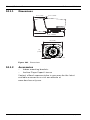
12
15
34
I/O
Lin
e
DC
12
V
-ou
Eth
t
Res
et
ern
et
Lin
e
-in
Figure 3.1
1.
DC power connection
Slide the plug adapter that matches your outlet socket
onto the supplied power supply.
2.
Insert the power connector jack from the power supply
into the DC12V socket of the camera.
3.
Connect the power supply to either a 230 VAC or a
120 VAC power supply outlet.
When power is supplied to the camera the LED on the bottomfront of the camera lights. (This LED can be disabled in the
Installer Options menu.)
Note:
The date/time must be synchronized each time after power on.
It is important to ensure that the date/time is correct for
recording. An incorrect date/time setting could prevent correct
recording.
Bosch Security Systems
Installation and Operation Manual
AR18-09-B003 | v1.1 | 2010.05