1
PKIv6 (UMU-DIIC)
User Manual v1.0.0
3. Search Certificates (only via Web)
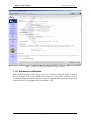
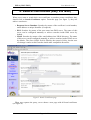
When users want to search their own certificates or another person certificates they
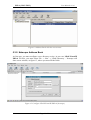
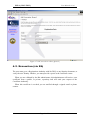
should click on Search Certificates option. From this page (see figure 3), they can
achieve searches to:
o Requests Server Database. Searches by means of the certificate’s serial number,
email address or unique identifier (if required).
o DNS. Searches by means of the user name into DNS server. The name of this
server can be configured manually or achieve searches inside DNS server by
default.
o LDAP. Searches by means of the email address into LDAP directory. The name
of this server can be configured manually or achieve searches inside LDAP server
by default.. The Search Suffix field is filled by the system’s Policy, but the user
can change it and to realize searches inside other compatible directories.
Figure 3. Search Certificates page
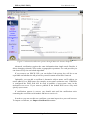
When user requests the query, server shows a new page with all found certificates
(see figure 4).
Page 12 of 36