1
Appendix B:
Installing a Faster Math Chip
NOTE: Installation of this option should be performed by
qualified service personnel. Improper installation may void
your warranty.
The A2630 is shipped with a 25 MHz 68882 math chip. However,
the A2630 will support a faster 68881 or 68882 math chip. Such a
device may greatly speed up math intensive operations over the
standard A2630 math chip. Motorola supplies both 68881 and
68882 parts in 33 MHz versions.
The original 68882 can be replaced by a 33 MHz 68881 or a
33 MHz 68882. If you install a 33 MHz math chip, you will need
to install a crystal oscillator, also known as a clock module. The
clock module is an industry standard 4-pin oscillator can with
TTL compatible output level.
To install the math chip, you need a chip puller. To install the
clock module, a soldering iron is needed. All references to the
A2630 board assume the board is positioned so that the Motorola chips are ‘up’ and ‘left,’ the memory chips are ‘right,’ and
the coprocessor slot connector edge is ‘down’ and ‘left.’ The
A2630 must be removed from the Amiga in order to install a new
chip.
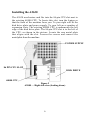
A 33 MHz chip can be dropped right into the math chip socket
(U201) once the standard part has been removed with a chip
puller. Be sure to install the chip in the right direction. Pin 1 of
the math chip is located by a dot and a gold stem in the corner of
the chip. Pin 1 on the socket should be in the lower left corner;
look for a small ‘1’ printed on the board.
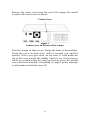
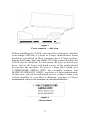
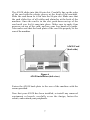
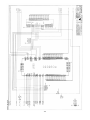
You will also need to install a clock module. The clock module is
soldered into the A2630 board as device U203. The shield
ground pin of the clock module looks like it’s attached directly to
the case of the clock module. This pin corresponds with the
lower right pin of the U203 location.
17