1
Installation of the decoder 76 425
Connection of the decoder
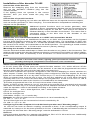
Remove the strapping plug from the locomotive
and put the decoder’s interface plug into the
vacated socket.
If the lighting does not operate in the correct
direction, then you must rotate the plug 180
degrees.
Connection of special functions
Besides lamps for lighting you can also use different items on the special functions outputs,
such as smoke generator or Telex-coupling. For travel direction independent switching the
outputs can be paralleled.
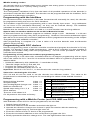
Additional special functions such as smoke generator, telex
coupling or driver compartment lighting can be connected to the
special function outputs A1 and A2. The feed to the device is
soldered directly to the decoder circuit board. The return line is
connected either to the blue wire of the decoder or the
locomotive chassis.
Connection of an IntelliSound module or a LISSY mini transmitter 68 400
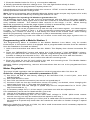
Alternatively a plug from an IntelliSound module or a LISSY mini transmitter can be inserted
into the SUSI interface socket on the under side of the decoder. For controlling a LISST mini
transmitter program Bit 1 in CV49 to 1 so that the decoder sends the identification address for
the control of the LISSY mini transmitter to the SUSI interface. For operating a sound module
on the SUSI-interface, Bit 1 in CV49 must be set to 0 (Factory setting).
Mounting the decoder in the locomotive
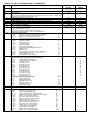
Use the enclosed double-sided tape to fasten the decoder to any place in the locomotive. The
sticking pad protects the decoder against conductive connections and holds it in place reliably.
Ensure that even after re-assembly of the locomotive no short-circuits occur from jammed
wires.
A short-circuit in the area of the motor, lighting, pick-up and wheel contacts can
possibly destroy the component and electronics of the locomotive!
Switch off train lighting front and rear
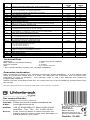
In CV107 (front) and CV108 (rear) the special function number 1-12, which will turn off the
white and the red light front and rear, can be entered. It can also be programmed here which
function output has the red end of the train light connected to it.
The function entered here must be configured in the Function-Mapping so that it switches no
other outputs. Further, the Function-Mapping must configured so that the outputs for the red
lights are not switched off or on by other function keys, i.e. the Function-Mapping CV for f-key
which is entered here must be set to zero. So that the switching off of the lights functions
correctly both CV's 107 and 108 must always be programmed. If one of CV's 107 or 108 is
programmed with the value 0 the function is considered to be deactivated.
The value programmed into CVs 107 and 108 consists of two parts.
Firstly, to which of the outputs A1 to A7, the light to be turned off is connected and secondly
with which function key f1 to f12 the lighting is to be switched. Because a CV can only contain
value the operation value is calculated according to the follow schema:
Light allocation:
A0v = white light front, A0h = white light rear
CV107 for red light front
CV108 for red light rear
Calculation: Output * 16 + function key
Example: the red front light is to be connected to A1 and controlled by f5.
CV 107 = 1 * 16 + 5 = 21
The red front light is to be connected to A2 and controlled by f6.
CV 108 = 2 * 16 + 6 = 38
Configuring Function Outputs A1 and A2 timed operation and "Shunting tango"
A1 and A2 can have an electric coupling connected to them. If the corresponding output is
switched on it stays on for the time specified in CV 99. If additionally the locomotive’s motor is
to operate for this time then “Shunting tango” must be activated in CV100.
RailCom
If the locomotive decoder is to operate with RailCom, Bit 3 of CV 29 must be set. Additionally
the Motorola Format in CV 12 must be switched off.