1
HiT – User manual HiTPOS Goody’s
2. Use of application
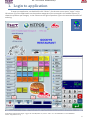
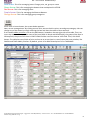
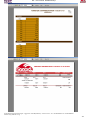
As mentioned in the previous paragraph, the column [1] contains all items of the shop sorted by
category. The home page contains the products most used by the client.
Column [2] shows the products per category. In column [3] are the functions of ordering. Details:
Dine-in: Charged products price list "lounge".
Takeaway: Charged products price list "package."
Dine-in Discount: Charged products discounted price list "lounge".
Takeaway Discount: Charged products price list discounted "package".
Quantity +: Increases the amount of product in one unit.
Quantity -: Reduces the amount of product in one unit.
Item Return: Removes the quantity of the item that is returned by the customer in case of change.
CAUTION: A prerequisite is the item that will choose to be GREATER value than what your customer
returns.
Price lists: This option opens a new grille through which we can change the price list as in previous
buttons.
Drawer: Opens the drawer.
Total POS: To the total POS a specific paragraph below (see page 4)
Cards: Makes card discount to your existing account, depending on the rate we set.
User Selection: Select user
3. Product Selection
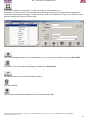
Each product selected, displays the corresponding additive or
subtractive comments in the last two rows. This means that if we
choose a Cheeseburger, in the last two rows will display our
comments “extra pickle sauce”, “without Ketchup", "without
Mustard", "Without pickle sauce” and "without". Therefore, if the
customer wants the product without some of the materials, in the
right column will appear as shown.
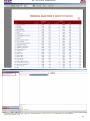
Subsequently, after printing our receipt, appears at the terminals of
the kitchen (KDS) just as typed. The first column shows whether the
product is dine-in or takeaway, the second is quantity, the third if it is
a combination (Combo), the description in the fourth, and in the fifth,
the value (comments always have a value of zero).
4. Total Frame
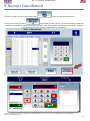
During that charge of our products, the blue box displays the
cost. There are some mini fields which show the quantity, item code,
item price and the price list we charge (Dine-in:1, Takeaway: 5,
Discount: 6,7,8). At checkout, we see to the right, the sum of our
receipt, which we are ready to print. We select user by pressing the
“user selection” button, located at the end of column[3].
HiT Hospitality Integrated Technologies - Syggrou Ave. 162-166 (Kalafati 17) – Athens– 17671 – Tel: + 3 0 210 8847420 – Fax: +30 210 8847418
website: http://www.hit.com.gr
3