1
HiT – User manual HiTPOS Goody’s
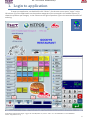
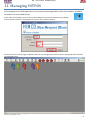
Blue Arrow: This is for managing items. Change price, vat, group or name.
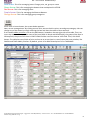
Green Arrow: This is for managing the buttons that are depicted in HiTPOS.
Red Arrow: This is for managing Users.
Purple Arrow: This is for managing the Shortcut Buttons.
Orange Arrow: This is for managing group categories.
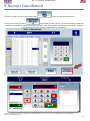
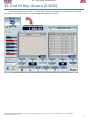
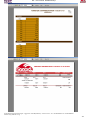
As we click on items button, the screen below appears…
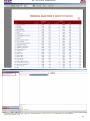
Now, we can manage items. By clicking on one item, we can check its price, vat and group category. We can
change any of the above by simply selecting the box and alter the value to what we want.
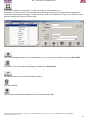
If we need to add a new item, click on the ADD button, located on the top-right side of the table. Then, we
insert the codart of the item, the name of the item (both in descA and descB fields), the group of the item in
GGroup field, the price of the item in PRICE1 field and the vat of the item at VAT1 field. Then, click SAVE
button. The table has many fields of price and vat so as to use them in case of more than one pricelists, like
DINE IN and TAKE AWAY pricelists. By default, price1 is for DINE IN and price5 is for TAKEAWAY.
HiT Hospitality Integrated Technologies - Syggrou Ave. 162-166 (Kalafati 17) – Athens– 17671 – Tel: + 3 0 210 8847420 – Fax: +30 210 8847418
website: http://www.hit.com.gr
9