1
Chapter 3
Using a web browser as client
Besides using the CLC Workbench as client, you also have access to the server from the web
interface. The web interface gives you access to browsing and searching data and up- and
downloading data.
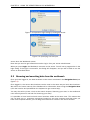
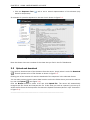
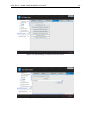
Simply type the address of the server into your browser, follow by the port number and you will see
the login dialog (see figure 3.1) (you will need to get information from your server administrator
about the server address).
Figure 3.1: The web interface of the server.
3.1
Browsing and searching data
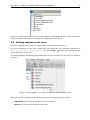
To the left, you will see the data locations connected to the server. You can browse the folder
hierarchy of the data location. When you click an element in the tree, a number of options are
available:
• Click the Element Info ( ) tab to see the properties of this element. Note that you can
edit the information in this view.
• Click the History (
) tab to see the history of this element.
13