1
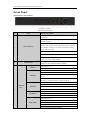
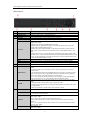
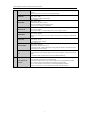
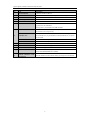
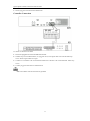
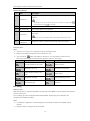
Quick Operation Guide of Network Video Recorder 4GHI/ESC 5JKL/EDIT 6MNO/PLAY 7PQRS/REC 8TUV/PTZ 9WXYZ/PREV 0/A 8 JOG SHUTTLE Control In PTZ Control mode, the F1 button can be used to zoom in (zoom+) the PTZ camera; The F2 button can be used to cycle through tab pages. Enter numeral “4”; Enter letters “GHI”; Exit and back to the previous menu. Enter numeral “5”; Enter letters “JKL”; Delete characters before cursor; Select the checkbox and ON/OFF switch; Start/stop record clipping in playback. Enter numeral “6”; Enter letters “MNO”; In Playback mode, it is used for direct access to playback interface. Enter numeral “7”; Enter letters “PQRS”; Manual record, for direct access to manual record interface; manually enable/disable record. Enter numeral “8”; Enter letters “TUV”; Access PTZ control interface. Enter numeral “9”; Enter letters “WXYZ”; Multi-camera display in live view; In Playback mode or MenuPlaybackTag playback interface, this button can be used to delete the selected tag. Enter numeral “0”; Switch between input methods (upper and lowercase alphabet, symbols and numeric input). In Playback mode, this button can be used to add the default tag. Move the active selection in a menu. The inner ring will move the selection up and down; the outer ring will move it left and right. In Playback mode, the inner ring is used to jump 30s forward/backward in video files. The outer ring can be used to speed up/slow down the video. In Live View mode, it can be used to cycle through different channels. In PTZ control mode, in can control the movement of the PTZ camera. 7