1
CLARiTY Laser Controller System Manual
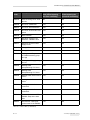
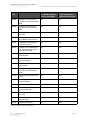
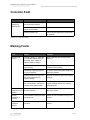
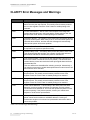
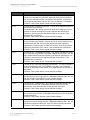
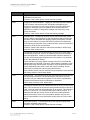
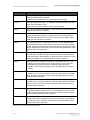
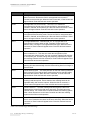
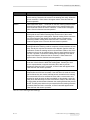
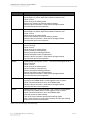
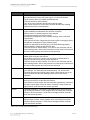
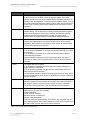
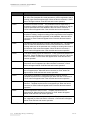
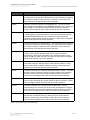
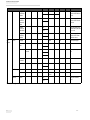
Error No.
Report on CLARiTY Operator Interface
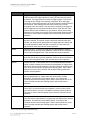
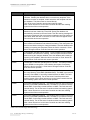
E09023
‘Internal error: Cannot set download mode of the FM/MHI’ - The FM/MHI
cannot change to download mode. This indicates an error in the
communication between ACC and FM/MHI.
Check connection between ACC and marking head or MHI. This fault
cannot be cleared directly. Turn off the Laser Controller and the laser
marking system. After a short interval turn on the Laser Controller and the
laser marking system and confirm normal operation.
E09100
‘No communication with marking head’ - No marking head connected.
Faulty power supply of marking head.
Faulty connection between ACC and FM/MHI.
Faulty FM/MHI.
Check power supply of marking head.
Check connection between ACC and marking head or MHI.
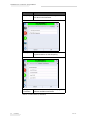
When the fault is corrected, a 'Clear' button will appear below.
Clear this fault and resume operation.
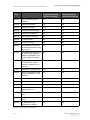
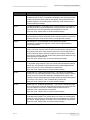
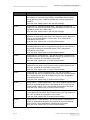
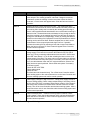
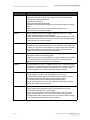
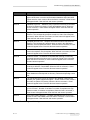
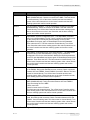
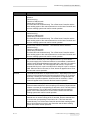
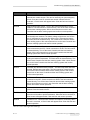
E09101
‘Internal error: Error status of the FM/MHI cannot be reset’ - The error flags
on the FM/MHI cannot be reset. This indicates an error in the
communication between ACC and FM/MHI.
Check connection between ACC and marking head or MHI.
This fault cannot be cleared directly.
Turn off the Laser Controller and the laser marking system.
After a short interval turn on the Laser Controller and the laser marking
system and confirm normal operation.
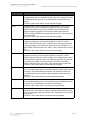
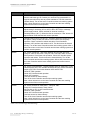
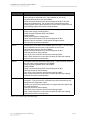
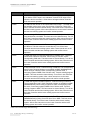
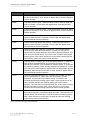
E09102
‘Interrupted communication with marking head’ - There have been errors on
the ACC while receiving data from the FM/MHI.
Faulty connection between ACC and FM/MHI.
Faulty FM/MHI.
Check connection between ACC and marking head or MHI.
This fault cannot be cleared directly.
Turn off the Laser Controller and the laser marking system.
After a short interval turn on the Laser Controller and the laser marking
system and confirm normal operation.
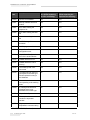
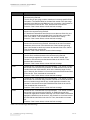
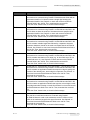
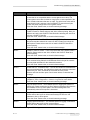
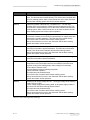
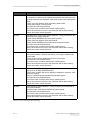
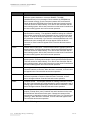
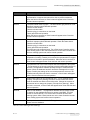
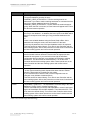
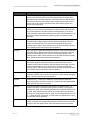
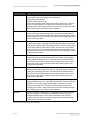
E09103
‘Internal error: FM/MHI not in configuration mode, cannot executed
command’ - Tried to execute a command in the control mode that is only
admitted in the configuration mode.
Contact your local service representative or support team who will be able
to provide assistance.
This fault cannot be cleared directly.
Turn off the Laser Controller and the laser marking system.
After a short interval turn on the Laser Controller and the laser marking
system and confirm normal operation.
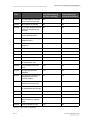
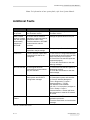
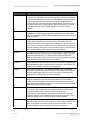
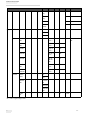
Table 8-4: Error Messages and Warnings
8-24
CLARiTY Error Messages and Warnings
Rev AC