1
DIAGENODE SX-8G IP-STAR USER MANUAL
PAGE 21
SX-8G IP-Star Software
Start and close SX-8G V52
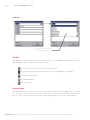
Turn on main switch located on right-front side of robot main body. Turn on the computer to open Windows. On
the desktop, click twice the following SX-8G IP-Star icon to open it.
To close the program, select File(F), in the initial window, and click on End.
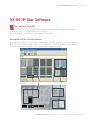
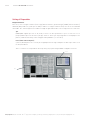
Description of SX-8G V52 Initial Window
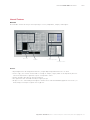
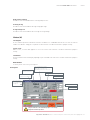
When application is opened, the following initial window appears. The stage layout shown in the center to bottom
area is same as the actual robot stage. Using this area, setting positions of reagents, tips and plate can be assigned.
Execution, edit and creation of a protocol can also be initiated by clicking the each button.
Software interface
(initial window)
Tip Module
Waste Chute
Peltier Cool/Heat Block 96 well plate module
SX-8G IP-Star Workstation
Diagenode Inc. North America / Phone: +1 862 209-4680 // Fax: +1 862 209-4681 // Mail: [email protected]