1
Foxit PhantomPDF
User Manual
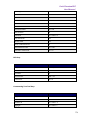
Document Keys
Action
Shortcut
First Page
Home
Previous Page
Left Arrow, Page Up, or Ctrl + Page Up
Next Page
Right Arrow, Page Down, or Ctrl + Page
Down
Last Page
End
Go to Page
Shift + Ctrl + N, or Ctrl + G
Select All (Unavailable with trial version)
Ctrl + A
Page Down
Space
Page Up
Shift + Space
Command Lines
Here are some command lines that can be used to Foxit PhantomPDF:
Command
Result
-Register
Set Foxit PhantomPDF as default reader.
-pwd <password>
Input the password of the protected PDF documents.
/p <PDF path>
Print the document with default printer
/t <PDF Path> [Printer]
Print the document with designated printer
<PDF Path> /A […][…]..
Open a PDF document with a command to exactly specify what to
display and how to display
178