1
15. Accessories
e) If the product has been dropped
or damaged in any way.
f) When the product exhibits a distinct change in performance - this
indicates a need for service.
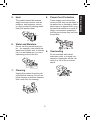
Do not place this product on an
unstable cart, stand, tripod, bracket, or table. The product may fall,
causing serious injury to a child or
adult, and serious damage to the
product. A product and cart combination should be moved with care.
Quick stops, excessive force, and
uneven surfaces may cause the
product and cart combination to
overturn.
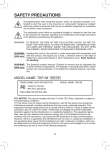
17. If glass components, including lens and lamp,
should break, contact your
dealer for repair service.
This product incorporates glass
components, including a lens and
a lamp. If such parts should break,
please handle with care to avoid
injury and contact your dealer for
repair service. The broken pieces
of glass may cause to injury. In
the unlikely event of the lamp rupturing, thoroughly clean the area
around the projector and discard
any edible items placed in that
area.
S3125A
16. Damage Requiring Service
Unplug this product from the wall
outlet and refer servicing to qualified service personnel under the
following conditions:
a) When the power-supply cord or
plug is damaged.
b) If liquid has been spilled, or objects have fallen into the product.
c) If the product has been exposed
to rain or water.
d) If the product does not operate
normally by following the operating instructions. Adjust only those
controls that are covered by the
operating instructions as an improper adjustment of other controls may result in damage and will
often require extensive work by a
qualified technician to restore the
product to its normal operation.
18. Servicing
Do not attempt to service this
product yourself as opening or
removing covers may expose you
to dangerous voltage or other hazards. Refer all servicing to qualified service personnel.
7
Before Using
Introduction